ptop won't boot to windows anymore

booting from the 1st ssd not cloned ssd

k0g9k1.jpg


and yea on system recovery box it did show this under details

I did the sfc /scannnow twice it ran the check twice but nope still got BSOD
 

My Computer My Computer

At a glance

Microsoft Windows 7 Professional 64-bit 7601 ...Intel(R) Core(TM) i7-3920XM CPU @ 2.90GHz24.00 GB(1) Intel(R) HD Graphics 4000 (2) NVIDIA GeFo...
Computer type
Laptop
Computer Manufacturer/Model Number
MSI GT60
OS
Microsoft Windows 7 Professional 64-bit 7601 Multiprocessor Free Service Pack 1
CPU
Intel(R) Core(TM) i7-3920XM CPU @ 2.90GHz
Motherboard
Micro-Star International Co., Ltd. MS-16F3
Memory
24.00 GB
Graphics Card(s)
(1) Intel(R) HD Graphics 4000 (2) NVIDIA GeForce GTX 670M
Sound Card
(1) Realtek High Definition Audio (2) Intel(R) Display Aud
Screen Resolution
0 x 0 x 0 bits (0 colors) @ 0 Hz
Hard Drives
(1) Crucial_CT960M500SSD1 ATA Device (2) ST750LX003-1AC154 ATA Device
Please try the below steps (original SSD - not cloned disk).

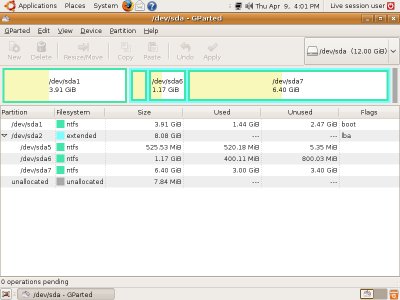
1. Boot from "Parted Magic" and open "Partition Editor". You will see a screen similar to the below one.

gparted-teaser.jpg


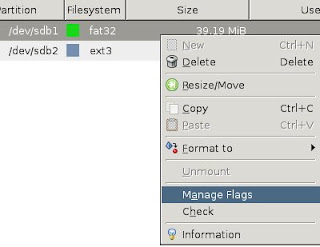
2. The first partition listed will be a 100 MB sized one. "EasyRE" seems to removed the "Boot" flag from it. We are going to fix it. Right click on the first 100 MB partition and choose "Manage Flags".

img_select.jpg


Then choose "Boot".

gparted-flags.png


3. Press the "Apply" button and reboot the system when completed. Instead of booting to "Windows", boot from Windows install disc and choose repair.

4. If "Boot" flag is applied correctly,The repair function should be able to detect the OS correctly like in the below example.

w74_zps490f9a17.png


5. Please note down the drive letter ( in the above example it is "D:" ). Instead of choosing "Next", click "Cancel" and you will be back to the previous screen. From there, press "Shift + F10" to open a command window.

Shift-F10.PNG


6. Now enter the CHKDSK command.

CHKDSK D: /R

Where, substitute D: with the drive letter detected by repair function.


7. After CHKDSK completes, reboot the system and again boot from the install disc and run "Startup Repair" up to three time. Sometimes it is required to recreate boot critical files again.

http://www.sevenforums.com/tutorials/105541-startup-repair-run-3-separate-times.html


8. If Windows still fails to boot, try replacing Registry hive files from the backup copy.

http://www.sevenforums.com/tutorials/139576-startup-repair-infinite-loop-recovery.html
 

My Computer My Computer

At a glance

Windows 7 Ultimate x64
Computer type
PC/Desktop
OS
Windows 7 Ultimate x64
Pardon my interruption...

I've been watching from the sidelines... Fwiw Anshad- outstanding support!!!

View attachment 326319
 
Last edited:

My Computer My Computer

At a glance

Win 10 Pro x64, Win 7 Pro x64Intel Core i7-6700HQ Skylake16gb Crucial DDR4NVIDIA GeForce GTX 960M 2 GB
Computer type
Laptop
Computer Manufacturer/Model Number
MSI PE60 6QE
OS
Win 10 Pro x64, Win 7 Pro x64
CPU
Intel Core i7-6700HQ Skylake
Motherboard
MSI MS-16J5
Memory
16gb Crucial DDR4
Graphics Card(s)
NVIDIA GeForce GTX 960M 2 GB
Screen Resolution
1920 x 1080
Hard Drives
Samsung 850 EVO 250 GB M.2 SSD (MZ-N5E250BW)
HGST 1TB @7200 RPM HTS721010A9E630
Case
Plastic
Keyboard
Got one...
Mouse
Yep, one of those too.
Internet Speed
FIOS 75/75
Antivirus
Defender
Browser
Chrome/FFox/Ex-PLODE-r/(L)Edge
Other Info
Defender, Custom Hosts, uBlock, regular backups w/ Macrium (Free)
20j9xv.jpg


On the parition editor for the 100MB I noticed it already had a check mark on it but here's the screenshot, when i restarted with windows 7 cd on system recovery options i still don't see OS detected
 

My Computer My Computer

At a glance

Microsoft Windows 7 Professional 64-bit 7601 ...Intel(R) Core(TM) i7-3920XM CPU @ 2.90GHz24.00 GB(1) Intel(R) HD Graphics 4000 (2) NVIDIA GeFo...
Computer type
Laptop
Computer Manufacturer/Model Number
MSI GT60
OS
Microsoft Windows 7 Professional 64-bit 7601 Multiprocessor Free Service Pack 1
CPU
Intel(R) Core(TM) i7-3920XM CPU @ 2.90GHz
Motherboard
Micro-Star International Co., Ltd. MS-16F3
Memory
24.00 GB
Graphics Card(s)
(1) Intel(R) HD Graphics 4000 (2) NVIDIA GeForce GTX 670M
Sound Card
(1) Realtek High Definition Audio (2) Intel(R) Display Aud
Screen Resolution
0 x 0 x 0 bits (0 colors) @ 0 Hz
Hard Drives
(1) Crucial_CT960M500SSD1 ATA Device (2) ST750LX003-1AC154 ATA Device
I did this command and got this message

chkdsk /r c:

2coq1q1.jpg


and chkdsk /r got this message

jgqoav.jpg
 

My Computer My Computer

At a glance

Microsoft Windows 7 Professional 64-bit 7601 ...Intel(R) Core(TM) i7-3920XM CPU @ 2.90GHz24.00 GB(1) Intel(R) HD Graphics 4000 (2) NVIDIA GeFo...
Computer type
Laptop
Computer Manufacturer/Model Number
MSI GT60
OS
Microsoft Windows 7 Professional 64-bit 7601 Multiprocessor Free Service Pack 1
CPU
Intel(R) Core(TM) i7-3920XM CPU @ 2.90GHz
Motherboard
Micro-Star International Co., Ltd. MS-16F3
Memory
24.00 GB
Graphics Card(s)
(1) Intel(R) HD Graphics 4000 (2) NVIDIA GeForce GTX 670M
Sound Card
(1) Realtek High Definition Audio (2) Intel(R) Display Aud
Screen Resolution
0 x 0 x 0 bits (0 colors) @ 0 Hz
Hard Drives
(1) Crucial_CT960M500SSD1 ATA Device (2) ST750LX003-1AC154 ATA Device
and final scan

chkdsk /r e:

Should i do this command that auto fixes chkdsk /F?


mttlq9.jpg


I rebooted and still BSOD
 

My Computer My Computer

At a glance

Microsoft Windows 7 Professional 64-bit 7601 ...Intel(R) Core(TM) i7-3920XM CPU @ 2.90GHz24.00 GB(1) Intel(R) HD Graphics 4000 (2) NVIDIA GeFo...
Computer type
Laptop
Computer Manufacturer/Model Number
MSI GT60
OS
Microsoft Windows 7 Professional 64-bit 7601 Multiprocessor Free Service Pack 1
CPU
Intel(R) Core(TM) i7-3920XM CPU @ 2.90GHz
Motherboard
Micro-Star International Co., Ltd. MS-16F3
Memory
24.00 GB
Graphics Card(s)
(1) Intel(R) HD Graphics 4000 (2) NVIDIA GeForce GTX 670M
Sound Card
(1) Realtek High Definition Audio (2) Intel(R) Display Aud
Screen Resolution
0 x 0 x 0 bits (0 colors) @ 0 Hz
Hard Drives
(1) Crucial_CT960M500SSD1 ATA Device (2) ST750LX003-1AC154 ATA Device
Another thing i noticed not sure if maybe this is why im getting BSOD but a user at another forum recommended for me to download this Program Autoruns for Windows

Autoruns. When it opens, select Analyze Offline System in the File Menu. So i did . I plugged in the SSD (with boot issues) into my other laptop and saw alot of missing system, files showing screenshots below

28mcvnd.jpg

10pzsco.jpg

154g7fb.jpg

2a5ygp3.jpg

6fz674.jpg

ixy29v.jpg

2jd2rsh.jpg

e0mvi9.jpg

1z6zf4k.jpg

v8qa3b.jpg
 

My Computer My Computer

At a glance

Microsoft Windows 7 Professional 64-bit 7601 ...Intel(R) Core(TM) i7-3920XM CPU @ 2.90GHz24.00 GB(1) Intel(R) HD Graphics 4000 (2) NVIDIA GeFo...
Computer type
Laptop
Computer Manufacturer/Model Number
MSI GT60
OS
Microsoft Windows 7 Professional 64-bit 7601 Multiprocessor Free Service Pack 1
CPU
Intel(R) Core(TM) i7-3920XM CPU @ 2.90GHz
Motherboard
Micro-Star International Co., Ltd. MS-16F3
Memory
24.00 GB
Graphics Card(s)
(1) Intel(R) HD Graphics 4000 (2) NVIDIA GeForce GTX 670M
Sound Card
(1) Realtek High Definition Audio (2) Intel(R) Display Aud
Screen Resolution
0 x 0 x 0 bits (0 colors) @ 0 Hz
Hard Drives
(1) Crucial_CT960M500SSD1 ATA Device (2) ST750LX003-1AC154 ATA Device
Hi

The missing files doesn't look critical. Sometimes when we uninstall softwares, it's Registry entries may not be properly removed.

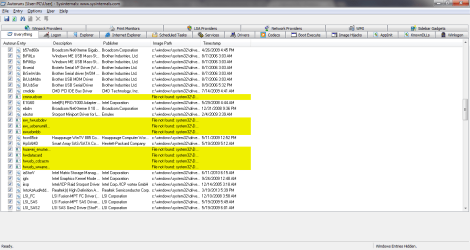
Below screenshot is from my own system.

Autoruns.png

The missing entries are from a previous install of "Huawei 3G Modem" (Now uninstalled).

Please try the "Regsitry Hive" restore instructions as per the guide and let me know whether it makes any difference.

http://www.sevenforums.com/tutorials/139576-startup-repair-infinite-loop-recovery.html


If the issue is causing by a corrupted hive file, this will solve that.
 

My Computer My Computer

At a glance

Windows 7 Ultimate x64
Computer type
PC/Desktop
OS
Windows 7 Ultimate x64

My Computer My Computer

At a glance

Microsoft Windows 7 Professional 64-bit 7601 ...Intel(R) Core(TM) i7-3920XM CPU @ 2.90GHz24.00 GB(1) Intel(R) HD Graphics 4000 (2) NVIDIA GeFo...
Computer type
Laptop
Computer Manufacturer/Model Number
MSI GT60
OS
Microsoft Windows 7 Professional 64-bit 7601 Multiprocessor Free Service Pack 1
CPU
Intel(R) Core(TM) i7-3920XM CPU @ 2.90GHz
Motherboard
Micro-Star International Co., Ltd. MS-16F3
Memory
24.00 GB
Graphics Card(s)
(1) Intel(R) HD Graphics 4000 (2) NVIDIA GeForce GTX 670M
Sound Card
(1) Realtek High Definition Audio (2) Intel(R) Display Aud
Screen Resolution
0 x 0 x 0 bits (0 colors) @ 0 Hz
Hard Drives
(1) Crucial_CT960M500SSD1 ATA Device (2) ST750LX003-1AC154 ATA Device
Update. I removed ssd drive & pushed in a small metal clip a little bit that holds one of 4 rams stick. was trying to see it wasn't loose after that when i restarted my pc. It no longer goes into blue screen. instead of shows black screen loading windows on bottom and then just reboots pc automatically. Now reboots instead of blue screen.
 

My Computer My Computer

At a glance

Microsoft Windows 7 Professional 64-bit 7601 ...Intel(R) Core(TM) i7-3920XM CPU @ 2.90GHz24.00 GB(1) Intel(R) HD Graphics 4000 (2) NVIDIA GeFo...
Computer type
Laptop
Computer Manufacturer/Model Number
MSI GT60
OS
Microsoft Windows 7 Professional 64-bit 7601 Multiprocessor Free Service Pack 1
CPU
Intel(R) Core(TM) i7-3920XM CPU @ 2.90GHz
Motherboard
Micro-Star International Co., Ltd. MS-16F3
Memory
24.00 GB
Graphics Card(s)
(1) Intel(R) HD Graphics 4000 (2) NVIDIA GeForce GTX 670M
Sound Card
(1) Realtek High Definition Audio (2) Intel(R) Display Aud
Screen Resolution
0 x 0 x 0 bits (0 colors) @ 0 Hz
Hard Drives
(1) Crucial_CT960M500SSD1 ATA Device (2) ST750LX003-1AC154 ATA Device
Do you think my MBR is corrupted? Saw these 2 programs but not sure if they would help


Download
MBRWizard! - The MBR Management Utility


or trying Nuclear BCD attempt 3 from this page

https://neosmart.net/wiki/recovering...ws-bootloader/
bcdedit - Problem recreating BCD on Windows 7 64bit - The requested system device cannot be found - Super User


A corrupted MBR or BCD will prevent system from booting at all - you don't even see the logo animation if one of them is corrupt.

It no longer goes into blue screen. instead of shows black screen loading windows on bottom and then just reboots pc automatically. Now reboots instead of blue screen.


Try a memory isolation test. That is remove all but one stick and boot the system. If the issue persist, unplug the corruntly plugged module and try another one. Repeat this with all modules - you will know if one of them is faulty.


Also you should select "Disable Automatic Restart on System Failure" to display the BSOD screen on some cases. If Windows restarts at a very early stage, BSOD may not be displayed at all.
 

My Computer My Computer

At a glance

Windows 7 Ultimate x64
Computer type
PC/Desktop
OS
Windows 7 Ultimate x64
Thanks for trying. I took it it to a pc shop and they said one of memory slots for ram went bad, so they tried removing that ram on that slot but still took them to BSOD. They also said they found about 100 viruses they had to clean. I was only using microsoft security essentials and never saw my laptop slowing down or any errors that would make me think i had a virus.

They must of tried everything since they stood with it for some days. but the last resort was to reinstall windows all over again. They managed to transfer my files back except programs. I had to reinstall those

Weird issue I saw was about 10 video files all had a size of 0 KB. It wouldn't let me play them like it did before. I checked the SSD drive (The one that couldn't boot into windows) to see if maybe was a bad transfer from this drive onto my new SSD drive but it also said 0 KB. Before the BSOD it was never 0 KB and was able to play

Is there a way to recover that or most likely the viruses erased the data from those 11 files?
 

My Computer My Computer

At a glance

Microsoft Windows 7 Professional 64-bit 7601 ...Intel(R) Core(TM) i7-3920XM CPU @ 2.90GHz24.00 GB(1) Intel(R) HD Graphics 4000 (2) NVIDIA GeFo...
Computer type
Laptop
Computer Manufacturer/Model Number
MSI GT60
OS
Microsoft Windows 7 Professional 64-bit 7601 Multiprocessor Free Service Pack 1
CPU
Intel(R) Core(TM) i7-3920XM CPU @ 2.90GHz
Motherboard
Micro-Star International Co., Ltd. MS-16F3
Memory
24.00 GB
Graphics Card(s)
(1) Intel(R) HD Graphics 4000 (2) NVIDIA GeForce GTX 670M
Sound Card
(1) Realtek High Definition Audio (2) Intel(R) Display Aud
Screen Resolution
0 x 0 x 0 bits (0 colors) @ 0 Hz
Hard Drives
(1) Crucial_CT960M500SSD1 ATA Device (2) ST750LX003-1AC154 ATA Device
That is surely weird but i have seen malwares which corrupts JPEG files and MS Office documents. It might be also a result of file system corruption happened due to multiple BSOD and/or boot failures. I would suggest trying "Puran File Recovery" which is a free program to recover lost files. If you are lucky, it will do the job.

Puran File Recovery - Recovery deleted files for free
 

My Computer My Computer

At a glance

Windows 7 Ultimate x64
Computer type
PC/Desktop
OS
Windows 7 Ultimate x64
Which option on that program you suggested should i select

deep scan, full scan, find lost files, scan custom list
 

My Computer My Computer

At a glance

Microsoft Windows 7 Professional 64-bit 7601 ...Intel(R) Core(TM) i7-3920XM CPU @ 2.90GHz24.00 GB(1) Intel(R) HD Graphics 4000 (2) NVIDIA GeFo...
Computer type
Laptop
Computer Manufacturer/Model Number
MSI GT60
OS
Microsoft Windows 7 Professional 64-bit 7601 Multiprocessor Free Service Pack 1
CPU
Intel(R) Core(TM) i7-3920XM CPU @ 2.90GHz
Motherboard
Micro-Star International Co., Ltd. MS-16F3
Memory
24.00 GB
Graphics Card(s)
(1) Intel(R) HD Graphics 4000 (2) NVIDIA GeForce GTX 670M
Sound Card
(1) Realtek High Definition Audio (2) Intel(R) Display Aud
Screen Resolution
0 x 0 x 0 bits (0 colors) @ 0 Hz
Hard Drives
(1) Crucial_CT960M500SSD1 ATA Device (2) ST750LX003-1AC154 ATA Device
Back
Top