- Local time
- 6:09 PM
- Messages
- 2,039
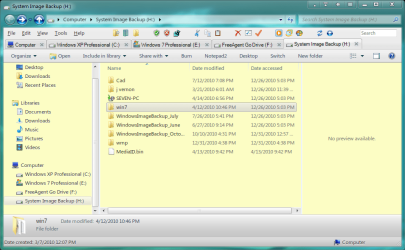
Quite a few people asked me how I managed to set this up as it is;

This is fairly easy to do and solves a lot of problems with various things in Win 7.
Obviously Mr Beltchev is active here on the forum, ( Kudos once again Sir, for an absolutely first class program), but it doesn't seem as if many QTTabbar users are here.
Get QTTabBar ( QTTabBar ) and Classicshell ( Welcome to Classic Shell ).
These are easy to use and you can customise them easily too.
The folder band menu has been removed ( see ;http://www.askvg.com/how-to-customi...te-rename-undo-and-many-other-useful-buttons/
http://www.askvg.com/how-to-make-folder-band-auto-hidden-in-windows-vista/
he also explains how to remove the folder band entirely by tweaking the shellstyle.dll ( I tried both methods, but saw no point in the autohide so disabled it entirely ).
Navigation and other panes are superfluous as you can reach any directory with two mouse clicks at most, of course the directories in the tabs are immediately available. QTTabBar has built in cascading previews for images and text, among other things.
I don't use all available buttons, as they are superfluous. Simply clicking on the file pane background for instance, goes up one level.
Middle clicking on any folder opens a new tab to that folder. All tabs are fully drag and drop capable.
The latest release of QTTabBar is running in that shot
QTTabBar 1.5.0.0 Alpha 5
For some info on setting up QTTabBar, see here;
More About QTTabBar
( This is a review I wrote quite some time ago, and is out of date, but the installation/customisation has not changed materially since).
All this is running on Windows 7 64 Bit Ultimate without any problems at all.
Regards....Mike Connor
PS. Also supports mouse gestures if you get this plugin;
QTHoney - QTTabBar Plugin for Mouse Gestures - ::bOrderFactory::Wiki
Makes the whole thing very comfortable and easy to use.

This is fairly easy to do and solves a lot of problems with various things in Win 7.
Obviously Mr Beltchev is active here on the forum, ( Kudos once again Sir, for an absolutely first class program), but it doesn't seem as if many QTTabbar users are here.
Get QTTabBar ( QTTabBar ) and Classicshell ( Welcome to Classic Shell ).
These are easy to use and you can customise them easily too.
The folder band menu has been removed ( see ;http://www.askvg.com/how-to-customi...te-rename-undo-and-many-other-useful-buttons/
http://www.askvg.com/how-to-make-folder-band-auto-hidden-in-windows-vista/
he also explains how to remove the folder band entirely by tweaking the shellstyle.dll ( I tried both methods, but saw no point in the autohide so disabled it entirely ).
Navigation and other panes are superfluous as you can reach any directory with two mouse clicks at most, of course the directories in the tabs are immediately available. QTTabBar has built in cascading previews for images and text, among other things.
I don't use all available buttons, as they are superfluous. Simply clicking on the file pane background for instance, goes up one level.
Middle clicking on any folder opens a new tab to that folder. All tabs are fully drag and drop capable.
The latest release of QTTabBar is running in that shot
QTTabBar 1.5.0.0 Alpha 5
For some info on setting up QTTabBar, see here;
More About QTTabBar
( This is a review I wrote quite some time ago, and is out of date, but the installation/customisation has not changed materially since).
All this is running on Windows 7 64 Bit Ultimate without any problems at all.
Regards....Mike Connor
PS. Also supports mouse gestures if you get this plugin;
QTHoney - QTTabBar Plugin for Mouse Gestures - ::bOrderFactory::Wiki
Makes the whole thing very comfortable and easy to use.
Last edited:
My Computer
At a glance
Several, including Windows 7 x64 Ultimate
- OS
- Several, including Windows 7 x64 Ultimate