quarantined items??

vett

New member
Member
VIP
Local time
12:43 PM
Messages
156
I have a couple of quarantined items in Microsoft security essentials two are quarantined and on says removed my question is should I remove them or just leave them. also just out of curiosity where do they go when removed, into thin air?
the three I have are;
detected items
1. exploit HTML/frameRef.gen (quarantined)
2. Trojan win32/alureon.GB (removed)
3. Trojan win32/bumat!rts (quarantined)
 

My Computer

Computer type
PC/Desktop
Computer Manufacturer/Model Number
Asus essentioCM6730 ac2
OS
Windows 7 Home Premium 64bit.
CPU
Intel Core i5-2320 Processor 3.0 GHz
Memory
6GB SDRAM DDR3
Graphics Card(s)
nvidia Geforce 9400gt
Hard Drives
1000 GB 7200 rpm Hard Drive
Only if you`re in the Rockies, but seriously, they will just be written over.

Are you scanning before you open your downloads ?

What AV are you using ?
 

My Computer

Computer type
PC/Desktop
Computer Manufacturer/Model Number
Skylake Special #666
OS
Windows 10 Pro x64
CPU
Intel Core i7 6700K
Motherboard
Asus Sabertooth Z170 Mark 1
Memory
GSkill TridentZ RGB 16GB 3600 16-16-16-36
Graphics Card(s)
EVGA GTX 980 Ti SC x2
Sound Card
Realtek High Definition
Monitor(s) Displays
AOC G2460PG
Screen Resolution
1920 x 1080 144Hz
Hard Drives
Samsung 860 Pro 256GB, Seagate Barracuda 4TB x2
PSU
EVGA 1000 P2, EVGA White Custom Braided Cables
Case
Corsair Vengeance C70 Gunmetal Black
Cooling
Corsair H100i v2, Corsair ML120 x2, Thermal Grizzly Kryonaut
Keyboard
Logitech G910 Orion Spectrum
Mouse
Logitech G700s
Internet Speed
Verizon Fios Quantum Gateway 75/75
Antivirus
Windows Defender, Malwarebytes Free 3.8.3
Browser
Chrome
Other Info
Corsair SP120 x4, LG Blu-ray Drive, Durabrand HT-395 100 Watt Dolby Digital Amp, Corsair H2100 Wireless 7.1 Headset
using Microsoft security essentials it scans first
 

My Computer

Computer type
PC/Desktop
Computer Manufacturer/Model Number
Asus essentioCM6730 ac2
OS
Windows 7 Home Premium 64bit.
CPU
Intel Core i5-2320 Processor 3.0 GHz
Memory
6GB SDRAM DDR3
Graphics Card(s)
nvidia Geforce 9400gt
Hard Drives
1000 GB 7200 rpm Hard Drive
You should also have Malwarebytes installed.

Never trust a program to scan for you, do it manually. Yes I know it scans for you.

I use MSE also.
 

My Computer

Computer type
PC/Desktop
Computer Manufacturer/Model Number
Skylake Special #666
OS
Windows 10 Pro x64
CPU
Intel Core i7 6700K
Motherboard
Asus Sabertooth Z170 Mark 1
Memory
GSkill TridentZ RGB 16GB 3600 16-16-16-36
Graphics Card(s)
EVGA GTX 980 Ti SC x2
Sound Card
Realtek High Definition
Monitor(s) Displays
AOC G2460PG
Screen Resolution
1920 x 1080 144Hz
Hard Drives
Samsung 860 Pro 256GB, Seagate Barracuda 4TB x2
PSU
EVGA 1000 P2, EVGA White Custom Braided Cables
Case
Corsair Vengeance C70 Gunmetal Black
Cooling
Corsair H100i v2, Corsair ML120 x2, Thermal Grizzly Kryonaut
Keyboard
Logitech G910 Orion Spectrum
Mouse
Logitech G700s
Internet Speed
Verizon Fios Quantum Gateway 75/75
Antivirus
Windows Defender, Malwarebytes Free 3.8.3
Browser
Chrome
Other Info
Corsair SP120 x4, LG Blu-ray Drive, Durabrand HT-395 100 Watt Dolby Digital Amp, Corsair H2100 Wireless 7.1 Headset
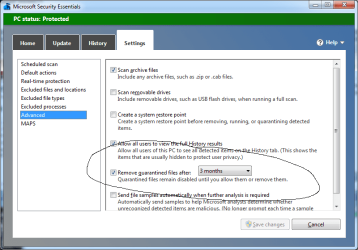
I agree with AddRam, you should run Malwarebytes. As far as the items quarintines, you can go to the settings tab and select how often they are removed.
mse.png
 

My Computer

Computer type
PC/Desktop
Computer Manufacturer/Model Number
Dude Build
OS
Windows 10 Pro X64
CPU
Intel(R) Core(TM) i5-3570K CPU OC@ 4.5GHZ Turbo
Motherboard
MSI Z77A-G45 Gaming
Memory
8.00 GB DDR3 1600Mhz
Graphics Card(s)
MSI Gaming X GTX 1070
Sound Card
Realtek High Definition
Monitor(s) Displays
Dell S23O9W, HP L1710
Screen Resolution
DELL-1920 x 1080 HP-1280 x1024
Hard Drives
Crucial m4 256 SSD, WD 7200RPM 500GB WD 1TB
PSU
Seasonic X650 GOLD
Case
Zalman Z12
Cooling
Antec Kuhler 920
Keyboard
Logitech
Mouse
MSI DS100 Interceptor
Internet Speed
50 down and 5 up
Antivirus
MSE
Browser
Chrome, IE 11
Other Info
Logitech X-620 Speakers
vett,

Based on what you reported for items infected, relying on just one program is not a good idea.

First, please download RogueKiller:
Tlcharger RogueKiller (Site Officiel)

When you get to the website, go to where it says:
(Download link) Lien de téléchargement
Select the version that applies to your system: x64
Click the dark-blue button that applies.
Save to the Desktop.

Close all windows and browsers.
Right-click RogueKiller and select: Run as Administrator

Press: SCAN

When done, a report opens on the Desktop: RKreport.txt

Please provide the RKreport.txt (Mode: Scan) in your reply.

(Please do not delete anything!)


Let's run the above, and then will press on to Malwarebytes, depending on what RogueKiller shows.
We may need to run something else beforehand.
 

My Computer

Computer type
PC/Desktop
Computer Manufacturer/Model Number
An ol' eMachines
OS
Windows 7 Home Premium
Internet Speed
Fine for me...I'm retired!
Back
Top