
Query installing Firefox on Windows7 - 2

Quasi

New member
Local time
5:36 PM
Messages
17
Query installing Firefox on Windows7 - 2
I have a new Toshiba X500-10T, can someone advise me if Firefox is suitable for this. I test my website with Firefox etc, and did try to install it but the version I downloaded installed but would not run and gave me an error box that asked me to complete my details and send to Firefox, I have had no reply. What version should I be downloading - a link would be appreciated if any one has a working version on Windows7. I asked Toshiba but told Firefox is not supported by them.
You may ave noticed that this was posted earlier today, It was my question but for some reason showed my sons username. Possibly due to the fact that he sent me a linknto this forum ast some time and seemed to remember his account and not mine. I did not notice this till after I received the first relies.
The first suggestion today from fikelfikel was to say:-
Firefox will work on any machine. Get version 3.6 RC1. It has better support for windows 7. You can download it here: http://en-us.www.mozilla.com/product...win&lang=en-GB
And from Tews:-

Firefox will run on any computer out there... The current version available is 3.6 and is available for download -=> here
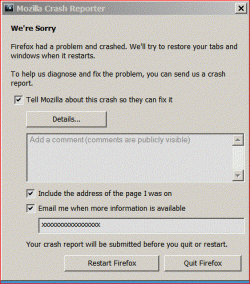
I followed fikelfikel advise first and had the same problem and received the foillowing message. I don't think trying the link suggested by Tews will be any better. Any suggestions. I don't know if it's a clash with Toshiba new system or what.
Sorry about the confusion.
 

Attachments
  • firefox_error.GIF
    firefox_error.GIF
    64.5 KB · Views: 25

My Computer

Computer Manufacturer/Model Number
Toshiba and others
OS
Windows7 & XP Pro
I have just uninstalled Firefox 3.6 RX1 and then tried Tews suggestion, Iinstaled 3.5.7.got the above crash report again. When doing both installs this time I disabled firewall and Norton Antivirus programme - made no difference. Has any other person has this problem? I have completed the Mozzilla Crash reported at least 12 times over a two week period, not had any feedback or help from them.

I am really stuck now.
 

My Computer

Computer Manufacturer/Model Number
Toshiba and others
OS
Windows7 & XP Pro
1. You are unlikely to receive any feedback from submitted crash reports; their main purpose is to help Mozilla programs find and fix problems.

2. Try removing the entire Firefox program folder structure, then download and try installing a fresh copy of Firefox; be sure to download from a Mozilla site, as there are some sites that purport to provide Firefox, but which provide corrupt and/or otherwise undesirable forms of the program.

3. If you still have no luck, then ask for assistance in the Firefox Support forum, which does not require registration:

Index page • mozillaZine Forums
 

My Computer

Computer type
PC/Desktop
Computer Manufacturer/Model Number
Intel(R) Core(TM) i5-2320 CPU @ 3.00GHz (Gateway computer)
OS
Microsoft Windows 7 Home Premium 64-bit 7601 Multiprocessor Free Service Pack 1
CPU
Intel(R) Core(TM) i5-2320 CPU @ 3.00GHz
Motherboard
Gateway IPISB-VR
Memory
8.00 GB
Graphics Card(s)
Intel(R) HD Graphics
Sound Card
(1) Realtek High Definition Audio (2) Intel(R) Display Aud
Monitor(s) Displays
ViewSonic 2250 Series
Screen Resolution
1920 x 1080 x 32 bits (4294967296 colors) @ 60 Hz
Hard Drives
(1) WDC WD10EADX-22TDHB0 (2) Generic Mini SD Reader USB Device (3) Generic USB CF Reader USB Device (4) Generic USB MS Reader USB Device (5) Generic USB SD Reader USB Device (6) Generic USB xD/SM Reader USB Device (7) Seagate FreeAgent Go
Keyboard
Gateway
Mouse
Logitech
Internet Speed
20 Mbps (Theoretical.)
Antivirus
Avast
Browser
Firefox
If you again reinstall and again fail, it might be worth your while to use Revo Uninstaller to uninstall and root out any last remnants of Firefox before you try again.
 

My Computer

Computer type
PC/Desktop
Computer Manufacturer/Model Number
Ignatz Special; 4 speed manual gearbox; factory air conditioning; one of one
OS
Windows 7 Home Premium SP1, 64-bit
CPU
Intel Skylake i5-6600K, not overclocked
Motherboard
AsRock Z170M Extreme 4, micro ATX
Memory
8 GB HyperX DDR4-2666 (2 x 4 GB)
Graphics Card(s)
none; graphics are integrated on CPU
Sound Card
onboard: Realtek ALC1150; external: USB Behringer UF0-202
Monitor(s) Displays
Dell S2340M 23 inch IPS
Screen Resolution
1600 x 900
Hard Drives
System: Crucial MX100 series SSD, 128 GB;
Data: Samsung Spinpoint 103SJ, 1 TB;
Backup: WD Caviar Green WD30EZRX-00D8PB0, 3 TB
PSU
Rosewill SilentNight 500 watt fanless, semi-modular
Case
Antec Solo II
Cooling
Noctua NH-U12S; Noctua F12 intake, Noctua S12A exhaust
Keyboard
Microsoft 200 6JH-00001 USB
Mouse
Dell or Microsoft optical wired; USB
Antivirus
Microsoft Security Essentials and Malwarebytes Premium
Browser
Pale Moon
Other Info
All fans PWM; speeds at idle: CPU circa 500 rpm; intake circa 600 rpm; exhaust circa 600 rpm; CPU temps 27 idle and 47 C load in a warm room (27 C/81 F) when running Intel Extreme Tuning Utility stress test.
Hi All - Late last night I went to start > programmes and found two Mozilla icons, one was "safe mode", I did not had that before, when I opened that one (other still would not open) when opened a an option box allowing me what to install i.e. plug-ins etc. I deselected all then clicked open and Firefox 3.6 RX1 opened. I then did a reboot and this time Firefox 3.6 RX1 opened straight away. I tried to add plug-in tools and this was not allowed (greyed out). I added what I needed that was available and did a reboot. Again all seemed on. I then tried installing UK version 3.5.7 (still had download on my desktop). Again this seemed to go without any problems. After another reboot the UK version 3.5.7. booted up normally. At that point the 3.6 RX1 must have been over-ridden as its no longer available as an optiuon. The last thing I did was to add the plug-in "tools". I needed this for web testing. Another reboot and all is working fine. I don't understand how it did it but many thanks to all. Perhaps if I had selected "Custom" install and started with just the basics it would have install the UK version from the start.

Another very satisfied customer. I still have other issues with my Toshiba X500-10, will start another post later.
Thanks Guys. :D
 

My Computer

Computer Manufacturer/Model Number
Toshiba and others
OS
Windows7 & XP Pro
Back
Top