Solved Question about Add/Remove Programs

sandie c

Banned
Local time
10:34 AM
Messages
4
Hi, I know how to use the Add/Remove programs, but someone had told me the programs dont get completely removed from your PC, and leave behind things. I was wondering if anyone knew what can be done to "completely" remove a program, as I m assuming this cant be a good thing for your PC to leave stuff behind when using the UNinstall, thanks for any help.
 

My Computer

Computer Manufacturer/Model Number
Dell Inspiron 560 64 bit
OS
Windows 7 Home premium 64bit
CPU
Pentium(R)DualCore [email protected] 3.20 GHz
Memory
4.00GB
Hello sandie c and welcome,

Many here would recommend revo uninstaller. There is a free version - Download Revo Uninstaller Freeware - Free and Full Download - Uninstall software, remove programs, solve uninstall problems after running the programs uninstaller it will check for left over files and/or registry entries and give you the option to remove them also.
Remember if you use the aggressive removal options which also check the registry for leftovers then back up the registry first and double check the entries just to be safe.

Danny
 

My Computer

Computer Manufacturer/Model Number
acer aspire 5935g
OS
Windows 7 Home Premium x64 SP1
CPU
intel(R)core(TM)2 duo CPU T6600 @ 2.20GHz
Motherboard
intel gm45/gm47 revision 07
Memory
3 gb ddr3
Graphics Card(s)
ati radeon hd4570/512mb
Monitor(s) Displays
lop156wh2-tle1 15.3 flat
Screen Resolution
1366x768
Hard Drives
OCZ-Agility3 60gig ssd
320gig external hdd
500gig external hdd
Mouse
Optical
Internet Speed
30Mbps Down/30Mbps Up
  • Like
Reactions: Arc
Thank you I just downloaded it. Im not too sure how to back up my registry though. Thanks again:D
 

My Computer

Computer Manufacturer/Model Number
Dell Inspiron 560 64 bit
OS
Windows 7 Home premium 64bit
CPU
Pentium(R)DualCore [email protected] 3.20 GHz
Memory
4.00GB

My Computer

Computer Manufacturer/Model Number
acer aspire 5935g
OS
Windows 7 Home Premium x64 SP1
CPU
intel(R)core(TM)2 duo CPU T6600 @ 2.20GHz
Motherboard
intel gm45/gm47 revision 07
Memory
3 gb ddr3
Graphics Card(s)
ati radeon hd4570/512mb
Monitor(s) Displays
lop156wh2-tle1 15.3 flat
Screen Resolution
1366x768
Hard Drives
OCZ-Agility3 60gig ssd
320gig external hdd
500gig external hdd
Mouse
Optical
Internet Speed
30Mbps Down/30Mbps Up
Thanks, appreciate the help.
 

My Computer

Computer Manufacturer/Model Number
Dell Inspiron 560 64 bit
OS
Windows 7 Home premium 64bit
CPU
Pentium(R)DualCore [email protected] 3.20 GHz
Memory
4.00GB
No problem:)
 

My Computer

Computer Manufacturer/Model Number
acer aspire 5935g
OS
Windows 7 Home Premium x64 SP1
CPU
intel(R)core(TM)2 duo CPU T6600 @ 2.20GHz
Motherboard
intel gm45/gm47 revision 07
Memory
3 gb ddr3
Graphics Card(s)
ati radeon hd4570/512mb
Monitor(s) Displays
lop156wh2-tle1 15.3 flat
Screen Resolution
1366x768
Hard Drives
OCZ-Agility3 60gig ssd
320gig external hdd
500gig external hdd
Mouse
Optical
Internet Speed
30Mbps Down/30Mbps Up
It sets a System Restore point before each uninstall. I'd use Advanced mode to be thorough.

On the other hand, Win7 Uninstalls are pretty thorough compared to past Windows. I have quit using Revo as a result.

Add/Remove was in XP, which is why you might still be concerned.
 
Thanks, yes I actually loved XP, still getting used to 7 , and now I hear there is an 8??
 

My Computer

Computer Manufacturer/Model Number
Dell Inspiron 560 64 bit
OS
Windows 7 Home premium 64bit
CPU
Pentium(R)DualCore [email protected] 3.20 GHz
Memory
4.00GB
Hi, I know how to use the Add/Remove programs, but someone had told me the programs dont get completely removed from your PC, and leave behind things. I was wondering if anyone knew what can be done to "completely" remove a program, as I m assuming this cant be a good thing for your PC to leave stuff behind when using the UNinstall, thanks for any help.

Dear sandie c,
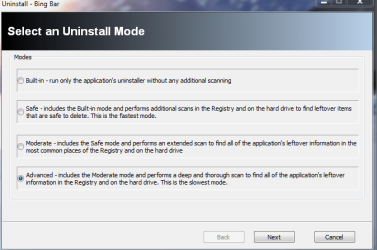
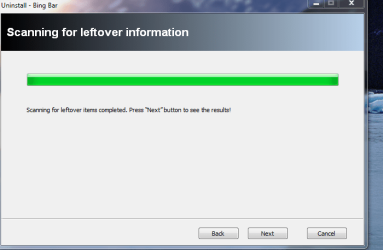
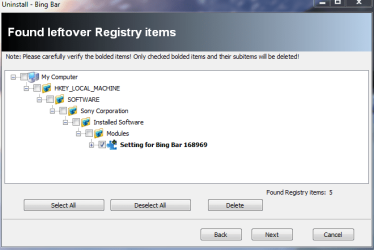
Accept a warm welcome from me too! Greg was right about better un-installations by Win.7 OS. Yet don't give up on the free Revo! I will give some demo', by un-installing the Bing bar! You should select the ADVANCED Option if you want a thorough removal of all related files and registry items.

The trick is to tick only the items in the Registry which are "thick black" as this line is typed. That way you are safe and as a regular user of Revo i never once had to back up the Registry.

Please view the thumbnails and i hope i have been of help! Click on each of the snaps for magnified view!
Regards,
sreedhav
 

Attachments

  • _2012-02-22_21-54-14.png
    _2012-02-22_21-54-14.png
    49.7 KB · Views: 10
  • _2012-02-22_21-54-51.png
    _2012-02-22_21-54-51.png
    21 KB · Views: 5
  • _2012-02-22_21-56-58.png
    _2012-02-22_21-56-58.png
    24.2 KB · Views: 4
  • Uninstall - Bing Bar_2012-02-22_21-57-40.png
    Uninstall - Bing Bar_2012-02-22_21-57-40.png
    20.2 KB · Views: 7

My Computer

Computer Manufacturer/Model Number
Sony Vaio C series VPCCB35FN laptop
OS
MS Windows 7 Home Premium 64-bit SP1
CPU
IntelCore [email protected]; Sandy Bridge 32nm Tech.
Motherboard
Sony Vaio Version:C609NJYJ
Memory
4096Mb RAM; Single ChannelDDR3@665MHz; DRAM Freq:662MHz
Graphics Card(s)
AMD Radeon HD 6630M; GPU:Whistler;BIOS Core&mem Clock:123.36
Sound Card
REALTEK High Definition Audio Device; INTEL Display Card
Monitor(s) Displays
Generic PnP Intel HD;Resolution:1920*1040 Pixels; BPP:32bits
Screen Resolution
Current Resolution:1920*1080 Pixels; Monitor Frequency:60Hz
Hard Drives
Internal HD:TOSHIBA MK5061GSY; Real Size:488 GB;NTFS; 3 Partitions; SATA; HEADS:16

External HDD: WD Elements 1023 PORTABLE; Estimated Size: 1TB; NTFS; 3 Partitions
Cooling
Lateral Exhaust with a Cooling Pad Placed Beneath.
Keyboard
Logitech Bluetooth+ Generic Integrated K-B
Mouse
Logitech Bluetooth
Internet Speed
2MBPS
Other Info
1)Trend Micro Titanium Maximum Security Suite Version:3
2)SAS-PRO

3)MBAM--PRO


4)WATERFOX+IE9 +WOT+LINKEXTEND+ DRWEBCUREIT LINK CHECKER

5)SPYWAREBLASTER

6) WINPATROL PLUS

7) SANDBOXIE and
8) A BIT OF COMMON SENSE.
Back
Top