Solved Question about Best HDD Storage Device

Solarstarshines

Mr Finger III
Guru
Gold Member
VIP
Local time
6:05 PM
Messages
7,450
Location
Laguna Hills Southern California
Hey guys my Dad hit me up about getting another external USB3.0
But I told him he might as well invest in like a 3TB right but then he in turn talked about how mechanical vs Hybrid SSD types were a lot better for storage based on Mechanics

Now my question is what would be best for storage and controllable corruption of files likes Video
pretty much that is all it will be is Video and Music His Church recordings if you will

I am looking for something Large but trustworthy something he will not complain about needing a new one and it could be external or internal

Massive Reliable and Price friendly :cool: Also if someone could give me Lifespan or suggested lifespan of product that also would be helpful and all suggestions welcome

Last but not least what why wouldn't a regular HDD be ok for storage I am still trying to wrap my head around this lol he mind blew me :shock:
 

My Computer

Computer type
PC/Desktop
Computer Manufacturer/Model Number
CoreI7-6700K MrFingerIII Special Builds
OS
Windows 10 Home Premium 64bit sp1
CPU
Intel I7-6700K @ 4.6 Ghz 1.344 volts everyday OC
Motherboard
Asrock Fatality K6 Z170 Socket 1151
Memory
32GB G-Skill TridentZ 3200mhz 16-18-18-38 DDR4
Graphics Card(s)
Sli Gigabyte Windforce GTX 980 G1
Sound Card
AC97 Creative Rage Tactic 3D Headphones Bluetooth
Monitor(s) Displays
27" Asus ROG Swift PG278Q G-Sync 48" Vizio Smart HD TV
Screen Resolution
2560x1440p 27"- 48" Currently Gaming at 2560x1440p Res 2K
Hard Drives
250GB Samsung Evo840SSD Seagate baracuda 500 GB WD Mybook 500Gb 1TB Seagate Barracuda
PSU
HX1050w Corsair Silver 80plus certified crosfire/sli
Case
Enthod Pro Full Tower
Cooling
Corsair H110i GT 280 mm High Performance WaterBlock
Keyboard
Logitech wireless keyboard
Mouse
Logitech wireless mouse
Internet Speed
Cox Cable 100+ mb
Antivirus
WebRoot Spysweeper with Antivirus
Browser
IE-10, Chrome, Opera
Other Info
My Other Rig is a AMD FX8320E @4.6Ghz 16GB Ballistic Sport Ram
Mobo Asrock Fatality 990FX 120GB OCZ SSD 1TB Seagate Barracuda Corsair H75 Cooling PSU Corsair CX750
GPU GTX Gigabyte 970G1
A spinner hdd is fine for storage. The ssd or hybrid drive will be better if you have the OS or other software that you use often. For storing video, .jpg's and such a usb external is great. Newegg has some very good deals right now. Good enough to make me want to buy a drive and I have them stacked like cord wood now.

Seagate Expansion 2TB USB Desktop Drive

WD Passport 1TB USB

Seagate Backup Plus 2TB USB 3.0

Sign up for Newegg emails and see the daily deals.
 

My Computer

Computer type
PC/Desktop
Computer Manufacturer/Model Number
Custom, Dell and Lenono LT's
OS
Win8/8.1,Win7-U64, Vista U64, uncounted Linux distor's
CPU
AMD and Intell, 9590, 8350, i5 3570k
Motherboard
CFVFZ, GA990FXA, Z77e-itx
Memory
Corsair G Skill
Graphics Card(s)
Crossfired Sapphire HD 7950 Vapor-X, ASUS R9 280X TOP
Sound Card
Realtek ALC889
Monitor(s) Displays
ViewSonic VX2770SMH 27" / ViewSonic VX2433 LCD 24"
Screen Resolution
1080i HD
Hard Drives
Samsung SSD 840 Pro
OCZ Agility 3's
OCZ Vector's
WD's Blue, red, green, Velociraptors
Seagate USB3 & Hybrid's
ASUS Blu-Ray
ASUS DVD
PSU
Corsair AX1200i, Seasonice 850 Gold
Case
Cooler Master HAF 922 & HAF 932, Lian Li Train case.
Cooling
Air, Glacer 240L expanded, custom EK loop with duel D5's
Keyboard
Microsoft SideWinder X4 USB Keyboard / Logitech 250 PS2
Mouse
Logitech G500 / MS wireless 5000
Internet Speed
Best of 5ms / 75+ dn / 12+ up More or less.
Antivirus
MS esentials-MalwareBytes
Browser
Firefox Chromebook
I would go with the external usb, it will be great and reliable for storage. Also use it for a image backup for him.
 

My Computer

Computer type
PC/Desktop
Computer Manufacturer/Model Number
Dude Build
OS
Windows 10 Pro X64
CPU
Intel(R) Core(TM) i5-3570K CPU OC@ 4.5GHZ Turbo
Motherboard
MSI Z77A-G45 Gaming
Memory
8.00 GB DDR3 1600Mhz
Graphics Card(s)
MSI Gaming X GTX 1070
Sound Card
Realtek High Definition
Monitor(s) Displays
Dell S23O9W, HP L1710
Screen Resolution
DELL-1920 x 1080 HP-1280 x1024
Hard Drives
Crucial m4 256 SSD, WD 7200RPM 500GB WD 1TB
PSU
Seasonic X650 GOLD
Case
Zalman Z12
Cooling
Antec Kuhler 920
Keyboard
Logitech
Mouse
MSI DS100 Interceptor
Internet Speed
50 down and 5 up
Antivirus
MSE
Browser
Chrome, IE 11
Other Info
Logitech X-620 Speakers
For just storage, a SSHD would be a waste of money; the small NAND used to cache the spinner portion works only for a very limited amount of the total data and that limited amount needs to be the only data being retrieved the vast majority of the time. A SSD is superior to a HDD for static storage (data that isn't being constantly rewritten across the entire volume) but are still too expensive to be cost effective, especially for larger volumes. HDDs are still the king of mass storage.

Regular internal type HDDs are generally superior to the cheap spinners normally found in external HDDs and there is no reason not to use them for data storage other than, mayhap, convenience. As long as they don't get jostled about and kept in an anti-static sleeve when stored, they take up much less room and will cost less than external drives because you won't be paying for duplicate enclosures and PSUs.

The data stored on the HDDs can be accessed by using an external dock (e-SATA is fastest followed by USB 3.0). A large number of HDDs would be easier to access frequently if in a NAS or RAID enclosure but that would present problems with backups. Even better is a computer with plenty of room for HDDs inside. Keep in mind there would be a limit to how many HDDs one could have in a computer due to a fixed number of drive letters available.

If the HDDs are accessed only occasionally, even the 3-4TB HDDs will most likely last an extremely long time (years) but keep in mind no media will last forever. Backups are essential to reasonably ensure data will never be lost. The easiest backup scheme would be to keep a duplicate of each HDD someplace away from the original, such as one at his home and another at your home.

One common misconception is that RAID (other than 0) is a backup. For data to be backed up, it has to exist in two or more separate places. Data stored in a RAID can be lost due to fire, flood, PSU and other mechanical failure, theft, and user error. Only by having duplicate data stored elsewhere can one reasonably ensure against data loss. Also, the backup drive must stay disconnected from the source drive except when making or updating the backup. Otherwise, whatever caused data loss on the source drive could take out the data on the backup.

Because of the difficulty of backing a NAS or RAID enclosure, I rarely recommend them for home use unless one needs a central storage point for multiple computers. The difficulty lies in having to come up with a volume equal to the volume of the RAID volume. That generally requires a second RAID.
 

My Computer

Computer type
PC/Desktop
Computer Manufacturer/Model Number
Custom Build
OS
Win 7 Ultimate 64 bit
CPU
Intel i7-3930K
Motherboard
ASUS P9X79 WS
Memory
Kingston HyperX Genesis 32GB Kit (8x4GB Modules) 1600MHz DDR
Graphics Card(s)
MSI R7850 Twin Frozr 2GD5/OC Radeon HD 7850 2GB 256-bit GDDR
Sound Card
Asus Xonar Essence STX
Monitor(s) Displays
3x Asus VG248QE 24", Vizio 32" TV
Screen Resolution
1920 x 1080, ?
Hard Drives
Samsung 128GB 840 Pro SSD (1),
Samsung 4TB 850 EVO SSDs (4)
Samsung 4TB 850 EVO SSDs (16) external backup drives used in 2.5" hot swap bays in the computer.
PSU
Corsair HX750w
Case
Antec Two Hundred v2 (modified)
Cooling
Cooler Master GeminII S524 120mm (fan replaced with a 140mm)
Keyboard
Logitech G510s
Mouse
Logitech M525 (two in use)
Internet Speed
=< 32Mbps down, 8Mbps up
Antivirus
AVAST!, MBAM, SAS, Spybot S&D (all but MBAM free) Glary Util
Browser
IE11
Other Info
LSI 9211-8i HBA card (8 SATA III ports), 2.5" & 3.5" Hot Swap Bays, HooToo HT-CR001 PCI-E to USB 3.0 Internal Hub + 6 Slot Card Reader, and LG Model CH12LS28 BD-ROM Optical Drive. Also, ScanSnap S1500 ADF duplexing scanner, Canon 9000F flat bed scanner, Corsair SP2500 2.1 speakers, Samsung CLP 415nw laser color printer, Cyberpower PP2200SW UPS
So it's safe to say using a external 3tb or internal doesn't matter if it is a quality one

So faster access times would have to go to the internal though wouldn't USB 3.0 isn't that super fast over sata 6 right isn't it slower?
 

My Computer

Computer type
PC/Desktop
Computer Manufacturer/Model Number
CoreI7-6700K MrFingerIII Special Builds
OS
Windows 10 Home Premium 64bit sp1
CPU
Intel I7-6700K @ 4.6 Ghz 1.344 volts everyday OC
Motherboard
Asrock Fatality K6 Z170 Socket 1151
Memory
32GB G-Skill TridentZ 3200mhz 16-18-18-38 DDR4
Graphics Card(s)
Sli Gigabyte Windforce GTX 980 G1
Sound Card
AC97 Creative Rage Tactic 3D Headphones Bluetooth
Monitor(s) Displays
27" Asus ROG Swift PG278Q G-Sync 48" Vizio Smart HD TV
Screen Resolution
2560x1440p 27"- 48" Currently Gaming at 2560x1440p Res 2K
Hard Drives
250GB Samsung Evo840SSD Seagate baracuda 500 GB WD Mybook 500Gb 1TB Seagate Barracuda
PSU
HX1050w Corsair Silver 80plus certified crosfire/sli
Case
Enthod Pro Full Tower
Cooling
Corsair H110i GT 280 mm High Performance WaterBlock
Keyboard
Logitech wireless keyboard
Mouse
Logitech wireless mouse
Internet Speed
Cox Cable 100+ mb
Antivirus
WebRoot Spysweeper with Antivirus
Browser
IE-10, Chrome, Opera
Other Info
My Other Rig is a AMD FX8320E @4.6Ghz 16GB Ballistic Sport Ram
Mobo Asrock Fatality 990FX 120GB OCZ SSD 1TB Seagate Barracuda Corsair H75 Cooling PSU Corsair CX750
GPU GTX Gigabyte 970G1
So it's safe to say using a external 3tb or internal doesn't matter if it is a quality one...

True but external HDDs are usually lower quality than many internal type HDDs.

...So faster access times would have to go to the internal though wouldn't USB 3.0 isn't that super fast over sata 6 right isn't it slower?

My mind is on strike and I'm not sure I understand what you are asking. Let's see if this helps.

For the purpose of this discussion, there are two types of HDDs that can be used for backups: external HDDs and internal type HDDs (HDDs that are normally installed inside a computer case). External HDDs are generally an internal type HDD that has been installed in an enclosure and provided with some kind of interface for connecting to a computer.

Internal type HDDs can be used externally by installing them in an external enclosure (making them into an external HDD; other than the HDD itself will probably be of better quality, there is not much advantage in that unless it's the only one you have) or by using them in a dock, like this one (I actually have that dock but rarely use it anymore because I now have a better alternative). Docks have the advantage over enclosures because only the one dock and PSU is needed for multiple HDDs. Also HDDs not enclosed in an enclosure require less room to store.

Docks generally now connect to the computer via USB or e-SATA (Firewire also has been used in the past). Obviously, USB 3.0 is the fastest of the USBs but one has to have USB 3.0 available on the computer to take advantage of USB 3.0 speeds; otherwise speeds revert to USB 2.0 speeds. e-SATA is generally fastest, especially e-SATA 3.0 (6 Gbps).
 

My Computer

Computer type
PC/Desktop
Computer Manufacturer/Model Number
Custom Build
OS
Win 7 Ultimate 64 bit
CPU
Intel i7-3930K
Motherboard
ASUS P9X79 WS
Memory
Kingston HyperX Genesis 32GB Kit (8x4GB Modules) 1600MHz DDR
Graphics Card(s)
MSI R7850 Twin Frozr 2GD5/OC Radeon HD 7850 2GB 256-bit GDDR
Sound Card
Asus Xonar Essence STX
Monitor(s) Displays
3x Asus VG248QE 24", Vizio 32" TV
Screen Resolution
1920 x 1080, ?
Hard Drives
Samsung 128GB 840 Pro SSD (1),
Samsung 4TB 850 EVO SSDs (4)
Samsung 4TB 850 EVO SSDs (16) external backup drives used in 2.5" hot swap bays in the computer.
PSU
Corsair HX750w
Case
Antec Two Hundred v2 (modified)
Cooling
Cooler Master GeminII S524 120mm (fan replaced with a 140mm)
Keyboard
Logitech G510s
Mouse
Logitech M525 (two in use)
Internet Speed
=< 32Mbps down, 8Mbps up
Antivirus
AVAST!, MBAM, SAS, Spybot S&D (all but MBAM free) Glary Util
Browser
IE11
Other Info
LSI 9211-8i HBA card (8 SATA III ports), 2.5" & 3.5" Hot Swap Bays, HooToo HT-CR001 PCI-E to USB 3.0 Internal Hub + 6 Slot Card Reader, and LG Model CH12LS28 BD-ROM Optical Drive. Also, ScanSnap S1500 ADF duplexing scanner, Canon 9000F flat bed scanner, Corsair SP2500 2.1 speakers, Samsung CLP 415nw laser color printer, Cyberpower PP2200SW UPS
For just a storage drive, personally, I would go with a large Internal Western Digital Blue or Green. (Ive just always been a big fan of WD drives)

But, if you want external, you may be better of getting one of the above, and then a good external case and put it together yourself (its very simple to do).
May cost a bit more, but you'll have a higher quality external drive that way. Plus you can get exactly what you want, ESATA/USB3 .. both etc.
 

My Computer

Computer Manufacturer/Model Number
Custom (Self Build)
OS
Windows 7 Home Premium 64bit
CPU
Intel Core i7 2700k
Motherboard
eVGA P67 SLI
Memory
8GB Mushkin Redline Ridgebacks @1866
Graphics Card(s)
EVGA GTX570 SC
Sound Card
XiFi Titanium HD
Monitor(s) Displays
LG W2453V
Screen Resolution
1920x1080
Hard Drives
Intel 320 80GB -- Intel X25-V 40GB --WD Black 1TB x2 -- WD Blue 640GB
PSU
Seasonic x750
Case
Corsair 600T SE White
Cooling
eVGA Superclocked CPU Cooler
Keyboard
Saitek Cyborg
Antivirus
Kaspersky
Browser
IE
Other Info
LG BD/DVD
The largest available drives tend to cost more than twice the cost of drives with half the capacity. Just my way of putting it. I haven't done statistical analysis or anything. But if cost is an issue you may be well served by a USB 3.0 (if the machine has USG 3.0 ports already) docking station, several 2 tb internal drives, and a plastic stack of drawers from Walmart. Just glancing at egg I saw WD 2 tb 6 Gb/s drives for around $90. These days you can probably get a USB 3.0 dock for around $20. Using external drives they make you pay through the nose for the fact it's enclosed and you just plug them in. It's just as easy to slide an internal drive into a dock. Just make sure to drain the static electricity from your body before picking up the drive.

I got the plastic stack of drawyers at Walmart for $8 I think. I forget if it was 5 or 6 drawers. Just save the anti-static bags the internal drives come in. But even if you have to buy some it's only a few dollars for all you are ever likely to need. Slide the internal drive into the anti-static bag and store in a drawer. Unless you are saving BluRay images like 50 GB a shot, even 1 TB drives will store plenty of video.
 

My Computer

Computer Manufacturer/Model Number
HP Media Center
OS
Windows 7 32 bit
CPU
AMD 5200+ dual core
Memory
2 GB
Graphics Card(s)
NVidia GeForce 6150SE 128 MB
Monitor(s) Displays
CRT
Screen Resolution
1280x1024
Hard Drives
500 GB Sata internal :

SIIG USB 3.0 docking stations w/WD Caviar Black 6 Gb/s drives
Keyboard
PS/2
Mouse
PS/2 Wheel Mouse
Other Info
SIIG USB 3.0 PCIexpress card.
The largest available drives tend to cost more than twice the cost of drives with half the capacity...


I just checked on NewEgg and the 2TB WD Greens are $90 and the 4TB are $180. Generally, the cost per TB of any drive is going to be the same. The advantage of larger drives is they require less space. The advantages of smaller drives are backups are faster and, should the drive fail, less data is at risk for loss (backups, of course, reduce, if not pretty much negate, the risk of loss). I personally prefer larger drives due to space considerations.

I also prefer WD Blacks for my working data drives (the ones installed in my computer); they are faster and have a longer warranty. I prefer the Greens for my backup drives because they are cheaper. For static storage, the Greens will be fine. Whatever drive one uses, a good backup scheme is imperative since even the best drives can fail on their own or be destroyed by external forces.

...I haven't done statistical analysis or anything. But if cost is an issue you may be well served by a USB 3.0 (if the machine has USG 3.0 ports already) docking station, several 2 tb internal drives, and a plastic stack of drawers from Walmart. Just glancing at egg I saw WD 2 tb 6 Gb/s drives for around $90. These days you can probably get a USB 3.0 dock for around $20. Using external drives they make you pay through the nose for the fact it's enclosed and you just plug them in...

USB 3.0 is fast but, if available on a machine, e-SATA is even faster. e-SATA is easy to add to a machine if one has an empty SATA port, preferably SATA 3 (6Gbps), and an unused PCI slot cover on the back. There are PCI cover adapters that mount on the back of a machine and connect to the SATA port via a cable. One can find docks that have e-SATA capabilities for not much more than ones without e-SATA.

...Using external drives they make you pay through the nose for the fact it's enclosed and you just plug them in. It's just as easy to slide an internal drive into a dock...

Absolutely! The drives also take up less space in storage.

...Just make sure to drain the static electricity from your body before picking up the drive...Just save the anti-static bags the internal drives come in. But even if you have to buy some it's only a few dollars for all you are ever likely to need. Slide the internal drive into the anti-static bag and store...

Excellent advice! I also use a pair of anti-static gloves when handling my drives (static is a huge problem where I live).
 

My Computer

Computer type
PC/Desktop
Computer Manufacturer/Model Number
Custom Build
OS
Win 7 Ultimate 64 bit
CPU
Intel i7-3930K
Motherboard
ASUS P9X79 WS
Memory
Kingston HyperX Genesis 32GB Kit (8x4GB Modules) 1600MHz DDR
Graphics Card(s)
MSI R7850 Twin Frozr 2GD5/OC Radeon HD 7850 2GB 256-bit GDDR
Sound Card
Asus Xonar Essence STX
Monitor(s) Displays
3x Asus VG248QE 24", Vizio 32" TV
Screen Resolution
1920 x 1080, ?
Hard Drives
Samsung 128GB 840 Pro SSD (1),
Samsung 4TB 850 EVO SSDs (4)
Samsung 4TB 850 EVO SSDs (16) external backup drives used in 2.5" hot swap bays in the computer.
PSU
Corsair HX750w
Case
Antec Two Hundred v2 (modified)
Cooling
Cooler Master GeminII S524 120mm (fan replaced with a 140mm)
Keyboard
Logitech G510s
Mouse
Logitech M525 (two in use)
Internet Speed
=< 32Mbps down, 8Mbps up
Antivirus
AVAST!, MBAM, SAS, Spybot S&D (all but MBAM free) Glary Util
Browser
IE11
Other Info
LSI 9211-8i HBA card (8 SATA III ports), 2.5" & 3.5" Hot Swap Bays, HooToo HT-CR001 PCI-E to USB 3.0 Internal Hub + 6 Slot Card Reader, and LG Model CH12LS28 BD-ROM Optical Drive. Also, ScanSnap S1500 ADF duplexing scanner, Canon 9000F flat bed scanner, Corsair SP2500 2.1 speakers, Samsung CLP 415nw laser color printer, Cyberpower PP2200SW UPS
LadyF the price structure appears to have changed. It used to be that getting that extra bit of capacity was exorbitant. Kind of like the CPU that was 25% faster costing 70% more etc.. But nowadays it looks like the main reason for a bunch of small drives is redundancy. I wish I had a chance to see some eSata in action. I've seen wild discrepancy of USB 3.0 speeds. I guess some onboard USB 3.0 that come standard is slow enough that people would disbelieve the sequential copy speeds I reported using SIIG card and docks. It's frustrating because people think you are yanking their chain when their USB 3.0 isn't in the same ballpark performance wise.
 

My Computer

Computer Manufacturer/Model Number
HP Media Center
OS
Windows 7 32 bit
CPU
AMD 5200+ dual core
Memory
2 GB
Graphics Card(s)
NVidia GeForce 6150SE 128 MB
Monitor(s) Displays
CRT
Screen Resolution
1280x1024
Hard Drives
500 GB Sata internal :

SIIG USB 3.0 docking stations w/WD Caviar Black 6 Gb/s drives
Keyboard
PS/2
Mouse
PS/2 Wheel Mouse
Other Info
SIIG USB 3.0 PCIexpress card.
I would not harp too much on the quality aspects. Most major companies get their drives from the same shops in Thailand. So there is really no distinction.

I personally prefer to work with an external open enclosure like thios one.

Aluratek External 2.5" & 3.5" Black SuperSpeed USB 3.0 SATA Hard Drive Docking Station Enclosure AUDDU200F - Newegg.com

That allows me to work with bare bone HDDs (are cheaper) in 2.5" and 3.5" size. And I can easily swap the disks. Most of my 2.5" disks are recovered from my laptops when I replaced the HDDs with SSDs.

I would rather buy a few smaller HDDs like this one which costs $60 with Promo Code: EMCYTZT4867. That spreads the risk of failure over 1 big HDD.
 
Last edited:

My Computer

Computer Manufacturer/Model Number
HP, Dell, Gateway, Toshiba - 4 laptops and 2 desktops
OS
Vista, Windows7, Mint Mate, Zorin, Windows 8
CPU
from 1.6GHz Duo to i7
Monitor(s) Displays
2x HP w2207
Hard Drives
5x HDD, 7x SSD, 12x Externals
Keyboard
with trackball - no mices
Mouse
Trackball mice
Internet Speed
DSL 6000
I would not harp too much on the quality aspects. Most major companies get their drives from the same shops in Thailand. So there is really no distinction...

I seen quite a few posts on forums that say the spinners they put in external drives are lower quality. Just because products have the same source doesn't necessarily mean they will be built with the same quality. WD Blacks are better than the Greens, for example. That said, I did have a 120GB WD external drive I used off and on for seven or eight years without a problem and I retired it mostly because it was too small to be of much use to me, was a pain to use because of the PSU, and it was starting to make funny noises.

...I personally prefer to work with an external enclosure like thios one.

Aluratek External 2.5" & 3.5" Black SuperSpeed USB 3.0 SATA Hard Drive Docking Station Enclosure AUDDU200F - Newegg.com

That allows me to work with bare bone HDDs (are cheaper) in 2.5" and 3.5" size. And I can easily swap the disks...

I used to the Kingwin I linked earlier. I bought it to use temporarily until I got my present rig built which has built-in swap bays:

da6c6c53-8b9c-4ba9-a833-08c88445eaae_zpscc6c4912.jpg


They are so much more convenient that having to horse around with an external dock. I do have a couple of cute little USB powered 2.5" dock I use with my notebook. The Kingwin dock does have an e-SATA connection and the dock worked out well for me when I was using it so I keep it for a backup.

...I would rather buy a few smaller HDDs like this one which costs $60 with Promo Code: EMCYTZT4867. That spreads the risk of failure over 1 big HDD.

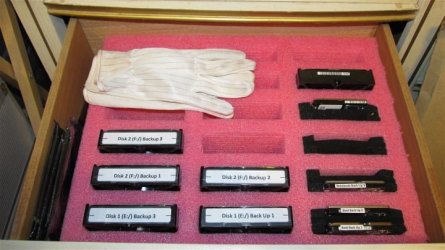
I agree that using smaller disks reduces failure risk (it also reduces the amount of time for making backups and doing restoration) but it also increases the number of drives one has to store. However, the failure risk can be mitigated with a solid backup scheme. I prefer larger ones because it reduces storage space requirements. Since removing and replacing anti-static sleeves is a hurt in the donkey and I'm a lazy old broad, I keep my backup drives in a drawer in an anti-static "egg crate" that gives me easy access to my backup drives.

Backup Drive Storage.01.2.JPG

I have room for only six HDDs in my computer. I use three HDDs for each HDD in my computer. I keep two at home and one in a safe deposit box at my credit union. The "egg crate" provides enough room for all 18 potential backup HDDs plus room for some spares and my 2.5" HDDs (most of which I have retired). Needless to say, the larger the HDDs, the more room I'll have for data.
 

My Computer

Computer type
PC/Desktop
Computer Manufacturer/Model Number
Custom Build
OS
Win 7 Ultimate 64 bit
CPU
Intel i7-3930K
Motherboard
ASUS P9X79 WS
Memory
Kingston HyperX Genesis 32GB Kit (8x4GB Modules) 1600MHz DDR
Graphics Card(s)
MSI R7850 Twin Frozr 2GD5/OC Radeon HD 7850 2GB 256-bit GDDR
Sound Card
Asus Xonar Essence STX
Monitor(s) Displays
3x Asus VG248QE 24", Vizio 32" TV
Screen Resolution
1920 x 1080, ?
Hard Drives
Samsung 128GB 840 Pro SSD (1),
Samsung 4TB 850 EVO SSDs (4)
Samsung 4TB 850 EVO SSDs (16) external backup drives used in 2.5" hot swap bays in the computer.
PSU
Corsair HX750w
Case
Antec Two Hundred v2 (modified)
Cooling
Cooler Master GeminII S524 120mm (fan replaced with a 140mm)
Keyboard
Logitech G510s
Mouse
Logitech M525 (two in use)
Internet Speed
=< 32Mbps down, 8Mbps up
Antivirus
AVAST!, MBAM, SAS, Spybot S&D (all but MBAM free) Glary Util
Browser
IE11
Other Info
LSI 9211-8i HBA card (8 SATA III ports), 2.5" & 3.5" Hot Swap Bays, HooToo HT-CR001 PCI-E to USB 3.0 Internal Hub + 6 Slot Card Reader, and LG Model CH12LS28 BD-ROM Optical Drive. Also, ScanSnap S1500 ADF duplexing scanner, Canon 9000F flat bed scanner, Corsair SP2500 2.1 speakers, Samsung CLP 415nw laser color printer, Cyberpower PP2200SW UPS
I seen quite a few posts on forums that say the spinners they put in external drives are lower quality. Just because products have the same source doesn't necessarily mean they will be built with the same quality. WD Blacks are better than the Greens, for example. That said, I did have a 120GB WD external drive I used off and on for seven or eight years without a problem and I retired it mostly because it was too small to be of much use to me
I don't really believe that. A statistical sample of 1 is not really convincing me.
 

My Computer

Computer Manufacturer/Model Number
HP, Dell, Gateway, Toshiba - 4 laptops and 2 desktops
OS
Vista, Windows7, Mint Mate, Zorin, Windows 8
CPU
from 1.6GHz Duo to i7
Monitor(s) Displays
2x HP w2207
Hard Drives
5x HDD, 7x SSD, 12x Externals
Keyboard
with trackball - no mices
Mouse
Trackball mice
Internet Speed
DSL 6000
The largest available drives tend to cost more than twice the cost of drives with half the capacity. Just my way of putting it. I haven't done statistical analysis or anything. But if cost is an issue you may be well served by a USB 3.0 (if the machine has USG 3.0 ports already) docking station, several 2 tb internal drives, and a plastic stack of drawers from Walmart. Just glancing at egg I saw WD 2 tb 6 Gb/s drives for around $90. These days you can probably get a USB 3.0 dock for around $20. Using external drives they make you pay through the nose for the fact it's enclosed and you just plug them in. It's just as easy to slide an internal drive into a dock. Just make sure to drain the static electricity from your body before picking up the drive.

I got the plastic stack of drawyers at Walmart for $8 I think. I forget if it was 5 or 6 drawers. Just save the anti-static bags the internal drives come in. But even if you have to buy some it's only a few dollars for all you are ever likely to need. Slide the internal drive into the anti-static bag and store in a drawer. Unless you are saving BluRay images like 50 GB a shot, even 1 TB drives will store plenty of video.

If it's going to be a huge Drive Internal then Cost shouldn't matter I assume he is spending 80 to 100 for just 128gb of space when he can cough up 160.00 for much more


Lady what I was saying is USB3.0 is still slower then Sata 6 Correct I just want to make sure we are clear

I think by most of the suggestions Internal would be a better choice he fill these other drives up in less then a month so I am assuming 3TB should suffice he doesn't want to erase them either but he does have everything backed up

This would be all Media and editing that is all he does
 

My Computer

Computer type
PC/Desktop
Computer Manufacturer/Model Number
CoreI7-6700K MrFingerIII Special Builds
OS
Windows 10 Home Premium 64bit sp1
CPU
Intel I7-6700K @ 4.6 Ghz 1.344 volts everyday OC
Motherboard
Asrock Fatality K6 Z170 Socket 1151
Memory
32GB G-Skill TridentZ 3200mhz 16-18-18-38 DDR4
Graphics Card(s)
Sli Gigabyte Windforce GTX 980 G1
Sound Card
AC97 Creative Rage Tactic 3D Headphones Bluetooth
Monitor(s) Displays
27" Asus ROG Swift PG278Q G-Sync 48" Vizio Smart HD TV
Screen Resolution
2560x1440p 27"- 48" Currently Gaming at 2560x1440p Res 2K
Hard Drives
250GB Samsung Evo840SSD Seagate baracuda 500 GB WD Mybook 500Gb 1TB Seagate Barracuda
PSU
HX1050w Corsair Silver 80plus certified crosfire/sli
Case
Enthod Pro Full Tower
Cooling
Corsair H110i GT 280 mm High Performance WaterBlock
Keyboard
Logitech wireless keyboard
Mouse
Logitech wireless mouse
Internet Speed
Cox Cable 100+ mb
Antivirus
WebRoot Spysweeper with Antivirus
Browser
IE-10, Chrome, Opera
Other Info
My Other Rig is a AMD FX8320E @4.6Ghz 16GB Ballistic Sport Ram
Mobo Asrock Fatality 990FX 120GB OCZ SSD 1TB Seagate Barracuda Corsair H75 Cooling PSU Corsair CX750
GPU GTX Gigabyte 970G1
I seen quite a few posts on forums that say the spinners they put in external drives are lower quality. Just because products have the same source doesn't necessarily mean they will be built with the same quality. WD Blacks are better than the Greens, for example. That said, I did have a 120GB WD external drive I used off and on for seven or eight years without a problem and I retired it mostly because it was too small to be of much use to me
I don't really believe that. A statistical sample of 1 is not really convincing me.


This is what I was told as well even though it's a spinner it was proclaimed lot of them break down and become garbage but I figure that was with abuse I have had the same 500gb Barracuda for at least 5 years still going strong
 

My Computer

Computer type
PC/Desktop
Computer Manufacturer/Model Number
CoreI7-6700K MrFingerIII Special Builds
OS
Windows 10 Home Premium 64bit sp1
CPU
Intel I7-6700K @ 4.6 Ghz 1.344 volts everyday OC
Motherboard
Asrock Fatality K6 Z170 Socket 1151
Memory
32GB G-Skill TridentZ 3200mhz 16-18-18-38 DDR4
Graphics Card(s)
Sli Gigabyte Windforce GTX 980 G1
Sound Card
AC97 Creative Rage Tactic 3D Headphones Bluetooth
Monitor(s) Displays
27" Asus ROG Swift PG278Q G-Sync 48" Vizio Smart HD TV
Screen Resolution
2560x1440p 27"- 48" Currently Gaming at 2560x1440p Res 2K
Hard Drives
250GB Samsung Evo840SSD Seagate baracuda 500 GB WD Mybook 500Gb 1TB Seagate Barracuda
PSU
HX1050w Corsair Silver 80plus certified crosfire/sli
Case
Enthod Pro Full Tower
Cooling
Corsair H110i GT 280 mm High Performance WaterBlock
Keyboard
Logitech wireless keyboard
Mouse
Logitech wireless mouse
Internet Speed
Cox Cable 100+ mb
Antivirus
WebRoot Spysweeper with Antivirus
Browser
IE-10, Chrome, Opera
Other Info
My Other Rig is a AMD FX8320E @4.6Ghz 16GB Ballistic Sport Ram
Mobo Asrock Fatality 990FX 120GB OCZ SSD 1TB Seagate Barracuda Corsair H75 Cooling PSU Corsair CX750
GPU GTX Gigabyte 970G1
I have at least 20 spinners and only 1 broke down in years - that was a Seagate external drive.
 

My Computer

Computer Manufacturer/Model Number
HP, Dell, Gateway, Toshiba - 4 laptops and 2 desktops
OS
Vista, Windows7, Mint Mate, Zorin, Windows 8
CPU
from 1.6GHz Duo to i7
Monitor(s) Displays
2x HP w2207
Hard Drives
5x HDD, 7x SSD, 12x Externals
Keyboard
with trackball - no mices
Mouse
Trackball mice
Internet Speed
DSL 6000

My Computer

Computer type
PC/Desktop
Computer Manufacturer/Model Number
CoreI7-6700K MrFingerIII Special Builds
OS
Windows 10 Home Premium 64bit sp1
CPU
Intel I7-6700K @ 4.6 Ghz 1.344 volts everyday OC
Motherboard
Asrock Fatality K6 Z170 Socket 1151
Memory
32GB G-Skill TridentZ 3200mhz 16-18-18-38 DDR4
Graphics Card(s)
Sli Gigabyte Windforce GTX 980 G1
Sound Card
AC97 Creative Rage Tactic 3D Headphones Bluetooth
Monitor(s) Displays
27" Asus ROG Swift PG278Q G-Sync 48" Vizio Smart HD TV
Screen Resolution
2560x1440p 27"- 48" Currently Gaming at 2560x1440p Res 2K
Hard Drives
250GB Samsung Evo840SSD Seagate baracuda 500 GB WD Mybook 500Gb 1TB Seagate Barracuda
PSU
HX1050w Corsair Silver 80plus certified crosfire/sli
Case
Enthod Pro Full Tower
Cooling
Corsair H110i GT 280 mm High Performance WaterBlock
Keyboard
Logitech wireless keyboard
Mouse
Logitech wireless mouse
Internet Speed
Cox Cable 100+ mb
Antivirus
WebRoot Spysweeper with Antivirus
Browser
IE-10, Chrome, Opera
Other Info
My Other Rig is a AMD FX8320E @4.6Ghz 16GB Ballistic Sport Ram
Mobo Asrock Fatality 990FX 120GB OCZ SSD 1TB Seagate Barracuda Corsair H75 Cooling PSU Corsair CX750
GPU GTX Gigabyte 970G1
I have at least 20 spinners and only 1 broke down in years - that was a Seagate external drive.


:doh:I actually like Seagate too I have a couple of there drives
 

My Computer

Computer type
PC/Desktop
Computer Manufacturer/Model Number
CoreI7-6700K MrFingerIII Special Builds
OS
Windows 10 Home Premium 64bit sp1
CPU
Intel I7-6700K @ 4.6 Ghz 1.344 volts everyday OC
Motherboard
Asrock Fatality K6 Z170 Socket 1151
Memory
32GB G-Skill TridentZ 3200mhz 16-18-18-38 DDR4
Graphics Card(s)
Sli Gigabyte Windforce GTX 980 G1
Sound Card
AC97 Creative Rage Tactic 3D Headphones Bluetooth
Monitor(s) Displays
27" Asus ROG Swift PG278Q G-Sync 48" Vizio Smart HD TV
Screen Resolution
2560x1440p 27"- 48" Currently Gaming at 2560x1440p Res 2K
Hard Drives
250GB Samsung Evo840SSD Seagate baracuda 500 GB WD Mybook 500Gb 1TB Seagate Barracuda
PSU
HX1050w Corsair Silver 80plus certified crosfire/sli
Case
Enthod Pro Full Tower
Cooling
Corsair H110i GT 280 mm High Performance WaterBlock
Keyboard
Logitech wireless keyboard
Mouse
Logitech wireless mouse
Internet Speed
Cox Cable 100+ mb
Antivirus
WebRoot Spysweeper with Antivirus
Browser
IE-10, Chrome, Opera
Other Info
My Other Rig is a AMD FX8320E @4.6Ghz 16GB Ballistic Sport Ram
Mobo Asrock Fatality 990FX 120GB OCZ SSD 1TB Seagate Barracuda Corsair H75 Cooling PSU Corsair CX750
GPU GTX Gigabyte 970G1
...Lady what I was saying is USB3.0 is still slower then Sata 6 Correct I just want to make sure we are clear...

In theory, Superspeed USB 3.0 speed can be as high as 5 Gbps but, usually, it's slower than that. SATA 3.0 is 6 Gbps. Not all machines have USB 3.0 and that's where e-SATA usually shines. Cards that add USB 3.0 usually are only PCIe x1 and the more USB sockets are in use (I've seen as many as seven on a card), the slower the speed on each port in use will be. I have seen only one USB 3.0 card that used PCIe x4. Generally speaking, SATA 3.0 will be faster than USB 3.0.
 

My Computer

Computer type
PC/Desktop
Computer Manufacturer/Model Number
Custom Build
OS
Win 7 Ultimate 64 bit
CPU
Intel i7-3930K
Motherboard
ASUS P9X79 WS
Memory
Kingston HyperX Genesis 32GB Kit (8x4GB Modules) 1600MHz DDR
Graphics Card(s)
MSI R7850 Twin Frozr 2GD5/OC Radeon HD 7850 2GB 256-bit GDDR
Sound Card
Asus Xonar Essence STX
Monitor(s) Displays
3x Asus VG248QE 24", Vizio 32" TV
Screen Resolution
1920 x 1080, ?
Hard Drives
Samsung 128GB 840 Pro SSD (1),
Samsung 4TB 850 EVO SSDs (4)
Samsung 4TB 850 EVO SSDs (16) external backup drives used in 2.5" hot swap bays in the computer.
PSU
Corsair HX750w
Case
Antec Two Hundred v2 (modified)
Cooling
Cooler Master GeminII S524 120mm (fan replaced with a 140mm)
Keyboard
Logitech G510s
Mouse
Logitech M525 (two in use)
Internet Speed
=< 32Mbps down, 8Mbps up
Antivirus
AVAST!, MBAM, SAS, Spybot S&D (all but MBAM free) Glary Util
Browser
IE11
Other Info
LSI 9211-8i HBA card (8 SATA III ports), 2.5" & 3.5" Hot Swap Bays, HooToo HT-CR001 PCI-E to USB 3.0 Internal Hub + 6 Slot Card Reader, and LG Model CH12LS28 BD-ROM Optical Drive. Also, ScanSnap S1500 ADF duplexing scanner, Canon 9000F flat bed scanner, Corsair SP2500 2.1 speakers, Samsung CLP 415nw laser color printer, Cyberpower PP2200SW UPS
LF is right. I happen to have USB3 and eSata ports on this system. I made the exact same Macrium images with both ports to exactly the same disk. The eSata port was faster than the USB3 port although the specifications would suggest otherwise. There must be a lot of overhead with USB3.
 

My Computer

Computer Manufacturer/Model Number
HP, Dell, Gateway, Toshiba - 4 laptops and 2 desktops
OS
Vista, Windows7, Mint Mate, Zorin, Windows 8
CPU
from 1.6GHz Duo to i7
Monitor(s) Displays
2x HP w2207
Hard Drives
5x HDD, 7x SSD, 12x Externals
Keyboard
with trackball - no mices
Mouse
Trackball mice
Internet Speed
DSL 6000
Back
Top