Question about combining two partitions

TeamMM3

New member
Local time
5:58 PM
Messages
24
I have a couple hard drives but the one in question is a terabyte hard drive I split into two partitions after I installed it, a 687 gig partition and 244 gig partition. I know it's possible to combine partitions but I just want to make sure before I do it that I won't lose everything. I am going to move all the things off the 244 partition to a separate drive and then just combine the empty partition with the 687 partition.

My question is, can I combine them without losing everything on the larger partition? Should I just move the files off both partitions to be safe? I just don't want to screw it up, it's pretty much my whole steam library (500+ gigs) and I'd rather not have to redownload it all if I can help it.
 

My Computer

Computer type
PC/Desktop
OS
Windows 10 64 bit
CPU
Intel(R) Core(TM) i7 CPU 920 @ 2.67GHz
Motherboard
Foxconn BLOODRAGE
Memory
10 gigabites
Graphics Card(s)
NVIDIA Geforce GTX 760 Ti
Hard Drives
250 Gig SSD
4 Terabite HDD
1 Terabite HDD
600 GB HDD
Antivirus
Defender, Superantispyware, Malwarebytes
Other Info
Powersupply: Corsair TX 750W

My Computer

Computer type
PC/Desktop
Computer Manufacturer/Model Number
Custom Build
OS
W7 Pro x64 SP1 | W10 Pro IP x64 | W8.1 Pro x64 VM | Linux Mint VM
CPU
i7-4790k @ 4GHz (4.4GHz Boost)
Motherboard
ASUS Sabertooth Z87 (BIOS Rev 2004)
Memory
16GB DDR3 Kingston HyperX Fury @ 1600MHz CL 9-9-9-27
Graphics Card(s)
EVGA GTX 980 Classified
Sound Card
Realtek Onboard
Monitor(s) Displays
Samsung S27D390
Screen Resolution
1920 x 1080
Hard Drives
240GB Intel 520 Series SSD |
Samsung 850 EVO 120GB SSD |
2TB WD Caviar Black |
2TB WD Caviar Green
PSU
Corsair HX850-80 Gold Modular
Case
Cooler Master Silencio 650
Cooling
Corsair H80i w/2 x Corsair SP120 | 2 x 120mm Noctua NF-S12B
Keyboard
Microsoft Sidewinder X4
Mouse
Gigabyte M6900 optical
Internet Speed
152mb
Antivirus
F-Secure
Browser
Firefox 38.0
Other Info
Backup Rig: Win 7 Pro 64-bit | AMD A10-5800k | ASUS F2A85-V Pro | 8GB Samsung DDR3 @1600MHz | 120GB Toshiba SDD | 2TB Seagate HDD | Cooler Master Silencio 550
It seemed to work fine, only question is now the bar above them in disk management is yellow instead of blue. Does this signify anything?
 

My Computer

Computer type
PC/Desktop
OS
Windows 10 64 bit
CPU
Intel(R) Core(TM) i7 CPU 920 @ 2.67GHz
Motherboard
Foxconn BLOODRAGE
Memory
10 gigabites
Graphics Card(s)
NVIDIA Geforce GTX 760 Ti
Hard Drives
250 Gig SSD
4 Terabite HDD
1 Terabite HDD
600 GB HDD
Antivirus
Defender, Superantispyware, Malwarebytes
Other Info
Powersupply: Corsair TX 750W
Do you now have more than four partitions on the drive? Please post a screenshot of disk management.
 

My Computer

Computer type
PC/Desktop
Computer Manufacturer/Model Number
Custom Build
OS
W7 Pro x64 SP1 | W10 Pro IP x64 | W8.1 Pro x64 VM | Linux Mint VM
CPU
i7-4790k @ 4GHz (4.4GHz Boost)
Motherboard
ASUS Sabertooth Z87 (BIOS Rev 2004)
Memory
16GB DDR3 Kingston HyperX Fury @ 1600MHz CL 9-9-9-27
Graphics Card(s)
EVGA GTX 980 Classified
Sound Card
Realtek Onboard
Monitor(s) Displays
Samsung S27D390
Screen Resolution
1920 x 1080
Hard Drives
240GB Intel 520 Series SSD |
Samsung 850 EVO 120GB SSD |
2TB WD Caviar Black |
2TB WD Caviar Green
PSU
Corsair HX850-80 Gold Modular
Case
Cooler Master Silencio 650
Cooling
Corsair H80i w/2 x Corsair SP120 | 2 x 120mm Noctua NF-S12B
Keyboard
Microsoft Sidewinder X4
Mouse
Gigabyte M6900 optical
Internet Speed
152mb
Antivirus
F-Secure
Browser
Firefox 38.0
Other Info
Backup Rig: Win 7 Pro 64-bit | AMD A10-5800k | ASUS F2A85-V Pro | 8GB Samsung DDR3 @1600MHz | 120GB Toshiba SDD | 2TB Seagate HDD | Cooler Master Silencio 550
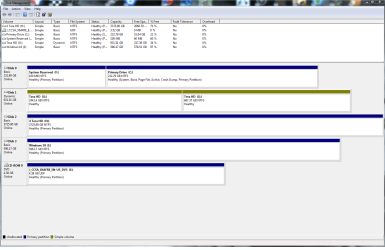
Here is the requested screenshot of my disk management
 

Attachments

  • Untitled.png
    Untitled.png
    160.5 KB · Views: 6

My Computer

Computer type
PC/Desktop
OS
Windows 10 64 bit
CPU
Intel(R) Core(TM) i7 CPU 920 @ 2.67GHz
Motherboard
Foxconn BLOODRAGE
Memory
10 gigabites
Graphics Card(s)
NVIDIA Geforce GTX 760 Ti
Hard Drives
250 Gig SSD
4 Terabite HDD
1 Terabite HDD
600 GB HDD
Antivirus
Defender, Superantispyware, Malwarebytes
Other Info
Powersupply: Corsair TX 750W
Somehow you've managed to convert the disk to a Dynamic Disk, and both partitions have the same letter G:. First off assign the second partition on the drive a different letter then follow http://www.sevenforums.com/tutorials/26829-convert-dynamic-disk-basic-disk.html to convert it back to a Basic Disk.

   Warning
Be sure to read all of the linked tutorial to ensure you don't lose any of your data when converting the disk back to a Basic Disk
 

My Computer

Computer type
PC/Desktop
Computer Manufacturer/Model Number
Custom Build
OS
W7 Pro x64 SP1 | W10 Pro IP x64 | W8.1 Pro x64 VM | Linux Mint VM
CPU
i7-4790k @ 4GHz (4.4GHz Boost)
Motherboard
ASUS Sabertooth Z87 (BIOS Rev 2004)
Memory
16GB DDR3 Kingston HyperX Fury @ 1600MHz CL 9-9-9-27
Graphics Card(s)
EVGA GTX 980 Classified
Sound Card
Realtek Onboard
Monitor(s) Displays
Samsung S27D390
Screen Resolution
1920 x 1080
Hard Drives
240GB Intel 520 Series SSD |
Samsung 850 EVO 120GB SSD |
2TB WD Caviar Black |
2TB WD Caviar Green
PSU
Corsair HX850-80 Gold Modular
Case
Cooler Master Silencio 650
Cooling
Corsair H80i w/2 x Corsair SP120 | 2 x 120mm Noctua NF-S12B
Keyboard
Microsoft Sidewinder X4
Mouse
Gigabyte M6900 optical
Internet Speed
152mb
Antivirus
F-Secure
Browser
Firefox 38.0
Other Info
Backup Rig: Win 7 Pro 64-bit | AMD A10-5800k | ASUS F2A85-V Pro | 8GB Samsung DDR3 @1600MHz | 120GB Toshiba SDD | 2TB Seagate HDD | Cooler Master Silencio 550
Shouldn't have bothered. Deleted the whole thing...ugh how frustrating
 

My Computer

Computer type
PC/Desktop
OS
Windows 10 64 bit
CPU
Intel(R) Core(TM) i7 CPU 920 @ 2.67GHz
Motherboard
Foxconn BLOODRAGE
Memory
10 gigabites
Graphics Card(s)
NVIDIA Geforce GTX 760 Ti
Hard Drives
250 Gig SSD
4 Terabite HDD
1 Terabite HDD
600 GB HDD
Antivirus
Defender, Superantispyware, Malwarebytes
Other Info
Powersupply: Corsair TX 750W
This is the absolute most frustrating thing in the world. I've got a gig of things to redownload now. A warning to everything thinking about doing this, don't bother. I assigned the second partition another letter, clicked on that partition, clicked delete partition, and it deleted the entire thing. Should have just kept it the way it was.
 

My Computer

Computer type
PC/Desktop
OS
Windows 10 64 bit
CPU
Intel(R) Core(TM) i7 CPU 920 @ 2.67GHz
Motherboard
Foxconn BLOODRAGE
Memory
10 gigabites
Graphics Card(s)
NVIDIA Geforce GTX 760 Ti
Hard Drives
250 Gig SSD
4 Terabite HDD
1 Terabite HDD
600 GB HDD
Antivirus
Defender, Superantispyware, Malwarebytes
Other Info
Powersupply: Corsair TX 750W
I've no idea how you managed to convert it to Dynamic in the first place, it shouldn't have happened if you followed the first two tutorials linked to the letter.
 

My Computer

Computer type
PC/Desktop
Computer Manufacturer/Model Number
Custom Build
OS
W7 Pro x64 SP1 | W10 Pro IP x64 | W8.1 Pro x64 VM | Linux Mint VM
CPU
i7-4790k @ 4GHz (4.4GHz Boost)
Motherboard
ASUS Sabertooth Z87 (BIOS Rev 2004)
Memory
16GB DDR3 Kingston HyperX Fury @ 1600MHz CL 9-9-9-27
Graphics Card(s)
EVGA GTX 980 Classified
Sound Card
Realtek Onboard
Monitor(s) Displays
Samsung S27D390
Screen Resolution
1920 x 1080
Hard Drives
240GB Intel 520 Series SSD |
Samsung 850 EVO 120GB SSD |
2TB WD Caviar Black |
2TB WD Caviar Green
PSU
Corsair HX850-80 Gold Modular
Case
Cooler Master Silencio 650
Cooling
Corsair H80i w/2 x Corsair SP120 | 2 x 120mm Noctua NF-S12B
Keyboard
Microsoft Sidewinder X4
Mouse
Gigabyte M6900 optical
Internet Speed
152mb
Antivirus
F-Secure
Browser
Firefox 38.0
Other Info
Backup Rig: Win 7 Pro 64-bit | AMD A10-5800k | ASUS F2A85-V Pro | 8GB Samsung DDR3 @1600MHz | 120GB Toshiba SDD | 2TB Seagate HDD | Cooler Master Silencio 550
No clue, all I did was delete the smaller volume partition then extended the volume and that's what happened. Followed the instructions above step by step but didn't work for me.
 

My Computer

Computer type
PC/Desktop
OS
Windows 10 64 bit
CPU
Intel(R) Core(TM) i7 CPU 920 @ 2.67GHz
Motherboard
Foxconn BLOODRAGE
Memory
10 gigabites
Graphics Card(s)
NVIDIA Geforce GTX 760 Ti
Hard Drives
250 Gig SSD
4 Terabite HDD
1 Terabite HDD
600 GB HDD
Antivirus
Defender, Superantispyware, Malwarebytes
Other Info
Powersupply: Corsair TX 750W
I've performed those steps myself a thousand times and never seen that happen, I certainly wouldn't have suggested it if I'd known that would be the outcome. I'm presuming that drive is a single 1TB drive?
 

My Computer

Computer type
PC/Desktop
Computer Manufacturer/Model Number
Custom Build
OS
W7 Pro x64 SP1 | W10 Pro IP x64 | W8.1 Pro x64 VM | Linux Mint VM
CPU
i7-4790k @ 4GHz (4.4GHz Boost)
Motherboard
ASUS Sabertooth Z87 (BIOS Rev 2004)
Memory
16GB DDR3 Kingston HyperX Fury @ 1600MHz CL 9-9-9-27
Graphics Card(s)
EVGA GTX 980 Classified
Sound Card
Realtek Onboard
Monitor(s) Displays
Samsung S27D390
Screen Resolution
1920 x 1080
Hard Drives
240GB Intel 520 Series SSD |
Samsung 850 EVO 120GB SSD |
2TB WD Caviar Black |
2TB WD Caviar Green
PSU
Corsair HX850-80 Gold Modular
Case
Cooler Master Silencio 650
Cooling
Corsair H80i w/2 x Corsair SP120 | 2 x 120mm Noctua NF-S12B
Keyboard
Microsoft Sidewinder X4
Mouse
Gigabyte M6900 optical
Internet Speed
152mb
Antivirus
F-Secure
Browser
Firefox 38.0
Other Info
Backup Rig: Win 7 Pro 64-bit | AMD A10-5800k | ASUS F2A85-V Pro | 8GB Samsung DDR3 @1600MHz | 120GB Toshiba SDD | 2TB Seagate HDD | Cooler Master Silencio 550
Oh I don't blame you, something just went wrong and I have no idea what. It is a single TB drive.
 

My Computer

Computer type
PC/Desktop
OS
Windows 10 64 bit
CPU
Intel(R) Core(TM) i7 CPU 920 @ 2.67GHz
Motherboard
Foxconn BLOODRAGE
Memory
10 gigabites
Graphics Card(s)
NVIDIA Geforce GTX 760 Ti
Hard Drives
250 Gig SSD
4 Terabite HDD
1 Terabite HDD
600 GB HDD
Antivirus
Defender, Superantispyware, Malwarebytes
Other Info
Powersupply: Corsair TX 750W
All too late but, Partition Wizard would have let you merge the 2 partitions.
 

My Computer

Computer type
PC/Desktop
Computer Manufacturer/Model Number
Skylake Special #666
OS
Windows 10 Pro x64
CPU
Intel Core i7 6700K
Motherboard
Asus Sabertooth Z170 Mark 1
Memory
GSkill TridentZ RGB 16GB 3600 16-16-16-36
Graphics Card(s)
EVGA GTX 980 Ti SC x2
Sound Card
Realtek High Definition
Monitor(s) Displays
AOC G2460PG
Screen Resolution
1920 x 1080 144Hz
Hard Drives
Samsung 860 Pro 256GB, Seagate Barracuda 4TB x2
PSU
EVGA 1000 P2, EVGA White Custom Braided Cables
Case
Corsair Vengeance C70 Gunmetal Black
Cooling
Corsair H100i v2, Corsair ML120 x2, Thermal Grizzly Kryonaut
Keyboard
Logitech G910 Orion Spectrum
Mouse
Logitech G700s
Internet Speed
Verizon Fios Quantum Gateway 75/75
Antivirus
Windows Defender, Malwarebytes Free 3.8.3
Browser
Chrome
Other Info
Corsair SP120 x4, LG Blu-ray Drive, Durabrand HT-395 100 Watt Dolby Digital Amp, Corsair H2100 Wireless 7.1 Headset
Back
Top