Question about RAMs

Girom

New member
Member
VIP
Local time
1:16 PM
Messages
170

My Computer

Computer type
PC/Desktop
Computer Manufacturer/Model Number
HP
OS
Windows 8
CPU
AMD A8-4500M APU with Radeon(tm) HD Graphics
Motherboard
Hewlett-Packard 184B
Memory
4.00 GB
Graphics Card(s)
AMD Radeon HD 7640G
Sound Card
(1) AMD High Definition Audio Device (2) IDT High Definiti
Keyboard
Logitech K120
Mouse
Kensington
It's not recommended to use different brands RAM in the same machine. If all is the same type, speed and size it may work. I've mixed RAM in the past, sometimes it works and other times it's a problem causing bsod's. You can try it but don't be surprised if it doesn't work.

Ideally you want all the RAM to be the same batch as a matched set.
 

My Computer

Computer type
PC/Desktop
Computer Manufacturer/Model Number
Custom, Dell and Lenono LT's
OS
Win8/8.1,Win7-U64, Vista U64, uncounted Linux distor's
CPU
AMD and Intell, 9590, 8350, i5 3570k
Motherboard
CFVFZ, GA990FXA, Z77e-itx
Memory
Corsair G Skill
Graphics Card(s)
Crossfired Sapphire HD 7950 Vapor-X, ASUS R9 280X TOP
Sound Card
Realtek ALC889
Monitor(s) Displays
ViewSonic VX2770SMH 27" / ViewSonic VX2433 LCD 24"
Screen Resolution
1080i HD
Hard Drives
Samsung SSD 840 Pro
OCZ Agility 3's
OCZ Vector's
WD's Blue, red, green, Velociraptors
Seagate USB3 & Hybrid's
ASUS Blu-Ray
ASUS DVD
PSU
Corsair AX1200i, Seasonice 850 Gold
Case
Cooler Master HAF 922 & HAF 932, Lian Li Train case.
Cooling
Air, Glacer 240L expanded, custom EK loop with duel D5's
Keyboard
Microsoft SideWinder X4 USB Keyboard / Logitech 250 PS2
Mouse
Logitech G500 / MS wireless 5000
Internet Speed
Best of 5ms / 75+ dn / 12+ up More or less.
Antivirus
MS esentials-MalwareBytes
Browser
Firefox Chromebook
Hi there .. Also your Laptop i think only has only two Ram slots
 

My Computer

Computer Manufacturer/Model Number
W530-3630QM1
OS
windows 7 home 64bit
CPU
INTEL-CORE I7
Memory
16GB
Hard Drives
750GB
Browser
Chrome
It's not recommended to use different brands RAM in the same machine. If all is the same type, speed and size it may work. I've mixed RAM in the past, sometimes it works and other times it's a problem causing bsod's. You can try it but don't be surprised if it doesn't work.

Ideally you want all the RAM to be the same batch as a matched set.

How do I find out which brand of RAM is being used?
 

My Computer

Computer type
PC/Desktop
Computer Manufacturer/Model Number
HP
OS
Windows 8
CPU
AMD A8-4500M APU with Radeon(tm) HD Graphics
Motherboard
Hewlett-Packard 184B
Memory
4.00 GB
Graphics Card(s)
AMD Radeon HD 7640G
Sound Card
(1) AMD High Definition Audio Device (2) IDT High Definiti
Keyboard
Logitech K120
Mouse
Kensington
Hi there .. Also your Laptop i think only has only two Ram slots

Does that mean that I could only buy 4gb batch for the other slot?
 

My Computer

Computer type
PC/Desktop
Computer Manufacturer/Model Number
HP
OS
Windows 8
CPU
AMD A8-4500M APU with Radeon(tm) HD Graphics
Motherboard
Hewlett-Packard 184B
Memory
4.00 GB
Graphics Card(s)
AMD Radeon HD 7640G
Sound Card
(1) AMD High Definition Audio Device (2) IDT High Definiti
Keyboard
Logitech K120
Mouse
Kensington

My Computer

Computer Manufacturer/Model Number
HP, Dell, Gateway, Toshiba - 4 laptops and 2 desktops
OS
Vista, Windows7, Mint Mate, Zorin, Windows 8
CPU
from 1.6GHz Duo to i7
Monitor(s) Displays
2x HP w2207
Hard Drives
5x HDD, 7x SSD, 12x Externals
Keyboard
with trackball - no mices
Mouse
Trackball mice
Internet Speed
DSL 6000
It's not recommended to use different brands RAM in the same machine. If all is the same type, speed and size it may work. I've mixed RAM in the past, sometimes it works and other times it's a problem causing bsod's. You can try it but don't be surprised if it doesn't work.

Ideally you want all the RAM to be the same batch as a matched set.

How do I find out which brand of RAM is being used?

My g7 had one stick of Hyundai ram.

Hi there .. Also your Laptop i think only has only two Ram slots

Does that mean that I could only buy 4gb batch for the other slot?

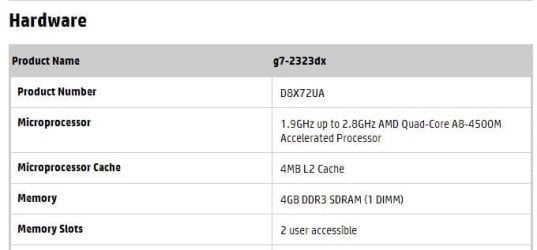
Maxie is correct, you only have two slots,

HP Pavilion g7-2323dx Notebook PC Product Specifications | HP® Support

girom.JPG

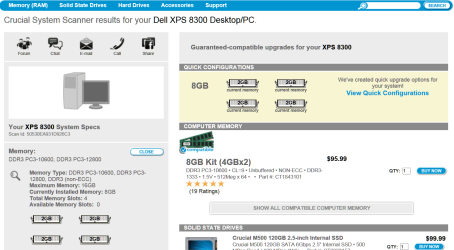
Try running the Crucial scanner and see what info it gives,

Use the Crucial System Scanner software to find out what type of memory is in your computer
 

My Computer

Computer type
PC/Desktop
Computer Manufacturer/Model Number
Self Built
OS
Win 10 Pro x64
CPU
Intel I5-2500K @3.3GHz
Motherboard
Asrock P67 Extreme4
Memory
16GB G.Skill Ripjaws X (4x4GB)
Graphics Card(s)
EVGA GeForce 750 Ti SC 2GB
Sound Card
ASUS Xonar DG 5.1 Channels 24-bit 96KHz PCI Interface Sound
Monitor(s) Displays
auria eq2367
Screen Resolution
1920 x 1080
Hard Drives
250GB Samsung 850 EVO SSD
1TB WD Blue
1TB Hitachi
PSU
SeaSonic X 650W 80 Plus Gold
Case
Corsair Obsidian 750D
Cooling
Corsair H60, Three 140mm case fans
Keyboard
Logitech Wireless Keyboard K520
Mouse
Logitech Wireless Mouse M310
Internet Speed
Wave Broadband ~ 100 dn 5 up
Antivirus
Windows Defender, Malwarebytes Premium
Browser
Edge, IE11, Chrome
Other Info
Laptop specs: HP g7-1365dx /
CPU: AMD A6-3420M APU with Radeon(tm) HD Graphics /
RAM: Crucial 8Gb (2x4Gb) /
SSD: Crucial M4-CT128M4SSD2 ATA Device/ FW 000F /
GFX: AMD Radeon HD 6520G /
OS: Windows 10 Pro x64
I used Crucial Scanner and chose notepad to open it but it had a bunch of weird text so I closed it and opened the program again but this time, a small black window seems to pop up for a second and then nothing happens.
 

My Computer

Computer type
PC/Desktop
Computer Manufacturer/Model Number
HP
OS
Windows 8
CPU
AMD A8-4500M APU with Radeon(tm) HD Graphics
Motherboard
Hewlett-Packard 184B
Memory
4.00 GB
Graphics Card(s)
AMD Radeon HD 7640G
Sound Card
(1) AMD High Definition Audio Device (2) IDT High Definiti
Keyboard
Logitech K120
Mouse
Kensington
The scanner is a .exe file, Notepad won't open it, the weird text was the code.
There's a video on the Crucial site, watch and follow their instructions.

Or even better......


My Computer

Computer type
PC/Desktop
Computer Manufacturer/Model Number
Home Built Desktop By DataTech
OS
Windows 7 Ultimate X64 SP1
CPU
Intel i5-2550K, Differing ~4.4-4.8GHz No built in GPU
Motherboard
ASUS P8Z68-V PRO/GEN3
Memory
16GB G.Skill Sniper 1866MHz @ 2133MHz 2x8GB
Graphics Card(s)
ASUS GTX650TIB-DC2OC-2GD5, (650TI Boost)
Sound Card
Onboard Realtek 5-1
Monitor(s) Displays
Samsung P2570HD
Screen Resolution
1920x1080
Hard Drives
Samsung 840 Pro 256GB SSD for OS, 500GB Seagate Constellation (Enterprise drive) for Data
PSU
Corsair HX650W
Case
Inwin Dragon Rider
Cooling
Hyper 212 EVO w/two Noctua fans, push-pull, @1300 RPM
Keyboard
E-Z Eyes, bright yellow keys with large characters
Mouse
steelseries SENSEI Laser Pro Gaming
Internet Speed
48-51Mbs Mbs down, 11 Mbs up Xfinity Cable
Antivirus
Norton Internet Security 2013
Browser
IE 10, Opera, Pale Moon if needed
Other Info
4 case fans, LG BluRay-RE, ASUS DVD-RW, Mr. Fusion power supply, 1.21 gigawatts.
Never mix RAM sticks. And the sticks from your old laptop will be slowpokes anyhow. Who wants those. And on normal laptops (not netbooks) you always need pairs.

It is easy to find out what you need. Just scan your PC from here: Use the Crucial System Scanner software to find out what type of memory is in your computer

I did just that the other day and have an 8GB kit for my little notebook on the way. All one needs to do is just download the file from crucial, saving it somewhere you can find it, then just double click on it (it doesn't need installing).

It's disgusting how expensive RAM has become lately. Back in February, I paid $230 for a 32GB kit from amazon (Newegg was out and claiming it was discontinued). Now, it's $343 from Amazon (plus, since the first of the year, I have to pay tax on Amazon purchases); misbegotten NewEgg is out again (they have had them in stock since I bought them) and shows them discontinued (misbegotten NewEgg running out of stock frequently is getting old, not to mention the discontinued notices on stock they restock later).
 

My Computer

Computer type
PC/Desktop
Computer Manufacturer/Model Number
Custom Build
OS
Win 7 Ultimate 64 bit
CPU
Intel i7-3930K
Motherboard
ASUS P9X79 WS
Memory
Kingston HyperX Genesis 32GB Kit (8x4GB Modules) 1600MHz DDR
Graphics Card(s)
MSI R7850 Twin Frozr 2GD5/OC Radeon HD 7850 2GB 256-bit GDDR
Sound Card
Asus Xonar Essence STX
Monitor(s) Displays
3x Asus VG248QE 24", Vizio 32" TV
Screen Resolution
1920 x 1080, ?
Hard Drives
Samsung 128GB 840 Pro SSD (1),
Samsung 4TB 850 EVO SSDs (4)
Samsung 4TB 850 EVO SSDs (16) external backup drives used in 2.5" hot swap bays in the computer.
PSU
Corsair HX750w
Case
Antec Two Hundred v2 (modified)
Cooling
Cooler Master GeminII S524 120mm (fan replaced with a 140mm)
Keyboard
Logitech G510s
Mouse
Logitech M525 (two in use)
Internet Speed
=< 32Mbps down, 8Mbps up
Antivirus
AVAST!, MBAM, SAS, Spybot S&D (all but MBAM free) Glary Util
Browser
IE11
Other Info
LSI 9211-8i HBA card (8 SATA III ports), 2.5" & 3.5" Hot Swap Bays, HooToo HT-CR001 PCI-E to USB 3.0 Internal Hub + 6 Slot Card Reader, and LG Model CH12LS28 BD-ROM Optical Drive. Also, ScanSnap S1500 ADF duplexing scanner, Canon 9000F flat bed scanner, Corsair SP2500 2.1 speakers, Samsung CLP 415nw laser color printer, Cyberpower PP2200SW UPS
It's not recommended to use different brands RAM in the same machine. If all is the same type, speed and size it may work. I've mixed RAM in the past, sometimes it works and other times it's a problem causing bsod's. You can try it but don't be surprised if it doesn't work.

Ideally you want all the RAM to be the same batch as a matched set.

How can I find out what kind of RAM is in the computer? If I put in this 4GB would it be ok? It's $18 HP RAM: Amazon.com: 4GB DDR3 PC310600R-9 1333MHz 240pin ECC Buffered HP 500203-061 *NOT FOR DESKTOPS*: Computers & Accessories
 

My Computer

Computer type
PC/Desktop
Computer Manufacturer/Model Number
HP
OS
Windows 8
CPU
AMD A8-4500M APU with Radeon(tm) HD Graphics
Motherboard
Hewlett-Packard 184B
Memory
4.00 GB
Graphics Card(s)
AMD Radeon HD 7640G
Sound Card
(1) AMD High Definition Audio Device (2) IDT High Definiti
Keyboard
Logitech K120
Mouse
Kensington

My Computer

Computer Manufacturer/Model Number
HP, Dell, Gateway, Toshiba - 4 laptops and 2 desktops
OS
Vista, Windows7, Mint Mate, Zorin, Windows 8
CPU
from 1.6GHz Duo to i7
Monitor(s) Displays
2x HP w2207
Hard Drives
5x HDD, 7x SSD, 12x Externals
Keyboard
with trackball - no mices
Mouse
Trackball mice
Internet Speed
DSL 6000

My Computer

Computer type
PC/Desktop
Computer Manufacturer/Model Number
HP
OS
Windows 8
CPU
AMD A8-4500M APU with Radeon(tm) HD Graphics
Motherboard
Hewlett-Packard 184B
Memory
4.00 GB
Graphics Card(s)
AMD Radeon HD 7640G
Sound Card
(1) AMD High Definition Audio Device (2) IDT High Definiti
Keyboard
Logitech K120
Mouse
Kensington
It's not recommended to use different brands RAM in the same machine. If all is the same type, speed and size it may work. I've mixed RAM in the past, sometimes it works and other times it's a problem causing bsod's. You can try it but don't be surprised if it doesn't work.

Ideally you want all the RAM to be the same batch as a matched set.

How can I find out what kind of RAM is in the computer? If I put in this 4GB would it be ok? It's $18 HP RAM: Amazon.com: 4GB DDR3 PC310600R-9 1333MHz 240pin ECC Buffered HP 500203-061 *NOT FOR DESKTOPS*: Computers & Accessories

No, that's not going to work for you, that's a 240 pin DIMM, you need a 204 pin DIMM,

Computer memory upgrades for HP - Compaq Pavilion g7-2323dx Laptop/Notebook from Crucial.com

8GB Kit (4GBx2), 204-pin SODIMM, DDR3 PC3-10600 upgrades for HP - Compaq Pavilion g7-2323dx Laptop/Notebook, CT4853877 from Crucial.com
 

My Computer

Computer type
PC/Desktop
Computer Manufacturer/Model Number
Self Built
OS
Win 10 Pro x64
CPU
Intel I5-2500K @3.3GHz
Motherboard
Asrock P67 Extreme4
Memory
16GB G.Skill Ripjaws X (4x4GB)
Graphics Card(s)
EVGA GeForce 750 Ti SC 2GB
Sound Card
ASUS Xonar DG 5.1 Channels 24-bit 96KHz PCI Interface Sound
Monitor(s) Displays
auria eq2367
Screen Resolution
1920 x 1080
Hard Drives
250GB Samsung 850 EVO SSD
1TB WD Blue
1TB Hitachi
PSU
SeaSonic X 650W 80 Plus Gold
Case
Corsair Obsidian 750D
Cooling
Corsair H60, Three 140mm case fans
Keyboard
Logitech Wireless Keyboard K520
Mouse
Logitech Wireless Mouse M310
Internet Speed
Wave Broadband ~ 100 dn 5 up
Antivirus
Windows Defender, Malwarebytes Premium
Browser
Edge, IE11, Chrome
Other Info
Laptop specs: HP g7-1365dx /
CPU: AMD A6-3420M APU with Radeon(tm) HD Graphics /
RAM: Crucial 8Gb (2x4Gb) /
SSD: Crucial M4-CT128M4SSD2 ATA Device/ FW 000F /
GFX: AMD Radeon HD 6520G /
OS: Windows 10 Pro x64
You must have made a mistake. Try again. You should get this kind of output.
 

Attachments

  • 2013-12-28_1229.png
    2013-12-28_1229.png
    55.5 KB · Views: 2

My Computer

Computer Manufacturer/Model Number
HP, Dell, Gateway, Toshiba - 4 laptops and 2 desktops
OS
Vista, Windows7, Mint Mate, Zorin, Windows 8
CPU
from 1.6GHz Duo to i7
Monitor(s) Displays
2x HP w2207
Hard Drives
5x HDD, 7x SSD, 12x Externals
Keyboard
with trackball - no mices
Mouse
Trackball mice
Internet Speed
DSL 6000
You will need to allow an ActiveX control to install on your machine.
 

My Computer

Computer type
PC/Desktop
Computer Manufacturer/Model Number
Home Built Desktop By DataTech
OS
Windows 7 Ultimate X64 SP1
CPU
Intel i5-2550K, Differing ~4.4-4.8GHz No built in GPU
Motherboard
ASUS P8Z68-V PRO/GEN3
Memory
16GB G.Skill Sniper 1866MHz @ 2133MHz 2x8GB
Graphics Card(s)
ASUS GTX650TIB-DC2OC-2GD5, (650TI Boost)
Sound Card
Onboard Realtek 5-1
Monitor(s) Displays
Samsung P2570HD
Screen Resolution
1920x1080
Hard Drives
Samsung 840 Pro 256GB SSD for OS, 500GB Seagate Constellation (Enterprise drive) for Data
PSU
Corsair HX650W
Case
Inwin Dragon Rider
Cooling
Hyper 212 EVO w/two Noctua fans, push-pull, @1300 RPM
Keyboard
E-Z Eyes, bright yellow keys with large characters
Mouse
steelseries SENSEI Laser Pro Gaming
Internet Speed
48-51Mbs Mbs down, 11 Mbs up Xfinity Cable
Antivirus
Norton Internet Security 2013
Browser
IE 10, Opera, Pale Moon if needed
Other Info
4 case fans, LG BluRay-RE, ASUS DVD-RW, Mr. Fusion power supply, 1.21 gigawatts.
It's not recommended to use different brands RAM in the same machine. If all is the same type, speed and size it may work. I've mixed RAM in the past, sometimes it works and other times it's a problem causing bsod's. You can try it but don't be surprised if it doesn't work.

Ideally you want all the RAM to be the same batch as a matched set.

How can I find out what kind of RAM is in the computer? If I put in this 4GB would it be ok? It's $18 HP RAM: Amazon.com: 4GB DDR3 PC310600R-9 1333MHz 240pin ECC Buffered HP 500203-061 *NOT FOR DESKTOPS*: Computers & Accessories

No, that's not going to work for you, that's a 240 pin DIMM, you need a 204 pin DIMM,

Computer memory upgrades for HP - Compaq Pavilion g7-2323dx Laptop/Notebook from Crucial.com

8GB Kit (4GBx2), 204-pin SODIMM, DDR3 PC3-10600 upgrades for HP - Compaq Pavilion g7-2323dx Laptop/Notebook, CT4853877 from Crucial.com

Thank you. Must I buy the 8GB set, or could I buy 4GB and add it to the existing 4Gb for a total of 8GB?
 

My Computer

Computer type
PC/Desktop
Computer Manufacturer/Model Number
HP
OS
Windows 8
CPU
AMD A8-4500M APU with Radeon(tm) HD Graphics
Motherboard
Hewlett-Packard 184B
Memory
4.00 GB
Graphics Card(s)
AMD Radeon HD 7640G
Sound Card
(1) AMD High Definition Audio Device (2) IDT High Definiti
Keyboard
Logitech K120
Mouse
Kensington

Thank you. Must I buy the 8GB set, or could I buy 4GB and add it to the existing 4Gb for a total of 8GB?

Look in the first link, there's a single 4GB stick, you should really run the scanner to get the EXACT results.

What happened when you ran it last time? "It didn't work" is not a helpful response, a more specific answer is needed.
 

My Computer

Computer type
PC/Desktop
Computer Manufacturer/Model Number
Self Built
OS
Win 10 Pro x64
CPU
Intel I5-2500K @3.3GHz
Motherboard
Asrock P67 Extreme4
Memory
16GB G.Skill Ripjaws X (4x4GB)
Graphics Card(s)
EVGA GeForce 750 Ti SC 2GB
Sound Card
ASUS Xonar DG 5.1 Channels 24-bit 96KHz PCI Interface Sound
Monitor(s) Displays
auria eq2367
Screen Resolution
1920 x 1080
Hard Drives
250GB Samsung 850 EVO SSD
1TB WD Blue
1TB Hitachi
PSU
SeaSonic X 650W 80 Plus Gold
Case
Corsair Obsidian 750D
Cooling
Corsair H60, Three 140mm case fans
Keyboard
Logitech Wireless Keyboard K520
Mouse
Logitech Wireless Mouse M310
Internet Speed
Wave Broadband ~ 100 dn 5 up
Antivirus
Windows Defender, Malwarebytes Premium
Browser
Edge, IE11, Chrome
Other Info
Laptop specs: HP g7-1365dx /
CPU: AMD A6-3420M APU with Radeon(tm) HD Graphics /
RAM: Crucial 8Gb (2x4Gb) /
SSD: Crucial M4-CT128M4SSD2 ATA Device/ FW 000F /
GFX: AMD Radeon HD 6520G /
OS: Windows 10 Pro x64

Thank you. Must I buy the 8GB set, or could I buy 4GB and add it to the existing 4Gb for a total of 8GB?

Look in the first link, there's a single 4GB stick, you should really run the scanner to get the EXACT results.

What happened when you ran it last time? "It didn't work" is not a helpful response, a more specific answer is needed.

When I ran it, a black box appeared for a second and disappeared and nothing happened. I guess I could buy this one assuming it's right. 4GB, 204-pin SODIMM, DDR3 PC3-10600 upgrades for HP - Compaq Pavilion g7-2323dx Laptop/Notebook, CT4853865 from Crucial.com
 

My Computer

Computer type
PC/Desktop
Computer Manufacturer/Model Number
HP
OS
Windows 8
CPU
AMD A8-4500M APU with Radeon(tm) HD Graphics
Motherboard
Hewlett-Packard 184B
Memory
4.00 GB
Graphics Card(s)
AMD Radeon HD 7640G
Sound Card
(1) AMD High Definition Audio Device (2) IDT High Definiti
Keyboard
Logitech K120
Mouse
Kensington
So you downloaded the file?

Downloading and running the Crucial System Scanner is easy.

First, agree to the terms and conditions.

Click the "download the scanner" button, and choose "Save File" when prompted.

Save the file to your desktop, or anywhere you prefer.

Navigate to this saved CrucialScan.exe file and open. If you get a security warning, click "Run" to allow the download.

It will take several moments while your browser is updated with your scan results.

The link you posted guarantees the ram is compatible,

gram.JPG

4GB, 204-pin SODIMM, DDR3 PC3-10600 upgrades for HP - Compaq Pavilion g7-2323dx Laptop/Notebook, CT4853865 from Crucial.com

I still think you should try the scanner again following the above quoted instructions.
 

My Computer

Computer type
PC/Desktop
Computer Manufacturer/Model Number
Self Built
OS
Win 10 Pro x64
CPU
Intel I5-2500K @3.3GHz
Motherboard
Asrock P67 Extreme4
Memory
16GB G.Skill Ripjaws X (4x4GB)
Graphics Card(s)
EVGA GeForce 750 Ti SC 2GB
Sound Card
ASUS Xonar DG 5.1 Channels 24-bit 96KHz PCI Interface Sound
Monitor(s) Displays
auria eq2367
Screen Resolution
1920 x 1080
Hard Drives
250GB Samsung 850 EVO SSD
1TB WD Blue
1TB Hitachi
PSU
SeaSonic X 650W 80 Plus Gold
Case
Corsair Obsidian 750D
Cooling
Corsair H60, Three 140mm case fans
Keyboard
Logitech Wireless Keyboard K520
Mouse
Logitech Wireless Mouse M310
Internet Speed
Wave Broadband ~ 100 dn 5 up
Antivirus
Windows Defender, Malwarebytes Premium
Browser
Edge, IE11, Chrome
Other Info
Laptop specs: HP g7-1365dx /
CPU: AMD A6-3420M APU with Radeon(tm) HD Graphics /
RAM: Crucial 8Gb (2x4Gb) /
SSD: Crucial M4-CT128M4SSD2 ATA Device/ FW 000F /
GFX: AMD Radeon HD 6520G /
OS: Windows 10 Pro x64
Back
Top