
Solved Question on "How to Create a Elevated Program Shortcut ..."

Last edited:

My Computer

Computer type
PC/Desktop
Computer Manufacturer/Model Number
Self built custom
OS
64-bit Windows 11 Pro for Workstations
CPU
Intel i7-8700K OC'd to 5 GHz
Motherboard
ASUS ROG Maximus XI Formula Z390
Memory
64 GB (4x16GB) G.SKILL TridentZ RGB DDR4 3600 MHz
Graphics Card(s)
ASUS ROG-STRIX-GTX1080TI-O11G-GAMING
Sound Card
Integrated
Monitor(s) Displays
2 x Samsung Odyssey G7 27"
Screen Resolution
2560x1440
Hard Drives
1TB Samsung 990 PRO M.2,
4TB Samsung 990 PRO PRO M.2,
TerraMaster F8 SSD Plus NAS
PSU
Seasonic Prime Titanium 850W
Case
Thermaltake Core P3
Cooling
Corsair Hydro H115i
Keyboard
Logitech wireless K800
Mouse
Logitech MX Master 4
Internet Speed
2 Gb/s Download and 100 Mb/s Upload
Antivirus
Malwarebyte Anti-Malware Premium
Browser
Google Chrome
Other Info
Logitech Z625 speaker system,
Logitech BRIO 4K Pro webcam,
HP Color LaserJet Pro MFP M477fdn,
APC SMART-UPS RT 1000 XL - SURT1000XLI,
Galaxy S23 Plus phone
Super. I will make changes in my Word file, where I have your tutorials.

Regards,

Hans L
 

My Computer

Computer Manufacturer/Model Number
BIOS American MegaTrend 1238
OS
Windows 7 Ultimate
CPU
Intel Core Duo E6600 @ 2.40 GHz
Motherboard
ASUS P5B-Deluxe
Memory
3 GB
Graphics Card(s)
Nvidia eVGA GeForce 8600 GTS & 7600 GT
Monitor(s) Displays
Iiyama PLE431S/PLH431S
Hans,

Ok, I figured out what was wrong. I got it working for me now at startup without a UAC prompt. :party:

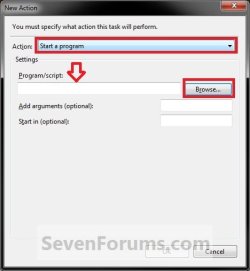
When you are creating the startup/log on task, you woud need to right click on the elevated task shortcut, click properties, copy that long Target path, then past it in the Program/script box when editing the Action for the startup/log on task instead of just selecting the elevated task shortcut.

See the outline below to help. I numbered it the order of the steps to do.

View attachment 121569

View attachment 121570

View attachment 121571

Shawn, I did the whole scheduling thing over, but it does not work. So, I have a few questions:

When, in the scheduler, one writes

C:\Windows\System32\schtasks.exe /run /tn Everything

in essence, it says to run the task of which "Action is a part. Why? Because it says that the program is

C:\Windows\System32\schtasks.exe

and the command is "run"

and what should be run is the task called "Everything" (althouhg my task is called "Everything_Task").

So, the Action part of the scheduler says "run the task of which I – Action – is a part". Does not seem to make sense.

Also, why is the shortcut necessary at all? Isn't it so that the scheduler runs all its tasks with triggers that says "At startup", and thus, all corresponding Actions are carried out? If that is true, could one then not in "Program/script" simply write

"C:\Program Files\Everything\Everything.exe" ?

I see, for instance, that Norton has a setup similar to the one I am trying to accomplish, and in its task, it says

Start a program C:\Program Files (x86)\Norton Internet Security\Engine\18.1.0.37\SymErr.exe/ submit

So, what da' ya' say?

Regards,

Hans L
 

My Computer

Computer Manufacturer/Model Number
BIOS American MegaTrend 1238
OS
Windows 7 Ultimate
CPU
Intel Core Duo E6600 @ 2.40 GHz
Motherboard
ASUS P5B-Deluxe
Memory
3 GB
Graphics Card(s)
Nvidia eVGA GeForce 8600 GTS & 7600 GT
Monitor(s) Displays
Iiyama PLE431S/PLH431S
Hans,

The elevated task shortcut is needed since you wanted to run the program without getting a UAC prompt.

The separate startup task is needed so that you could run the elevated task shortcut at startup without getting a UAC prompt.

If you were to just run the "C:\Program Files\Everything\Everything.exe" file, you would get a UAC prompt.


You are making a mistake somewhere, but not sure where yet. To see what I can do to help more, what is the name of your elevated task shortcut?

You would paste the target of this shortcut at step 14.
 

My Computer

Computer type
PC/Desktop
Computer Manufacturer/Model Number
Self built custom
OS
64-bit Windows 11 Pro for Workstations
CPU
Intel i7-8700K OC'd to 5 GHz
Motherboard
ASUS ROG Maximus XI Formula Z390
Memory
64 GB (4x16GB) G.SKILL TridentZ RGB DDR4 3600 MHz
Graphics Card(s)
ASUS ROG-STRIX-GTX1080TI-O11G-GAMING
Sound Card
Integrated
Monitor(s) Displays
2 x Samsung Odyssey G7 27"
Screen Resolution
2560x1440
Hard Drives
1TB Samsung 990 PRO M.2,
4TB Samsung 990 PRO PRO M.2,
TerraMaster F8 SSD Plus NAS
PSU
Seasonic Prime Titanium 850W
Case
Thermaltake Core P3
Cooling
Corsair Hydro H115i
Keyboard
Logitech wireless K800
Mouse
Logitech MX Master 4
Internet Speed
2 Gb/s Download and 100 Mb/s Upload
Antivirus
Malwarebyte Anti-Malware Premium
Browser
Google Chrome
Other Info
Logitech Z625 speaker system,
Logitech BRIO 4K Pro webcam,
HP Color LaserJet Pro MFP M477fdn,
APC SMART-UPS RT 1000 XL - SURT1000XLI,
Galaxy S23 Plus phone
Hans,

The elevated task shortcut is needed since you wanted to run the program without getting a UAC prompt.

The separate startup task is needed so that you could run the elevated task shortcut at startup without getting a UAC prompt.

If you were to just run the "C:\Program Files\Everything\Everything.exe" file, you would get a UAC prompt.


You are making a mistake somewhere, but not sure where yet. To see what I can do to help more, what is the name of your elevated task shortcut?

You would paste the target of this shortcut at step 14.

Shawn, I was going to send screenshots, but I could not use the PRTSC button on the keyboard. I'll install a screenshot program tomorrow.

Regards,

Hans L
 

My Computer

Computer Manufacturer/Model Number
BIOS American MegaTrend 1238
OS
Windows 7 Ultimate
CPU
Intel Core Duo E6600 @ 2.40 GHz
Motherboard
ASUS P5B-Deluxe
Memory
3 GB
Graphics Card(s)
Nvidia eVGA GeForce 8600 GTS & 7600 GT
Monitor(s) Displays
Iiyama PLE431S/PLH431S
Ok mate. :)
 

My Computer

Computer type
PC/Desktop
Computer Manufacturer/Model Number
Self built custom
OS
64-bit Windows 11 Pro for Workstations
CPU
Intel i7-8700K OC'd to 5 GHz
Motherboard
ASUS ROG Maximus XI Formula Z390
Memory
64 GB (4x16GB) G.SKILL TridentZ RGB DDR4 3600 MHz
Graphics Card(s)
ASUS ROG-STRIX-GTX1080TI-O11G-GAMING
Sound Card
Integrated
Monitor(s) Displays
2 x Samsung Odyssey G7 27"
Screen Resolution
2560x1440
Hard Drives
1TB Samsung 990 PRO M.2,
4TB Samsung 990 PRO PRO M.2,
TerraMaster F8 SSD Plus NAS
PSU
Seasonic Prime Titanium 850W
Case
Thermaltake Core P3
Cooling
Corsair Hydro H115i
Keyboard
Logitech wireless K800
Mouse
Logitech MX Master 4
Internet Speed
2 Gb/s Download and 100 Mb/s Upload
Antivirus
Malwarebyte Anti-Malware Premium
Browser
Google Chrome
Other Info
Logitech Z625 speaker system,
Logitech BRIO 4K Pro webcam,
HP Color LaserJet Pro MFP M477fdn,
APC SMART-UPS RT 1000 XL - SURT1000XLI,
Galaxy S23 Plus phone
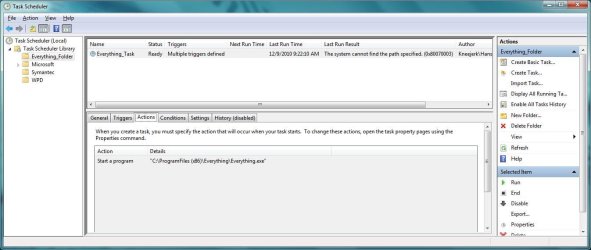
Shawn, I have lost track a little, because I have had to work on so many issues setting up the laptop for a month in Florida (takes one month to set the darn thing up :-), so I am sure there are a few errors that I have done. However, here are the screenshots attached.

Now, whatever is wrong, I do believe it can be fixed rather easily. I can now navigate the scheduler with flair :-)

Regards,

Hans
 

Attachments

  • Actions.jpg
    Actions.jpg
    103.5 KB · Views: 7
  • General.jpg
    General.jpg
    106.4 KB · Views: 3
  • Shortcot.jpg
    Shortcot.jpg
    38.6 KB · Views: 3
  • Triggers.jpg
    Triggers.jpg
    105.8 KB · Views: 3

My Computer

Computer Manufacturer/Model Number
BIOS American MegaTrend 1238
OS
Windows 7 Ultimate
CPU
Intel Core Duo E6600 @ 2.40 GHz
Motherboard
ASUS P5B-Deluxe
Memory
3 GB
Graphics Card(s)
Nvidia eVGA GeForce 8600 GTS & 7600 GT
Monitor(s) Displays
Iiyama PLE431S/PLH431S
It seems like you should be entering the path below at step 14 instead for your Startup task.

C:\Windows\System32\schtasks.exe /run /tn "Everything_UAC"
 

My Computer

Computer type
PC/Desktop
Computer Manufacturer/Model Number
Self built custom
OS
64-bit Windows 11 Pro for Workstations
CPU
Intel i7-8700K OC'd to 5 GHz
Motherboard
ASUS ROG Maximus XI Formula Z390
Memory
64 GB (4x16GB) G.SKILL TridentZ RGB DDR4 3600 MHz
Graphics Card(s)
ASUS ROG-STRIX-GTX1080TI-O11G-GAMING
Sound Card
Integrated
Monitor(s) Displays
2 x Samsung Odyssey G7 27"
Screen Resolution
2560x1440
Hard Drives
1TB Samsung 990 PRO M.2,
4TB Samsung 990 PRO PRO M.2,
TerraMaster F8 SSD Plus NAS
PSU
Seasonic Prime Titanium 850W
Case
Thermaltake Core P3
Cooling
Corsair Hydro H115i
Keyboard
Logitech wireless K800
Mouse
Logitech MX Master 4
Internet Speed
2 Gb/s Download and 100 Mb/s Upload
Antivirus
Malwarebyte Anti-Malware Premium
Browser
Google Chrome
Other Info
Logitech Z625 speaker system,
Logitech BRIO 4K Pro webcam,
HP Color LaserJet Pro MFP M477fdn,
APC SMART-UPS RT 1000 XL - SURT1000XLI,
Galaxy S23 Plus phone
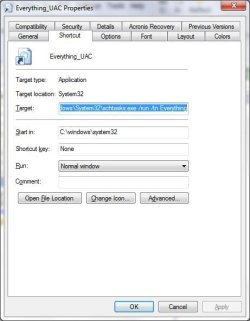
It seems like you should be entering the path below at step 14 instead for your Startup task.

C:\Windows\System32\schtasks.exe /run /tn "Everything_UAC"

Shawn, would you kindly refer to the attachment in question and tell me exactly where to put the line above.

Thank you!

Hans
 

My Computer

Computer Manufacturer/Model Number
BIOS American MegaTrend 1238
OS
Windows 7 Ultimate
CPU
Intel Core Duo E6600 @ 2.40 GHz
Motherboard
ASUS P5B-Deluxe
Memory
3 GB
Graphics Card(s)
Nvidia eVGA GeForce 8600 GTS & 7600 GT
Monitor(s) Displays
Iiyama PLE431S/PLH431S
This should be the "Target" path from the Everything_UAC properties screenshot of yours above. It needs to be pasted in the line here at step 14.

Step8.jpg
 

My Computer

Computer type
PC/Desktop
Computer Manufacturer/Model Number
Self built custom
OS
64-bit Windows 11 Pro for Workstations
CPU
Intel i7-8700K OC'd to 5 GHz
Motherboard
ASUS ROG Maximus XI Formula Z390
Memory
64 GB (4x16GB) G.SKILL TridentZ RGB DDR4 3600 MHz
Graphics Card(s)
ASUS ROG-STRIX-GTX1080TI-O11G-GAMING
Sound Card
Integrated
Monitor(s) Displays
2 x Samsung Odyssey G7 27"
Screen Resolution
2560x1440
Hard Drives
1TB Samsung 990 PRO M.2,
4TB Samsung 990 PRO PRO M.2,
TerraMaster F8 SSD Plus NAS
PSU
Seasonic Prime Titanium 850W
Case
Thermaltake Core P3
Cooling
Corsair Hydro H115i
Keyboard
Logitech wireless K800
Mouse
Logitech MX Master 4
Internet Speed
2 Gb/s Download and 100 Mb/s Upload
Antivirus
Malwarebyte Anti-Malware Premium
Browser
Google Chrome
Other Info
Logitech Z625 speaker system,
Logitech BRIO 4K Pro webcam,
HP Color LaserJet Pro MFP M477fdn,
APC SMART-UPS RT 1000 XL - SURT1000XLI,
Galaxy S23 Plus phone
Shawn, I can't see how this can work:

Activity

C:\Windows\System32\schtasks.exe /run /tn "Everything_UAC"

Shortcut/target:

C:\Windows\System32\schtasks.exe /run /tn Everything

Doesn't "Everything_UAC" have to have a path?Doesn't the shortcut have to start "Everything.exe"?And why does the Activity have to have "C:\Windows\System32\schtasks.exe". The command in Activity is already in the task scheduler, and should not have to tell the task scheduler how to run.

You said you had the thing working. Why do you nt show, by screenshots the way I did, what you have in the various places.

Thanks,

Hans L
 

My Computer

Computer Manufacturer/Model Number
BIOS American MegaTrend 1238
OS
Windows 7 Ultimate
CPU
Intel Core Duo E6600 @ 2.40 GHz
Motherboard
ASUS P5B-Deluxe
Memory
3 GB
Graphics Card(s)
Nvidia eVGA GeForce 8600 GTS & 7600 GT
Monitor(s) Displays
Iiyama PLE431S/PLH431S
It would just be to many screenshots and steps to post here. Delete what you have and start over using exactly what I did below to see if this may help. :)

The below will not work in a standard user account. It will only work in administrator accounts.

If you have any startup program entries for the Everthing program, then you will need to delete them as well.


This is a condensed version of what I did though step by step. Click on the links in the steps for how.

A. I created a elevated program shortcut for the installed Everthing program EXE file in it's C:\Program Files folder.

B. Move this new elevated program shortcut (ex: task-name) into your C:\Users\(user-name)\My Documents folder to store it at.


C. Next, I created a new separate start up/log on task. While doing this be sure to:
  • Check the Run with hightest Priveleges box at step 8.
  • Include both steps 11 and 14 to run at startup and log on.
  • At step 15, be sure to use the elevated program shortcut (ex: task-name) from step A above.
  • Do not do step 16 since you are doing 15 instead.
 

My Computer

Computer type
PC/Desktop
Computer Manufacturer/Model Number
Self built custom
OS
64-bit Windows 11 Pro for Workstations
CPU
Intel i7-8700K OC'd to 5 GHz
Motherboard
ASUS ROG Maximus XI Formula Z390
Memory
64 GB (4x16GB) G.SKILL TridentZ RGB DDR4 3600 MHz
Graphics Card(s)
ASUS ROG-STRIX-GTX1080TI-O11G-GAMING
Sound Card
Integrated
Monitor(s) Displays
2 x Samsung Odyssey G7 27"
Screen Resolution
2560x1440
Hard Drives
1TB Samsung 990 PRO M.2,
4TB Samsung 990 PRO PRO M.2,
TerraMaster F8 SSD Plus NAS
PSU
Seasonic Prime Titanium 850W
Case
Thermaltake Core P3
Cooling
Corsair Hydro H115i
Keyboard
Logitech wireless K800
Mouse
Logitech MX Master 4
Internet Speed
2 Gb/s Download and 100 Mb/s Upload
Antivirus
Malwarebyte Anti-Malware Premium
Browser
Google Chrome
Other Info
Logitech Z625 speaker system,
Logitech BRIO 4K Pro webcam,
HP Color LaserJet Pro MFP M477fdn,
APC SMART-UPS RT 1000 XL - SURT1000XLI,
Galaxy S23 Plus phone
Shawn, I finally got it to work.

However (sorry!!!!!), if I add "-startup" to

Task Scheduler Library – Everything_shortcut_task – Actions – Add arguements optional): -startup

in order to make Everything start up minimized to the tray, it does not work.

And, I have to say this:

I do not understand why first, the shortcut refers to

C:\Windows\System32\schtasks.exe /run /tn Everything_shortcut_task

and then, second, Task Scheduler (Local) – Task Scheduler Library – Everything–Folder – Everything_task – Actions – Start a program

refers to the SAME THING:

C:\Windows\System32\schtasks.exe /run /tn Everything_shortcut_task

It works, but it does not make any sense at all. Do you have any explanation, Shawn?

Regards,

Hans L
 

My Computer

Computer Manufacturer/Model Number
BIOS American MegaTrend 1238
OS
Windows 7 Ultimate
CPU
Intel Core Duo E6600 @ 2.40 GHz
Motherboard
ASUS P5B-Deluxe
Memory
3 GB
Graphics Card(s)
Nvidia eVGA GeForce 8600 GTS & 7600 GT
Monitor(s) Displays
Iiyama PLE431S/PLH431S
I put "-startup" back, and now, it works. Go figure. So, we are set.

Now, I have a Windows Explorer replacement called DOpus (very good!!!), and every time I change a folder name, I get the dreaded UAC prompt. That is really ridiculous.Is there is away to fix this too?

Shawn, do you think that in the future SP1 for Windows 7, there will be ways to exempt files and programs from the UAC prompt?

All that aside, I wish, at this time, to thank you so very much for your exceptional patience with me and my problem. We, on this list and others, are lucky to have you around!

Regards,

Hans L
 

My Computer

Computer Manufacturer/Model Number
BIOS American MegaTrend 1238
OS
Windows 7 Ultimate
CPU
Intel Core Duo E6600 @ 2.40 GHz
Motherboard
ASUS P5B-Deluxe
Memory
3 GB
Graphics Card(s)
Nvidia eVGA GeForce 8600 GTS & 7600 GT
Monitor(s) Displays
Iiyama PLE431S/PLH431S
That's great news Hans. I'm happy to hear that you got it sorted. :party:

I wouldn't count on an exception list for UAC to ever be added since it would defeat the purpose of UAC. If a program on the exception list was compromised by malware, then it would be able to cause havoc without you being able to stop it by denying it permission to run elevated with the UAC prompt.
 

My Computer

Computer type
PC/Desktop
Computer Manufacturer/Model Number
Self built custom
OS
64-bit Windows 11 Pro for Workstations
CPU
Intel i7-8700K OC'd to 5 GHz
Motherboard
ASUS ROG Maximus XI Formula Z390
Memory
64 GB (4x16GB) G.SKILL TridentZ RGB DDR4 3600 MHz
Graphics Card(s)
ASUS ROG-STRIX-GTX1080TI-O11G-GAMING
Sound Card
Integrated
Monitor(s) Displays
2 x Samsung Odyssey G7 27"
Screen Resolution
2560x1440
Hard Drives
1TB Samsung 990 PRO M.2,
4TB Samsung 990 PRO PRO M.2,
TerraMaster F8 SSD Plus NAS
PSU
Seasonic Prime Titanium 850W
Case
Thermaltake Core P3
Cooling
Corsair Hydro H115i
Keyboard
Logitech wireless K800
Mouse
Logitech MX Master 4
Internet Speed
2 Gb/s Download and 100 Mb/s Upload
Antivirus
Malwarebyte Anti-Malware Premium
Browser
Google Chrome
Other Info
Logitech Z625 speaker system,
Logitech BRIO 4K Pro webcam,
HP Color LaserJet Pro MFP M477fdn,
APC SMART-UPS RT 1000 XL - SURT1000XLI,
Galaxy S23 Plus phone
That's great news Hans. I'm happy to hear that you got it sorted. :party:

I wouldn't count on an exception list for UAC to ever be added since it would defeat the purpose of UAC. If a program on the exception list was compromised by malware, then it would be able to cause havoc without you being able to stop it by denying it permission to run elevated with the UAC prompt.

Okay, guess we have to live with making our own exceptions, even if it is a little unwieldy.

Regards,

Hans L
 

My Computer

Computer Manufacturer/Model Number
BIOS American MegaTrend 1238
OS
Windows 7 Ultimate
CPU
Intel Core Duo E6600 @ 2.40 GHz
Motherboard
ASUS P5B-Deluxe
Memory
3 GB
Graphics Card(s)
Nvidia eVGA GeForce 8600 GTS & 7600 GT
Monitor(s) Displays
Iiyama PLE431S/PLH431S
Back
Top