
Okay, so I recently installed Windows 7 Enterprise and did a little tweaking to my Policy Editor to enable CLT-ALT-DEL at login. I applied and saved and rebooted my computer.
After the reboot, everything looked and felt normal with the exception of my Windows Explorer. As I look to the left of the panel, I see everything except "My Computer" or my local drives. This is where I would need to go to view and access my files. I can still manually type in C: or D: etc but I rather have ease of access with a mouse click.
I searched online for an answer and every time I would find a solution it was to enable / disable view of certain drives on Policy Editor (in which I have it as disabled), or to use the folder options menu to enable view of all drive letters (in which case wasn't what I needed either). I have also checked disk management to see if my drives were "online" and they all were.
Is there a fix for this? If you need more information, please let me know! Thanks in advance!
After the reboot, everything looked and felt normal with the exception of my Windows Explorer. As I look to the left of the panel, I see everything except "My Computer" or my local drives. This is where I would need to go to view and access my files. I can still manually type in C: or D: etc but I rather have ease of access with a mouse click.
I searched online for an answer and every time I would find a solution it was to enable / disable view of certain drives on Policy Editor (in which I have it as disabled), or to use the folder options menu to enable view of all drive letters (in which case wasn't what I needed either). I have also checked disk management to see if my drives were "online" and they all were.
Is there a fix for this? If you need more information, please let me know! Thanks in advance!
Attachments
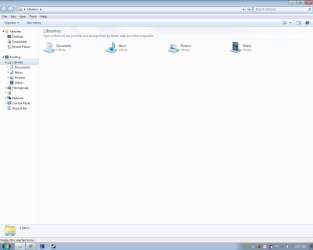
My Computer
At a glance
windows 7 64 bit
- OS
- windows 7 64 bit


