
Solved Dual boot question windows 7

michaelB2

New member
Local time
11:46 AM
Messages
16
windows 7 Question reg. deleting data on partition
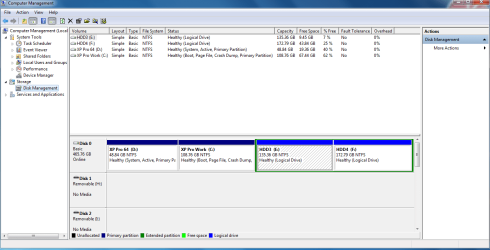
Capture.PNGHi there, I have a dual boot config xp pro and w7. I want to stick only with 7 now. I want to get rid of xp which is on partition left from 7.

I do not want to delete the partition on which is xp. I want to use it for storage.

Question:
1. Can I delete just anything on it (program files / windows / documents) and just leave mbr relevant stuff on it?
2. Will deleting all of mentioned above will affect booting in any way or would it be ok as long I do not touch boot.ini etc?

Thank you
 
Last edited:

My Computer

Computer Manufacturer/Model Number
myself
OS
Windows 7 Ultimate x64
CPU
athlon dual 64 bit
Motherboard
msi
Memory
2 gb
Graphics Card(s)
msi 1 gb
Monitor(s) Displays
aoc 22"
Hard Drives
1 500gb 4 partitions
Case
hp midtower
Hello michaelB2, welcome to Seven Forums!


Before we make any specific recommendations will you please post a snip/screen-shot of the entire disk management drive map with a full description as to which drive/partition is which, so we can see what you have going on as there may be a fairly simple way to resolve the situation.

In the Windows start menu right click computer and click manage, in the left pane of the "Computer Management" window that opens click disk management and post a snip of that.

How to Upload and Post a Screenshot and File in Seven Forums
 

My Computer

Computer Manufacturer/Model Number
* BFK Customs *
OS
W 7 64-bit Ultimate
CPU
Intel Q9550 Yorkfield
Motherboard
ASUS P5Q Pro
Memory
8GB Dominator 8500C5D
Graphics Card(s)
ATI : XFX 5870
Sound Card
Realtek HD Audio 7-1
Monitor(s) Displays
1x 47" LCD HDMI & 3x 26" LCD HDMI
Screen Resolution
1920x1080P & 1920x1200
Hard Drives
1x 80GB Intel X25-M G2 SSD : 1x 500GB & 1x 640GB WD Caviar Black(s)
PSU
Corsair 620HX
Case
Cooler Master RC-690
Cooling
Tuniq Tower 120, 2x 140mm and 3x 120mm case fans
Keyboard
Microsoft 500
Mouse
Razer Diamondback 3G
Internet Speed
14 Mb/s
Other Info
1x Koutech 3Gb/s SATA HDD Hot Swap Rack
Ok, uploaded. To explain (did not rename the partitions since installing 7 yet) "xp pro 64 (d:)" is the partition in question.
 

My Computer

Computer Manufacturer/Model Number
myself
OS
Windows 7 Ultimate x64
CPU
athlon dual 64 bit
Motherboard
msi
Memory
2 gb
Graphics Card(s)
msi 1 gb
Monitor(s) Displays
aoc 22"
Hard Drives
1 500gb 4 partitions
Case
hp midtower
You have not said yet where is Win7.

Assuming it's C boot the Win7 DVD, at first screen press Shift F10 to open a Command Line then use Diskpart to mark Win7 partition active: http://www.sevenforums.com/tutorials/71432-partition-mark-active.html

Close Command box, boot into DVD Repair Console to run Startup Repair up to 3 separate times until it writes the System MBR to Win7 partition and it starts up: http://www.sevenforums.com/tutorials/105541-startup-repair-run-3-separate-times.html

Now you can delete XP partition in Disk Management, reformat for data.
 
Yeah, little confused I am. It is on C.
 

My Computer

Computer Manufacturer/Model Number
myself
OS
Windows 7 Ultimate x64
CPU
athlon dual 64 bit
Motherboard
msi
Memory
2 gb
Graphics Card(s)
msi 1 gb
Monitor(s) Displays
aoc 22"
Hard Drives
1 500gb 4 partitions
Case
hp midtower
Understood.
But, can I not just delete everything on partition D (Folders Program Files / Windows etc.), keeping mbr and just keep it like it is without deleting it and formatting?
 

My Computer

Computer Manufacturer/Model Number
myself
OS
Windows 7 Ultimate x64
CPU
athlon dual 64 bit
Motherboard
msi
Memory
2 gb
Graphics Card(s)
msi 1 gb
Monitor(s) Displays
aoc 22"
Hard Drives
1 500gb 4 partitions
Case
hp midtower
I would recommend writing the MBR to the Windows 7 partition as greg stated. I can see what you want to do going wrong very easily. I'm not even sure you would be able to do it.
 

My Computer

Computer type
Laptop
Computer Manufacturer/Model Number
Toshiba P775-S7100
OS
Windows 7 Professional SP1 64-bit
CPU
Intel Core i5-2450M @2.5 GHz
Memory
6 GB DDR3 1333MHz
Graphics Card(s)
Intel HD 3000
Monitor(s) Displays
Built-in 17.3" LED; 22" Insignia NS-L22Q-10A
Screen Resolution
1600x900; 1360x768
Hard Drives
750 GB Hitachi
1TB Seagate FreeAgent External
Internet Speed
Verizon DSL Speed(Down/Up): 3360 Kbps / 800 Kbps
Antivirus
MSE and MBAM Pro
Browser
IE10
Hello michaelB2, welcome to Seven Forums!


After you have done what Greg has suggested and made C: "System Active", it makes no sense to leave the boot files on D: if it's even possible it would cause issues later.


After you have made backups of the data form D: and you want to wipe but leave the partition intact, have a look at Option Three in this tutorial at the link below to completely over-write all data for a clean partition to continue to use.

Partition Wizard : Use the Bootable CD
 

My Computer

Computer Manufacturer/Model Number
* BFK Customs *
OS
W 7 64-bit Ultimate
CPU
Intel Q9550 Yorkfield
Motherboard
ASUS P5Q Pro
Memory
8GB Dominator 8500C5D
Graphics Card(s)
ATI : XFX 5870
Sound Card
Realtek HD Audio 7-1
Monitor(s) Displays
1x 47" LCD HDMI & 3x 26" LCD HDMI
Screen Resolution
1920x1080P & 1920x1200
Hard Drives
1x 80GB Intel X25-M G2 SSD : 1x 500GB & 1x 640GB WD Caviar Black(s)
PSU
Corsair 620HX
Case
Cooler Master RC-690
Cooling
Tuniq Tower 120, 2x 140mm and 3x 120mm case fans
Keyboard
Microsoft 500
Mouse
Razer Diamondback 3G
Internet Speed
14 Mb/s
Other Info
1x Koutech 3Gb/s SATA HDD Hot Swap Rack
Ok, I will try that later, I will give feedback, too! IF you do not hear from me again, does NOT mean, I don't know to say thank you, it will just mean I f***** up my PC......
 

My Computer

Computer Manufacturer/Model Number
myself
OS
Windows 7 Ultimate x64
CPU
athlon dual 64 bit
Motherboard
msi
Memory
2 gb
Graphics Card(s)
msi 1 gb
Monitor(s) Displays
aoc 22"
Hard Drives
1 500gb 4 partitions
Case
hp midtower

My Computer

Computer Manufacturer/Model Number
* BFK Customs *
OS
W 7 64-bit Ultimate
CPU
Intel Q9550 Yorkfield
Motherboard
ASUS P5Q Pro
Memory
8GB Dominator 8500C5D
Graphics Card(s)
ATI : XFX 5870
Sound Card
Realtek HD Audio 7-1
Monitor(s) Displays
1x 47" LCD HDMI & 3x 26" LCD HDMI
Screen Resolution
1920x1080P & 1920x1200
Hard Drives
1x 80GB Intel X25-M G2 SSD : 1x 500GB & 1x 640GB WD Caviar Black(s)
PSU
Corsair 620HX
Case
Cooler Master RC-690
Cooling
Tuniq Tower 120, 2x 140mm and 3x 120mm case fans
Keyboard
Microsoft 500
Mouse
Razer Diamondback 3G
Internet Speed
14 Mb/s
Other Info
1x Koutech 3Gb/s SATA HDD Hot Swap Rack
diskpart. Am I right, when setting W7 partition to "active" I have to set the actual active partition to "inactive"? Or does startup repair does it automatically? And, do I have to run startup repair three times, or could it be necessary to run it more than one time if it doesn't fix it. This part I do not understand...
 

My Computer

Computer Manufacturer/Model Number
myself
OS
Windows 7 Ultimate x64
CPU
athlon dual 64 bit
Motherboard
msi
Memory
2 gb
Graphics Card(s)
msi 1 gb
Monitor(s) Displays
aoc 22"
Hard Drives
1 500gb 4 partitions
Case
hp midtower
Don't be concerned, just follow this tutorial starting at Option One and you will be ok. ;)


Startup Repair - Run 3 Separate Times


You are making this harder than it needs to be, all you needed to do was follow along from Option One to mark the C: as active then do the 3 separate restarts with a system restart between each repair to recreate the boot files to the C: partition; it will take more than a single repair and you don't have to mark anything as inactive, it will be done automatically.

You didn't need to use diskpart.
 

My Computer

Computer Manufacturer/Model Number
* BFK Customs *
OS
W 7 64-bit Ultimate
CPU
Intel Q9550 Yorkfield
Motherboard
ASUS P5Q Pro
Memory
8GB Dominator 8500C5D
Graphics Card(s)
ATI : XFX 5870
Sound Card
Realtek HD Audio 7-1
Monitor(s) Displays
1x 47" LCD HDMI & 3x 26" LCD HDMI
Screen Resolution
1920x1080P & 1920x1200
Hard Drives
1x 80GB Intel X25-M G2 SSD : 1x 500GB & 1x 640GB WD Caviar Black(s)
PSU
Corsair 620HX
Case
Cooler Master RC-690
Cooling
Tuniq Tower 120, 2x 140mm and 3x 120mm case fans
Keyboard
Microsoft 500
Mouse
Razer Diamondback 3G
Internet Speed
14 Mb/s
Other Info
1x Koutech 3Gb/s SATA HDD Hot Swap Rack
Hello again.


My apologies for being unpleasant earlier, I just have 17 things going on today. :confused:


In disk management right click the C: partition and click "Mark as Active" then put the Windows DVD or repair CD into the CD-ROM and restart to boot from that to do 3 startup repairs, they can all be done at once but you have to restart the PC between each repair for it to work.

How to Run a Startup Repair in Windows 7
 

My Computer

Computer Manufacturer/Model Number
* BFK Customs *
OS
W 7 64-bit Ultimate
CPU
Intel Q9550 Yorkfield
Motherboard
ASUS P5Q Pro
Memory
8GB Dominator 8500C5D
Graphics Card(s)
ATI : XFX 5870
Sound Card
Realtek HD Audio 7-1
Monitor(s) Displays
1x 47" LCD HDMI & 3x 26" LCD HDMI
Screen Resolution
1920x1080P & 1920x1200
Hard Drives
1x 80GB Intel X25-M G2 SSD : 1x 500GB & 1x 640GB WD Caviar Black(s)
PSU
Corsair 620HX
Case
Cooler Master RC-690
Cooling
Tuniq Tower 120, 2x 140mm and 3x 120mm case fans
Keyboard
Microsoft 500
Mouse
Razer Diamondback 3G
Internet Speed
14 Mb/s
Other Info
1x Koutech 3Gb/s SATA HDD Hot Swap Rack
update

Had to spent time with my boy, so now an update:

Well, it doesn't work, everything went fine until I wanted to select OS to start the 3 startup. 7 told me "sorry with dvd not possible to...." Guess DVD might be corrupted.

So, now what? Creating Rescue CD and trying with it? Or getting 3rd party app?

cheers
 

My Computer

Computer Manufacturer/Model Number
myself
OS
Windows 7 Ultimate x64
CPU
athlon dual 64 bit
Motherboard
msi
Memory
2 gb
Graphics Card(s)
msi 1 gb
Monitor(s) Displays
aoc 22"
Hard Drives
1 500gb 4 partitions
Case
hp midtower
Naw according to the snip he posted, there's no System Reserved partition.

The repair CD Greg posted the link for should do the job.


One question though; you don't have the Windows 7 SP 1 public Beta installed, do you?
 

My Computer

Computer Manufacturer/Model Number
* BFK Customs *
OS
W 7 64-bit Ultimate
CPU
Intel Q9550 Yorkfield
Motherboard
ASUS P5Q Pro
Memory
8GB Dominator 8500C5D
Graphics Card(s)
ATI : XFX 5870
Sound Card
Realtek HD Audio 7-1
Monitor(s) Displays
1x 47" LCD HDMI & 3x 26" LCD HDMI
Screen Resolution
1920x1080P & 1920x1200
Hard Drives
1x 80GB Intel X25-M G2 SSD : 1x 500GB & 1x 640GB WD Caviar Black(s)
PSU
Corsair 620HX
Case
Cooler Master RC-690
Cooling
Tuniq Tower 120, 2x 140mm and 3x 120mm case fans
Keyboard
Microsoft 500
Mouse
Razer Diamondback 3G
Internet Speed
14 Mb/s
Other Info
1x Koutech 3Gb/s SATA HDD Hot Swap Rack
to gregrocker: Yes, I installed my 7 from same DVD. I will create Repair CD.

to bare foot kid: (Public Beta) Not, that I know off, under properties it says just windows 7 ultimate, nothing about version...
 

My Computer

Computer Manufacturer/Model Number
myself
OS
Windows 7 Ultimate x64
CPU
athlon dual 64 bit
Motherboard
msi
Memory
2 gb
Graphics Card(s)
msi 1 gb
Monitor(s) Displays
aoc 22"
Hard Drives
1 500gb 4 partitions
Case
hp midtower
Repair cd ready. So, now I do the "diskpart" part booting into it with the 7 dvd, change the active partition?
Than I boot into the Repair system with the repair cd?

Or can I do all steps necessary with booting from repair disk?

Thanks in advance
 

My Computer

Computer Manufacturer/Model Number
myself
OS
Windows 7 Ultimate x64
CPU
athlon dual 64 bit
Motherboard
msi
Memory
2 gb
Graphics Card(s)
msi 1 gb
Monitor(s) Displays
aoc 22"
Hard Drives
1 500gb 4 partitions
Case
hp midtower
That's right, boot into CD, press Shift F10 to open Command line then use the diskpart commands linked earlier to mark Win7 partition Active.

If Shift F10 doesn't work, boot into Repair CD, click through to Advanced recovery Tools list to open the Command Line.

After marking Active, return to CD Recovery Tools list to Run Startup Repair up to 3 separate times with reboots.
 
OK, here I am again. Used the repair cd, everything went fine. Boot went right away into 7. The partition with xp is still listed as primary but not longer marked "active", can I format or delete it now? Anything to look after before that?
 

My Computer

Computer Manufacturer/Model Number
myself
OS
Windows 7 Ultimate x64
CPU
athlon dual 64 bit
Motherboard
msi
Memory
2 gb
Graphics Card(s)
msi 1 gb
Monitor(s) Displays
aoc 22"
Hard Drives
1 500gb 4 partitions
Case
hp midtower
Back
Top