
Hello, made this account to ask some PC questions.
I filled out a ton of PC specific questions so if you're wondering what motherboard I'm using or hard drive, look there (wherever it is, still new so ...)
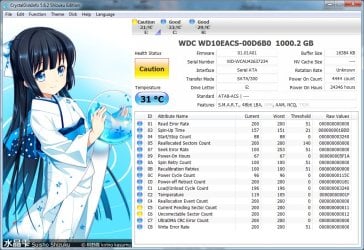
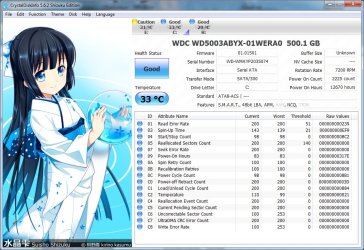
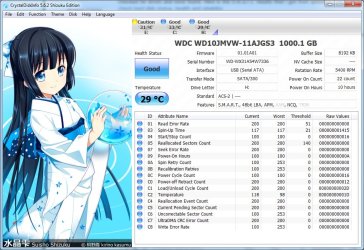
Anyhow, I did some scans with CrystalDiskInfo and have attached it for your viewing. The 500 Gb is my OS HD. I'm not PC savy other than the average google up problems and try to figure it out. Technical issues that involve installing tons of software and looking at tons of data confuses me and depresses me (I have depression / anxiety issues).
So I recently got a 3.0 PCI express card because I got a bunch of external hard drives.
I notice that the file transfer varies a lot. Single files transfer fast, but many times I have stuff like shows that are around 200 MB each and commonly transfer folders of them at 5-10 GB. My transfers from internal hd to internal hd starts at 80mbs and get to be about 40mbs (slowest I've had is around 30mbs). For internal to external hd 3.0 usb, I also start out fast with 120mbs and then it slowly goes down more and more to around even 40 or 30s which is not much of an upgrade from 2.0.
What's with the major slow down?
It just seems like my speed just slowly dies down and I'm not talking about the sudden drop in the first few seconds, but after several minutes.
I have checked and defrag my drive. Windows show none is fragmented. I check disk before as well, about a week or two ago, all seems well.
Here's some data from my hd scans.
Any thoughts as to why it gets so slow?
My 500 gb, I have 160GB left and sometimes i get to 80GB left.
1TB storage hard drive I have about 100 GB left.
I also notice that the mbs transfer changes like sometimes when I transfer and it's slow, I cancel and try to transfer again and it seems a bit overall faster...sometimes. Based on quickly looking at some old files, it seems like both internal hard drives are about 5 years old but I find it weird that CrystalDiskInfo says that the 1TB hd which I leave idle and probably turns off on its own a lot due to the power saving has twice the hours as my OS HD which I have on all the time and use a lot more........
Just weird stuff.....
I filled out a ton of PC specific questions so if you're wondering what motherboard I'm using or hard drive, look there (wherever it is, still new so ...)
Anyhow, I did some scans with CrystalDiskInfo and have attached it for your viewing. The 500 Gb is my OS HD. I'm not PC savy other than the average google up problems and try to figure it out. Technical issues that involve installing tons of software and looking at tons of data confuses me and depresses me (I have depression / anxiety issues).
So I recently got a 3.0 PCI express card because I got a bunch of external hard drives.
I notice that the file transfer varies a lot. Single files transfer fast, but many times I have stuff like shows that are around 200 MB each and commonly transfer folders of them at 5-10 GB. My transfers from internal hd to internal hd starts at 80mbs and get to be about 40mbs (slowest I've had is around 30mbs). For internal to external hd 3.0 usb, I also start out fast with 120mbs and then it slowly goes down more and more to around even 40 or 30s which is not much of an upgrade from 2.0.
What's with the major slow down?
It just seems like my speed just slowly dies down and I'm not talking about the sudden drop in the first few seconds, but after several minutes.
I have checked and defrag my drive. Windows show none is fragmented. I check disk before as well, about a week or two ago, all seems well.
Here's some data from my hd scans.
Any thoughts as to why it gets so slow?
My 500 gb, I have 160GB left and sometimes i get to 80GB left.
1TB storage hard drive I have about 100 GB left.
I also notice that the mbs transfer changes like sometimes when I transfer and it's slow, I cancel and try to transfer again and it seems a bit overall faster...sometimes. Based on quickly looking at some old files, it seems like both internal hard drives are about 5 years old but I find it weird that CrystalDiskInfo says that the 1TB hd which I leave idle and probably turns off on its own a lot due to the power saving has twice the hours as my OS HD which I have on all the time and use a lot more........
Just weird stuff.....
Attachments
My Computer
At a glance
Windows 7 Home 64bitIntel Core i5 Quad 750 2.66 GBZ 8MB LGA11564GBASUS GTX 560
- Computer type
- PC/Desktop
- Computer Manufacturer/Model Number
- Custom
- OS
- Windows 7 Home 64bit
- CPU
- Intel Core i5 Quad 750 2.66 GBZ 8MB LGA1156
- Motherboard
- Asus p7h55-M Pro h55 DDR3 LGA1156
- Memory
- 4GB
- Graphics Card(s)
- ASUS GTX 560
- Hard Drives
- OS HD: 500GB WD5003abyx (160 GB left, many times to 80)
Commonly connected HD for file saving: WD10EACS
They're both SATA 3.0 and based on the oldest file that I can quickly find, they're about 5 years old since the file is 2009.
I have othe
- Antivirus
- Kaspersky
- Browser
- Firefox and Google Chrome (firefox atm)


