
Racing fan(s)

gogreen

New member
Power User
VIP
Local time
2:59 AM
Messages
544
Location
Florida
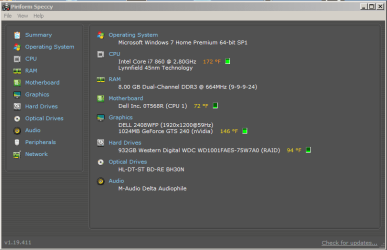
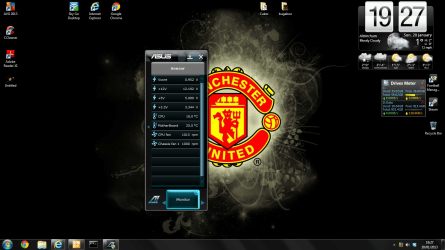
Just noticed this problem. Sometimes the CPU fan races when I'm running certain programs--mainly playback with a music notation program and VST samples. I opened the computer case and cleaned the chassis fan and processor fan. They didn't seem to have a lot of dust on them, but perhaps a little there means a lot. The computer is about 2.5 years old. Attached is Speccy's temperature reading and my CPU resource monitor when the music program is running. Any idea what's happening? Thanks.
 

Attachments
  • speccy.png
    speccy.png
    18.5 KB · Views: 30
  • cpu.png
    cpu.png
    77.5 KB · Views: 14

My Computer

Computer type
PC/Desktop
Computer Manufacturer/Model Number
Dell Studio XPS 8100, Dell XPS 15 laptop
OS
Windows 10 Home, 64 bit
CPU
Intel Core i7 860 @ 2.8 GHz
Motherboard
Dell 0T568R (CPU1)
Memory
8.0 GB Dual Channel DDR3 @ 664 MHz (9-9-9-24)
Graphics Card(s)
nVidia GeForce GTS 240
Sound Card
M-Audio Delta Audiophile 2496
Monitor(s) Displays
Dell 2407WFP
Screen Resolution
1920x1200
Hard Drives
977 GB Western Digital WDC WD1001FAES-75W7A0 (SCSI)
Antivirus
Windows Defender, MalwareBytes Anti-Malware, AdwCleaner
Browser
Firefox, occasionally IE and Edge
Other Info
Mozilla Firefox, Mozilla Thunderbird. Western Digital Passport 250 GB external HD, two Mushkin Enhanced Mulholland 32GB USB flash drives, AKG K240 Studio headphones, Asus AC-1900 dual band wireless router.
Your CPU temperature is hot, especially when you are at idle.
Is the CPU heatsink/cooler still firmly attached?
 

My Computer

Computer type
PC/Desktop
Computer Manufacturer/Model Number
Custom Built
OS
Windows 10 Pro x64, Windows 8.1 Pro x64, Windows 7 Ultimate x64 SP1,
CPU
INTEL i9-7920X LGA 2066
Motherboard
Gigabyte X299-WU8 F3
Memory
64 GB (4 X 16 GB) G-Skill V Series DDR4 3200 Quad Channel
Graphics Card(s)
EVGA GTX 1060 SC 3 GB
Sound Card
Realtek Onboard ALC1220
Monitor(s) Displays
2 x Samsung S27E310
Screen Resolution
1920x1080
Hard Drives
Samsung 2 x 970 EVO Plus 500 GB NVMe
1 x 6TB WD 6003FZBX SATA
1 x 6TB WD 60EFRX SATA
12 x 3TB WD 30EFRX SATA
PSU
Seasonic X-1050
Case
Thermaltake Armor+
Cooling
Corsair H80i V2 Liquid AOI Cooler
Keyboard
Logitech G510s
Mouse
Logitech MX Master 2S
Internet Speed
200 Mb/s
Antivirus
ESET NOD32 13.1
Browser
EDGE (Dev, Canary, Beta), Chrome
Other Info
ASUS RT-AC68U router
Malwarebytes 4.0.4
What should the CPU heatsink/cooler temperature be?

Yes, it's firmly attached. Dell uses what they call "fastner" caps--odd things, but after loosening them and changing my mind about removing the fan to clean it, I re-fastened it. Perhaps I should remove it and vacuum it?
 

My Computer

Computer type
PC/Desktop
Computer Manufacturer/Model Number
Dell Studio XPS 8100, Dell XPS 15 laptop
OS
Windows 10 Home, 64 bit
CPU
Intel Core i7 860 @ 2.8 GHz
Motherboard
Dell 0T568R (CPU1)
Memory
8.0 GB Dual Channel DDR3 @ 664 MHz (9-9-9-24)
Graphics Card(s)
nVidia GeForce GTS 240
Sound Card
M-Audio Delta Audiophile 2496
Monitor(s) Displays
Dell 2407WFP
Screen Resolution
1920x1200
Hard Drives
977 GB Western Digital WDC WD1001FAES-75W7A0 (SCSI)
Antivirus
Windows Defender, MalwareBytes Anti-Malware, AdwCleaner
Browser
Firefox, occasionally IE and Edge
Other Info
Mozilla Firefox, Mozilla Thunderbird. Western Digital Passport 250 GB external HD, two Mushkin Enhanced Mulholland 32GB USB flash drives, AKG K240 Studio headphones, Asus AC-1900 dual band wireless router.
What is a good CPU temperature at idle depends on a number of things but somewhere around 105 F (40 C). Yours is 172 F (77 C).

With that temperature, I am not surprised that the fan is running fast.

Did you loosened the cooler from the CPU or just the fan?

I would also check the CPU temperature in the BIOS. It is usually the most accurate.
 

My Computer

Computer type
PC/Desktop
Computer Manufacturer/Model Number
Custom Built
OS
Windows 10 Pro x64, Windows 8.1 Pro x64, Windows 7 Ultimate x64 SP1,
CPU
INTEL i9-7920X LGA 2066
Motherboard
Gigabyte X299-WU8 F3
Memory
64 GB (4 X 16 GB) G-Skill V Series DDR4 3200 Quad Channel
Graphics Card(s)
EVGA GTX 1060 SC 3 GB
Sound Card
Realtek Onboard ALC1220
Monitor(s) Displays
2 x Samsung S27E310
Screen Resolution
1920x1080
Hard Drives
Samsung 2 x 970 EVO Plus 500 GB NVMe
1 x 6TB WD 6003FZBX SATA
1 x 6TB WD 60EFRX SATA
12 x 3TB WD 30EFRX SATA
PSU
Seasonic X-1050
Case
Thermaltake Armor+
Cooling
Corsair H80i V2 Liquid AOI Cooler
Keyboard
Logitech G510s
Mouse
Logitech MX Master 2S
Internet Speed
200 Mb/s
Antivirus
ESET NOD32 13.1
Browser
EDGE (Dev, Canary, Beta), Chrome
Other Info
ASUS RT-AC68U router
Malwarebytes 4.0.4
105 F? Yeah, I'm nowhere near that. I removed the fan and cooler to inspect it. It's a bear to get back on, but I think I put it back firmly. Is there supposed to be layer of grease between the CPU top and the bottom of the fan? I noticed a thin layer of hard, caked, almost powdery stuff there. Could this be affecting the sensing and regulation of the temperature?

When I restarted, the computer now runs for a minute or so and then crashes--totally, as if someone cut the power.

Just restarted after a rest and got into Speccy. It now reports the CPU temperature as 211 F!

Could this new going dead, high temperature, and the racing fan suggest that my hard drive is failing (has failed)?
 

My Computer

Computer type
PC/Desktop
Computer Manufacturer/Model Number
Dell Studio XPS 8100, Dell XPS 15 laptop
OS
Windows 10 Home, 64 bit
CPU
Intel Core i7 860 @ 2.8 GHz
Motherboard
Dell 0T568R (CPU1)
Memory
8.0 GB Dual Channel DDR3 @ 664 MHz (9-9-9-24)
Graphics Card(s)
nVidia GeForce GTS 240
Sound Card
M-Audio Delta Audiophile 2496
Monitor(s) Displays
Dell 2407WFP
Screen Resolution
1920x1200
Hard Drives
977 GB Western Digital WDC WD1001FAES-75W7A0 (SCSI)
Antivirus
Windows Defender, MalwareBytes Anti-Malware, AdwCleaner
Browser
Firefox, occasionally IE and Edge
Other Info
Mozilla Firefox, Mozilla Thunderbird. Western Digital Passport 250 GB external HD, two Mushkin Enhanced Mulholland 32GB USB flash drives, AKG K240 Studio headphones, Asus AC-1900 dual band wireless router.
First off you are running hot. Please post all temp in (C) not (F).
Any time you remove a cpu cooler you need to remove all the old thermo past and install new thermo paste. Take a read through this.
http://www.arcticsilver.com/pdf/appmeth/int/vl/intel_app_method_vertical_line_v1.1.pdf
Don't
use your computer until your properly clean and install the proper thermo compound (paste) in the proper fashion and install the cooler properly.
 

My Computer

Computer type
PC/Desktop
Computer Manufacturer/Model Number
Home made Desktop
OS
Windows 10 Pro. 64/ version 1709 Windows 7 Pro/64
CPU
Intel i7-6800K @ 4.3
Motherboard
ASUS X-99 Deluxe II
Memory
Corsair Platinum 16 gig @2400
Graphics Card(s)
EVGA GTX 1070 OC
Monitor(s) Displays
Asus 27" LED LCD/VE278Q
Screen Resolution
1920-1080 or 1280-720 HDMI
Hard Drives
INTEL SSD 730-240 Gb Sata 3.0/
PSU
EVGA Platium 1200W
Case
Phanteks Luxe Tempered Glass 8 fans/ one radiator
Cooling
XSPC/ Water Cooled CPU
Keyboard
Das 4 Professional
Mouse
Logitech M705/MX Anywhere 2-S
Internet Speed
100 mbits
Antivirus
Microsoft Security Essentials/ Malwarebytes Premium 3.0/ SAS
Browser
I.E. 11 default/Firefox/ ISP Time Warner Cable/Spectrum
Other Info
LG BluRay Burner/
Sound system-KLipsch-THX/
Icy Dock ssd Hot Swap bays.
105 F? Yeah, I'm nowhere near that. I removed the fan and cooler to inspect it. It's a bear to get back on, but I think I put it back firmly. Is there supposed to be layer of grease between the CPU top and the bottom of the fan? I noticed a thin layer of hard, caked, almost powdery stuff there. Could this be affecting the sensing and regulation of the temperature?

When I restarted, the computer now runs for a minute or so and then crashes--totally, as if someone cut the power.

Just restarted after a rest and got into Speccy. It now reports the CPU temperature as 211 F!

Could this new going dead, high temperature, and the racing fan suggest that my hard drive is failing (has failed)?

There is supposed to be a layer of "grease" as you called it. It's heat sink compound and it conducts heat from the cpu to the heatsink, without it you're burning up your cpu. Do not use the computer until you've put some between the cpu and the heatsink.
 

My Computer

Computer type
PC/Desktop
Computer Manufacturer/Model Number
Self built
OS
Windows 11 Home x64
CPU
AMD Ryzen 5 5600G
Motherboard
ASUSTeK Prime B450M-A II
Memory
G.SKILL Ripjaws Gaming Series (2x8G) DDR4
Graphics Card(s)
None (AMD Radeon Graphics on MB and CPU)
Sound Card
None (integrated on MB)
Monitor(s) Displays
Acer S200HLAbd Black 20"
Screen Resolution
1600 x 900
Hard Drives
Samsung SSD 840 EVO 120GB (W10)
WD Blue 500G SATA 6G WDBAAX5000ENC-NRSN (Backup/Storage)
PSU
Corsair CX500 500W ATX12V v2.3 80 Plus Bronze Active PFC
Case
Unknown
Cooling
CPU-stock cooling fan, 1 extra 80mm case fan
Keyboard
Azio KB505U Large Print Tri-Color Illuminated USB Keyboard
Mouse
MS Optical Wheel Mouse (USB)
Internet Speed
ATT Fiber 5000/VOIP 5G down/5G up
Antivirus
Win Defender, SAS, Spyware Blaster all free editions
Browser
Firefox, Waterfox, sometimes Edge
Thanks for the heat sink compound warning! I will get some heat sink compound tomorrow and apply it, and then try again. I've been finding some pretty good instructions in Internet searches on heat sink compound and how to apply it.
 

My Computer

Computer type
PC/Desktop
Computer Manufacturer/Model Number
Dell Studio XPS 8100, Dell XPS 15 laptop
OS
Windows 10 Home, 64 bit
CPU
Intel Core i7 860 @ 2.8 GHz
Motherboard
Dell 0T568R (CPU1)
Memory
8.0 GB Dual Channel DDR3 @ 664 MHz (9-9-9-24)
Graphics Card(s)
nVidia GeForce GTS 240
Sound Card
M-Audio Delta Audiophile 2496
Monitor(s) Displays
Dell 2407WFP
Screen Resolution
1920x1200
Hard Drives
977 GB Western Digital WDC WD1001FAES-75W7A0 (SCSI)
Antivirus
Windows Defender, MalwareBytes Anti-Malware, AdwCleaner
Browser
Firefox, occasionally IE and Edge
Other Info
Mozilla Firefox, Mozilla Thunderbird. Western Digital Passport 250 GB external HD, two Mushkin Enhanced Mulholland 32GB USB flash drives, AKG K240 Studio headphones, Asus AC-1900 dual band wireless router.
Use the link I gave you in post #6. In my opinion it will take care of your needs.
 

My Computer

Computer type
PC/Desktop
Computer Manufacturer/Model Number
Home made Desktop
OS
Windows 10 Pro. 64/ version 1709 Windows 7 Pro/64
CPU
Intel i7-6800K @ 4.3
Motherboard
ASUS X-99 Deluxe II
Memory
Corsair Platinum 16 gig @2400
Graphics Card(s)
EVGA GTX 1070 OC
Monitor(s) Displays
Asus 27" LED LCD/VE278Q
Screen Resolution
1920-1080 or 1280-720 HDMI
Hard Drives
INTEL SSD 730-240 Gb Sata 3.0/
PSU
EVGA Platium 1200W
Case
Phanteks Luxe Tempered Glass 8 fans/ one radiator
Cooling
XSPC/ Water Cooled CPU
Keyboard
Das 4 Professional
Mouse
Logitech M705/MX Anywhere 2-S
Internet Speed
100 mbits
Antivirus
Microsoft Security Essentials/ Malwarebytes Premium 3.0/ SAS
Browser
I.E. 11 default/Firefox/ ISP Time Warner Cable/Spectrum
Other Info
LG BluRay Burner/
Sound system-KLipsch-THX/
Icy Dock ssd Hot Swap bays.
Thanks for the heat sink compound warning! I will get some heat sink compound tomorrow and apply it, and then try again. I've been finding some pretty good instructions in Internet searches on heat sink compound and how to apply it.

Use the link I gave you in post #6. In my opinion it will take care of your needs.

Layback Bear's link is what you need to do and that should fix your high cpu temp problems. For comparison right now my cpu temp is 31c and MB temp is 30c while I'm browsing the forum, that is essentially idle. I've never seen it go as high as 50c, high 40's when I'm watching a video full screen. You have a higher end processor than I do, mine is an AMD Athlon II 640x4 Propus 3G.

Follow the instructions at the Layback Bears link and you'll be fine, the fact your pc shut down maybe saved your cpu, lets hope so.
 

My Computer

Computer type
PC/Desktop
Computer Manufacturer/Model Number
Self built
OS
Windows 11 Home x64
CPU
AMD Ryzen 5 5600G
Motherboard
ASUSTeK Prime B450M-A II
Memory
G.SKILL Ripjaws Gaming Series (2x8G) DDR4
Graphics Card(s)
None (AMD Radeon Graphics on MB and CPU)
Sound Card
None (integrated on MB)
Monitor(s) Displays
Acer S200HLAbd Black 20"
Screen Resolution
1600 x 900
Hard Drives
Samsung SSD 840 EVO 120GB (W10)
WD Blue 500G SATA 6G WDBAAX5000ENC-NRSN (Backup/Storage)
PSU
Corsair CX500 500W ATX12V v2.3 80 Plus Bronze Active PFC
Case
Unknown
Cooling
CPU-stock cooling fan, 1 extra 80mm case fan
Keyboard
Azio KB505U Large Print Tri-Color Illuminated USB Keyboard
Mouse
MS Optical Wheel Mouse (USB)
Internet Speed
ATT Fiber 5000/VOIP 5G down/5G up
Antivirus
Win Defender, SAS, Spyware Blaster all free editions
Browser
Firefox, Waterfox, sometimes Edge
Just whilst were on the subject of CPU temps:

Everything looks ok here right?.

Untitled.png
 

My Computer

Computer Manufacturer/Model Number
Cooler Master
OS
Windows 7 Home Premium 64 Bit
CPU
Core I7 1155 3.4GHZ
Memory
8GB DDR 1600
Hard Drives
64 GB SSD - OS
1TB - DATA
PSU
340 Watt Corsair
Case
Cooler Master
Cooling
Cooler Master
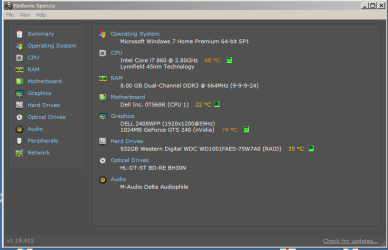
I removed the old thermal paste--it was dry and a bit caked on both the CPU and the heat sink. I cleaned both, and reapplied heat sink compound. So I think I'm back to where I started before I opened the box and dusted and cleaned. The problem is that the fan(s) races unexpectedly. My CPU starts at about 68 C, and often rises from there to wholly unacceptable levels when the fan races again. Before anything else happens, I shut down. I've posted my recent startup temps. They seem high to me.

Since I replaced the heat sink compound and restarted, I've gotten two blue screen messages. The first was a bad pooler caller message, and the second was an IRQL not less or equal message. Both of these occured after a few minutes of seemingly normal operation. The fan speed started to increase, the messages appeared, and the fan started really racing. Then I shut everything down.

I ran CCleaner's registry cleaner AND Glary Utilities registry cleaner. Both found a few things, which I purged. I checked Windows Update--all is up to date, including MSE and Malwarebytes Anti-malware. An MSE quick scan showed everything OK. I also downloaded and ran Kaspersky's TDSSKiller.exe. All was OK there, too.

I just tried to run a full MSE scan, but after a minute or so, Speccy reported the temperature rising into the upper 80s C, the fan started racing, and I shut down. I seem to get a few minutes of seemingly normal operation before the temp rises fast and fan starts racing.

So something still is amiss. Any ideas? Thanks.
 

Attachments

  • speccy.png
    speccy.png
    18.8 KB · Views: 8

My Computer

Computer type
PC/Desktop
Computer Manufacturer/Model Number
Dell Studio XPS 8100, Dell XPS 15 laptop
OS
Windows 10 Home, 64 bit
CPU
Intel Core i7 860 @ 2.8 GHz
Motherboard
Dell 0T568R (CPU1)
Memory
8.0 GB Dual Channel DDR3 @ 664 MHz (9-9-9-24)
Graphics Card(s)
nVidia GeForce GTS 240
Sound Card
M-Audio Delta Audiophile 2496
Monitor(s) Displays
Dell 2407WFP
Screen Resolution
1920x1200
Hard Drives
977 GB Western Digital WDC WD1001FAES-75W7A0 (SCSI)
Antivirus
Windows Defender, MalwareBytes Anti-Malware, AdwCleaner
Browser
Firefox, occasionally IE and Edge
Other Info
Mozilla Firefox, Mozilla Thunderbird. Western Digital Passport 250 GB external HD, two Mushkin Enhanced Mulholland 32GB USB flash drives, AKG K240 Studio headphones, Asus AC-1900 dual band wireless router.
First off did you clean and install your thermo compound as per the instruction link I posted before? It's very important that it is done correctly and the cup cooler is installed correctly. If you do it wrong you could be making a toaster out of your cpu and motherboard. Next I noticed your cpu and video card temps are high at the same time. This can be caused by poor circulation of cool air through the tower (case). Remove the side panel of the case and point a window fan or the like blowing inside your case when in use and see if the temps go down and by how much.
 

My Computer

Computer type
PC/Desktop
Computer Manufacturer/Model Number
Home made Desktop
OS
Windows 10 Pro. 64/ version 1709 Windows 7 Pro/64
CPU
Intel i7-6800K @ 4.3
Motherboard
ASUS X-99 Deluxe II
Memory
Corsair Platinum 16 gig @2400
Graphics Card(s)
EVGA GTX 1070 OC
Monitor(s) Displays
Asus 27" LED LCD/VE278Q
Screen Resolution
1920-1080 or 1280-720 HDMI
Hard Drives
INTEL SSD 730-240 Gb Sata 3.0/
PSU
EVGA Platium 1200W
Case
Phanteks Luxe Tempered Glass 8 fans/ one radiator
Cooling
XSPC/ Water Cooled CPU
Keyboard
Das 4 Professional
Mouse
Logitech M705/MX Anywhere 2-S
Internet Speed
100 mbits
Antivirus
Microsoft Security Essentials/ Malwarebytes Premium 3.0/ SAS
Browser
I.E. 11 default/Firefox/ ISP Time Warner Cable/Spectrum
Other Info
LG BluRay Burner/
Sound system-KLipsch-THX/
Icy Dock ssd Hot Swap bays.
Thanks, Layback Bear.

Everything seems to be working OK except the temps seem a bit warm. I removed the case side panel and within 15 seconds, the CPU temp settled about 5 degrees lower--to around 66-67 C or so. The graphics card is still at about 71 C. I haven't tried a fan yet, but I might.

I haven't gotten any more blue screen messages.

I ran the Dell diagnostics, and all seems to be OK except I'm getting MPcache "auxiliary processor has failed" reports, including failing Dirty Cache Reads Test, Alternating CPU Write Test, Random Access Thrash test, and APIC MP Test. Apparently these are all L1, L2, and L3 multiprocessor failures. Error codes include 5800:301C and 5800:021C.

What do you think these results mean?

I also ran the complete RAM test, and it was OK.

Thanks.
 

My Computer

Computer type
PC/Desktop
Computer Manufacturer/Model Number
Dell Studio XPS 8100, Dell XPS 15 laptop
OS
Windows 10 Home, 64 bit
CPU
Intel Core i7 860 @ 2.8 GHz
Motherboard
Dell 0T568R (CPU1)
Memory
8.0 GB Dual Channel DDR3 @ 664 MHz (9-9-9-24)
Graphics Card(s)
nVidia GeForce GTS 240
Sound Card
M-Audio Delta Audiophile 2496
Monitor(s) Displays
Dell 2407WFP
Screen Resolution
1920x1200
Hard Drives
977 GB Western Digital WDC WD1001FAES-75W7A0 (SCSI)
Antivirus
Windows Defender, MalwareBytes Anti-Malware, AdwCleaner
Browser
Firefox, occasionally IE and Edge
Other Info
Mozilla Firefox, Mozilla Thunderbird. Western Digital Passport 250 GB external HD, two Mushkin Enhanced Mulholland 32GB USB flash drives, AKG K240 Studio headphones, Asus AC-1900 dual band wireless router.
Totally off topic but what music notation program you were using?
 

My Computer

Computer type
PC/Desktop
Computer Manufacturer/Model Number
Custom Build
OS
Win 7 Ultimate 64 bit
CPU
Intel i7-3930K
Motherboard
ASUS P9X79 WS
Memory
Kingston HyperX Genesis 32GB Kit (8x4GB Modules) 1600MHz DDR
Graphics Card(s)
MSI R7850 Twin Frozr 2GD5/OC Radeon HD 7850 2GB 256-bit GDDR
Sound Card
Asus Xonar Essence STX
Monitor(s) Displays
3x Asus VG248QE 24", Vizio 32" TV
Screen Resolution
1920 x 1080, ?
Hard Drives
Samsung 128GB 840 Pro SSD (1),
Samsung 4TB 850 EVO SSDs (4)
Samsung 4TB 850 EVO SSDs (16) external backup drives used in 2.5" hot swap bays in the computer.
PSU
Corsair HX750w
Case
Antec Two Hundred v2 (modified)
Cooling
Cooler Master GeminII S524 120mm (fan replaced with a 140mm)
Keyboard
Logitech G510s
Mouse
Logitech M525 (two in use)
Internet Speed
=< 32Mbps down, 8Mbps up
Antivirus
AVAST!, MBAM, SAS, Spybot S&D (all but MBAM free) Glary Util
Browser
IE11
Other Info
LSI 9211-8i HBA card (8 SATA III ports), 2.5" & 3.5" Hot Swap Bays, HooToo HT-CR001 PCI-E to USB 3.0 Internal Hub + 6 Slot Card Reader, and LG Model CH12LS28 BD-ROM Optical Drive. Also, ScanSnap S1500 ADF duplexing scanner, Canon 9000F flat bed scanner, Corsair SP2500 2.1 speakers, Samsung CLP 415nw laser color printer, Cyberpower PP2200SW UPS
Finale with Garritan Concert & Marching Band 2 sounds and Garritan Personal Orchestra 4 sounds.
 

My Computer

Computer type
PC/Desktop
Computer Manufacturer/Model Number
Dell Studio XPS 8100, Dell XPS 15 laptop
OS
Windows 10 Home, 64 bit
CPU
Intel Core i7 860 @ 2.8 GHz
Motherboard
Dell 0T568R (CPU1)
Memory
8.0 GB Dual Channel DDR3 @ 664 MHz (9-9-9-24)
Graphics Card(s)
nVidia GeForce GTS 240
Sound Card
M-Audio Delta Audiophile 2496
Monitor(s) Displays
Dell 2407WFP
Screen Resolution
1920x1200
Hard Drives
977 GB Western Digital WDC WD1001FAES-75W7A0 (SCSI)
Antivirus
Windows Defender, MalwareBytes Anti-Malware, AdwCleaner
Browser
Firefox, occasionally IE and Edge
Other Info
Mozilla Firefox, Mozilla Thunderbird. Western Digital Passport 250 GB external HD, two Mushkin Enhanced Mulholland 32GB USB flash drives, AKG K240 Studio headphones, Asus AC-1900 dual band wireless router.
So far it indicated poor air flow through the case. Find a fan and use it. Get back with results.
 

My Computer

Computer type
PC/Desktop
Computer Manufacturer/Model Number
Home made Desktop
OS
Windows 10 Pro. 64/ version 1709 Windows 7 Pro/64
CPU
Intel i7-6800K @ 4.3
Motherboard
ASUS X-99 Deluxe II
Memory
Corsair Platinum 16 gig @2400
Graphics Card(s)
EVGA GTX 1070 OC
Monitor(s) Displays
Asus 27" LED LCD/VE278Q
Screen Resolution
1920-1080 or 1280-720 HDMI
Hard Drives
INTEL SSD 730-240 Gb Sata 3.0/
PSU
EVGA Platium 1200W
Case
Phanteks Luxe Tempered Glass 8 fans/ one radiator
Cooling
XSPC/ Water Cooled CPU
Keyboard
Das 4 Professional
Mouse
Logitech M705/MX Anywhere 2-S
Internet Speed
100 mbits
Antivirus
Microsoft Security Essentials/ Malwarebytes Premium 3.0/ SAS
Browser
I.E. 11 default/Firefox/ ISP Time Warner Cable/Spectrum
Other Info
LG BluRay Burner/
Sound system-KLipsch-THX/
Icy Dock ssd Hot Swap bays.
Finale with Garritan Concert & Marching Band 2 sounds and Garritan Personal Orchestra 4 sounds.

I last used Allegro. I got Finale 2010 but never installed it. I've been away from the music scene for a while.
 

My Computer

Computer type
PC/Desktop
Computer Manufacturer/Model Number
Custom Build
OS
Win 7 Ultimate 64 bit
CPU
Intel i7-3930K
Motherboard
ASUS P9X79 WS
Memory
Kingston HyperX Genesis 32GB Kit (8x4GB Modules) 1600MHz DDR
Graphics Card(s)
MSI R7850 Twin Frozr 2GD5/OC Radeon HD 7850 2GB 256-bit GDDR
Sound Card
Asus Xonar Essence STX
Monitor(s) Displays
3x Asus VG248QE 24", Vizio 32" TV
Screen Resolution
1920 x 1080, ?
Hard Drives
Samsung 128GB 840 Pro SSD (1),
Samsung 4TB 850 EVO SSDs (4)
Samsung 4TB 850 EVO SSDs (16) external backup drives used in 2.5" hot swap bays in the computer.
PSU
Corsair HX750w
Case
Antec Two Hundred v2 (modified)
Cooling
Cooler Master GeminII S524 120mm (fan replaced with a 140mm)
Keyboard
Logitech G510s
Mouse
Logitech M525 (two in use)
Internet Speed
=< 32Mbps down, 8Mbps up
Antivirus
AVAST!, MBAM, SAS, Spybot S&D (all but MBAM free) Glary Util
Browser
IE11
Other Info
LSI 9211-8i HBA card (8 SATA III ports), 2.5" & 3.5" Hot Swap Bays, HooToo HT-CR001 PCI-E to USB 3.0 Internal Hub + 6 Slot Card Reader, and LG Model CH12LS28 BD-ROM Optical Drive. Also, ScanSnap S1500 ADF duplexing scanner, Canon 9000F flat bed scanner, Corsair SP2500 2.1 speakers, Samsung CLP 415nw laser color printer, Cyberpower PP2200SW UPS
On subject. Did you use the external fan or not? If you did what was the effect on cooling?
 

My Computer

Computer type
PC/Desktop
Computer Manufacturer/Model Number
Home made Desktop
OS
Windows 10 Pro. 64/ version 1709 Windows 7 Pro/64
CPU
Intel i7-6800K @ 4.3
Motherboard
ASUS X-99 Deluxe II
Memory
Corsair Platinum 16 gig @2400
Graphics Card(s)
EVGA GTX 1070 OC
Monitor(s) Displays
Asus 27" LED LCD/VE278Q
Screen Resolution
1920-1080 or 1280-720 HDMI
Hard Drives
INTEL SSD 730-240 Gb Sata 3.0/
PSU
EVGA Platium 1200W
Case
Phanteks Luxe Tempered Glass 8 fans/ one radiator
Cooling
XSPC/ Water Cooled CPU
Keyboard
Das 4 Professional
Mouse
Logitech M705/MX Anywhere 2-S
Internet Speed
100 mbits
Antivirus
Microsoft Security Essentials/ Malwarebytes Premium 3.0/ SAS
Browser
I.E. 11 default/Firefox/ ISP Time Warner Cable/Spectrum
Other Info
LG BluRay Burner/
Sound system-KLipsch-THX/
Icy Dock ssd Hot Swap bays.
No fan, so far. I left the case open and it's been running a bit cooler. Started this morning in the upper 50s C. I did some pretty intensive work. It slowly went up to about 81-82 C, but when I finished, it went back to the upper 60s C. I had the computer on for several hours.

This afternoon, I did the same, but when I went back to the computer just now (I shouldn't have left it alone!), the fan was going pretty strong again and a blue screen reported that something went wrong and the computer shut down to protect itself. Very unpredictable behavior.

Do you think the CPU is failing? I can't understand why it seemed OK for a while, and then suddenly, for no apparent reason, the fan races and, I guess, something overheats. When I shut it down, I accidentally restarted it, and the fan was back down to normal--seemed like a normal startup was taking place, but I didn't let it reboot--I unplugged it for now.
 

My Computer

Computer type
PC/Desktop
Computer Manufacturer/Model Number
Dell Studio XPS 8100, Dell XPS 15 laptop
OS
Windows 10 Home, 64 bit
CPU
Intel Core i7 860 @ 2.8 GHz
Motherboard
Dell 0T568R (CPU1)
Memory
8.0 GB Dual Channel DDR3 @ 664 MHz (9-9-9-24)
Graphics Card(s)
nVidia GeForce GTS 240
Sound Card
M-Audio Delta Audiophile 2496
Monitor(s) Displays
Dell 2407WFP
Screen Resolution
1920x1200
Hard Drives
977 GB Western Digital WDC WD1001FAES-75W7A0 (SCSI)
Antivirus
Windows Defender, MalwareBytes Anti-Malware, AdwCleaner
Browser
Firefox, occasionally IE and Edge
Other Info
Mozilla Firefox, Mozilla Thunderbird. Western Digital Passport 250 GB external HD, two Mushkin Enhanced Mulholland 32GB USB flash drives, AKG K240 Studio headphones, Asus AC-1900 dual band wireless router.
Back
Top