Solved Radically simplify win7 folder structure...?

kbuss

New member
Local time
3:53 PM
Messages
8
Hi Guys! Im looking for reasonable routes to simplify win7's flawed and cluttered folder structure.
my aim to only have:
  • one program folder, all programs go there (no separate x86)
  • one user folder, no default user, all user, public etc. i only use one admin account, no need or plan to use others.
  • no dumbs*** stacked documents folder with music, favorites, pictures etc /w added shortcuts, those we never use.
  • possibly get rid of common files, program data folders, force apps to use own folder or "username/appdata" folder for that.

now,
found numerous guides how to delete these manually but thats not what i want.
i want to intrinsicly configure windows to get rid of those and only use the remaining, and also force installed apps to stick to those.

my question, is this even possible, any tool or fix to accomplish this easily.
fresh win7 install is not a problem if required.

if any older threads about this, thank you for pointing me to those, i didnt manage to find.

thx for any help on the above. :geek:

ps: the long story why I need this
i use a lot of CAD and music software.
one example.
I installed Massive, Kore2 and 4 expansions for it, these are music (VST) softwares from Native Instruments, a leading manufacturer.
this happens:

C:\Program Files\Native Instruments - 24 folders
C:\Program Files (x86)\Native Instruments - 3 folders
C:\Program Files\Common Files\Native Instruments - 10 folders
C:\Program Files (x86)\Common Files\Native Instruments - 117 folders
C:\Users\xxxx\AppData\Local\Native Instruments - 37 folders
C:\Users\xxxx\AppData\Roaming\Native Instruments - 1folder
C:\Users\xxxx\AppData\Local\cache\Native Instruments - 1 folder
C:\Users\xxxx\Documents\Native Instruments - 107 folder
C:\Users\All Users\Native Instruments - 2 folders

and my actual program folders that i was able to select at installation.

C:\mu\Kore 2 - 2 folders
C:\mu\Kore 2 Sample Content - 111 folders
C:\mu\Massive - 2 folders
C:\mu\Native Instruments - 75 folders

together, they like 500 folders!!!! insane.
as you see, i try to keep all my music stuff in "mu" folder.
but mostly it only puts documentation in there.
basically these programs put their stuff in ALL the possible locations scattered on the drive, and if you install several of these, maintaining them becomes an extremly time consuming and iterative task.
 

My Computer

Computer type
PC/Desktop
Computer Manufacturer/Model Number
custom
OS
Windows 7 Professional N x64
CPU
i5-4670k
Motherboard
asus z97 pro
Memory
8 GB
Graphics Card(s)
intel hd 4600 integrated
Hard Drives
Samsung 840 evo 250 gb SSD
Antivirus
nod 32
Browser
chrome
And what you gain with it?
As I can see, Native Instruments has programs that run at 64 bits and other at 32 bits. And there are common files for the two of them.
Everything under C:\Users xxx\AppData are configuration data made for the xxx user.
C:\Users\All Users\Native Instruments - 2 folders has the templates to be loaded when creating a new user.
That is a well and good structured program. And you want to ruin that structure. I'll ask again, what you gain with it?
 

My Computers

System One System Two

  • Computer type
    PC/Desktop
    Computer Manufacturer/Model Number
    custom build
    OS
    Windows 7 HP 64
    CPU
    i5 6600K - 800MHz to 4200MHz
    Motherboard
    GA-Z170-HD3P
    Memory
    4+4G GSkill DDR4 3000
    Graphics Card(s)
    IG - Intel 530
    Monitor(s) Displays
    Samsung 226BW
    Screen Resolution
    1680x1050
    Hard Drives
    (1) -1 SM951 – 128GB M.2 AHCI PCIe SSD drive for Windows 7 and Lubuntu
    (2) -1 WD SATA 3 - 1T for Data
    (3) -1 WD SATA 3 - 1T for backup
    PSU
    Thermaltake 450W TR2 gold
    Keyboard
    Old and good Chicony mechanical keyboard
    Mouse
    Logitech mX performance - 9 buttons (had to disable some)
    Internet Speed
    500Mb/s
    Browser
    Firefox 64
    Other Info
    TinyWall firewall
  • Computer type
    Laptop
    System Manufacturer/Model Number
    Asus Q550LF
    OS
    Windows 7 Pro
    CPU
    i7-4500U 800MHz to 3.0GHz
    Motherboard
    Asus Q550LF
    Memory
    (4+4)G DDR3 1600
    Graphics Card(s)
    IG intel 4400 + NVIDIA GeForce GT 745M
    Sound Card
    Realtek
    Monitor(s) Displays
    LG Display LP156WF4-SPH1
    Screen Resolution
    1920 x 1080
    Hard Drives
    BX500 120G SSD for Windows and programs +
    1T HDD for data
    Internet Speed
    500 Mb/s
    Browser
    Firefox
    Other Info
    TinyWall firewall
kbuss. I agree with Megahertz, what do you expect to gain?. The chance of wrecking Windows is very likely. Just leave it alone.
 

My Computer

Computer type
PC/Desktop
Computer Manufacturer/Model Number
Self built using existing case
OS
Windows 7 Home Premium 64 bit sp1
CPU
Intel i5 3570 3.4Ghz Ivy Bridge SKT 1155 quad core
Motherboard
Gigabyte Z77-HD3 SKT 1155 2xSata 3, 4x USB 3.0
Memory
G-Skill Rip Jaws 16Gb (8x2) DDR3 -1600 PC3 12800 CL 10 red
Graphics Card(s)
Gigabyte NVIDIA GT610 1Gb DDR3 810/1200 PCI-E 2.0 Silent
Sound Card
NVIDIA High Definition & Realtech High Definition Audio
Monitor(s) Displays
2 x Philips 226V4L 16:9 aspect ratio
Screen Resolution
1920 x 1080 HD
Hard Drives
Samsung 840 Pro 256gb SSD, SATA 3.
Hitachi Touro Portable 1tb, USB 3.0 HDD used for image b/ups.
PSU
Corsair VS450
Case
Codeng
Cooling
PSU fan & CPU fan
Keyboard
Logitech
Mouse
Logitech Wireless trackball M570
Internet Speed
Wireless 3G. 3mg down & 550kb up.
Antivirus
Bitdefender Internet Security 2020
Browser
Opera (Current Version) & Firefox
Other Info
MS Office 2013 Pro. Davis weather station software. MGE Nova 600 avr UPS.
my question, is this even possible, any tool or fix to accomplish this easily.
My guess is no, that this is not possible and that there is no tool to do this.
 

My Computer

Computer type
PC/Desktop
Computer Manufacturer/Model Number
diy
OS
Win7 pro x64
CPU
stock i7 7700k
Motherboard
Gigabyte Z270N-WIFI mini-ITX
Memory
Corsair Vengeance LPX 16GB (2x8GB) DDR4 @ 3200MHz
Graphics Card(s)
integrated Intel HD 630
Sound Card
onboard Realtek ALC1220
Monitor(s) Displays
two vertically mounted samsung 55" 4k un55mu8000
Screen Resolution
1920x1280
Hard Drives
256GB Samsung EVO 960 M.2 pci-e NVMe SSD
PSU
SilverStone Nightjar ST45NF 450Watt Fanless
Case
No case. Motherboard is mounted directly onto power supply
Cooling
Evercool low profile 815EP with Panaflow 12L fan at 7v
Keyboard
Ortek MCK-86 mini
Mouse
Belkin 5-button USB
Internet Speed
spectrum 400mbps
It's possible (I wouldn't change the two separate program folders; 32bit and 64 bit programs are segregated for a reason) but it would involve uninstalling all the programs, then reinstalling them, telling the program where to install itself, assuming the program will allow that.

It would be a lot of work, though, assuming it can be done and I fail to see what you will gain. I almost never need to access my program folders.
 

My Computer

Computer type
PC/Desktop
Computer Manufacturer/Model Number
Custom Build
OS
Win 7 Ultimate 64 bit
CPU
Intel i7-3930K
Motherboard
ASUS P9X79 WS
Memory
Kingston HyperX Genesis 32GB Kit (8x4GB Modules) 1600MHz DDR
Graphics Card(s)
MSI R7850 Twin Frozr 2GD5/OC Radeon HD 7850 2GB 256-bit GDDR
Sound Card
Asus Xonar Essence STX
Monitor(s) Displays
3x Asus VG248QE 24", Vizio 32" TV
Screen Resolution
1920 x 1080, ?
Hard Drives
Samsung 128GB 840 Pro SSD (1),
Samsung 4TB 850 EVO SSDs (4)
Samsung 4TB 850 EVO SSDs (16) external backup drives used in 2.5" hot swap bays in the computer.
PSU
Corsair HX750w
Case
Antec Two Hundred v2 (modified)
Cooling
Cooler Master GeminII S524 120mm (fan replaced with a 140mm)
Keyboard
Logitech G510s
Mouse
Logitech M525 (two in use)
Internet Speed
=< 32Mbps down, 8Mbps up
Antivirus
AVAST!, MBAM, SAS, Spybot S&D (all but MBAM free) Glary Util
Browser
IE11
Other Info
LSI 9211-8i HBA card (8 SATA III ports), 2.5" & 3.5" Hot Swap Bays, HooToo HT-CR001 PCI-E to USB 3.0 Internal Hub + 6 Slot Card Reader, and LG Model CH12LS28 BD-ROM Optical Drive. Also, ScanSnap S1500 ADF duplexing scanner, Canon 9000F flat bed scanner, Corsair SP2500 2.1 speakers, Samsung CLP 415nw laser color printer, Cyberpower PP2200SW UPS
what do you mean? is this a serious question? :huh::huh:
this was one example, using the computer properly i would install 10-20 of these apps
most of these wont remove ANY of their folders upon uninstall, so in few weeks your folder structure becomes a horrible mess that makes finding any file or config a 15 minute task. especially if you try some of their apps then uninstall and they leave folders basically everywhere, and its extremely hard to remove them manually cos they iterative and repetitive and no indication on which belongs where.

no wonder there are programs from good developers that actually ask at install, where should they keep the misc files, even possibly everithing in 1 folder...

And what you gain with it?
As I can see, Native Instruments has programs that run at 64 bits and other at 32 bits. And there are common files for the two of them.

no, there are two common files folder w mostly the same content. it even folder spams w empty folders in them. it forces a company folder structure thats for other stuff youll "supposedly" buy, or something.
also why would you need two different Program Files folder in win7 at all? its completely useless.

Everything under C:\Users xxx\AppData are configuration data made for the xxx user.
C:\Users\All Users\Native Instruments - 2 folders has the templates to be loaded when creating a new user.

yes but who ever use additional user accounts on their beloved private machine with expensive programs and his work on it??? this entire multi user concept is completely dumb and for public machines in a café or someth... kinda weird that nobody else has problem with it. it should be allowed to not include at all upon OS install...

That is a well and good structured program. And you want to ruin that structure. I'll ask again, what you gain with it?
i dont understand you now, if you jokeing or not... :II as I said, 2 apps made 500 folders.
a good structured program makes 1 program folder with max 15-20 subfolders, an appdata folder and thats it. and puts all the scattered data in container files.
Native instruments are well known for this folder spamming.

but obviously you using your machine very differently from me.
basically my initial thought was professional music studios use several TBs, 100-200 of these programs and apps, and surely there must be a way to contain this mess. because this makes the drives and the registry impossible to maintain properly. you cannot have 12hours of downtime while the tech cleans up 1000s of junk subfolders and registry after an uninstall...

besides i though this annoys a lot of people too, anyone who uses more complicated programs...
 

My Computer

Computer type
PC/Desktop
Computer Manufacturer/Model Number
custom
OS
Windows 7 Professional N x64
CPU
i5-4670k
Motherboard
asus z97 pro
Memory
8 GB
Graphics Card(s)
intel hd 4600 integrated
Hard Drives
Samsung 840 evo 250 gb SSD
Antivirus
nod 32
Browser
chrome
And what you gain with it?

PS: just to better visualize from another viewpont.
absynth is only 1 part of the Kore package, which is in all a middle sized program, ~6GB, not huge.
now, just for this subpart it makes this much folders.
also it force installs an older version
and puts all the documentation in a separate folder tree (omg :rolleyes::rolleyes:)
but most of the below are big folder stems w lot of subfolders...

a lot of manufactrurers does this almost as bad.
its crazy.

so this is what i try to combat and keep in check every way possible.
 

Attachments

  • ScreenClip [3].png
    ScreenClip [3].png
    136.7 KB · Views: 1

My Computer

Computer type
PC/Desktop
Computer Manufacturer/Model Number
custom
OS
Windows 7 Professional N x64
CPU
i5-4670k
Motherboard
asus z97 pro
Memory
8 GB
Graphics Card(s)
intel hd 4600 integrated
Hard Drives
Samsung 840 evo 250 gb SSD
Antivirus
nod 32
Browser
chrome
It's possible (I wouldn't change the two separate program folders; 32bit and 64 bit programs are segregated for a reason)

Yes, but what is the reason? a lot of programs dont even respect it and default to Program Files folder at install, even if they are x86...

but it would involve uninstalling all the programs, then reinstalling them, telling the program where to install itself, assuming the program will allow that.

no no... thats not what I meant. I ALWAYS specify that folder, this time its c:\mu (for music)
the problem is this program for example only install some documentation in it :cry::cry::D
its a joke really.

what i need is to force win7 to keep its folder structure to a reasonable minimum and dont let these intallers spit everything all around the hard drive.
 

My Computer

Computer type
PC/Desktop
Computer Manufacturer/Model Number
custom
OS
Windows 7 Professional N x64
CPU
i5-4670k
Motherboard
asus z97 pro
Memory
8 GB
Graphics Card(s)
intel hd 4600 integrated
Hard Drives
Samsung 840 evo 250 gb SSD
Antivirus
nod 32
Browser
chrome
My guess is no, that this is not possible and that there is no tool to do this.

hmm...
and if I satisfy with getting rid of the
  • multi user concept, just one damn user instead of the normal user/default user/public etc bloatcrap that ppl never use
  • the two separate Program Files folder and having just one instead?

that would be so nice.
also I feel these are the ones ppl must be the most annoyed about...
 

My Computer

Computer type
PC/Desktop
Computer Manufacturer/Model Number
custom
OS
Windows 7 Professional N x64
CPU
i5-4670k
Motherboard
asus z97 pro
Memory
8 GB
Graphics Card(s)
intel hd 4600 integrated
Hard Drives
Samsung 840 evo 250 gb SSD
Antivirus
nod 32
Browser
chrome
Yes, but what is the reason? a lot of programs dont even respect it and default to Program Files folder at install, even if they are x86...

Read here for the answer to that. Why do I have two 'Program Files' folders?


no no... thats not what I meant. I ALWAYS specify that folder, this time its c:\mu (for music)
the problem is this program for example only install some documentation in it :cry::cry::D
its a joke really.

what i need is to force win7 to keep its folder structure to a reasonable minimum and dont let these intallers spit everything all around the hard drive.

Then the problem lies with the clowns who designed the programs. Either change programs or live with it.
 

My Computer

Computer type
PC/Desktop
Computer Manufacturer/Model Number
Custom Build
OS
Win 7 Ultimate 64 bit
CPU
Intel i7-3930K
Motherboard
ASUS P9X79 WS
Memory
Kingston HyperX Genesis 32GB Kit (8x4GB Modules) 1600MHz DDR
Graphics Card(s)
MSI R7850 Twin Frozr 2GD5/OC Radeon HD 7850 2GB 256-bit GDDR
Sound Card
Asus Xonar Essence STX
Monitor(s) Displays
3x Asus VG248QE 24", Vizio 32" TV
Screen Resolution
1920 x 1080, ?
Hard Drives
Samsung 128GB 840 Pro SSD (1),
Samsung 4TB 850 EVO SSDs (4)
Samsung 4TB 850 EVO SSDs (16) external backup drives used in 2.5" hot swap bays in the computer.
PSU
Corsair HX750w
Case
Antec Two Hundred v2 (modified)
Cooling
Cooler Master GeminII S524 120mm (fan replaced with a 140mm)
Keyboard
Logitech G510s
Mouse
Logitech M525 (two in use)
Internet Speed
=< 32Mbps down, 8Mbps up
Antivirus
AVAST!, MBAM, SAS, Spybot S&D (all but MBAM free) Glary Util
Browser
IE11
Other Info
LSI 9211-8i HBA card (8 SATA III ports), 2.5" & 3.5" Hot Swap Bays, HooToo HT-CR001 PCI-E to USB 3.0 Internal Hub + 6 Slot Card Reader, and LG Model CH12LS28 BD-ROM Optical Drive. Also, ScanSnap S1500 ADF duplexing scanner, Canon 9000F flat bed scanner, Corsair SP2500 2.1 speakers, Samsung CLP 415nw laser color printer, Cyberpower PP2200SW UPS
hmm...
and if I satisfy with getting rid of themulti user concept, just one damn user instead of the normal user/default user/public etc bloatcrap that ppl never use
  • the two separate Program Files folder and having just one instead?
that would be so nice. also I feel these are the ones ppl must be the most annoyed about...
I am not aware that you can safely eliminate the user accounts you mention. Here is more info..
Public user delete

Its like you have identified that your car's ride would be smoother if only it was rear-wheel drive so you are now wanting to unmount the engine and put it in the rear. Its a neat idea, but not really possible on a car that is already built.
 

My Computer

Computer type
PC/Desktop
Computer Manufacturer/Model Number
diy
OS
Win7 pro x64
CPU
stock i7 7700k
Motherboard
Gigabyte Z270N-WIFI mini-ITX
Memory
Corsair Vengeance LPX 16GB (2x8GB) DDR4 @ 3200MHz
Graphics Card(s)
integrated Intel HD 630
Sound Card
onboard Realtek ALC1220
Monitor(s) Displays
two vertically mounted samsung 55" 4k un55mu8000
Screen Resolution
1920x1280
Hard Drives
256GB Samsung EVO 960 M.2 pci-e NVMe SSD
PSU
SilverStone Nightjar ST45NF 450Watt Fanless
Case
No case. Motherboard is mounted directly onto power supply
Cooling
Evercool low profile 815EP with Panaflow 12L fan at 7v
Keyboard
Ortek MCK-86 mini
Mouse
Belkin 5-button USB
Internet Speed
spectrum 400mbps

basically these programs put their stuff in ALL the possible locations scattered on the drive, and if you install several of these, maintaining them becomes an extremly time consuming and iterative task.

You don't maintain software by trawling through the hard drive and changing stuff - that's asking for trouble. This goes double for the registry. You do installs and updates using the software's own tools. Uninstall stuff with Revo uninstaller - it scans for related folders and registry keys and gives you the option of removing leftover dirs etc.

Windows doesn't scatter files all over the HDD - the software does that during install. Where is your next VST going to put its files if you have changed the Windows file structure ?

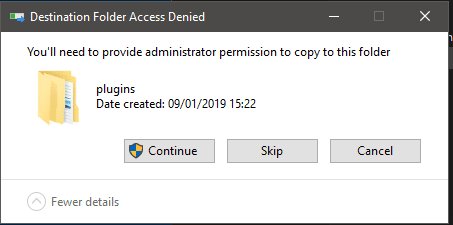
The 'don't go there' concept has been ramped up in Windows 10, for a very good reason. Try adding a required file to a program folder, and you get this


denied.png
 

My Computer

Computer type
PC/Desktop
Computer Manufacturer/Model Number
self build
OS
Windows 7 Pro x64 sp1
CPU
i7 4770K
Motherboard
MSI B85M-E45
Memory
8GB Corsair Vengeance 1600MHz
Graphics Card(s)
onboard
Monitor(s) Displays
LG 27MP35
Screen Resolution
1920-1080
Hard Drives
Seagate 2TB
PSU
Cooler Master GX 750
Case
Antec 300
Cooling
Seidon 120V
Internet Speed
60/18
Antivirus
MSE
Browser
Firefox
Hi Guys! Im looking for reasonable routes to simplify win7's flawed and cluttered folder structure.
my aim to only have:
  • one program folder, all programs go there (no separate x86)
  • one user folder, no default user, all user, public etc. i only use one admin account, no need or plan to use others.
  • no dumbs*** stacked documents folder with music, favorites, pictures etc /w added shortcuts, those we never use.
  • possibly get rid of common files, program data folders, force apps to use own folder or "username/appdata" folder for that.

now,
found numerous guides how to delete these manually but thats not what i want.
i want to intrinsicly configure windows to get rid of those and only use the remaining, and also force installed apps to stick to those.

my question, is this even possible, any tool or fix to accomplish this easily.
fresh win7 install is not a problem if required.

if any older threads about this, thank you for pointing me to those, i didnt manage to find.

thx for any help on the above. :geek:

ps: the long story why I need this
i use a lot of CAD and music software.
one example.
I installed Massive, Kore2 and 4 expansions for it, these are music (VST) softwares from Native Instruments, a leading manufacturer.
this happens:

C:\Program Files\Native Instruments - 24 folders
C:\Program Files (x86)\Native Instruments - 3 folders
C:\Program Files\Common Files\Native Instruments - 10 folders
C:\Program Files (x86)\Common Files\Native Instruments - 117 folders
C:\Users\xxxx\AppData\Local\Native Instruments - 37 folders
C:\Users\xxxx\AppData\Roaming\Native Instruments - 1folder
C:\Users\xxxx\AppData\Local\cache\Native Instruments - 1 folder
C:\Users\xxxx\Documents\Native Instruments - 107 folder
C:\Users\All Users\Native Instruments - 2 folders

and my actual program folders that i was able to select at installation.

C:\mu\Kore 2 - 2 folders
C:\mu\Kore 2 Sample Content - 111 folders
C:\mu\Massive - 2 folders
C:\mu\Native Instruments - 75 folders

together, they like 500 folders!!!! insane.
as you see, i try to keep all my music stuff in "mu" folder.
but mostly it only puts documentation in there.
basically these programs put their stuff in ALL the possible locations scattered on the drive, and if you install several of these, maintaining them becomes an extremly time consuming and iterative task.

What you are proposing is highly impractical. It amounts to a massive redesign of Windows folder structure and how Windows works. Windows does not provide the facilities to do this. It would require a major redesign and rewrite of many system files. In practice only Microsoft could do that. And after it was all done you would have to deal with the many problems you had created. And than deal with the compatibility problems with applications that were not designed for such an environment.

Windows is a complex operating system, as it must be. It must provide the facilities needed by a large multinational corporation with thousands of user accounts. And it must work for a home user with only one user account. And the same OS can do this without significant configuration changes. This is not an easy task.

Years ago I read a statement by a very experienced and wise programmer. I will paraphrase it here:

Designing software means making many decisions.
Many of those decisions will be hard.
Some of those decisions will be very hard.
Sometimes whatever decision you make somebody will say it was a stupid one.

Of course some may say "let the user decide everything". That doesn't work either. One of the major complaints about software is that there are too many options. It greatly complicates development, makes for a support nightmare, and creates a system that nobody likes or understands.

I don't have time to deal with everything you have brought up. But regarding thre "Program files" and "program files (x86)" folders:

There is more here than is immediately apparent. Many people have both 32 and 64 bit versions of a program and this situation occurs with a standard installation of a 64 bit OS. The programs can have the same names and use identical folder structures. A user can install a newer version of one or both versions and the files will automatically go to the right folder.

By convention 64 bit applications install to "Program files" and 32 bit applications install to "Program files (x86)". But this is more than a convention. Many programs are unaware of this convention, but they don't need to be. An old 32 bit application that predates 64 bit might be hard coded to install to the "Program files" folder. But that is not where the files will go. They will actually go to the "Program files (x86)" folder. The 32 bit application might later read from "Program files" and will succeed. When a 32 bit application references "Program files" it will be silently and automatically redirected to "Program files (x86)". And all without the programs knowledge or involvement. A 64 bit aware 32 bit process can temporarily override this redirection if necessary but there is no facility for the user to control this.

There are good and valid reasons why Windows was designed the way it was. But the reasons why are often poorly understood. It is very easy to criticize something when you approach it from a narrow perspective and without knowledge of the complex implications. Trying to design something better that does take all of the implications into account is very difficult. Many have tried, most have failed.
 

My Computer

Computer type
PC/Desktop
Computer Manufacturer/Model Number
HP
OS
Windows 7 Pro 64 bit
CPU
Xeon W3520
Memory
8 GB
Graphics Card(s)
Nvidia Geforce 210
You don't maintain software by trawling through the hard drive and changing stuff - that's asking for trouble. This goes double for the registry. You do installs and updates using the software's own tools. Uninstall stuff with Revo

1st useful advice, thx man! Ill try Revo
But what you say.... Idk which programs you use, my last win7 install which lasted about 3 years, i had like 5-600 softwares up at different times and 90% of them dont uninstall properly and leave their different user folders AND registry entries in there.
to add insult, some of them also name the folder by the MANUFACTURER!!! not the actual software name, so to do a cleanup, you scrath your head what that could have been 3 months ago...

The 'don't go there' concept has been ramped up in Windows 10, for a very good reason. Try adding a required file to a program folder, and you get this

jeeeez... another reason not to switch.

but whatever, i kinda get the picture.
mostly my aim was to probe the community about this
if somebody was fed up like me and made a mod.

it did worth a try.
 

My Computer

Computer type
PC/Desktop
Computer Manufacturer/Model Number
custom
OS
Windows 7 Professional N x64
CPU
i5-4670k
Motherboard
asus z97 pro
Memory
8 GB
Graphics Card(s)
intel hd 4600 integrated
Hard Drives
Samsung 840 evo 250 gb SSD
Antivirus
nod 32
Browser
chrome
There are good and valid reasons why Windows was designed the way it was. But the reasons why are often poorly understood. It is very easy to criticize something when you approach it from a narrow perspective and without knowledge of the complex implications. Trying to design something better that does take all of the implications into account is very difficult. Many have tried, most have failed.

wow man :D

Id die to see MKHBD's face reading this statement.

you basically elevated this OS to GOD level

ka-chingggggg

maybe im too dumb to see the point of creating hundreds, maybe thousands of empty folders upon OS install, instead just creating them when theyre actually needed...
or why it has perverse amount of duplication, triplication in the system files or registry for so called "error protection and restore" which in practice never work and you stuck with a clean OS reinstall in 99% of the time.
but yea im narrow minded.

in my opinion its a horrible os that was basically forced on ppl with marketing and monopoly

but hey...

at least its free :cool::cool::cool:
 

My Computer

Computer type
PC/Desktop
Computer Manufacturer/Model Number
custom
OS
Windows 7 Professional N x64
CPU
i5-4670k
Motherboard
asus z97 pro
Memory
8 GB
Graphics Card(s)
intel hd 4600 integrated
Hard Drives
Samsung 840 evo 250 gb SSD
Antivirus
nod 32
Browser
chrome

My Computer

Computer type
PC/Desktop
Computer Manufacturer/Model Number
custom
OS
Windows 7 Professional N x64
CPU
i5-4670k
Motherboard
asus z97 pro
Memory
8 GB
Graphics Card(s)
intel hd 4600 integrated
Hard Drives
Samsung 840 evo 250 gb SSD
Antivirus
nod 32
Browser
chrome
error
 

My Computer

Computer type
PC/Desktop
Computer Manufacturer/Model Number
HP p6-2020t
OS
Win 7 Ult 64-bit
CPU
G620 2.6GHZ Pentium R
Memory
6 GB
Monitor(s) Displays
25" HPLV2311
Screen Resolution
1920 x 1200
Hard Drives
1 SATA, 1 exterior SATA
Case
HP
Cooling
PSU
Antivirus
Glasswire
Browser
Waterfox; Firefox; Chrome for work
Other Info
Firewall--Glasswire
Similar specs in Gateway DX4200
Verizon FIOS Wired network

1 other Win7 computer-- has SSD
Back
Top