Raid 0 + AHCI?

society misfit

New member
Pro User
Local time
11:46 PM
Messages
195
So I picked up a pair of Corsair Force 120Gb SSD drives and set them up in RAID 0. Figured I could just slap them in, load the AMD RAID drivers then do a clean install of Win 7. Which I’ve done and everything seems to be working fine. Now reading about the performance benefits when setting your drive controller to AHCI within Windows. My question is, can I still set the controller to AHCI within Windows even though I’ve configured the drives in a RAID 0? The BIOS only allows 3 choices, IDE, RAID and AHCI. It’s a Asus M4A7TD EVO Motherboard (AMD 870/SB 850 chipset)
 

My Computer

Computer type
PC/Desktop
Computer Manufacturer/Model Number
Misfits Machine!
OS
Windows 7 Professional
CPU
Intel i7 4790K
Motherboard
ASUS Maximus VII Hero
Memory
32 GB G.SKILL TridentX F3-2400C10D-GTX
Graphics Card(s)
EVGA GeForce GTX 980 Superclocked X2 SLI
Sound Card
Teac UD-501 External USB DAC/Bryston BHA-1 Headphone Amp
Monitor(s) Displays
BenQ BL3200PT
Screen Resolution
2560x1440
Hard Drives
Samsung 850 Pro Series 256GB SSD
Western Digital Red 3TB
PSU
Corsair RM Series Gold 1000W
Case
Corsair Carbide Series Air 540
Cooling
Corsair Hydro Series H110
Keyboard
Corsair Vengeance K70 - Cherry MX Red/Razer Orbweaver Elite
Mouse
Razer DeathAdder Chroma
Thanks for the reply but still didn’t really answer my question. My BIOS is set to RAID 0 for my 2 SSD. I assumed that setting this to AHCI within the BIOS I would lose the RAID and therefor have to reinstall Windows. However, the many SSD tweaks that I’ve read (http://www.sevenforums.com/tutorials/70822-ssd-tweaks-optimizations-windows-7-a.html) state to set your IDE ATA/ATAPI Controller within device manager to AHCI. Would this not conflict with what the BIOS is set at?
 

My Computer

Computer type
PC/Desktop
Computer Manufacturer/Model Number
Misfits Machine!
OS
Windows 7 Professional
CPU
Intel i7 4790K
Motherboard
ASUS Maximus VII Hero
Memory
32 GB G.SKILL TridentX F3-2400C10D-GTX
Graphics Card(s)
EVGA GeForce GTX 980 Superclocked X2 SLI
Sound Card
Teac UD-501 External USB DAC/Bryston BHA-1 Headphone Amp
Monitor(s) Displays
BenQ BL3200PT
Screen Resolution
2560x1440
Hard Drives
Samsung 850 Pro Series 256GB SSD
Western Digital Red 3TB
PSU
Corsair RM Series Gold 1000W
Case
Corsair Carbide Series Air 540
Cooling
Corsair Hydro Series H110
Keyboard
Corsair Vengeance K70 - Cherry MX Red/Razer Orbweaver Elite
Mouse
Razer DeathAdder Chroma
You can pick RAID or AHCI not both. When you pick RAID most times Windows will install a RAID driver that gives performance like the AHCI or better.

If you want AHCI you will need to break the RAID and reload Windows. -WS
 

My Computer

Computer type
PC/Desktop
Computer Manufacturer/Model Number
Dell OP7010
OS
Windows 7 Enterprise (x64); Windows Server 2008 R2 (x64)
Memory
16GB
Monitor(s) Displays
4 Dell 24" LCD
Screen Resolution
1280x1024
Keyboard
Dell
Mouse
Dell Optical
Internet Speed
40meg
On PC's, the implementation of RAID is a superset of AHCI.
or alternatively, AHCI is a subset of RAID.

since you have your BIOS already set to RAID, you're good to go. you're getting all the NCQ and other AHCI jazz.

Even though RAID-0 is... well, i hope you have good frequent backups.
 

My Computer

OS
Windows 7 Ultimate x64
CPU
Core i7 960
Motherboard
ASUS P6TD Deluxe
Memory
Corsair XMS3 DDR3-1600 - 12 GB
Graphics Card(s)
eVGA GTX 275 1792 MB
Sound Card
Onboard HD etc
Monitor(s) Displays
Dell SP2208WFP
Hard Drives
Western Digital Caviar Black 1 TB x 2 (RAID-1)
PSU
BFG EX-1200
Case
CoolerMaster HAF 922
Cooling
Thermalright Ultra 120 Extreme with Noctua NH-12 Fan
Keyboard
MS Natural (you know, like the ones you find in nature...)
Mouse
MS Intellimouse Explorer
Just as packet explained, my understanding is that with RAID chosen, you will get the benefits of AHCI.
 

My Computer

Computer Manufacturer/Model Number
Self-Built in July 2009
OS
Windows 7 Ultimate x64
CPU
Intel Q9550 2.83Ghz OC'd to 3.40Ghz
Motherboard
Gigabyte GA-EP45-UD3R rev. 1.1, F12 BIOS
Memory
8GB G.Skill PI DDR2-800, 4-4-4-12 timings
Graphics Card(s)
EVGA 1280MB Nvidia GeForce GTX570
Sound Card
Realtek ALC899A 8 channel onboard audio
Monitor(s) Displays
23" Acer x233H
Screen Resolution
1920x1080
Hard Drives
Intel X25-M 80GB Gen 2 SSD
Western Digital 1TB Caviar Black, 32MB cache. WD1001FALS
PSU
Corsair 620HX modular
Case
Antec P182
Cooling
stock
Keyboard
ABS M1 Mechanical
Mouse
Logitech G9 Laser Mouse
Internet Speed
15/2 cable modem
Other Info
Windows and Linux enthusiast. Logitech G35 Headset.
Took a few posts, but the correct info got out there. AHCI and RAID are two different settings, as explained above. You can set your BIOS to one or the other. You could have seen this by going into your BIOS and looking through the controller options. The "tweaks" you read about were concerning systems without arrays, and just drives used as separate drives.
 

My Computer

OS
Windows 7 Ultimate x64 SP1
CPU
Intel Core i7-2600
Motherboard
Gigabyte GA-P67A-UD3P-B3
Memory
12 GB Patriot Extreme DDR3-1333
Graphics Card(s)
Nvidia GTX 470
Monitor(s) Displays
Dell UltraSharp 2209WA
Hard Drives
OCZ Agility3 240 GB, WD5001AALS, WD7501AALS
PSU
OCZ ModStream 700W
Case
CoolerMaster HAF 912 Advanced
Cooling
CoolerMaster Hyper 212 Plus
If he wants to run in AHCI mode and lose the RAID functionality, yes. I'm a firm believer in the Anandtech tests that prove RAID0 is a waste in a desktop environment. However, that was with mechanical drives. I'm not sure about SSDs, but if it was me, Instead of buying two drives, I would have just bought a single larger one and run it in AHCI.
 

My Computer

OS
Windows 7 Ultimate x64 SP1
CPU
Intel Core i7-2600
Motherboard
Gigabyte GA-P67A-UD3P-B3
Memory
12 GB Patriot Extreme DDR3-1333
Graphics Card(s)
Nvidia GTX 470
Monitor(s) Displays
Dell UltraSharp 2209WA
Hard Drives
OCZ Agility3 240 GB, WD5001AALS, WD7501AALS
PSU
OCZ ModStream 700W
Case
CoolerMaster HAF 912 Advanced
Cooling
CoolerMaster Hyper 212 Plus
If he wants to run in AHCI mode and lose the RAID functionality, yes. I'm a firm believer in the Anandtech tests that prove RAID0 is a waste in a desktop environment. However, that was with mechanical drives. I'm not sure about SSDs, but if it was me, Instead of buying two drives, I would have just bought a single larger one and run it in AHCI.

Agreed, it looks great in benchmarks...but real world performance?????? With the OS and such, it's not about fast sustained writes, but rather fast random I/O...and the RAID configuration isn't helping in that area.
 

My Computer

Computer Manufacturer/Model Number
Self-Built in July 2009
OS
Windows 7 Ultimate x64
CPU
Intel Q9550 2.83Ghz OC'd to 3.40Ghz
Motherboard
Gigabyte GA-EP45-UD3R rev. 1.1, F12 BIOS
Memory
8GB G.Skill PI DDR2-800, 4-4-4-12 timings
Graphics Card(s)
EVGA 1280MB Nvidia GeForce GTX570
Sound Card
Realtek ALC899A 8 channel onboard audio
Monitor(s) Displays
23" Acer x233H
Screen Resolution
1920x1080
Hard Drives
Intel X25-M 80GB Gen 2 SSD
Western Digital 1TB Caviar Black, 32MB cache. WD1001FALS
PSU
Corsair 620HX modular
Case
Antec P182
Cooling
stock
Keyboard
ABS M1 Mechanical
Mouse
Logitech G9 Laser Mouse
Internet Speed
15/2 cable modem
Other Info
Windows and Linux enthusiast. Logitech G35 Headset.
On PC's, the implementation of RAID is a superset of AHCI.
or alternatively, AHCI is a subset of RAID.

since you have your BIOS already set to RAID, you're good to go. you're getting all the NCQ and other AHCI jazz.

Even though RAID-0 is... well, i hope you have good frequent backups.

+1 :)
 

My Computer

Computer type
PC/Desktop
Computer Manufacturer/Model Number
Dell OP7010
OS
Windows 7 Enterprise (x64); Windows Server 2008 R2 (x64)
Memory
16GB
Monitor(s) Displays
4 Dell 24" LCD
Screen Resolution
1280x1024
Keyboard
Dell
Mouse
Dell Optical
Internet Speed
40meg

My Computer

Computer type
PC/Desktop
Computer Manufacturer/Model Number
Dell OP7010
OS
Windows 7 Enterprise (x64); Windows Server 2008 R2 (x64)
Memory
16GB
Monitor(s) Displays
4 Dell 24" LCD
Screen Resolution
1280x1024
Keyboard
Dell
Mouse
Dell Optical
Internet Speed
40meg
Agreed, it looks great in benchmarks...but real world performance?????? With the OS and such, it's not about fast sustained writes, but rather fast random I/O...and the RAID configuration isn't helping in that area.

I think this sums it up nicely : from what I have read, the benefits from RAID'ing SSD's are negligible, especially from an OS standpoint given the majority of IO is read.

On mechnical platters, its a different story depending on your needs (I use RAID0 on mechanical drives for a very specific bit of work where the write activity is extremely high, and the benefit of RAID has been demonstrated to offset the risk).
 

My Computer

Computer type
PC/Desktop
Computer Manufacturer/Model Number
Golden Mk. I.4
OS
Windows 10 Pro x64 ; Xubuntu x64
CPU
Intel i7 860 @ 2.80 GHz O/C'ed to 4.0GHz
Motherboard
Gigabyte P55A-UD3R Rev.1. Award BIOS F13
Memory
16GB Corsair Vengance DDR3 @ 661 MHz Dual Channel (9-9-9-24)
Graphics Card(s)
EVGA NVidia GTX 560 1024MB
Sound Card
Realtek Integrated
Monitor(s) Displays
Dual Samsung SyncMaster 2494HS
Screen Resolution
1920*1080 and 1920*1080
Hard Drives
1*Samsung 840 EVO 120GB SSD;
1*OCZ Vertex 2 60GB SSD;
2*Samsung F3 SpinPoint 1TB in RAID0;
1*Samsung F1 SpinPoint 1TB;
2*Western Digital 1TB External USB 3.0
1*Western Digital 500GB External USB 3.0
1*Seagate 500GB External USB 2.0
PSU
Thermaltake ToughPower QFan 750W
Case
Thermaltake Element S VK60001W2Z
Cooling
Corsair H60 Water Cooling, 2*230mm and 2*80mm case fans
Keyboard
Logitech G110
Mouse
Logitech MX518
Thanks for everyones input. The reason for the two 120GB drives was the cost. A local store had them on sale. A 240GB drive was just too expensive. I could have purchased 3 Corsair Force 120GB drives for the price of 1 240GB drive of the same model. And a single 120GB drive just wasn’t enough disc space.

I ran DiskMark in IDE mode on 1 drive when I first got them. Obviously it out performed my current HDD but it was nowhere near what I expected (sorry I don’t have that benchmark). Once I configured RAID the performance increase was amazing!!! Unfortunately I did not test in AHCI prior to setting up the RAID

I’ve yet to find any tests between AHCI and RAID0. But the ones I’ve seen between AHCI and IDE do not show that great of a performance increase

SSD Benchmark Tests: SATA IDE vs AHCI Mode | AHCI vs IDE,SSD,AHCI,IDE,SATA,Solid State Drive,Benchmark Performance SSD Testing AHCI vs IDE,Benchmark Performance SSD Testing: Intel ICH10 SATA AHCI vs IDE Mode Speed and IOPS Comparison

I’m quite happy with the performance I get out of my 2 SSD’s in RAID 0 (yes i perform frequent backups), was just inquiring if I could squeeze any more performance out of my set up if I could set AHCI with RAID. Not to mention I was a little puzzled with this AHCI stuff!! Thanks again.

Below is my CrystalDiskMark results.
 

Attachments

  • SSD.jpg
    SSD.jpg
    34.2 KB · Views: 9

My Computer

Computer type
PC/Desktop
Computer Manufacturer/Model Number
Misfits Machine!
OS
Windows 7 Professional
CPU
Intel i7 4790K
Motherboard
ASUS Maximus VII Hero
Memory
32 GB G.SKILL TridentX F3-2400C10D-GTX
Graphics Card(s)
EVGA GeForce GTX 980 Superclocked X2 SLI
Sound Card
Teac UD-501 External USB DAC/Bryston BHA-1 Headphone Amp
Monitor(s) Displays
BenQ BL3200PT
Screen Resolution
2560x1440
Hard Drives
Samsung 850 Pro Series 256GB SSD
Western Digital Red 3TB
PSU
Corsair RM Series Gold 1000W
Case
Corsair Carbide Series Air 540
Cooling
Corsair Hydro Series H110
Keyboard
Corsair Vengeance K70 - Cherry MX Red/Razer Orbweaver Elite
Mouse
Razer DeathAdder Chroma
Hey, at least it works :)

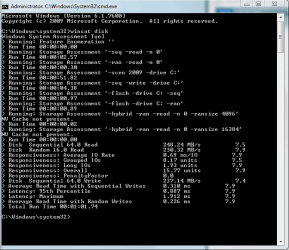
I'd be quite interested to compare your results to some that I have, using the winsat Windows command like this:

1. Open an elevated Command Prompt
- Start Orb, type cmd in search box, righ-click on cmd and click Open as administrator
2. Type winsat disk
3. Take screencapture of result and upload here.

Regards,
Golden
 

My Computer

Computer type
PC/Desktop
Computer Manufacturer/Model Number
Golden Mk. I.4
OS
Windows 10 Pro x64 ; Xubuntu x64
CPU
Intel i7 860 @ 2.80 GHz O/C'ed to 4.0GHz
Motherboard
Gigabyte P55A-UD3R Rev.1. Award BIOS F13
Memory
16GB Corsair Vengance DDR3 @ 661 MHz Dual Channel (9-9-9-24)
Graphics Card(s)
EVGA NVidia GTX 560 1024MB
Sound Card
Realtek Integrated
Monitor(s) Displays
Dual Samsung SyncMaster 2494HS
Screen Resolution
1920*1080 and 1920*1080
Hard Drives
1*Samsung 840 EVO 120GB SSD;
1*OCZ Vertex 2 60GB SSD;
2*Samsung F3 SpinPoint 1TB in RAID0;
1*Samsung F1 SpinPoint 1TB;
2*Western Digital 1TB External USB 3.0
1*Western Digital 500GB External USB 3.0
1*Seagate 500GB External USB 2.0
PSU
Thermaltake ToughPower QFan 750W
Case
Thermaltake Element S VK60001W2Z
Cooling
Corsair H60 Water Cooling, 2*230mm and 2*80mm case fans
Keyboard
Logitech G110
Mouse
Logitech MX518
Hey, at least it works :)

I'd be quite interested to compare your results to some that I have, using the winsat Windows command like this:

1. Open an elevated Command Prompt
- Start Orb, type cmd in search box, righ-click on cmd and click Open as administrator
2. Type winsat disk
3. Take screencapture of result and upload here.

Regards,
Golden

Here ya go! Would you mind posting yours as well for comparison? Thanks
 

Attachments

  • winsat disk.jpg
    winsat disk.jpg
    65 KB · Views: 235

My Computer

Computer type
PC/Desktop
Computer Manufacturer/Model Number
Misfits Machine!
OS
Windows 7 Professional
CPU
Intel i7 4790K
Motherboard
ASUS Maximus VII Hero
Memory
32 GB G.SKILL TridentX F3-2400C10D-GTX
Graphics Card(s)
EVGA GeForce GTX 980 Superclocked X2 SLI
Sound Card
Teac UD-501 External USB DAC/Bryston BHA-1 Headphone Amp
Monitor(s) Displays
BenQ BL3200PT
Screen Resolution
2560x1440
Hard Drives
Samsung 850 Pro Series 256GB SSD
Western Digital Red 3TB
PSU
Corsair RM Series Gold 1000W
Case
Corsair Carbide Series Air 540
Cooling
Corsair Hydro Series H110
Keyboard
Corsair Vengeance K70 - Cherry MX Red/Razer Orbweaver Elite
Mouse
Razer DeathAdder Chroma
This is my single ACHI connected OCZ Vertex2 60GB SSD, and my 2 x Samsung F3 SpinPoints in RAID0.

See any significant difference between RAID'ing and not RAID'ing SSD's?
 

Attachments

  • SSD.png
    SSD.png
    15.6 KB · Views: 248
  • HDD.png
    HDD.png
    17.1 KB · Views: 225

My Computer

Computer type
PC/Desktop
Computer Manufacturer/Model Number
Golden Mk. I.4
OS
Windows 10 Pro x64 ; Xubuntu x64
CPU
Intel i7 860 @ 2.80 GHz O/C'ed to 4.0GHz
Motherboard
Gigabyte P55A-UD3R Rev.1. Award BIOS F13
Memory
16GB Corsair Vengance DDR3 @ 661 MHz Dual Channel (9-9-9-24)
Graphics Card(s)
EVGA NVidia GTX 560 1024MB
Sound Card
Realtek Integrated
Monitor(s) Displays
Dual Samsung SyncMaster 2494HS
Screen Resolution
1920*1080 and 1920*1080
Hard Drives
1*Samsung 840 EVO 120GB SSD;
1*OCZ Vertex 2 60GB SSD;
2*Samsung F3 SpinPoint 1TB in RAID0;
1*Samsung F1 SpinPoint 1TB;
2*Western Digital 1TB External USB 3.0
1*Western Digital 500GB External USB 3.0
1*Seagate 500GB External USB 2.0
PSU
Thermaltake ToughPower QFan 750W
Case
Thermaltake Element S VK60001W2Z
Cooling
Corsair H60 Water Cooling, 2*230mm and 2*80mm case fans
Keyboard
Logitech G110
Mouse
Logitech MX518
Not sure what I’m comparing here. By the looks of it a SSD in RAID0 compared to a 7200 HDD in RAID0 shows a difference across the board. However, a SSD in RAID0 compared to a SSD in AHCI shows advantages in both formats. But we are comparing 2 different drives so it’s hard to tell the advantages of either or. I ran that test on a WD 1TB Green drive…too pitiful to even post! But it works great as a storage/backup drive.

My post was inquiring if AHCI could be turned on with a RAID config only because of all the SSD tweaks I’ve read on the net. Some do mention RAID but don’t go into detail…hence my confusion. I’m quite happy with my RAID0 set up. It performs like anything I’ve ever experienced on a PC. Im not too concerned about the risk everyone goes on about with RAID0. IMO a single drive in non RAID is at the same amount of risk as 2 drives in RAID0. You lose one you lose it all!!!! Besides I do perform frequent backups of my files.

Thanks again.
 

My Computer

Computer type
PC/Desktop
Computer Manufacturer/Model Number
Misfits Machine!
OS
Windows 7 Professional
CPU
Intel i7 4790K
Motherboard
ASUS Maximus VII Hero
Memory
32 GB G.SKILL TridentX F3-2400C10D-GTX
Graphics Card(s)
EVGA GeForce GTX 980 Superclocked X2 SLI
Sound Card
Teac UD-501 External USB DAC/Bryston BHA-1 Headphone Amp
Monitor(s) Displays
BenQ BL3200PT
Screen Resolution
2560x1440
Hard Drives
Samsung 850 Pro Series 256GB SSD
Western Digital Red 3TB
PSU
Corsair RM Series Gold 1000W
Case
Corsair Carbide Series Air 540
Cooling
Corsair Hydro Series H110
Keyboard
Corsair Vengeance K70 - Cherry MX Red/Razer Orbweaver Elite
Mouse
Razer DeathAdder Chroma
Hi,

Sorry, I seem to have caused confusion by posting my mechanical RAID setup in addition to my SSD setup - ignore that RAID one for the time being. I put it up there for an additional comparison.

You should be comparing your SSD result (your image) against my SSD result (my first image) - I don't see a significant difference between them.

You have a choice of either ACHI or RAID, but not both.

Regards,
Golden
 

My Computer

Computer type
PC/Desktop
Computer Manufacturer/Model Number
Golden Mk. I.4
OS
Windows 10 Pro x64 ; Xubuntu x64
CPU
Intel i7 860 @ 2.80 GHz O/C'ed to 4.0GHz
Motherboard
Gigabyte P55A-UD3R Rev.1. Award BIOS F13
Memory
16GB Corsair Vengance DDR3 @ 661 MHz Dual Channel (9-9-9-24)
Graphics Card(s)
EVGA NVidia GTX 560 1024MB
Sound Card
Realtek Integrated
Monitor(s) Displays
Dual Samsung SyncMaster 2494HS
Screen Resolution
1920*1080 and 1920*1080
Hard Drives
1*Samsung 840 EVO 120GB SSD;
1*OCZ Vertex 2 60GB SSD;
2*Samsung F3 SpinPoint 1TB in RAID0;
1*Samsung F1 SpinPoint 1TB;
2*Western Digital 1TB External USB 3.0
1*Western Digital 500GB External USB 3.0
1*Seagate 500GB External USB 2.0
PSU
Thermaltake ToughPower QFan 750W
Case
Thermaltake Element S VK60001W2Z
Cooling
Corsair H60 Water Cooling, 2*230mm and 2*80mm case fans
Keyboard
Logitech G110
Mouse
Logitech MX518
Raid vs ahci

I Have two PCs that I build using the same Circuit board Asus P5K-E one of em Raid0 the other AHCI, the RAID 0 is much faster for editing video and working with large files, I always backup my system. epically the RAID 0 !!
 

My Computer

Computer Manufacturer/Model Number
own build
OS
Windows 7 Home Premium 64bit
CPU
Intel(R) core(TM) 26600 @ 2.40GHz
Motherboard
Asus P5K-E
Memory
4.00GB
Graphics Card(s)
1 GB
Back
Top