Raid stopped working after restart

scsuperman2000

New member
Local time
2:10 PM
Messages
7
ok i restarted my computer and for some reason my raid drive reads as unformatted how do i correct this and preferably without losing the data. did a registry restore and a memory scan with no affect.
 

My Computer

Computer Manufacturer/Model Number
personal
OS
6_1_7600 64bit
CPU
amd phenom II x6 1090t 3.21ghz
Motherboard
asus crosshair IV extreme
Memory
8gb data not on hand
Graphics Card(s)
2x evga gtx470
Monitor(s) Displays
dynex 40"
Does you mother board have an option for ahci/raid? Maybe it decided to go ahci. If so change it back to raid.

My board has a habit of changing things around when I try to tweak it too much.
 

My Computer

Computer Manufacturer/Model Number
Custom
OS
Windows 7 Pro x64 -- PCLinuxOS KDE4 FullMonty 2011
CPU
i7-875k @ Turbo - 7,6,5,5 - 3.6ghz
Motherboard
Asus P7P55D-E Deluxe
Memory
Corsair CMD8GX3M4A1600C8 8gb
Graphics Card(s)
Asus EAH5850 DirectCU/2DIS/1GD5
Sound Card
On Board
Monitor(s) Displays
Samsung SyncMaster T220 - Panasonic VT30a 50"
Screen Resolution
1680x1050 -
Hard Drives
Corsair Force 3 SSD 120GB x 2 ::
WD VelociRaptor 150GB WD1500HLFS x 2
PSU
Corsair HX-850 Power Supply
Case
Coolmaster HAF 932
Cooling
Corsair H50
Keyboard
Logitech Wireless MK700
Mouse
Logitech Wireless MX620
Internet Speed
Good enough for now
Other Info
Voip. Insanely cheap phone calls.
A very good suggestion by Hipster Doofus.

When after a gap of about four months I switched on my Desktop, Windows would not start and my RAID was lost. When I checked I found that the motherboard battery was dead and this has changed the bios settings. I changed the battery and set my BIOS to RAID and then I was back in business.
 

My Computer

OS
Windows 7 Home Premium 32 bit
the bios look different like an update was done i am trying a very slow recovery program i found irecover i am hoping it helps other wise back into the bios to confirm as you said
 

My Computer

Computer Manufacturer/Model Number
personal
OS
6_1_7600 64bit
CPU
amd phenom II x6 1090t 3.21ghz
Motherboard
asus crosshair IV extreme
Memory
8gb data not on hand
Graphics Card(s)
2x evga gtx470
Monitor(s) Displays
dynex 40"
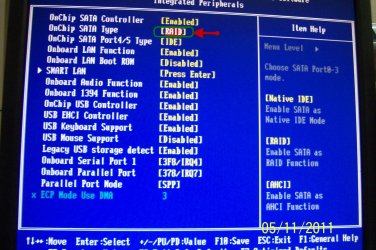
While I am not sure whther this - checking RAID selection in BIOS - would help in your case, anyone who has lost RAID all of a sudden, should always check this setting first.

In my BIOS it it is under Integrated Peripherals.

Biosraid.jpg
 

My Computer

OS
Windows 7 Home Premium 32 bit
the bios look different like an update was done i am trying a very slow recovery program i found irecover i am hoping it helps other wise back into the bios to confirm as you said

That does look like your BIOS was inadvertently reset due to a dead CMOS battery. I agree with jumanji - why run a recovery if you can check the RAID setting first?
 

My Computer

Computer type
PC/Desktop
Computer Manufacturer/Model Number
Custom-built
OS
Windows 7 Professional SP1 32-bit
CPU
Intel Core 2 Duo E6600 2.4GHz
Motherboard
Asus PL5D2
Memory
4GB DDR2-667 (4x1GB in dual-channel config)
Graphics Card(s)
nVidia GeForce 9800 GT
Sound Card
Creative X-Fi XtremeMusic
Monitor(s) Displays
Acer P236H
Screen Resolution
1920x1200 (DVI)
Hard Drives
OCZ SSD Vertex Plus 60GB SATA (Firmware 3.55), 64MB cache
Hitachi HD321KJ SATA, 320GB, 7200rpm, 16MB cache
PSU
Antec TruePower 2.0
Case
Cooler Master Centurion
Cooling
Too many fans
Keyboard
Standard
Mouse
Microsoft wireless optical mouse
Internet Speed
AT&T U-verse (18mbit/sec)
Antivirus
Microsoft Security Essentials
Browser
Firefox
Other Info
Other devices:
Compaq CQ-60 laptop
Google Nexus 7 (2012) tablet
Nvidia SHIELD tablet (US/LTE)
Hardkernel ODROID-XU single-board computer (Samsung Exynos 5420)
it was already 2 hours in by the time i got a reply just being cautious i guess if the program can fix it great otherwise i wait a day and a half to try the other way. better safe then sorry and best not to waste time invested
 

My Computer

Computer Manufacturer/Model Number
personal
OS
6_1_7600 64bit
CPU
amd phenom II x6 1090t 3.21ghz
Motherboard
asus crosshair IV extreme
Memory
8gb data not on hand
Graphics Card(s)
2x evga gtx470
Monitor(s) Displays
dynex 40"
Yes, scsuperman2000, I do agree that since you have already started the recovery process you shouldn't break it.

My post in fact is meant for others, so that they do not straight away rush to any other process. :)

Sometimes we do tend to overlook simple things.
 

My Computer

OS
Windows 7 Home Premium 32 bit
was able to find the bios section and it had reset i guess it did an update. wasted 4 days trying irecover wouldn't recommend it after my experience. thank you for your help with my issue. oh and all 4tb plus of data intact.
 

My Computer

Computer Manufacturer/Model Number
personal
OS
6_1_7600 64bit
CPU
amd phenom II x6 1090t 3.21ghz
Motherboard
asus crosshair IV extreme
Memory
8gb data not on hand
Graphics Card(s)
2x evga gtx470
Monitor(s) Displays
dynex 40"
Back
Top