RAM Being Used Up when Computer on Idle?

RunOrDie

New member
Member
VIP
Local time
1:34 AM
Messages
140
Hello fellow members,

I was wondering why my roughly 2.8GB of RAM is being used when my laptop is on Idle? I have a total of 8GB of RAM installed so I don't know what's using all of this memory. When I watch a video online on Google Chrome, I am using 3.38GB worth of RAM!!

When I go to Task Manager, I see I have around 120 Processes but with CPU activity of 0-1%. Also, my Cached RAM is 4513 and my Available RAM is 4636 while I only get around 0-100MB of Free RAM.

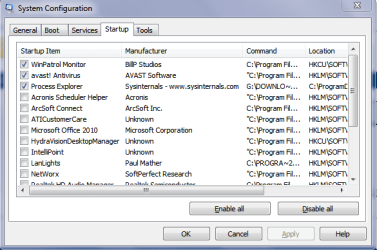
I looked at my Startup programs and they are are important, so I don't know I have so many Processes though.
 

My Computer My Computer

At a glance

Windows 7 Ultimate x64Intel i7-3520M8GBNvidia GeForce GT 540M
Computer type
Laptop
Computer Manufacturer/Model Number
Sony Vaio S Premium
OS
Windows 7 Ultimate x64
CPU
Intel i7-3520M
Memory
8GB
Graphics Card(s)
Nvidia GeForce GT 540M
Monitor(s) Displays
Dell UP2414Q (2), Dell S2740L (2) and Viewsonic VX2260WM (1)
Screen Resolution
1600x900
Hard Drives
Crucial M4 256GB SSD and Western Digital 5400RPM 500GB HDD
Keyboard
Logitech K810
Mouse
Logitech Performance MX
I'd remove the Google Chrome spyware and try Firefox or IE10 to see if the problem persists.

If so then work through the Troubleshooting Steps for Windows 7 starting with testing hardware, establishing a Clean Boot, using Process Explorer to drill down, and all other steps.

What Startup programs are so important they must start with Win7? Only your AV needs to start, unless you use Sync, Gadgets or Stickies. All others are freeloaders and can spy on you.

I'd also use a free lightweight AV like Microsoft Security Essentials at least until you know if a bloatware AV is the problem.
 
I don't think you have a problem with how much RAM is being used.
Let Windows manage your RAM to make best use of it.

I think you have a problem with 120 processes running, but that's just my opinion.
I usually have less than 50 processes running, and I keep my startup programs to the minimum ... and check msconfig periodically to make sure something didn't sneak in there on me :)
 

My Computer My Computer

At a glance

Multi-Boot W7_Pro_x64 W8.1_Pro_x64 W10_Pro_x6...AMD Athlon II x4 6206GB GSkill DDR2 800AMD 4670 GPU + AMD 4200 IGP
Computer type
PC/Desktop
Computer Manufacturer/Model Number
home built
OS
Multi-Boot W7_Pro_x64 W8.1_Pro_x64 W10_Pro_x64 +Linux_VMs +Chromium_VM
CPU
AMD Athlon II x4 620
Motherboard
Gigabyte GA-MA785G-UD3H
Memory
6GB GSkill DDR2 800
Graphics Card(s)
AMD 4670 GPU + AMD 4200 IGP
Sound Card
on board Realtek ALC889A
Monitor(s) Displays
RCA 40" LCD TV, Insignia 32" LCD TV, HP 15" LCD monitor
Screen Resolution
1680 x 1050
Hard Drives
OCZ Vertex 3 120GB,
Samsung F3 1TB (3),
Several others - WD, Seagate, Hitachi, ...
PSU
Corsair 500 W
Case
Rosewill mid tower
Cooling
CM 90mm rifle
Keyboard
Gyration wireless, Logitech wireless, Dell USB wired
Mouse
Gyration wireless, Logitech wireless, V7 USB wired
Internet Speed
Spectrum - 100Mbps D / 10Mbps U
Antivirus
Avast, MBAM3, EMET, WinPatrol
Browser
Pale Moon, Firefox, IE
Other Info
2 multi-boot PC's
Mainly HTPC/Office/Gen purpose (no gaming).
Trendnet USB KVM.
LG DVD burner/Blue Ray Player.
Tray system for removable SATA backup drives.

Not currently OCd, under-volted.
I use Hybrid sleep, rarely re-boot or shutdown.

Hauppauge HD-PVR, Avermedia PCIe TV Tuner, Hauppauge PCI TV Tuner.
Having a low value for free memory is a good thing, zero being the ideal. Having a high value for cached memory is also a good thing. Free memory is wasted memory and modern operating systems hate waste.

The idea that free memory is necessary for good performance is hopelessly outdated and has no place in a modern OS.
 

My Computer My Computer

At a glance

Windows 7 Pro 64 bitXeon W35208 GBNvidia Geforce 210
Computer type
PC/Desktop
Computer Manufacturer/Model Number
HP
OS
Windows 7 Pro 64 bit
CPU
Xeon W3520
Memory
8 GB
Graphics Card(s)
Nvidia Geforce 210
Ok so I have disabled several of my Startups (only have 15 enabled on Startup) but I am still at 107 Processes.

I do have AVG AV and that program alone has 5 Processes. Do I really need AVG Scanning Module, AVG Identity Protection Services, AVG User Interface, AVG Watchdog Service?

I also have 18 Processes that are all svchost.exe...
 

My Computer My Computer

At a glance

Windows 7 Ultimate x64Intel i7-3520M8GBNvidia GeForce GT 540M
Computer type
Laptop
Computer Manufacturer/Model Number
Sony Vaio S Premium
OS
Windows 7 Ultimate x64
CPU
Intel i7-3520M
Memory
8GB
Graphics Card(s)
Nvidia GeForce GT 540M
Monitor(s) Displays
Dell UP2414Q (2), Dell S2740L (2) and Viewsonic VX2260WM (1)
Screen Resolution
1600x900
Hard Drives
Crucial M4 256GB SSD and Western Digital 5400RPM 500GB HDD
Keyboard
Logitech K810
Mouse
Logitech Performance MX
When I just finished telling you that you only need your AV to start with Win7, why would you report back that you only have 15 items in the startup list? Are we in some kind of XP timewarp here, or do you want help for WIn7? You have 15 freeloaders on your Startup and wonder why you have a slow boot?

AVG is bloatware, not recommended here, and the source of regular problems.

I would uninstall AVG and replace it as already suggested with MSE.

AVG is such bloatware it requires a special tool (like a virus) to uninstall it: AVG uninstaller | Download tools and utilities
 
The number of processes running doesn't really mean very much. It is what they are doing that is important. In your case the answer seems clear - not very much. With a low CPU usage at idle and 4513 MB memory available I don't think you have a problem.
 

My Computer My Computer

At a glance

Windows 7 Pro 64 bitXeon W35208 GBNvidia Geforce 210
Computer type
PC/Desktop
Computer Manufacturer/Model Number
HP
OS
Windows 7 Pro 64 bit
CPU
Xeon W3520
Memory
8 GB
Graphics Card(s)
Nvidia Geforce 210
Gregrocker,

I uninstalled MSE, because even from their site, it recommends to download a different AV.

Furthermore, I require more than just my AV on startup. I need my Synaptics, wireless etc.
 

My Computer My Computer

At a glance

Windows 7 Ultimate x64Intel i7-3520M8GBNvidia GeForce GT 540M
Computer type
Laptop
Computer Manufacturer/Model Number
Sony Vaio S Premium
OS
Windows 7 Ultimate x64
CPU
Intel i7-3520M
Memory
8GB
Graphics Card(s)
Nvidia GeForce GT 540M
Monitor(s) Displays
Dell UP2414Q (2), Dell S2740L (2) and Viewsonic VX2260WM (1)
Screen Resolution
1600x900
Hard Drives
Crucial M4 256GB SSD and Western Digital 5400RPM 500GB HDD
Keyboard
Logitech K810
Mouse
Logitech Performance MX

My Computer My Computer

At a glance

Multi-Boot W7_Pro_x64 W8.1_Pro_x64 W10_Pro_x6...AMD Athlon II x4 6206GB GSkill DDR2 800AMD 4670 GPU + AMD 4200 IGP
Computer type
PC/Desktop
Computer Manufacturer/Model Number
home built
OS
Multi-Boot W7_Pro_x64 W8.1_Pro_x64 W10_Pro_x64 +Linux_VMs +Chromium_VM
CPU
AMD Athlon II x4 620
Motherboard
Gigabyte GA-MA785G-UD3H
Memory
6GB GSkill DDR2 800
Graphics Card(s)
AMD 4670 GPU + AMD 4200 IGP
Sound Card
on board Realtek ALC889A
Monitor(s) Displays
RCA 40" LCD TV, Insignia 32" LCD TV, HP 15" LCD monitor
Screen Resolution
1680 x 1050
Hard Drives
OCZ Vertex 3 120GB,
Samsung F3 1TB (3),
Several others - WD, Seagate, Hitachi, ...
PSU
Corsair 500 W
Case
Rosewill mid tower
Cooling
CM 90mm rifle
Keyboard
Gyration wireless, Logitech wireless, Dell USB wired
Mouse
Gyration wireless, Logitech wireless, V7 USB wired
Internet Speed
Spectrum - 100Mbps D / 10Mbps U
Antivirus
Avast, MBAM3, EMET, WinPatrol
Browser
Pale Moon, Firefox, IE
Other Info
2 multi-boot PC's
Mainly HTPC/Office/Gen purpose (no gaming).
Trendnet USB KVM.
LG DVD burner/Blue Ray Player.
Tray system for removable SATA backup drives.

Not currently OCd, under-volted.
I use Hybrid sleep, rarely re-boot or shutdown.

Hauppauge HD-PVR, Avermedia PCIe TV Tuner, Hauppauge PCI TV Tuner.
Touchpad software is only needed if you have a scroll pad or tap to click which will not work without it, but most will so I would disable it to test it as the software can cause problems.

Wireless software is the worst of the duplicate utilties which interfere and cause issues with Win7, which has a perfectly lean built-in wireless utility. I would turn off the wireless crapware and enable Win7 wireless from the System tray. Some require uninstall before releasing the stranglehold on Win7.

Feel free to ask about any others so we can reassure you further, based on tens of thousands of installs we've helped with here?
 
Back
Top