Solved RAM issue on 7 Professional 64 bit

ShadowFalls

New member
Member
Local time
8:45 PM
Messages
68
Location
Holt, Fl
I recently updated my Realtek audio driver and found that upon restart I could no get any display. After disassembling and reassembling my computer several times I finally got it up and running again but with a major performance issue. Out of the 16gb of installed memory i have installed on my motherboard it use to be that 12 were detected by windows and 8 were usable......now it says 12 detected and 2 usable. Being a 3d modeler and video editor this is unacceptable. Can any one help?

msconfig has all ready been checked.
 

Attachments
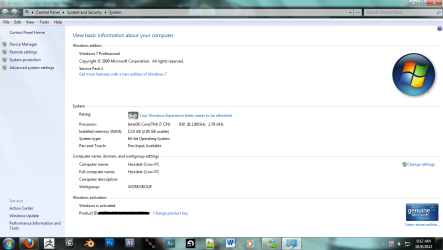
  • Untitled.png
    Untitled.png
    83.2 KB · Views: 36

My Computer My Computer

Computer type
PC/Desktop
Computer Manufacturer/Model Number
Custom PC
OS
Microsoft Windows 7 Professional 64-bit 7601 Multiprocessor Free Service Pack 1
CPU
Intel(R) Core(TM) i7-3970x CPU @ 3.50GHz 4.00Ghz
Motherboard
Gigabyte Technology X79-UP4
Memory
Total: 12.00 GB
Graphics Card(s)
NVIDIA/EVGA GeForce GTX 690
Sound Card
motherboard
Monitor(s) Displays
Acer HN274Hbmiiid Black
Screen Resolution
1920 x 1080 x 32 bits (4294967296 colors) @ 120 Hz
Hard Drives
X2 Western Digital WD Black WD4001FAEX 4TB
PSU
Corsair AX1200
Case
coolermaster HAFX
Cooling
Intel Thermal Solution RTS2011LC
Keyboard
RAZER DeathStalker
Mouse
Wacom Tablet Intuos 4
Internet Speed
DSL 256k
Antivirus
Kaspersky
Browser
Firefox
I recently updated my Realtek audio driver and found that upon restart I could no get any display. After disassembling and reassembling my computer several times I finally got it up and running again but with a major performance issue. Out of the 16gb of installed memory i have installed on my motherboard it use to be that 12 were detected by windows and 8 were usable......now it says 12 detected and 2 usable. Being a 3d modeler and video editor this is unacceptable. Can any one help?

msconfig has all ready been checked.

So you've gone to msconfig, boot, and advanced options to check it isn't set to a certain amount of memory? Have you also checked your bios to make sure it's not only allowing so much as well?
 

My Computer My Computer

Computer type
PC/Desktop
Computer Manufacturer/Model Number
Custom Built
OS
MS Windows 7 Professional 64-bit SP1
CPU
Intel(R) Core(TM) i5-2400 CPU @ 3.10GHz
Motherboard
Asus P8Z77-V LK
Memory
G.SKILL Ares 8GB (2x4GB)
Graphics Card(s)
EVGA nVidia GeForce GTX 760 Superclocked
Sound Card
Realtek High Definition Audio
Monitor(s) Displays
ASUS VN247 24" 1ms
Screen Resolution
1920x1080
Hard Drives
Mushkin Chronos 120GB SSD (OS), 1TB Seagate HDD (Data)
PSU
XFX Pro Series 850w P1-850B-BEFX
Case
Corsair Obsidian 750D
Cooling
Corsair H100i (cpu) and case fans
Keyboard
Corsair Vengeance K70
Mouse
Corsair Vengeance M60
Internet Speed
1.14 MB/s (9.6 mbps)
Browser
Google Chrome

My Computer My Computer

Computer type
PC/Desktop
Computer Manufacturer/Model Number
Home made Desktop
OS
Windows 10 Pro. 64/ version 1709 Windows 7 Pro/64
CPU
Intel i7-6800K @ 4.3
Motherboard
ASUS X-99 Deluxe II
Memory
Corsair Platinum 16 gig @2400
Graphics Card(s)
EVGA GTX 1070 OC
Monitor(s) Displays
Asus 27" LED LCD/VE278Q
Screen Resolution
1920-1080 or 1280-720 HDMI
Hard Drives
INTEL SSD 730-240 Gb Sata 3.0/
PSU
EVGA Platium 1200W
Case
Phanteks Luxe Tempered Glass 8 fans/ one radiator
Cooling
XSPC/ Water Cooled CPU
Keyboard
Das 4 Professional
Mouse
Logitech M705/MX Anywhere 2-S
Internet Speed
100 mbits
Antivirus
Microsoft Security Essentials/ Malwarebytes Premium 3.0/ SAS
Browser
I.E. 11 default/Firefox/ ISP Time Warner Cable/Spectrum
Other Info
LG BluRay Burner/
Sound system-KLipsch-THX/
Icy Dock ssd Hot Swap bays.
My motherboard doesn't give the option to limit memory or any other options associated with ram for that matter. I detailed my specs better..
 

My Computer My Computer

Computer type
PC/Desktop
Computer Manufacturer/Model Number
Custom PC
OS
Microsoft Windows 7 Professional 64-bit 7601 Multiprocessor Free Service Pack 1
CPU
Intel(R) Core(TM) i7-3970x CPU @ 3.50GHz 4.00Ghz
Motherboard
Gigabyte Technology X79-UP4
Memory
Total: 12.00 GB
Graphics Card(s)
NVIDIA/EVGA GeForce GTX 690
Sound Card
motherboard
Monitor(s) Displays
Acer HN274Hbmiiid Black
Screen Resolution
1920 x 1080 x 32 bits (4294967296 colors) @ 120 Hz
Hard Drives
X2 Western Digital WD Black WD4001FAEX 4TB
PSU
Corsair AX1200
Case
coolermaster HAFX
Cooling
Intel Thermal Solution RTS2011LC
Keyboard
RAZER DeathStalker
Mouse
Wacom Tablet Intuos 4
Internet Speed
DSL 256k
Antivirus
Kaspersky
Browser
Firefox
How much ram is indicated in the Bios?
Did you install your ram as per motherboard directions.
Your motherboard has more setting than most people will know how to use.
But for now don't mess with them. Leave them a default (Auto).
Just make sure your ram is seated properly and the little clips on each end are engaged properly. I would like to see more specs. on your ram. Look at mine.
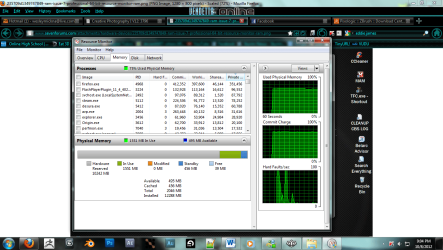
Then go to Resource Monitor and upload this.
Resource Monitor RAM.PNG
 

My Computer My Computer

Computer type
PC/Desktop
Computer Manufacturer/Model Number
Home made Desktop
OS
Windows 10 Pro. 64/ version 1709 Windows 7 Pro/64
CPU
Intel i7-6800K @ 4.3
Motherboard
ASUS X-99 Deluxe II
Memory
Corsair Platinum 16 gig @2400
Graphics Card(s)
EVGA GTX 1070 OC
Monitor(s) Displays
Asus 27" LED LCD/VE278Q
Screen Resolution
1920-1080 or 1280-720 HDMI
Hard Drives
INTEL SSD 730-240 Gb Sata 3.0/
PSU
EVGA Platium 1200W
Case
Phanteks Luxe Tempered Glass 8 fans/ one radiator
Cooling
XSPC/ Water Cooled CPU
Keyboard
Das 4 Professional
Mouse
Logitech M705/MX Anywhere 2-S
Internet Speed
100 mbits
Antivirus
Microsoft Security Essentials/ Malwarebytes Premium 3.0/ SAS
Browser
I.E. 11 default/Firefox/ ISP Time Warner Cable/Spectrum
Other Info
LG BluRay Burner/
Sound system-KLipsch-THX/
Icy Dock ssd Hot Swap bays.
How much ram is indicated in the Bios?
Did you install your ram as per motherboard directions.
Your motherboard has more setting than most people will know how to use.
But for now don't mess with them. Leave them a default (Auto).
Just make sure your ram is seated properly and the little clips on each end are engaged properly. I would like to see more specs. on your ram. Look at mine.
Then go to Resource Monitor and upload this.View attachment 235709


hmmm... i'm gonna take an educated guess and say i have way to much hardware reserved memory
 

Attachments

  • Untitled.png
    Untitled.png
    135.1 KB · Views: 24

My Computer My Computer

Computer type
PC/Desktop
Computer Manufacturer/Model Number
Custom PC
OS
Microsoft Windows 7 Professional 64-bit 7601 Multiprocessor Free Service Pack 1
CPU
Intel(R) Core(TM) i7-3970x CPU @ 3.50GHz 4.00Ghz
Motherboard
Gigabyte Technology X79-UP4
Memory
Total: 12.00 GB
Graphics Card(s)
NVIDIA/EVGA GeForce GTX 690
Sound Card
motherboard
Monitor(s) Displays
Acer HN274Hbmiiid Black
Screen Resolution
1920 x 1080 x 32 bits (4294967296 colors) @ 120 Hz
Hard Drives
X2 Western Digital WD Black WD4001FAEX 4TB
PSU
Corsair AX1200
Case
coolermaster HAFX
Cooling
Intel Thermal Solution RTS2011LC
Keyboard
RAZER DeathStalker
Mouse
Wacom Tablet Intuos 4
Internet Speed
DSL 256k
Antivirus
Kaspersky
Browser
Firefox
Yeah, that would be a good guess.

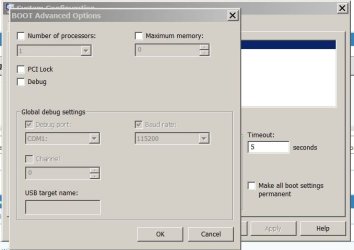
Please check MSCONFIG and make sure the "Maximum Memory" box isn't checked.

Capture.JPG
 

My Computer My Computer

Computer type
PC/Desktop
Computer Manufacturer/Model Number
Custom built by me.
OS
Windows 10 Pro
CPU
Intel Core i7-4770K (3.5Ghz)
Motherboard
Gigabyte G1 Sniper 5 (F10 Bios)
Memory
32 gig Corsair Dominator Platinum (4x8Gig)
Graphics Card(s)
Sapphire Tri-X R9 Fury
Sound Card
Soundblaster ZXR
Monitor(s) Displays
NEC PA242W 24" LCD Monitor
Screen Resolution
1920 x 1200
Hard Drives
Primary - Samsung 850 Pro (512gig), Samsung 840 Pro (256gig), 2TB WD Caviar Black.
PSU
EVGA Supernova 1000 G2
Case
Cooler Master HAF X
Cooling
Corsair H100i with Corsair Air Series SP120 Quiet Fans
Keyboard
Logitech Wireless Wave
Mouse
Logitech Performance MX
Internet Speed
High Speed Cable
Antivirus
Norton Security
Browser
IE11
Other Info
Memory Timings - 1866MHz @ 9-9-9-27-1T @ 1.5 volts
it's not....but i did find an audio driver in device manager that appears to have installed itself several times over. "Nvidia HD Audio"....this problem occurred after i updated my realtek hd audio driver.
 

My Computer My Computer

Computer type
PC/Desktop
Computer Manufacturer/Model Number
Custom PC
OS
Microsoft Windows 7 Professional 64-bit 7601 Multiprocessor Free Service Pack 1
CPU
Intel(R) Core(TM) i7-3970x CPU @ 3.50GHz 4.00Ghz
Motherboard
Gigabyte Technology X79-UP4
Memory
Total: 12.00 GB
Graphics Card(s)
NVIDIA/EVGA GeForce GTX 690
Sound Card
motherboard
Monitor(s) Displays
Acer HN274Hbmiiid Black
Screen Resolution
1920 x 1080 x 32 bits (4294967296 colors) @ 120 Hz
Hard Drives
X2 Western Digital WD Black WD4001FAEX 4TB
PSU
Corsair AX1200
Case
coolermaster HAFX
Cooling
Intel Thermal Solution RTS2011LC
Keyboard
RAZER DeathStalker
Mouse
Wacom Tablet Intuos 4
Internet Speed
DSL 256k
Antivirus
Kaspersky
Browser
Firefox
What I would do if it was my computer would be remove the realtek driver I just installed and reboot and see if Windows 7 will pick it up a different driver. My computer has 4 Nvidia HD Audio so I don't think that is a problem. I have seen this one time before and going by memory it was either the ram or the video card wasn't seated properly.
 

My Computer My Computer

Computer type
PC/Desktop
Computer Manufacturer/Model Number
Home made Desktop
OS
Windows 10 Pro. 64/ version 1709 Windows 7 Pro/64
CPU
Intel i7-6800K @ 4.3
Motherboard
ASUS X-99 Deluxe II
Memory
Corsair Platinum 16 gig @2400
Graphics Card(s)
EVGA GTX 1070 OC
Monitor(s) Displays
Asus 27" LED LCD/VE278Q
Screen Resolution
1920-1080 or 1280-720 HDMI
Hard Drives
INTEL SSD 730-240 Gb Sata 3.0/
PSU
EVGA Platium 1200W
Case
Phanteks Luxe Tempered Glass 8 fans/ one radiator
Cooling
XSPC/ Water Cooled CPU
Keyboard
Das 4 Professional
Mouse
Logitech M705/MX Anywhere 2-S
Internet Speed
100 mbits
Antivirus
Microsoft Security Essentials/ Malwarebytes Premium 3.0/ SAS
Browser
I.E. 11 default/Firefox/ ISP Time Warner Cable/Spectrum
Other Info
LG BluRay Burner/
Sound system-KLipsch-THX/
Icy Dock ssd Hot Swap bays.
didn't work...i took extra cation in making sure my ram was all installed properly.....i'll double check my video card but i doubt it
 

My Computer My Computer

Computer type
PC/Desktop
Computer Manufacturer/Model Number
Custom PC
OS
Microsoft Windows 7 Professional 64-bit 7601 Multiprocessor Free Service Pack 1
CPU
Intel(R) Core(TM) i7-3970x CPU @ 3.50GHz 4.00Ghz
Motherboard
Gigabyte Technology X79-UP4
Memory
Total: 12.00 GB
Graphics Card(s)
NVIDIA/EVGA GeForce GTX 690
Sound Card
motherboard
Monitor(s) Displays
Acer HN274Hbmiiid Black
Screen Resolution
1920 x 1080 x 32 bits (4294967296 colors) @ 120 Hz
Hard Drives
X2 Western Digital WD Black WD4001FAEX 4TB
PSU
Corsair AX1200
Case
coolermaster HAFX
Cooling
Intel Thermal Solution RTS2011LC
Keyboard
RAZER DeathStalker
Mouse
Wacom Tablet Intuos 4
Internet Speed
DSL 256k
Antivirus
Kaspersky
Browser
Firefox
Those drivers (or driver issue) isn't going to cause the RAM issue you're experiencing. Yeah you want to fix it, but that's not likely going to solve the RAM issue.

Also since Windows (properties page) show 12gig of RAM installed that means the system recognizes the 12 gig of RAM, but for some reason has it allocated differently. You may have to check your BIOS settings. Also does your system have a built in video card?
 

My Computer My Computer

Computer type
PC/Desktop
Computer Manufacturer/Model Number
Custom built by me.
OS
Windows 10 Pro
CPU
Intel Core i7-4770K (3.5Ghz)
Motherboard
Gigabyte G1 Sniper 5 (F10 Bios)
Memory
32 gig Corsair Dominator Platinum (4x8Gig)
Graphics Card(s)
Sapphire Tri-X R9 Fury
Sound Card
Soundblaster ZXR
Monitor(s) Displays
NEC PA242W 24" LCD Monitor
Screen Resolution
1920 x 1200
Hard Drives
Primary - Samsung 850 Pro (512gig), Samsung 840 Pro (256gig), 2TB WD Caviar Black.
PSU
EVGA Supernova 1000 G2
Case
Cooler Master HAF X
Cooling
Corsair H100i with Corsair Air Series SP120 Quiet Fans
Keyboard
Logitech Wireless Wave
Mouse
Logitech Performance MX
Internet Speed
High Speed Cable
Antivirus
Norton Security
Browser
IE11
Other Info
Memory Timings - 1866MHz @ 9-9-9-27-1T @ 1.5 volts
if you're asking if my motherboard has onboard video, then the answer is no. I have to use additional hardware (in this case the gtx 580) for my gpu
 

My Computer My Computer

Computer type
PC/Desktop
Computer Manufacturer/Model Number
Custom PC
OS
Microsoft Windows 7 Professional 64-bit 7601 Multiprocessor Free Service Pack 1
CPU
Intel(R) Core(TM) i7-3970x CPU @ 3.50GHz 4.00Ghz
Motherboard
Gigabyte Technology X79-UP4
Memory
Total: 12.00 GB
Graphics Card(s)
NVIDIA/EVGA GeForce GTX 690
Sound Card
motherboard
Monitor(s) Displays
Acer HN274Hbmiiid Black
Screen Resolution
1920 x 1080 x 32 bits (4294967296 colors) @ 120 Hz
Hard Drives
X2 Western Digital WD Black WD4001FAEX 4TB
PSU
Corsair AX1200
Case
coolermaster HAFX
Cooling
Intel Thermal Solution RTS2011LC
Keyboard
RAZER DeathStalker
Mouse
Wacom Tablet Intuos 4
Internet Speed
DSL 256k
Antivirus
Kaspersky
Browser
Firefox
Yeah I see you have a older i7 system like me, I've got an i7-950 vs your 930.

Anyway I noticed your WEI needs refreshing, you might give that a try first to clear that issue. Though I don't think it'll help, stranger things have happened so it "might" resolve the memory issue, I doubt it, but...

- Also, how long has this system been like this?
- Did you just install more memory?
- How many dimms are installed?
 

My Computer My Computer

Computer type
PC/Desktop
Computer Manufacturer/Model Number
Custom built by me.
OS
Windows 10 Pro
CPU
Intel Core i7-4770K (3.5Ghz)
Motherboard
Gigabyte G1 Sniper 5 (F10 Bios)
Memory
32 gig Corsair Dominator Platinum (4x8Gig)
Graphics Card(s)
Sapphire Tri-X R9 Fury
Sound Card
Soundblaster ZXR
Monitor(s) Displays
NEC PA242W 24" LCD Monitor
Screen Resolution
1920 x 1200
Hard Drives
Primary - Samsung 850 Pro (512gig), Samsung 840 Pro (256gig), 2TB WD Caviar Black.
PSU
EVGA Supernova 1000 G2
Case
Cooler Master HAF X
Cooling
Corsair H100i with Corsair Air Series SP120 Quiet Fans
Keyboard
Logitech Wireless Wave
Mouse
Logitech Performance MX
Internet Speed
High Speed Cable
Antivirus
Norton Security
Browser
IE11
Other Info
Memory Timings - 1866MHz @ 9-9-9-27-1T @ 1.5 volts
your starting to use terms i'm unfamiliar with but i'll give it my best shot....I have 4 total ram sticks on my motherboard. Each are 4gb in size. My system (both firmware and os) only detect 3 of the sticks. My system has only been like this for a day and i have not made any hardware changes. new score is 5.5
 

My Computer My Computer

Computer type
PC/Desktop
Computer Manufacturer/Model Number
Custom PC
OS
Microsoft Windows 7 Professional 64-bit 7601 Multiprocessor Free Service Pack 1
CPU
Intel(R) Core(TM) i7-3970x CPU @ 3.50GHz 4.00Ghz
Motherboard
Gigabyte Technology X79-UP4
Memory
Total: 12.00 GB
Graphics Card(s)
NVIDIA/EVGA GeForce GTX 690
Sound Card
motherboard
Monitor(s) Displays
Acer HN274Hbmiiid Black
Screen Resolution
1920 x 1080 x 32 bits (4294967296 colors) @ 120 Hz
Hard Drives
X2 Western Digital WD Black WD4001FAEX 4TB
PSU
Corsair AX1200
Case
coolermaster HAFX
Cooling
Intel Thermal Solution RTS2011LC
Keyboard
RAZER DeathStalker
Mouse
Wacom Tablet Intuos 4
Internet Speed
DSL 256k
Antivirus
Kaspersky
Browser
Firefox
your starting to use terms i'm unfamiliar with but i'll give it my best shot....I have 4 total ram sticks on my motherboard. Each are 4gb in size. My system (both firmware and os) only detect 3 of the sticks. My system has only been like this for a day and i have not made any hardware changes. new score is 5.5

Not sure what you mean here "My system (both firmware and os) only detect 3 of the sticks" but if your system is only detecting 3 out of 4 memory sticks (dimms) than that's a problem right there, and one that needs to be fixed right away.

Other than that, you may need to remove and re-insert the memory sticks. You might also read your manual for your mother board to insure you have the sticks correctly installed.
 

My Computer My Computer

Computer type
PC/Desktop
Computer Manufacturer/Model Number
Custom built by me.
OS
Windows 10 Pro
CPU
Intel Core i7-4770K (3.5Ghz)
Motherboard
Gigabyte G1 Sniper 5 (F10 Bios)
Memory
32 gig Corsair Dominator Platinum (4x8Gig)
Graphics Card(s)
Sapphire Tri-X R9 Fury
Sound Card
Soundblaster ZXR
Monitor(s) Displays
NEC PA242W 24" LCD Monitor
Screen Resolution
1920 x 1200
Hard Drives
Primary - Samsung 850 Pro (512gig), Samsung 840 Pro (256gig), 2TB WD Caviar Black.
PSU
EVGA Supernova 1000 G2
Case
Cooler Master HAF X
Cooling
Corsair H100i with Corsair Air Series SP120 Quiet Fans
Keyboard
Logitech Wireless Wave
Mouse
Logitech Performance MX
Internet Speed
High Speed Cable
Antivirus
Norton Security
Browser
IE11
Other Info
Memory Timings - 1866MHz @ 9-9-9-27-1T @ 1.5 volts
the next step for me to do in troubleshooting requires a shutdown which im going to hold off on till tomorrow.
 

My Computer My Computer

Computer type
PC/Desktop
Computer Manufacturer/Model Number
Custom PC
OS
Microsoft Windows 7 Professional 64-bit 7601 Multiprocessor Free Service Pack 1
CPU
Intel(R) Core(TM) i7-3970x CPU @ 3.50GHz 4.00Ghz
Motherboard
Gigabyte Technology X79-UP4
Memory
Total: 12.00 GB
Graphics Card(s)
NVIDIA/EVGA GeForce GTX 690
Sound Card
motherboard
Monitor(s) Displays
Acer HN274Hbmiiid Black
Screen Resolution
1920 x 1080 x 32 bits (4294967296 colors) @ 120 Hz
Hard Drives
X2 Western Digital WD Black WD4001FAEX 4TB
PSU
Corsair AX1200
Case
coolermaster HAFX
Cooling
Intel Thermal Solution RTS2011LC
Keyboard
RAZER DeathStalker
Mouse
Wacom Tablet Intuos 4
Internet Speed
DSL 256k
Antivirus
Kaspersky
Browser
Firefox
Well let us know.

Later.
 

My Computer My Computer

Computer type
PC/Desktop
Computer Manufacturer/Model Number
Custom built by me.
OS
Windows 10 Pro
CPU
Intel Core i7-4770K (3.5Ghz)
Motherboard
Gigabyte G1 Sniper 5 (F10 Bios)
Memory
32 gig Corsair Dominator Platinum (4x8Gig)
Graphics Card(s)
Sapphire Tri-X R9 Fury
Sound Card
Soundblaster ZXR
Monitor(s) Displays
NEC PA242W 24" LCD Monitor
Screen Resolution
1920 x 1200
Hard Drives
Primary - Samsung 850 Pro (512gig), Samsung 840 Pro (256gig), 2TB WD Caviar Black.
PSU
EVGA Supernova 1000 G2
Case
Cooler Master HAF X
Cooling
Corsair H100i with Corsair Air Series SP120 Quiet Fans
Keyboard
Logitech Wireless Wave
Mouse
Logitech Performance MX
Internet Speed
High Speed Cable
Antivirus
Norton Security
Browser
IE11
Other Info
Memory Timings - 1866MHz @ 9-9-9-27-1T @ 1.5 volts
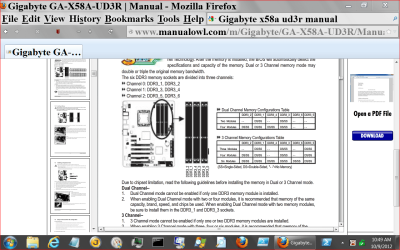
Your motherboard is triple channel capable. Install 3 sticks of ram as per your motherboard manual. The location of your ram might be causing your high hardware reading in Resource Monitor. Some times the ram slot closes to the cpu is not the one to start withunless you fill all the slots. I say again use your motherboard manual. Pay attention to your ram slot colors.
Page 16 of your manual.
gone------------.PNG
 

My Computer My Computer

Computer type
PC/Desktop
Computer Manufacturer/Model Number
Home made Desktop
OS
Windows 10 Pro. 64/ version 1709 Windows 7 Pro/64
CPU
Intel i7-6800K @ 4.3
Motherboard
ASUS X-99 Deluxe II
Memory
Corsair Platinum 16 gig @2400
Graphics Card(s)
EVGA GTX 1070 OC
Monitor(s) Displays
Asus 27" LED LCD/VE278Q
Screen Resolution
1920-1080 or 1280-720 HDMI
Hard Drives
INTEL SSD 730-240 Gb Sata 3.0/
PSU
EVGA Platium 1200W
Case
Phanteks Luxe Tempered Glass 8 fans/ one radiator
Cooling
XSPC/ Water Cooled CPU
Keyboard
Das 4 Professional
Mouse
Logitech M705/MX Anywhere 2-S
Internet Speed
100 mbits
Antivirus
Microsoft Security Essentials/ Malwarebytes Premium 3.0/ SAS
Browser
I.E. 11 default/Firefox/ ISP Time Warner Cable/Spectrum
Other Info
LG BluRay Burner/
Sound system-KLipsch-THX/
Icy Dock ssd Hot Swap bays.
Can actually use 4 memory dimms...

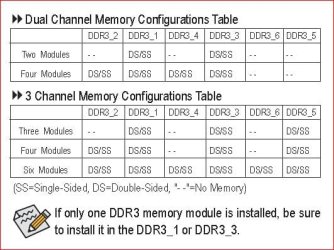
You can actually run 4 dimms (memory sticks) with that board as well (BTW I have the Gigabyte GA-X58A-UD5), you just need to make sure they are in the correct slots per the diagram for either duel or triple channel mode. Same page (16)

UD3 Memory Configuration Diagram.JPG

http://download.gigabyte.us/FileList/Manual/mb_manual_ga-x58a-ud3r_v2.0_e.pdf

Personally I would just go with 3 slots but....

Anyway why he has 10gig of memory in system reserve is still baffling though. The fix could be as simple as reseating/re-configuring the memory though.

BTW there is no memory remapping feature on that board (or mine).
 

My Computer My Computer

Computer type
PC/Desktop
Computer Manufacturer/Model Number
Custom built by me.
OS
Windows 10 Pro
CPU
Intel Core i7-4770K (3.5Ghz)
Motherboard
Gigabyte G1 Sniper 5 (F10 Bios)
Memory
32 gig Corsair Dominator Platinum (4x8Gig)
Graphics Card(s)
Sapphire Tri-X R9 Fury
Sound Card
Soundblaster ZXR
Monitor(s) Displays
NEC PA242W 24" LCD Monitor
Screen Resolution
1920 x 1200
Hard Drives
Primary - Samsung 850 Pro (512gig), Samsung 840 Pro (256gig), 2TB WD Caviar Black.
PSU
EVGA Supernova 1000 G2
Case
Cooler Master HAF X
Cooling
Corsair H100i with Corsair Air Series SP120 Quiet Fans
Keyboard
Logitech Wireless Wave
Mouse
Logitech Performance MX
Internet Speed
High Speed Cable
Antivirus
Norton Security
Browser
IE11
Other Info
Memory Timings - 1866MHz @ 9-9-9-27-1T @ 1.5 volts
I get it now....didn't know there was such a thing as double sided ram

there is one thing im not clear on though....what's the difference between dual and 3 channel
 

My Computer My Computer

Computer type
PC/Desktop
Computer Manufacturer/Model Number
Custom PC
OS
Microsoft Windows 7 Professional 64-bit 7601 Multiprocessor Free Service Pack 1
CPU
Intel(R) Core(TM) i7-3970x CPU @ 3.50GHz 4.00Ghz
Motherboard
Gigabyte Technology X79-UP4
Memory
Total: 12.00 GB
Graphics Card(s)
NVIDIA/EVGA GeForce GTX 690
Sound Card
motherboard
Monitor(s) Displays
Acer HN274Hbmiiid Black
Screen Resolution
1920 x 1080 x 32 bits (4294967296 colors) @ 120 Hz
Hard Drives
X2 Western Digital WD Black WD4001FAEX 4TB
PSU
Corsair AX1200
Case
coolermaster HAFX
Cooling
Intel Thermal Solution RTS2011LC
Keyboard
RAZER DeathStalker
Mouse
Wacom Tablet Intuos 4
Internet Speed
DSL 256k
Antivirus
Kaspersky
Browser
Firefox
Back
Top