Solved RAM issues in msconfig, HELP

MROOD

New member
Local time
2:43 AM
Messages
9
Hi

I have windows 7 64bit,
Well I found out that ACT OF WAR cannot be played with windows7 that is over 2 GB of ram. On here I have 6Gigs
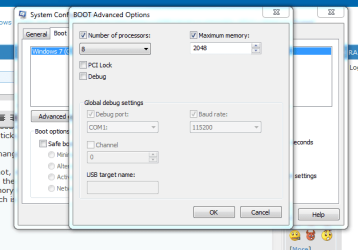
So I found a solution to this problem by going to my system config,Boot,
Advanced options. There I had brought my maximum memory from 6144 which
was what it came with to 2000 which it is at now. And I applied it, an
restarted my comp, and wonderfully my game worked.

Now that I am no longer playing the game I wanted to
bring the maximum memory back up to 6144 again. But every time I do change it through the ms config option, it just goes back to 2000 after saving and re-starting the computer. I have tried it 5 times, I select the maximum memory 6144 and save and restart but it kepps on reverting back to 2000 ?So my question is/ Is this a problem? and how can I bring it back up to
the original 6144 or 6 gigs of ram ? memory(if i can)

Thank you
 

My Computer

Computer Manufacturer/Model Number
my own build
OS
windows ultimate x64
CPU
i7
Motherboard
gigbyte UD7
Memory
6gb ocz
Graphics Card(s)
5970 x fire
Sound Card
creative x fi
Monitor(s) Displays
24inch ben q
Hard Drives
3.5tb
PSU
850 watt xfx
Case
coolermaster cosmos sport
Cooling
air standard
Hi

Now that I am no longer playing the game I wanted to
bring the maximum memory back up to 6144 again. But every time I do change it through the ms config option, it just goes back to 2000 after saving and re-starting the computer. I have tried it 5 times, I select the maximum memory 6144 and save and restart but it kepps on reverting back to 2000 ?So my question is/ Is this a problem? and how can I bring it back up to
the original 6144 or 6 gigs of ram ? memory(if i can)

Thank you

Probably the simplest way, considering you built this yourself, is to take the extra 4 Gigs of RAM out of the machine, and then reboot. Then shutdown, replace the RAM and reboot again. Normally Windows will then find the RAM.

Remove any RAM limit configurations before you do this.

Regards....Mike Connor
 

My Computer

OS
Several, including Windows 7 x64 Ultimate
Hi

Now that I am no longer playing the game I wanted to
bring the maximum memory back up to 6144 again. But every time I do change it through the ms config option, it just goes back to 2000 after saving and re-starting the computer. I have tried it 5 times, I select the maximum memory 6144 and save and restart but it kepps on reverting back to 2000 ?So my question is/ Is this a problem? and how can I bring it back up to
the original 6144 or 6 gigs of ram ? memory(if i can)

Thank you

Probably the simplest way, considering you built this yourself, is to take the extra 4 Gigs of RAM out of the machine, and then reboot. Then shutdown, replace the RAM and reboot again. Normally Windows will then find the RAM.

Remove any RAM limit configurations before you do this.

Regards....Mike Connor

Thanks, how do i remove the ram configs, as I dont think I have a ram configs?
 

My Computer

Computer Manufacturer/Model Number
my own build
OS
windows ultimate x64
CPU
i7
Motherboard
gigbyte UD7
Memory
6gb ocz
Graphics Card(s)
5970 x fire
Sound Card
creative x fi
Monitor(s) Displays
24inch ben q
Hard Drives
3.5tb
PSU
850 watt xfx
Case
coolermaster cosmos sport
Cooling
air standard
Thanks, how do i remove the ram configs, as I dont think I have a ram configs?

I don't know what you set up to limit the ram usage in the first place. Whatever you did to limit RAM usage, you will have to remove.

Once there are no constraints, then Windows should once again use all the RAM it needs, up to the full installed amount.

Regards....Mike Connor
 

My Computer

OS
Several, including Windows 7 x64 Ultimate
im gonna try this right now, also i dint config any ram settings, all it was just insert the 3 sticks, 3x2 and away I go,,,

I,ll get back to u in 10 mins

cheers
 

My Computer

Computer Manufacturer/Model Number
my own build
OS
windows ultimate x64
CPU
i7
Motherboard
gigbyte UD7
Memory
6gb ocz
Graphics Card(s)
5970 x fire
Sound Card
creative x fi
Monitor(s) Displays
24inch ben q
Hard Drives
3.5tb
PSU
850 watt xfx
Case
coolermaster cosmos sport
Cooling
air standard
im gonna try this right now, also i dint config any ram settings, all it was just insert the 3 sticks, 3x2 and away I go,,,

I,ll get back to u in 10 mins

cheers


Thanks, how do i remove the ram configs, as I dont think I have a ram configs?

I don't know what you set up to limit the ram usage in the first place. Whatever you did to limit RAM usage, you will have to remove.

Once there are no constraints, then Windows should once again use all the RAM it needs, up to the full installed amount.

Regards....Mike Connor
 

My Computer

Computer Manufacturer/Model Number
my own build
OS
windows ultimate x64
CPU
i7
Motherboard
gigbyte UD7
Memory
6gb ocz
Graphics Card(s)
5970 x fire
Sound Card
creative x fi
Monitor(s) Displays
24inch ben q
Hard Drives
3.5tb
PSU
850 watt xfx
Case
coolermaster cosmos sport
Cooling
air standard
This is a new one for me. I never heard of a program that wouldn't run because you have to much ram. My understanding is that programs use the ram they need and no more. They will argue when they ask for more ram and it isn't there.
 

My Computer

Computer type
PC/Desktop
Computer Manufacturer/Model Number
Home made Desktop
OS
Windows 10 Pro. 64/ version 1709 Windows 7 Pro/64
CPU
Intel i7-6800K @ 4.3
Motherboard
ASUS X-99 Deluxe II
Memory
Corsair Platinum 16 gig @2400
Graphics Card(s)
EVGA GTX 1070 OC
Monitor(s) Displays
Asus 27" LED LCD/VE278Q
Screen Resolution
1920-1080 or 1280-720 HDMI
Hard Drives
INTEL SSD 730-240 Gb Sata 3.0/
PSU
EVGA Platium 1200W
Case
Phanteks Luxe Tempered Glass 8 fans/ one radiator
Cooling
XSPC/ Water Cooled CPU
Keyboard
Das 4 Professional
Mouse
Logitech M705/MX Anywhere 2-S
Internet Speed
100 mbits
Antivirus
Microsoft Security Essentials/ Malwarebytes Premium 3.0/ SAS
Browser
I.E. 11 default/Firefox/ ISP Time Warner Cable/Spectrum
Other Info
LG BluRay Burner/
Sound system-KLipsch-THX/
Icy Dock ssd Hot Swap bays.
Uncheck the box "Maximum Memory";


Regards....Mike Connor
 

My Computer

OS
Several, including Windows 7 x64 Ultimate
Hi Mike

I just took out 2x sticks of ram (4gig) restarted the comp and under system specs the comp realised there was only 2 gig left, so I switched it off and re-applied the remaining 2x sticks, now totaling 6gb ram !

nothing has changed, it still shows 2000 gb ram under msconfig,

That screenshot, shows that I should uncheck the tick box ?
Well I have at the moment the box is ticked, (checked) as I thought if the maximium memory box was checked then the PC would use the maximum memory available? which is 6gb ?

Ive tried to attach a screenshot like you have !


Also I seen somewhere once you reduce your ram in the smconfig place ten to revert back to what it was before, you have to go and do somthing in the ini fole or folders ? I dont know if this is right.


Uncheck the box "Maximum Memory";


Regards....Mike Connor
 

Attachments

  • Capture.PNG
    Capture.PNG
    18.2 KB · Views: 40

My Computer

Computer Manufacturer/Model Number
my own build
OS
windows ultimate x64
CPU
i7
Motherboard
gigbyte UD7
Memory
6gb ocz
Graphics Card(s)
5970 x fire
Sound Card
creative x fi
Monitor(s) Displays
24inch ben q
Hard Drives
3.5tb
PSU
850 watt xfx
Case
coolermaster cosmos sport
Cooling
air standard
This is a new one for me. I never heard of a program that wouldn't run because you have to much ram. My understanding is that programs use the ram they need and no more. They will argue when they ask for more ram and it isn't there.


I thought that too, but the screenshot ive attached below shows my pc is only using 2gb instead of the 6gb, and now im trying to revert back to the 6gb by selecting the advance options in the msconfig section, im gonna try inchecking the maximum memory bit and see what happens !
 

My Computer

Computer Manufacturer/Model Number
my own build
OS
windows ultimate x64
CPU
i7
Motherboard
gigbyte UD7
Memory
6gb ocz
Graphics Card(s)
5970 x fire
Sound Card
creative x fi
Monitor(s) Displays
24inch ben q
Hard Drives
3.5tb
PSU
850 watt xfx
Case
coolermaster cosmos sport
Cooling
air standard
Do this. Uncheck "Number of processors" and "Maximum memory" those two checkboxes should be unchecked.
NEVER CHANGE THEM AGAIN!
 

My Computer

Computer type
PC/Desktop
Computer Manufacturer/Model Number
Alienware Aurora ALX R4
OS
Windows 10 Pro (x64)
CPU
Intel Core i7-3930K (3.2GHz - 4.5GHz)
Motherboard
Alienware Aurora-R4 x79
Memory
4x Samsung 4GB PC3-12800 DDR3 (16GB 1600MHz)
Graphics Card(s)
Nvidia Geforce GTX 690
Sound Card
SteelSeries Siberia Elite
Monitor(s) Displays
Dell UltraSharp U3011
Screen Resolution
2560x1600
Hard Drives
Samsung 850 Pro 256 GB, Seagate 1TB Desktop Hybrid HDD, 2x Western Digital 4TB Green HDD
PSU
875W Some Dell PSU <.<
Case
Alienware Aurora ALX
Cooling
Custom Liquid Cooling (EK CPU & GPU blocks) dual EK 480RAD
Keyboard
Logitech G710+ Mechanical
Mouse
Logitech G700s
Internet Speed
Verizon Fios (50 mbps average)
Other Info
Server: Intel NUC D54250WYK: i5-4250U, 16GB, 256 GB mSATA, Windows Server 2012 R2
Uncheck the box, and the RAM is no longer limited. I don't know of any other way to constrain memory usage in Windows 7. That is not to say that there are none, I just don't know about them.

If you remove the constraint in that box, ( box set to zero (0) ), and uncheck the box, Windows should automatically start using the full RAM complement at its disposal again.

Occasionally the system can "hang" at a certain preset memory usage. Presumably due to a registry setting. I don't know where the registry setting is. ( Or any ini files concerning it ).

On the few occasions where I have had to fiddle with this, unchecking the box, shutting down the machine, and then removing and replacing the RAM sticks has solved the problem. The only people I know of who play around with this much are gamers. I have no idea why it works on some games.

To be perfectly honest, I have no idea why these options are available, or what they might be used for.

Under normal circumstances you should never check these boxes.

Uncheck the "Number of processors" box as well.

Regards....Mike Connor
 

My Computer

OS
Several, including Windows 7 x64 Ultimate
thanks, it looks like the isue is now fixed, a full 6gb is shown and the ram rescource monitor is looking as it was before the change, damn I thought clicking the maximum tick box was selecting all the ram, I was wrong !

cheers for the help :D


Hi Mike

I just took out 2x sticks of ram (4gig) restarted the comp and under system specs the comp realised there was only 2 gig left, so I switched it off and re-applied the remaining 2x sticks, now totaling 6gb ram !

nothing has changed, it still shows 2000 gb ram under msconfig,

That screenshot, shows that I should uncheck the tick box ?
Well I have at the moment the box is ticked, (checked) as I thought if the maximium memory box was checked then the PC would use the maximum memory available? which is 6gb ?

Ive tried to attach a screenshot like you have !


Also I seen somewhere once you reduce your ram in the smconfig place ten to revert back to what it was before, you have to go and do somthing in the ini fole or folders ? I dont know if this is right.


Uncheck the box "Maximum Memory";


Regards....Mike Connor
 

My Computer

Computer Manufacturer/Model Number
my own build
OS
windows ultimate x64
CPU
i7
Motherboard
gigbyte UD7
Memory
6gb ocz
Graphics Card(s)
5970 x fire
Sound Card
creative x fi
Monitor(s) Displays
24inch ben q
Hard Drives
3.5tb
PSU
850 watt xfx
Case
coolermaster cosmos sport
Cooling
air standard
Do this. Uncheck "Number of processors" and "Maximum memory" those two checkboxes should be unchecked.
NEVER CHANGE THEM AGAIN!


yes sir, all fixed now, wont be messing around with these settings any more !:D
 

My Computer

Computer Manufacturer/Model Number
my own build
OS
windows ultimate x64
CPU
i7
Motherboard
gigbyte UD7
Memory
6gb ocz
Graphics Card(s)
5970 x fire
Sound Card
creative x fi
Monitor(s) Displays
24inch ben q
Hard Drives
3.5tb
PSU
850 watt xfx
Case
coolermaster cosmos sport
Cooling
air standard
thanks, it looks like the isue is now fixed, a full 6gb is shown and the ram rescource monitor is looking as it was before the change, damn I thought clicking the maximum tick box was selecting all the ram, I was wrong !

cheers for the help :D

My pleasure.

Regards....Mike Connor
 

My Computer

OS
Several, including Windows 7 x64 Ultimate
Well until now I have never looked there before. Mine are both unchecked.
 

My Computer

Computer type
PC/Desktop
Computer Manufacturer/Model Number
Home made Desktop
OS
Windows 10 Pro. 64/ version 1709 Windows 7 Pro/64
CPU
Intel i7-6800K @ 4.3
Motherboard
ASUS X-99 Deluxe II
Memory
Corsair Platinum 16 gig @2400
Graphics Card(s)
EVGA GTX 1070 OC
Monitor(s) Displays
Asus 27" LED LCD/VE278Q
Screen Resolution
1920-1080 or 1280-720 HDMI
Hard Drives
INTEL SSD 730-240 Gb Sata 3.0/
PSU
EVGA Platium 1200W
Case
Phanteks Luxe Tempered Glass 8 fans/ one radiator
Cooling
XSPC/ Water Cooled CPU
Keyboard
Das 4 Professional
Mouse
Logitech M705/MX Anywhere 2-S
Internet Speed
100 mbits
Antivirus
Microsoft Security Essentials/ Malwarebytes Premium 3.0/ SAS
Browser
I.E. 11 default/Firefox/ ISP Time Warner Cable/Spectrum
Other Info
LG BluRay Burner/
Sound system-KLipsch-THX/
Icy Dock ssd Hot Swap bays.
Back
Top