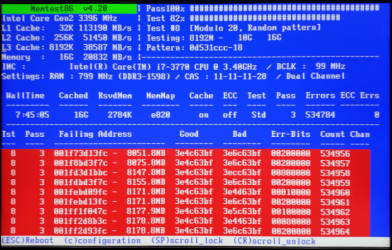
RAM - Test with Memtest86+

How to Test and Diagnose RAM Issues with Memtest86+

Contents


Part 1: Preparing the Media
Method 1: With a USB Memory Stick


1. Download the latest version of the "Auto-installer for USB Key (Win 9x/2k/xp/7)" from this link: Memtest86+ - Advanced Memory Diagnostic Tool


2. Plug in an empty USB key drive. Size is no concern, as the actual files take up 180 KB of space.​

3. Go into the .zip folder you downloaded, and double-click on the .exe file inside.​

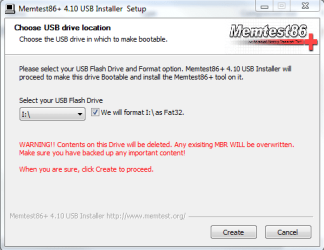
4. Follow the setup utility. To reduce the risk of problems, it is advised to format the drive.​

installer.PNG


Method 2: With a CD

1. Download the latest version of the "Precompiled Boot ISO (.zip) from this link: Memtest86+ - Advanced Memory Diagnostic Tool

You want the "Precompiled Boot ISO (.zip)".​

2. Open the .zip file you downloaded, and then drag the .ISO file inside onto the Desktop.​


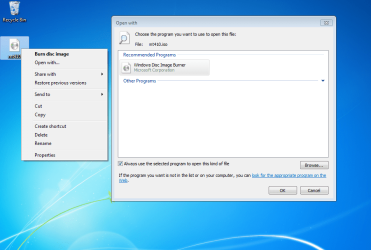
3. Right-click on the ISO, and select Open with>Windows Disc Image Burner.open with.PNG
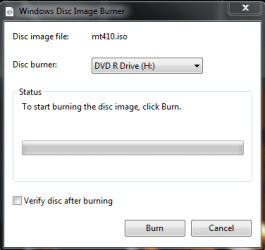
4. Insert a blank CD into the CD drive, and make sure the correct Disc burner is selected.abt2burn.PNG
5. Click on "Burn".

Now the CD is ready to use.


Part 2: Testing

1. With the CD in the drive, or the USB key inserted, reboot your computer. If Memtest does not automatically boot, go into the BIOS and change the CD drive or USB drive to be the first to boot.​

2. Memtest will immediately start testing as soon as it boots. No attendance is needed.​


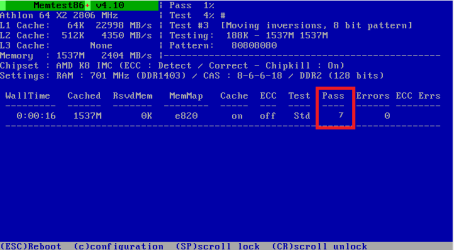
3. Let it run until at least 8 passes are completed, or errors are found (whichever comes first). The longer you run it, the better.Capture.PNG
Seven passes will take several hours, depending on your amount of RAM. It is advised to leave it running overnight.


Part 3: If You Have Errors:


The goal is to test all the RAM sticks and all the motherboard slots.​


Check your motherboard manual to ensure the RAM sticks are in the recommended motherboard slots. Some motherboards have very specific slots required for the number of RAM sticks installed.​


If you get errors, stop the test and continue with the next step.​


user108345_pic7120_1390783159.png


1. Remove all but one stick of RAM from your computer (this will be RAM stick #1), and run Memtest86 again, for 7 passes.​
Be sure to note the RAM stick, use a piece of tape with a number, and note the motherboard slot.
If this stick passes the test then go to step #3.


2. If RAM stick #1 has errors, repeat the test with RAM stick #2 in the same motherboard slot.​
If RAM stick #2 passes, this indicates that RAM stick #1 may be bad. If you want to be absolutely sure, re-test RAM stick #1 in another known good slot.
If RAM stick #2 has errors, this indicates another possible bad RAM stick, a possible motherboard slot failure or inadequate settings.
3. Test the next stick of RAM (stick #2) in the next motherboard slot.If this RAM stick has errors repeat step #2 using a known good stick if possible, or another stick.
If this RAM stick has no errors and both sticks failed in slot#1, test RAM stick #1 in this slot.
4. If you find a stick that passes the test, test it in all the other motherboard slots.


If Part 2 testing shows errors, and all tests in Part 3 show errors, you will need to test the RAM sticks in another computer and/or test other RAM in your computer to identify the problem.​


In this way, you can identify whether it is a bad stick of RAM, a bad motherboard, or incompatibility between the sticks.​


Thanks to Dave76 for his assistance in this part.​


   Note
While the same concept is completely valid for other operating systems, a different image burner will be needed. A good free program is ImgBurn.


Last edited by a moderator:
Looks good Jon, I tried the USB installer method and was impressed with the ease of the process.
This can easily be put on a USB and removed when no longer needed.

This led to making a USB rescue drive, which quickly led to approximately 400 apps on 1.44GB.
Including the Windows 7 System Repair Disc and MS Sysinternals Suite.
Most of these will never get used but, it's better to have something when needed than have to look for it.

Hi Dave

Im interested in what you have done here.I have about 7-8 1 gig usb sticks with various boot programs on like partition wizard, killdisk, now memtest but its always bothered me that especially in the memest case that it uses only 200kb of space on a 1 gig flash drive.
How do you install more than 1 boot program on 1 flash drive and how does the pc recognise which program you want to use at boot.
I would be very interested in making something along the lines of what you have done.

Danny


Hi Danny,
I am using this:
How to Create the Ultimate Bootable USB Flash Drive
You can add as many ISO programs as you have room for, then edit the loader file to add it to the start list. Works great.

The other one is Liberkey, has a lot of useful apps that come with it, as far as I remember you can't add apps to it, but you can use the free space to store any files you want. I just made a folder for the misc files.


USB doesn'n worked for me either. However, with a rewritable CD the program works. Maybe there is a bug in the latest version of the program or there is some kind of security proram which doesn't allows our machines to boot from an USB. I'm only guessing... :)

Make sure you have your BIOS set to boot from a USB device, there are usually a couple of choices, try them until you find the right one.

Thanks for posting back Dave. Looks like ive got a nice little project on for an easter sunday now.Will have a look at the links you supplied and give it a go.

Thanks again

Danny
 

My Computer

Computer Manufacturer/Model Number
acer aspire 5935g
OS
Windows 7 Home Premium x64 SP1
CPU
intel(R)core(TM)2 duo CPU T6600 @ 2.20GHz
Motherboard
intel gm45/gm47 revision 07
Memory
3 gb ddr3
Graphics Card(s)
ati radeon hd4570/512mb
Monitor(s) Displays
lop156wh2-tle1 15.3 flat
Screen Resolution
1366x768
Hard Drives
OCZ-Agility3 60gig ssd
320gig external hdd
500gig external hdd
Mouse
Optical
Internet Speed
30Mbps Down/30Mbps Up
Your welcome, it's actually pretty easy.

Have to search for the appropriate programs in ISO format.
 

My Computer

Computer type
PC/Desktop
Computer Manufacturer/Model Number
76~2.0
OS
Windows 7 Ult x64 - SP1/ Windows 8 Pro x64
CPU
Intel Core i5-3570K 4.6GHz
Motherboard
Gigabyte GA-Z77X UD3H, f18
Memory
8GB (2X4GB) DDR3 1600 Corsair Vengeance CL8 1.5v
Graphics Card(s)
Sapphire HD 7770 Vapor-X OC 1GB DDR5
Sound Card
Onboard VIA VT2021
Monitor(s) Displays
22" LCD Dell
Screen Resolution
1680x1050
Hard Drives
Samsung 840Pro 128GB SSD,
Seagate Barracuda 500GB SATA2 7200rpm 32MB cache, Seagate Barracuda 1TB SATA2 7200rpm 32MB cache,
PSU
Corsair HX650W
Case
Cooler Master Storm Scout
Cooling
Corsair H80 2x12cm Noctua NF P12 , 2x14cm case fans
Keyboard
Logitech Wave
Mouse
CM Sentinel
Internet Speed
Dismal
Antivirus
Avast
Browser
Opera Next
Other Info
Haswell laptop: HP Envy 17t-j, i7-4700MQ, GeForce 740M 2GB DDR3, 17.3" Full HD 1920x1080, 16GB RAM, Samsung 840 Pro 128GB, 1TB Hitachi 7200 HDD,
Desktop: eSATA ports,
External eSATA Seagate 500GB SATA2 7200rpm,
External WD USB 500GB
Your welcome, it's actually pretty easy.

Have to search for the appropriate programs in ISO format.

Yes got it.All boot programs on 1 USB genius.Thanks mate

Danny
 

My Computer

Computer Manufacturer/Model Number
acer aspire 5935g
OS
Windows 7 Home Premium x64 SP1
CPU
intel(R)core(TM)2 duo CPU T6600 @ 2.20GHz
Motherboard
intel gm45/gm47 revision 07
Memory
3 gb ddr3
Graphics Card(s)
ati radeon hd4570/512mb
Monitor(s) Displays
lop156wh2-tle1 15.3 flat
Screen Resolution
1366x768
Hard Drives
OCZ-Agility3 60gig ssd
320gig external hdd
500gig external hdd
Mouse
Optical
Internet Speed
30Mbps Down/30Mbps Up
Glad it worked for you, it makes a very nice USB flash drive multi tool device.

And :focus: Memtest86+ works on it also.
 

My Computer

Computer type
PC/Desktop
Computer Manufacturer/Model Number
76~2.0
OS
Windows 7 Ult x64 - SP1/ Windows 8 Pro x64
CPU
Intel Core i5-3570K 4.6GHz
Motherboard
Gigabyte GA-Z77X UD3H, f18
Memory
8GB (2X4GB) DDR3 1600 Corsair Vengeance CL8 1.5v
Graphics Card(s)
Sapphire HD 7770 Vapor-X OC 1GB DDR5
Sound Card
Onboard VIA VT2021
Monitor(s) Displays
22" LCD Dell
Screen Resolution
1680x1050
Hard Drives
Samsung 840Pro 128GB SSD,
Seagate Barracuda 500GB SATA2 7200rpm 32MB cache, Seagate Barracuda 1TB SATA2 7200rpm 32MB cache,
PSU
Corsair HX650W
Case
Cooler Master Storm Scout
Cooling
Corsair H80 2x12cm Noctua NF P12 , 2x14cm case fans
Keyboard
Logitech Wave
Mouse
CM Sentinel
Internet Speed
Dismal
Antivirus
Avast
Browser
Opera Next
Other Info
Haswell laptop: HP Envy 17t-j, i7-4700MQ, GeForce 740M 2GB DDR3, 17.3" Full HD 1920x1080, 16GB RAM, Samsung 840 Pro 128GB, 1TB Hitachi 7200 HDD,
Desktop: eSATA ports,
External eSATA Seagate 500GB SATA2 7200rpm,
External WD USB 500GB
This fixed my BSOD.

Best tutorial of all time. I owe you.

Best Regards,
FredeGail
 

My Computer

Computer Manufacturer/Model Number
Brewed
OS
Microsoft Windows 7 Ultimate: x64 (SP1)
CPU
Intel® Core™ i5-2500K Processor
Motherboard
ASUS P8Z68-V PRO
Memory
Kingston DDR3 HyperX 1600MHz 8GB
Graphics Card(s)
ASUS GTX 560 TI DirectCU II 900MHz
Sound Card
Realtek® ALC892 8-Channel High Definition Audio CODEC
Monitor(s) Displays
ACER LCD P246HBD 1920x1080 (24") - Dell 1280x800
Screen Resolution
ACER LCD P246HBD ~ [1920X1080] - DELL ~ [1280x800]
Hard Drives
500 GB WD Caviar SE116 7200rpm SATA2
PSU
Corsair 750W Power Supply
Case
Coolermaster CM Scout
Cooling
Zalman FS-C77 Fatal1ty CPU Cooler
Keyboard
Logitech G15
Mouse
Coolermaster Sentinel Advanced
Internet Speed
[↓ 10 MB/s DL] [↑ 1 MB/s UL]
Other Info
- ROCCAT™ Kave – Solid 5.1 Surround Sound Gaming Headset
- Not overclocking
So glad to hear it FredeGail, thanks for posting an encouraging message!
 

My Computer

Computer Manufacturer/Model Number
Custom
OS
Windows 7 Professional x64
CPU
Intel i7 2600K OC'd @ 4620 MHz
Motherboard
Asus P8Z68-V Pro
Memory
16GB GSkill Sniper 2133 Mhz (4x4GB)
Graphics Card(s)
EVGA GeForce GTX 480 SuperClocked+
Sound Card
Realtek High Definition Audio
Monitor(s) Displays
2x Acer S273HLbmii 27"
Screen Resolution
2 x 1920x1080
Hard Drives
64GB Crucial M4 SSD

Storage: Hitachi 1TB 5400RPM, Samsung 1.5TB 5400RPM
PSU
Corsair HW Series 750w (modular)
Case
Cooler Master HAF 932 Advanced Blue Edition
Cooling
CM Hyper 212+ CPU cooler, 3x 230mm + 1x 140mm case fans
Keyboard
Logitech MK320 (wireless)
Mouse
Logitech MK320 (wireless)
Internet Speed
30 Mb/s : 2 Mb/s
Anytime ;)
 

My Computer

Computer Manufacturer/Model Number
Brewed
OS
Microsoft Windows 7 Ultimate: x64 (SP1)
CPU
Intel® Core™ i5-2500K Processor
Motherboard
ASUS P8Z68-V PRO
Memory
Kingston DDR3 HyperX 1600MHz 8GB
Graphics Card(s)
ASUS GTX 560 TI DirectCU II 900MHz
Sound Card
Realtek® ALC892 8-Channel High Definition Audio CODEC
Monitor(s) Displays
ACER LCD P246HBD 1920x1080 (24") - Dell 1280x800
Screen Resolution
ACER LCD P246HBD ~ [1920X1080] - DELL ~ [1280x800]
Hard Drives
500 GB WD Caviar SE116 7200rpm SATA2
PSU
Corsair 750W Power Supply
Case
Coolermaster CM Scout
Cooling
Zalman FS-C77 Fatal1ty CPU Cooler
Keyboard
Logitech G15
Mouse
Coolermaster Sentinel Advanced
Internet Speed
[↓ 10 MB/s DL] [↑ 1 MB/s UL]
Other Info
- ROCCAT™ Kave – Solid 5.1 Surround Sound Gaming Headset
- Not overclocking
After running the memtest is there a way to pull up past tests, or do you have to see the screen as it finishes? I just ran it for 5 hours, and had a power failure in the building before I could get back to it. Not sure if it logs the data somewhere, but I couldn't find it.

Thanks,
 

My Computer

OS
Win 7 Ultimate x64
CPU
AMD Phenom II X4 970 Black Edition Deneb 3.5GHz Socket AM3
Motherboard
Gigabyte MA770T-UD3
Memory
G.SKILL Ripjaws Series 8GB (2 x 4GB) 240-Pin DDR3 SDRAM DDR
Graphics Card(s)
NVIDIA GeForce 9500 GT
Hello carisch,

Unfortunately, there are no logs generated by Memtest86. The only report given is the one displayed on the screen. I'm afraid you'll have to run the test over again. :(
 

My Computer

Computer Manufacturer/Model Number
Custom
OS
Windows 7 Professional x64
CPU
Intel i7 2600K OC'd @ 4620 MHz
Motherboard
Asus P8Z68-V Pro
Memory
16GB GSkill Sniper 2133 Mhz (4x4GB)
Graphics Card(s)
EVGA GeForce GTX 480 SuperClocked+
Sound Card
Realtek High Definition Audio
Monitor(s) Displays
2x Acer S273HLbmii 27"
Screen Resolution
2 x 1920x1080
Hard Drives
64GB Crucial M4 SSD

Storage: Hitachi 1TB 5400RPM, Samsung 1.5TB 5400RPM
PSU
Corsair HW Series 750w (modular)
Case
Cooler Master HAF 932 Advanced Blue Edition
Cooling
CM Hyper 212+ CPU cooler, 3x 230mm + 1x 140mm case fans
Keyboard
Logitech MK320 (wireless)
Mouse
Logitech MK320 (wireless)
Internet Speed
30 Mb/s : 2 Mb/s
Hi,

I recently began getting BSOD for no apparent reason. I did a total system reset, wiping and formatting all hard drives and even did a CMOS jumper reset and took battery out to reset CMOS. Also, I installed the latest Asus BIOS, which is 0801 for my board.

The BSOD I got initially had the "Page Fault in Nonpaged Area" error. But then when I tried to reinstall Windows it gave me the c000021a BSOD, putting me in a loop to the recovery module, but then failing to be able to anything and restarting, and round and round I went.

Read up and saw it could be RAM issues. I've downloaded the latest Memtest86+, being 4.20 I think. I burnt the iso and loaded up the PC, and as it should it ran straight into Memtest. With all 4 RAM sticks in, it threw up errors immediately. It brought up a total of about 700 errors after 3 trials of 10 passes, all errors in the 3200-3300MB range.

I then followed this tutorial and took all sticks out. I put a single stick back in Bay 1 and ran 10 passes with no errors. Proceeded to this with the other 3 sticks, all using Bay 1. They all returned with no errors at all. This led me to think it must one of the RAM bays that's damaged then.

So I then proceeded to use one of the RAM sticks (as all seem to work fine from previous test) in Bay 2, 3 and 4, running 10 passes on each Bay. All Bays passed with no errors.

I'm now confused as it seems all sticks are error-free and all Bays are error-free. However, when I stick all 4 RAM sticks in again, I get the errors coming up again.

Any ideas???
 

My Computer

Computer Manufacturer/Model Number
Custom
OS
Windows 7 Ultimate 64 bit
CPU
Intel Core 2 Duo E4600 2.4GHz
Motherboard
Asus P5Q SE2
Memory
8GB Crucial Ballistix DDR2 800MHz (4 x 2GB)
Graphics Card(s)
XFX ATi Radeon 5770 1GB
Sound Card
Native Instruments Audio 2 DJ External USB
Monitor(s) Displays
LG 23" 1920x1080p
Hard Drives
Samsung F1 640GB
Samsung F3 2TB
PSU
Generic Model 750W
Case
Achilles
Cooling
Arctic Freezer Pro 7 on CPU and 4 x 12cm Case Fans
Hello Bunford!

It sounds as if there may be an incompatibility between the RAM going on. Did you buy all RAM at the same time? Is it all the same brand, speed, size, and latency? If not, I'd expect that's the problem.

You might also try running Memtest on two sticks; see what results.
 

My Computer

Computer Manufacturer/Model Number
Custom
OS
Windows 7 Professional x64
CPU
Intel i7 2600K OC'd @ 4620 MHz
Motherboard
Asus P8Z68-V Pro
Memory
16GB GSkill Sniper 2133 Mhz (4x4GB)
Graphics Card(s)
EVGA GeForce GTX 480 SuperClocked+
Sound Card
Realtek High Definition Audio
Monitor(s) Displays
2x Acer S273HLbmii 27"
Screen Resolution
2 x 1920x1080
Hard Drives
64GB Crucial M4 SSD

Storage: Hitachi 1TB 5400RPM, Samsung 1.5TB 5400RPM
PSU
Corsair HW Series 750w (modular)
Case
Cooler Master HAF 932 Advanced Blue Edition
Cooling
CM Hyper 212+ CPU cooler, 3x 230mm + 1x 140mm case fans
Keyboard
Logitech MK320 (wireless)
Mouse
Logitech MK320 (wireless)
Internet Speed
30 Mb/s : 2 Mb/s
Hello Bunford,

Usually when you have more than 4GB RAM, 2GB cards or larger, 4 RAM cards, you will need to adjust the RAM settings, most of the time a voltage bump is needed.


Can you download CPUZ and post a snip of the CPU, Mainboard, Memory, and SPD tabs.
For posting the information , enter 'Snipping tool' in the Start button > Search box, hit enter. Select the area you want to post and save to a convenient place.
How to Post a Screenshot in Seven Forums

Have you been checking your temperatures?
Use Speed Fan or Real Temp(for Intel CPU) , run one of these and check the CPU temps when at idle, under load and/or testing.
Let us know the minimum and maximum temps you get.

Go to your BIOS and tell us what the CPU, RAM and the CPU integrated memory controller voltages are.
 

My Computer

Computer type
PC/Desktop
Computer Manufacturer/Model Number
76~2.0
OS
Windows 7 Ult x64 - SP1/ Windows 8 Pro x64
CPU
Intel Core i5-3570K 4.6GHz
Motherboard
Gigabyte GA-Z77X UD3H, f18
Memory
8GB (2X4GB) DDR3 1600 Corsair Vengeance CL8 1.5v
Graphics Card(s)
Sapphire HD 7770 Vapor-X OC 1GB DDR5
Sound Card
Onboard VIA VT2021
Monitor(s) Displays
22" LCD Dell
Screen Resolution
1680x1050
Hard Drives
Samsung 840Pro 128GB SSD,
Seagate Barracuda 500GB SATA2 7200rpm 32MB cache, Seagate Barracuda 1TB SATA2 7200rpm 32MB cache,
PSU
Corsair HX650W
Case
Cooler Master Storm Scout
Cooling
Corsair H80 2x12cm Noctua NF P12 , 2x14cm case fans
Keyboard
Logitech Wave
Mouse
CM Sentinel
Internet Speed
Dismal
Antivirus
Avast
Browser
Opera Next
Other Info
Haswell laptop: HP Envy 17t-j, i7-4700MQ, GeForce 740M 2GB DDR3, 17.3" Full HD 1920x1080, 16GB RAM, Samsung 840 Pro 128GB, 1TB Hitachi 7200 HDD,
Desktop: eSATA ports,
External eSATA Seagate 500GB SATA2 7200rpm,
External WD USB 500GB
Hello Bunford!

It sounds as if there may be an incompatibility between the RAM going on. Did you buy all RAM at the same time? Is it all the same brand, speed, size, and latency? If not, I'd expect that's the problem.

You might also try running Memtest on two sticks; see what results.

All RAM was bought same time, is fine and has been working harmoniously for about 2 years without any issues so it's definitely not incompatability issues.

There was one that was not seated right last night, which I realised after posting. Reseated it and it's done 6 passes so far overnight without any errors.
 

My Computer

Computer Manufacturer/Model Number
Custom
OS
Windows 7 Ultimate 64 bit
CPU
Intel Core 2 Duo E4600 2.4GHz
Motherboard
Asus P5Q SE2
Memory
8GB Crucial Ballistix DDR2 800MHz (4 x 2GB)
Graphics Card(s)
XFX ATi Radeon 5770 1GB
Sound Card
Native Instruments Audio 2 DJ External USB
Monitor(s) Displays
LG 23" 1920x1080p
Hard Drives
Samsung F1 640GB
Samsung F3 2TB
PSU
Generic Model 750W
Case
Achilles
Cooling
Arctic Freezer Pro 7 on CPU and 4 x 12cm Case Fans
Hello Bunford,

Usually when you have more than 4GB RAM, 2GB cards or larger, 4 RAM cards, you will need to adjust the RAM settings, most of the time a voltage bump is needed.


Can you download CPUZ and post a snip of the CPU, Mainboard, Memory, and SPD tabs.
For posting the information , enter 'Snipping tool' in the Start button > Search box, hit enter. Select the area you want to post and save to a convenient place.
How to Post a Screenshot in Seven Forums

Have you been checking your temperatures?
Use Speed Fan or Real Temp(for Intel CPU) , run one of these and check the CPU temps when at idle, under load and/or testing.
Let us know the minimum and maximum temps you get.

Go to your BIOS and tell us what the CPU, RAM and the CPU integrated memory controller voltages are.

Cheers for this. With latest Memtest run having now done 6 passes without errors. I'm planning to trying to reinstall Windows now and see where it gets me. If I BSOD, I'll do all the above and then post back here as I'll be stumped by then :sarc:
 

My Computer

Computer Manufacturer/Model Number
Custom
OS
Windows 7 Ultimate 64 bit
CPU
Intel Core 2 Duo E4600 2.4GHz
Motherboard
Asus P5Q SE2
Memory
8GB Crucial Ballistix DDR2 800MHz (4 x 2GB)
Graphics Card(s)
XFX ATi Radeon 5770 1GB
Sound Card
Native Instruments Audio 2 DJ External USB
Monitor(s) Displays
LG 23" 1920x1080p
Hard Drives
Samsung F1 640GB
Samsung F3 2TB
PSU
Generic Model 750W
Case
Achilles
Cooling
Arctic Freezer Pro 7 on CPU and 4 x 12cm Case Fans
Hello Bunford!

It sounds as if there may be an incompatibility between the RAM going on. Did you buy all RAM at the same time? Is it all the same brand, speed, size, and latency? If not, I'd expect that's the problem.

You might also try running Memtest on two sticks; see what results.

This is what we used to call "Suukaan" problem, (meaning two wives of a person), I had install windows xp every week just bcz of two different ram present.
 

My Computer

Computer Manufacturer/Model Number
Dell Inspiron 6000
OS
Windows 7 Ultimate x32bit
Memory
1Gb
Hard Drives
60Gb Internal
Mouse
Dell
Just a question I got 16gb ram how long time should it take? :P
 

My Computer

OS
Windows 7 Ultimate x64
CPU
Intel i7-960 3,2ghz
Motherboard
ASUS P6T WS PRO, X58,
Memory
Corsair Dominator DHX DDR3 1333MHz 16GB
Graphics Card(s)
XFX GeForce 9800GX2 680M 1GB XXX PCI-E
Sound Card
Creative SB X-Fi Xtreme Gamer Fatal1ty
Monitor(s) Displays
2x 24" lcd
Hard Drives
1x WD 2tb
4x WD 1tb
1x Intel 120gb ssd(can't find it yet)
Case
Antec Twelve Hundred
To do a complete pass might take a couple of hours or more--I'd plan on a morning, or an afternoon at least.

You must do the full test, though. IIRC last time I had problems it was with Test #8--the memory was bad...
 

My Computer

Computer type
Laptop
Computer Manufacturer/Model Number
Dell Latitude E6540 Laptop
OS
Windows 7 Professional 64bit
CPU
Intel Core i7 4600M @ 2.90GHz
Motherboard
Dell Inc. 0CYT5F (SOCKET 0)
Memory
16.0GB Dual-Channel DDR3 @ 797MHz (11-11-11-28)
Graphics Card(s)
Intel HD Graphics 4600 (Dell) 2048MB ATI AMD Radeon HD 8790M
Sound Card
Realtek High Definition Audio
Monitor(s) Displays
HP ZR30w (2560x1600@60Hz)
Hard Drives
256GB LITEONIT LMT-256M6M-41 mm SATA (SSD)
1TB Samsung SSD 860 EVO mSATA SATA (SSD)
2TB USB 3.0 USB Device
115GB SanDisk Ultra Fit USB
Other Info
Multiple Dell E-Port Plus II Port Replicator/Docking Stations 0Y72NH USB 3.0 + 130W AC Adapters
how many passes does it use?
 

My Computer

OS
Windows 7 Ultimate x64
CPU
Intel i7-960 3,2ghz
Motherboard
ASUS P6T WS PRO, X58,
Memory
Corsair Dominator DHX DDR3 1333MHz 16GB
Graphics Card(s)
XFX GeForce 9800GX2 680M 1GB XXX PCI-E
Sound Card
Creative SB X-Fi Xtreme Gamer Fatal1ty
Monitor(s) Displays
2x 24" lcd
Hard Drives
1x WD 2tb
4x WD 1tb
1x Intel 120gb ssd(can't find it yet)
Case
Antec Twelve Hundred
It will keep going forever if you let it, but iirc after one pass (11 tests) it will give you a message at the bottom saying you've completed successfully.

Memtest86.com - Memory Diagnostic
 

My Computer

Computer type
Laptop
Computer Manufacturer/Model Number
Dell Latitude E6540 Laptop
OS
Windows 7 Professional 64bit
CPU
Intel Core i7 4600M @ 2.90GHz
Motherboard
Dell Inc. 0CYT5F (SOCKET 0)
Memory
16.0GB Dual-Channel DDR3 @ 797MHz (11-11-11-28)
Graphics Card(s)
Intel HD Graphics 4600 (Dell) 2048MB ATI AMD Radeon HD 8790M
Sound Card
Realtek High Definition Audio
Monitor(s) Displays
HP ZR30w (2560x1600@60Hz)
Hard Drives
256GB LITEONIT LMT-256M6M-41 mm SATA (SSD)
1TB Samsung SSD 860 EVO mSATA SATA (SSD)
2TB USB 3.0 USB Device
115GB SanDisk Ultra Fit USB
Other Info
Multiple Dell E-Port Plus II Port Replicator/Docking Stations 0Y72NH USB 3.0 + 130W AC Adapters
Back
Top