RAM Usage and performance

koogen

New member
Local time
6:54 PM
Messages
4
Hello there.

I just bought a new pc with the following configs:

Mainboard: MSI X 58 PRO-E
Processor: Core i7 920 @ 2.67 GHZ, 8MB Cache Memory.
RAM ; 2 X 2GB DDR 3(1333) KINGSTON
GRAPHICS; Geforce GT 220 1GB DDR 3
OS; WIN 7 ULTIMATE 64

I use my pc mainly for graphics designing. the problem is that whn idle my ram usage is @ 22/23/26 % varying from time to time.

Should i upgrade to 8 GB to increase performance in term of memory?? coz i run photoshop illustrator and freehand at the same time to perform designing tasks. so i just wanna know wether 4gb is too less for my system or how cabn i optimize my RAM usage?

Thanks
 

My Computer

OS
Windows 7 Ultimate 64
CPU
Core i7 920
Motherboard
MSI X58 PRO-E
Memory
2 X 2GB DDR3 1333
Graphics Card(s)
Geforce GT 220
Monitor(s) Displays
SAMSUNG LCD 24"
Hard Drives
HITACHI 500 GB SATA
Hello there.

I just bought a new pc with the following configs:

Mainboard: MSI X 58 PRO-E
Processor: Core i7 920 @ 2.67 GHZ, 8MB Cache Memory.
RAM ; 2 X 2GB DDR 3(1333) KINGSTON
GRAPHICS; Geforce GT 220 1GB DDR 3
OS; WIN 7 ULTIMATE 64

I use my pc mainly for graphics designing. the problem is that whn idle my ram usage is @ 22/23/26 % varying from time to time.

Should i upgrade to 8 GB to increase performance in term of memory?? coz i run photoshop illustrator and freehand at the same time to perform designing tasks. so i just wanna know wether 4gb is too less for my system or how cabn i optimize my RAM usage?

Thanks


koogen;

I recommend you upgrade to 8 gigs to enable you to better use the graphic design programs you want.

Jan
 

My Computer

Computer Manufacturer/Model Number
LAPTOP. HP Pavilion dv7-4010TX .
OS
Win 7 Ultimate 64-bit. SP1.
CPU
Intel i7 -720QM.[1.6GHz Turbo Boost 2.8GHz. 6MB Cache.]
Memory
8 DDR 3 RAM. 1066MHZ
Graphics Card(s)
ATI 1024 MB. DDR3. Radeon HD5650
Monitor(s) Displays
17.3" High Definition Brightview LCD. LED Backlit.
Screen Resolution
1600 x 900.
Hard Drives
640GB
Case
Laptop / notebook.
Mouse
Logitech Anywhere mouse. MX.
Internet Speed
ADSL [ but too slow ]
Hello,

Are you just paying attention to the RAM statistics in task manager?

If you had no numbers or charts to look at, how would you rate your system performance? Is the machine bogging down?
 

My Computer

Computer Manufacturer/Model Number
Toshiba P300
OS
Windows 8 Pro
CPU
Intel Centrino Dual Core P7450 2.13GHz
Memory
4gb
Graphics Card(s)
ATI Mobility Raedon HD3650
Hard Drives
Toshiba MK3252GSX ATA
Internet Speed
Wish it were faster
Yea the Ram is at 25 % idle....when running photoshop it jumps to 35%!!!!!!! then slowly increases as i work on my designs up to 44%...
 

My Computer

OS
Windows 7 Ultimate 64
CPU
Core i7 920
Motherboard
MSI X58 PRO-E
Memory
2 X 2GB DDR3 1333
Graphics Card(s)
Geforce GT 220
Monitor(s) Displays
SAMSUNG LCD 24"
Hard Drives
HITACHI 500 GB SATA
:huh:

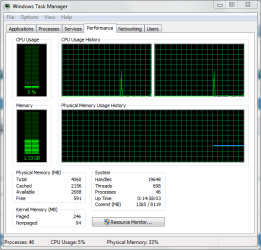
This is my task manager screen shot and all I'm doing is surfing Seven Forums. I am still nowhere close to maxing out 4 gigs of RAM though.

But if you want to double up your RAM and leave 4 gigs of it just standing by then, go for it.
 

Attachments

  • Capture.PNG
    Capture.PNG
    16.5 KB · Views: 69

My Computer

Computer Manufacturer/Model Number
Toshiba P300
OS
Windows 8 Pro
CPU
Intel Centrino Dual Core P7450 2.13GHz
Memory
4gb
Graphics Card(s)
ATI Mobility Raedon HD3650
Hard Drives
Toshiba MK3252GSX ATA
Internet Speed
Wish it were faster
Mainboard: MSI X 58 PRO-E
Processor: Core i7 920 @ 2.67 GHZ, 8MB Cache Memory.
RAM ; 2 X 2GB DDR 3(1333) KINGSTON

I use my pc mainly for graphics designing.

Should i upgrade to 8 GB to increase performance in term of memory?? coz i run photoshop illustrator and freehand at the same time to perform designing tasks. so i just wanna know wether 4gb is too less for my system or how cabn i optimize my

For CAD, you want large amounts of RAM. Since you have an X58 and an i7 LGA 1366, why aren't you using triple channel? To maximize your memory potential, use either 6GB's or 12GB in a triple channel configuration... in other words, fill up all the slots with 2GB dimms.
 

My Computer

OS
7 Ultimate x64
CPU
i5-2500k
Motherboard
Asus P8P67 Pro
Memory
8GB G.Skill Ripjaws X F3-12800CL7D-8GBXH 1866MHz 8-9-8-24
Graphics Card(s)
EVGA GTX 570 SC
Sound Card
X-Fi Titanium Fatality
Monitor(s) Displays
Samsung S27A550H 27" LED
Screen Resolution
1920x1080
Hard Drives
OCZ Vertex 3 120GB.
1TB Samsung F3.
2TB Samsung F4.
PSU
PC Power & Cooling Silencer 760
Case
Lian Li Lancool K62
Cooling
Thermalright Venomous X Black/Scythe S-Flex/Shin-Etsu X23
Keyboard
MS Natural Elite 4000 Ergonomic
Mouse
Logitech G500
Internet Speed
6MB/768
Other Info
Logitech Z-5500 505 watts.
D-Link DGL-4500.
Tripp-Lite Smart Pro 1500.
hmmmm thats interesting...!!! bu still i shud be within budget!!!!
 

My Computer

OS
Windows 7 Ultimate 64
CPU
Core i7 920
Motherboard
MSI X58 PRO-E
Memory
2 X 2GB DDR3 1333
Graphics Card(s)
Geforce GT 220
Monitor(s) Displays
SAMSUNG LCD 24"
Hard Drives
HITACHI 500 GB SATA
Yea the Ram is at 25 % idle....when running photoshop it jumps to 35%!!!!!!! then slowly increases as i work on my designs up to 44%...

Call me thick, but I don't see a problem. The ram is there to be used, and at 44% it is still far from being all used.
 

My Computer

Computer type
PC/Desktop
Computer Manufacturer/Model Number
Me
OS
Win 7 Ultimate x64
CPU
FX-8350 @ 4.6 GHz so far
Motherboard
Asus M5A97 EVO
Memory
ADATA XPG V1 Series Black 8GB DDR3 1600
Graphics Card(s)
Sapphire R9 270x Dual-X
Sound Card
Xonar DGX w/ Corsair Vengence 1300
Monitor(s) Displays
Acer S232HL Abid
Screen Resolution
1920x1080
Hard Drives
120 GB OCZ Vertex 3
500 GB Seagate 7200.12
PSU
Antec Earthwatts 650W Green
Case
Antec Three Hundred
Cooling
Cooler Master 212 EVO
Keyboard
Logitech G510
Mouse
Logitech G500s
Internet Speed
35000/3000
yea the ram is at 25 % idle....when running photoshop it jumps to 35%!!!!!!! Then slowly increases as i work on my designs up to 44%...

call me thick, but i don't see a problem. The ram is there to be used, and at 44% it is still far from being all used.
Exactly!
 

My Computer

Computer type
PC/Desktop
Computer Manufacturer/Model Number
Home Built desktop, Dell G15 5511 Gaming laptop,MS Surface Pro 7 tablet
OS
W10 Pro desktop, W11 laptop, W11 Pro tablet (all 64-bit)
CPU
3.7Ghz 8700K i7, i7-11800H, i7-1065G7
Motherboard
ASUS TUF Z370-Pro Gaming in desktop
Memory
16G desktop, 16G laptop, 4G tablet
Graphics Card(s)
AMD Radeon RX580, RTX 3060, Intel Iris Plus
Sound Card
High Definition Audio (Built-in to mobo)
Monitor(s) Displays
Samsung U32J59 32" (2x), 15.6", 12"
Screen Resolution
3840x2160, 3840x2160, 1920x1080, 2160x1440
Hard Drives
500G SSD for OS; 2T, 10T & 15T HDDs for Data on Desktop, 1TB SSD laptop, 128G SSD tablet.
PSU
Corsair CX 750M
Case
Antec 100
Cooling
CM 212+
Keyboard
IBM Model M - used continuously since 1986
Mouse
Microsoft Pro IntelliMouse
Internet Speed
400M down 8M up
Antivirus
Windows Defender
Browser
FireFox
Other Info
Built my first computer (8Mhz 8088cpu, 640K RAM, 20MB HDD, 2 360K floppy drives) in 1985 and have been building them for myself, relatives and friends ever since.
The ram should be used to maximize outputs...think gonna upgrade to 12GB bcoz of my 3d apps...
 

My Computer

OS
Windows 7 Ultimate 64
CPU
Core i7 920
Motherboard
MSI X58 PRO-E
Memory
2 X 2GB DDR3 1333
Graphics Card(s)
Geforce GT 220
Monitor(s) Displays
SAMSUNG LCD 24"
Hard Drives
HITACHI 500 GB SATA
Yea the Ram is at 25 % idle....when running photoshop it jumps to 35%!!!!!!! then slowly increases as i work on my designs up to 44%...

Call me thick, but I don't see a problem. The ram is there to be used, and at 44% it is still far from being all used.

+2 Exactly.

Koogen, I think you are concerned over nothing. Trust Windows to use and manage the RAM well and efficiently. It does a very fine job of it. You appear to be in good shape.
 

My Computer

Computer Manufacturer/Model Number
Home built
OS
Windows 7 Ultimate 32 bit
CPU
Intel(R) Pentium(R) 4 CPU 3.00GHz
Motherboard
ASUS P4P800-VM Motherboard Chipset: Intel 865G + ICH5
Memory
2.50 GB RAM
Graphics Card(s)
NVIDIA GeForce 7600 GS
Sound Card
SoundMax Integrated Digital Audio (Chip)
Monitor(s) Displays
ViewSonic VX 1962 wm
Screen Resolution
1680 X 1050
Hard Drives
Seagate Barracuda 7200.10 80 GB
ST380215A ATA Device 18.6 GB
Western Digital "My Book" external hard drive 750 GB
Cooling
Fan based
Keyboard
Microsoft Comfort Curve Keyboard 2000 v10 USB
Mouse
Logitec optic USB
Internet Speed
3.01 Mb/s download 0.64 Mb/s upload
Back
Top