RAM usage creeps up?

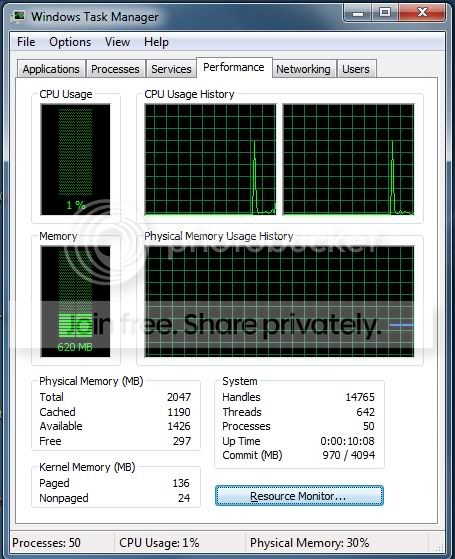
what am i doing ? :cry: just My PC 2 day alive and hour per hour my ram usage rise . which my work wrong ? :cry: .

As far as I can tell, absolutely nothing is going wrong. Your machine is doing what your machine should do.

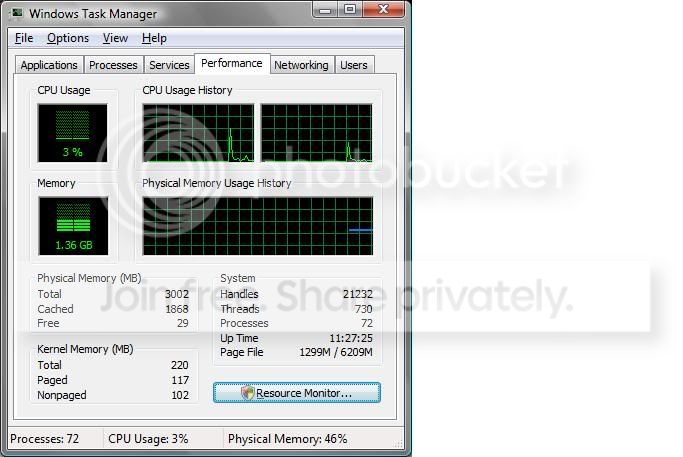
Please have a look at my screenshot. (sorry, it's from Vista, but I am on my wife's laptop).
TaskManager.jpg


The only thing open at the time this screenshot was taken was Outlook and Firefox. Notice that out of 3GB of RAM, that it shows only 29MB free? Now, look right above where it says Cached...see how it has 1868MB cached?

If anything ever came along and needed RAM, windows could make all of the 1868 available as well as the 29 free....providing 1897MB of RAM in an instant. So, I really have 1897 free and available to use or nearly 66% of my RAM.

I believe you are looking at the 29MB free number and saying "oh no, I've got less than 1% memory free....my machine is going to crash". This is simply not the case.
 

My Computer

Computer Manufacturer/Model Number
Self-Built in July 2009
OS
Windows 7 Ultimate x64
CPU
Intel Q9550 2.83Ghz OC'd to 3.40Ghz
Motherboard
Gigabyte GA-EP45-UD3R rev. 1.1, F12 BIOS
Memory
8GB G.Skill PI DDR2-800, 4-4-4-12 timings
Graphics Card(s)
EVGA 1280MB Nvidia GeForce GTX570
Sound Card
Realtek ALC899A 8 channel onboard audio
Monitor(s) Displays
23" Acer x233H
Screen Resolution
1920x1080
Hard Drives
Intel X25-M 80GB Gen 2 SSD
Western Digital 1TB Caviar Black, 32MB cache. WD1001FALS
PSU
Corsair 620HX modular
Case
Antec P182
Cooling
stock
Keyboard
ABS M1 Mechanical
Mouse
Logitech G9 Laser Mouse
Internet Speed
15/2 cable modem
Other Info
Windows and Linux enthusiast. Logitech G35 Headset.
ty pparks1 for replaying .
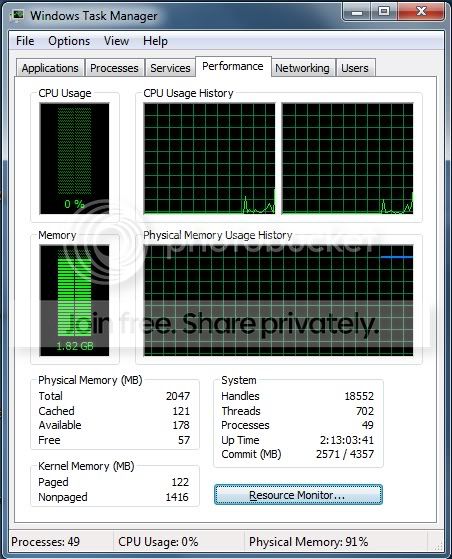
but when my ram usage is 89 % i cant run game and program of windows fast and stable . how i can free cached memory ?
The only thing open at the time this screen shot was taken was FireFox and IDM .
Untitled.jpg


i thing a program or a driver make this wast . how i can find them ?
ty for replaying .
 

My Computer

Computer Manufacturer/Model Number
Asus/Intel
OS
Windows 7 Build 7600 RTM
CPU
Intel Core 2 Due E7200
Motherboard
Asus P5Q
Memory
crucial 2x1GiG
Graphics Card(s)
ATI Sapphire 4850
Sound Card
Realtech
Monitor(s) Displays
AOC 2230
Hard Drives
HDD Hitachi 500 GB SATA
HDD Hitachi 160 GB SATA
HDD Maxtor 160 GB SATA
Case
Green Caspain
ty pparks1 for replaying .
but when my ram usage is 89 % i cant run game and program of windows fast and stable . how i can free cached memory ?
The only thing open at the time this screen shot was taken was FireFox and IDM .
Untitled.jpg


i thing a program or a driver make this wast . how i can find them ?
ty for replaying .
the cached RAM isn't a problem as it is still available but it is cached for quick access...something is actually using the RAM right now...check your processes and see whats up
 

My Computer

Computer Manufacturer/Model Number
Compal JFT02 (Custom Build Laptop)
OS
Windows 7 Home Premium x64 - Mac OS X 10.6.4 x64
CPU
Intel Core 2 Duo T9300 2.5 GHz
Motherboard
JFT02
Memory
4GB Kingston DDR2-800
Graphics Card(s)
NVIDIA Geforce 8600M GT (512MB Model)
Sound Card
Realtek HD Audio
Monitor(s) Displays
WUXGA Standard Laptop Display
Screen Resolution
1680*1050
Hard Drives
Toshiba 320GB 5400RPM Laptop HD
PSU
Standard Laptop Power Supply
Case
Standard Laptop Case
Cooling
Standard Laptop Cooling
Keyboard
Standard Laptop 105 Key-Keyboard
Mouse
Synaptics Touchpad
Internet Speed
Verizion Online DSL 3360/864 kbs (dl/up)
what am i doing ? :cry: just My PC 2 day alive and hour per hour my ram usage rise . which my work wrong ? :cry: .


plz help me :huh:

Jabdon

first the picture doesn't open to any size

K
 

My Computer

Computer Manufacturer/Model Number
HP Pavillion dv-7 1005 Tx
OS
Win 8 Release candidate 8400
CPU
[email protected]
Memory
4 gigs
Graphics Card(s)
Nvidia 9600M
Sound Card
HD built-in
Monitor(s) Displays
17" Wxga
Screen Resolution
1440x900
Cooling
none
Internet Speed
45Mb down 5Mb up
ty pparks1 for replaying .
but when my ram usage is 89 % i cant run game and program of windows fast and stable . how i can free cached memory ?
The only thing open at the time this screen shot was taken was FireFox and IDM .
Untitled.jpg


i thing a program or a driver make this wast . how i can find them ?
ty for replaying .

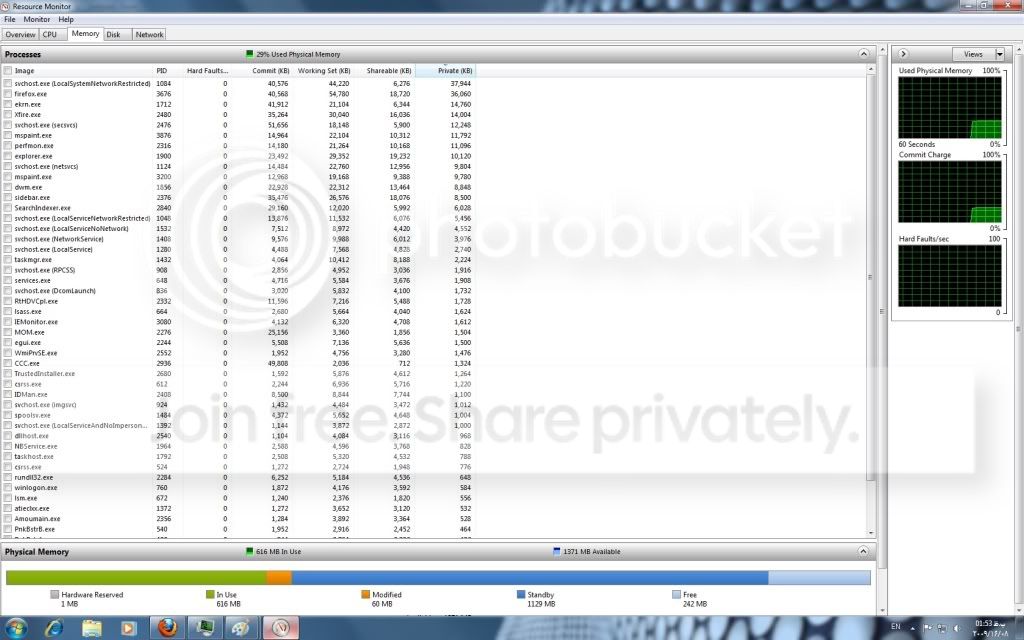
Interestingly, you don't have much cached....thus something is actually using your RAM. Even with your free, and cached ram...you only have about 170MB of available RAM...which is why you are experiencing problems.

In your earlier screen shot, it showed CCC.exe taking up tons of RAM (500-800MB) if I remember correctly and that is the ATI catalyst control center. Seems to me that it shouldn't take so much RAM. Might want to look into that and see what the deal is.
 

My Computer

Computer Manufacturer/Model Number
Self-Built in July 2009
OS
Windows 7 Ultimate x64
CPU
Intel Q9550 2.83Ghz OC'd to 3.40Ghz
Motherboard
Gigabyte GA-EP45-UD3R rev. 1.1, F12 BIOS
Memory
8GB G.Skill PI DDR2-800, 4-4-4-12 timings
Graphics Card(s)
EVGA 1280MB Nvidia GeForce GTX570
Sound Card
Realtek ALC899A 8 channel onboard audio
Monitor(s) Displays
23" Acer x233H
Screen Resolution
1920x1080
Hard Drives
Intel X25-M 80GB Gen 2 SSD
Western Digital 1TB Caviar Black, 32MB cache. WD1001FALS
PSU
Corsair 620HX modular
Case
Antec P182
Cooling
stock
Keyboard
ABS M1 Mechanical
Mouse
Logitech G9 Laser Mouse
Internet Speed
15/2 cable modem
Other Info
Windows and Linux enthusiast. Logitech G35 Headset.
In your earlier screen shot, it showed CCC.exe taking up tons of RAM (500-800MB) if I remember correctly and that is the ATI catalyst control center. Seems to me that it shouldn't take so much RAM. Might want to look into that and see what the deal is.

He definitely has something wrong going on. Looking in my Task Manger CCC.exe and MOM.exe (second ATI process) are using around ~13 MB combined.
 

My Computer

Computer type
PC/Desktop
Computer Manufacturer/Model Number
Me
OS
Win 7 Ultimate x64
CPU
FX-8350 @ 4.6 GHz so far
Motherboard
Asus M5A97 EVO
Memory
ADATA XPG V1 Series Black 8GB DDR3 1600
Graphics Card(s)
Sapphire R9 270x Dual-X
Sound Card
Xonar DGX w/ Corsair Vengence 1300
Monitor(s) Displays
Acer S232HL Abid
Screen Resolution
1920x1080
Hard Drives
120 GB OCZ Vertex 3
500 GB Seagate 7200.12
PSU
Antec Earthwatts 650W Green
Case
Antec Three Hundred
Cooling
Cooler Master 212 EVO
Keyboard
Logitech G510
Mouse
Logitech G500s
Internet Speed
35000/3000
Here was the original link that he posted;
DAPIX.ORG - Free Image Hosting

That shows ccc.exe is using 567,528KB

Something there is seriously wrong. Almost like a memory leak.
 

My Computer

Computer Manufacturer/Model Number
Self-Built in July 2009
OS
Windows 7 Ultimate x64
CPU
Intel Q9550 2.83Ghz OC'd to 3.40Ghz
Motherboard
Gigabyte GA-EP45-UD3R rev. 1.1, F12 BIOS
Memory
8GB G.Skill PI DDR2-800, 4-4-4-12 timings
Graphics Card(s)
EVGA 1280MB Nvidia GeForce GTX570
Sound Card
Realtek ALC899A 8 channel onboard audio
Monitor(s) Displays
23" Acer x233H
Screen Resolution
1920x1080
Hard Drives
Intel X25-M 80GB Gen 2 SSD
Western Digital 1TB Caviar Black, 32MB cache. WD1001FALS
PSU
Corsair 620HX modular
Case
Antec P182
Cooling
stock
Keyboard
ABS M1 Mechanical
Mouse
Logitech G9 Laser Mouse
Internet Speed
15/2 cable modem
Other Info
Windows and Linux enthusiast. Logitech G35 Headset.
hi ,
i using this detail for ATI Driver :

Driver Packaging Version 8.632-090702a-084683C-ATI
Catalyst™ Version 09.7
Provider ATI Technologies Inc.
2D Driver Version 8.01.01.921
2D Driver File Path /REGISTRY/MACHINE/SYSTEM/ControlSet001/Control/Class/{4D36E968-E325-11CE-BFC1-08002BE10318}/0000
Direct3D Version 8.14.10.0678
OpenGL Version 6.14.10.8787
Catalyst™ Control Center Version 2009.0702.1239.20840

and if u thing this driver make mistake i uninstall it ?
just i say that when i restart windows everything its true and ram usage is :
2.jpg


1.jpg


i thing in duration windows alive 1 program or driver waste my ram . if i find source I KILL IT :mad:
ty for replaying .
 

My Computer

Computer Manufacturer/Model Number
Asus/Intel
OS
Windows 7 Build 7600 RTM
CPU
Intel Core 2 Due E7200
Motherboard
Asus P5Q
Memory
crucial 2x1GiG
Graphics Card(s)
ATI Sapphire 4850
Sound Card
Realtech
Monitor(s) Displays
AOC 2230
Hard Drives
HDD Hitachi 500 GB SATA
HDD Hitachi 160 GB SATA
HDD Maxtor 160 GB SATA
Case
Green Caspain
hi all ,
i change ATI VGA driver from CAT 9.7 to CAT 9.8 and everything fine . my problem sours was CCC.exe and CAT 9.7 . tanx all of friend for replaying and helping me .
Good Luck .
 

My Computer

Computer Manufacturer/Model Number
Asus/Intel
OS
Windows 7 Build 7600 RTM
CPU
Intel Core 2 Due E7200
Motherboard
Asus P5Q
Memory
crucial 2x1GiG
Graphics Card(s)
ATI Sapphire 4850
Sound Card
Realtech
Monitor(s) Displays
AOC 2230
Hard Drives
HDD Hitachi 500 GB SATA
HDD Hitachi 160 GB SATA
HDD Maxtor 160 GB SATA
Case
Green Caspain
I have a similar problem with 6GB of memory. After bootup, only 25% of it is used, but around 12 hrs after bootup, it creeps into and past 85%. The problem is not so much the memory itself as the side effects once it gets up there of waiting almost a minute for most programs to load or respond at all, crashes of internet explorer, Microsoft Word pausing for 10 seconds or more without responding to the keyboard, etc.

And yes, I have a less capable machine running the same operating system that does not do this. But that does not mean I laugh at those who have the problem. As of now, my power machine needs rebooting every few hours, or perhaps it is time to reinstall the operating system from scratch (shudder)?
 

My Computer

Computer Manufacturer/Model Number
Dell/Studio XPS
OS
Windows 7 Home Premium 64 bit
CPU
Intel i7 CPU
Motherboard
Dell OR849J
Memory
6 GB
Graphics Card(s)
ATI Radeon HD 4600 Series
Sound Card
ATI Hight Definition Audio Device
Monitor(s) Displays
2 dell monitors
Hard Drives
640 GB and 1 TB internal
Back
Top