Ram usage go insane

Ramm

New member
Local time
2:01 PM
Messages
9
I have a 6GB of RAM with no paging file. For a long time it was OK but lately, the RAM started to go crazy.

I mostly have Firefox open and lately I have eclipse. The memory in performance tab is always much more than the total memory of the processes memory. When I open the computer, it looks OK but as time goes by, the RAM accumulates. When that happens and I close everything, the memory is around 3GB as if something hangs on it and won't let go no matter what. Ofcourse, if I reopen Firefox and eclipse, soon enough, the memory goes back closer to 5.5GB and the memory problems reappear.

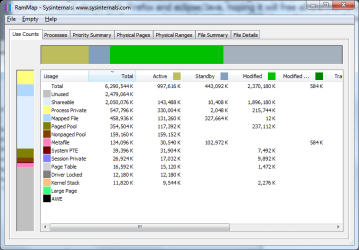
I have no idea what is it as in the processes tab, I see no abnormal memory usage it's as if something external is holding this memory and won't let go. I attached a screenshot of RAMMAP - do you see anything suspicious?

Thanks!
 

Attachments
  • 1.png
    1.png
    14.7 KB · Views: 0

My Computer

Computer type
PC/Desktop
OS
Microsoft Windows 7 Ultimate 64-bit 7601 Multiprocessor Free Service Pack 1
CPU
Intel(R) Core(TM)2 Duo CPU E6750 @ 2.66GHz
Motherboard
ASUSTeK Computer INC. P5K SE
Memory
6.00 GB
Graphics Card(s)
NVIDIA GeForce 210
Sound Card
(1) NVIDIA High Definition Audio (2) Realtek High Definiti
Screen Resolution
1280 x 1024 x 32 bits (4294967296 colors) @ 60 Hz
Hard Drives
(1) Maxtor 6L160P0 ATA Device (2) Maxtor 6Y200P0 ATA Device (3) WD Elements 1023 USB Device
The easiest thing to do if you have the means to do so is to up the amount of ram you have in the system. Also; I would try closing any programs you know you dont need open and see if that does anything to help out the situation. If it doesnt; post back and we can go from there.
 

My Computer

Computer type
PC/Desktop
Computer Manufacturer/Model Number
custom built
OS
Windows 7 ultimate 64-bit
CPU
Intel I7 2600K 3.4ghz
Motherboard
Asus Evo P8P67
Memory
Corsair 16gb ddr3 1600mhz
Graphics Card(s)
Nvidia Geforce gt 430
Sound Card
Sound Blaster Titanium x-fi pci express
Monitor(s) Displays
Dell E198WFP
Hard Drives
1 western digital 2TB drive.
PSU
Antec 1200 watt
Case
Inwin Dragon Rider
Cooling
6 case supplied cooling fans
Keyboard
logitech mk700
Mouse
logitech m705
Internet Speed
25-50mbps download; 10mbps upload(i think)
Antivirus
avg free 2014
Browser
mozilla firefox
Other Info
Also have a pretty bad speaker setup which is a klipsch promedia 5.1 surround speaker setup with huge subwoofer and lg blu ray player/writer. Also a hp officejet pro 8600 plus wireless all in one and a logitech s7500 webcam.
Already did that

Adding RAM won't help as it will just postpone the time for the problem to occur, 6GB seems more than fair for my needs.

I already closed everything I don't need and even then, the RAM is around 3.5GB so when re-opening Firefox and Eclipse, which I use often, the memory goes up to 4.5-5.5 and from there to the RAM disaster, the path is short.
 

My Computer

Computer type
PC/Desktop
OS
Microsoft Windows 7 Ultimate 64-bit 7601 Multiprocessor Free Service Pack 1
CPU
Intel(R) Core(TM)2 Duo CPU E6750 @ 2.66GHz
Motherboard
ASUSTeK Computer INC. P5K SE
Memory
6.00 GB
Graphics Card(s)
NVIDIA GeForce 210
Sound Card
(1) NVIDIA High Definition Audio (2) Realtek High Definiti
Screen Resolution
1280 x 1024 x 32 bits (4294967296 colors) @ 60 Hz
Hard Drives
(1) Maxtor 6L160P0 ATA Device (2) Maxtor 6Y200P0 ATA Device (3) WD Elements 1023 USB Device
Well; You should try and check to see what programs that you have open when it happens are using the most memory and close those programs if they are not essential to what it is you are doing. And I still believe adding more ram will definitely help the situation because yes it will prolong the amount of time before the amount of ram diminishes. 6gb of ram is not a lot. And heck; I have 16gb in my system currently; and even I have the same issue you are explaining from time to time. Usually the best route to clear it up at least short term anyways is to reboot the system which will refresh the amount of ram, etc the system has for use. Its just a factual trait of windows that windows does have memory leaks from running programs that are poorly coded/written which over a period of time will cause memory leaks.
 

My Computer

Computer type
PC/Desktop
Computer Manufacturer/Model Number
custom built
OS
Windows 7 ultimate 64-bit
CPU
Intel I7 2600K 3.4ghz
Motherboard
Asus Evo P8P67
Memory
Corsair 16gb ddr3 1600mhz
Graphics Card(s)
Nvidia Geforce gt 430
Sound Card
Sound Blaster Titanium x-fi pci express
Monitor(s) Displays
Dell E198WFP
Hard Drives
1 western digital 2TB drive.
PSU
Antec 1200 watt
Case
Inwin Dragon Rider
Cooling
6 case supplied cooling fans
Keyboard
logitech mk700
Mouse
logitech m705
Internet Speed
25-50mbps download; 10mbps upload(i think)
Antivirus
avg free 2014
Browser
mozilla firefox
Other Info
Also have a pretty bad speaker setup which is a klipsch promedia 5.1 surround speaker setup with huge subwoofer and lg blu ray player/writer. Also a hp officejet pro 8600 plus wireless all in one and a logitech s7500 webcam.
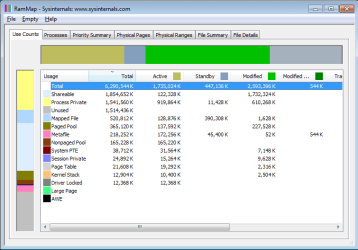
There are 2 things that seem odd. First, the modified memory is very high. Without a pagefile this is going to be high but this is rather to much. There seems to be a memory leak but the cause is unknowable from the display. Second, the free memory is disturbingly high. In itself that is not too unusual but combined with the high modified memory it is disturbing. The only possibilities I can see are that a large program was recently closed or you are running one of those memory "optimizers". I hope it is not the latter.

I would like to see a screenshot of Task Manager, Performance tab. This gives an overview of the memory situation not seen anywhere else. With memory problems that is where I like to start. A screenshot of Resource monitor showing the memory tab and the list sorted by commit would also be useful.

The total of the values in the memory usage column in Task manager will never equal total usage. Memory management in any modern OS is far too complex for anything that simple. Among other things there are major users of memory that are not processes.
 

My Computer

Computer type
PC/Desktop
Computer Manufacturer/Model Number
HP
OS
Windows 7 Pro 64 bit
CPU
Xeon W3520
Memory
8 GB
Graphics Card(s)
Nvidia Geforce 210

My Computer

Computer type
PC/Desktop
Computer Manufacturer/Model Number
Home made Desktop
OS
Windows 10 Pro. 64/ version 1709 Windows 7 Pro/64
CPU
Intel i7-6800K @ 4.3
Motherboard
ASUS X-99 Deluxe II
Memory
Corsair Platinum 16 gig @2400
Graphics Card(s)
EVGA GTX 1070 OC
Monitor(s) Displays
Asus 27" LED LCD/VE278Q
Screen Resolution
1920-1080 or 1280-720 HDMI
Hard Drives
INTEL SSD 730-240 Gb Sata 3.0/
PSU
EVGA Platium 1200W
Case
Phanteks Luxe Tempered Glass 8 fans/ one radiator
Cooling
XSPC/ Water Cooled CPU
Keyboard
Das 4 Professional
Mouse
Logitech M705/MX Anywhere 2-S
Internet Speed
100 mbits
Antivirus
Microsoft Security Essentials/ Malwarebytes Premium 3.0/ SAS
Browser
I.E. 11 default/Firefox/ ISP Time Warner Cable/Spectrum
Other Info
LG BluRay Burner/
Sound system-KLipsch-THX/
Icy Dock ssd Hot Swap bays.
Thank you all for your replies. When I left my computer, it was on 4.3GB with no popup messages, when I returned to it, several hours afterwards, it was on 4.6GB and the popup message to close the highest memory consumption application was shown. Even now, I'm on 4.6GB and I got another popup saying my computer is low on memory in general, but I should have 1.4GB free! so why is it considered low?

Here is a screenshot of my specs + performance tab, do you need any other info?

I did try to use 1 memory optimizer but nothing happened so I removed it, nothing like that is running in the background though, it was a one time try (and fail). the 2 applications I have are Firefox (700mb) and java/emulator (mobile device) which are up to 800-900mb. It could be that rammap snapshot was taken after closing and reopening the 2 applications as part of me trying to understand what happens.

Will you recommend me to use a pagefile? I removed that long time ago and didn't have a problem, not sure what happened suddenly

Is there a real working ram cleaner application out there? I can't consider a reboot once a day as a solution :)
 

Attachments

  • 1.png
    1.png
    37.2 KB · Views: 18
  • 2.png
    2.png
    16.8 KB · Views: 18

My Computer

Computer type
PC/Desktop
OS
Microsoft Windows 7 Ultimate 64-bit 7601 Multiprocessor Free Service Pack 1
CPU
Intel(R) Core(TM)2 Duo CPU E6750 @ 2.66GHz
Motherboard
ASUSTeK Computer INC. P5K SE
Memory
6.00 GB
Graphics Card(s)
NVIDIA GeForce 210
Sound Card
(1) NVIDIA High Definition Audio (2) Realtek High Definiti
Screen Resolution
1280 x 1024 x 32 bits (4294967296 colors) @ 60 Hz
Hard Drives
(1) Maxtor 6L160P0 ATA Device (2) Maxtor 6Y200P0 ATA Device (3) WD Elements 1023 USB Device
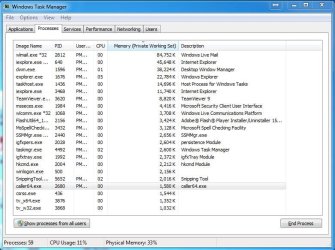
This screenshot would be handy
Capture.JPG

*note* clicking on the memory column will sort the programs using the most memory at the top
 

My Computer

Computer type
PC/Desktop
Computer Manufacturer/Model Number
Pauly Special
OS
Win7 Ultimate X64
CPU
Intel i5 3570K
Motherboard
Gigabyte Z77X-DS3H
Memory
8GB DDR3 1600
Graphics Card(s)
Onboard
Sound Card
Onboard
Screen Resolution
1280x1024
Hard Drives
Samsung 840 Evo SSD (OS)
1TB Spinner (Data)
PSU
800W Arctic
Case
Cooler Master
Cooling
3x120mm Fans
Keyboard
MS Wireless
Mouse
MS Wireless
Internet Speed
20M
My computer just died so I had to restart... I hope the processes tab is not that significant.

Now Firefox + java + emulator are open and the performance is on 2.97GB, let's see what happens next. I hope the info I posted will suffice.
 

My Computer

Computer type
PC/Desktop
OS
Microsoft Windows 7 Ultimate 64-bit 7601 Multiprocessor Free Service Pack 1
CPU
Intel(R) Core(TM)2 Duo CPU E6750 @ 2.66GHz
Motherboard
ASUSTeK Computer INC. P5K SE
Memory
6.00 GB
Graphics Card(s)
NVIDIA GeForce 210
Sound Card
(1) NVIDIA High Definition Audio (2) Realtek High Definiti
Screen Resolution
1280 x 1024 x 32 bits (4294967296 colors) @ 60 Hz
Hard Drives
(1) Maxtor 6L160P0 ATA Device (2) Maxtor 6Y200P0 ATA Device (3) WD Elements 1023 USB Device
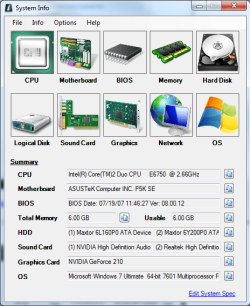
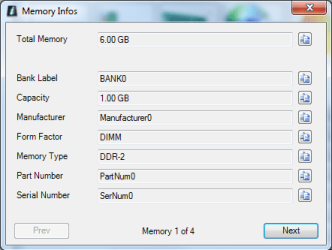
Because of your motherboard specs I'm wondering what ram you are using and what slots you have the ram modules installed. 6 gigs of ram with a Dual Channel motherboard is confusing.

Motherboards - P5K SE - ASUS


4 x DIMM, Max. 8 GB, DDR 1066*/800/667 Non-ECC,Un-buffered Memory
Dual Channel memory architecture
*The chipset officially supports the memory frequency up to DDR2 800MHz. Tuned by ASUS Super Memspeed Technology, this motherboard natively supports up to DDR2 1066MHz
 

My Computer

Computer type
PC/Desktop
Computer Manufacturer/Model Number
Home made Desktop
OS
Windows 10 Pro. 64/ version 1709 Windows 7 Pro/64
CPU
Intel i7-6800K @ 4.3
Motherboard
ASUS X-99 Deluxe II
Memory
Corsair Platinum 16 gig @2400
Graphics Card(s)
EVGA GTX 1070 OC
Monitor(s) Displays
Asus 27" LED LCD/VE278Q
Screen Resolution
1920-1080 or 1280-720 HDMI
Hard Drives
INTEL SSD 730-240 Gb Sata 3.0/
PSU
EVGA Platium 1200W
Case
Phanteks Luxe Tempered Glass 8 fans/ one radiator
Cooling
XSPC/ Water Cooled CPU
Keyboard
Das 4 Professional
Mouse
Logitech M705/MX Anywhere 2-S
Internet Speed
100 mbits
Antivirus
Microsoft Security Essentials/ Malwarebytes Premium 3.0/ SAS
Browser
I.E. 11 default/Firefox/ ISP Time Warner Cable/Spectrum
Other Info
LG BluRay Burner/
Sound system-KLipsch-THX/
Icy Dock ssd Hot Swap bays.
Bank0 and Bank2 have 1GB each and
Bank1 and Bank3 have 2GB each
total of 6GB

DDR-2 for all
 

Attachments

  • 3.png
    3.png
    11.4 KB · Views: 19

My Computer

Computer type
PC/Desktop
OS
Microsoft Windows 7 Ultimate 64-bit 7601 Multiprocessor Free Service Pack 1
CPU
Intel(R) Core(TM)2 Duo CPU E6750 @ 2.66GHz
Motherboard
ASUSTeK Computer INC. P5K SE
Memory
6.00 GB
Graphics Card(s)
NVIDIA GeForce 210
Sound Card
(1) NVIDIA High Definition Audio (2) Realtek High Definiti
Screen Resolution
1280 x 1024 x 32 bits (4294967296 colors) @ 60 Hz
Hard Drives
(1) Maxtor 6L160P0 ATA Device (2) Maxtor 6Y200P0 ATA Device (3) WD Elements 1023 USB Device
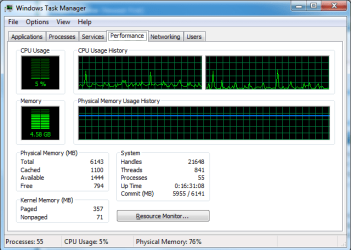
Slowly slowly the RAM goes up even though I do nothing on my computer for several hours and I guess soon it will warn me again for the low memory problem.

I posted everything you asked me to, can anything good come out of it?
 

My Computer

Computer type
PC/Desktop
OS
Microsoft Windows 7 Ultimate 64-bit 7601 Multiprocessor Free Service Pack 1
CPU
Intel(R) Core(TM)2 Duo CPU E6750 @ 2.66GHz
Motherboard
ASUSTeK Computer INC. P5K SE
Memory
6.00 GB
Graphics Card(s)
NVIDIA GeForce 210
Sound Card
(1) NVIDIA High Definition Audio (2) Realtek High Definiti
Screen Resolution
1280 x 1024 x 32 bits (4294967296 colors) @ 60 Hz
Hard Drives
(1) Maxtor 6L160P0 ATA Device (2) Maxtor 6Y200P0 ATA Device (3) WD Elements 1023 USB Device
Most likely there is a memory leak resulting in the commit charge hitting the commit limit. Most likely that is what the error message is referring to. The screenshot in post #7 shows this reaching dangerous levels. This has nothing to do with how much RAM is available or free. Low levels of physical memory availability rarely result in any problems other than poor performance.

I asked for a screenshot of Resource Monitor - Memory tab sorted by Commit. I have not seen that. If the problem is caused by a process this should show which it is. When the commit charge is high there is at most only an incidental effect on RAM usage, and may not be effected at all.

Unless disk space is very short I would recommend the use of a pagefile. The lack of a pagefile makes the results of a memory leak much more serious.
 

My Computer

Computer type
PC/Desktop
Computer Manufacturer/Model Number
HP
OS
Windows 7 Pro 64 bit
CPU
Xeon W3520
Memory
8 GB
Graphics Card(s)
Nvidia Geforce 210
See attached

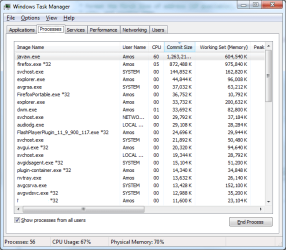
javaw.exe that eclipse is using reached 1.2GB. but even when removing it, the performance was above 3Gb. This screenshot gives any hope?
 

Attachments

  • 4.png
    4.png
    25.1 KB · Views: 15

My Computer

Computer type
PC/Desktop
OS
Microsoft Windows 7 Ultimate 64-bit 7601 Multiprocessor Free Service Pack 1
CPU
Intel(R) Core(TM)2 Duo CPU E6750 @ 2.66GHz
Motherboard
ASUSTeK Computer INC. P5K SE
Memory
6.00 GB
Graphics Card(s)
NVIDIA GeForce 210
Sound Card
(1) NVIDIA High Definition Audio (2) Realtek High Definiti
Screen Resolution
1280 x 1024 x 32 bits (4294967296 colors) @ 60 Hz
Hard Drives
(1) Maxtor 6L160P0 ATA Device (2) Maxtor 6Y200P0 ATA Device (3) WD Elements 1023 USB Device
Java and firefox contribute over 2 GB to the commit charge. This is high but not high enough to explain the near 6 GB total commit. You may have a malware problem. You cannot assume that your AV product will detect this.
 

My Computer

Computer type
PC/Desktop
Computer Manufacturer/Model Number
HP
OS
Windows 7 Pro 64 bit
CPU
Xeon W3520
Memory
8 GB
Graphics Card(s)
Nvidia Geforce 210
The performance tab reports 4.25GB, 2GB is Firefox and Java, you suggests that there is another hidden malware that takes up the rest of the lost GBs? I have AVG running, any other idea on how can I catch what is it?
 

My Computer

Computer type
PC/Desktop
OS
Microsoft Windows 7 Ultimate 64-bit 7601 Multiprocessor Free Service Pack 1
CPU
Intel(R) Core(TM)2 Duo CPU E6750 @ 2.66GHz
Motherboard
ASUSTeK Computer INC. P5K SE
Memory
6.00 GB
Graphics Card(s)
NVIDIA GeForce 210
Sound Card
(1) NVIDIA High Definition Audio (2) Realtek High Definiti
Screen Resolution
1280 x 1024 x 32 bits (4294967296 colors) @ 60 Hz
Hard Drives
(1) Maxtor 6L160P0 ATA Device (2) Maxtor 6Y200P0 ATA Device (3) WD Elements 1023 USB Device
I was working on Firefox and eclipse/Java. I started getting the popups when reaching 5.1+gb in performance. I closed both Firefox and eclipse/Java, hoping it will free all the memory both of them are using but surprisingly, Performance showed 3.15GB! over 2GB above the number I had after restarting the computer. Here is Rammap again, please help!
 

Attachments

  • 1.png
    1.png
    24.7 KB · Views: 0

My Computer

Computer type
PC/Desktop
OS
Microsoft Windows 7 Ultimate 64-bit 7601 Multiprocessor Free Service Pack 1
CPU
Intel(R) Core(TM)2 Duo CPU E6750 @ 2.66GHz
Motherboard
ASUSTeK Computer INC. P5K SE
Memory
6.00 GB
Graphics Card(s)
NVIDIA GeForce 210
Sound Card
(1) NVIDIA High Definition Audio (2) Realtek High Definiti
Screen Resolution
1280 x 1024 x 32 bits (4294967296 colors) @ 60 Hz
Hard Drives
(1) Maxtor 6L160P0 ATA Device (2) Maxtor 6Y200P0 ATA Device (3) WD Elements 1023 USB Device
Back
Top