Solved Ram usage goes high after a while?

hammer8232

Banned
Local time
2:05 PM
Messages
12
I have 4GB and windows vista 32 bit and my ram usage goes high after a while like when im done playing my games like Call Of Duty? I am upgrading to 64-bit soon but i never used to have this problem like when i used to play my games it didnt stutter or so called lag i dont know if its cause i dont have fast enough ram or what. I ordered new ram yesterday the same 4GB but a better kind so i dont know if this will help or not but i know when i get my system up to 64-bit i will maybe wont have any problems because right now i only can use 3.25GB but i use 2gb of that 3.25 gb. :eek::eek:
 

My Computer

Computer type
PC/Desktop
OS
Windows vista 32 bit
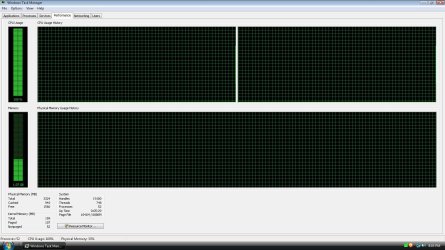
Post a screenshot of Task Manager - Performance tab when the problem occurs. The is will provide some much needed information.
 

My Computer

Computer type
PC/Desktop
Computer Manufacturer/Model Number
HP
OS
Windows 7 Pro 64 bit
CPU
Xeon W3520
Memory
8 GB
Graphics Card(s)
Nvidia Geforce 210

My Computer

Computer type
PC/Desktop
Computer Manufacturer/Model Number
Home made Desktop
OS
Windows 10 Pro. 64/ version 1709 Windows 7 Pro/64
CPU
Intel i7-6800K @ 4.3
Motherboard
ASUS X-99 Deluxe II
Memory
Corsair Platinum 16 gig @2400
Graphics Card(s)
EVGA GTX 1070 OC
Monitor(s) Displays
Asus 27" LED LCD/VE278Q
Screen Resolution
1920-1080 or 1280-720 HDMI
Hard Drives
INTEL SSD 730-240 Gb Sata 3.0/
PSU
EVGA Platium 1200W
Case
Phanteks Luxe Tempered Glass 8 fans/ one radiator
Cooling
XSPC/ Water Cooled CPU
Keyboard
Das 4 Professional
Mouse
Logitech M705/MX Anywhere 2-S
Internet Speed
100 mbits
Antivirus
Microsoft Security Essentials/ Malwarebytes Premium 3.0/ SAS
Browser
I.E. 11 default/Firefox/ ISP Time Warner Cable/Spectrum
Other Info
LG BluRay Burner/
Sound system-KLipsch-THX/
Icy Dock ssd Hot Swap bays.
Thats when its not high
 

Attachments

  • SS.jpg
    SS.jpg
    233.7 KB · Views: 9

My Computer

Computer type
PC/Desktop
OS
Windows vista 32 bit
This is when im done playing my games and it stays that way until i restart my pc
 

Attachments

  • Untitled.jpg
    Untitled.jpg
    233.6 KB · Views: 14

My Computer

Computer type
PC/Desktop
OS
Windows vista 32 bit
And if you guys say its fine its not because i like to game but i cant really when it gets like that.
 

My Computer

Computer type
PC/Desktop
OS
Windows vista 32 bit
There is nothing wrong with the memory usage in either screenshot. But I do find it odd that the usage is higher in the second, if that is actually during gameplay.

But the CPU usage is very high in both. Note that there is no relationship between CPU usage and memory usage. Look in task Manager -processes tab to see which process (if any) is responsible.
 

My Computer

Computer type
PC/Desktop
Computer Manufacturer/Model Number
HP
OS
Windows 7 Pro 64 bit
CPU
Xeon W3520
Memory
8 GB
Graphics Card(s)
Nvidia Geforce 210
Okay lets try this.
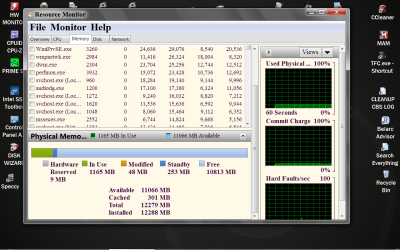
Start Orb and type in resmon and go to the memory tab and then to the bottom. You should see what I have previously posted. It will give a good idea of what the ram is doing. Used, Modified, Standby, Free or Hardware Reserve.
 

My Computer

Computer type
PC/Desktop
Computer Manufacturer/Model Number
Home made Desktop
OS
Windows 10 Pro. 64/ version 1709 Windows 7 Pro/64
CPU
Intel i7-6800K @ 4.3
Motherboard
ASUS X-99 Deluxe II
Memory
Corsair Platinum 16 gig @2400
Graphics Card(s)
EVGA GTX 1070 OC
Monitor(s) Displays
Asus 27" LED LCD/VE278Q
Screen Resolution
1920-1080 or 1280-720 HDMI
Hard Drives
INTEL SSD 730-240 Gb Sata 3.0/
PSU
EVGA Platium 1200W
Case
Phanteks Luxe Tempered Glass 8 fans/ one radiator
Cooling
XSPC/ Water Cooled CPU
Keyboard
Das 4 Professional
Mouse
Logitech M705/MX Anywhere 2-S
Internet Speed
100 mbits
Antivirus
Microsoft Security Essentials/ Malwarebytes Premium 3.0/ SAS
Browser
I.E. 11 default/Firefox/ ISP Time Warner Cable/Spectrum
Other Info
LG BluRay Burner/
Sound system-KLipsch-THX/
Icy Dock ssd Hot Swap bays.
OP, click on the Processes tab in Windows Task Manager, then the CPU heading, it will sort processes by % of CPU they are using, that is now what we need to see.

You must have made an mistake on your screen shots, of the Performance tab and not understand CPU vs. RAM usage?

CPU%| RAM in use
100%| 1.07 gigs before

88% | 699 megs after
 

My Computer

Computer type
PC/Desktop
Computer Manufacturer/Model Number
Self Built Custom
OS
Windows 7 Ultimate Retail Box (64-bit installed) + Service Pack 1
CPU
AMD FX-8350 CPU v1.15 (or 1.0F) BIOS was required!
Motherboard
MSI 890FXA-GD70
Memory
8G CAS-7 G-Skill DDR3 @1333 (2 fours) [mobo nonOC max rec'd]
Graphics Card(s)
Radeon HD 7950 [3 gigs of GDDR5] MSI Twin Frozr model
Sound Card
Realtek High Definition Audio (onboard mobo, ALC-889 chip)
Monitor(s) Displays
2 WS LED Monitors: One LG One Viewsonic
Screen Resolution
1920 by 1080
Hard Drives
SSD for OS: Samsung 840 Pro
SSD for VM and utilities: Adata SX900
7200 RPM SATA HDs for the rest: Hitachi and Seagate
PSU
Corsair TX850 - 850W max, in service since August 2010.
Case
Thermaltake Armor A90
Cooling
Thermaltake Spin Q CPU Cooler, in service since August 2010
Keyboard
Logitech G11
Mouse
Logitech M310 Wireless
Internet Speed
100 Megabit broadband supposedly upgraded from 50 (Cable)
Antivirus
Bitdefender Internet Security 2014 suite
Browser
Pale Moon 64-bit main, also IceDragon, Opera, and Maxthon.
Other Info
CompTIA A+ certified (220-800 series) in July 2013.
Are you dumb i posted a screen hot when i was not gaming and when i was done gameing i posted antother screenshot what are you retarded. JEESH
 

My Computer

Computer type
PC/Desktop
OS
Windows vista 32 bit
OP, click on the Processes tab in Windows Task Manager, then the CPU heading, it will sort processes by % of CPU they are using, that is now what we need to see.

You must have made an mistake on your screen shots, of the Performance tab and not understand CPU vs. RAM usage?

CPU%| RAM in use
100%| 1.07 gigs before

88% | 699 megs after

Are you dumb i posted a screen hot when i was not gaming and when i was done gameing i posted antother screenshot what are you retarded. JEESH

Look again, what tab are you on?
http://www.sevenforums.com/performa...-usage-goes-high-after-while.html#post2407346


And answer this too!
http://www.sevenforums.com/performa...-usage-goes-high-after-while.html#post2407402

As this isn't your first thread

http://www.sevenforums.com/performance-maintenance/290802-not-alot-free-ram.html

JEESH, really? If you want help answer each post. Your comments are rude!!
 

My Computer

Computer type
PC/Desktop
Computer Manufacturer/Model Number
Dude Build
OS
Windows 10 Pro X64
CPU
Intel(R) Core(TM) i5-3570K CPU OC@ 4.5GHZ Turbo
Motherboard
MSI Z77A-G45 Gaming
Memory
8.00 GB DDR3 1600Mhz
Graphics Card(s)
MSI Gaming X GTX 1070
Sound Card
Realtek High Definition
Monitor(s) Displays
Dell S23O9W, HP L1710
Screen Resolution
DELL-1920 x 1080 HP-1280 x1024
Hard Drives
Crucial m4 256 SSD, WD 7200RPM 500GB WD 1TB
PSU
Seasonic X650 GOLD
Case
Zalman Z12
Cooling
Antec Kuhler 920
Keyboard
Logitech
Mouse
MSI DS100 Interceptor
Internet Speed
50 down and 5 up
Antivirus
MSE
Browser
Chrome, IE 11
Other Info
Logitech X-620 Speakers
Are you dumb i posted a screen hot when i was not gaming and when i was done gameing i posted antother screenshot what are you retarded. JEESH

With comments like that to people that are trying to help you, you won't get a lot more help.
 

My Computer

OS
Windows 7 Professional 64 bit

My Computer

Computer type
PC/Desktop
Computer Manufacturer/Model Number
Self built custom
OS
64-bit Windows 11 Pro for Workstations
CPU
Intel i7-8700K OC'd to 5 GHz
Motherboard
ASUS ROG Maximus XI Formula Z390
Memory
64 GB (4x16GB) G.SKILL TridentZ RGB DDR4 3600 MHz
Graphics Card(s)
ASUS ROG-STRIX-GTX1080TI-O11G-GAMING
Sound Card
Integrated
Monitor(s) Displays
2 x Samsung Odyssey G7 27"
Screen Resolution
2560x1440
Hard Drives
1TB Samsung 990 PRO M.2,
4TB Samsung 990 PRO PRO M.2,
TerraMaster F8 SSD Plus NAS
PSU
Seasonic Prime Titanium 850W
Case
Thermaltake Core P3
Cooling
Corsair Hydro H115i
Keyboard
Logitech wireless K800
Mouse
Logitech MX Master 4
Internet Speed
2 Gb/s Download and 100 Mb/s Upload
Antivirus
Malwarebyte Anti-Malware Premium
Browser
Google Chrome
Other Info
Logitech Z625 speaker system,
Logitech BRIO 4K Pro webcam,
HP Color LaserJet Pro MFP M477fdn,
APC SMART-UPS RT 1000 XL - SURT1000XLI,
Galaxy S23 Plus phone
I went out to dinner and when I came back I was retarded.
Must of been something I had for dinner.
 

My Computer

Computer type
PC/Desktop
Computer Manufacturer/Model Number
Home made Desktop
OS
Windows 10 Pro. 64/ version 1709 Windows 7 Pro/64
CPU
Intel i7-6800K @ 4.3
Motherboard
ASUS X-99 Deluxe II
Memory
Corsair Platinum 16 gig @2400
Graphics Card(s)
EVGA GTX 1070 OC
Monitor(s) Displays
Asus 27" LED LCD/VE278Q
Screen Resolution
1920-1080 or 1280-720 HDMI
Hard Drives
INTEL SSD 730-240 Gb Sata 3.0/
PSU
EVGA Platium 1200W
Case
Phanteks Luxe Tempered Glass 8 fans/ one radiator
Cooling
XSPC/ Water Cooled CPU
Keyboard
Das 4 Professional
Mouse
Logitech M705/MX Anywhere 2-S
Internet Speed
100 mbits
Antivirus
Microsoft Security Essentials/ Malwarebytes Premium 3.0/ SAS
Browser
I.E. 11 default/Firefox/ ISP Time Warner Cable/Spectrum
Other Info
LG BluRay Burner/
Sound system-KLipsch-THX/
Icy Dock ssd Hot Swap bays.
Check your CPU usage dude.... Sort that out first than look into your RAM. 100% will bog your system down.

And yah you're asking people for help, don't be a prick.
 

My Computer

Computer type
PC/Desktop
OS
7 0 64-bit
CPU
Intel Core i5-3570K
Motherboard
p8Z77-V
Memory
Corsair Vengeance 8GB DDR3
Graphics Card(s)
HD7750 V2 Radeon HD 7750
Monitor(s) Displays
2 x 25" Asus VH242H
Hard Drives
1 x 120 GB SSD
1 x 3 TB
1 x 2 TB
I think he was referring to me....

I'll just not respond. :p
 

My Computer

Computer type
PC/Desktop
Computer Manufacturer/Model Number
Self Built Custom
OS
Windows 7 Ultimate Retail Box (64-bit installed) + Service Pack 1
CPU
AMD FX-8350 CPU v1.15 (or 1.0F) BIOS was required!
Motherboard
MSI 890FXA-GD70
Memory
8G CAS-7 G-Skill DDR3 @1333 (2 fours) [mobo nonOC max rec'd]
Graphics Card(s)
Radeon HD 7950 [3 gigs of GDDR5] MSI Twin Frozr model
Sound Card
Realtek High Definition Audio (onboard mobo, ALC-889 chip)
Monitor(s) Displays
2 WS LED Monitors: One LG One Viewsonic
Screen Resolution
1920 by 1080
Hard Drives
SSD for OS: Samsung 840 Pro
SSD for VM and utilities: Adata SX900
7200 RPM SATA HDs for the rest: Hitachi and Seagate
PSU
Corsair TX850 - 850W max, in service since August 2010.
Case
Thermaltake Armor A90
Cooling
Thermaltake Spin Q CPU Cooler, in service since August 2010
Keyboard
Logitech G11
Mouse
Logitech M310 Wireless
Internet Speed
100 Megabit broadband supposedly upgraded from 50 (Cable)
Antivirus
Bitdefender Internet Security 2014 suite
Browser
Pale Moon 64-bit main, also IceDragon, Opera, and Maxthon.
Other Info
CompTIA A+ certified (220-800 series) in July 2013.
Back
Top