Solved Random BSOD - Error 0x0000003b

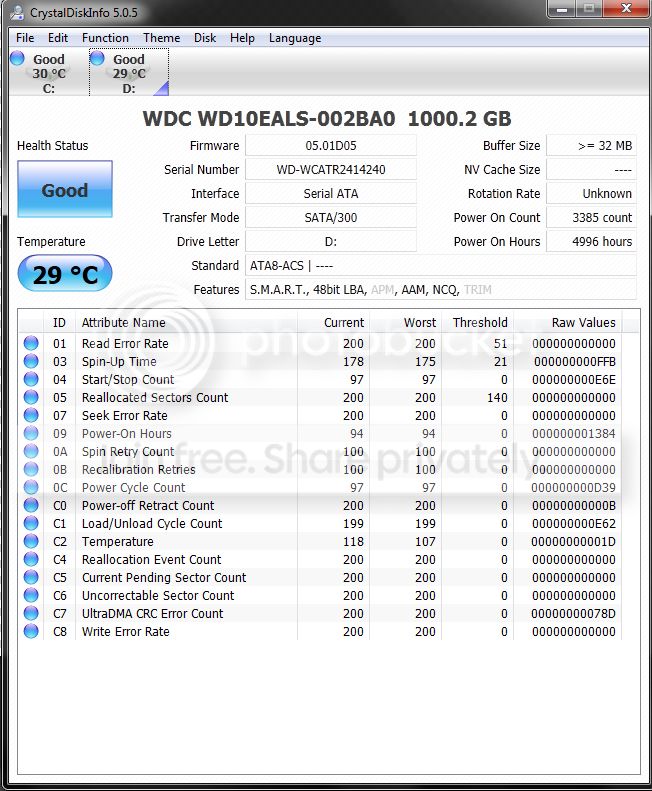
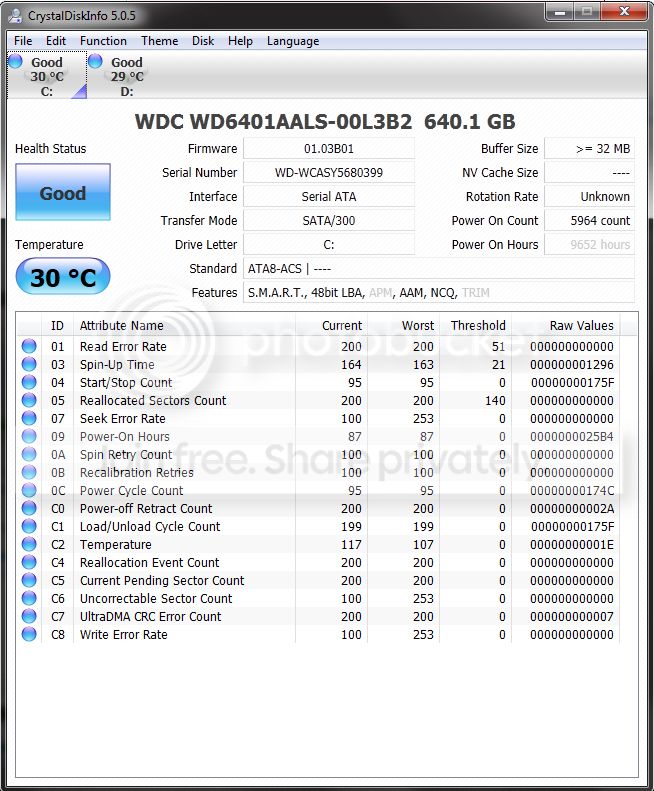
Upload a screenshot of your hard disk using crystal disk info:
Run Disk Check on your hard disk for file system errors and bad sectors on it:
Test your hard drive:
Take memtest. Run for 8 passes and test each stick in a know good slot for an additional 6 passes.


The goal is to test all the RAM sticks and all the motherboard slots.

Check your motherboard manual to ensure the RAM sticks are in the recommended motherboard slots. Some motherboards have very specific slots required for the number of RAM sticks installed.

If you get errors, stop the test and continue with the next step.

1. Remove all but one stick of RAM from your computer (this will be RAM stick #1), and run Memtest86 again, for 7 passes.
Be sure to note the RAM stick, use a piece of tape with a number, and note the motherboard slot.
If this stick passes the test then go to step #3.

2. If RAM stick #1 has errors, repeat the test with RAM stick #2 in the same motherboard slot.
If RAM stick #2 passes, this indicates that RAM stick #1 may be bad. If you want to be absolutely sure, re-test RAM stick #1 in another known good slot.
If RAM stick #2 has errors, this indicates another possible bad RAM stick, a possible motherboard slot failure or inadequate settings.
3. Test the next stick of RAM (stick #2) in the next motherboard slot.
If this RAM stick has errors repeat step #2 using a known good stick if possible, or another stick.
If this RAM stick has no errors and both sticks failed in slot#1, test RAM stick #1 in this slot.
4. If you find a stick that passes the test, test it in all the other motherboard slots.

If Part 2 testing shows errors, and all tests in Part 3 show errors, you will need to test the RAM sticks in another computer and/or test other RAM in your computer to identify the problem.

In this way, you can identify whether it is a bad stick of RAM, a bad motherboard, or incompatibility between the sticks.
 

My Computer

Computer type
PC/Desktop
Computer Manufacturer/Model Number
Self assembled
OS
Windows 10 Home 64Bit
CPU
Intel Core i5 10400 @ 2.90GHz
Motherboard
Intel Corporation DG41WV (PROCESSOR)
Memory
8.00GB Single-Channel Unknown @ 1329MHz (16-20-20-38)
Sound Card
Realtek High Definition Audio
Monitor(s) Displays
DELL E170S
Screen Resolution
1280x1024 pixels
Hard Drives
931GB TOSHIBA DT01ACA100 (SATA)
238GB TEAM TM8PS7256G (SATA SSD)
Case
Nothing Fancy
Cooling
Fans
Keyboard
A4 Tech Co LTD
Mouse
A4 Tech Co Ltd/Logitech
Internet Speed
25 Mbps
Thanks, I will run memtest. That is one thing on my comp that is the oldest is the memory. I was hoping it was not that. Is it looking like its something hardware related?
Here are both the screens from crystal disk (640 is my system drive, and the 1tb is media)
crystaldisk2.jpg


crystaldisk.jpg
 

My Computer

Computer Manufacturer/Model Number
scratch built
OS
Windows 7 home premium 64bit
CPU
AMD FX 4100 black edition quad core 3.6ghz (unlocked)
Motherboard
Gigabyte 78lm mATX
Memory
8gb crucial ballistix ddr3-1333
Graphics Card(s)
Geforce gt640 1gb
Sound Card
Realtek HD audio
Monitor(s) Displays
Gateway 21.5"
Screen Resolution
1920x1080
Hard Drives
Western Digital black 640gb system drive, western digital blue 1tb media
PSU
500w cooler master
Case
raidmax
Cooling
6 120mm fans (2 intakes on front) 3 exhaust, and heatsink
Internet Speed
25mb/s down, 5mb/s up
STOP 0x0000003B: SYSTEM_SERVICE_EXCEPTION
Usual causes: System service, Device driver, graphics driver, memory
Bug check usual causes shows memory as a cause and I ignored that when I found errors with software stuff.
 

My Computer

Computer type
PC/Desktop
Computer Manufacturer/Model Number
Self assembled
OS
Windows 10 Home 64Bit
CPU
Intel Core i5 10400 @ 2.90GHz
Motherboard
Intel Corporation DG41WV (PROCESSOR)
Memory
8.00GB Single-Channel Unknown @ 1329MHz (16-20-20-38)
Sound Card
Realtek High Definition Audio
Monitor(s) Displays
DELL E170S
Screen Resolution
1280x1024 pixels
Hard Drives
931GB TOSHIBA DT01ACA100 (SATA)
238GB TEAM TM8PS7256G (SATA SSD)
Case
Nothing Fancy
Cooling
Fans
Keyboard
A4 Tech Co LTD
Mouse
A4 Tech Co Ltd/Logitech
Internet Speed
25 Mbps
Understandable. Well, Since I got all the other things fixed, only thing left is memory LOL. Unfortunately.
But quick question, which nvidia driver is known to be stable with windows 7. I downgraded to 306.97. Do I need to go back more?
 

My Computer

Computer Manufacturer/Model Number
scratch built
OS
Windows 7 home premium 64bit
CPU
AMD FX 4100 black edition quad core 3.6ghz (unlocked)
Motherboard
Gigabyte 78lm mATX
Memory
8gb crucial ballistix ddr3-1333
Graphics Card(s)
Geforce gt640 1gb
Sound Card
Realtek HD audio
Monitor(s) Displays
Gateway 21.5"
Screen Resolution
1920x1080
Hard Drives
Western Digital black 640gb system drive, western digital blue 1tb media
PSU
500w cooler master
Case
raidmax
Cooling
6 120mm fans (2 intakes on front) 3 exhaust, and heatsink
Internet Speed
25mb/s down, 5mb/s up
Understandable. Well, Since I got all the other things fixed, only thing left is memory LOL. Unfortunately.
But quick question, which nvidia driver is known to be stable with windows 7. I downgraded to 306.97. Do I need to go back more?

Not at the moment.. I will let you know if you have to do that.

Did the BSOD occur during a GPU intensive task?
 

My Computer

Computer type
PC/Desktop
Computer Manufacturer/Model Number
Self assembled
OS
Windows 10 Home 64Bit
CPU
Intel Core i5 10400 @ 2.90GHz
Motherboard
Intel Corporation DG41WV (PROCESSOR)
Memory
8.00GB Single-Channel Unknown @ 1329MHz (16-20-20-38)
Sound Card
Realtek High Definition Audio
Monitor(s) Displays
DELL E170S
Screen Resolution
1280x1024 pixels
Hard Drives
931GB TOSHIBA DT01ACA100 (SATA)
238GB TEAM TM8PS7256G (SATA SSD)
Case
Nothing Fancy
Cooling
Fans
Keyboard
A4 Tech Co LTD
Mouse
A4 Tech Co Ltd/Logitech
Internet Speed
25 Mbps
Actually its interesting you brought that up, it wasnt really graphic intensive, but it seems to happen most when I am switching between windows on my computer. Like when processing photos, and I go to my task bar and switch to firefox, or anything else really, that is when I have noticed it to happen.
 

My Computer

Computer Manufacturer/Model Number
scratch built
OS
Windows 7 home premium 64bit
CPU
AMD FX 4100 black edition quad core 3.6ghz (unlocked)
Motherboard
Gigabyte 78lm mATX
Memory
8gb crucial ballistix ddr3-1333
Graphics Card(s)
Geforce gt640 1gb
Sound Card
Realtek HD audio
Monitor(s) Displays
Gateway 21.5"
Screen Resolution
1920x1080
Hard Drives
Western Digital black 640gb system drive, western digital blue 1tb media
PSU
500w cooler master
Case
raidmax
Cooling
6 120mm fans (2 intakes on front) 3 exhaust, and heatsink
Internet Speed
25mb/s down, 5mb/s up
Hmm..proceed with memtest and let us know the results. Sometimes errors are found after 8 passes.
 

My Computer

Computer type
PC/Desktop
Computer Manufacturer/Model Number
Self assembled
OS
Windows 10 Home 64Bit
CPU
Intel Core i5 10400 @ 2.90GHz
Motherboard
Intel Corporation DG41WV (PROCESSOR)
Memory
8.00GB Single-Channel Unknown @ 1329MHz (16-20-20-38)
Sound Card
Realtek High Definition Audio
Monitor(s) Displays
DELL E170S
Screen Resolution
1280x1024 pixels
Hard Drives
931GB TOSHIBA DT01ACA100 (SATA)
238GB TEAM TM8PS7256G (SATA SSD)
Case
Nothing Fancy
Cooling
Fans
Keyboard
A4 Tech Co LTD
Mouse
A4 Tech Co Ltd/Logitech
Internet Speed
25 Mbps
Like when processing photos, and I go to my task bar and switch to firefox, or anything else really, that is when I have noticed it to happen.

I think we have exactly the same problem when reading your description of the crash.

What I did now is:

- Erased all NVidia related with uninstall and then with Driver Fusion. Then installed the driver package from the link of this thread.

- Also checked that my BIOS is the latest M3A78 motherboard´s version 2301. Changed AVG to Microsoft Security Essentials.

- Ran SFC /SCANNOW without any problems.

- Ran Driver Verifier check instructed in other thread here. It gave Blue Screen before logging on, issue was Daemon Tools. I then updated the DT but I can take it also off if it seems it´s causing the thing. I just think that is not the problem.

After these things I haven´t had BSOD yet, but it has jammed the system still occasionally.

I could do the Memtest also properly. Still when two guys have replaced ATI Radeon 4830 with GeForce 640 and having issues I think the chance is low that we both have bad memory (but still possible ofcourse).

How about the fact that GeForce has DDR3 memory in it, but otherwise I have DDR2 because the motherboard supports only that. There is also the fact that GeForce is PCIe 3 but the motherboard has PCIe 2.

It should be backwards compatible and mostly is because it´s working fine except the random crashes. But not giving up yet to non-compatibility.

I´ll proceed too with running proper Memtests.
 

My Computer

OS
Win 7 64 bit
To be fair, I was having the problem before I upgraded to the 640, Had this problem with the 4830 as well.
 

My Computer

Computer Manufacturer/Model Number
scratch built
OS
Windows 7 home premium 64bit
CPU
AMD FX 4100 black edition quad core 3.6ghz (unlocked)
Motherboard
Gigabyte 78lm mATX
Memory
8gb crucial ballistix ddr3-1333
Graphics Card(s)
Geforce gt640 1gb
Sound Card
Realtek HD audio
Monitor(s) Displays
Gateway 21.5"
Screen Resolution
1920x1080
Hard Drives
Western Digital black 640gb system drive, western digital blue 1tb media
PSU
500w cooler master
Case
raidmax
Cooling
6 120mm fans (2 intakes on front) 3 exhaust, and heatsink
Internet Speed
25mb/s down, 5mb/s up
oh almost forgot, I ran multiple passes with memtest, and there was no errors. Not sure where to go from here.
 
Last edited:

My Computer

Computer Manufacturer/Model Number
scratch built
OS
Windows 7 home premium 64bit
CPU
AMD FX 4100 black edition quad core 3.6ghz (unlocked)
Motherboard
Gigabyte 78lm mATX
Memory
8gb crucial ballistix ddr3-1333
Graphics Card(s)
Geforce gt640 1gb
Sound Card
Realtek HD audio
Monitor(s) Displays
Gateway 21.5"
Screen Resolution
1920x1080
Hard Drives
Western Digital black 640gb system drive, western digital blue 1tb media
PSU
500w cooler master
Case
raidmax
Cooling
6 120mm fans (2 intakes on front) 3 exhaust, and heatsink
Internet Speed
25mb/s down, 5mb/s up
How many sticks of ram do you have?
 

My Computer

Computer type
PC/Desktop
Computer Manufacturer/Model Number
Self assembled
OS
Windows 10 Home 64Bit
CPU
Intel Core i5 10400 @ 2.90GHz
Motherboard
Intel Corporation DG41WV (PROCESSOR)
Memory
8.00GB Single-Channel Unknown @ 1329MHz (16-20-20-38)
Sound Card
Realtek High Definition Audio
Monitor(s) Displays
DELL E170S
Screen Resolution
1280x1024 pixels
Hard Drives
931GB TOSHIBA DT01ACA100 (SATA)
238GB TEAM TM8PS7256G (SATA SSD)
Case
Nothing Fancy
Cooling
Fans
Keyboard
A4 Tech Co LTD
Mouse
A4 Tech Co Ltd/Logitech
Internet Speed
25 Mbps
I have 4, each 1gb. All are the same brand, same speed.
 

My Computer

Computer Manufacturer/Model Number
scratch built
OS
Windows 7 home premium 64bit
CPU
AMD FX 4100 black edition quad core 3.6ghz (unlocked)
Motherboard
Gigabyte 78lm mATX
Memory
8gb crucial ballistix ddr3-1333
Graphics Card(s)
Geforce gt640 1gb
Sound Card
Realtek HD audio
Monitor(s) Displays
Gateway 21.5"
Screen Resolution
1920x1080
Hard Drives
Western Digital black 640gb system drive, western digital blue 1tb media
PSU
500w cooler master
Case
raidmax
Cooling
6 120mm fans (2 intakes on front) 3 exhaust, and heatsink
Internet Speed
25mb/s down, 5mb/s up
Umm okay.

Test each stick in different slots, see how the computer performs. (No need memtest, just manually by yourself.)

Do this test with all the sticks.
 

My Computer

Computer type
PC/Desktop
Computer Manufacturer/Model Number
Self assembled
OS
Windows 10 Home 64Bit
CPU
Intel Core i5 10400 @ 2.90GHz
Motherboard
Intel Corporation DG41WV (PROCESSOR)
Memory
8.00GB Single-Channel Unknown @ 1329MHz (16-20-20-38)
Sound Card
Realtek High Definition Audio
Monitor(s) Displays
DELL E170S
Screen Resolution
1280x1024 pixels
Hard Drives
931GB TOSHIBA DT01ACA100 (SATA)
238GB TEAM TM8PS7256G (SATA SSD)
Case
Nothing Fancy
Cooling
Fans
Keyboard
A4 Tech Co LTD
Mouse
A4 Tech Co Ltd/Logitech
Internet Speed
25 Mbps
So basically take them out of which slot they are in and put them in a different slot? I will take them out and switch them tonight, I will report back if I get another bsod, and upload the dump file again. I appreciate the help. I am far more confused than you are LOL!
 

My Computer

Computer Manufacturer/Model Number
scratch built
OS
Windows 7 home premium 64bit
CPU
AMD FX 4100 black edition quad core 3.6ghz (unlocked)
Motherboard
Gigabyte 78lm mATX
Memory
8gb crucial ballistix ddr3-1333
Graphics Card(s)
Geforce gt640 1gb
Sound Card
Realtek HD audio
Monitor(s) Displays
Gateway 21.5"
Screen Resolution
1920x1080
Hard Drives
Western Digital black 640gb system drive, western digital blue 1tb media
PSU
500w cooler master
Case
raidmax
Cooling
6 120mm fans (2 intakes on front) 3 exhaust, and heatsink
Internet Speed
25mb/s down, 5mb/s up

My Computer

Computer type
PC/Desktop
Computer Manufacturer/Model Number
Self assembled
OS
Windows 10 Home 64Bit
CPU
Intel Core i5 10400 @ 2.90GHz
Motherboard
Intel Corporation DG41WV (PROCESSOR)
Memory
8.00GB Single-Channel Unknown @ 1329MHz (16-20-20-38)
Sound Card
Realtek High Definition Audio
Monitor(s) Displays
DELL E170S
Screen Resolution
1280x1024 pixels
Hard Drives
931GB TOSHIBA DT01ACA100 (SATA)
238GB TEAM TM8PS7256G (SATA SSD)
Case
Nothing Fancy
Cooling
Fans
Keyboard
A4 Tech Co LTD
Mouse
A4 Tech Co Ltd/Logitech
Internet Speed
25 Mbps
Oh sorry, I should have been more clear, I switched the ram sticks around, and if I get another bsod then I will upload the file.
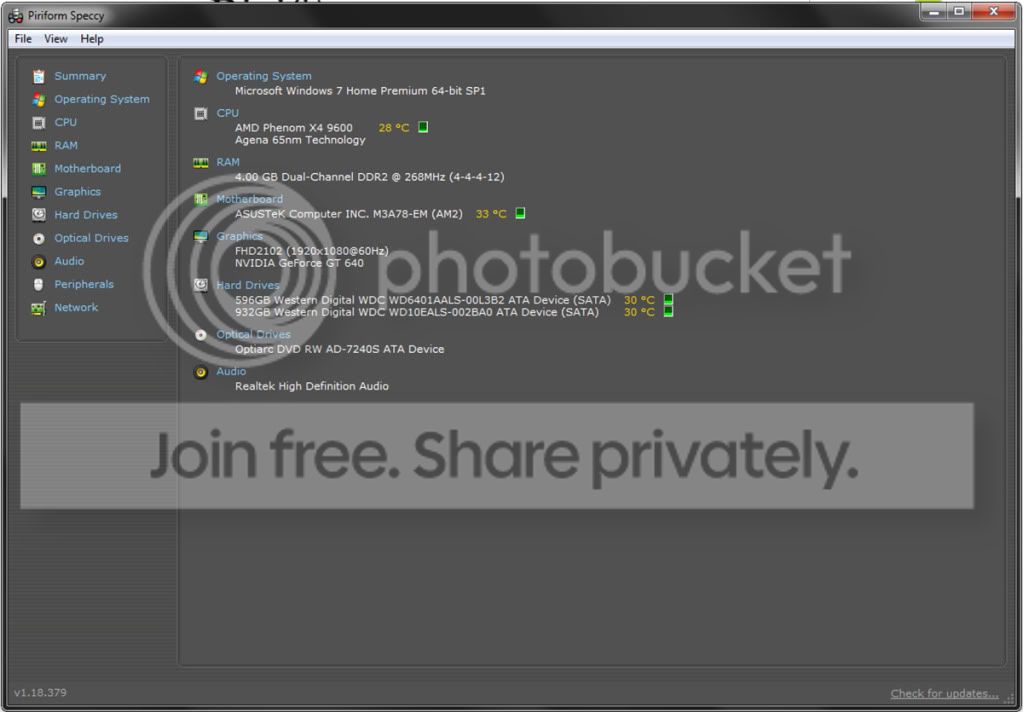
Here is the screen from speccy
Untitled-1-1.jpg
 

My Computer

Computer Manufacturer/Model Number
scratch built
OS
Windows 7 home premium 64bit
CPU
AMD FX 4100 black edition quad core 3.6ghz (unlocked)
Motherboard
Gigabyte 78lm mATX
Memory
8gb crucial ballistix ddr3-1333
Graphics Card(s)
Geforce gt640 1gb
Sound Card
Realtek HD audio
Monitor(s) Displays
Gateway 21.5"
Screen Resolution
1920x1080
Hard Drives
Western Digital black 640gb system drive, western digital blue 1tb media
PSU
500w cooler master
Case
raidmax
Cooling
6 120mm fans (2 intakes on front) 3 exhaust, and heatsink
Internet Speed
25mb/s down, 5mb/s up
Looks okay.
Keep us posted.

And test one stick at a time.
 

My Computer

Computer type
PC/Desktop
Computer Manufacturer/Model Number
Self assembled
OS
Windows 10 Home 64Bit
CPU
Intel Core i5 10400 @ 2.90GHz
Motherboard
Intel Corporation DG41WV (PROCESSOR)
Memory
8.00GB Single-Channel Unknown @ 1329MHz (16-20-20-38)
Sound Card
Realtek High Definition Audio
Monitor(s) Displays
DELL E170S
Screen Resolution
1280x1024 pixels
Hard Drives
931GB TOSHIBA DT01ACA100 (SATA)
238GB TEAM TM8PS7256G (SATA SSD)
Case
Nothing Fancy
Cooling
Fans
Keyboard
A4 Tech Co LTD
Mouse
A4 Tech Co Ltd/Logitech
Internet Speed
25 Mbps
I haven´t had time to do the Memtest yet but I will as soon as possible. Could this be something Flash related:

GeForce 9800 GT Win 7 crashes frequently ... - AnandTech Forums

Just thinking of the nature of this problem. I haven´t had crash when playing games, it´s always related to browsing on desktop or internet and when using mouse. And like richphotos said changing from window to another.

What motherboard do you have richphotos and what PCIe bus is there (2.0 or 3.0 or what). GeForce 640 is made for 3.0 but hardly this is hardware incompatibility issue as I guess it wouldn´t work so fine overall. One thing that has crossed my mind is power. When I installed the GeForce640 with my friend we were wondering a long time that the graphics card doesn´t have any external power cable slot in it. But then again why would it work when playing GPU intensive games but not when browsing the net. That makes me think that this must be some driver incompatibility issue.
 

My Computer

OS
Win 7 64 bit
All I know is its not graphics related on my end, because I get the same problem now with the 640 as I did with the 4830.
 

My Computer

Computer Manufacturer/Model Number
scratch built
OS
Windows 7 home premium 64bit
CPU
AMD FX 4100 black edition quad core 3.6ghz (unlocked)
Motherboard
Gigabyte 78lm mATX
Memory
8gb crucial ballistix ddr3-1333
Graphics Card(s)
Geforce gt640 1gb
Sound Card
Realtek HD audio
Monitor(s) Displays
Gateway 21.5"
Screen Resolution
1920x1080
Hard Drives
Western Digital black 640gb system drive, western digital blue 1tb media
PSU
500w cooler master
Case
raidmax
Cooling
6 120mm fans (2 intakes on front) 3 exhaust, and heatsink
Internet Speed
25mb/s down, 5mb/s up
All I know is its not graphics related on my end, because I get the same problem now with the 640 as I did with the 4830.
@richphotos
How's the ram test going? how many sticks are you running your PC on now? any blue screen/crashes?
 

My Computer

Computer type
PC/Desktop
Computer Manufacturer/Model Number
Self assembled
OS
Windows 10 Home 64Bit
CPU
Intel Core i5 10400 @ 2.90GHz
Motherboard
Intel Corporation DG41WV (PROCESSOR)
Memory
8.00GB Single-Channel Unknown @ 1329MHz (16-20-20-38)
Sound Card
Realtek High Definition Audio
Monitor(s) Displays
DELL E170S
Screen Resolution
1280x1024 pixels
Hard Drives
931GB TOSHIBA DT01ACA100 (SATA)
238GB TEAM TM8PS7256G (SATA SSD)
Case
Nothing Fancy
Cooling
Fans
Keyboard
A4 Tech Co LTD
Mouse
A4 Tech Co Ltd/Logitech
Internet Speed
25 Mbps
Back
Top