Windows Update memory leak, and random CPU spikes

TheVicksKid

New member
Local time
12:10 PM
Messages
5
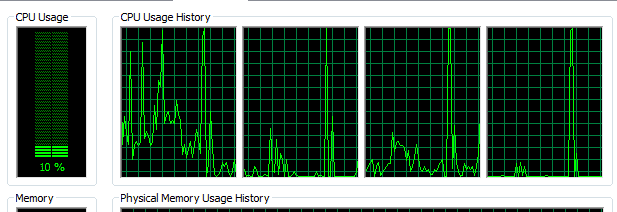
Hey, so over the past few weeks my computer has been getting random CPU spikes, where there's only 3% being used but it says it's using 100% of it and freezes.
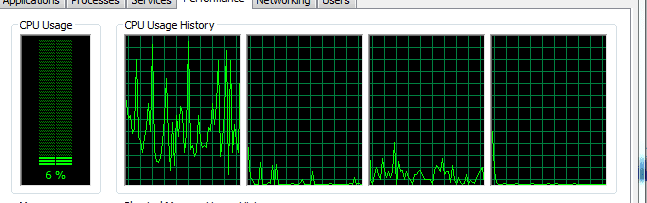
77034705329f40fdcb12225e38109192.png

eee96ab41c9b36d2285875b2593c2c8b.png

On top of this, Windows Update seems to be taking up a lot of memory - and I mean insane amount, I've seen it go up twice as high as in this screenshot. For now, I keep the service disabled rather than cripple my machine, but when it's enabled it's always when it's "Checking for new updates"

792d0663f923348e053878191a29f5c3.png

After further investigation it seems like both of these problems are caused when I am doing something over the internet. The CPU problem happens when I'm downloading games off of Steam (as well as random things as well, but it always happens in that scenario) and the memory problem always happens when windows update is checking for new updates.

How do I fix this?
 

My Computer

Computer type
Laptop
Computer Manufacturer/Model Number
Asus K35E
OS
Windows 7 Home Premium x64
CPU
Intel(R) Core(TM) i3-2330M CPU @ 2.20GHz, 2200 MHz
Memory
4.00 GB (2.79 GB useable)
Antivirus
Microsoft Security Essentials

My Computer

Computer type
PC/Desktop
Computer Manufacturer/Model Number
Custom Build
OS
Windows 7 Ultimate x64 SP1
CPU
AMD Phenom 2 1090T
Motherboard
Gigabyte GA-890FXA-UD5
Memory
2x8GB Kingston HyperX Fury Black 1600Mhz Unganged
Graphics Card(s)
MSI GTX 970 Gaming 4G
Sound Card
Realtek On-Board HD 7.1 Audio / Logitech G35
Monitor(s) Displays
3xAcer GD245HQ
Screen Resolution
1920x1080
Hard Drives
Samsung 850 Pro 512GB SSD - OS /
WD Caviar Black SATA 3 - 1 TBx2 - Dynamic RAID 0 /
WD Caviar Green SATA 2 - 640GBx2 - Dynamic RAID 0 /
WD Caviar Green SATA 2 - 640GB - Internal Backup /
Seagate Barracude SATA 3 - 3TB - External Backup/ Sync
PSU
HighPower 1000W
Case
Cooler Master HAF 932
Cooling
Noctua NH-D14
Keyboard
Logitech G19
Mouse
Logitech G500
Internet Speed
100/4 Mbit Cable (100GB quota)
Antivirus
ZoneAlarm Extreme Security / MBAM Pro / MBAE Free / SAS Free
Browser
IE 11 - Firefox - Chrome
Other Info
Logitech F710/ G27/ G940/ Z5500 // TrackIR 5 // Nvidia 3D Surround Vision
Had the same problem with roughly the same memory usage. In addition to the steps in the post mentioned it was also neccessary to remove Windows Update KB2990214. It might also be worth resetting Internet Explorer. (Tools > Options > Advanced > Reset > Reboot) You can get Windows Update Agent from here:

https://support.microsoft.com/en-us/kb/949104

Now I get memory usage like this and Windows Updates works.

View attachment 359819

Worth mentioning. If the fix doesn't work first time around you can try downloading the MS Fix It Tool 50202 that you can download from here:

https://www.winhelp.us/reinstall-windows-update.html

I found that it needs to be run anywhere up to three times with a reboot between each attempt before repairs are successful using aggressive options. Then proceed with the fix mentioned in the post Gokay linked. Then reboot and configure Windows Updates.

https://www.winhelp.us/configure-automatic-updates-in-windows.html

Reboot again and check for updates by choosing "Windows Updates" from the Start Menu > All Programs listin the first instance rather than via Control Panel.
 
Last edited:

My Computer

Computer type
Laptop
Computer Manufacturer/Model Number
ASUS
OS
Microsoft Windows 7 Home Premium 64-bit 7601 Multiprocessor Free Service Pack 1
CPU
AMD C-60 APU with Radeon(tm) HD Graphics
Motherboard
ASUSTeK COMPUTER INC. X501U
Memory
4.00 GB
Graphics Card(s)
AMD Radeon HD 6290 Graphics
Sound Card
(1) AMD High Definition Audio Device (2) Realtek High Defi
Screen Resolution
1366 x 768 x 32 bits (4294967296 colors) @ 60 Hz
Hard Drives
Hitachi HTS545050A7E380 SATA Disk Device
Antivirus
Comodo CIS & FW, SecureAplus App Whitelisting, Threatfire
Browser
Cyberfox 64bit, Opera 64bit, Airfox
Other Info
Spy-The-Spy, HitmanPro.Alert, Norton Connect Safe, MJRegWatcher, BitDefender TrafficLight, Voodoo Shield, Zemana AntiMalware
The thing is, I don't even have Internet Explorer on my computer so I can't reset it.
 

My Computer

Computer type
Laptop
Computer Manufacturer/Model Number
Asus K35E
OS
Windows 7 Home Premium x64
CPU
Intel(R) Core(TM) i3-2330M CPU @ 2.20GHz, 2200 MHz
Memory
4.00 GB (2.79 GB useable)
Antivirus
Microsoft Security Essentials
No IE

The thing is, I don't even have Internet Explorer on my computer so I can't reset it.

You mean you've created a custom install of windows without IE? Or you've just hidden IE by turning it off in Windows Features?
 

My Computer

Computer type
Laptop
Computer Manufacturer/Model Number
ASUS
OS
Microsoft Windows 7 Home Premium 64-bit 7601 Multiprocessor Free Service Pack 1
CPU
AMD C-60 APU with Radeon(tm) HD Graphics
Motherboard
ASUSTeK COMPUTER INC. X501U
Memory
4.00 GB
Graphics Card(s)
AMD Radeon HD 6290 Graphics
Sound Card
(1) AMD High Definition Audio Device (2) Realtek High Defi
Screen Resolution
1366 x 768 x 32 bits (4294967296 colors) @ 60 Hz
Hard Drives
Hitachi HTS545050A7E380 SATA Disk Device
Antivirus
Comodo CIS & FW, SecureAplus App Whitelisting, Threatfire
Browser
Cyberfox 64bit, Opera 64bit, Airfox
Other Info
Spy-The-Spy, HitmanPro.Alert, Norton Connect Safe, MJRegWatcher, BitDefender TrafficLight, Voodoo Shield, Zemana AntiMalware

My Computer

Computer type
Laptop
Computer Manufacturer/Model Number
ASUS
OS
Microsoft Windows 7 Home Premium 64-bit 7601 Multiprocessor Free Service Pack 1
CPU
AMD C-60 APU with Radeon(tm) HD Graphics
Motherboard
ASUSTeK COMPUTER INC. X501U
Memory
4.00 GB
Graphics Card(s)
AMD Radeon HD 6290 Graphics
Sound Card
(1) AMD High Definition Audio Device (2) Realtek High Defi
Screen Resolution
1366 x 768 x 32 bits (4294967296 colors) @ 60 Hz
Hard Drives
Hitachi HTS545050A7E380 SATA Disk Device
Antivirus
Comodo CIS & FW, SecureAplus App Whitelisting, Threatfire
Browser
Cyberfox 64bit, Opera 64bit, Airfox
Other Info
Spy-The-Spy, HitmanPro.Alert, Norton Connect Safe, MJRegWatcher, BitDefender TrafficLight, Voodoo Shield, Zemana AntiMalware
I mean it's gone completely, but it should be there :S

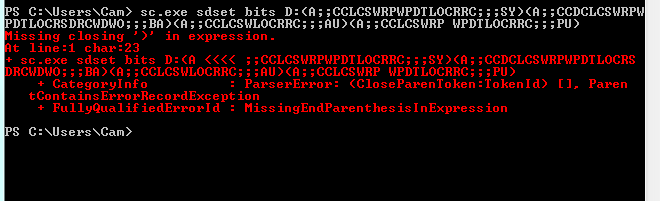
Also, how exactly do I do this?

3dfc7c3679705492a81a68892d3eb0a3.png
 

My Computer

Computer type
Laptop
Computer Manufacturer/Model Number
Asus K35E
OS
Windows 7 Home Premium x64
CPU
Intel(R) Core(TM) i3-2330M CPU @ 2.20GHz, 2200 MHz
Memory
4.00 GB (2.79 GB useable)
Antivirus
Microsoft Security Essentials
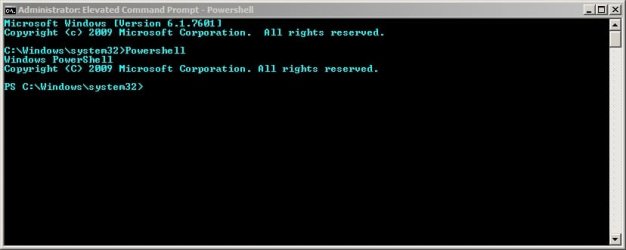
Well like I said I can't help if you don't have internet explorer. If you're trying those steps anyway you need to run Powershell from an Elevated Command Prompt which should open in C:\Windows\System32 - your screenshot shows the wrong directory and it should look like this:

Administrator_ Elevated Command Prompt - Powershell.jpg

Elevated Command Prompt opens at C:Windows\System32 = type powershell and press Enter.

To leave Powershell and go back to the command window to run other commands type exit whilst still in Powershell.

To close the window entirely type exit again.
 
Last edited:

My Computer

Computer type
Laptop
Computer Manufacturer/Model Number
ASUS
OS
Microsoft Windows 7 Home Premium 64-bit 7601 Multiprocessor Free Service Pack 1
CPU
AMD C-60 APU with Radeon(tm) HD Graphics
Motherboard
ASUSTeK COMPUTER INC. X501U
Memory
4.00 GB
Graphics Card(s)
AMD Radeon HD 6290 Graphics
Sound Card
(1) AMD High Definition Audio Device (2) Realtek High Defi
Screen Resolution
1366 x 768 x 32 bits (4294967296 colors) @ 60 Hz
Hard Drives
Hitachi HTS545050A7E380 SATA Disk Device
Antivirus
Comodo CIS & FW, SecureAplus App Whitelisting, Threatfire
Browser
Cyberfox 64bit, Opera 64bit, Airfox
Other Info
Spy-The-Spy, HitmanPro.Alert, Norton Connect Safe, MJRegWatcher, BitDefender TrafficLight, Voodoo Shield, Zemana AntiMalware
Thank you! It seems like the problem is fixed :)

However, the CPU spikes are still there randomly (only with Steam when downloading games, or downloading software)
 

My Computer

Computer type
Laptop
Computer Manufacturer/Model Number
Asus K35E
OS
Windows 7 Home Premium x64
CPU
Intel(R) Core(TM) i3-2330M CPU @ 2.20GHz, 2200 MHz
Memory
4.00 GB (2.79 GB useable)
Antivirus
Microsoft Security Essentials
Svchost problem

Sounds like you've got other problems that I don't know much about. Are you saying that you still see high svchost usage? I don't know how you ran those fixes so fast including the reboots!

There's another option that I use to reset Windows Updates and clear Windows Updates history and temp files. It requires a reboot afterwards. You can try it if you like. Here's the details.

Download and install UVK installer.exe

Run the program by right clicking the desktop icon and choosing "Run as administrator"

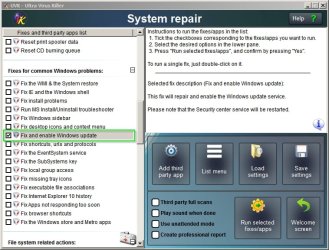
Click the system repair button and scroll to the windows update fix and run it.

Any problems and it's possible to go through the whole process of fixing windows updates again.

UVK - Ultra Virus Killer.jpg

Note: I wouldn't mess about with the other UVK fixes unless you know that you've got the specific problem that they fix. It's safe to run the built in third party malware scans though.

Edit 2:

Note: Should add do not run Rogue Killer

Edit: After running the UVK Windows Update fix you again need to reconfigure Windows Updates via Start Menu > Program List > Windows Update and still need to run a check for updates once configured.

If you still get problems - as a temporary workaround you can try

Start > Run then type services.msc

Press Enter.

Stop Windows Update Service

Stop BITS

If Windows Update Service won't stop - restart Bits and try again. Then stop BITS.

Note: That's not a fix but it enables you to use your machine in the meantime.
 
Last edited:

My Computer

Computer type
Laptop
Computer Manufacturer/Model Number
ASUS
OS
Microsoft Windows 7 Home Premium 64-bit 7601 Multiprocessor Free Service Pack 1
CPU
AMD C-60 APU with Radeon(tm) HD Graphics
Motherboard
ASUSTeK COMPUTER INC. X501U
Memory
4.00 GB
Graphics Card(s)
AMD Radeon HD 6290 Graphics
Sound Card
(1) AMD High Definition Audio Device (2) Realtek High Defi
Screen Resolution
1366 x 768 x 32 bits (4294967296 colors) @ 60 Hz
Hard Drives
Hitachi HTS545050A7E380 SATA Disk Device
Antivirus
Comodo CIS & FW, SecureAplus App Whitelisting, Threatfire
Browser
Cyberfox 64bit, Opera 64bit, Airfox
Other Info
Spy-The-Spy, HitmanPro.Alert, Norton Connect Safe, MJRegWatcher, BitDefender TrafficLight, Voodoo Shield, Zemana AntiMalware

My Computer

Computer type
Laptop
Computer Manufacturer/Model Number
ASUS
OS
Microsoft Windows 7 Home Premium 64-bit 7601 Multiprocessor Free Service Pack 1
CPU
AMD C-60 APU with Radeon(tm) HD Graphics
Motherboard
ASUSTeK COMPUTER INC. X501U
Memory
4.00 GB
Graphics Card(s)
AMD Radeon HD 6290 Graphics
Sound Card
(1) AMD High Definition Audio Device (2) Realtek High Defi
Screen Resolution
1366 x 768 x 32 bits (4294967296 colors) @ 60 Hz
Hard Drives
Hitachi HTS545050A7E380 SATA Disk Device
Antivirus
Comodo CIS & FW, SecureAplus App Whitelisting, Threatfire
Browser
Cyberfox 64bit, Opera 64bit, Airfox
Other Info
Spy-The-Spy, HitmanPro.Alert, Norton Connect Safe, MJRegWatcher, BitDefender TrafficLight, Voodoo Shield, Zemana AntiMalware
You should make a tutorial for this until they come with a fix! :)
 

My Computer

Computer type
PC/Desktop
Computer Manufacturer/Model Number
Custom Build
OS
Windows 7 Ultimate x64 SP1
CPU
AMD Phenom 2 1090T
Motherboard
Gigabyte GA-890FXA-UD5
Memory
2x8GB Kingston HyperX Fury Black 1600Mhz Unganged
Graphics Card(s)
MSI GTX 970 Gaming 4G
Sound Card
Realtek On-Board HD 7.1 Audio / Logitech G35
Monitor(s) Displays
3xAcer GD245HQ
Screen Resolution
1920x1080
Hard Drives
Samsung 850 Pro 512GB SSD - OS /
WD Caviar Black SATA 3 - 1 TBx2 - Dynamic RAID 0 /
WD Caviar Green SATA 2 - 640GBx2 - Dynamic RAID 0 /
WD Caviar Green SATA 2 - 640GB - Internal Backup /
Seagate Barracude SATA 3 - 3TB - External Backup/ Sync
PSU
HighPower 1000W
Case
Cooler Master HAF 932
Cooling
Noctua NH-D14
Keyboard
Logitech G19
Mouse
Logitech G500
Internet Speed
100/4 Mbit Cable (100GB quota)
Antivirus
ZoneAlarm Extreme Security / MBAM Pro / MBAE Free / SAS Free
Browser
IE 11 - Firefox - Chrome
Other Info
Logitech F710/ G27/ G940/ Z5500 // TrackIR 5 // Nvidia 3D Surround Vision
Well the memory leak is back :/
 

My Computer

Computer type
Laptop
Computer Manufacturer/Model Number
Asus K35E
OS
Windows 7 Home Premium x64
CPU
Intel(R) Core(TM) i3-2330M CPU @ 2.20GHz, 2200 MHz
Memory
4.00 GB (2.79 GB useable)
Antivirus
Microsoft Security Essentials
Okay then I'd suggest going through the same steps again and try force installing Windows Update Agent from the command prompt:

"C:\Full Path to Installer\WindowsUpdateAgent-7.6-x64.exe" /wuforce

Replace Full Path to Installer in the line above with the actual path.

Other than that I'd suggest getting help by posting in the Windows Updates section and post the requested information. The helpers there will be able to give you better advice on how to fix the problem. I fixed the problem on my own machine but maybe there are other isuues on your machine that I'm not aware of.
 

My Computer

Computer type
Laptop
Computer Manufacturer/Model Number
ASUS
OS
Microsoft Windows 7 Home Premium 64-bit 7601 Multiprocessor Free Service Pack 1
CPU
AMD C-60 APU with Radeon(tm) HD Graphics
Motherboard
ASUSTeK COMPUTER INC. X501U
Memory
4.00 GB
Graphics Card(s)
AMD Radeon HD 6290 Graphics
Sound Card
(1) AMD High Definition Audio Device (2) Realtek High Defi
Screen Resolution
1366 x 768 x 32 bits (4294967296 colors) @ 60 Hz
Hard Drives
Hitachi HTS545050A7E380 SATA Disk Device
Antivirus
Comodo CIS & FW, SecureAplus App Whitelisting, Threatfire
Browser
Cyberfox 64bit, Opera 64bit, Airfox
Other Info
Spy-The-Spy, HitmanPro.Alert, Norton Connect Safe, MJRegWatcher, BitDefender TrafficLight, Voodoo Shield, Zemana AntiMalware
Back
Top