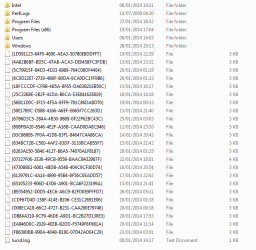
I just recently built this computer and today I noticed that there was files being created in my C Drive, outside of the folders. The first one was created on the 12/1/2014 and the latest 26/1/2014 and they are all around the same size of 3kb with the same format in their File Names, an example would be {4A82B6BF-BD5C-47AB-ACA3-DE0458FC3FDB} Every file has the brackets and the dashes and the File Type is just labeled as File so I cannot open these. Any help with identifying what these files are would be appreciated and if they are safe to delete.
I believe those are registration entries for some program(s). I don't know why they are showing up as orphaned entries in the "C" drive directory. You can check the registry by copying the entire key,
{4A82B6BF-BD5C-47AB-ACA3-DE0458FC3FDB} for example, and initiating a search which should provide some information.
Run Regedit as Admin;
Step 1
Press the "Windows" key to display the caption box, and then type "regedit" (without the quotes) on the Start screen to search for the Registry Editor utility.
Step 2
Right-click the "Registry Editor" utility. The Advanced icon appears in the bottom right corner of the Start screen.
Step 3
Click the "Advanced" icon and choose "Run as Administrator" from the context menu to launch the Registry Editor with elevated privileges.
Post back if you need more details on how to do a reg search.
HTH