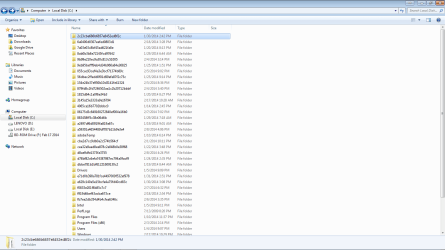
What is all this crap in the attached image... It's in my C:// folder, and I'm pretty sure more of it is getting put there... not sure what program or how it's getting there, but what can I do?
1*Samsung 840 EVO 120GB SSD;
1*OCZ Vertex 2 60GB SSD;
2*Samsung F3 SpinPoint 1TB in RAID0;
1*Samsung F1 SpinPoint 1TB;
2*Western Digital 1TB External USB 3.0
1*Western Digital 500GB External USB 3.0
1*Seagate 500GB External USB 2.0
PSU
Thermaltake ToughPower QFan 750W
Case
Thermaltake Element S VK60001W2Z
Cooling
Corsair H60 Water Cooling, 2*230mm and 2*80mm case fans
Launch a Command prompt and type (or copy and paste)
set > %USERPROFILE%\Downloads\Environs.txt
exit
Attach Environs.txt from your Downloads folder to your next post. Use the paperclip icon on the post menu to attach the file)I'm looking for two environment variables TEMP & TMP - both should be set to \AppData\Local\Temp
My Computer
At a glance
x64 (6.3.9600) Win8.1 Pro & soon dual boot x6...AMD A6-3420M APU with Radeon(tm) HD Graphics6.00 GBAMD Radeon(TM) HD 6520G
Hey guys, sorry I haven't gotten back to you, thanks for your help! I've been busy the last couple of days, and I'll get back to you when I get back home to my laptop today. Thanks!