Random Freeze/Hang When Running Applications

Icezed

New member
Local time
8:16 PM
Messages
24
After several weeks of struggle with BSOD I was finally able to clear the problem up but i still have an unsolved problem which i decide to post it here because it's not a BSOD anymore. Well it's just as the title says, the freeze occurs randomly. Not only when i run some games, it also occurs when i browse the web which i believe would not use as much as resources as the game do. It's not an old system, i just installed my Windows 2 days ago, also all drivers have been updated. Whenever the freeze occurs, i always checked the event viewer to see what could possibly caused this, but i see nothing, no application failure or such. But when the freeze happened yesterday i noticed there was an event ID 7000, 7009, and 7011 which seems to be the cause of the freeze due to the windows error reporting service timeout. I have googled the problem and solved it right away and yet the freeze still occurs until now. I did a full scan with Malwarebytes Anti Malwares, no infections. I did both memtest86 and Windows Memory Diagnostic tools, both shows no errors. I did hard drive fitness test from Hitachi, it also shows no error both on quick and extended test (note : I do not use my seagate hard disk as my primary one and yes, i installed windows in my hitachi). Lastly, i did sfc /scannow and chkdsk, both also showed positive result. I guess i'm at the dead end now, i really need your help guys :confused:
 

My Computer My Computer

Computer type
PC/Desktop
OS
Windows 7 Professional X64 SP1
Sound Card
Onboard
I had a very similar problem. You can read about it here:
http://www.sevenforums.com/performance-maintenance/263815-windows-7-periodically-freezes.html
To save some time you can go to the end of the thread and look at the fix. You may have a hard drive problem as I did. You can run the MFG's Extended tests but it may Pass and still be the hard drive as it was in my case. Is your hard drive light ON-SOLID for the duration of a Freeze? In my case it was and this is a clue that the hard drive may be faulty. If its the hard drive, you can make an image of the hard drive and restore it to a known good hard drive. You can use "windows 7 backup" to make and restore the image. My problem went away for good when I did this and there is no loss of programs or functionality. The main headache is that you will need a known good hard drive and it will need to be at least as big as your present system drive is. I hope this helps.
 

My Computer My Computer

Computer type
PC/Desktop
Computer Manufacturer/Model Number
Custom Build
OS
Windows 7 professional 64 bit
CPU
i7-870
Motherboard
Gigabyte GA-P55-USB3 (rev 2)
Memory
G.Skill F3-10666CL9D-8GBRL; (8GB)
Graphics Card(s)
Radeon HD4670
Sound Card
on board
Monitor(s) Displays
Dell U2311H plus ASUS PB238
Screen Resolution
1080P (dual monitors)
Hard Drives
VelociRaptor WD1500HLHX 150GB (system)
2TB Samsung spinpoint (data)
596GB WD caviar blue (data)
PSU
FSP AS400 400W ATX2.31/EPS2.92
Case
Antec Sonata III 500
Cooling
CPU cooled by Rosewill HSF RCX-Z90-CP
Keyboard
Microsoft ergonomic PS-2
Mouse
Logitech M510
Internet Speed
very fast via cable
Antivirus
Microsoft Security Essentials
Browser
Chrome and IE10
Other Info
Also have hauppauge TV Card HVR-1600
CPU, case and GPU Fans are controlled by SpeedFan.
Thanks for your help, i already read some of those but i'm almost sure that my hard drive is not the main cause. Why? Because i just replaced my hard drive two days ago along with a new installation of Windows, oh and this also happened on my Seagate hard drive which runs fine in my 3 years of usage, yes i used that as backup so i guess if i need any backup i'll just move it to my Seagate. But you know, this freezing problem is very weird, at first it came along with other serveal problem like crc error when moving large files and BSOD, both problem fixed when i replaced my Hitachi hard drive. But this freeze, it was never gone. I think about some incompatibility, defect, or corruption on my mobo, is that possible?

Update : today when i logged on explorer.exe constantly crashes, even after i restarted it. Tried safe mode and it runs just fine
 

My Computer My Computer

Computer type
PC/Desktop
OS
Windows 7 Professional X64 SP1
Sound Card
Onboard

My Computer My Computer

Computer type
PC/Desktop
Computer Manufacturer/Model Number
Custom Build
OS
Windows 7 professional 64 bit
CPU
i7-870
Motherboard
Gigabyte GA-P55-USB3 (rev 2)
Memory
G.Skill F3-10666CL9D-8GBRL; (8GB)
Graphics Card(s)
Radeon HD4670
Sound Card
on board
Monitor(s) Displays
Dell U2311H plus ASUS PB238
Screen Resolution
1080P (dual monitors)
Hard Drives
VelociRaptor WD1500HLHX 150GB (system)
2TB Samsung spinpoint (data)
596GB WD caviar blue (data)
PSU
FSP AS400 400W ATX2.31/EPS2.92
Case
Antec Sonata III 500
Cooling
CPU cooled by Rosewill HSF RCX-Z90-CP
Keyboard
Microsoft ergonomic PS-2
Mouse
Logitech M510
Internet Speed
very fast via cable
Antivirus
Microsoft Security Essentials
Browser
Chrome and IE10
Other Info
Also have hauppauge TV Card HVR-1600
CPU, case and GPU Fans are controlled by SpeedFan.
As i have posted before, i did almost all of them except i plugged 2 stick when i did memtest86 and i have never checked the cables. Alright then i'll do it immediately and will report the result. Oh i got another bad news for myself, i can't even log in to windows now, it only shows cursor in a blank screen
 

My Computer My Computer

Computer type
PC/Desktop
OS
Windows 7 Professional X64 SP1
Sound Card
Onboard
Random freezes in Windows is usually a HEAT related issue.

CPU or GPU can be effected.

Fan(s), thermal paste, or power supplies failing can be common causes.

Inspect case and fans, remove DUST BUNNIES! :)
 

My Computer My Computer

Computer type
PC/Desktop
Computer Manufacturer/Model Number
Self Built Custom
OS
Windows 7 Ultimate Retail Box (64-bit installed) + Service Pack 1
CPU
AMD FX-8350 CPU v1.15 (or 1.0F) BIOS was required!
Motherboard
MSI 890FXA-GD70
Memory
8G CAS-7 G-Skill DDR3 @1333 (2 fours) [mobo nonOC max rec'd]
Graphics Card(s)
Radeon HD 7950 [3 gigs of GDDR5] MSI Twin Frozr model
Sound Card
Realtek High Definition Audio (onboard mobo, ALC-889 chip)
Monitor(s) Displays
2 WS LED Monitors: One LG One Viewsonic
Screen Resolution
1920 by 1080
Hard Drives
SSD for OS: Samsung 840 Pro
SSD for VM and utilities: Adata SX900
7200 RPM SATA HDs for the rest: Hitachi and Seagate
PSU
Corsair TX850 - 850W max, in service since August 2010.
Case
Thermaltake Armor A90
Cooling
Thermaltake Spin Q CPU Cooler, in service since August 2010
Keyboard
Logitech G11
Mouse
Logitech M310 Wireless
Internet Speed
100 Megabit broadband supposedly upgraded from 50 (Cable)
Antivirus
Bitdefender Internet Security 2014 suite
Browser
Pale Moon 64-bit main, also IceDragon, Opera, and Maxthon.
Other Info
CompTIA A+ certified (220-800 series) in July 2013.
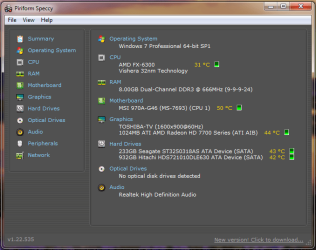
Unfortunately my pc is a brand new, so dust won't be a problem. Temperatures? well you can take a look at the attached image, it's fairly normal i think. And that's what i'm wondering about, is there any way to diagnose my PSU?
 

Attachments

  • temp.png
    temp.png
    28.8 KB · Views: 6

My Computer My Computer

Computer type
PC/Desktop
OS
Windows 7 Professional X64 SP1
Sound Card
Onboard
Yes, PSU tester, an actual piece of hardware itself that everyone with a desktop should probably own, since PSUs are a failure point that is very hard to pin down, otherwise: [but will fail eventually]

Example:
Rexus PST-3 Network/ PC Service Tools - Newegg.com

Warning on those devices, do not leave connected, it's very fast at determining if good or not.
 

My Computer My Computer

Computer type
PC/Desktop
Computer Manufacturer/Model Number
Self Built Custom
OS
Windows 7 Ultimate Retail Box (64-bit installed) + Service Pack 1
CPU
AMD FX-8350 CPU v1.15 (or 1.0F) BIOS was required!
Motherboard
MSI 890FXA-GD70
Memory
8G CAS-7 G-Skill DDR3 @1333 (2 fours) [mobo nonOC max rec'd]
Graphics Card(s)
Radeon HD 7950 [3 gigs of GDDR5] MSI Twin Frozr model
Sound Card
Realtek High Definition Audio (onboard mobo, ALC-889 chip)
Monitor(s) Displays
2 WS LED Monitors: One LG One Viewsonic
Screen Resolution
1920 by 1080
Hard Drives
SSD for OS: Samsung 840 Pro
SSD for VM and utilities: Adata SX900
7200 RPM SATA HDs for the rest: Hitachi and Seagate
PSU
Corsair TX850 - 850W max, in service since August 2010.
Case
Thermaltake Armor A90
Cooling
Thermaltake Spin Q CPU Cooler, in service since August 2010
Keyboard
Logitech G11
Mouse
Logitech M310 Wireless
Internet Speed
100 Megabit broadband supposedly upgraded from 50 (Cable)
Antivirus
Bitdefender Internet Security 2014 suite
Browser
Pale Moon 64-bit main, also IceDragon, Opera, and Maxthon.
Other Info
CompTIA A+ certified (220-800 series) in July 2013.
Too bad i have no money for that. Guess i'll just do another hardware check then, other than the PSU i mean :rolleyes:
 

My Computer My Computer

Computer type
PC/Desktop
OS
Windows 7 Professional X64 SP1
Sound Card
Onboard
Back
Top