Solved Random freezes - Seven Professional x64

bigfeh

New member
Member
Local time
3:57 PM
Messages
91
So first of all hello guys :)

I need some help with my computer. It's been randomly freezing for a while, but I don't really have any info. It appears to crash more often when games are running or when Flash is running (for that reason, I have uninstalled it). I ran the SF Diag tools and the .zip is attached. I get no BSOD, nothing - Just freezes. Requires a hard reset.

(Sorry if I posted in the wrong section! I couldn't find one more appropriate)
 
Last edited:

My Computer My Computer

Computer type
PC/Desktop
Computer Manufacturer/Model Number
Alienware
OS
Windows 7 Professional x64
CPU
i5-2400 CPU
Memory
2x8GB Corsair Dominator Platinum 1600MHz
Graphics Card(s)
nVidia GTS 450 1.5GB
Hard Drives
2x1TB RAID0
Antivirus
McAfee Security Center
Browser
Firefox 23.0a1
It seems you do did have a BSOD, and here's the analysis:

Code:
[COLOR="Red"]BugCheck 1E[/COLOR], {[COLOR="SeaGreen"]ffffffffc0000005[/COLOR], 1, 8, 1}

Probably caused by : win32k.sys ( win32k!DEC_SHARE_REF_CNT+e4 )

Code:
Usual causes:  Device driver, hardware, System service, compatibility, Remote control programs, memory, BIOS

It seems that the kernel detected a illegal instruction, which couldn't be handled by kernel.

Code:
2: kd> [COLOR="SeaGreen"]lmvm nvlddmkm[/COLOR]
start             end                 module name
fffff880`05857000 fffff880`062f5000   nvlddmkm   (deferred)             
    Image path: \SystemRoot\system32\DRIVERS\nvlddmkm.sys
    Image name: nvlddmkm.sys
    Timestamp:        [COLOR="Red"]Sat Dec 29 06:47:52 2012[/COLOR] (50DE9218)
    CheckSum:         00A7F96C
    ImageSize:        00A9E000
    Translations:     0000.04b0 0000.04e4 0409.04b0 0409.04e4
Version: 314.22
Release Date for Desktops and Notebooks : March 25th 2013
In Device Manager: 9.18.13.1422
  1. Download Driver
  2. Start :orb: Type: Device Manager
  3. Expand Display Adapters
  4. Right-Click Driver Name, Uninstall
  5. Reboot
  6. Run Driver Sweeper
  7. Reboot
  8. Install Downloaded Driver
Driver Sweeper will scan for any left over files from the old driver, old driver files can cause conflicts with new driver installations. Create a System Restore point beforehand, in case any problems or issues arise.

Driver Sweeper:
Remove:

Code:
Start Menu\Programs\McAfee

McAfee is known to cause BSODs with Windows 7, it's best to remove this program using the official McAfee Removal Tool.

Install and perform full scans with:
   Information
Remember to install the free version of Malwarebytes not the free trail; untick the free trial box during installation. MSE is the most lightweight and compatible with the Windows 7 operating system

You can also view this thread for a complete free and lightweight security protection combination:
Reduce the number of programs at startup, to avoid any driver or program conflicts:
 

My Computer My Computer

Computer type
Laptop
So, uh, first off, sorry for the late response.

I reinstalled the GPU drivers (which were already up to date) and ran DriverSweeper.

I'm pretty sure it's not a malware issue, and it's not McAfee either (I just reinstalled it today - was using MSE)

Apart from updating the video drivers, do you have any ideas?

EDIT: I didn't see that BSOD... when was that?

EDIT 2: So, reinstalling the video driver did not resolve the problem. What else could it be?
 
Last edited:

My Computer My Computer

Computer type
PC/Desktop
Computer Manufacturer/Model Number
Alienware
OS
Windows 7 Professional x64
CPU
i5-2400 CPU
Memory
2x8GB Corsair Dominator Platinum 1600MHz
Graphics Card(s)
nVidia GTS 450 1.5GB
Hard Drives
2x1TB RAID0
Antivirus
McAfee Security Center
Browser
Firefox 23.0a1
McAfee is very well known to cause problems with computers in general, and what driver version did you install? Was it the 2013 version? Your graphics driver was outdated.

What were the results of the scans?

Have you reduced number of programs at startup?
 

My Computer My Computer

Computer type
Laptop
MucAfee is the worst possible crapware you can install on your PC, cause of countless problems we've seen here since before Win7 was even released. The issue is almost always resolved by removing it.

It is an infection itself so be sure to use the Removal Tool to get it all out as is required for serious infections and bloated AV crapware.
 
McAfee is very well known to cause problems with computers in general, and what driver version did you install? Was it the 2013 version? Your graphics driver was outdated.

What were the results of the scans?

Have you reduced number of programs at startup?
McAfee was not the cause of the problem (the problem continued, even after uninstalling McAfee with their own removal tool). Either way, the driver version which is - and already was - installed is 314.22. I updated this a while ago (And had already reinstalled it). The driver was already up to date prior to the post.

I was already with MSE and it did not find anything for the week I had it installed. I got rid of MBAM right after the problems started, but found out soon after it was not the root cause of the issue. I'm reinstalling it atm, even though I'm sure it's not a malware issue.

I didn't remove any startup programs (I kind of need them, and if they didn't start with Windows, I'd open them either way), but I think I can remove Garena and Steam for now (The rest are only cloud storage syncing software and system stuff, like the thermal controller, audio card configs., Mouse/keyboard CI, GPU controllers and a RAID controller.
 

My Computer My Computer

Computer type
PC/Desktop
Computer Manufacturer/Model Number
Alienware
OS
Windows 7 Professional x64
CPU
i5-2400 CPU
Memory
2x8GB Corsair Dominator Platinum 1600MHz
Graphics Card(s)
nVidia GTS 450 1.5GB
Hard Drives
2x1TB RAID0
Antivirus
McAfee Security Center
Browser
Firefox 23.0a1
Run a full scan with Malwarebytes which is never the issue.

I'd also run a full scan from CD using Windows Defender Offline and then go over your PC closely using the Troubleshooting Steps for Windows 7.

Run a Clean Boot as shown in the steps until you have this resolved, then only re-enable the programs you absolutely need running at startup. Would you drive around all day with someone in your car because you are taking them to the dentist next week?

But first complete the steps BlueRobot gave you.
 
Run a full scan with Malwarebytes which is never the issue.

I'd also run a full scan from CD using Windows Defender Offline and then go over your PC closely using the Troubleshooting Steps for Windows 7.

Run a Clean Boot as shown in the steps until you have this resolved, then only re-enable the programs you absolutely need running at startup. Would you drive around all day with someone in your car because you are taking them to the dentist next week?

But first complete the steps BlueRobot gave you.
Alright, so the full scan is running atm. Not malware, though.

The steps BlueRobot gave me are already completed, and I don't think I'll be getting rid of McAfee this early again unless it's really necessary, given it was reinstalled only yesterday.

I'll follow the steps described in the troubleshooting steps.
 

My Computer My Computer

Computer type
PC/Desktop
Computer Manufacturer/Model Number
Alienware
OS
Windows 7 Professional x64
CPU
i5-2400 CPU
Memory
2x8GB Corsair Dominator Platinum 1600MHz
Graphics Card(s)
nVidia GTS 450 1.5GB
Hard Drives
2x1TB RAID0
Antivirus
McAfee Security Center
Browser
Firefox 23.0a1
So, here are a couple things I've already done, and are not the root cause of the problem:
1. Malware - running a scan though
2. McAfee is not the problem
4. "\SystemRoot\SysWow64\Drivers\GEARAspiWDM.sys has been blocked from loading due to incompatibility with this system. Please contact your software vendor for a compatible version of the driver."
8. Not the RAM.
9. Will do, even though the HDDs were the first suspects and showed nothing
10. No floppy drives, cabling is good, no extra HDDs
11. Not overheating, have been using speedfan for more than a year already
12. Well, there's an ethernet port without a driver but it's been there since I reinstalled Windows and I never use it. Rest is OK
13. I think I'll roll back the GPU driver.
14. I installed this OS myself
15. Already done that. Five times.
16. Could be, but that's more of a last resort
18. ^ Last-est resort after the last resort.

EDIT: Yes, I know - I uninstalled McAfee without any advice, and the problems continued, so I'm coming back (I can't stand MSE, honestly). I just want you to understand that it's not the problem, at least this time.
 

My Computer My Computer

Computer type
PC/Desktop
Computer Manufacturer/Model Number
Alienware
OS
Windows 7 Professional x64
CPU
i5-2400 CPU
Memory
2x8GB Corsair Dominator Platinum 1600MHz
Graphics Card(s)
nVidia GTS 450 1.5GB
Hard Drives
2x1TB RAID0
Antivirus
McAfee Security Center
Browser
Firefox 23.0a1
MemTest86+ for testing the RAM couldn't have taken 44 minutes to complete, the test when run for the recommended 7-8 passes, will take least 6-8 hours to complete.
 

My Computer My Computer

Computer type
Laptop
MemTest86+ for testing the RAM couldn't have taken 44 minutes to complete, the test when run for the recommended 7-8 passes, will take least 6-8 hours to complete.
I ran it prior to my OP here, I was already looking into this problem and, of course, RAM was the first suspect. Memtest showed nothing (that was a couple days ago), but if you want I can run it again tonight.
 

My Computer My Computer

Computer type
PC/Desktop
Computer Manufacturer/Model Number
Alienware
OS
Windows 7 Professional x64
CPU
i5-2400 CPU
Memory
2x8GB Corsair Dominator Platinum 1600MHz
Graphics Card(s)
nVidia GTS 450 1.5GB
Hard Drives
2x1TB RAID0
Antivirus
McAfee Security Center
Browser
Firefox 23.0a1
Run Memtest86+ for least 7-8 passes, and preferably overnight as it can take a while to fully complete.

Test each RAM stick individually, if an error is found then move the same RAM stick into the next DIMM slot and test again, if errors are found for the same RAM stick in every available slot then you have a faulty RAM module. On the other hand, if no errors are found in the next slot or the other slots for the same RAM module, then you have a faulty DIMM slot.

Test each RAM stick and every motherboard DIMM slot available.

test|Slot1|Slot2
RAM1| Error | Error
RAM2|Good|Good
It is a RAM, a bad RAM.

But if you have got a result like that:
test|Slot1|Slot2
RAM1| Error |Good
RAM2| Error |Good
It is a motherboard issue. The particular slot is bad.

Run Driver Verifier to scan for any corrupted drivers which may be causing problems, this program works by running various stress tests on drivers, in order to produce a BSOD which will locate the driver; run for least 24 hours:
 

My Computer My Computer

Computer type
Laptop
Run Memtest86+ for least 7-8 passes, and preferably overnight as it can take a while to fully complete.

Test each RAM stick individually, if an error is found then move the same RAM stick into the next DIMM slot and test again, if errors are found for the same RAM stick in every available slot then you have a faulty RAM module. On the other hand, if no errors are found in the next slot or the other slots for the same RAM module, then you have a faulty DIMM slot.

Test each RAM stick and every motherboard DIMM slot available.

test|Slot1|Slot2
RAM1| Error | Error
RAM2|Good|Good
It is a RAM, a bad RAM.

But if you have got a result like that:
test|Slot1|Slot2
RAM1| Error |Good
RAM2| Error |Good
It is a motherboard issue. The particular slot is bad.

Run Driver Verifier to scan for any corrupted drivers which may be causing problems, this program works by running various stress tests on drivers, in order to produce a BSOD which will locate the driver; run for least 24 hours:
Driver verifier is now enabled. I'll run Memtest tonight and I'll update tomorrow with the results. Will reboot in a while and will also update with the progress on driver verifier.

EDIT: MBAM found nothing; rebooting.
 
Last edited:

My Computer My Computer

Computer type
PC/Desktop
Computer Manufacturer/Model Number
Alienware
OS
Windows 7 Professional x64
CPU
i5-2400 CPU
Memory
2x8GB Corsair Dominator Platinum 1600MHz
Graphics Card(s)
nVidia GTS 450 1.5GB
Hard Drives
2x1TB RAID0
Antivirus
McAfee Security Center
Browser
Firefox 23.0a1
Update: Great news! The computer BSOD'd in my face while booting with driver verifier :) While I try to retrieve the .dmp, here's some info:

Driver is PxHlpa64.sys, address FFFFF880018E207C base at FFFFF880018DF00, datestamp 4e9c3bce
STOP code is 0xC9.

EDIT: I've looked into this and it seems that (obviously - this is the Internet, after all) someone else had the same problem, same driver, GEARAspiWDM.sys also present (it was mentioned in SEVERAL errors in my logs), same stop code, same everything. Might be worth taking a look; there could be some golden info there. http://www.sevenforums.com/bsod-help-support/150064-random-bsods-please-help.html
Also, nVidia.

EDIT 2: Posting from the affected system. Awfully slow, attempting to retrieve BSOD dump. Will update.

EDIT 3: A couple processes just went haywire, eating my CPU (McAfee, Windows Explorer and a couple svchost.exe. Uploading memory dump. Seems stable now.

EDIT 4: Wow, 450MB... not going to upload this now. I can get all the information you guys want, I'm on the affected system now.

EDIT 5: Disregard the first BSOD. That is really old and happened because of faulty RAM back in early March/late February. It is completely unrelated to the present issue.

EDIT 6: Just froze again, twice. No BSODs, nothing. Just froze. Does that mean anything?

EDIT 7: Audio is jittering like crazy. I really need to get this issue solved, any ideas?
 
Last edited:

My Computer My Computer

Computer type
PC/Desktop
Computer Manufacturer/Model Number
Alienware
OS
Windows 7 Professional x64
CPU
i5-2400 CPU
Memory
2x8GB Corsair Dominator Platinum 1600MHz
Graphics Card(s)
nVidia GTS 450 1.5GB
Hard Drives
2x1TB RAID0
Antivirus
McAfee Security Center
Browser
Firefox 23.0a1
A 0xC9 bugcheck is caused by Driver Verifier on I/O management errors. This is usually caused by poorly written drivers. There should have been four parameters following the C9 code. The parameters should be in the dump but I don't see the dump. :confused:

I just read your link to the other BSOD and I concur with Yowan. Remove the software or see if the OEMs have updates.

McAfee doesn't seem to play well with comm packets and often returns bad addresses after a scan. These bad addresses may not be caught unless they happen to point to reserved/invalid areas but the address can reek havoc for the process receiving the packet. And more often than not, they can't keep up with all the system driver updates from Microsoft. McAfee is also a bloated AV that often has 4-5 drivers running. We see McAfee problems all the time so they're easy to blame. I'm not aware of any SF tech that supports its use. But as the owner, you make your own choices.

If you're looking for guidance, remove McAfee and ignore Norton all together. And NEVER run more than one real-time AV on a PC.
 

My Computer My Computer

Computer type
PC/Desktop
Computer Manufacturer/Model Number
Built 2/11/2011
OS
Windows 7 Pro-x64
CPU
i7-2600 3.4GHz - 3.8GHz Turbo
Motherboard
Intel DH67BL-B3
Memory
8Gb - 2x4GB, Muskin 991770 PC3-1333
Graphics Card(s)
Integrated Intel HD 2000
Sound Card
Integrated Intel 10.1 HD, RealTek ALC892
Monitor(s) Displays
Asus LCD VH222H, Haier HL24XSL2a
Screen Resolution
1920x1080, 1920x1080
Hard Drives
Crucial SSD C300-128Gb,
Western Digital WD5002AALX - 500Gb,
Western Digital WD7501AALS - 750Gb
PSU
Seasonic 650W 80+ Gold Modular
Case
Rosewill Defender
Cooling
Stock CPU, Four 120mm case fans, PCH fan added
Keyboard
Logitech EX100 Y-RBH94 Wireless
Mouse
Logitech EX100 M-RCE95 Wireless
Internet Speed
3.0/1.5 Mbs
Antivirus
Microsoft Security Essentials
Browser
Microsoft Internet Explorer 11
Other Info
Antec Veris Premier-Multimedia IR Station,
Cyber Accoustics-3602 Speakers,
AFT XM-5U Card Reader,
Hauppauge TV-HVR-2250,
Sony LX300 USB Turntable
Disable Driver Verifier also, this is the reasoning behind the freezing, and upload the Minidump.
 

My Computer My Computer

Computer type
Laptop
Driver Verifier has been disabled and now the computer's back to normal; guess it was eating my CPU.

So, uh... Problem is, I have to update the driver but I can't find it anywhere, and I don't know who the manufacturer is; only thing I know for sure is that it's CD/DVD drive-related, device manager says it's associated with that piece of hardware. But how am I supposed to remove something I don't know where it is?

On a (probably) unrelated topic, why all the hate on mcafee and norton? Also, any recommendations for AVs? I've heard that norton used to be good a few years ago bu for some reason it just got worse... That's all I know.

EDIT: will upload minidump when I get home, in a couple hours.
 

My Computer My Computer

Computer type
PC/Desktop
Computer Manufacturer/Model Number
Alienware
OS
Windows 7 Professional x64
CPU
i5-2400 CPU
Memory
2x8GB Corsair Dominator Platinum 1600MHz
Graphics Card(s)
nVidia GTS 450 1.5GB
Hard Drives
2x1TB RAID0
Antivirus
McAfee Security Center
Browser
Firefox 23.0a1
PxHlpa64.sys is basically used by Roxio Burn, but is is also used by some other programs like Adobe lightroom, Cyberlink, QuickTime and even by Dell Media Experience. Mostly, this driver and one another driver from QuickTime simultaneously cause the ODD (CD/DVD drive) fail.

If you have any of those programs installed, uninstalled them.

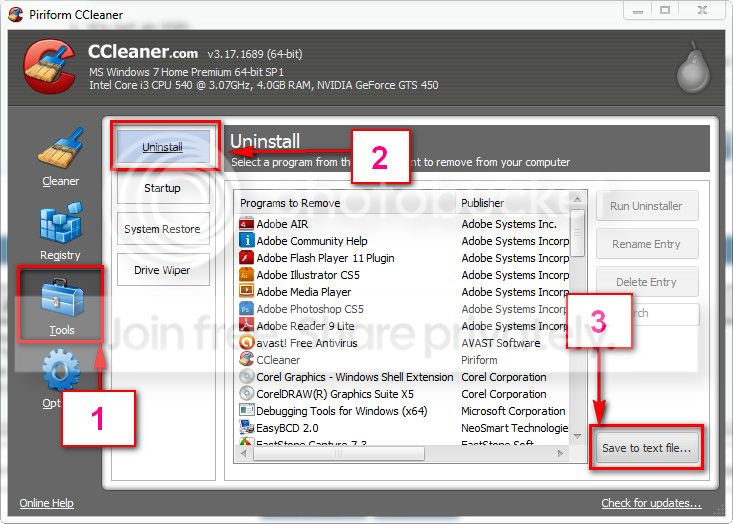
If you are not sure, download and install CCleaner. Then run it.
Go to "Tools" .... by default it will open the "uninstall" tab.
Click on save as text file. Save it on your desktop.
Upload the text file for us.
2012-11-02_224417.jpg


But one thing you can do .... delete it manually.....> ▼

NAME|FILE
pxhlpa64.sys | c:\windows\system32\drivers\pxhlpa64.sys
 

My Computer My Computer

Computer type
PC/Desktop
Computer Manufacturer/Model Number
Self Assembled
OS
Microsoft Windows 10 Pro Insider Preview 64-bit
CPU
Intel(R) Core(TM) i3-4130 CPU @ 3.40GHz
Motherboard
Gigabyte Technology Co., Ltd. B85M-D3H
Memory
Corsair Vengence 4GB x2 (8.00GB Dual-Channel DDR3 @ 798MHz)
Graphics Card(s)
2047MB GeForce GTS 450 (ZOTAC International)
Sound Card
Onboard (Realtek High Definition Audio)
Monitor(s) Displays
LG Flatron E2040T
Screen Resolution
1600x900
Hard Drives
Western Digital 1 TB
Seagate 500 GB
PSU
Corsair VS550
Case
Cooler Master K380
Cooling
Cooler Master Seidon 120V Plus
Keyboard
Logitech MK260r
Mouse
Logitech MK260r
Internet Speed
PMPL Broadband
Antivirus
Windows Defender + MBAM
Browser
Firefox
Other Info
Dell Studio 15" Laptop
PxHlpa64.sys is basically used by Roxio Burn, but is is also used by some other programs like Adobe lightroom, Cyberlink, QuickTime and even by Dell Media Experience. Mostly, this driver and one another driver from QuickTime simultaneously cause the ODD (CD/DVD drive) fail.

If you have any of those programs installed, uninstalled them.

If you are not sure, download and install CCleaner. Then run it.
Go to "Tools" .... by default it will open the "uninstall" tab.
Click on save as text file. Save it on your desktop.
Upload the text file for us.
2012-11-02_224417.jpg


But one thing you can do .... delete it manually.....> ▼

NAME|FILE
pxhlpa64.sys | c:\windows\system32\drivers\pxhlpa64.sys
Thanks mate! I'll get home in some hours and get rid of it. I'd rather not uninstall QuickTime because I kind of need the codec, and I don't know if it'll uninstall the codec as well. Is it necessary that I uninstall QuickTime? Either way, thanks :)
 

My Computer My Computer

Computer type
PC/Desktop
Computer Manufacturer/Model Number
Alienware
OS
Windows 7 Professional x64
CPU
i5-2400 CPU
Memory
2x8GB Corsair Dominator Platinum 1600MHz
Graphics Card(s)
nVidia GTS 450 1.5GB
Hard Drives
2x1TB RAID0
Antivirus
McAfee Security Center
Browser
Firefox 23.0a1

My Computer My Computer

Computer type
PC/Desktop
Computer Manufacturer/Model Number
Self Assembled
OS
Microsoft Windows 10 Pro Insider Preview 64-bit
CPU
Intel(R) Core(TM) i3-4130 CPU @ 3.40GHz
Motherboard
Gigabyte Technology Co., Ltd. B85M-D3H
Memory
Corsair Vengence 4GB x2 (8.00GB Dual-Channel DDR3 @ 798MHz)
Graphics Card(s)
2047MB GeForce GTS 450 (ZOTAC International)
Sound Card
Onboard (Realtek High Definition Audio)
Monitor(s) Displays
LG Flatron E2040T
Screen Resolution
1600x900
Hard Drives
Western Digital 1 TB
Seagate 500 GB
PSU
Corsair VS550
Case
Cooler Master K380
Cooling
Cooler Master Seidon 120V Plus
Keyboard
Logitech MK260r
Mouse
Logitech MK260r
Internet Speed
PMPL Broadband
Antivirus
Windows Defender + MBAM
Browser
Firefox
Other Info
Dell Studio 15" Laptop
Back
Top