
I hope that I am in the correct forum as I have joined only 10 minutes ago.
In the past, I have had to re-install Windows 7 Home Edition 32 bit, a couple or even few times since which I checked the mother-board and pressed everything that I could firmly into its socket. That cured the problem of crashing, which the computer had. Now, the computer is freezing at random times into my session. I tried to rectify the problem by doing a CHKDSK /f/r test and then a series of bootrec checks and an SFC /scannow check.
During this series of attempts to resolve the problem I discovered, also, how to check on which drive my OS was located. This led to a BIG surprise! It showed that I have 3 (three) OSs. One is designated Windows 7 and two Windows 7 Home premium and they are located on separate partitions or drives, not sure which, and they are listed as C: E: & F:
When I try to boot now I am given a choice of which OS to use and this has never occurred before. Each OS shows different icons on the desktop of each OS and irrespective of which OS I choose the computer still, from time to freezes at a random time or random use. I thought it was only the OS on C: which was the problem because the other two boot much more quickly and programs open more quickly but eventually the other two also freeze. Is anyone able to s suggest a remedy, apart from another re-installation AND is it recommended to delete the E: & F: OSs OR keep one of those (because both are entitiled Home premium, not just Windows 7),load the programs onto it and delete C:
Sorry that it has been soooooo long-winded but I hope that all the info is relevant to a solution. Kind regards to any helper. Careybird
In the past, I have had to re-install Windows 7 Home Edition 32 bit, a couple or even few times since which I checked the mother-board and pressed everything that I could firmly into its socket. That cured the problem of crashing, which the computer had. Now, the computer is freezing at random times into my session. I tried to rectify the problem by doing a CHKDSK /f/r test and then a series of bootrec checks and an SFC /scannow check.
During this series of attempts to resolve the problem I discovered, also, how to check on which drive my OS was located. This led to a BIG surprise! It showed that I have 3 (three) OSs. One is designated Windows 7 and two Windows 7 Home premium and they are located on separate partitions or drives, not sure which, and they are listed as C: E: & F:
When I try to boot now I am given a choice of which OS to use and this has never occurred before. Each OS shows different icons on the desktop of each OS and irrespective of which OS I choose the computer still, from time to freezes at a random time or random use. I thought it was only the OS on C: which was the problem because the other two boot much more quickly and programs open more quickly but eventually the other two also freeze. Is anyone able to s suggest a remedy, apart from another re-installation AND is it recommended to delete the E: & F: OSs OR keep one of those (because both are entitiled Home premium, not just Windows 7),load the programs onto it and delete C:
Sorry that it has been soooooo long-winded but I hope that all the info is relevant to a solution. Kind regards to any helper. Careybird
My Computer
At a glance
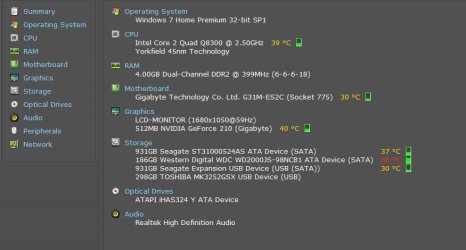
Windows 7 Home Premium, 32 bit, SP1Intel(R) Core(TM)2 Quad CPU Q8300 @ 2.50GHz4.00 GBNVIDIA GeForce 210
- Computer type
- PC/Desktop
- Computer Manufacturer/Model Number
- Megatrek
- OS
- Windows 7 Home Premium, 32 bit, SP1
- CPU
- Intel(R) Core(TM)2 Quad CPU Q8300 @ 2.50GHz
- Motherboard
- Gigabyte Technology Co., Ltd. G31M-ES2C
- Memory
- 4.00 GB
- Graphics Card(s)
- NVIDIA GeForce 210
- Sound Card
- NVIDIA High Definition Audio
- Monitor(s) Displays
- Topview
- Hard Drives
- ST31000524AS ATA Device, WDC WD2000JS-98NCB1 ATA Device
TOSHIBA MK3252GSX USB Deviceice,
- Keyboard
- Genius
- Mouse
- Genius
- Antivirus
- Windows defender & Malwarebytes
- Browser
- Chrome, Firefox & Opera
- Other Info
- Bios: Award Modular BIOS v6.00PG


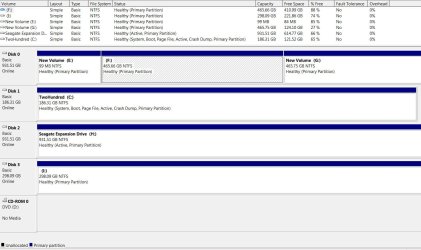
 probably had a OS on it as it's marked as Active (has a MBR set).