Random PC Freezing - no pattern

Thanks. It still looks like rolling it back helped but only time will tell.
 

My Computer

Computer type
Laptop
Computer Manufacturer/Model Number
Dell M6500 Precision Work Station
OS
Windows 7 Pro SP1 64 bit
Memory
8 GB
Screen Resolution
1920x
Internet Speed
30 Mbps
Antivirus
Norton Security
Browser
IE 11
Thanks. It still looks like rolling it back helped but only time will tell.
Since the re-boot performed by my friend on Tuesday afternoon, the machine has now remained up and operational continuously for 1 day 21 hours. That includes two full 12-hour sessions of Australian Open recording plus a few other random programs.

Before he left my house on Tuesday I confirmed that I could connect through both Team Viewer as well as RealVNC, just to eliminate the possibility that a first-time network interrupt could "disturb" the serenity and stability as it possibly did earlier on Tuesday when the machine froze just as checked in from NY. So every few hours now I check with Team Viewer to be sure all is well, and it still is.

We'll see how long this lasts. But for now it's almost two days without a freeze.
 

My Computer

Computer type
PC/Desktop
Computer Manufacturer/Model Number
Home-built, two systems (1) and (2)
OS
Windows 7 Pro x64 (1), Win7 Pro X64 (2)
CPU
i5-3350p 3.1Ghz/6MB-cache (1); E8400 3.0Ghz/6MB-cache (2)
Motherboard
ASUS P8Z77-V Pro (1); ASUS P5Q3 (2)
Memory
8GB PC3-12800 DDR3 (1); 4GB PC3-10600 DDR3 (2)
Graphics Card(s)
ATI HD7750 (1), (see TV cards); ATI R7 250 (2)
Sound Card
Realtek ALC892 HD Audio (1); Realtek ALC1200 HD Audio (2)
Monitor(s) Displays
Eizo HD2441W LCD, Eizo S2433W (1); Eizo 24" S2433W (2)
Screen Resolution
1920x1200, 1920x1200 (1); 1920x1200 (2)
Hard Drives
(1) 1TB SATA-II (7200RPM), 2x2TB SATA-III (7200RPM), 250GB SATA-III (10000RPM) for OS; 2x2TB external USB 3.0

(2) 320GB SATA-II (7200RPM), 750GB SATA-II (7200RPM), 150GB SATA-II (10000RPM) for OS; 2TB external USB 3.0
PSU
Nesteq ECS-6001 600W (1); Nesteq ECS-5001 500W (2)
Case
Acousti-Case 360 (1) and (2)
Cooling
Noctua NH-U12P SE2 for CPU, 2x120mm case fans (1) and (2)
Keyboard
IBM PS/2 (1) and (2)
Mouse
Logitech MX Revolution wireless (1); Microsoft wired (2)
Internet Speed
100mbps down / 10mbps up
Antivirus
Microsoft Security Essentials; Malwarebyte Anti-Malware Pro
Browser
Firefox
Other Info
Ceton InfiniTV 4-tuner cablecard-enabled TV card as well as Hauppauge HVR-2250 OTA/ATSC 2-tuner TV card in (1), running under Win7 WMC
Dead again.
 

My Computer

Computer type
PC/Desktop
Computer Manufacturer/Model Number
Home-built, two systems (1) and (2)
OS
Windows 7 Pro x64 (1), Win7 Pro X64 (2)
CPU
i5-3350p 3.1Ghz/6MB-cache (1); E8400 3.0Ghz/6MB-cache (2)
Motherboard
ASUS P8Z77-V Pro (1); ASUS P5Q3 (2)
Memory
8GB PC3-12800 DDR3 (1); 4GB PC3-10600 DDR3 (2)
Graphics Card(s)
ATI HD7750 (1), (see TV cards); ATI R7 250 (2)
Sound Card
Realtek ALC892 HD Audio (1); Realtek ALC1200 HD Audio (2)
Monitor(s) Displays
Eizo HD2441W LCD, Eizo S2433W (1); Eizo 24" S2433W (2)
Screen Resolution
1920x1200, 1920x1200 (1); 1920x1200 (2)
Hard Drives
(1) 1TB SATA-II (7200RPM), 2x2TB SATA-III (7200RPM), 250GB SATA-III (10000RPM) for OS; 2x2TB external USB 3.0

(2) 320GB SATA-II (7200RPM), 750GB SATA-II (7200RPM), 150GB SATA-II (10000RPM) for OS; 2TB external USB 3.0
PSU
Nesteq ECS-6001 600W (1); Nesteq ECS-5001 500W (2)
Case
Acousti-Case 360 (1) and (2)
Cooling
Noctua NH-U12P SE2 for CPU, 2x120mm case fans (1) and (2)
Keyboard
IBM PS/2 (1) and (2)
Mouse
Logitech MX Revolution wireless (1); Microsoft wired (2)
Internet Speed
100mbps down / 10mbps up
Antivirus
Microsoft Security Essentials; Malwarebyte Anti-Malware Pro
Browser
Firefox
Other Info
Ceton InfiniTV 4-tuner cablecard-enabled TV card as well as Hauppauge HVR-2250 OTA/ATSC 2-tuner TV card in (1), running under Win7 WMC
Great!

I wonder if Aardvarkly has tried it?
 

My Computer

Computer type
Laptop
Computer Manufacturer/Model Number
Dell M6500 Precision Work Station
OS
Windows 7 Pro SP1 64 bit
Memory
8 GB
Screen Resolution
1920x
Internet Speed
30 Mbps
Antivirus
Norton Security
Browser
IE 11
I'm still out of town and won't be back home until next Wednesday. But I have a new plan for trying to identify (or exclude) assorted possible network-related possible culprits. I am suspicious of network-related villains more than anything else, as I've now kind of proven to myself that it's seemingly not apparently related to actual compuiter hardware or expansion cards or USB connections. Instead I will focus on "network anomalies" (including what happens when I remote-in through either RealVNC or Team Viewer).

My plan is to literally disconnect as much as possible from the new M910t machine, letting it run almost standalone in essentially a non-networked environment. It will be connected to the TV coax, and to one main switch->router (so that I also have WiFi) which is connected to a modem. This will allow me to get to the internet from that machine for mail etc., and will support "watching TV" on the second monitor. But I will physically disconnect all other LAN cable connections to that main switch which feeds all other network cable runs and remote device nodes throughout the house.

This will hopefully allow me ascertain that the new M910t is actually working perfectly or not, and that it is either the TV tuner card and supporting drivers along with WMC, or possibly some other software I've got installed on the machine which is actually the culprit or not. Everything external to the M910t and its own direct internet connection to the one main switch and main router and cable modem will be eliminated from the environment.

I can live with this severely restricted home environment for a week, if it holds up 24/7 100% proving that it is NOT within this very limited kernel of hardware/software where the cause is coming from. Or, if the freeze still occurs then at least I will have most likely eliminated yet other additional causes from outside the M910t itself along with my use of it for WMC functions. And then I can focus on trying to isolate what within the hardware/software of the M910t might be at fault... although honestly it really does seem like it surely will come out of the test innocent.

Depending on the results of that one week of solitary isolated confinement I will then slowly and carefully add back specific single ethernet cable connections to the main switch which relate to the devices or other connections pertinent to that specific cable. One by one I will try to check out or find guilty specific LAN components, and then proceed from there based on whatever evidence results.

I do have quite a bit outside of the M910t on my LAN, but it does seem as though a network hiccup (not coming from the NIC in the motherboard) is seemingly always involved. I have 30 devices in my "addfress reservation table" of the router, although typically only 6-12 of them might actually be on and visible//active at any one time. I have four primary CAT6 runs from the main switch/router to the rest of the house. I have three GS105 switches and three GS108 switches. I have eight Linksys DMA2100 WMC extenders connected to my two HTPCs. I have two routers (connected to switches) running in "access point mode" providing remote WiFi signal strength. I have a pair of Netsys "ethernet over coax" gizmos providing one remote location which didn't have a CAT6 run possible to it with wired internet over a coax cable that was already there.

That's a lot of network action going on, and a lot of cables and connections and devices, any one or more of which might be a contributing factor. Of course this all worked perfectly for many many years and without a glitch until three months ago when all of this started. So I really do have a hard time accepting that some "wire in a wall" has now gone bad.

Nevertheless, we shall see what we shall see. One thing at a time. First things first. Hopefully an answer comes out the other end of this diagnostic project.
 

My Computer

Computer type
PC/Desktop
Computer Manufacturer/Model Number
Home-built, two systems (1) and (2)
OS
Windows 7 Pro x64 (1), Win7 Pro X64 (2)
CPU
i5-3350p 3.1Ghz/6MB-cache (1); E8400 3.0Ghz/6MB-cache (2)
Motherboard
ASUS P8Z77-V Pro (1); ASUS P5Q3 (2)
Memory
8GB PC3-12800 DDR3 (1); 4GB PC3-10600 DDR3 (2)
Graphics Card(s)
ATI HD7750 (1), (see TV cards); ATI R7 250 (2)
Sound Card
Realtek ALC892 HD Audio (1); Realtek ALC1200 HD Audio (2)
Monitor(s) Displays
Eizo HD2441W LCD, Eizo S2433W (1); Eizo 24" S2433W (2)
Screen Resolution
1920x1200, 1920x1200 (1); 1920x1200 (2)
Hard Drives
(1) 1TB SATA-II (7200RPM), 2x2TB SATA-III (7200RPM), 250GB SATA-III (10000RPM) for OS; 2x2TB external USB 3.0

(2) 320GB SATA-II (7200RPM), 750GB SATA-II (7200RPM), 150GB SATA-II (10000RPM) for OS; 2TB external USB 3.0
PSU
Nesteq ECS-6001 600W (1); Nesteq ECS-5001 500W (2)
Case
Acousti-Case 360 (1) and (2)
Cooling
Noctua NH-U12P SE2 for CPU, 2x120mm case fans (1) and (2)
Keyboard
IBM PS/2 (1) and (2)
Mouse
Logitech MX Revolution wireless (1); Microsoft wired (2)
Internet Speed
100mbps down / 10mbps up
Antivirus
Microsoft Security Essentials; Malwarebyte Anti-Malware Pro
Browser
Firefox
Other Info
Ceton InfiniTV 4-tuner cablecard-enabled TV card as well as Hauppauge HVR-2250 OTA/ATSC 2-tuner TV card in (1), running under Win7 WMC
Just checked in and... DEAD AGAIN. My friend re-booted it 12 hours ago.

I give up for now. Can't bother him again, as there obviously is no point. I have my laptop with me and can survive completely fine as I am. I'll watch the Australian Open on ESPN while I'm still in NY.
 

My Computer

Computer type
PC/Desktop
Computer Manufacturer/Model Number
Home-built, two systems (1) and (2)
OS
Windows 7 Pro x64 (1), Win7 Pro X64 (2)
CPU
i5-3350p 3.1Ghz/6MB-cache (1); E8400 3.0Ghz/6MB-cache (2)
Motherboard
ASUS P8Z77-V Pro (1); ASUS P5Q3 (2)
Memory
8GB PC3-12800 DDR3 (1); 4GB PC3-10600 DDR3 (2)
Graphics Card(s)
ATI HD7750 (1), (see TV cards); ATI R7 250 (2)
Sound Card
Realtek ALC892 HD Audio (1); Realtek ALC1200 HD Audio (2)
Monitor(s) Displays
Eizo HD2441W LCD, Eizo S2433W (1); Eizo 24" S2433W (2)
Screen Resolution
1920x1200, 1920x1200 (1); 1920x1200 (2)
Hard Drives
(1) 1TB SATA-II (7200RPM), 2x2TB SATA-III (7200RPM), 250GB SATA-III (10000RPM) for OS; 2x2TB external USB 3.0

(2) 320GB SATA-II (7200RPM), 750GB SATA-II (7200RPM), 150GB SATA-II (10000RPM) for OS; 2TB external USB 3.0
PSU
Nesteq ECS-6001 600W (1); Nesteq ECS-5001 500W (2)
Case
Acousti-Case 360 (1) and (2)
Cooling
Noctua NH-U12P SE2 for CPU, 2x120mm case fans (1) and (2)
Keyboard
IBM PS/2 (1) and (2)
Mouse
Logitech MX Revolution wireless (1); Microsoft wired (2)
Internet Speed
100mbps down / 10mbps up
Antivirus
Microsoft Security Essentials; Malwarebyte Anti-Malware Pro
Browser
Firefox
Other Info
Ceton InfiniTV 4-tuner cablecard-enabled TV card as well as Hauppauge HVR-2250 OTA/ATSC 2-tuner TV card in (1), running under Win7 WMC
Research project phase #1 underway.

I had my friend re-boot one more time, and I confirmed from my remote connection that all was well. Then I disconnected, and had him remove the ethernet cable from the back of the PC.

I will see when I return home Tuesday night if the machine is still up, or if it's dead.

P.S. - after the re-boot Windows advised that there was a BSOD, which is unexpected. This isn't normally what I see in the event log upon re-boot. I usually simply see a power kernel message that the machine was re-booted without being shutdown normally previously. I don't recall actually having a blue screen. Oh well. Ethernet cable is out, so let's see what Tuesday brings.
 

My Computer

Computer type
PC/Desktop
Computer Manufacturer/Model Number
Home-built, two systems (1) and (2)
OS
Windows 7 Pro x64 (1), Win7 Pro X64 (2)
CPU
i5-3350p 3.1Ghz/6MB-cache (1); E8400 3.0Ghz/6MB-cache (2)
Motherboard
ASUS P8Z77-V Pro (1); ASUS P5Q3 (2)
Memory
8GB PC3-12800 DDR3 (1); 4GB PC3-10600 DDR3 (2)
Graphics Card(s)
ATI HD7750 (1), (see TV cards); ATI R7 250 (2)
Sound Card
Realtek ALC892 HD Audio (1); Realtek ALC1200 HD Audio (2)
Monitor(s) Displays
Eizo HD2441W LCD, Eizo S2433W (1); Eizo 24" S2433W (2)
Screen Resolution
1920x1200, 1920x1200 (1); 1920x1200 (2)
Hard Drives
(1) 1TB SATA-II (7200RPM), 2x2TB SATA-III (7200RPM), 250GB SATA-III (10000RPM) for OS; 2x2TB external USB 3.0

(2) 320GB SATA-II (7200RPM), 750GB SATA-II (7200RPM), 150GB SATA-II (10000RPM) for OS; 2TB external USB 3.0
PSU
Nesteq ECS-6001 600W (1); Nesteq ECS-5001 500W (2)
Case
Acousti-Case 360 (1) and (2)
Cooling
Noctua NH-U12P SE2 for CPU, 2x120mm case fans (1) and (2)
Keyboard
IBM PS/2 (1) and (2)
Mouse
Logitech MX Revolution wireless (1); Microsoft wired (2)
Internet Speed
100mbps down / 10mbps up
Antivirus
Microsoft Security Essentials; Malwarebyte Anti-Malware Pro
Browser
Firefox
Other Info
Ceton InfiniTV 4-tuner cablecard-enabled TV card as well as Hauppauge HVR-2250 OTA/ATSC 2-tuner TV card in (1), running under Win7 WMC
When I got home last night the Win7 M910t PC was STILL UP!! It had been running for almost 4 days, and had NOT FROZEN!

Naively optimistic I plugged the ethernet cable back in, and the machine continued to operate normally. I went to sleep.

This morning I started working with my Win10 laptop (that I had taken with me on my week-long trip) in order to "sync" various folders and files with my home desktop PC counterpart. Looking at File Explorer on the laptop it appeared the desktop PC was still operating normally and un-frozen. All the mapped network drives still were available and seemingly responding.

I then tried to connect to the desktop PC RealVNC "server" using RealVNC "viewer" (i.e. client) on the laptop. No response. In fact, all indications were that the desktop PC had frozen. I went downstairs to check, and sure enough it was frozen. Hmmm...

So, I've now taken a timeout to regroup and collect my thoughts. Seems when the PC is "isolated" from the network it runs properly. This suggests it's not software on my PC which is at fault, but something external somewhere on my home LAN which intermittently triggers the freeze on the PC.

I've now turned off the screensaver and power-save mode on the monitor so that I can see if/when the freeze occurs from the clock on the screen. Also, I've re-booted and again disconnected the ethernet cable, and of course it's been up now for more than 8 hours.

I will now very slowly add LAN connections selectively, e.g. WMC extenders 1-4 one at a time, in an attempt to expose the villain component. I will try to eliminate switches, and/or unwanted ethernet connections to switches, and/or wireless access points, so as to bring online only the selected LAN component I next want to investigate. So I will have plenty of unplugged ethernet cables dangling, until I get to the bottom of this... hopefully.
 

My Computer

Computer type
PC/Desktop
Computer Manufacturer/Model Number
Home-built, two systems (1) and (2)
OS
Windows 7 Pro x64 (1), Win7 Pro X64 (2)
CPU
i5-3350p 3.1Ghz/6MB-cache (1); E8400 3.0Ghz/6MB-cache (2)
Motherboard
ASUS P8Z77-V Pro (1); ASUS P5Q3 (2)
Memory
8GB PC3-12800 DDR3 (1); 4GB PC3-10600 DDR3 (2)
Graphics Card(s)
ATI HD7750 (1), (see TV cards); ATI R7 250 (2)
Sound Card
Realtek ALC892 HD Audio (1); Realtek ALC1200 HD Audio (2)
Monitor(s) Displays
Eizo HD2441W LCD, Eizo S2433W (1); Eizo 24" S2433W (2)
Screen Resolution
1920x1200, 1920x1200 (1); 1920x1200 (2)
Hard Drives
(1) 1TB SATA-II (7200RPM), 2x2TB SATA-III (7200RPM), 250GB SATA-III (10000RPM) for OS; 2x2TB external USB 3.0

(2) 320GB SATA-II (7200RPM), 750GB SATA-II (7200RPM), 150GB SATA-II (10000RPM) for OS; 2TB external USB 3.0
PSU
Nesteq ECS-6001 600W (1); Nesteq ECS-5001 500W (2)
Case
Acousti-Case 360 (1) and (2)
Cooling
Noctua NH-U12P SE2 for CPU, 2x120mm case fans (1) and (2)
Keyboard
IBM PS/2 (1) and (2)
Mouse
Logitech MX Revolution wireless (1); Microsoft wired (2)
Internet Speed
100mbps down / 10mbps up
Antivirus
Microsoft Security Essentials; Malwarebyte Anti-Malware Pro
Browser
Firefox
Other Info
Ceton InfiniTV 4-tuner cablecard-enabled TV card as well as Hauppauge HVR-2250 OTA/ATSC 2-tuner TV card in (1), running under Win7 WMC
Malwarebytes yesterday publicly released 1.0.527 of their component package, which after much testing and beta testing help from their users they are certain has now corrected the "freeze" problem they caused with something they did back in 1.0.508 relating to (a) web protect, and (b) multi-processor CPU machines, and (c) Win7. I'm not exactly sure what (b) means, but I'm willing to accept their announcement along with the fact that many many people had been affected.

This morning I upgraded Malwarebytes on both of my desktop machines as well as my laptops. I also plugged everything back into the LAN (including my new M910t HTPC), and started up all PC's (including my upstairs desktop which I'd turned off for a week). This is the way I should normally be running 24/7, with no concern about stability no matter what is going on at any machine and no matter whether I'm recording TV or watching TV.

So far it's been 12 hours and not a freeze. I have used RealVNC to remotely connect into various machines from other machines, and I've watched TV programs, and I've recorded TV programs.

I'm not trying to be overly optimistic and am honestly prepared to see a freeze on one or more machines sometime in the next few hours or days. But we shall see what we shall see, and go from there. Didn't really get to implement my "selective connection" project to try and isolate LAN components as either being or not being culprits yet, but if a freeze does show up again I'll have to be serious about really getting to the bottom of this.

Note that I did look at the Intel Network Adapter Driver for my machines, and they're all dated from back in late 2017. So it's most likely unrelated to the NIC drivers. I'm more suspicious of something relating to RealVNC, or Team Viewer, or Dyn Updater, and remote connections. Also note that WMC extenders (for viewing TV around the house) run as Remote Desktop Connections, which is another variety of remote connection from one machine (extender) to another (HTPC).
 

My Computer

Computer type
PC/Desktop
Computer Manufacturer/Model Number
Home-built, two systems (1) and (2)
OS
Windows 7 Pro x64 (1), Win7 Pro X64 (2)
CPU
i5-3350p 3.1Ghz/6MB-cache (1); E8400 3.0Ghz/6MB-cache (2)
Motherboard
ASUS P8Z77-V Pro (1); ASUS P5Q3 (2)
Memory
8GB PC3-12800 DDR3 (1); 4GB PC3-10600 DDR3 (2)
Graphics Card(s)
ATI HD7750 (1), (see TV cards); ATI R7 250 (2)
Sound Card
Realtek ALC892 HD Audio (1); Realtek ALC1200 HD Audio (2)
Monitor(s) Displays
Eizo HD2441W LCD, Eizo S2433W (1); Eizo 24" S2433W (2)
Screen Resolution
1920x1200, 1920x1200 (1); 1920x1200 (2)
Hard Drives
(1) 1TB SATA-II (7200RPM), 2x2TB SATA-III (7200RPM), 250GB SATA-III (10000RPM) for OS; 2x2TB external USB 3.0

(2) 320GB SATA-II (7200RPM), 750GB SATA-II (7200RPM), 150GB SATA-II (10000RPM) for OS; 2TB external USB 3.0
PSU
Nesteq ECS-6001 600W (1); Nesteq ECS-5001 500W (2)
Case
Acousti-Case 360 (1) and (2)
Cooling
Noctua NH-U12P SE2 for CPU, 2x120mm case fans (1) and (2)
Keyboard
IBM PS/2 (1) and (2)
Mouse
Logitech MX Revolution wireless (1); Microsoft wired (2)
Internet Speed
100mbps down / 10mbps up
Antivirus
Microsoft Security Essentials; Malwarebyte Anti-Malware Pro
Browser
Firefox
Other Info
Ceton InfiniTV 4-tuner cablecard-enabled TV card as well as Hauppauge HVR-2250 OTA/ATSC 2-tuner TV card in (1), running under Win7 WMC
Thanks for the information about the malwarebytes update. Hope you don't have any more problems.
 

My Computer

Computer type
Laptop
Computer Manufacturer/Model Number
Dell M6500 Precision Work Station
OS
Windows 7 Pro SP1 64 bit
Memory
8 GB
Screen Resolution
1920x
Internet Speed
30 Mbps
Antivirus
Norton Security
Browser
IE 11
Interesting new observations and hints.

(1) My new downstairs M910t HPTC has remained stable for two days now. No freeze, although I did have to reboot after one day for some reason. Actually, I do now remember why I re-booted. I had to take the machine down to swap the two TV tuner cards, as the Ceton card was running very hot in its third "negotiable x16/14/x1" expansion slot with the Hauppauge card in the middle x1 slot and the Inno3D card in the primary x16 slot. I swapped the Ceton and Hauppauge cards, to bring the Ceton card next to the cooling fan in the Inno3d graphics card and hopefully get it to take advantage of improved airflow from the exhaust suction of the graphics card fan. It actually made a very big difference with the Ceton card now running about 15 degrees Centigrade cooler!

However before that reboot it had not frozen, and since that reboot it has not frozen. No idea why "stability" is the current situation, although I did perform the hardware change a few days ago which (a) replaced the 2-slot EVGA GTX 1050ti SC with the new 1-slot Inno3D GTX 1050ti, and (b) installed the Hauppauge HVR-2250 OTA/ATSC TV tuner card which had been awaiting the availability of an open accessible x1 slot which was now made available with the graphics card change.

Note that the M910t has been plugged back into the LAN via ethernet cable for these same two days.

(2) My upstairs ASUS Z170-Deluxe was powered back on two days ago and has now frozen at least five times, even after the upgrade of Malwarebytes to 1.0.527 components (obviously irrelevant to my situation, which I already knew since this machine has been unstable for at least 3 months now).

Now curiously, these past three freezes were followed up with some exploration as best as possible. Both machines are part of the same "workgroup" (not homegroup), and all of the disk partitions of each machine are permanently mapped as network drives to the other machine (i.e. reestablished at boot time). Each machine is also accessible from the other machine or from my laptops through RealVNC as well as through Team Viewer.

Interestingly, the presumed "frozen" machine was not actually frozen at all! Yes, I couldn't get it to respond at all by jiggling the mouse or hitting a keyboard key or powering either of the two attached monitors off and on. But in fact I DID actually have full access to the disk partitions of the machine from the other un-frozen machine (i.e. referencing the folders/files on the "frozen" machine through Windows Explorer or equivalent). So the machine wasn't really frozen... it simply wasn't responding to either my USB wireless mouse nor my USB wired keyboard. Hmmm...

Note that I use a Logitech Performance MX wireless mouse and the receiver is plugged into one of the USB ports on one of my Eizo monitors. While the machine was still frozen I tried plugging a spare wired USB mouse into an open USB port on the machine itself, but never heard the "new hardware detected" sound nor did the mouse actually function. I suspect the USB hub and/or driver was locked up, i.e. "the apparent freeze" from HID while inside the computer things were apparently still running normally in terms of network drive functions.

I also tried to connect to the "frozen" machine through both RealVNC as well as Team Viewer, and both attempts were unsuccessful. And yet, all of the mapped network drives on this machine were still available through normal LAN access via Windows Explorer.

(3) As part of my focused research into this machine's problems (not really wanting to spend the energy to replace the motherboard for a brand new one, which I have in a carton having purchased it in November for exactly this purpose) I made a few changes to my operating environment.

(a) I turned off "power save" mode after 10 minutes for the monitors, but left "screen saver" after 6 minutes on.

(b) I launched both USBDeview and USBLogView (from Nirsoft) and left them open and visible on the desktop of one machine (the Eizo with the mouse receiver plugged into one of its USB ports), while powering the other Eizo monitor off. I was just hoping that something USB-related might appear in the displayed output of one or the other of these programs when the what I will now call the "USB device freeze" symptom occurs again.

(c) I double-checked to ensure what I already knew was the case, namely that I had already un-checked the "allow computer to turn off this device to save power" on all of the USB hubs in Device Manager. This hopefully would avoid the possibility of powering down a USB hub but for some reason failing to power it back up when re-needed as the cause of the seeming USB failure.

(4) I had reason to do some work, and decided to do it on the upstairs problematic ASUS machine. So first I double-checked on the M910t through Windows Explorer that all network drives were still accessible and operational, and they were. I then went upstairs and was pleased to see that the "Mystify" screensaver was working properly, appearing only on the one Eizo monitor which I hadn't powered off and on which I knew the two USB-monitoring windows were open.

I then jiggled the mouse, to come out of screen saver mode. And the machine froze!! Screen saver stopped. Hit some keyboard keys, and no response. Mouse dead, keyboard dead. Screensaver frozen.

I then powered on the other monitor, and the other portion of the currently frozen screensaver pattern was on it, but also not moving. Frozen as well. One instant ago everything was presumably alive and well and the screen saver running around working normally, and then when I jiggled the mouse to have things come back to life on the screen everything USB-related froze (including the monitor, which has a USB hub in it which is directly involved in the mouse communication).

Went downstairs to the M910t and confirmed through Windows Explorer that in fact the ASUS machine was NOT DEAD, but was alive and well as far as serving up disk partitions. It was operating just fine internally for that mapped network drive feature, even though the two screens were frozen and the mouse/keyboard human interface was frozen. And I couldn't get to it through RealVNC and Team Viewer, both of which come through the router and ethernet cable to one of the two NIC's.

(5) I've now pulled out the USB cable going to the Eizo monitor into which the mouse USB receiver was plugged in. I've moved that receiver over to one of the two USB ports on the other Eizo monitor, just to eliminate the USB hub built into the first Eizo monitor as flaking out and responsible for the "UBS freeze" in some way. I've again powered off that second monitor (which now has the USB mouse receiver plugged into it, as the USB hub in the monitor is always powered on as long as the monitor is plugged into wall power even if the monitor screen itself is powered off.

So I'm back to having only one Eizo monitor powered on, but now with no USB mouse receiver plugged into it. The receiver is now in the other Eizo monitor.

Note that I utilize Logitech's Setpoint 6.67.83 (driver 5.90.41) on the problem ASUS machine to manage the Performance MX wireless USB mouse, although I know there is a slightly newer version available. Also, I use an old IBM PS/2 keyboard connected through an Adesso PS/2-to-USB adapter since the ASUS Z170-Deluxe board doesn't have a PS/2 connector.

I checked the Intel USB driver which is running, and it's the same 5.0.4.43 from 1/11/2017 that has been there since I built the machine in January of that year. So this isn't something which has changed in the past three months which might be causing my instability.


Bottom line: the machine itself is not really "freezing" totally. It's actually still working fine, internally, and serving the disk partitions to other machines directly connected to it on the LAN via mapped network drives.

What actually seems to be freezing is the USB interface of mouse/keyboard and apparently the monitor(s) one of which has an active USB hub and active USB connector in use for the mouse.

I've now moved the USB mouse receiver out of the Eizo monitor previously used, and also pulled the USB cable to that monitor. I've relocated the receiver to a USB port in the other Eizo monitor. I still have another option which would be to eliminate wireless USB mouse entirely, pull that second USB cable out of the second monitor, and just go with a regular wired USB mouse plugged into a USB port on the PC itself.

Another clue that this is strongly USB-related is the fact that after a freeze I really have no other recourse but to hard power-down (by holding the POWER button for 5 seconds), and then power-up. Upon restart I often have much trouble with some other USB-connected devices coming back to life properly, such as the Motorola Tuning Adapter (required for the Ceton cablecard-enabled TV tuner card), two USB-connected printers and one USB-connected scanner (through an external USB hub), etc. Very often I have to then shut down and re-start two or three times before all USB devices return to normal. In fact some times I can't shut down cleanly, because I'm sure the USB devices are "still locked up". So "shutting down" remains on the screen indefinitely, and I'm forced to once again hard power-down in order to then be able to re-start.

Eventually, things return to normal. But it's always a struggle.

That's why I though it was the whole USB hardware interface on the ASUS Z170-Deluxe (which has both Intel and Asmedia USB hubs, each supported by its own driver) which was intermittent, and which would probably be cured if I totally replaced the motherboard. And this still might actually be the true root cause.

Or, it might be related to the Logitech mouse, or the Logitech Setpoint software.

Or, it might be related to the USB hubs on the Eizo monitors.

But remember... this has all worked perfectly for 1 1/2 years, until about 3 months ago when the intermittency first began.

Anyway, I've now been back up for over an hour, and no freeze yet. I've now turned off screensaver as well, so that if I do come upstairs again and jiggle the mouse and it freezes instantly at least the last visible state of both USB-view monitors will be visible on the screen, perhaps providing some clue or information that might be helpful. Or, maybe it won't, and the mouse/keyboard will simply freeze even though (if, as before) internally Windows is still running normally and still feeding network drives to the LAN.

More in the next chapter.
 

My Computer

Computer type
PC/Desktop
Computer Manufacturer/Model Number
Home-built, two systems (1) and (2)
OS
Windows 7 Pro x64 (1), Win7 Pro X64 (2)
CPU
i5-3350p 3.1Ghz/6MB-cache (1); E8400 3.0Ghz/6MB-cache (2)
Motherboard
ASUS P8Z77-V Pro (1); ASUS P5Q3 (2)
Memory
8GB PC3-12800 DDR3 (1); 4GB PC3-10600 DDR3 (2)
Graphics Card(s)
ATI HD7750 (1), (see TV cards); ATI R7 250 (2)
Sound Card
Realtek ALC892 HD Audio (1); Realtek ALC1200 HD Audio (2)
Monitor(s) Displays
Eizo HD2441W LCD, Eizo S2433W (1); Eizo 24" S2433W (2)
Screen Resolution
1920x1200, 1920x1200 (1); 1920x1200 (2)
Hard Drives
(1) 1TB SATA-II (7200RPM), 2x2TB SATA-III (7200RPM), 250GB SATA-III (10000RPM) for OS; 2x2TB external USB 3.0

(2) 320GB SATA-II (7200RPM), 750GB SATA-II (7200RPM), 150GB SATA-II (10000RPM) for OS; 2TB external USB 3.0
PSU
Nesteq ECS-6001 600W (1); Nesteq ECS-5001 500W (2)
Case
Acousti-Case 360 (1) and (2)
Cooling
Noctua NH-U12P SE2 for CPU, 2x120mm case fans (1) and (2)
Keyboard
IBM PS/2 (1) and (2)
Mouse
Logitech MX Revolution wireless (1); Microsoft wired (2)
Internet Speed
100mbps down / 10mbps up
Antivirus
Microsoft Security Essentials; Malwarebyte Anti-Malware Pro
Browser
Firefox
Other Info
Ceton InfiniTV 4-tuner cablecard-enabled TV card as well as Hauppauge HVR-2250 OTA/ATSC 2-tuner TV card in (1), running under Win7 WMC
Quick scare...

After five hours I wandered upstairs to see how the ASUS machine was fairing, and if it was frozen or not. It appeared to be running normally, as the clock and hardware monitor on the screen (which were still visible, since I'd turned off both screensaver and powersave mode) were still moving normally.

I then jiggled the mouse, and nothing happened! As if it were frozen again! I moved the mouse around and still nothing happened. I picked up the mouse to look at the on/off button on the bottom and it sure looked like it was still in the ON position as I know I had left it in. And yet, no reaction to a jiggle.

I then powered the mouse off, and then powered the mouse back on. And amazingly, suddenly the cursor began to move on the screen. Very strange. Could it have been the mouse power-save itself which was flaking out? i'm sure I would have tried this kind of kick-start in the past, to no avail. So why this time did it come out of "freeze" and back to life? Don't know.

Whatever the explanation, things are once again running normally. I have managed to escape what I thought for sure was another freeze. There was nothing showing in either of the two USB monitor windows which provided anything informative, so whatever caused the mouse to stop operating however briefly went completely unobserved by the PC itself.

Time to go to sleep. I'll leave the mouse power button in the ON position and see what things look like in eight hours or so.

Very interesting.
 

My Computer

Computer type
PC/Desktop
Computer Manufacturer/Model Number
Home-built, two systems (1) and (2)
OS
Windows 7 Pro x64 (1), Win7 Pro X64 (2)
CPU
i5-3350p 3.1Ghz/6MB-cache (1); E8400 3.0Ghz/6MB-cache (2)
Motherboard
ASUS P8Z77-V Pro (1); ASUS P5Q3 (2)
Memory
8GB PC3-12800 DDR3 (1); 4GB PC3-10600 DDR3 (2)
Graphics Card(s)
ATI HD7750 (1), (see TV cards); ATI R7 250 (2)
Sound Card
Realtek ALC892 HD Audio (1); Realtek ALC1200 HD Audio (2)
Monitor(s) Displays
Eizo HD2441W LCD, Eizo S2433W (1); Eizo 24" S2433W (2)
Screen Resolution
1920x1200, 1920x1200 (1); 1920x1200 (2)
Hard Drives
(1) 1TB SATA-II (7200RPM), 2x2TB SATA-III (7200RPM), 250GB SATA-III (10000RPM) for OS; 2x2TB external USB 3.0

(2) 320GB SATA-II (7200RPM), 750GB SATA-II (7200RPM), 150GB SATA-II (10000RPM) for OS; 2TB external USB 3.0
PSU
Nesteq ECS-6001 600W (1); Nesteq ECS-5001 500W (2)
Case
Acousti-Case 360 (1) and (2)
Cooling
Noctua NH-U12P SE2 for CPU, 2x120mm case fans (1) and (2)
Keyboard
IBM PS/2 (1) and (2)
Mouse
Logitech MX Revolution wireless (1); Microsoft wired (2)
Internet Speed
100mbps down / 10mbps up
Antivirus
Microsoft Security Essentials; Malwarebyte Anti-Malware Pro
Browser
Firefox
Other Info
Ceton InfiniTV 4-tuner cablecard-enabled TV card as well as Hauppauge HVR-2250 OTA/ATSC 2-tuner TV card in (1), running under Win7 WMC
Well, fascinating new results.

This morning I glanced over at the one M910t screen which was still powered on (the second monitor was powered off) and the Mystify screen saver was running around normally. Note that on this machine I also use a Logitech wireless USB Performance MX mouse with Setpoint software installed, but the receiver happens to be plugged into a front USB port on the tower case rather than into a USB port on either monitor. For sure one of the monitors (the powered off one) does not have a USB cable connecting it to the PC, but I'm nor sure if the other one (which was powered on and running screen saver) does or not. I'll have to double-check.

I was about to go upstairs to see if the ASUS machine (which I'd left with screen saver disabled and mouse with power-on) was still running normally and had not frozen while I slept. But before doing that I decided to give a quick check to the M910t by jiggling its mouse, just to confirm it would come back to normal life as I was sure it would... since the screen saver was operating and I could see the hard-drive light blinking occasionally.

Well imagine my surprise when my mouse jiggle cause the screen saver to freeze!!! Unbelievable!! I tried powering the mouse off and then on again, but to no avail. I tried powering off the monitors and powering them on, but to no avail. Keyboard also produced no response. Note that this is EXACTLY the same "virtual freeze" trigger and symptom as I'd experienced on the ASUS machine last night when still running with the Mystify screen saver enabled.

I then went upstairs (where the screen saver is disabled) and sure enough everything looked normal. Onscreen clock and hardware monitors still moving normally, and the two USB monitor windows were still present and reporting no new USB activity since yesterday when I started them. I then jiggled the mouse and the onscreen cursor moved normally. Tested everything and sure enough this machine was running perfectly. It's now been up for 16 hours since the last freeze, and without a new freeze. Note that the changes here were (a) pulling the USB cable from the monitor where I'd previously had the mouse receiver inserted into one of its USB ports, (b) moving the mouse receiver over to a USB port in the the other monitor, and (c) disabling Mystify screen saver so that any onscreen clues would be present if a freeze did occur.

I then repeated my experimenting (but in reverse this time), to see if the M910t was actually truly frozen internally or simply on the screens and with the USB mouse/keyboard. In other words I used Windows Explorer on the ASUS to examine the mapped network drives on the M910t, and sure enough the machine was alive and well and able to serve up data from all disk partitions. It even was able to spin-up "sleeping" disk drives (which get spun down after 10 minutes of inactivity) and make their data available. I was even able to run applications on the ASUS that use data located on the network drives hosted by the M910t. As with yesterday, I was also unable to connect to the M910t through RealVNC and Team Viewer (which come through the router and ethernet) which is still a curious symptom since Windows Explorer also uses router and ethernet to access mapped network drives.

In other words, this was exactly the total set of symptoms I'd observed yesterday when it was the ASUS machine that froze with its screensaver enabled when I jiggled the mouse, namely that the machine itself wasn't actually frozen/dead, but simply jiggling the USB mouse had somehow triggered a freeze of the screen saver and all USB interfaces, while allowing Windows Explorer mapped network drive access while rejecting RealVNC and Team Viewer connections.

Once again, I am looking at a wireless USB Logitech mouse (Performance MX in both cases, but until a few days ago I was using an older MX Revolution which I decided to replace as I thought its battery might finally be again and somehow responsible for my intermittent symptoms that seemed tied to the wireless USB mouse in some way) that is definitely involved in triggering the USB/screen freeze. This time it's on the M910t which had otherwise been up for over a day (and with screen saver coming on and then going away on mouse-jiggle throughout, and without a problem). And for some reason, after a long overnight period of inactivity this morning when I finally jiggled it the USB/screen freeze occurred.

So once again I'm suspicious of something perhaps in the power-save internals of the wireless USB Logitech mouse and/or Setpoint software which is directly involved. Definitely seems to be possible to cause a problem when Mystify (or any other?) screen saver is enabled (as it was on M910t and ASUS when freeze occurred), and less or not possible when screen saver is disabled (as it now is on my ASUS).

I can certainly replace the wireless USB Logitech mouse/receiver on the M910t with a wired USB mouse that I have. I can also disable the screen saver on the M910t as I've done on the ASUS (while still using the wireless USB Logitech mouse/receiver). I can change the screen saver on the M910t to a different one (although that really seems like the lowest probability culprit). If the one powered-on monitor on the M910t actually does have a USB cable connecting it to the PC, I can pull it out (as I did on my ASUS machine) as I'm certainly not using its USB ports.

Still very strange that whatever USB-related instability is occurring here has infected THREE separate machines (one of which actually died and had to be replaced by the new M910t, because of the many frequent hard power-off/on cycles I had to perform when it kept freezing), including the brand new non-ASUS Lenovo M910t. But note that the same monitors and USB cabling and USB human interface devices are being used with the M910t as were being used with the now dead ASUS machine before it. And of course I really pretty much run the same hardware/software setup on all three of these machines, so I guess it could be something in a recent Windows 7 Update and/or drivers which is responsible.

Or, maybe a recent NVidia driver update is involved. I have the same NVidia GTX 1050ti graphics card in both desktop machines and have the same NVidia driver installed in both Win7 systems. This is definitely involved with screen saver and power-save mode, and coming out of screen saver mode from a mouse jiggle.

I don't have any Win10 desktop machines to use as another point of reference. I only have two Win10 Lenogo laptops (P70 and W530), neither of which have EVER frozen. And these machines also use external mice (but from Lenovo, not Logitech, and thus also don't have Setpoint software/driver installed). They both do have miniDP->DP connections to one of my Eizo monitors, and they both do run the same Mystify screen saver after 6 minutes and then power off after 10 minutes, same setup as with my desktops. And no freezes or any USB-related anomalies. So this could be the result of using Win10, or perhaps not using a Logitech mouse and Setpoint, or maybe something else tied to the laptop hardware vs. the desktop hardware.

Fascinating. Ok, time to re-boot the M910t, double-check that there's no USB cable to the powered-on monitor, and disable the screen saver. For the moment I'll stick with the wireless USB Logitech mouse. This will then almost mimic my "success" with the ASUS machine (which does have a mouse receiver plugged into the other powered-off monitor, rather than reverting to a wired mouse). Let's see if I can induce the same seeming stability back into the M910t that I seem to have induced into the ASUS machine.

Real success would be if I could get the ASUS machine (which was actually my real HTPC before all of this started) back into service as a reliable 24/7 HTPC with no USB-triggered freezes. Even if I had to disable screen saver permanently, I can still power off both monitors manually when not in use, as a way of accomplishing the same thing.
 

My Computer

Computer type
PC/Desktop
Computer Manufacturer/Model Number
Home-built, two systems (1) and (2)
OS
Windows 7 Pro x64 (1), Win7 Pro X64 (2)
CPU
i5-3350p 3.1Ghz/6MB-cache (1); E8400 3.0Ghz/6MB-cache (2)
Motherboard
ASUS P8Z77-V Pro (1); ASUS P5Q3 (2)
Memory
8GB PC3-12800 DDR3 (1); 4GB PC3-10600 DDR3 (2)
Graphics Card(s)
ATI HD7750 (1), (see TV cards); ATI R7 250 (2)
Sound Card
Realtek ALC892 HD Audio (1); Realtek ALC1200 HD Audio (2)
Monitor(s) Displays
Eizo HD2441W LCD, Eizo S2433W (1); Eizo 24" S2433W (2)
Screen Resolution
1920x1200, 1920x1200 (1); 1920x1200 (2)
Hard Drives
(1) 1TB SATA-II (7200RPM), 2x2TB SATA-III (7200RPM), 250GB SATA-III (10000RPM) for OS; 2x2TB external USB 3.0

(2) 320GB SATA-II (7200RPM), 750GB SATA-II (7200RPM), 150GB SATA-II (10000RPM) for OS; 2TB external USB 3.0
PSU
Nesteq ECS-6001 600W (1); Nesteq ECS-5001 500W (2)
Case
Acousti-Case 360 (1) and (2)
Cooling
Noctua NH-U12P SE2 for CPU, 2x120mm case fans (1) and (2)
Keyboard
IBM PS/2 (1) and (2)
Mouse
Logitech MX Revolution wireless (1); Microsoft wired (2)
Internet Speed
100mbps down / 10mbps up
Antivirus
Microsoft Security Essentials; Malwarebyte Anti-Malware Pro
Browser
Firefox
Other Info
Ceton InfiniTV 4-tuner cablecard-enabled TV card as well as Hauppauge HVR-2250 OTA/ATSC 2-tuner TV card in (1), running under Win7 WMC
I had tried to put everything in order for the two posts previous to your last one but you have a very complicated setup. :-)

Looks like you're on track to finding the problem.
 

My Computer

Computer type
Laptop
Computer Manufacturer/Model Number
Dell M6500 Precision Work Station
OS
Windows 7 Pro SP1 64 bit
Memory
8 GB
Screen Resolution
1920x
Internet Speed
30 Mbps
Antivirus
Norton Security
Browser
IE 11
I had tried to put everything in order for the two posts previous to your last one but you have a very complicated setup. :-)

Looks like you're on track to finding the problem.
You haven't heard from me in about 1 1/2 days, because astonishingly things have been solid since both machines were last booted and I didn't want to jinx anything.

Hard to believe, but I think what I have done that's genuinely of significance is simply to (a) turn OFF screen saver, and (b) set the advanced power option regarding power-save for the monitors to NEVER so that it is never placed in power-save mode. I already had hibernation set to OFF and also sleep is set to NEVER, so it was just screen saver features that I still had active (and which probably was not really important for modern non-CRT monitors anyway).

Both of these functions are controlled by the NVidia graphics driver I believe, so it is actually something relatively recently changed in the NVidia driver (which applies equally to both of my desktop machines, which both have GTX 1050ti cards in them and run the same version of the NVidia driver) which I believe is genuinely at fault for my newly observed instability and "freeze" symptom which started about three months ago having never been present in the past 8 years (on assorted machines all of which also used NVidia graphics cards).

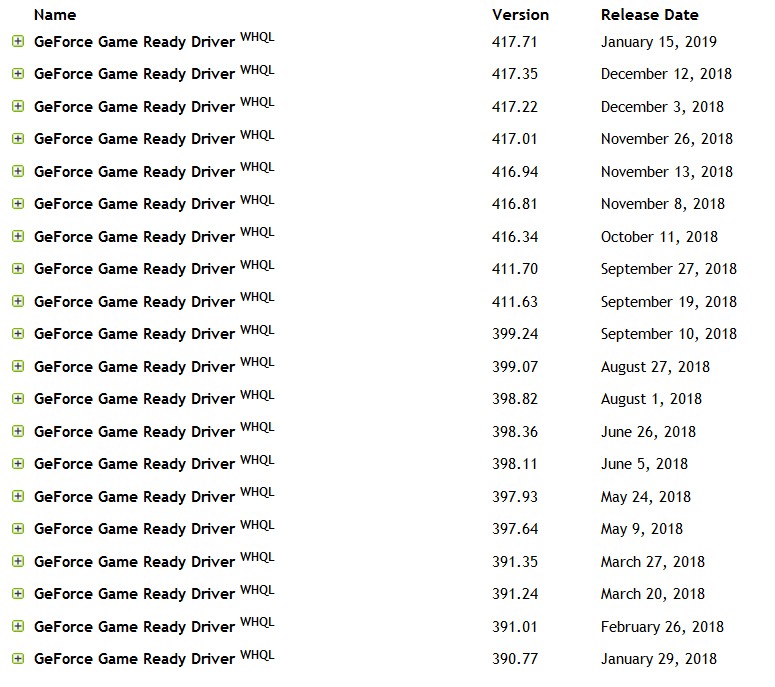
Here's the history of NVidia driver updates in 2018:

AAVFDZ.jpg


Note that there was a big version change/jump in mid-September (which I probably installed in October), which included support for the new NVidia RTX cards. Perhaps this was a significant change that somehow affected my hardware/software setup negatively.

I also did remove the USB cable from one of my Eizo monitors on the ASUS machine and moved the Logitech wireless USB mouse receiver over to a USB port on the other Eizo monitor, because I was at least a bit suspicious of perhaps a flaky hub in the first monitor, but I'm not 100% convinced this was really important (other than to just reduce the number of USB devices managed by Windows, to simplify things a bit as seen by the PC and OS). I certainly didn't have the Logitech wireless USB mouse receiver on the M910t plugged into one of its two Eizo monitors (i.e. it's plugged into a front USB port on the PC), and in fact both of those monitors didn't even have a USB cable connecting them to the PC. So I'm still actually using the same wireless Logitech USB mouse and Setpoint software on both machine. It wasn't necessary to revert to wired USB mice to restore the stability I've now seen over the past two days .

I'm sure it's something unique about the combination of Logitech wireless USB mice, Setpoint driver/software, and the recent NVidia drivers and how they manage screen saver and power-save, and what happens to wake up the monitor from both simple screen saver mode and also from power-save mode when the mouse is jiggled. It's probably also relevant what happens inside the Logitech mice when you don't use it for a long period (with the power button still in ON) vs. what happens if you simply power OFF the mouse when you no longer need it. Perhaps the mouse itself also has its own built-in power-save circuitry that kicks in even if the power button is ON, which is a function of time.

I have my fingers crossed that this newly restored stability remains. I watched a lot of TV last night (while additional new recordings were being made) and the M910t just kept ticking. It's a great relief not to have to run back and forth re-booting one or the other machine throughout the day.

Again, in my opinion the "workaround" that seems to overcome whatever is really at work here triggering what clearly is only a USB-freeze that affects only (a) mouse/keyboard, (b) onscreen display of screensaver or wake-up from power save mode, and (c) ability to be connected to through RealVNC or Team Viewer, and is not an actual internal Windows 7 freeze which is actually still alive and running normally since I can still get to the machine's mapped network drives from Windows Explorer and apps running on the other LAN machines, is simply to disable screen saver and screen power-save mode. Apparently this takes the NVidia drivers out of the picture thus eliminating whatever apparently harmful interaction they might have with my wireless USB Logitech mice and Setpoint driver/software.

I suspect there still may be a hiccup that occurs occasionally, but for the moment I believe I have "emerged victorious". And I only had to totally replace one ASUS machine which died as a result of repeated hard power-off/on. I avoided (through procrastination, and now serendipity) going through the major heartache of replacing the motherboard in my other ASUS machine which I had originally thought was at fault.

I actually do now have a large number of significant "spare new hardware parts" I had purchased over the past few months in anticipation of their being needed or used to repair/rebuild both of my ASUS desktop machines. I always buy parts in two's anyway, as I'm a firm believer in the "spare system". I like to always have a "spare" available for the future when I know I need one replacement part right now. Like toilet paper.

These new spare parts will simply go into the "parts locker" for possible future use, including an expensive in-the-carton brand new ASUS Z170-Deluxe motherboard, an expensive second in-the-carton brand new Lenovo M910t desktop PC, an expensive second Inno3D 1-slot GTX 1050ti graphics card, an expensive Seasonic 600W fanless ATX PSU, two Sabrent USB 3.0 hubs, some Lenovo internal drive mounting brackets, some extra mice and keyboards, etc. All of this was purchased in anticipation of probably replacing both of my supposedly failing ASUS desktop machines.

Turns out it was likely the NVidia driver which most likely was the culprit, and how it negatively impacted with my Eizo monitors and Logitech mice and the overall USB interface, when screen saver and monitor power-save mode was involved and a mouse-jiggle used to supposedly come back to life.

That's my current position.
 

My Computer

Computer type
PC/Desktop
Computer Manufacturer/Model Number
Home-built, two systems (1) and (2)
OS
Windows 7 Pro x64 (1), Win7 Pro X64 (2)
CPU
i5-3350p 3.1Ghz/6MB-cache (1); E8400 3.0Ghz/6MB-cache (2)
Motherboard
ASUS P8Z77-V Pro (1); ASUS P5Q3 (2)
Memory
8GB PC3-12800 DDR3 (1); 4GB PC3-10600 DDR3 (2)
Graphics Card(s)
ATI HD7750 (1), (see TV cards); ATI R7 250 (2)
Sound Card
Realtek ALC892 HD Audio (1); Realtek ALC1200 HD Audio (2)
Monitor(s) Displays
Eizo HD2441W LCD, Eizo S2433W (1); Eizo 24" S2433W (2)
Screen Resolution
1920x1200, 1920x1200 (1); 1920x1200 (2)
Hard Drives
(1) 1TB SATA-II (7200RPM), 2x2TB SATA-III (7200RPM), 250GB SATA-III (10000RPM) for OS; 2x2TB external USB 3.0

(2) 320GB SATA-II (7200RPM), 750GB SATA-II (7200RPM), 150GB SATA-II (10000RPM) for OS; 2TB external USB 3.0
PSU
Nesteq ECS-6001 600W (1); Nesteq ECS-5001 500W (2)
Case
Acousti-Case 360 (1) and (2)
Cooling
Noctua NH-U12P SE2 for CPU, 2x120mm case fans (1) and (2)
Keyboard
IBM PS/2 (1) and (2)
Mouse
Logitech MX Revolution wireless (1); Microsoft wired (2)
Internet Speed
100mbps down / 10mbps up
Antivirus
Microsoft Security Essentials; Malwarebyte Anti-Malware Pro
Browser
Firefox
Other Info
Ceton InfiniTV 4-tuner cablecard-enabled TV card as well as Hauppauge HVR-2250 OTA/ATSC 2-tuner TV card in (1), running under Win7 WMC
Are you really sure? :D
 

My Computer

Computer type
Laptop
Computer Manufacturer/Model Number
Dell M6500 Precision Work Station
OS
Windows 7 Pro SP1 64 bit
Memory
8 GB
Screen Resolution
1920x
Internet Speed
30 Mbps
Antivirus
Norton Security
Browser
IE 11
Are you really sure? :D
I thought I was... but the best laid plans of mice and men...

Apparently not quite out of the woods yet. I had another freeze (on both machines) this afternoon, or at least so I thought was this afternoon. And by the way there is now yet another one of these "mysterious freeze" threads posted here, by yet another person going crazy from this symptom. I have an extended reply to him, on that thread, so I'll try and be briefer here.

Having had a "lucky run" of stability, when I got around to it earlier this afternoon I decided to check things out on the ASUS machine which by now should have been up for more than two days without a freeze. So I went upstairs and powered-on the monitor (I confess I had powered it off last night, rather than just leaving it always on), the desktop reappeared and I saw that the clock shows 1:38PM (which was correct) and it seemed to be running all normally. And I also powered on the mouse (I confess that I had powered it off as well last night), but remember that the wireless Logitech receiver is plugged into a USB port on the other monitor (which I hadn't powered back on) and which is independent of the power on/off state of the screen. The USB ports on monitors are always available as long as wall power is present, having nothing to do with whether the screen itself is on or off.

Anyway, when I powered the mouse back on and jiggled the mouse I didn't see any cursor movement on screen. It appeared frozen. And in fact, now the whole screen was truly frozen and my PERFMON ("EKG" for the CPU) window was now also frozen. Couldn't believe it! But it happened when I powered on the USB-involved mouse and jiggled it, not when I powered on the monitor (which no longer had any USB connectivity) and looked at it.

I then went downstairs to see if I'd just frozen the M910t as well. Again, I powered on the main monitor (which again, naively I had powered off last night) but nothing from the Windows desktop appeared... suggesting it was seriously frozen. I powered on the other monitor, and nothing there either. I powered on the mouse (which again, foolishly I had powered off last night) and still no response to a jiggle. Clearly this machine had also frozen, either right now or sometime during the night, either on its own or non-coincidentally "in sympathy" for some reason with the ASUS machine. I hard powered-off here so that I could go back to the ASUS machine and do whatever diagnosis I could.

So back at the ASUS machine I got it up and running again, but noticed that my normal nightly (4:45AM) scheduled Macrium Reflect backup kicked off. It will do that if it detects that its previous scheduled backup has been missed for some reason (i.e. other than my canceling it manually). I looked at the logs, and sure enough it had NOT run last night at 4:45AM as scheduled. It hadn't run and failed (because say the external USB 3.0 backup drive was somehow not available), it hadn't run at all. So the automatic scheduled task (kicked off by Windows) hadn't started at all at 4:45AM, as if Windows was frozen.

I then saw that my NovaBACKUP nightly scheduled job had also just completed, from its own "catch up" run when it, too, discovers its last scheduled run (normally done at 1:30AM) has not occurred for some reason. And once again, looking at the logs I saw that it's 1:30AM run had also not occurred. Again, no entry for "device not available" but it simply had for some reason not even started or gotten far enough along to create a log entry for a "failure". This meant that whatever freeze was likely in effect was happening as early as 1:30AM.

Perhaps it was the spun-down state of my external USB 3.0 Verbatim backup drive (which gets spun-down after 10 minutes of inactivity by the Green Button software from Verbatim) that failed to properly come back to life. Maybe the signal to spin-up the idle drive failed to make it over the USB interface, so that the drive never became ready and/or Windows froze or timed out awaiting proper state indication for the drive that NovaBACKUP now needed (assuming the backup task actually did kick off at 1:30AM, with the program asking for my V-drive to be available for use).

And so this freeze state appears to have happened much earlier in the night, no later than 1:30AM when NovaBACKUP perhaps started but failed to successfully see or not see the V-drive... which again is a USB-connected device. It was still in effect at 4:45AM when Macrium Reflect failed to start/run. I first saw its symptoms at 1:38PM when my Logitech mouse jiggle failed to be handled properly and the onscreen interface now froze solid even though up until that instant apparently the onscreen clock was progressing normally as it showed the correct 1:38PM when the monitor got powered on.


I will (for now anyway) leave all monitors powered on always, even though I don't really want to. I want to be able to see everything, and every clue. I'd previously turned off both screen saver and set power-save mode to NEVER.

I will also leave all wireless mice powered on, even when re-charging.

I have now disconnected the remaining USB cable to one monitor (into which I'd placed the Logitech receiver) so that there are now NO USB connections to any monitor. That receiver which was in the Eizo monitor has now been moved to a front USB port on the PC.

Really hard to believe my external 2TB USB 3.0 Verbatim backup drive is flaky, but for now I will leave that untouched, with the same scheduled nightly NovaBACKUP (at 1:30AM) and Macrium Reflect (at 4:45AM) running as usual.

The M910t machine has its own Verbatim backup drive and nightly schedule for both NovaBACKUP and Macrium Reflect. Looking at the logs on that machine both the 1:00AM NovaBACKUP job atnd 5:00AM Macrium Reflect job ran properly last night. This implies the M910t was not impacted overnight by whatever was going on with the ASUS machine as early as 1:30AM. But it obviously WAS for sure impacted by something that happened at 1:38PM on the ASUS machine when it froze hard and required a reboot after my mouse jiggle.


So... I'm still hunting this down. With the Nvidia driver kind of eliminated by virtue of my disabling screen saver and power-save mode on the monitors, could it really be a flaky USB interface in my Z170 motherboard, occasionally impacting the external Verbatim drive availability? I suppose I really could finally go forward with the painful replacing of the Z170 motherboard with the brand new one I bought for this purpose, rather than the more extreme complete machine replacement with the second brand new M910t I bought.

I could replace both wireless USB Logitech mice/receivers with a pair of Lenovo wired USB mice, at least to see if that makes any difference. I don't want to suppress the nightly backups to the external USB 3.0 Verbatim drives on both machines.

This sure seems USB related. Let's see if pulling that remaining USB cable to the final Eizo monitor makes any difference. That now makes the ASUS machine down two 2-port USB hubs (and an active Logitech mouse/receiver connection through one of the four USB ports) from where it was a few days ago.

Tearing my hear out. Shoot me!

 

My Computer

Computer type
PC/Desktop
Computer Manufacturer/Model Number
Home-built, two systems (1) and (2)
OS
Windows 7 Pro x64 (1), Win7 Pro X64 (2)
CPU
i5-3350p 3.1Ghz/6MB-cache (1); E8400 3.0Ghz/6MB-cache (2)
Motherboard
ASUS P8Z77-V Pro (1); ASUS P5Q3 (2)
Memory
8GB PC3-12800 DDR3 (1); 4GB PC3-10600 DDR3 (2)
Graphics Card(s)
ATI HD7750 (1), (see TV cards); ATI R7 250 (2)
Sound Card
Realtek ALC892 HD Audio (1); Realtek ALC1200 HD Audio (2)
Monitor(s) Displays
Eizo HD2441W LCD, Eizo S2433W (1); Eizo 24" S2433W (2)
Screen Resolution
1920x1200, 1920x1200 (1); 1920x1200 (2)
Hard Drives
(1) 1TB SATA-II (7200RPM), 2x2TB SATA-III (7200RPM), 250GB SATA-III (10000RPM) for OS; 2x2TB external USB 3.0

(2) 320GB SATA-II (7200RPM), 750GB SATA-II (7200RPM), 150GB SATA-II (10000RPM) for OS; 2TB external USB 3.0
PSU
Nesteq ECS-6001 600W (1); Nesteq ECS-5001 500W (2)
Case
Acousti-Case 360 (1) and (2)
Cooling
Noctua NH-U12P SE2 for CPU, 2x120mm case fans (1) and (2)
Keyboard
IBM PS/2 (1) and (2)
Mouse
Logitech MX Revolution wireless (1); Microsoft wired (2)
Internet Speed
100mbps down / 10mbps up
Antivirus
Microsoft Security Essentials; Malwarebyte Anti-Malware Pro
Browser
Firefox
Other Info
Ceton InfiniTV 4-tuner cablecard-enabled TV card as well as Hauppauge HVR-2250 OTA/ATSC 2-tuner TV card in (1), running under Win7 WMC
Take a look at the Event Log to see if it identifies what happened around the 1:30 AM time period.
 

My Computer

Computer type
Laptop
Computer Manufacturer/Model Number
Dell M6500 Precision Work Station
OS
Windows 7 Pro SP1 64 bit
Memory
8 GB
Screen Resolution
1920x
Internet Speed
30 Mbps
Antivirus
Norton Security
Browser
IE 11
Take a look at the Event Log to see if it identifies what happened around the 1:30 AM time period.
Shows nothing at or near any freeze time.

Still struggling to identify the primary cause for all of this, having now pretty much disconnected all "extra" USB hubs and devices as well as screen saver and other power save options which require awakening from power save mode at a later time.

But I haven't gotten there yet.

Still had three freezes on the ASUS machine over two days, having achieved 1 day 21 hours of "sustained life" in one stint. Similar longevity on the M910t machine, but again two freezes over three days. And there's no required apparent sympathetic tie-in for most of these freezes, as only one machine but not both can go out. Last night I had been watching TV for almost 5 hours while in my kitchen when all of a sudden the M910t which had been up for more than a day and which had been feeding TV for the past 5 hours just suddenly froze for no obvious reason and at a random time.

Currently back up to 21 hours on the ASUS machine and 14 hours since the last M910t freeze. This latest "stability" was preceded by un-check ALL "stability-related" hardware monitoring options in Aida64 which is the software product I use to keep an eye on the internal hardware workings of all of my machines. So it's another "something in common" which might explain why all of my Win7 machines are experiencing freezes.

Aida64 has a category of setup options described as "stability", including a number that are parenthetically described with "(may cause system lockup in rare cases)". I've been running with these options (and display of the hardware values they report) enabled for years and years without an issue. But last night I disabled them all on both the ASUS and M910t machines (which are different motherboards and different low-level I/O sensor chips!), just in case. So for now I've lost monitoring and reporting of a number of hardware readouts I would normally been interested in seeing, but I at least want to determine if un-checking these items in Aida64 does in fact improve "stability".

This is really frustrating. Mortifying. I am the "IT guy" for 20 of my friends and family, remoting in to all of their machines (virtually all of which I built and configured for them, both hardware and software) with RealVNC or Team Viewer. Most are Win7 (also running Aida64 with all of those "stability" options CHECKED, not un-checked) but two are Win8.1 laptops, four are Win10 laptops and two are Win10 desktops. And NONE of them has ANY stability or "freeze" problem. They are ALL routinely up for many consecutive days or weeks and even more than a month, without my eventual occasionally re-booting them remotely because of a Windows or other software update. These people are all just accustomed to their computers simply being always up and alive whenever they jiggle their mouse.

Except for me, and my two high-end Win7 desktop machines... both of which run WMC and support TV via extenders.

And that's how my two Win7 desktop machines also used to work until about three months ago when all of this started. I, too, had 24/7 100% stable up-time for weeks or more (sufficient to record all of many Olympics both summer and winter on my one HTPC). I used to have just one HTPC because that's all I needed, though now I have two in my attempt to refind stability for my TV recording and watching.

The struggle continues. Let's see if this backoff of Aida64 low-level hardware monitoring (self-described as "stabilty related") makes any difference.

I do note that the only Win7 machines under my control which exhibit this freeze symptom are my own two HTPC machines which run Windows Media Center, something I could not at this point bear to give up (although if I did I'd then no doubt upgrade those machines to Win10). Maybe that's somehow at the heart of this although I don't know why it would only have been in the past three months.
 

My Computer

Computer type
PC/Desktop
Computer Manufacturer/Model Number
Home-built, two systems (1) and (2)
OS
Windows 7 Pro x64 (1), Win7 Pro X64 (2)
CPU
i5-3350p 3.1Ghz/6MB-cache (1); E8400 3.0Ghz/6MB-cache (2)
Motherboard
ASUS P8Z77-V Pro (1); ASUS P5Q3 (2)
Memory
8GB PC3-12800 DDR3 (1); 4GB PC3-10600 DDR3 (2)
Graphics Card(s)
ATI HD7750 (1), (see TV cards); ATI R7 250 (2)
Sound Card
Realtek ALC892 HD Audio (1); Realtek ALC1200 HD Audio (2)
Monitor(s) Displays
Eizo HD2441W LCD, Eizo S2433W (1); Eizo 24" S2433W (2)
Screen Resolution
1920x1200, 1920x1200 (1); 1920x1200 (2)
Hard Drives
(1) 1TB SATA-II (7200RPM), 2x2TB SATA-III (7200RPM), 250GB SATA-III (10000RPM) for OS; 2x2TB external USB 3.0

(2) 320GB SATA-II (7200RPM), 750GB SATA-II (7200RPM), 150GB SATA-II (10000RPM) for OS; 2TB external USB 3.0
PSU
Nesteq ECS-6001 600W (1); Nesteq ECS-5001 500W (2)
Case
Acousti-Case 360 (1) and (2)
Cooling
Noctua NH-U12P SE2 for CPU, 2x120mm case fans (1) and (2)
Keyboard
IBM PS/2 (1) and (2)
Mouse
Logitech MX Revolution wireless (1); Microsoft wired (2)
Internet Speed
100mbps down / 10mbps up
Antivirus
Microsoft Security Essentials; Malwarebyte Anti-Malware Pro
Browser
Firefox
Other Info
Ceton InfiniTV 4-tuner cablecard-enabled TV card as well as Hauppauge HVR-2250 OTA/ATSC 2-tuner TV card in (1), running under Win7 WMC

My Computer

Computer type
Laptop
Computer Manufacturer/Model Number
Dell M6500 Precision Work Station
OS
Windows 7 Pro SP1 64 bit
Memory
8 GB
Screen Resolution
1920x
Internet Speed
30 Mbps
Antivirus
Norton Security
Browser
IE 11
Back
Top