Random shutdowns. No warning. No BSOD. Passes all tests.

well the 3rd option I mentioned is still a possibility. will help you rule out a few things.
If a FRESH operating system still has the issue then it would definitely be hardware
 

My Computer My Computer

At a glance

Windows 7 ultimate 64 bitAMD FX 812032 GB ddr3 corsair 1600mhz ramNvidia geforce 660ti
Computer type
PC/Desktop
Computer Manufacturer/Model Number
Self Assembled
OS
Windows 7 ultimate 64 bit
CPU
AMD FX 8120
Motherboard
Asrock 990fx extreme 4
Memory
32 GB ddr3 corsair 1600mhz ram
Graphics Card(s)
Nvidia geforce 660ti
Monitor(s) Displays
24" Wide acer gd245hq + ipex 19"
Screen Resolution
2560*1440 + 1280*1024
Hard Drives
Kingston 120gb ssd 450mb read/write
4X2TB hdds Seagate/Western Digital
PSU
m850w cooler master
Case
600t Corsair
Cooling
h80i water cooler
Mouse
g9x logitech mouse
Antivirus
Zonealarm Extreme Security Suite
Browser
Google Chrome
Did you do "quick scan" or "full scan" in PW recovery wizard?
You know how many paritions were on disk before you did screw it up?
All those partitions were adjacent to each other (no unallocated space in between)?
You know the sizes (approximately) of the partitions you would expect?

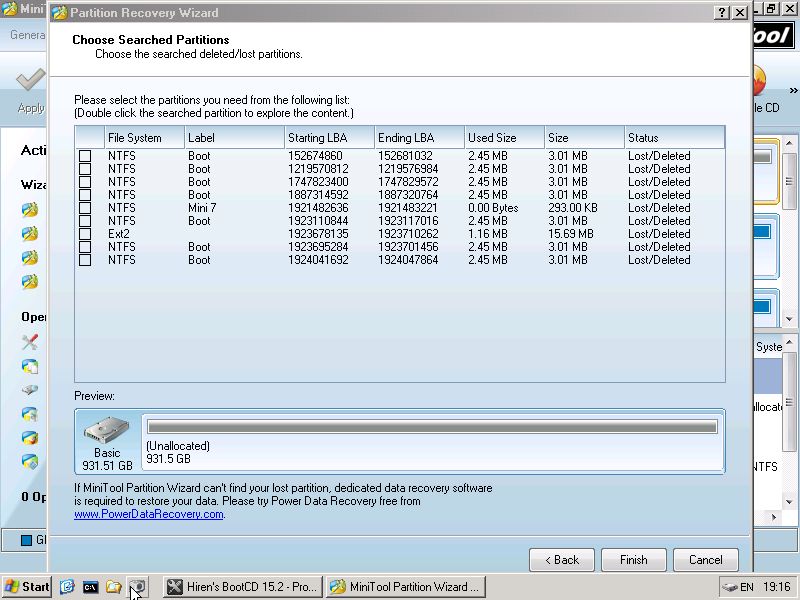
Do a "quick scan", normally it will list all partitions (if there were adjacent). Don't recover 3MB partitions (they are fake, but I've seen them many times). You can see if the partition is NTFS and the size and "used size". Not sure what to recover??.... post screenshot
 

My Computer My Computer

At a glance

Microsoft Windows 7 Home Premium 64-bits 7601...Intel(R) Core(TM) i3 CPU M 370 @ 2.40GHz4,00 GBATI Mobility Radeon HD 5400 Series
Computer type
Laptop
Computer Manufacturer/Model Number
ACER ASPIRE 5742G
OS
Microsoft Windows 7 Home Premium 64-bits 7601 Multiprocessor Free Service Pack 1
CPU
Intel(R) Core(TM) i3 CPU M 370 @ 2.40GHz
Motherboard
Acer Aspire 5742G
Memory
4,00 GB
Graphics Card(s)
ATI Mobility Radeon HD 5400 Series
Sound Card
(1) AMD High Definition Audio Device (2) Realtek High Defi
Screen Resolution
1366 x 768 x 32 bits (4294967296 colors) @ 60 Hz
Hard Drives
WDC WD5000BEVT-22ZAT0
It would better if you performed furmark; not any other thing. MSI program is not that much efficient and trustworthy.
When WEI runs 'Testing Direct 3D 9' or something along those lines it crashes. It also crashes during gaming, not even heavy gaming. And crashes on internet use, such as heavy youtube.
As there is an issue, there must be a reason behind it.

The computer shuts down at its own. It is not overheating. No testable hardware are not failing. Then there remains the motherboard which we cannot test directly. And, before blaming the motherboard, we should make all the other options exploited.
 

My Computer My Computer

At a glance

Microsoft Windows 10 Pro Insider Preview 64-bitIntel(R) Core(TM) i3-4130 CPU @ 3.40GHzCorsair Vengence 4GB x2 (8.00GB Dual-Channel ...2047MB GeForce GTS 450 (ZOTAC International)
Computer type
PC/Desktop
Computer Manufacturer/Model Number
Self Assembled
OS
Microsoft Windows 10 Pro Insider Preview 64-bit
CPU
Intel(R) Core(TM) i3-4130 CPU @ 3.40GHz
Motherboard
Gigabyte Technology Co., Ltd. B85M-D3H
Memory
Corsair Vengence 4GB x2 (8.00GB Dual-Channel DDR3 @ 798MHz)
Graphics Card(s)
2047MB GeForce GTS 450 (ZOTAC International)
Sound Card
Onboard (Realtek High Definition Audio)
Monitor(s) Displays
LG Flatron E2040T
Screen Resolution
1600x900
Hard Drives
Western Digital 1 TB
Seagate 500 GB
PSU
Corsair VS550
Case
Cooler Master K380
Cooling
Cooler Master Seidon 120V Plus
Keyboard
Logitech MK260r
Mouse
Logitech MK260r
Internet Speed
PMPL Broadband
Antivirus
Windows Defender + MBAM
Browser
Firefox
Other Info
Dell Studio 15" Laptop
Did you do "quick scan" or "full scan" in PW recovery wizard?
You know how many paritions were on disk before you did screw it up?
All those partitions were adjacent to each other (no unallocated space in between)?
You know the sizes (approximately) of the partitions you would expect?

Do a "quick scan", normally it will list all partitions (if there were adjacent). Don't recover 3MB partitions (they are fake, but I've seen them many times). You can see if the partition is NTFS and the size and "used size". Not sure what to recover??.... post screenshot

Full Drive Scan:
zsP4Evh.jpg


Running FurMark now
 

My Computer My Computer

At a glance

Windows 7i7 2600kMuskin 4GB x2XFX 6950 x2
Computer type
PC/Desktop
Computer Manufacturer/Model Number
Custom
OS
Windows 7
CPU
i7 2600k
Motherboard
MSI MCII
Memory
Muskin 4GB x2
Graphics Card(s)
XFX 6950 x2
Hard Drives
1TB WD x2
64GB SSD
250GB Maxtor x4
Is this one of the striped volumes which are around 290gb that you deleted? How? How is it even possible to be given a tutorial to mark another HD's Partition D Inactive and end up deleting a completely different HD's striped partition thereby destroying all of the data on the striped drives? I'm sorry but I cannot imagine this and haven't seen anything like it in all five years of WIn7.

Post another screenshot of Disk Mgmt so we can see what tells you this is deleted. The found partition has no used space so may be lost. Others may need to be consulted to determine exactly what can be done.
 
Is this one of the striped volumes which are around 290gb that you deleted? How? How is it even possible to be given a tutorial to mark another HD's Partition D Inactive and end up deleting a completely different HD's striped partition thereby destroying all of the data on the striped drives? I'm sorry but I cannot imagine this and haven't seen anything like it in all five years of WIn7.

Post another screenshot of Disk Mgmt so we can see what tells you this is deleted. The found partition has no used space so may be lost. Others may need to be consulted to determine exactly what can be done.

No this is my single 1TB drive.
 

My Computer My Computer

At a glance

Windows 7i7 2600kMuskin 4GB x2XFX 6950 x2
Computer type
PC/Desktop
Computer Manufacturer/Model Number
Custom
OS
Windows 7
CPU
i7 2600k
Motherboard
MSI MCII
Memory
Muskin 4GB x2
Graphics Card(s)
XFX 6950 x2
Hard Drives
1TB WD x2
64GB SSD
250GB Maxtor x4
Waiting for the screenshot requested.

Please answer how this happened so we know what we're working with. I don't see anywhere near the data that was on D, which was only to have been marked Inactive. PW is usually very good about being able to easily undelete partitions. Was anything else done?
 

My Computer My Computer

At a glance

Microsoft Windows 10 Pro Insider Preview 64-bitIntel(R) Core(TM) i3-4130 CPU @ 3.40GHzCorsair Vengence 4GB x2 (8.00GB Dual-Channel ...2047MB GeForce GTS 450 (ZOTAC International)
Computer type
PC/Desktop
Computer Manufacturer/Model Number
Self Assembled
OS
Microsoft Windows 10 Pro Insider Preview 64-bit
CPU
Intel(R) Core(TM) i3-4130 CPU @ 3.40GHz
Motherboard
Gigabyte Technology Co., Ltd. B85M-D3H
Memory
Corsair Vengence 4GB x2 (8.00GB Dual-Channel DDR3 @ 798MHz)
Graphics Card(s)
2047MB GeForce GTS 450 (ZOTAC International)
Sound Card
Onboard (Realtek High Definition Audio)
Monitor(s) Displays
LG Flatron E2040T
Screen Resolution
1600x900
Hard Drives
Western Digital 1 TB
Seagate 500 GB
PSU
Corsair VS550
Case
Cooler Master K380
Cooling
Cooler Master Seidon 120V Plus
Keyboard
Logitech MK260r
Mouse
Logitech MK260r
Internet Speed
PMPL Broadband
Antivirus
Windows Defender + MBAM
Browser
Firefox
Other Info
Dell Studio 15" Laptop
May be still running the test, which is why the partition recovery can't proceed - or the Disk Mgmt screenie.
 
Waiting for the screenshot requested.

Please answer how this happened so we know what we're working with. I don't see anywhere near the data that was on D, which was only to have been marked Inactive. PW is usually very good about being able to easily undelete partitions. Was anything else done?

I marked the partition as inactive, on both of my 1TB.
Then I saw that they still had primary paritions while my stripped drive or USB didnt have one. So I thought that they would would without a primary partition and have them naked.
So I started with my D drive and used diskpart to clean the drive.
That is when the issue happened. I'm pretty sure it did not format the drive because it took about half a second to clean, while I know it takes much longer to delete 1TB of data.

And according to MS clean command only marks files for deletion.


Ok well it crashes instantly with FurMark on any Burn in test. on a 720 test it will run for a couple seconds and then crash.
I wanted to try out my second card, and then try out my old geforce 8990 before I posted, but I didn't have time last night, so I will do that when I get home from class.

May be still running the test, which is why the partition recovery can't proceed - or the Disk Mgmt screenie.

Yeah, I really am trying to not use the drive at all. Because if they files were only marked for deletion, then everything should still be recoverable as long as I don't use it.

Thing is that drive had all my downloads, documents and programs. So I am stuck using IE, and having to reinstall a lot of these programs on my C drive to work.

Ill get the screenie when I get home today.

And again guys, really, thank you so much for your help. Im trying to rep as much as possible, but the website is limiting me.
 

My Computer My Computer

At a glance

Windows 7i7 2600kMuskin 4GB x2XFX 6950 x2
Computer type
PC/Desktop
Computer Manufacturer/Model Number
Custom
OS
Windows 7
CPU
i7 2600k
Motherboard
MSI MCII
Memory
Muskin 4GB x2
Graphics Card(s)
XFX 6950 x2
Hard Drives
1TB WD x2
64GB SSD
250GB Maxtor x4
Ok well it crashes instantly with FurMark on any Burn in test. on a 720 test it will run for a couple seconds and then crash.
So we can assign the issue with the failing GPU.

If your other GPU passes furmark, and the appropriate display driver is installed, you will be able to run WEI smoothly.
 

My Computer My Computer

At a glance

Microsoft Windows 10 Pro Insider Preview 64-bitIntel(R) Core(TM) i3-4130 CPU @ 3.40GHzCorsair Vengence 4GB x2 (8.00GB Dual-Channel ...2047MB GeForce GTS 450 (ZOTAC International)
Computer type
PC/Desktop
Computer Manufacturer/Model Number
Self Assembled
OS
Microsoft Windows 10 Pro Insider Preview 64-bit
CPU
Intel(R) Core(TM) i3-4130 CPU @ 3.40GHz
Motherboard
Gigabyte Technology Co., Ltd. B85M-D3H
Memory
Corsair Vengence 4GB x2 (8.00GB Dual-Channel DDR3 @ 798MHz)
Graphics Card(s)
2047MB GeForce GTS 450 (ZOTAC International)
Sound Card
Onboard (Realtek High Definition Audio)
Monitor(s) Displays
LG Flatron E2040T
Screen Resolution
1600x900
Hard Drives
Western Digital 1 TB
Seagate 500 GB
PSU
Corsair VS550
Case
Cooler Master K380
Cooling
Cooler Master Seidon 120V Plus
Keyboard
Logitech MK260r
Mouse
Logitech MK260r
Internet Speed
PMPL Broadband
Antivirus
Windows Defender + MBAM
Browser
Firefox
Other Info
Dell Studio 15" Laptop
I can't fathom why you would Clean a HD that had important data. First of all, important data should always be backed up against a HD failure. Anyone who would use the Clean command has to know that it wipes everything off the disk.

I would run the scan again because PW is showing 0 space used on 290gb of a 1tb HD and no other real content to recover. You may have lost your data. This was done deliberately disregarding the exact steps you were given, while you had us here to help you avoid making any such mistakes. It just boggles my mind how anyone could do such a thing. :shock:
 
I can't fathom why you would Clean a HD that had important data. First of all, important data should always be backed up against a HD failure. Anyone who would use the Clean command has to know that it wipes everything off the disk.

I would run the scan again because PW is showing 0 space used on 290gb of a 1tb HD and no other real content to recover. You may have lost your data. This was done deliberately disregarding the exact steps you were given, while you had us here to help you avoid making any such mistakes. It just boggles my mind how anyone could do such a thing. :shock:

Well I know the clean command doesnt delet the data simply removes the partition. When I did that to my bootable usb it simply removed the boot record for it but kept all the data and it still functioned as a usb. I thought the same would happen with my hdd.
I know the clean /all command will wipe the drive.

I know I didnt follow your exact instructions and got myself into this mess, but I still feel like my data is recoverable so ill keep on working at it :)

I still plan on trying test disk; some googling "accidental cleaning of hdd" has said that might work.
Also I will get you the screenie so you have a better look
Maybe add to your amazing repretoir of knowledge in case someone else makes the same mistake in the future
 

My Computer My Computer

At a glance

Windows 7i7 2600kMuskin 4GB x2XFX 6950 x2
Computer type
PC/Desktop
Computer Manufacturer/Model Number
Custom
OS
Windows 7
CPU
i7 2600k
Motherboard
MSI MCII
Memory
Muskin 4GB x2
Graphics Card(s)
XFX 6950 x2
Hard Drives
1TB WD x2
64GB SSD
250GB Maxtor x4
Ok well it crashes instantly with FurMark on any Burn in test. on a 720 test it will run for a couple seconds and then crash.
So we can assign the issue with the failing GPU.

If your other GPU passes furmark, and the appropriate display driver is installed, you will be able to run WEI smoothly.

Yes, this is great that we have been able to narrow it down to my GPU. I hope my secondary one works :/ if it doesnt work I would find it very odd that both of my graphics cards crapped out around the same time and might have to start looking at software again
 

My Computer My Computer

At a glance

Windows 7i7 2600kMuskin 4GB x2XFX 6950 x2
Computer type
PC/Desktop
Computer Manufacturer/Model Number
Custom
OS
Windows 7
CPU
i7 2600k
Motherboard
MSI MCII
Memory
Muskin 4GB x2
Graphics Card(s)
XFX 6950 x2
Hard Drives
1TB WD x2
64GB SSD
250GB Maxtor x4
Lol ... dont be pessimistic :) The other GPU will work, provided the appropriate driver (314.22 WHQL for nvidia) is installed.

Even if that one is not working, you need to search the reason in the PCIe slots, not to the drivers.


   Information
The data on the HDD is not written over using the clean command like it does with the clean all command below. With the clean command, the data on the HDD is only marked as being deleted instead and is only written over when new data is written/saved to the same location on the HDD next.
So theoretically clean command does not wipe everything up, but actually it does :)
 
Last edited:

My Computer My Computer

At a glance

Microsoft Windows 10 Pro Insider Preview 64-bitIntel(R) Core(TM) i3-4130 CPU @ 3.40GHzCorsair Vengence 4GB x2 (8.00GB Dual-Channel ...2047MB GeForce GTS 450 (ZOTAC International)
Computer type
PC/Desktop
Computer Manufacturer/Model Number
Self Assembled
OS
Microsoft Windows 10 Pro Insider Preview 64-bit
CPU
Intel(R) Core(TM) i3-4130 CPU @ 3.40GHz
Motherboard
Gigabyte Technology Co., Ltd. B85M-D3H
Memory
Corsair Vengence 4GB x2 (8.00GB Dual-Channel DDR3 @ 798MHz)
Graphics Card(s)
2047MB GeForce GTS 450 (ZOTAC International)
Sound Card
Onboard (Realtek High Definition Audio)
Monitor(s) Displays
LG Flatron E2040T
Screen Resolution
1600x900
Hard Drives
Western Digital 1 TB
Seagate 500 GB
PSU
Corsair VS550
Case
Cooler Master K380
Cooling
Cooler Master Seidon 120V Plus
Keyboard
Logitech MK260r
Mouse
Logitech MK260r
Internet Speed
PMPL Broadband
Antivirus
Windows Defender + MBAM
Browser
Firefox
Other Info
Dell Studio 15" Laptop
Both Clean and Clean All remove all of the data, however after using Clean it is still recoverable using Undelete. The best undelete we've seen here is Partition Wizard Partition Recovery Wizard - Video Help.

There must have been something else done to the HDD if PW RW is not showing the data to recover. Is there some reason you can't post back the screenshot now? Why do I need to ask five times?
 
Clean all: removes all data. Actually by overwrting it by zero's or random stuff

Clean: overrides only first MB from drive. on first sector is MBR (so holds partition table)... that's overwritten.

Between first sector and end of first MB can be the start of a partition. But if partitions were made in win7... they will start at MB boundary.
 

My Computer My Computer

At a glance

Microsoft Windows 7 Home Premium 64-bits 7601...Intel(R) Core(TM) i3 CPU M 370 @ 2.40GHz4,00 GBATI Mobility Radeon HD 5400 Series
Computer type
Laptop
Computer Manufacturer/Model Number
ACER ASPIRE 5742G
OS
Microsoft Windows 7 Home Premium 64-bits 7601 Multiprocessor Free Service Pack 1
CPU
Intel(R) Core(TM) i3 CPU M 370 @ 2.40GHz
Motherboard
Acer Aspire 5742G
Memory
4,00 GB
Graphics Card(s)
ATI Mobility Radeon HD 5400 Series
Sound Card
(1) AMD High Definition Audio Device (2) Realtek High Defi
Screen Resolution
1366 x 768 x 32 bits (4294967296 colors) @ 60 Hz
Hard Drives
WDC WD5000BEVT-22ZAT0
I wanted to try out my second card, and then try out my old geforce 8990 before I posted, but I didn't have time last night, so I will do that when I get home from class.
:o Was searching for the driver for that said device as I was unaware of it. What I have figured out that there is no such device?
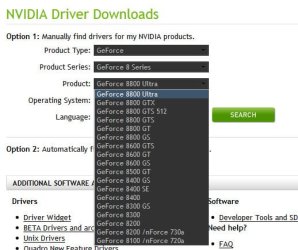
2013-10-26_000534.jpg


Are you talking about Radeon HD 8990 by any chance? For AMD, I will recommend 13.4 Whql.

2013-10-26_000909.jpg
 

My Computer My Computer

At a glance

Microsoft Windows 10 Pro Insider Preview 64-bitIntel(R) Core(TM) i3-4130 CPU @ 3.40GHzCorsair Vengence 4GB x2 (8.00GB Dual-Channel ...2047MB GeForce GTS 450 (ZOTAC International)
Computer type
PC/Desktop
Computer Manufacturer/Model Number
Self Assembled
OS
Microsoft Windows 10 Pro Insider Preview 64-bit
CPU
Intel(R) Core(TM) i3-4130 CPU @ 3.40GHz
Motherboard
Gigabyte Technology Co., Ltd. B85M-D3H
Memory
Corsair Vengence 4GB x2 (8.00GB Dual-Channel DDR3 @ 798MHz)
Graphics Card(s)
2047MB GeForce GTS 450 (ZOTAC International)
Sound Card
Onboard (Realtek High Definition Audio)
Monitor(s) Displays
LG Flatron E2040T
Screen Resolution
1600x900
Hard Drives
Western Digital 1 TB
Seagate 500 GB
PSU
Corsair VS550
Case
Cooler Master K380
Cooling
Cooler Master Seidon 120V Plus
Keyboard
Logitech MK260r
Mouse
Logitech MK260r
Internet Speed
PMPL Broadband
Antivirus
Windows Defender + MBAM
Browser
Firefox
Other Info
Dell Studio 15" Laptop
Lol ... dont be pessimistic :) The other GPU will work, provided the appropriate driver (314.22 WHQL for nvidia) is installed.

Even if that one is not working, you need to search the reason in the PCIe slots, not to the drivers.


   Information
The data on the HDD is not written over using the clean command like it does with the clean all command below. With the clean command, the data on the HDD is only marked as being deleted instead and is only written over when new data is written/saved to the same location on the HDD next.
So theoretically clean command does not wipe everything up, but actually it does :)

Data is only overriden if I writr to the drive again. I have been careful not to. I know pw recovery wizard searches wothouth writting and thats all ive done so far.

And my secondary GPU is another 6950 which would use the ati drivers I recently reinstalled. The geforce card is the first gph I ever had, its about 10 years old and I only use it for testing purposes now.

Both Clean and Clean All remove all of the data, however after using Clean it is still recoverable using Undelete. The best undelete we've seen here is Partition Wizard Partition Recovery Wizard - Video Help.

There must have been something else done to the HDD if PW RW is not showing the data to recover. Is there some reason you can't post back the screenshot now? Why do I need to ask five times?

Im sorry im taking so long to get you the screenshot. Like I said I only have about 1-2 hours on my computer a day due to school and work. Today when I get home from school I will post the screenie :) pinky promise.

Clean all: removes all data. Actually by overwrting it by zero's or random stuff

Clean: overrides only first MB from drive. on first sector is MBR (so holds partition table)... that's overwritten.

Between first sector and end of first MB can be the start of a partition. But if partitions were made in win7... they will start at MB boundary.

Thats what im hoping, that it was just the partition sectoee and no data was actually lost.

I wanted to try out my second card, and then try out my old geforce 8990 before I posted, but I didn't have time last night, so I will do that when I get home from class.
:o Was searching for the driver for that said device as I was unaware of it. What I have figured out that there is no such device?

View attachment 291138


Are you talking about Radeon HD 8990 by any chance? For AMD, I will recommend 13.4 Whql.

View attachment 291139

I am not sure of the exact model number, I know it is 8xxx series and a pretty old card, and I still have the original driver cd for it.
 

My Computer My Computer

At a glance

Windows 7i7 2600kMuskin 4GB x2XFX 6950 x2
Computer type
PC/Desktop
Computer Manufacturer/Model Number
Custom
OS
Windows 7
CPU
i7 2600k
Motherboard
MSI MCII
Memory
Muskin 4GB x2
Graphics Card(s)
XFX 6950 x2
Hard Drives
1TB WD x2
64GB SSD
250GB Maxtor x4
Not the original driver CD, but the NVIDIA DRIVERS 314.22WHQL.

Driver is available, but as you are saying that the device is very old .... usually the life span of a GPU is not much more than more or less 3 years and after that it is expected to fail upto some extent.

hsxi.jpg
 

My Computer My Computer

At a glance

Microsoft Windows 10 Pro Insider Preview 64-bitIntel(R) Core(TM) i3-4130 CPU @ 3.40GHzCorsair Vengence 4GB x2 (8.00GB Dual-Channel ...2047MB GeForce GTS 450 (ZOTAC International)
Computer type
PC/Desktop
Computer Manufacturer/Model Number
Self Assembled
OS
Microsoft Windows 10 Pro Insider Preview 64-bit
CPU
Intel(R) Core(TM) i3-4130 CPU @ 3.40GHz
Motherboard
Gigabyte Technology Co., Ltd. B85M-D3H
Memory
Corsair Vengence 4GB x2 (8.00GB Dual-Channel DDR3 @ 798MHz)
Graphics Card(s)
2047MB GeForce GTS 450 (ZOTAC International)
Sound Card
Onboard (Realtek High Definition Audio)
Monitor(s) Displays
LG Flatron E2040T
Screen Resolution
1600x900
Hard Drives
Western Digital 1 TB
Seagate 500 GB
PSU
Corsair VS550
Case
Cooler Master K380
Cooling
Cooler Master Seidon 120V Plus
Keyboard
Logitech MK260r
Mouse
Logitech MK260r
Internet Speed
PMPL Broadband
Antivirus
Windows Defender + MBAM
Browser
Firefox
Other Info
Dell Studio 15" Laptop
Back
Top