randomly disconnecting "default gateway is not available"

chaosrealm93

New member
Member
VIP
Local time
10:04 AM
Messages
174
Hey guys,

I've been getting this problem quite a lot recently. My computer would randomly disconnect from the internet. When I go to diagnose it, it would say either "default gateway is not available" or "network adapter is disabled" or "reset the local area connection adapter". I try to fix this with a restart, but more often than not, it would BSOD with a 9F code. After restarting, the networking would work again for some time before repeating the cycle.

Any guesses? Thanks.

*could this be a sign my network chip/motherboard is starting to die?
 
Last edited:

My Computer My Computer

At a glance

Windows 7 Pro 64 bitIntel i7 6700kKingston HyperX Fury 16GB 2133MHzEVGA GTX 1060 6GB
Computer type
PC/Desktop
OS
Windows 7 Pro 64 bit
CPU
Intel i7 6700k
Motherboard
ASUS Z-170-A
Memory
Kingston HyperX Fury 16GB 2133MHz
Graphics Card(s)
EVGA GTX 1060 6GB
Sound Card
N/A
Monitor(s) Displays
Viewsonic VX2240w
Screen Resolution
1680 x 1050
Hard Drives
Sandisk Ultra II 480GB SSD,
WD Caviar Black 1TB
PSU
Corsair RM750x
Case
Corsair 550D
Cooling
CoolerMaster Hyper 212
Keyboard
$20 Logitech El Cheapo
Mouse
Logitech G500s
Antivirus
avast! free antivirus
Browser
Google Chrome
Hello,

Is this a wired or wireless issue?

Can you please give us some more detail info and also output? Follow the guidelines here. Thanks.
 

My Computer My Computer

At a glance

Win7 & Win8 64bitIntel i5
Computer Manufacturer/Model Number
Lenovo Desktop/Samsung Laptop
OS
Win7 & Win8 64bit
CPU
Intel i5
Internet Speed
Charter-20 Mbps
Antivirus
Avast
Browser
FF, IE9 and Chrome
  1. wired
  2. rogers
  3. either DSL or cable
  4. Cisco DPC3825 DOCSIS 3.0 Gateway
  5. avast free antivirus

ipconfig /all txt file attached
 

Attachments

Last edited:

My Computer My Computer

At a glance

Windows 7 Pro 64 bitIntel i7 6700kKingston HyperX Fury 16GB 2133MHzEVGA GTX 1060 6GB
Computer type
PC/Desktop
OS
Windows 7 Pro 64 bit
CPU
Intel i7 6700k
Motherboard
ASUS Z-170-A
Memory
Kingston HyperX Fury 16GB 2133MHz
Graphics Card(s)
EVGA GTX 1060 6GB
Sound Card
N/A
Monitor(s) Displays
Viewsonic VX2240w
Screen Resolution
1680 x 1050
Hard Drives
Sandisk Ultra II 480GB SSD,
WD Caviar Black 1TB
PSU
Corsair RM750x
Case
Corsair 550D
Cooling
CoolerMaster Hyper 212
Keyboard
$20 Logitech El Cheapo
Mouse
Logitech G500s
Antivirus
avast! free antivirus
Browser
Google Chrome
asdf
 

My Computer My Computer

At a glance

Windows 7 Pro 64 bitIntel i7 6700kKingston HyperX Fury 16GB 2133MHzEVGA GTX 1060 6GB
Computer type
PC/Desktop
OS
Windows 7 Pro 64 bit
CPU
Intel i7 6700k
Motherboard
ASUS Z-170-A
Memory
Kingston HyperX Fury 16GB 2133MHz
Graphics Card(s)
EVGA GTX 1060 6GB
Sound Card
N/A
Monitor(s) Displays
Viewsonic VX2240w
Screen Resolution
1680 x 1050
Hard Drives
Sandisk Ultra II 480GB SSD,
WD Caviar Black 1TB
PSU
Corsair RM750x
Case
Corsair 550D
Cooling
CoolerMaster Hyper 212
Keyboard
$20 Logitech El Cheapo
Mouse
Logitech G500s
Antivirus
avast! free antivirus
Browser
Google Chrome
Apologize for the delay, been so busy lately and thank you for the info provided. Your ipconfig/all output looks good, no issue there.

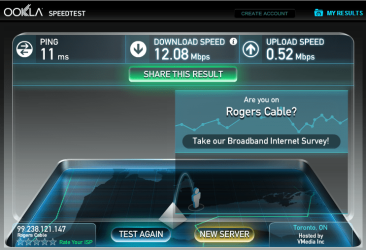
Can also post your Speedtest?

Most likely you're using Cable under Rogers. Any other computers having similar issue as yours? Would be nice if you can plug in another computer to your modem/router.
 

My Computer My Computer

At a glance

Win7 & Win8 64bitIntel i5
Computer Manufacturer/Model Number
Lenovo Desktop/Samsung Laptop
OS
Win7 & Win8 64bit
CPU
Intel i5
Internet Speed
Charter-20 Mbps
Antivirus
Avast
Browser
FF, IE9 and Chrome
no problem. speedtest attached (i dont think it has always been this slow.... =\

yes, im on robber's cable and no. i have a macbook thats on wireless and connect to the same network. i have no disconnection issues.
 

Attachments

  • Untitled.png
    Untitled.png
    92.2 KB · Views: 0

My Computer My Computer

At a glance

Windows 7 Pro 64 bitIntel i7 6700kKingston HyperX Fury 16GB 2133MHzEVGA GTX 1060 6GB
Computer type
PC/Desktop
OS
Windows 7 Pro 64 bit
CPU
Intel i7 6700k
Motherboard
ASUS Z-170-A
Memory
Kingston HyperX Fury 16GB 2133MHz
Graphics Card(s)
EVGA GTX 1060 6GB
Sound Card
N/A
Monitor(s) Displays
Viewsonic VX2240w
Screen Resolution
1680 x 1050
Hard Drives
Sandisk Ultra II 480GB SSD,
WD Caviar Black 1TB
PSU
Corsair RM750x
Case
Corsair 550D
Cooling
CoolerMaster Hyper 212
Keyboard
$20 Logitech El Cheapo
Mouse
Logitech G500s
Antivirus
avast! free antivirus
Browser
Google Chrome
Thanks! Your speed looks fine....

Edit:
Please do this first....

Refresh your wireless networks by removing all Wi-Fi Profiles then re-add your own SSID with the proper encryption.
http://kb.netgear.com/app/answers/detail/a_id/20055


If refreshing your wireless networks didn't help at all then follow the next steps here:
- Do a scan in your computer for possible infections/nasties, it won't hurt. I use Free SuperAntiSpyware or Malwarebytes. You don't have to post the logs. Test your connection after.

- I would also suggest to update your Wi-Fi adapter to the latest that might get rid of the BSOD.
 
Last edited:

My Computer My Computer

At a glance

Win7 & Win8 64bitIntel i5
Computer Manufacturer/Model Number
Lenovo Desktop/Samsung Laptop
OS
Win7 & Win8 64bit
CPU
Intel i5
Internet Speed
Charter-20 Mbps
Antivirus
Avast
Browser
FF, IE9 and Chrome
yea-that speed test you posted sure is pretty slow. One thing that 2xg didnt mention that you might also want to try is power cycling your modem and router. Unplug both the modem and router for about a minute or so and then plug the modem in first; let that boot; then plug the router back in and see if that helps at all. Doing this will help to refresh the connections to the isp. If it comes down to it in the end you might need to contact the isp and see if there are any issues going on in your area that they need to address.
 

My Computer My Computer

At a glance

Windows 7 ultimate 64-bitIntel I7 2600K 3.4ghzCorsair 16gb ddr3 1600mhzNvidia Geforce gt 430
Computer type
PC/Desktop
Computer Manufacturer/Model Number
custom built
OS
Windows 7 ultimate 64-bit
CPU
Intel I7 2600K 3.4ghz
Motherboard
Asus Evo P8P67
Memory
Corsair 16gb ddr3 1600mhz
Graphics Card(s)
Nvidia Geforce gt 430
Sound Card
Sound Blaster Titanium x-fi pci express
Monitor(s) Displays
Dell E198WFP
Hard Drives
1 western digital 2TB drive.
PSU
Antec 1200 watt
Case
Inwin Dragon Rider
Cooling
6 case supplied cooling fans
Keyboard
logitech mk700
Mouse
logitech m705
Internet Speed
25-50mbps download; 10mbps upload(i think)
Antivirus
avg free 2014
Browser
mozilla firefox
Other Info
Also have a pretty bad speaker setup which is a klipsch promedia 5.1 surround speaker setup with huge subwoofer and lg blu ray player/writer. Also a hp officejet pro 8600 plus wireless all in one and a logitech s7500 webcam.
@2xg, matts6887, i've tried that. both pulling the power on the modem/router (same box in my case) as well as logging in to 192.168.0.1 and doing factory resets. my computer is wired, so i cant really delete any wifi profiles.

i'll do another scan with avast

i reinstalled the networking driver, but i still get these problems randomly
 

My Computer My Computer

At a glance

Windows 7 Pro 64 bitIntel i7 6700kKingston HyperX Fury 16GB 2133MHzEVGA GTX 1060 6GB
Computer type
PC/Desktop
OS
Windows 7 Pro 64 bit
CPU
Intel i7 6700k
Motherboard
ASUS Z-170-A
Memory
Kingston HyperX Fury 16GB 2133MHz
Graphics Card(s)
EVGA GTX 1060 6GB
Sound Card
N/A
Monitor(s) Displays
Viewsonic VX2240w
Screen Resolution
1680 x 1050
Hard Drives
Sandisk Ultra II 480GB SSD,
WD Caviar Black 1TB
PSU
Corsair RM750x
Case
Corsair 550D
Cooling
CoolerMaster Hyper 212
Keyboard
$20 Logitech El Cheapo
Mouse
Logitech G500s
Antivirus
avast! free antivirus
Browser
Google Chrome
Sorry about that, I was helping another OP last night with wireless issue and gave you the answer that wasn't meant for you. :o

Please scan your computer with SuperAntiSpyware as well.

Also, might be worth it to uninstall Avast for now as part of debugging and use this utility.

Is your computer current with Windows Updates? To be safe, you may install Free AVG or MSE to replace Avast.
 

My Computer My Computer

At a glance

Win7 & Win8 64bitIntel i5
Computer Manufacturer/Model Number
Lenovo Desktop/Samsung Laptop
OS
Win7 & Win8 64bit
CPU
Intel i5
Internet Speed
Charter-20 Mbps
Antivirus
Avast
Browser
FF, IE9 and Chrome
bwahahah!!

but..but... i like avast ='(
okay, i'll uninstall it for now

yes, my computer is current with windows update
 

My Computer My Computer

At a glance

Windows 7 Pro 64 bitIntel i7 6700kKingston HyperX Fury 16GB 2133MHzEVGA GTX 1060 6GB
Computer type
PC/Desktop
OS
Windows 7 Pro 64 bit
CPU
Intel i7 6700k
Motherboard
ASUS Z-170-A
Memory
Kingston HyperX Fury 16GB 2133MHz
Graphics Card(s)
EVGA GTX 1060 6GB
Sound Card
N/A
Monitor(s) Displays
Viewsonic VX2240w
Screen Resolution
1680 x 1050
Hard Drives
Sandisk Ultra II 480GB SSD,
WD Caviar Black 1TB
PSU
Corsair RM750x
Case
Corsair 550D
Cooling
CoolerMaster Hyper 212
Keyboard
$20 Logitech El Cheapo
Mouse
Logitech G500s
Antivirus
avast! free antivirus
Browser
Google Chrome

My Computer My Computer

At a glance

Windows 7 Home Premium x64 SP1Intel i3-3220Corsair Vengeance Black Dual Channel 8 GBClub 3D HD 7850 Royal Queen Series
Computer type
PC/Desktop
Computer Manufacturer/Model Number
Custom Build
OS
Windows 7 Home Premium x64 SP1
CPU
Intel i3-3220
Motherboard
Asrock B75M-DGS R2.0
Memory
Corsair Vengeance Black Dual Channel 8 GB
Graphics Card(s)
Club 3D HD 7850 Royal Queen Series
Sound Card
Stock
Monitor(s) Displays
Philips 224CL2
Screen Resolution
1920 x 1080p
Hard Drives
WDC Blue 500GB
Seagate Barracuda 1 TB
PSU
Corsair CX500
Case
Thermaltake Commander MS-I
Cooling
Stock
Keyboard
Logitech K100
Mouse
XTECGO Team Eagle
Internet Speed
312 kbps
Antivirus
Microsoft Security Essentials
Browser
Chrome, Firefox, IE
Back
Top