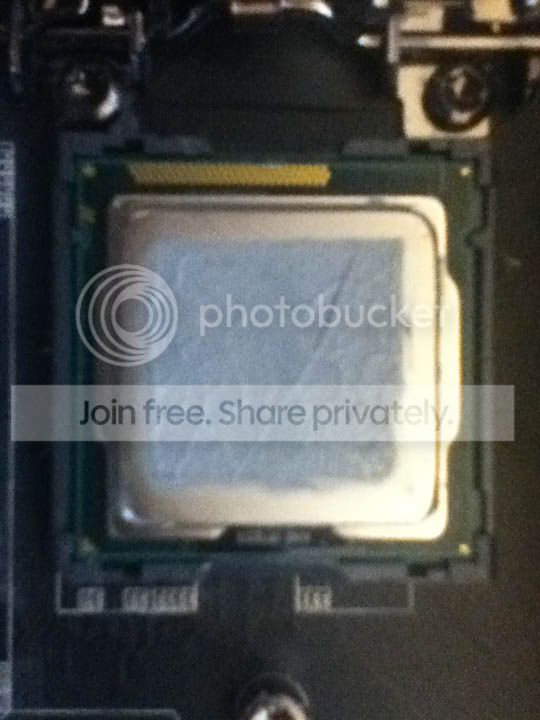
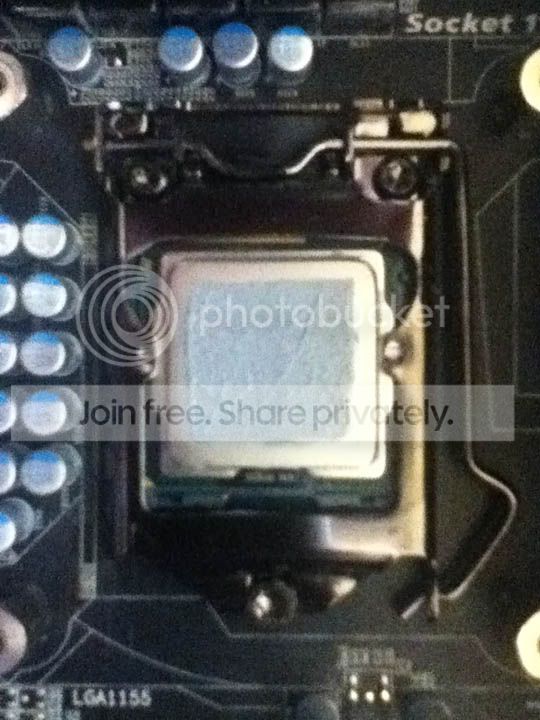
So upon getting my brand new CPU cooler with many other computer goodies this Christmas morning, it was not long before I hurried off to install my new Cooler master Hyper 212 Plus (not flash by any means, but decent). A complete novice to CPU coolers, I was cautious about installation, aware of what was potentially at stake here, and held off. After some encouragement from a family member I decided to go ahead, but my lack of knowledge proved problematic. You know how about a pea sized dollop of thermal paste is good? Well...lets say I may have put something a little closer to 4 peas (hurr), and there was a lot of excess, which has kind of spurted out covering most of the CPU, with a some on the PCB part (as opposed to the slightly smaller metal square), with some even managing to get onto the bracket.
Now I'll be honest I don't want to repeat the experience, but if this is going to cause serious irreversible problems, please let me know?
However what I really wanted to ask, was when it comes to deal to this mess, say I change cooler again as my set-up is really designed for something more like a Corsair Hydro Series cooler, as the large vengeance ram obstructs larger coolers (such as the Hyper 212 plus, by about 1cm), but this is a long-term-temporary stand in (temporary, but will be there a while). Anyway...when I come to change coolers, or perhaps earlier than that, a clean up will be required for sure. My main question to all you, what is a good way to do this?
I think removal of the CPU will be an idea, that way I can clean it well, get any of it off the bracket. I used cotton buds (some people call them Q-Tips or something..) and rubbing alcohol (ethanol) to remove the other paste, I would plan on using that again. Could this cause damage to the PCB or any other parts in the socket area? Obviously it wants to be 100% dry before I put power back through it, but I don't plan on drenching it or anything, just a damp cotton bud, dry enough no alcohol should drip off, or even leave much of a residue. Any tips will be greatly appreciated
Thanks
Now I'll be honest I don't want to repeat the experience, but if this is going to cause serious irreversible problems, please let me know?
However what I really wanted to ask, was when it comes to deal to this mess, say I change cooler again as my set-up is really designed for something more like a Corsair Hydro Series cooler, as the large vengeance ram obstructs larger coolers (such as the Hyper 212 plus, by about 1cm), but this is a long-term-temporary stand in (temporary, but will be there a while). Anyway...when I come to change coolers, or perhaps earlier than that, a clean up will be required for sure. My main question to all you, what is a good way to do this?
I think removal of the CPU will be an idea, that way I can clean it well, get any of it off the bracket. I used cotton buds (some people call them Q-Tips or something..) and rubbing alcohol (ethanol) to remove the other paste, I would plan on using that again. Could this cause damage to the PCB or any other parts in the socket area? Obviously it wants to be 100% dry before I put power back through it, but I don't plan on drenching it or anything, just a damp cotton bud, dry enough no alcohol should drip off, or even leave much of a residue. Any tips will be greatly appreciated
Thanks
My Computer
At a glance
Windows 7 Professional 64bitIntel i7 3770k 3.5ghzCorsair Vengeance 16gb (4x4gb)Gigabyte G1 Gaming GTX970
- Computer type
- PC/Desktop
- Computer Manufacturer/Model Number
- Custom Build
- OS
- Windows 7 Professional 64bit
- CPU
- Intel i7 3770k 3.5ghz
- Motherboard
- Asus P8Z77-V Deluxe
- Memory
- Corsair Vengeance 16gb (4x4gb)
- Graphics Card(s)
- Gigabyte G1 Gaming GTX970
- Sound Card
- None
- Monitor(s) Displays
- 3x AOC 12367fh 23"
- Screen Resolution
- 1920x1080
- Hard Drives
- Western Digital Caviar Black 1TB - 64mb cache
Western Digital Caviar Green 1TB - 32mb cache
Samsung 830 SSD 128Gb Boot Drive
- PSU
- Corsair AX-860W ATX
- Case
- Corsair 500R black
- Cooling
- Corsair 500r Stock cooling (3x120mm, 1x200mm) & Corsair H100
- Keyboard
- Logitech G110 gaming keyboard
- Mouse
- Logitech G500s
- Other Info
- Corsair Hydro 100 CPU Cooler

 Im asking if you guys know of any things one might do that would damage parts that you would like to tell me not to do, or anything that would make it easier to do, or safer.