RC1 as main OS

Same here.
I dual boot Xp and Seven since 7000.
Mind you I never go into XP any more.
It's Seven 7100 all the time now.
 

My Computer

OS
Dual boot XP Pro and Seven/7127
when build 7000 was released i formatted my hdd and i'm using 7 as the only OS on my drive since then
 

My Computer

OS
Windows 7
CPU
Intel Pentium D CPU 3.40GHz
Motherboard
Elitegroup
Memory
4,00 GB DDR2
Graphics Card(s)
GeForce 8600GT
Sound Card
onboard
Monitor(s) Displays
dual hyundai nw220
Screen Resolution
1680x1050
Hard Drives
750 GB SATA
My choice.

Hey "Rosco997"
Everybody has there own choice and opinion's. You can do also.
I do recommend that you either add a Hard Drive (mainly) or create another partition for a location to make a backup of all you data files for your protection.

I run 7 different computers systems for different reasons.
One is a CE. HP iPaq 5555, (hand held toy) use it for security monitoring.
3 laptops, One is my wife's toy netbook (Acer AspireONE) with Win 7 7000. She likes it.
Another laptop is an older Toshiba Satellite A20-s207 running 2 Win XP sp3, love it and keeping it alive, (have rebuilt it 2wice).
Another is my Lenovo 3000 N100, Running Win XP sp3 mod, (LastXP 21), and Win 7 7100 x86, I have tested it since the 7000 version. I use the Win 7 most of the time now, cause a lot less buggs and now Win 7 7100 has greater Network capabilities now.

And 3 Desktops that I Built Myself, My main box is a Gigabyte MoBo GA 965 DS3 using a Quad Core Intel 6600 (2.4GHz) and 8 Gig of Mem with 7TBs of Hdd's and 2 9400GT nVidia (Sprinkle Cards), This is my WorkHorse that I use for Design and Development of Engineering work. And I still run Windows XP x64 cause some of the software I use will still not run well on Win 7 yet. But I have 3 OS's installed on it (Win XP x86, Win XP x64 and Win 7 7077 x64) for tests and my main usage.
Another Desktop I just finished a couple weeks ago is also a Gigabyte MoBo G31 M45 that I built for testing Software and Security Issues, I run a Intel Core2Duo 6450 (2.13GHz) and 4 Gig of Mem and 2 TBts of Hdd's and a nVidia 6200GS card + Intel 3100 (onboard), with 4 os's, Win XP x86 and x64, and Win 7 7100 RC x86 and x64, I use this box for constant testing and Debugging. And believe me I have sent MS many responces on driver issues, security issues, Application compatibility and other glitches since the 7000 release. And I have seen some of the greatest improvements of the operating systems compatibility and functionality ever.
I have had computers since 1977 (dout you heard of this one "TRS 80" we called it the trash 80 from Radio Shack) and used Windows since version 1.1 (still have it), and the worst OS's have been Win ME and Vista. to this day I believe that Windows 7 is the best Operating system out there and I will end up getting a VLK for all my boxs and most of my laptops when it is released.
My 3rd box is an old one ( a SOYO SY-P4IS2, with a Intel P4 2.4GHz, 1.5 Gig Mem, 1 TBts of Hdd's and 2 nVidia 5200 cards), I use this one for my home security, running Win XP sp3 x86. I've had this one running for years.

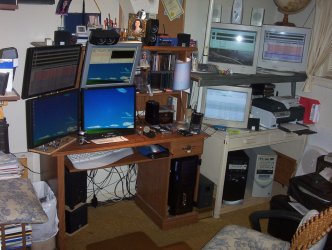
Attached is an Image of my office, you get the Idea of my systems usage there.

This is the best site for opinions, Ideas, views and knowledge. here you can find out most anything you want to know.

 

Attachments

  • 100_1475.JPG
    100_1475.JPG
    267 KB · Views: 61

My Computer

OS
Windows 7 7600 x86 &x64, Windows XPP sp3 (x86) & sp2 x64
CPU
C2Q 6600, C2D 6420, C2D T2060, C2-ATOM N270
Motherboard
Gigabyte GA-965P-DS3, GA-G31M-ES2L, Lenovo 3000 N100, Acer A
Memory
8 Gig, 4 Gig, 2 Gig, 1.5 Gig
Graphics Card(s)
nVidia 9400 GS, 7200GT, FX 5200
Monitor(s) Displays
2-Hanns-G HW191D, 1-Hanns-G JC199D, 1-AOC 720LM, 2-Samtron
Screen Resolution
1440x900, 1280x1024
Hard Drives
Seagate Barracuda 11 & 12 series
2-500G, 2-1Tb
WD My Book 1Tb
Samsung 3-500G
Maxtor Diamond 9 - 11 80G to 300G about 8 diff.
PSU
many from 1000w to 250w
Case
many
Cooling
Massive fans on all, and my home build AC unit
Keyboard
MS Natural Multimedia
Mouse
MS IntelliMouse 3.0
Internet Speed
10Mbs d/l 768Kbs u/l
I started with build 6801, I think it was, on my laptops. I remember waiting until like 3:00 am for the download to complete and proceeded to install it. Wow! From that point forward I have been completely hooked; have used W7 pretty much exclusively since then. Installed RC last week from TechNet and now, six or seven builds later, it is better than ever.
Funny, I needed to boot my "old" Vista x64 to flash an OCZ Vertex the other day and, although it runs REALLY well, it just doesn't come close to Windows 7.
So I use W7 as the main OS on two desktops (x64), two laptops(x64) and two netbooks(x86).
Tom
 

My Computer

Computer type
PC/Desktop
Computer Manufacturer/Model Number
Dell: XPS 420 (2), XPS M1330 (several), XPS 14z, Mini 9, Mini 10v
OS
W8 Pro, W7 Ultimate, XP Pro x64, Vista x64, Ubuntu
CPU
Q6600, Q6700, T7500, T7500, N270, N270
Motherboard
Dell
Memory
8GB, 8GB, 4GB, 4GB, 2GB, 2GB
Graphics Card(s)
ATI, nVidia, nVidia, nVidia, Intel, Intel
Monitor(s) Displays
Dell 2408WFP
Hard Drives
A drawer full. OCZ Vertex's in RAID 0. Vertex 3's, Vertex 4, Samsung 830's, Samsung 840's, Intel 330. Don't use dino drives any more except for servers.
Keyboard
Logitech Wave
Internet Speed
29 Mbps DL / .95 Mbps UL
Other Info
New project(2013)...Another low power server. Zotac H67ITX, i3-2100T, Windows Server 2012 Essentials on Samsung SSD.
Previous project...Low power (38-40 watts using Kill-a-Watt) Windows Home Server. Zotac ION (Atom 330, GeForce9400), 4GB RAM, 2x2TB WD Green, IN WIM miniITX Case. Fits on a shelf in laundry closet, practically silent.
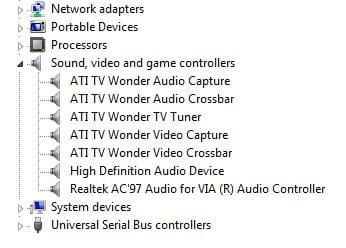
i got dual boot with vista only reason is tv tuner card driver is not available in win 7!!!:(

Which tv tuner card? After some fuss, I even got my ancient TV Wonder PCI from ATI working under 7 in x86. If I remember correctly, I used the XP drivers for it and may or may not have installed in XP compatibility mode. It even fully works in the Media Center, which in Vista's version, it says incompatible although I haven't tried in there in a long time.
 

Attachments

  • Untitled-Captured-02.jpg
    Untitled-Captured-02.jpg
    16.3 KB · Views: 5

My Computer

Computer Manufacturer/Model Number
self built
OS
7600.20510 x86
CPU
P4 550 3.4 GHz HT running at 3.5 GHz
Motherboard
MSI PM8M3-V (MS-7211 v1.x) Micro-ATX mainboard
Memory
OCZ 2 GB(2x1GB) DDR400mHz running @ 414 mHz
Graphics Card(s)
HIS Radeon HD 3850 IceQ 3 Turbo HDMI Dual DL-DVI AGP
Sound Card
MOTU Traveler firewire studio interface 192 kHz 24 bit
Monitor(s) Displays
22" widescreen Acer X223W LCD, 17" Compaq P75 CRT
Screen Resolution
1680x1050 and 1280x1024
Hard Drives
SATA I x2 WD, 400 GB and 120 GB, SATA 2 WD Caviar Black 1 TB
PSU
350W generic
Case
Cybertronpc, it glows blue
Cooling
stock cpu fan, Ice-Q 3 gpu and system, many case fans
Keyboard
Logitch Classical Keyboard 200
Mouse
Logitech Mediaplay cordless
Internet Speed
1792/448 kbits/sec
Other Info
SATA II PCI fake RAID adapter, 1 GB Readyboost, original ATI Remote Wonder (even works with WMC perfectly), Logitech Rumblepad 2 game controller x2
Windows 7 RC1 is working very well for me. I'm still dual-booting with Vista, however I'm using Win7 almost exclusively. That said, it's important to keep the transition to the final release of Win7 in mind. I've heard it may be possible to upgrade over RC1. I don't know if that's certain and if it is I don't know if it's a good idea. So I'm preparing to eventually wipe my hard disk and do a fresh install. That means redundant backups of all my data.
 

My Computer

Computer type
PC/Desktop
OS
Windows 7 x64
CPU
Intel Core2 Extreme Q6850 3.00GHz
Motherboard
EVGA 132-CK-NF79
Memory
8 GB
Graphics Card(s)
Radeon R7 260X
Sound Card
Xonar DS
Hard Drives
Hitachi Deskstar 1 tb
Windows 7 RC1 is working very well for me. I'm still dual-booting with Vista, however I'm using Win7 almost exclusively. That said, it's important to keep the transition to the final release of Win7 in mind. I've heard it may be possible to upgrade over RC1. I don't know if that's certain and if it is I don't know if it's a good idea. So I'm preparing to eventually wipe my hard disk and do a fresh install. That means redundant backups of all my data.

With backups and things like that in mind, I have begun to transition more to "cloud" type computing. With Microsoft Live I have been experimenting with Live Sync and Live Mesh and Live Office to sync files and data to my SkyDrive. That way, reinstalling any OS and getting back to where I left off isn't quite as lengthy. Plus, just before I reformat I cut an Acronis Image and then I can always retrieve anything and everything.

Awww, who am I kidding? With good 750GB HDDs for $50 I usually just buy a new one.
 

My Computer

Computer type
PC/Desktop
Computer Manufacturer/Model Number
Dell: XPS 420 (2), XPS M1330 (several), XPS 14z, Mini 9, Mini 10v
OS
W8 Pro, W7 Ultimate, XP Pro x64, Vista x64, Ubuntu
CPU
Q6600, Q6700, T7500, T7500, N270, N270
Motherboard
Dell
Memory
8GB, 8GB, 4GB, 4GB, 2GB, 2GB
Graphics Card(s)
ATI, nVidia, nVidia, nVidia, Intel, Intel
Monitor(s) Displays
Dell 2408WFP
Hard Drives
A drawer full. OCZ Vertex's in RAID 0. Vertex 3's, Vertex 4, Samsung 830's, Samsung 840's, Intel 330. Don't use dino drives any more except for servers.
Keyboard
Logitech Wave
Internet Speed
29 Mbps DL / .95 Mbps UL
Other Info
New project(2013)...Another low power server. Zotac H67ITX, i3-2100T, Windows Server 2012 Essentials on Samsung SSD.
Previous project...Low power (38-40 watts using Kill-a-Watt) Windows Home Server. Zotac ION (Atom 330, GeForce9400), 4GB RAM, 2x2TB WD Green, IN WIM miniITX Case. Fits on a shelf in laundry closet, practically silent.
I've heard it may be possible to upgrade over RC1. I don't know if that's certain and if it is I don't know if it's a good idea. So I'm preparing to eventually wipe my hard disk and do a fresh install.

I never understood this train of thought about upgrading or not. I have done countless upgrades on all sorts of Microsoft's OSes over the years. Only one had adverse affects and that was years ago going from XP to Vista I think. Why do all the work of reinstalling when you don't have to?

Here's my main point about it: If you upgrade and don't like it for ANY particular reason, why not THEN format and clean install? It's like you have a free shot at going for the gusto lol. If someone is so worried that the upgrade is going to go so badly that important data will be lost from the system drive, then backup first.
 

My Computer

Computer Manufacturer/Model Number
self built
OS
7600.20510 x86
CPU
P4 550 3.4 GHz HT running at 3.5 GHz
Motherboard
MSI PM8M3-V (MS-7211 v1.x) Micro-ATX mainboard
Memory
OCZ 2 GB(2x1GB) DDR400mHz running @ 414 mHz
Graphics Card(s)
HIS Radeon HD 3850 IceQ 3 Turbo HDMI Dual DL-DVI AGP
Sound Card
MOTU Traveler firewire studio interface 192 kHz 24 bit
Monitor(s) Displays
22" widescreen Acer X223W LCD, 17" Compaq P75 CRT
Screen Resolution
1680x1050 and 1280x1024
Hard Drives
SATA I x2 WD, 400 GB and 120 GB, SATA 2 WD Caviar Black 1 TB
PSU
350W generic
Case
Cybertronpc, it glows blue
Cooling
stock cpu fan, Ice-Q 3 gpu and system, many case fans
Keyboard
Logitch Classical Keyboard 200
Mouse
Logitech Mediaplay cordless
Internet Speed
1792/448 kbits/sec
Other Info
SATA II PCI fake RAID adapter, 1 GB Readyboost, original ATI Remote Wonder (even works with WMC perfectly), Logitech Rumblepad 2 game controller x2
So that many of you are using Win 7 ONLY then huh.

wow. that is crazy. I'm currently TRYING to dual boot with win 7 and vista 64.. but this is my first night. once I get things going I have a feeling I'll be on 7 pretty often.
 

My Computer

OS
Windows 7 Ultimate Edition x64
CPU
Q9650 E0 @ 4.0 GHz 1.304v
Motherboard
eVGA 750i FTW!
Memory
2x2GB Corsair Dominator PC2-8500C5D 1100 Mhz 5-5-5-15
Graphics Card(s)
eVGA/Gigabyte GTX 480's SLI
Sound Card
X-Fi XtremeGamer
Monitor(s) Displays
Dell U2410 24" IPS Panel (Beautiful)
Screen Resolution
1900 x 1200 & 1680 x 1050
Hard Drives
WD Caviar Black 640GB AALS x2 (Raid0) + Seagate Pro 500GB External x2
PSU
Enermax Revolution 85+ 1050w PSU
Case
Cooler Master HAF 932 H20
Cooling
Apogee GTZ, Feser 360, D5 Vario, Scythe GT 1850's
Keyboard
Logitech G11
Mouse
Logitech MX-518 / G9
Internet Speed
Fast!
Other Info
Nikon D40 DSLR 18-105mm VR - Nikon 35mm f/1.8 & 55-200mm VR
Bose Companion 3 - 16GB Patriot Xporter USB - ATH AD900's & UR Triple.Fi 10 Custom Phones w/ 32GB iPod Touch 3rd Gen -
Google Nexus One (Phone Rocks!) w/ Kingston 16GB MicroSDHC Class 10 running Amon RA1.7 and Cyan 5.06.1
I've switched over to Win 7 7100 x64 exclusively now having worked out the kinks on earlier beta's.

The only problems I have are with three of my games that behave erratically, one crashes when I quit the game, one won't play in-game cinematics and one won't work at all but the other 30+ are fine :)
 
Last edited:

My Computer

Computer Manufacturer/Model Number
Self Build
OS
Win 7 7201 x64
CPU
AMD Athlon 64 X2 6400
Motherboard
Gigabyte GA-M56S-S3
Memory
8Gb DDR2 6400 (4 x 2)
Graphics Card(s)
NVIDIA GeForce 8800GT
Sound Card
Realtek Hi-Def Onboard
Monitor(s) Displays
Sony Bravia 26"
Screen Resolution
1360 x 768
Hard Drives
2 x WD5000AAKS 500GB (RAID 0)
PSU
OCZ 700W ModXStream
Case
XCLIO A380 Twin Engine
Cooling
Air
I got rid of XP completely and use Windows 7 as my main OS.
I got few important documents, musics to keep so that's not the problem and I have another PC to share files with :)
 

My Computer

Computer Manufacturer/Model Number
Custom Built
OS
Windows 7 Ultimate 64-bit (6.1, Build 7600)
CPU
Intel(R) Core(TM)2 Duo CPU E8400 @ 3.00GHz (2 CPUs), ~3.0GHz
Motherboard
ASUS P5-KPL/1600
Memory
Kingston ValueRAM 2GB DDR2-800 RAM Retail x2 (Total 4GB RAM)
Graphics Card(s)
XFX GeForce 9800GTX+ 512MB
Sound Card
VIA HD Audio rear output
Monitor(s) Displays
SyncMaster T220/T220G(Digital)
Screen Resolution
1680x1050
Hard Drives
Western Digital Caviar Black | 750 GB | S-ATA II | 32MB Cache Buffer
PSU
Enermax Tomahawk ETK500AWT
Case
CoolerMaster Centurion 590
Cooling
5 CoolerMaster 120mm LED fans
Keyboard
MobileGear KB17 Slim Multimedia Keyboard in Silver Colour
Mouse
Razer DeathAdder
Internet Speed
DL: 1Mb/s | UL: 512Kb/s
I was having issues with Vista on my Laptop Which was the x86 version. I decided to to do the upgrade to 7077 x86 and it had some glitches so I finally said screw this and did a clean install of x64 Win7 7100.. now my laptop is running the best it has EVER run!!
 

My Computer

Computer Manufacturer/Model Number
Main: Custom Build & Laptop: Toshiba Satellite P205-S6347
OS
Main: Dual Boot (Vista SP2 64 Ultimate & Win7 64 7100) Laptop:Win7 64 7100
CPU
Main: Phenom X4 9500 Laptop: Core 2 Duo T5450
Motherboard
Main: Biostar
Memory
Main: 8GB Laptop: 4GB
Graphics Card(s)
Main: MSI GeForce 9500GT Laptop: Intel GMA X3100
Sound Card
Main: SB XFi Extreme Audio
Monitor(s) Displays
Main: Westinghouse TX-42
Screen Resolution
Main: 1920x1080P Laptop: 1440x900
Other Info
Main Desktop is Washu Version 9.2 Original Washu Version 1.0 built in 1995
I never understood this train of thought about upgrading or not. I have done countless upgrades on all sorts of Microsoft's OSes over the years. Only one had adverse affects and that was years ago going from XP to Vista I think. Why do all the work of reinstalling when you don't have to?

Here's my main point about it: If you upgrade and don't like it for ANY particular reason, why not THEN format and clean install? It's like you have a free shot at going for the gusto lol. If someone is so worried that the upgrade is going to go so badly that important data will be lost from the system drive, then backup first.
.
If you upgrade and have issues right away then you can start over, no harm done. The real problem is more subtle. The upgrade may appear to be 100% successful, but you discover there are issues down the road when you try to install service packs or a new IE, after you've invested more time personalizing the OS. You have to also consider if you have issues over time you can never be certain if it's because of the upgrade or due to some other software you've installed. Doing a clean install eliminates that doubt. I agree it's a lot of extra work and most of the time it's probably not necessary. After Win7 goes gold I'll probably wait a while to see the results people are getting with upgrading over RC1 before I decide.
 

My Computer

Computer type
PC/Desktop
OS
Windows 7 x64
CPU
Intel Core2 Extreme Q6850 3.00GHz
Motherboard
EVGA 132-CK-NF79
Memory
8 GB
Graphics Card(s)
Radeon R7 260X
Sound Card
Xonar DS
Hard Drives
Hitachi Deskstar 1 tb
Back
Top