RDP Question - Router Issues with Computer Name

A4orce84

New member
Member
Local time
6:36 AM
Messages
44
Hello Everyone,

I am trying Remote Desktop from my laptop to my Windows 7 desktop. Currently I have it working by connecting to it's IPv4 address. However, I want to be able to RDP connect to it via its actual computer name.

Currently my settings under ipconfig are the following:
Code:
  Connection-specific DNS Suffix  . : Belkin
  Link-local IPv6 Address . . . . . : fe80::79c5:1e97:c9b:fdf%11
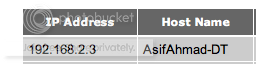
  IPv4 Address. . . . . . . . . . . : 192.168.2.3
  Subnet Mask . . . . . . . . . . . : 255.255.255.0
  Default Gateway . . . . . . . . . : 192.168.2.1

As you can see above, I am connecting to the "192.168.2.3" in RDP, and it works great. But when I do a ping for my desktop under it's computer name, it is a different IP address.

So I believe I need to change some settings in my router, I just don't know what. If anyone could offer any assistance, it would be greatly appreciated!

Thanks,

--Asif
 

My Computer

OS
windows vista
I believe Computer "name" needs to be propagated by the DNS/DHCP server (in your case your router). To what IP do you point DNS/DHCP inquiries? for example Google.com=Ip x.x.x.x Should show in your control panel.

Why do you need/want to use the machine name anyway? BTW there is a free (and much better) alternative called Team Viewer.
 

My Computer

Computer Manufacturer/Model Number
HP Pavillion dv-7 1005 Tx
OS
Win 8 Release candidate 8400
CPU
[email protected]
Memory
4 gigs
Graphics Card(s)
Nvidia 9600M
Sound Card
HD built-in
Monitor(s) Displays
17" Wxga
Screen Resolution
1440x900
Cooling
none
Internet Speed
45Mb down 5Mb up
A few question to understand the problem.
How is built your network? Are you behind a router?
Are both machines in the same LAN or are you trying to connect over internet?
 

My Computer

Computer type
Laptop
Computer Manufacturer/Model Number
Toshiba Sattelite A665-S6092
OS
Windows 7 Ultimate x64
CPU
Intel Core i7-740QM
Memory
8 GB DDR3
Graphics Card(s)
NVIDIA GeForce 330GT
Screen Resolution
1366x768
Hard Drives
Samsung 840 SSD 500GB
1TB USB3 external HD
Cooling
Coolermaster Notepal U3 notebook cooling pad
Internet Speed
3mbps ASDL
Antivirus
ClamWin 0.98.7
Browser
Opera 12.17 x86 (main), Firefox 38 (sec), IE11 (last resort)
Looks like I already have that setting in my router:

LAN-DHCP.png


So not sure why it wont let me connect under my hostname still ??
 

My Computer

OS
windows vista
A few question to understand the problem.
How is built your network? Are you behind a router?
Are both machines in the same LAN or are you trying to connect over internet?

My network is built with the following:


1. Desktop (Wireless)
2. Laptop (Wireless)
3. Belkin-N Wireless Router

Both machines are behind a router and are on the same network. They are both part of the same workgroup and I have file sharing working, and as I said above I can RDP into the desktop using the IP.

If you need any additional information, please let me know.
 

My Computer

OS
windows vista
A few question to understand the problem.
How is built your network? Are you behind a router?
Are both machines in the same LAN or are you trying to connect over internet?

My network is built with the following:


1. Desktop (Wireless)
2. Laptop (Wireless)
3. Belkin-N Wireless Router

Both machines are behind a router and are on the same network. They are both part of the same workgroup and I have file sharing working, and as I said above I can RDP into the desktop using the IP.

If you need any additional information, please let me know.

Seems like there is a problem with DNSs. Try changing both computers to use fixed local IP addresses, and make both of them point their primary DNS server to the router LAN IP to use it as DNS server (and put the DNSs provided by your ISP under secondary or tertiary).

Also, from command line, try issuing a "nslookup <computername>" from both sides. That command should print the IP address you've assigned, or an error if something went wrong.
 

My Computer

Computer type
Laptop
Computer Manufacturer/Model Number
Toshiba Sattelite A665-S6092
OS
Windows 7 Ultimate x64
CPU
Intel Core i7-740QM
Memory
8 GB DDR3
Graphics Card(s)
NVIDIA GeForce 330GT
Screen Resolution
1366x768
Hard Drives
Samsung 840 SSD 500GB
1TB USB3 external HD
Cooling
Coolermaster Notepal U3 notebook cooling pad
Internet Speed
3mbps ASDL
Antivirus
ClamWin 0.98.7
Browser
Opera 12.17 x86 (main), Firefox 38 (sec), IE11 (last resort)
So very quickly doing NSlookup, I see the following (on both machines):

Code:
Asifs-MBP:~ aahmad$ nslookup asifahmad-dt
Server:		192.168.2.1
Address:	192.168.2.1#53

Non-authoritative answer:
Name:	asifahmad-dt.Belkin
Address: 184.106.15.239
Name:	asifahmad-dt.Belkin
Address: 204.232.137.207
 

My Computer

OS
windows vista
Can you ping from both PCs using hostnames? If so, it isn't any kind of issue with DNS. There shouldn't be an issue with DNS to begin with because Windows 7 can resolve neighboring PC's hostnames using the built in LLMNR protocol, making a DNS server unnecessary. Are you running RDP on some port other than 3389? If so, connect using hostname : port (no spaces though, just trying to avoid making it use an emoticon in the syntax).
 

My Computer

OS
Windows 7 Ultimate x64
Back
Top