
re: browser.newtab.url cmd in FireFox

reble

New member
Member
VIP
Local time
2:06 AM
Messages
326
Location
Kennewick, Wa
re: browser.newtab.url cmd in FireFox

I am having a problem with the FireFox about:config cmd "browser.newtab.url". When I reinstall FireFox (for what ever reason it had to be uninstalled). I set the "browser.newtab.url" cmd in "about:config" to "browser.newtab.url user set string about:blank" So when I open a new tab it is a blank tab. After a while when I clack on new tab I get the following, see DropBox link new-tab-error.jpg . When I go back into FireFox about:config and bring up the " .newtab.url" cmd it is set for "browser.newtab.url user set string chrome://quick_start/content/index.html" . I change the "browser.newtab.url" cmd back to "about:blank" and hit new tab again I still have the same age that is in the jpg picture above. Why?


Steve
 

My Computer My Computer

Computer type
Laptop
Computer Manufacturer/Model Number
Dell Inspiron 3541
OS
windows 7 home 32 bit, I just changed back from 64 to 32bit
CPU
amc a6-6310, radon r4 graphics 1800mhz with 4 cores
Memory
6.8gb
Graphics Card(s)
not sure off hand
Sound Card
not shure off hand
Monitor(s) Displays
built in lcd
Screen Resolution
1366 x 768
Hard Drives
1 500gb sata internal HDD and 1 250 gb's sata HDD in a USB external USB case.
Keyboard
Wifi with attached wifi mouse
Internet Speed
don't know
Antivirus
Zone Alarm
Browser
Firefox
Other Info
The gateway laptop model MD2614U died because a voltage regulator on the motherboard went poof. The Gateway laptop has been scraped.
Hi Steve, after opening about:config in FF copy & paste browser.newtab.url into the search bar at the top. When it's displayed. right click & select 'modify' then enter the url or other you want displayed on opening a new tab.
 

My Computer My Computer

Computer Manufacturer/Model Number
Look in my Signature.
OS
Win7 H.Prem. 32bit+SP1
I know how to modify the entry. Even after changing the entry to "about:blank" the page in the Dropbox picture is still there. Why?

Hi Steve, after opening about:config in FF copy & paste browser.newtab.url into the search bar at the top. When it's displayed. right click & select 'modify' then enter the url or other you want displayed on opening a new tab.
 

My Computer My Computer

Computer type
Laptop
Computer Manufacturer/Model Number
Dell Inspiron 3541
OS
windows 7 home 32 bit, I just changed back from 64 to 32bit
CPU
amc a6-6310, radon r4 graphics 1800mhz with 4 cores
Memory
6.8gb
Graphics Card(s)
not sure off hand
Sound Card
not shure off hand
Monitor(s) Displays
built in lcd
Screen Resolution
1366 x 768
Hard Drives
1 500gb sata internal HDD and 1 250 gb's sata HDD in a USB external USB case.
Keyboard
Wifi with attached wifi mouse
Internet Speed
don't know
Antivirus
Zone Alarm
Browser
Firefox
Other Info
The gateway laptop model MD2614U died because a voltage regulator on the motherboard went poof. The Gateway laptop has been scraped.
Firefox problem

My thoughts:

I can't see your image. Dropbox access is blocked on my machine for my own reasons. It would be better to post a screenshot in future. Having said that - I see that you needed to remove and reinstall Firefox. I suppose that you know that if you remove Firefox via add/ remove programs then it doesn't fully remove it?

There are files and folders that need to be removed manually.

See: Uninstalling Firefox - MozillaZine Knowledge Base
 

My Computer My Computer

Computer type
Laptop
Computer Manufacturer/Model Number
ASUS
OS
Microsoft Windows 7 Home Premium 64-bit 7601 Multiprocessor Free Service Pack 1
CPU
AMD C-60 APU with Radeon(tm) HD Graphics
Motherboard
ASUSTeK COMPUTER INC. X501U
Memory
4.00 GB
Graphics Card(s)
AMD Radeon HD 6290 Graphics
Sound Card
(1) AMD High Definition Audio Device (2) Realtek High Defi
Screen Resolution
1366 x 768 x 32 bits (4294967296 colors) @ 60 Hz
Hard Drives
Hitachi HTS545050A7E380 SATA Disk Device
Antivirus
Comodo CIS & FW, SecureAplus App Whitelisting, Threatfire
Browser
Cyberfox 64bit, Opera 64bit, Airfox
Other Info
Spy-The-Spy, HitmanPro.Alert, Norton Connect Safe, MJRegWatcher, BitDefender TrafficLight, Voodoo Shield, Zemana AntiMalware
I remove and reinstall FireFox (even after a total hd partition wipe) the "browser.newtab.url" user string is set to "about:blank" the new tab when opened is a blank for maby a week or 2. Then the screen capture in the screenshot comes back (or some other kind like it) and I can't dump it without unstalling FireFox along with bookmarks, cookies and saved passwords.

Steve


My thoughts:

I can't see your image. Dropbox access is blocked on my machine for my own reasons. It would be better to post a screenshot in future. Having said that - I see that you needed to remove and reinstall Firefox. I suppose that you know that if you remove Firefox via add/ remove programs then it doesn't fully remove it?

There are files and folders that need to be removed manually.

See: Uninstalling Firefox - MozillaZine Knowledge Base
 

Attachments

  • new tab error.jpg
    new tab error.jpg
    40.6 KB · Views: 0

My Computer My Computer

Computer type
Laptop
Computer Manufacturer/Model Number
Dell Inspiron 3541
OS
windows 7 home 32 bit, I just changed back from 64 to 32bit
CPU
amc a6-6310, radon r4 graphics 1800mhz with 4 cores
Memory
6.8gb
Graphics Card(s)
not sure off hand
Sound Card
not shure off hand
Monitor(s) Displays
built in lcd
Screen Resolution
1366 x 768
Hard Drives
1 500gb sata internal HDD and 1 250 gb's sata HDD in a USB external USB case.
Keyboard
Wifi with attached wifi mouse
Internet Speed
don't know
Antivirus
Zone Alarm
Browser
Firefox
Other Info
The gateway laptop model MD2614U died because a voltage regulator on the motherboard went poof. The Gateway laptop has been scraped.
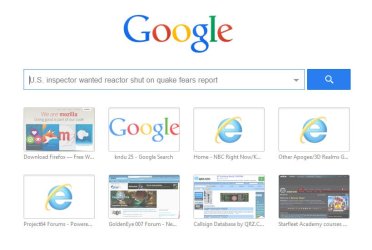
Firefox New Tab

Hmm. Well personally I've ditched Firefox and much prefer Cyberfox. However maybe you could take a look at this article and see if you think that it describes the same problen:

How to Remove Search Box from New Tab Page in Mozilla Firefox? - AskVG

As for Firefox backup and reinstall - the way I used to do it was by using:

MozBackup - Backup tool for Firefox and Thunderbird

It can backup your saved passwords and bookmarks and allow you to fully remove firefox then clean install it and restore whatever elements of your old profile that you wish to restore.

See user guide here: MozBackup - Backup tool for Firefox and Thunderbird (click Instuctions for PDF download)
 

My Computer My Computer

Computer type
Laptop
Computer Manufacturer/Model Number
ASUS
OS
Microsoft Windows 7 Home Premium 64-bit 7601 Multiprocessor Free Service Pack 1
CPU
AMD C-60 APU with Radeon(tm) HD Graphics
Motherboard
ASUSTeK COMPUTER INC. X501U
Memory
4.00 GB
Graphics Card(s)
AMD Radeon HD 6290 Graphics
Sound Card
(1) AMD High Definition Audio Device (2) Realtek High Defi
Screen Resolution
1366 x 768 x 32 bits (4294967296 colors) @ 60 Hz
Hard Drives
Hitachi HTS545050A7E380 SATA Disk Device
Antivirus
Comodo CIS & FW, SecureAplus App Whitelisting, Threatfire
Browser
Cyberfox 64bit, Opera 64bit, Airfox
Other Info
Spy-The-Spy, HitmanPro.Alert, Norton Connect Safe, MJRegWatcher, BitDefender TrafficLight, Voodoo Shield, Zemana AntiMalware
Back
Top