Solved Re compress DVDs back to a DVD?

Tomha

New member
Member
VIP
Local time
3:04 AM
Messages
391
Location
Auckland, New Zealand
Over the years I have collected quite a few DVDs, I mainly watched them on TV, till I got my ipod, since then I have wanted to watch them on it on the go. Instead of repurchasing the movie off itunes for another $20-30 I made copies of the DVDs. In order to watch my DVDs on my ipod, I would rip the dvd's content and use it to make a video file (I used to just make a video file straight from the DVD, but since I switched to 64 bit I cant find a good program do do this as DVD43, which I originally used, isnt 64bit). Since I started this, a couple of DVDs have gone missing after lending them to friends and one was stood on, my xbox killed another one when it itself died. The video files I made from the DVDs are very low resolution (for ipod), and not suitable for our TV, but I don't want to have to go and buy them again. The files I have extracted from the DVDs have been as big as 37gb total, far to big to just move onto a normal DVD. Is there some kind of software that can re compress this onto a DVD that will work on my TV as if it were the original?

Thanks
 

My Computer My Computer

Computer type
PC/Desktop
Computer Manufacturer/Model Number
Custom Build
OS
Windows 7 Professional 64bit
CPU
Intel i7 3770k 3.5ghz
Motherboard
Asus P8Z77-V Deluxe
Memory
Corsair Vengeance 16gb (4x4gb)
Graphics Card(s)
Gigabyte G1 Gaming GTX970
Sound Card
None
Monitor(s) Displays
3x AOC 12367fh 23"
Screen Resolution
1920x1080
Hard Drives
Western Digital Caviar Black 1TB - 64mb cache
Western Digital Caviar Green 1TB - 32mb cache
Samsung 830 SSD 128Gb Boot Drive
PSU
Corsair AX-860W ATX
Case
Corsair 500R black
Cooling
Corsair 500r Stock cooling (3x120mm, 1x200mm) & Corsair H100
Keyboard
Logitech G110 gaming keyboard
Mouse
Logitech G500s
Other Info
Corsair Hydro 100 CPU Cooler

My Computer My Computer

Computer Manufacturer/Model Number
The Vampire
OS
Windows 7 Ultimate
CPU
Intel i5 2500k @ 3.30
Motherboard
P8Z68 V-Pro
Memory
G.Skill Ripjaws 1600 2x4 Gb
Graphics Card(s)
BFG GTX 260 MAXCORE 55 OC 896MB GDDR3
Sound Card
Onboard
Monitor(s) Displays
50'' Sony Display Panel
Screen Resolution
1360 x 768
Hard Drives
Seagate 750 GB
WD 160 GB
PSU
OCZ 750 Watts ZT Series Fully Modular PSU 80 Plus Bronze
Case
NZXT Red Phantom
Cooling
120mm x2 Intake, 120mm x 1 and 200mm x2 Exhaust
Keyboard
LX710 Logitech Wireless Keyboard
Mouse
Logitech Wireless Mouse
I don't have any .iso files, it's all video_ts folders and such with many more .vob files and the likes inside.
 

My Computer My Computer

Computer type
PC/Desktop
Computer Manufacturer/Model Number
Custom Build
OS
Windows 7 Professional 64bit
CPU
Intel i7 3770k 3.5ghz
Motherboard
Asus P8Z77-V Deluxe
Memory
Corsair Vengeance 16gb (4x4gb)
Graphics Card(s)
Gigabyte G1 Gaming GTX970
Sound Card
None
Monitor(s) Displays
3x AOC 12367fh 23"
Screen Resolution
1920x1080
Hard Drives
Western Digital Caviar Black 1TB - 64mb cache
Western Digital Caviar Green 1TB - 32mb cache
Samsung 830 SSD 128Gb Boot Drive
PSU
Corsair AX-860W ATX
Case
Corsair 500R black
Cooling
Corsair 500r Stock cooling (3x120mm, 1x200mm) & Corsair H100
Keyboard
Logitech G110 gaming keyboard
Mouse
Logitech G500s
Other Info
Corsair Hydro 100 CPU Cooler
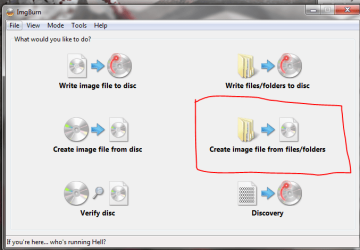
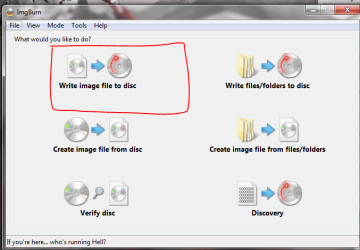
Ah ok, what your gonna wanna do is crate iso files from those folders. a simple way to this is to use imgburn. once you intsall it, (if you dont already have it) load it up. one of the options it gives in the menu is to create images from folders. all you have to do is select the video_TS folder and make an image. when you have your image, shrink i down if its too big. if you dont need to shrink, you can use imgburn to burn the image to a dvd and voila!! you got your DVD. heres a link The Official ImgBurn Website

step1.PNG

step2.PNG
 

My Computer My Computer

Computer Manufacturer/Model Number
The Vampire
OS
Windows 7 Ultimate
CPU
Intel i5 2500k @ 3.30
Motherboard
P8Z68 V-Pro
Memory
G.Skill Ripjaws 1600 2x4 Gb
Graphics Card(s)
BFG GTX 260 MAXCORE 55 OC 896MB GDDR3
Sound Card
Onboard
Monitor(s) Displays
50'' Sony Display Panel
Screen Resolution
1360 x 768
Hard Drives
Seagate 750 GB
WD 160 GB
PSU
OCZ 750 Watts ZT Series Fully Modular PSU 80 Plus Bronze
Case
NZXT Red Phantom
Cooling
120mm x2 Intake, 120mm x 1 and 200mm x2 Exhaust
Keyboard
LX710 Logitech Wireless Keyboard
Mouse
Logitech Wireless Mouse
You beauty :D Thanks a tonne, works like a dream.
 

My Computer My Computer

Computer type
PC/Desktop
Computer Manufacturer/Model Number
Custom Build
OS
Windows 7 Professional 64bit
CPU
Intel i7 3770k 3.5ghz
Motherboard
Asus P8Z77-V Deluxe
Memory
Corsair Vengeance 16gb (4x4gb)
Graphics Card(s)
Gigabyte G1 Gaming GTX970
Sound Card
None
Monitor(s) Displays
3x AOC 12367fh 23"
Screen Resolution
1920x1080
Hard Drives
Western Digital Caviar Black 1TB - 64mb cache
Western Digital Caviar Green 1TB - 32mb cache
Samsung 830 SSD 128Gb Boot Drive
PSU
Corsair AX-860W ATX
Case
Corsair 500R black
Cooling
Corsair 500r Stock cooling (3x120mm, 1x200mm) & Corsair H100
Keyboard
Logitech G110 gaming keyboard
Mouse
Logitech G500s
Other Info
Corsair Hydro 100 CPU Cooler
glad it works. enjoy! if you got more questions keep em coming.
 

My Computer My Computer

Computer Manufacturer/Model Number
The Vampire
OS
Windows 7 Ultimate
CPU
Intel i5 2500k @ 3.30
Motherboard
P8Z68 V-Pro
Memory
G.Skill Ripjaws 1600 2x4 Gb
Graphics Card(s)
BFG GTX 260 MAXCORE 55 OC 896MB GDDR3
Sound Card
Onboard
Monitor(s) Displays
50'' Sony Display Panel
Screen Resolution
1360 x 768
Hard Drives
Seagate 750 GB
WD 160 GB
PSU
OCZ 750 Watts ZT Series Fully Modular PSU 80 Plus Bronze
Case
NZXT Red Phantom
Cooling
120mm x2 Intake, 120mm x 1 and 200mm x2 Exhaust
Keyboard
LX710 Logitech Wireless Keyboard
Mouse
Logitech Wireless Mouse
Kinda asking for the impossible here :P but is it possible to shrink the .iso without loosing on resolution or significant quality?
 

My Computer My Computer

Computer type
PC/Desktop
Computer Manufacturer/Model Number
Custom Build
OS
Windows 7 Professional 64bit
CPU
Intel i7 3770k 3.5ghz
Motherboard
Asus P8Z77-V Deluxe
Memory
Corsair Vengeance 16gb (4x4gb)
Graphics Card(s)
Gigabyte G1 Gaming GTX970
Sound Card
None
Monitor(s) Displays
3x AOC 12367fh 23"
Screen Resolution
1920x1080
Hard Drives
Western Digital Caviar Black 1TB - 64mb cache
Western Digital Caviar Green 1TB - 32mb cache
Samsung 830 SSD 128Gb Boot Drive
PSU
Corsair AX-860W ATX
Case
Corsair 500R black
Cooling
Corsair 500r Stock cooling (3x120mm, 1x200mm) & Corsair H100
Keyboard
Logitech G110 gaming keyboard
Mouse
Logitech G500s
Other Info
Corsair Hydro 100 CPU Cooler
Kinda asking for the impossible here :P but is it possible to shrink the .iso without loosing on resolution or significant quality?

Not really. Anytime you shrink a video to a smaller size there always quality loss. How much depends on how much you are compressing it.


What are you trying to do? Copy Dual layer rips to a standard single layer DVD?


One thing you can try, is copy the main movie only, and get rid of extras you do not want.

For example, Lets say one rip is around 6GB in size, requiring a dual layer DVD.

By the time you get rid of all the trailers and menus, and extra audio tracks you may be able to fit the movie on a regular DVD without compressing it at all.

For example, for me I always get rid of all the AC3 tracks that are in Spanish, French etc and just keep the main English one.
Youd be surprised how much room that wil take up.

It will be only the movie itself .. but thats not exactly a bad thing.
 

My Computer My Computer

Computer Manufacturer/Model Number
Custom (Self Build)
OS
Windows 7 Home Premium 64bit
CPU
Intel Core i7 2700k
Motherboard
eVGA P67 SLI
Memory
8GB Mushkin Redline Ridgebacks @1866
Graphics Card(s)
EVGA GTX570 SC
Sound Card
XiFi Titanium HD
Monitor(s) Displays
LG W2453V
Screen Resolution
1920x1080
Hard Drives
Intel 320 80GB -- Intel X25-V 40GB --WD Black 1TB x2 -- WD Blue 640GB
PSU
Seasonic x750
Case
Corsair 600T SE White
Cooling
eVGA Superclocked CPU Cooler
Keyboard
Saitek Cyborg
Antivirus
Kaspersky
Browser
IE
Other Info
LG BD/DVD
There are some things that need to be cleared up here:

1. You went to a low resolution file to watch on a portable device. That means going back to a higher quality DVD setting is not going to be possible. Yes, you can convert those files to DVDs, but the quality won't be very good at all, once you actually watch the DVD. It's the same concept behind a photo. If you have a poster-sized high-res photo and you shrink it down to a thumbnail, you can't expect to go back to a poster sized file of the same quality.

2. The most efficient, easiest, and most common method or ripping DVDs is with DVDfab HD Decrypter. It's free, updated often, and works with x64 OSes. I thought DVD43 died out years ago, to be honest.

3. If you have them in .vob files already, in video_ts folders...you are ready to burn a DVD. That's a DVD format. There's no need to go to an .iso file first. However, if the size is too large for a DVD, then you aren't uncompressing the files properly.

4. That all being said, you have an Xbox. Is that a 360? If so, just stream the files from your computer. I rip my old DVDs to mp4 files using Handbrake (after ripping with DVDfab). I then put them on my WHS 2011 box and stream them to my TV via the 360. Any Windows 7 computer can do this.
 

My Computer My Computer

OS
Windows 7 Ultimate x64 SP1
CPU
Intel Core i7-2600
Motherboard
Gigabyte GA-P67A-UD3P-B3
Memory
12 GB Patriot Extreme DDR3-1333
Graphics Card(s)
Nvidia GTX 470
Monitor(s) Displays
Dell UltraSharp 2209WA
Hard Drives
OCZ Agility3 240 GB, WD5001AALS, WD7501AALS
PSU
OCZ ModStream 700W
Case
CoolerMaster HAF 912 Advanced
Cooling
CoolerMaster Hyper 212 Plus
In reply:

1) I take the video files from the dvd in original quality, I hold onto them, and make copies (.m4v as oposed to the whole video_ts folder thing) to play on my ipod, but I still have the original files in original quality.

2) I use DVD Decrypter with Handbreak, I don't think it could be easier

3) DVD decrypter is the one decompressing the files, I have no idea how it is getting the sizes it is, perhaps I will do a comparison of DVD Decrypter vs DVDfab. 1 thing is that I imagine many of the DVDs are on dual layer, while I am trying to fit them on single layer DVDs, still now idea how 1 dual layer dvd stores 40gb of data though =/

4) Our xbox 360 died and took with it one of our dvds. Although streaming is a possibility, the size these massive folders take up on my computer is also an issue, I would like to be able to move them off my computer and onto dvds, new dvds I can use for those I lost, and backups for the ones I still have.
 

My Computer My Computer

Computer type
PC/Desktop
Computer Manufacturer/Model Number
Custom Build
OS
Windows 7 Professional 64bit
CPU
Intel i7 3770k 3.5ghz
Motherboard
Asus P8Z77-V Deluxe
Memory
Corsair Vengeance 16gb (4x4gb)
Graphics Card(s)
Gigabyte G1 Gaming GTX970
Sound Card
None
Monitor(s) Displays
3x AOC 12367fh 23"
Screen Resolution
1920x1080
Hard Drives
Western Digital Caviar Black 1TB - 64mb cache
Western Digital Caviar Green 1TB - 32mb cache
Samsung 830 SSD 128Gb Boot Drive
PSU
Corsair AX-860W ATX
Case
Corsair 500R black
Cooling
Corsair 500r Stock cooling (3x120mm, 1x200mm) & Corsair H100
Keyboard
Logitech G110 gaming keyboard
Mouse
Logitech G500s
Other Info
Corsair Hydro 100 CPU Cooler
Back
Top