re default programs

ruggb

New member
Member
Local time
6:26 AM
Messages
79
I have a learning center app - computer has about 10 logins
each login is for a different class
one is for MS Office
one for Open Office
one is for beginner
etc.

All programs are installed for all users, but some users do not have direct access to all programs.

the MS Office and Open Office setup is a piece of cake.
one has MS Office set as default
one has Open Office set as default.
for Beginner, I set Wordpad as default
and the question is ----
How do I configure this user so that other office files, like XLS(X), PPT(X), etc. do not open ???????????? since this user theoretically does not have an office program installed.
Actually, I forgot what happens when u try to open one of these files with no supporting program.

thx
  • Share
    • digg.gif
    • delicious.gif
    • technorati.gif
    • twitter.png
    • facebook.gif
    • reddit.gif
 

My Computer

OS
windows 7
Hello ruggb, Hopefully I can be of help.

Go into Control Panel>Programs>Default Programs and click "Set your default programs". Select a program and click "Choose defaults for this program". Check or uncheck extensions based on what you would like that program to open.

In addition, in Default Programs, click "Associate a file type or protocol with a program". A list will pop up, and you can select another program to open specific extensions.

Hope this answers your question. Post back and let us know how it goes, or if you need any further help.
 

My Computer

Computer type
PC/Desktop
Computer Manufacturer/Model Number
Custom Asus Build
OS
Microsoft Windows 8.1 Pro 64-bit
CPU
Intel(R) Core(TM) i3-4130 CPU @ 3.40GHz
Motherboard
B85M-E
Memory
8.00 GB
Graphics Card(s)
None
Sound Card
Realtek High Definition Audio
Monitor(s) Displays
Asus 23.6" Monitor
Screen Resolution
1920 x 1080 x 32 bits (4294967296 colors) @ 60 Hz
Hard Drives
INTEL SSDSC2BW180A4
Samsung SSD 840 PRO Series
PSU
Seasonic S12II-380Bronze
Case
Lian Li
Cooling
Fan, Passive
Keyboard
Logitech K120
Mouse
Microsoft Touch Mouse
Internet Speed
4ms Ping, 19.0 Mbps Download, 19.0 Mbps Upload
Antivirus
Eset Endpoint
Browser
Internet Explorer, Chrome
thx dustsailor

the issue is - if there is no program installed to open an XLS file and you dbl click on one what happens??

Since MS Office and Open Office are installed on the unit MS Office is the default and there is no way to change it to "unknown application" that I know of.
 

My Computer

OS
windows 7
Hello Ruggb,

If you install a program on the computer, then by default all users on the computer will be able to run the program unless the program runs elevated and the user is a standard users, or you were able to specify to not allow other users to run the program during installation.

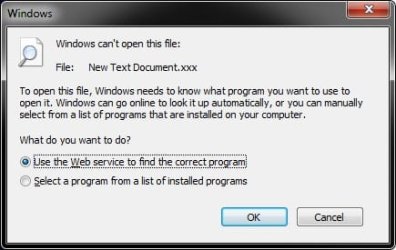
When a users tries to open a file that doesn't have a program associated to open it with, then they will get this below to choose a option to use to find a program to open it with. If they choose the bottom option, it will open the usual Open with dialog.
Open-with.jpg
If you unassociate a file extension (ex: .xls), then that will affect all users on the computer.

What edition of Windows 7 do you have? It depends on what edition you have for what options you may have available to prevent a user from being able to run specific files and/or programs.

Hope this helps some,
Shawn
 

My Computer

Computer type
PC/Desktop
Computer Manufacturer/Model Number
Self built custom
OS
64-bit Windows 11 Pro for Workstations
CPU
Intel i7-8700K OC'd to 5 GHz
Motherboard
ASUS ROG Maximus XI Formula Z390
Memory
64 GB (4x16GB) G.SKILL TridentZ RGB DDR4 3600 MHz
Graphics Card(s)
ASUS ROG-STRIX-GTX1080TI-O11G-GAMING
Sound Card
Integrated
Monitor(s) Displays
2 x Samsung Odyssey G7 27"
Screen Resolution
2560x1440
Hard Drives
1TB Samsung 990 PRO M.2,
4TB Samsung 990 PRO PRO M.2,
TerraMaster F8 SSD Plus NAS
PSU
Seasonic Prime Titanium 850W
Case
Thermaltake Core P3
Cooling
Corsair Hydro H115i
Keyboard
Logitech wireless K800
Mouse
Logitech MX Master 4
Internet Speed
2 Gb/s Download and 100 Mb/s Upload
Antivirus
Malwarebyte Anti-Malware Premium
Browser
Google Chrome
Other Info
Logitech Z625 speaker system,
Logitech BRIO 4K Pro webcam,
HP Color LaserJet Pro MFP M477fdn,
APC SMART-UPS RT 1000 XL - SURT1000XLI,
Galaxy S23 Plus phone
If you unassociate a file extension (ex: .xls), then that will affect all users on the computer.
Apologies for the misinformation. I read a microsoft article that said "default programs" were per-user. Apparently that is limited to setting the actual default programs. Thanks for clarifying.

With certain versions of windows, you can edit the group policy, but I wouldn't know how to do that per-user. Brink will be more helpful here I think.
 

My Computer

Computer type
PC/Desktop
Computer Manufacturer/Model Number
Custom Asus Build
OS
Microsoft Windows 8.1 Pro 64-bit
CPU
Intel(R) Core(TM) i3-4130 CPU @ 3.40GHz
Motherboard
B85M-E
Memory
8.00 GB
Graphics Card(s)
None
Sound Card
Realtek High Definition Audio
Monitor(s) Displays
Asus 23.6" Monitor
Screen Resolution
1920 x 1080 x 32 bits (4294967296 colors) @ 60 Hz
Hard Drives
INTEL SSDSC2BW180A4
Samsung SSD 840 PRO Series
PSU
Seasonic S12II-380Bronze
Case
Lian Li
Cooling
Fan, Passive
Keyboard
Logitech K120
Mouse
Microsoft Touch Mouse
Internet Speed
4ms Ping, 19.0 Mbps Download, 19.0 Mbps Upload
Antivirus
Eset Endpoint
Browser
Internet Explorer, Chrome
Hello Dusty,

No, you are corrrect. Default Programs and Open with are a per user setting and not global. It's just that when you unassociate a file extension it strips the registry enty for that file extension which does affect all users. That's all. :)
 

My Computer

Computer type
PC/Desktop
Computer Manufacturer/Model Number
Self built custom
OS
64-bit Windows 11 Pro for Workstations
CPU
Intel i7-8700K OC'd to 5 GHz
Motherboard
ASUS ROG Maximus XI Formula Z390
Memory
64 GB (4x16GB) G.SKILL TridentZ RGB DDR4 3600 MHz
Graphics Card(s)
ASUS ROG-STRIX-GTX1080TI-O11G-GAMING
Sound Card
Integrated
Monitor(s) Displays
2 x Samsung Odyssey G7 27"
Screen Resolution
2560x1440
Hard Drives
1TB Samsung 990 PRO M.2,
4TB Samsung 990 PRO PRO M.2,
TerraMaster F8 SSD Plus NAS
PSU
Seasonic Prime Titanium 850W
Case
Thermaltake Core P3
Cooling
Corsair Hydro H115i
Keyboard
Logitech wireless K800
Mouse
Logitech MX Master 4
Internet Speed
2 Gb/s Download and 100 Mb/s Upload
Antivirus
Malwarebyte Anti-Malware Premium
Browser
Google Chrome
Other Info
Logitech Z625 speaker system,
Logitech BRIO 4K Pro webcam,
HP Color LaserJet Pro MFP M477fdn,
APC SMART-UPS RT 1000 XL - SURT1000XLI,
Galaxy S23 Plus phone
What about associating another program to an extension (Which extensions to use is another matter), such as wordpad for the "basic" user? I'm not sure what pop-up will be displayed if a program cannot run a specific extension, but it could be helpful, assuming "Associate a file type or protocol with a program" is per user and not global. I have a feeling the pop-up would look much like the one you posted in your first post. Brink, if you are aware of a better method of restricting program access per user, then disregard this post. As you say, Ruggb will likely need a higher version of windows 7 in order to change such settings, if available.

Its a bit controversial, but windows live family safety may come in handy here. At least you would be able to restrict specific programs per user, but a single hotmail account may be needed for that feature, I am not completely sure. Example:
Capture.PNG
 

My Computer

Computer type
PC/Desktop
Computer Manufacturer/Model Number
Custom Asus Build
OS
Microsoft Windows 8.1 Pro 64-bit
CPU
Intel(R) Core(TM) i3-4130 CPU @ 3.40GHz
Motherboard
B85M-E
Memory
8.00 GB
Graphics Card(s)
None
Sound Card
Realtek High Definition Audio
Monitor(s) Displays
Asus 23.6" Monitor
Screen Resolution
1920 x 1080 x 32 bits (4294967296 colors) @ 60 Hz
Hard Drives
INTEL SSDSC2BW180A4
Samsung SSD 840 PRO Series
PSU
Seasonic S12II-380Bronze
Case
Lian Li
Cooling
Fan, Passive
Keyboard
Logitech K120
Mouse
Microsoft Touch Mouse
Internet Speed
4ms Ping, 19.0 Mbps Download, 19.0 Mbps Upload
Antivirus
Eset Endpoint
Browser
Internet Explorer, Chrome
Dusty,

It really just depends on what edition Ruggb has for what options may work best. If the other user is also an administrator instead of a standard user, then none this would matter since the other user will still be able to just as easily change the setting to what they want.

If the other user is a standard user, then one option would be to open the "Security" permissions of the .exe file of any program you do not want a user to be able to run, add that specific user account to the list, and set the access permissions to "Deny" for that user only. This will stop the user from being able to use that program, but not stop them from installing another program that could open the file though.
Again, we need to know what edition he has to see what may work best. :)
 

My Computer

Computer type
PC/Desktop
Computer Manufacturer/Model Number
Self built custom
OS
64-bit Windows 11 Pro for Workstations
CPU
Intel i7-8700K OC'd to 5 GHz
Motherboard
ASUS ROG Maximus XI Formula Z390
Memory
64 GB (4x16GB) G.SKILL TridentZ RGB DDR4 3600 MHz
Graphics Card(s)
ASUS ROG-STRIX-GTX1080TI-O11G-GAMING
Sound Card
Integrated
Monitor(s) Displays
2 x Samsung Odyssey G7 27"
Screen Resolution
2560x1440
Hard Drives
1TB Samsung 990 PRO M.2,
4TB Samsung 990 PRO PRO M.2,
TerraMaster F8 SSD Plus NAS
PSU
Seasonic Prime Titanium 850W
Case
Thermaltake Core P3
Cooling
Corsair Hydro H115i
Keyboard
Logitech wireless K800
Mouse
Logitech MX Master 4
Internet Speed
2 Gb/s Download and 100 Mb/s Upload
Antivirus
Malwarebyte Anti-Malware Premium
Browser
Google Chrome
Other Info
Logitech Z625 speaker system,
Logitech BRIO 4K Pro webcam,
HP Color LaserJet Pro MFP M477fdn,
APC SMART-UPS RT 1000 XL - SURT1000XLI,
Galaxy S23 Plus phone
lots o information - thx - i think.

we are using W7 x64 Pro

the issue is not one of security. I just want the computer to react like it does not know what program to use because it hasn't been installed.

The program must be installed for other student logons and as I understand it, installing for one user only keeps links from appearing in other user's start menus. Obviously, they can browse the program files folder and open Excel but there are no direct links to the program on their menus.

I have removed and set links for different users, but I have a Beginner User and they might have XLS files in their documents and I would like them to get the popup above.
It is sounding like it isn't possible to set the .XLS extension to be unknown on a per user basis.

What I want is to stop the program from opening when they dbl clk the .XLS file.
There are a few file extensions listed in the user hive and I was hoping I could add .XLS there and do what I wanted but..... maybe not. None of the ones listed are unknown so I didn't know what to experiment with.

I guess I will just have to make sure there are no XLS files in their documents folder.

It isn't like a disaster, I'm just trying to make their experience as real life as possible.

thx
 

My Computer

OS
windows 7
Back
Top