
RE: Going to Do a Factory Reinstall & would like advice/opinions

MissPunkin91

New member
Member
Local time
5:25 PM
Messages
59
RE: Going to Do a Factory Reinstall & would like advice/opinions

Hello All!
We've been having issues with our laptop the past few months & I am considering doing one of those factory reinstall processes.
This is what we have: acer 7535-5020 laptop running Win 7 Home Premium - 64 bit
Current issues: slow, spinning circle on internet use - sometimes screen sort of fades away and/or message that program has become unresponsive (We have IE9, Google Chrome and Mozilla loaded - not big fans of IE9 - seems to behave badly more often than the others)
Windows media player will skip, fade or stop while doing other processes like loading an internet page
Games that we do play will lag, sound will suddenly sound like an old cassette tape slowed down and sometimes become unresponsive. The ones we do play are of course, Facebook - mostly Bejeweled Blitz and Bayou Blast. Our acer had the wild tangent and I have purchased a few of these - Bejeweled 2, 3 and Twist, Collapse Blast and another one - can't remember which. Bejeweled games are the worst problem-wise with the lag and sound - maybe because they are so fast-paced? We play a few of the preinstalled classic ones - solitaire and such and that is for game usage.
Programs that are installed and will be installed again are: Office 2010 Home and Student, several of the Scrapbook and Hallmark programs, a Kodak digital recorder and its associated programs, anytime organzier, AIM (a seven version), and of course, the usual stuff that came preloaded.
I have been running Webroot Secure Anywhere for virus and stuff - paid for until August, I think.

Since we were having so many problems, we installed Advanced System Care - don't think it really helped any and NOW I seem to have discovered that many folks say stay away from such things.

Anyhow, am planning on doing the complete reinstall this weekend and am wondering, after I redo it and after I spend 500 hours uploading Windows updates - what things should we consider as far as installing and/or deleting to keep the system operating the way that it should?

Should we be considering any other virus/malware programs?
What would you all recommend as far as deleting from the preloaded junk?
Any tips on what we should do in a particular order that maybe we haven't done in the past? (We've done 2 reinstalls - about 1 a year since we got it- last year a few weeks before Christmas had a major black screen of death and had to do a recovery from my discs after spending hours trying to figure out to get the laptop to read the disc since it was no longer able to do it from within its own system - yeah - had to figure out how to tell Bios to enable boot from the cd)

oh, we had a prob too with trying to update our ati radeon hd3200 graphics at one point - still not sure if the driver is really updated or not but anyhow.....

Hubby wanted to upgrade to windows 8 since they are now offering it at like $39 something dollars and I did do the compatibility thing but I'm very leery of doing it..not sure we'd like it, not sure how sticky it would be to get win 7 back if we didn't and not sure how much darn tweaking we'd have to do to all things work like we would want - besides I have to admit that I mostly impressed with win 7 and how easy it was to install programs that we needed and/or wanted and most of all - call me crazy - it runs my old Sim City 3000 game like a charm!!! And that's after I read online that many folks weren't able to make it work. And considering we went from a Wind 98/upgraded to 2000 desktop to Win 7, the headaches were very minimal as far as getting the laptop up and zipping to our liking.
Now, if we could just get her back to the point where we're all happy again.

any advice, tips, suggestions would be most greatly appreciated!!!!!

And If I need to provide more info, I will gladly do so - though this post is probably rather long already, LOL.

Thanks again!!!!:D
 

My Computer My Computer

At a glance

Microsoft Windows 7 Home Premium 64-bit 7601 ...AMD Turion(tm) X2 Dual-Core Mobile RM-704.00 GBATI Radeon HD 3200 Graphics
OS
Microsoft Windows 7 Home Premium 64-bit 7601 Multiprocessor Free Service Pack 1
CPU
AMD Turion(tm) X2 Dual-Core Mobile RM-70
Motherboard
Acer JM70PU
Memory
4.00 GB
Graphics Card(s)
ATI Radeon HD 3200 Graphics
Sound Card
(1) ATI HDMI Audio (2) Realtek High Definition Audio
Screen Resolution
1600 x 900 x 32 bits (4294967296 colors) @ 60 Hz
Hard Drives
Hitachi HTS545032B9A300 SATA Disk Device
You can restore to factory condition using Acer Recovery partition or Recovery disks: Acer Support - Answers, E-Mail, Chat - How do I restore my computer using the eRecovery Management program?

However this is an inferior install loaded with preinstalled factory bloatware and duplicate utilities which have better versions built into Win7, so I'd consider getting the superior Clean Reinstall - Factory OEM Windows 7 with just the Win7 OS you own with the PC. Everything you need is in the blue link including the installer and the tools and methods which will assure you get and keep a perfect install.
 
Thanks for replying back.
I guess if we would decide to go that route, there would be things that came with the Acer version that would no longer exist. Hmm...I wonder if there is anything really important in it that we would/might want? How would I determine that?
And if so, we would probably be able to save it to my external drive for future use?
So much to consider but for now, I must call it a night.
There was some scuttlebutt awhile back with there being some class-action lawsuit against acer for some laptops not getting a complete win 7 version on them - and ours was 1 of them :(
Apparently there was no conclusion as of yet and therefore, we did not get any new recovery discs as was stated in that. Perhaps this is where some of our problems come from?
Again, thanks for replying and I shall look into this more tomorrow after work and a good night's sleep.
Have a great night yourself!
 

My Computer My Computer

At a glance

Microsoft Windows 7 Home Premium 64-bit 7601 ...AMD Turion(tm) X2 Dual-Core Mobile RM-704.00 GBATI Radeon HD 3200 Graphics
OS
Microsoft Windows 7 Home Premium 64-bit 7601 Multiprocessor Free Service Pack 1
CPU
AMD Turion(tm) X2 Dual-Core Mobile RM-70
Motherboard
Acer JM70PU
Memory
4.00 GB
Graphics Card(s)
ATI Radeon HD 3200 Graphics
Sound Card
(1) ATI HDMI Audio (2) Realtek High Definition Audio
Screen Resolution
1600 x 900 x 32 bits (4294967296 colors) @ 60 Hz
Hard Drives
Hitachi HTS545032B9A300 SATA Disk Device
Hello MissPunkin and welcome to Seven Forums.

Just my personal opinion and others may very well disagree. But I'd try a Repair Install first. It will try to fix Windows 7 while preserving your user accounts, data, programs, system drivers, etc. You'll have to reinstall Windows updates but it should still be a lot quicker than doing a factory reinstall.

http://www.sevenforums.com/tutorials/3413-repair-install.html

If you really want to do the factory reinstall, I would suggest you not do it. You'd be reinstalling all of the factory bloatware, trial programs, etc that tend to bog down a new system and that you've probably uninstalled as part of the tweaking that goes into a new system. Instead of a factory reinstall I'd recommend a Clean Install. One of the Forum experts prepared this tutorial. And from personal experience, it works very well. I did this to a Dell Inspiron and Sony Vaio.

http://www.sevenforums.com/tutorials/219487-clean-reinstall-factory-oem-windows-7-a.html

And for comparison purposes, a traditional clean install:

http://www.sevenforums.com/tutorials/1649-clean-install-windows-7-a.html

However you decide to proceed, once you get your computer set up to your liking, I'd suggest getting into the habit of making periodic system images. A system image is kinda like a "snapshot" of your entire hard drive and includes the operating system, all updates, installed programs, personalized settings, documents, music, photos, etc. If your computer ever crashes due to a hard drive failure or malware, you could use the system image and get your computer up and running in about 30 minutes. And it will be exactly like it was when the system image was created. The more often a system image is made the more up to date the restore will be.

As far as routine maintenance to keep your computer running smoothly, the built in Windows 7 tools like disk cleanup, defrag, check disk, etc are adequate for most users. A lightweight anti-virus like Microsoft Security Essentials is also recommended. (Don't get too hung up on the never ending debate about which AV is the best. No anti-malware product is 100% effective 100% of the time. If there was such a thing we'd all be using it.) For other suggestions on how to maintain your computer go through this tutorial. Not everything will apply but you may see some tips you haven't used before.

http://www.sevenforums.com/tutorials/11728-optimize-windows-7-a.html
 

My Computer My Computer

At a glance

Win 7 Pro 64-bitIntel i5 2.4 Ghz8GB DDR3Intel HD 3000
Computer type
Laptop
Computer Manufacturer/Model Number
Sony Vaio VPCEB47GM Laptop
OS
Win 7 Pro 64-bit
CPU
Intel i5 2.4 Ghz
Memory
8GB DDR3
Graphics Card(s)
Intel HD 3000
Sound Card
IDT High Definition
Monitor(s) Displays
15.6 WGXA Anti-Glare LED
Screen Resolution
1280x800
Hard Drives
640Gb 7200rpm
Antivirus
MSE
Browser
Opera (primary) with IE9 backup
Thanks for the advice everyone!

I really think doing just a windows 7 install without all the bloatware may be just what the doctor ordered.

My next question will be, do I have to purchase - either online or retail - a Windows 7 disc or are you able to do a download and use the product code that is on the bottom of the laptop?

I've been looking over different sites/posts related to this and have gotten myself confused.

I do know that I need to stay with the same format - a 64 bit and I see no reason to upgrade since I think home premium suits us just fine?

Advice is welcomed and greatly appreciated!!!!
 

My Computer My Computer

At a glance

Microsoft Windows 7 Home Premium 64-bit 7601 ...AMD Turion(tm) X2 Dual-Core Mobile RM-704.00 GBATI Radeon HD 3200 Graphics
OS
Microsoft Windows 7 Home Premium 64-bit 7601 Multiprocessor Free Service Pack 1
CPU
AMD Turion(tm) X2 Dual-Core Mobile RM-70
Motherboard
Acer JM70PU
Memory
4.00 GB
Graphics Card(s)
ATI Radeon HD 3200 Graphics
Sound Card
(1) ATI HDMI Audio (2) Realtek High Definition Audio
Screen Resolution
1600 x 900 x 32 bits (4294967296 colors) @ 60 Hz
Hard Drives
Hitachi HTS545032B9A300 SATA Disk Device
I thought of another question.
Please excuse my lack of knowledge, if you will. I con't consider myself technical by any means when it comes to computer stuff but am willing learn and you all seem to be so kind and helpful! This site rocks!

Anyhow, if we choose to download the Win 7 install from a site, where would you all recommend saving it to?

The laptop drive?
My back up hard-drive? I can check and see how much room is left on it.
A USB drive? And, if so, what size should I get? I currently have an 8Gb that has stuff on it but I can transfer that over to the back up hard drive, if need be.

Or should I consider cd or dvd?

Any suggestions would be more than welcomed and appreciated!

Thanks everyone!!!!
 

My Computer My Computer

At a glance

Microsoft Windows 7 Home Premium 64-bit 7601 ...AMD Turion(tm) X2 Dual-Core Mobile RM-704.00 GBATI Radeon HD 3200 Graphics
OS
Microsoft Windows 7 Home Premium 64-bit 7601 Multiprocessor Free Service Pack 1
CPU
AMD Turion(tm) X2 Dual-Core Mobile RM-70
Motherboard
Acer JM70PU
Memory
4.00 GB
Graphics Card(s)
ATI Radeon HD 3200 Graphics
Sound Card
(1) ATI HDMI Audio (2) Realtek High Definition Audio
Screen Resolution
1600 x 900 x 32 bits (4294967296 colors) @ 60 Hz
Hard Drives
Hitachi HTS545032B9A300 SATA Disk Device
You can visit Digital River, an official Microsoft download site. Download the ISO for your version of Windows 7 that was installed on your computer at the factory. Your 25-digit Product key on the bottom of the computer is tied to that particular version.

Once the ISO is downloaded to desktop you'll have to burn it to a DVD. Burn at no more than 4x speed for optimum reliability.

Official Windows 7 SP1 ISO from Digital River « My Digital Life
 

My Computer My Computer

At a glance

Win 7 Pro 64-bitIntel i5 2.4 Ghz8GB DDR3Intel HD 3000
Computer type
Laptop
Computer Manufacturer/Model Number
Sony Vaio VPCEB47GM Laptop
OS
Win 7 Pro 64-bit
CPU
Intel i5 2.4 Ghz
Memory
8GB DDR3
Graphics Card(s)
Intel HD 3000
Sound Card
IDT High Definition
Monitor(s) Displays
15.6 WGXA Anti-Glare LED
Screen Resolution
1280x800
Hard Drives
640Gb 7200rpm
Antivirus
MSE
Browser
Opera (primary) with IE9 backup
For now, just download it to the pc you`re using. It only takes up 3.09 gigs and it will be done, then you can burn it to a dvd. Do you have a dvd burner on this machine ?
 

My Computer My Computer

At a glance

Windows 10 Pro x64Intel Core i7 6700KGSkill TridentZ RGB 16GB 3600 16-16-16-36EVGA GTX 980 Ti SC x2
Computer type
PC/Desktop
Computer Manufacturer/Model Number
Skylake Special #666
OS
Windows 10 Pro x64
CPU
Intel Core i7 6700K
Motherboard
Asus Sabertooth Z170 Mark 1
Memory
GSkill TridentZ RGB 16GB 3600 16-16-16-36
Graphics Card(s)
EVGA GTX 980 Ti SC x2
Sound Card
Realtek High Definition
Monitor(s) Displays
AOC G2460PG
Screen Resolution
1920 x 1080 144Hz
Hard Drives
Samsung 860 Pro 256GB, Seagate Barracuda 4TB x2
PSU
EVGA 1000 P2, EVGA White Custom Braided Cables
Case
Corsair Vengeance C70 Gunmetal Black
Cooling
Corsair H100i v2, Corsair ML120 x2, Thermal Grizzly Kryonaut
Keyboard
Logitech G910 Orion Spectrum
Mouse
Logitech G700s
Internet Speed
Verizon Fios Quantum Gateway 75/75
Antivirus
Windows Defender, Malwarebytes Free 3.8.3
Browser
Chrome
Other Info
Corsair SP120 x4, LG Blu-ray Drive, Durabrand HT-395 100 Watt Dolby Digital Amp, Corsair H2100 Wireless 7.1 Headset
When you have burned your Windows 7 DVD, you could burn the drivers disk.

Acer001.PNG
 

My Computer My Computer

At a glance

ME/XP/Vista/Win7
OS
ME/XP/Vista/Win7
Great idea.:)
 

My Computer My Computer

At a glance

Windows 10 Pro x64Intel Core i7 6700KGSkill TridentZ RGB 16GB 3600 16-16-16-36EVGA GTX 980 Ti SC x2
Computer type
PC/Desktop
Computer Manufacturer/Model Number
Skylake Special #666
OS
Windows 10 Pro x64
CPU
Intel Core i7 6700K
Motherboard
Asus Sabertooth Z170 Mark 1
Memory
GSkill TridentZ RGB 16GB 3600 16-16-16-36
Graphics Card(s)
EVGA GTX 980 Ti SC x2
Sound Card
Realtek High Definition
Monitor(s) Displays
AOC G2460PG
Screen Resolution
1920 x 1080 144Hz
Hard Drives
Samsung 860 Pro 256GB, Seagate Barracuda 4TB x2
PSU
EVGA 1000 P2, EVGA White Custom Braided Cables
Case
Corsair Vengeance C70 Gunmetal Black
Cooling
Corsair H100i v2, Corsair ML120 x2, Thermal Grizzly Kryonaut
Keyboard
Logitech G910 Orion Spectrum
Mouse
Logitech G700s
Internet Speed
Verizon Fios Quantum Gateway 75/75
Antivirus
Windows Defender, Malwarebytes Free 3.8.3
Browser
Chrome
Other Info
Corsair SP120 x4, LG Blu-ray Drive, Durabrand HT-395 100 Watt Dolby Digital Amp, Corsair H2100 Wireless 7.1 Headset
Aargh! Once again, my browser became unresponsive and even now, tis slow to load the page.
Yep, a clean install is the path I've chosen.

Yes, our gal has a dvd burner. By the way, her name is Gertie. LOL, we've named all our home computers. Our 2 really old desktops are Bessie and Frannie.

And, since I'm doubtful to internet access once I begin this process, I want to make sure I have all the info I might require at hand, henceforth - many printed pages now cover my table!

Bessie might be able to get me online, in a pinch. The last time I was online with her, I had installed an older version of Opera and was able to get a slow but steady access to my yahoo groups and to my e-mail. Facebook came up but was really slow to download but I was able to post from there as well.

I hate to use her though since I don't have any kind of virus protection on her. She's loaded as far up as she goes with Win 2000. She's an HP 8570C pavillion, that despite being old, still works just fine and I do use her her an alternate when I'm working in Office or playing a few older games like lose your marbles.

Anyhow, as far as burning the copy of Win to the DVD, should I do it right away before I begin the clean install process just to be on the safe side or do you think I can wait until afterwards?

I also have 2 sets of recovery discs for Gertie the troubled laptop, so I have no worries about getting her operational in some form or fashion. The least migraine-inducing will be what I hope for, LOL.

I'll go through the tutorial here and pop in my questions starting from the top.

Files are all almost backed up. Have just a few small things left.

Programs either have disc or were online installed - office 2010. Not a problem, have reinstalled it before and easily accessible.

browser bookmarks backed up

we don't have itunes so no need to de authorize that

not sure what the unbootable windows copy in #3 refers to. If it is something I need to consider, if someone wants to clue me in, that would be awesome!

Recovery discs are made

do I need to consider doing the windows 7 backup image since I have the recovery discs?

I shall run the Belarc Advisor next. What should I be looking for with this?

Got the program key

Will have to take a look at this ninite - should i do this before or after the clean install?

wireless and ethernet drivers - lol - does Acer really have a support download page? Sorry, but after our brief experience with them when we 1st got the laptop - and then to get the notice of a class settlement act because of windows 7 supposedly not containing all data or something.....well....enuff said there.

I don't understand the partition thing in #8 so I guess I shall just click next after deleting and so on as the instructions state unless someone tells me otherwise.


#9 says to connect to network and so on...should I use our wireless router or go via cable directly to the modem at 1st? Or, does it make a difference?

Should I download copies of CCleaner and Puran and malwarebytes now or should I wait until the laptop is back up and running? I can save these to the backup drive and then load them in after the install, correct?

I don't know how to a windows 7 backup image as stated in #17, but we can do that once everything is back up and running.

Lastly, if anyone can think of anything that I'm overlooking, please let me know.

Since I don't work until tomorrow afternoon, I may just go ahead and get this puppy started tonite, that way by the weekend, I should have a happy Gertie laptop again, right?

Thanks again to everyone!!!! This site is awesome and you are all wonderful!!!!!
 

My Computer My Computer

At a glance

Microsoft Windows 7 Home Premium 64-bit 7601 ...AMD Turion(tm) X2 Dual-Core Mobile RM-704.00 GBATI Radeon HD 3200 Graphics
OS
Microsoft Windows 7 Home Premium 64-bit 7601 Multiprocessor Free Service Pack 1
CPU
AMD Turion(tm) X2 Dual-Core Mobile RM-70
Motherboard
Acer JM70PU
Memory
4.00 GB
Graphics Card(s)
ATI Radeon HD 3200 Graphics
Sound Card
(1) ATI HDMI Audio (2) Realtek High Definition Audio
Screen Resolution
1600 x 900 x 32 bits (4294967296 colors) @ 60 Hz
Hard Drives
Hitachi HTS545032B9A300 SATA Disk Device
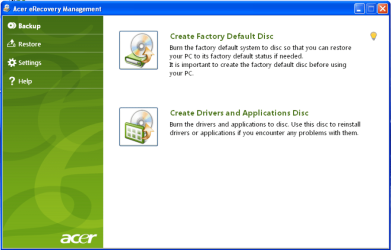
Okay, just checked my recovery discs and yes, I had already created the drivers one - have 2 copies of it as well.

Thank you, thank you for the advice.

By the way, I downloaded the ninite thing and saw one of the apps was called TeraCopy. got a chuckle out of that one, I didnt' know I had created a copy thing, LOL.

Anyhow, back to checking my list in preparation.
 

My Computer My Computer

At a glance

Microsoft Windows 7 Home Premium 64-bit 7601 ...AMD Turion(tm) X2 Dual-Core Mobile RM-704.00 GBATI Radeon HD 3200 Graphics
OS
Microsoft Windows 7 Home Premium 64-bit 7601 Multiprocessor Free Service Pack 1
CPU
AMD Turion(tm) X2 Dual-Core Mobile RM-70
Motherboard
Acer JM70PU
Memory
4.00 GB
Graphics Card(s)
ATI Radeon HD 3200 Graphics
Sound Card
(1) ATI HDMI Audio (2) Realtek High Definition Audio
Screen Resolution
1600 x 900 x 32 bits (4294967296 colors) @ 60 Hz
Hard Drives
Hitachi HTS545032B9A300 SATA Disk Device

My Computer My Computer

At a glance

Windows 10 Pro x64Intel Core i7 6700KGSkill TridentZ RGB 16GB 3600 16-16-16-36EVGA GTX 980 Ti SC x2
Computer type
PC/Desktop
Computer Manufacturer/Model Number
Skylake Special #666
OS
Windows 10 Pro x64
CPU
Intel Core i7 6700K
Motherboard
Asus Sabertooth Z170 Mark 1
Memory
GSkill TridentZ RGB 16GB 3600 16-16-16-36
Graphics Card(s)
EVGA GTX 980 Ti SC x2
Sound Card
Realtek High Definition
Monitor(s) Displays
AOC G2460PG
Screen Resolution
1920 x 1080 144Hz
Hard Drives
Samsung 860 Pro 256GB, Seagate Barracuda 4TB x2
PSU
EVGA 1000 P2, EVGA White Custom Braided Cables
Case
Corsair Vengeance C70 Gunmetal Black
Cooling
Corsair H100i v2, Corsair ML120 x2, Thermal Grizzly Kryonaut
Keyboard
Logitech G910 Orion Spectrum
Mouse
Logitech G700s
Internet Speed
Verizon Fios Quantum Gateway 75/75
Antivirus
Windows Defender, Malwarebytes Free 3.8.3
Browser
Chrome
Other Info
Corsair SP120 x4, LG Blu-ray Drive, Durabrand HT-395 100 Watt Dolby Digital Amp, Corsair H2100 Wireless 7.1 Headset
Well,
got the win 7 downloaded and now on a dvd.
Printing out one last set of instructions
then going to make sure I have all backedup one last time
and then, we're going to start the process

Wish me luck!!!!!
 

My Computer My Computer

At a glance

Microsoft Windows 7 Home Premium 64-bit 7601 ...AMD Turion(tm) X2 Dual-Core Mobile RM-704.00 GBATI Radeon HD 3200 Graphics
OS
Microsoft Windows 7 Home Premium 64-bit 7601 Multiprocessor Free Service Pack 1
CPU
AMD Turion(tm) X2 Dual-Core Mobile RM-70
Motherboard
Acer JM70PU
Memory
4.00 GB
Graphics Card(s)
ATI Radeon HD 3200 Graphics
Sound Card
(1) ATI HDMI Audio (2) Realtek High Definition Audio
Screen Resolution
1600 x 900 x 32 bits (4294967296 colors) @ 60 Hz
Hard Drives
Hitachi HTS545032B9A300 SATA Disk Device
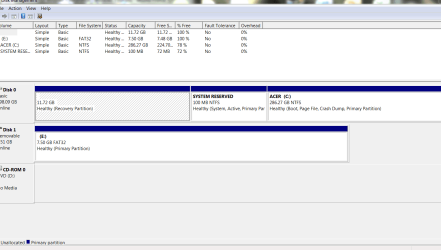
Yikes,
as I'm reading, I am confused on the drive options.
Right now I have C and Q - Q being reserved, I guess? Is that where all of the factory reinstall stuff resides?
Do I want to make sure that there is still this same kind of thing on the new install?

Oh gosh, yes...I am confused!
 

My Computer My Computer

At a glance

Microsoft Windows 7 Home Premium 64-bit 7601 ...AMD Turion(tm) X2 Dual-Core Mobile RM-704.00 GBATI Radeon HD 3200 Graphics
OS
Microsoft Windows 7 Home Premium 64-bit 7601 Multiprocessor Free Service Pack 1
CPU
AMD Turion(tm) X2 Dual-Core Mobile RM-70
Motherboard
Acer JM70PU
Memory
4.00 GB
Graphics Card(s)
ATI Radeon HD 3200 Graphics
Sound Card
(1) ATI HDMI Audio (2) Realtek High Definition Audio
Screen Resolution
1600 x 900 x 32 bits (4294967296 colors) @ 60 Hz
Hard Drives
Hitachi HTS545032B9A300 SATA Disk Device
The tutorial Clean Reinstall - Factory OEM Windows 7 explains that your Recovery partition may or may not run after reinstall. So it's important to make the Recovery Disks as you did.

With those to use if you ever want to revert to Factory condition, you can delete all partitions using the drive options shown in Steps 6-7 of Clean Install Windows 7, then create new as you wish to format, ignore the small boot partition it creates, highlight the first large partition to click Next and begin install. Or after deleting all just click Next to let the installer create and format the install partition for you.

If you'd like specific advice you can post back a screenshot of your maximized Disk mgmt drive map and listings, using the Snipping Tool in Start menu, attaching the saved file using the paper clip in reply box.
 
awesome
give me a few and I shall be right back, hopefully....everything is running slow so give me a bit and THANKS!!!!!!!!
 

My Computer My Computer

At a glance

Microsoft Windows 7 Home Premium 64-bit 7601 ...AMD Turion(tm) X2 Dual-Core Mobile RM-704.00 GBATI Radeon HD 3200 Graphics
OS
Microsoft Windows 7 Home Premium 64-bit 7601 Multiprocessor Free Service Pack 1
CPU
AMD Turion(tm) X2 Dual-Core Mobile RM-70
Motherboard
Acer JM70PU
Memory
4.00 GB
Graphics Card(s)
ATI Radeon HD 3200 Graphics
Sound Card
(1) ATI HDMI Audio (2) Realtek High Definition Audio
Screen Resolution
1600 x 900 x 32 bits (4294967296 colors) @ 60 Hz
Hard Drives
Hitachi HTS545032B9A300 SATA Disk Device
hope that i did the capture right!


The tutorial Clean Reinstall - Factory OEM Windows 7 explains that your Recovery partition may or may not run after reinstall. So it's important to make the Recovery Disks as you did.

With those to use if you ever want to revert to Factory condition, you can delete all partitions using the drive options shown in Steps 6-7 of Clean Install Windows 7, then create new as you wish to format, ignore the small boot partition it creates, highlight the first large partition to click Next and begin install. Or after deleting all just click Next to let the installer create and format the install partition for you.

If you'd like specific advice you can post back a screenshot of your maximized Disk mgmt drive map and listings, using the Snipping Tool in Start menu, attaching the saved file using the paper clip in reply box.
 

Attachments

  • Capture.PNG
    Capture.PNG
    24.7 KB · Views: 8

My Computer My Computer

At a glance

Microsoft Windows 7 Home Premium 64-bit 7601 ...AMD Turion(tm) X2 Dual-Core Mobile RM-704.00 GBATI Radeon HD 3200 Graphics
OS
Microsoft Windows 7 Home Premium 64-bit 7601 Multiprocessor Free Service Pack 1
CPU
AMD Turion(tm) X2 Dual-Core Mobile RM-70
Motherboard
Acer JM70PU
Memory
4.00 GB
Graphics Card(s)
ATI Radeon HD 3200 Graphics
Sound Card
(1) ATI HDMI Audio (2) Realtek High Definition Audio
Screen Resolution
1600 x 900 x 32 bits (4294967296 colors) @ 60 Hz
Hard Drives
Hitachi HTS545032B9A300 SATA Disk Device
You can save the Recovery partition and it MIGHT run later as shown in Acer Support - Answers, E-Mail, Chat - How do I restore my computer using the eRecovery Management program?

But since you have chosen the path for Clean Reinstall I'd want the prime real estate for Win7 and rely only on the Recovery Disks for the off-chance you'd want to restore the factory bloatware.

So when you come to the window where you select where to install Win7, click on Drive Options, highlight each partition to Delete, then select Create New and create one or two partitions depending upon if you want the OS on one and data on another, format each, highlight the first large partition (ignore small boot partition at front of drive) and click Next.

Then study again the section about drivers so you're prepared to get that important step correct.

Let us know how it goes.
 
ok, I think that I am ready to do this....feeling a little bit nervy but hopefully everything I've gotten from you all will make it fairly easy to do.
Obviously, if you don't see any replies back by sometime tomorrow afternoon before 2:30 p.m.(the time I leave for work), then you know something went wrong.

Thanks so much for all of your wonderful help & tips!!!

Wish us luck and here we go.................. :party:
 

My Computer My Computer

At a glance

Microsoft Windows 7 Home Premium 64-bit 7601 ...AMD Turion(tm) X2 Dual-Core Mobile RM-704.00 GBATI Radeon HD 3200 Graphics
OS
Microsoft Windows 7 Home Premium 64-bit 7601 Multiprocessor Free Service Pack 1
CPU
AMD Turion(tm) X2 Dual-Core Mobile RM-70
Motherboard
Acer JM70PU
Memory
4.00 GB
Graphics Card(s)
ATI Radeon HD 3200 Graphics
Sound Card
(1) ATI HDMI Audio (2) Realtek High Definition Audio
Screen Resolution
1600 x 900 x 32 bits (4294967296 colors) @ 60 Hz
Hard Drives
Hitachi HTS545032B9A300 SATA Disk Device
Back
Top