re install clean windows 7

nvyaniv

New member
Local time
11:09 PM
Messages
13
hi guys this is my first post ...
i have a comp with a single hdd which has 4 drives.. i had xp on c drive and and windows 7 on i drive.. and wen i checked it turns out c drive is the system drive.. so every time i log on windows 7 dose n't show as c drive.. so basically i wanna remove it and start afresh with a 64 bit version (ya before i had a 32 bit version).. and so basically wat i want is when i install the 64 bit version it should be c drive.. and wen i install xp that drive should show c drive..
as in each operating system should show as c drive in the respective drive it is installed in.. and i dont wanna touch the other two drives cause i have a lot of data on them..
i hope i've explained clearly enouhg..
 

My Computer My Computer

At a glance

windows 7 ultimate 32 bit
OS
windows 7 ultimate 32 bit
i dont wanna dual boot.. in case i havent mentioned i have removed windows xp but c drive is still the system drive.. basically i wanna remove delete the two drives c drive on which xp WAS installed.. and i dive on which 7 IS installed.. and start fresh wit a windows 7 making that drive the system drive.. i guess i can simply install 7 in the c drive but i dont wanna risk any fuure problem.. so how do i delete it?? i tried doing it with a windows 7 installation cd.. it formated but its still the system drive.. how do i make it such tat my hdd dosnt have a system drive to install a fresh copy of 7..??
 

My Computer My Computer

At a glance

windows 7 ultimate 32 bit
OS
windows 7 ultimate 32 bit
Win7 doesn't show as C because you installed it from XP which held onto the letter during install.

Always boot the installer. Select Custom Install, then Choose carefully the XP and Win7 partition, click on Drive Options to delete both, then recreate and format install partition as desired. Clean Install Windows 7

If you don't touch any other partition your data will be safe. But you should back it up anyway.

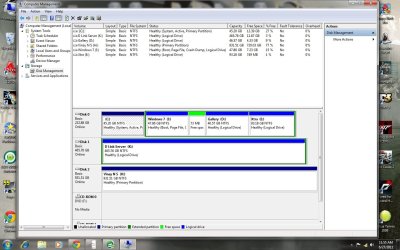
It would be best if you post back a screenshot of your maximized Disk Mgmt drive map with listings, using Snipping Tool in Start Menu. There may be unseen issues that need to be taken into account.
 
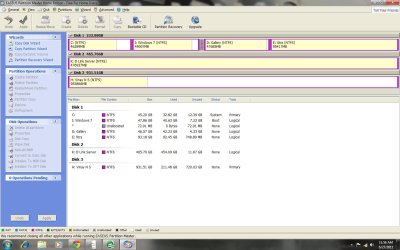
i've attached two screen shots as asked.. hopefully its self explainatory.. and just FYI.. c drive has ubuntu installed through windows 7 using wubi.. in case that makes any diffference.. :huh:
and the vinay ns and d link server are external hdds..
 

Attachments

  • my comp.jpg
    my comp.jpg
    151.7 KB · Views: 14
  • my comp2.jpg
    my comp2.jpg
    129.5 KB · Views: 10

My Computer My Computer

At a glance

windows 7 ultimate 32 bit
OS
windows 7 ultimate 32 bit
Move any data off Windows 7 partition into your other data partitions, shrinking Win7 if necessary as you go to make more space for the data partitions, which can be resized easily in any direction using free Partition Wizard bootable CD which will not fail. Easeus can and will fail.

Use free Partition Wizard bootable CD to delete Win7 partition, then create a new Logical Data sub-partition there, or shrink the Logical Extended partition from the left to make more space for C.

If you have GRUB on C, rightclick it with PW to Wipe it with at least one set of zeroes to erase all GRUB.

Boot the Win7 DVD, select Custom Install, use Drive Options to delete C, create a new partition there, format and install Win7. Follow the tips given here (which apply) to get a perfect reinstall: Reinstalling Windows 7

As long as you don't touch the other partitions your data will be safe, however you should back it up when doing any resizing or install anyway.
 
sry for the trouble but this seems a llil bit confusing..
i dont need any data on I drive and C drive.. i wnana wipe them both clean.. i heard this trouble is because C drive is the system drive, so i wiped XP and deleted it and created another parttion.. and as expected i had problem booting into 7.. and i ended up trying the recovery disk adn stuff.. somehow i ended up booting into 7 doin something.. but turns out c drive is still the system drive.. so i wanna wipe both theses drives clean.. so i end up with no system drive.. and thus i can do a clean install of Windows 8 leaked version or windows 7..
and fro wat i understood from ur above post i just need to delete the two drives from a windwos bootable installatin disk and i should be good to go right??
 

My Computer My Computer

At a glance

windows 7 ultimate 32 bit
OS
windows 7 ultimate 32 bit
OS's can not boot from Logicl drive, which your Windows 7 drive is. There System will be C:
Your biggest problem is is playing with 3rd party partitioning tools & Linux.
 

My Computer My Computer

At a glance

ME/XP/Vista/Win7
OS
ME/XP/Vista/Win7
You can delete C with the booted Win7 Installation DVD, then create a new partition, format and install to C.

I would not want to take a chance using the installer to delete only the I Logical subpartition as it could delete the whole extended Logical partition. This is why I would use PW CD which is known not to fail in operations such as these.

And if GRUB was on C then I would want to wipe it first, not just delete, as GRUB can corrupt WIn7 until wiped from the partition on which it was installed.
 
so basically wat u guys are saying is
i can format c and i drive using windows install disk.. but before that i need to uninstall ubuntu can cause that can create problems..???
 

My Computer My Computer

At a glance

windows 7 ultimate 32 bit
OS
windows 7 ultimate 32 bit
If you have GRUB on the C drive then it's best to wipe it first, not just delete or format. See option 3 here: Partition Wizard Use the Bootable CD

I would also not format I using the booted Win7 installer unless it is clear you are not affecting the other two data partition within the Logical Extended partition. They are a part of the same partition and could be deleted if you are not careful.

For this reason I would use Partition Wizard to delete I, do any resizing such as to shrink the Logical from the left to make room for a bigger C, and to delete and Wipe C to get it ready for the install.
 
again sry for the noob questions.. :o but two things..
1) wat is grub? and how does it come into the whole pic??
2) I drive is a separate drive.. how is connected to the other two dries?? (gallery and xtra) i've formatted so many times before but it has never effected these two drives.. all my movies setups and all my data is in tact..
 

My Computer My Computer

At a glance

windows 7 ultimate 32 bit
OS
windows 7 ultimate 32 bit
You said C has Ubuntu so if you used GRUB bootloader it needs to be wiped, but only if you installed GRUB bootloader used to dual boot Ubuntu with Win7.

Can you see in your Disk Management that I is part of an extended Logical partition? A logical partition is for data, not OS's. Look at the green border around all of those sub-partitions to see what is included in your Logical Extended partition.

This is why Win7 wouldn't boot when you deleted C earlier, because it's boot files were on C since they cannot reside on a Logical like I. This was explained earlier.

I is only a sub-partition of the greater Logical partition shown in your screenshot which includes D and E. No bootable OS can go into one of those and boot on its own.

You can shrink, delete, extend and create new sub-partitions within the Extended using Disk management, or for operations which Disk Mgmt cannot do use free Partition Wizard bootable CD. You of course cannot delete I while Win7 is still running, so use PW CD.

But if you use the WIn7 installer to delete a sub-partition I would be certain that it is only deleting I and not the whole Logical Extended partition with all your data.
 
ubuntu is installed through windows.. i can simply unistall it throuhg the remove software.. its using that wubi stuff.. so no prob am assuming.. so only thing i need to do now is.. collect all my data from I drive and and back it up.. and i can say bye bye to I dirve without much dificulty.. but to delete C drive and the boot files i need to use the partition wizard software u gave a link for.. make a bootable disk or usb and delete c drive .. and with the unallocated space create a drive and install winwos 8 on it.. right??
and btw is windows 8 leaked thing good enough?? i mena i wanna just try it out.. wen i wanna change, i can simply format it and install seven rihgt?? shouldnt be too much problem??
 

My Computer My Computer

At a glance

windows 7 ultimate 32 bit
OS
windows 7 ultimate 32 bit
If no GRUB is on C you can format or delete and recreate it with booted Win7 installer or PW CD.

I would use PW CD to delete I and resize as desired.

What I would do is delete I, then Resize the Logical Extended from the left to make more room for a new C partition. Then delete C and create a new partition, format with installer.
 
how do i know if grub is installed or not??? and my idea is to evenly distibute the size of I drive among rest three..
and btw wat about win 8??? worth trying??
 

My Computer My Computer

At a glance

windows 7 ultimate 32 bit
OS
windows 7 ultimate 32 bit
If you install Linux you have GRUB.
All Linux code must be deleted using the CLEAN ALL command.As you have had linux on the HD you need do a Clean all & full format.

Try a full clean & full format in command prompt.
Type in command line
DISKPART
LIST DISK
SELECT DISK # (win HD)
CLEAN ALL
CREATE PARTITION PRIMARY
SELECT PARTITION 1
ACTIVE
FORMAT fs=NTFS
ASSIGN
EXIT
EXIT

http://www.sevenforums.com/tutorials/91339-ssd-hdd-optimize-windows-reinstallation.html

Than reinstall
 

My Computer My Computer

At a glance

ME/XP/Vista/Win7
OS
ME/XP/Vista/Win7
i unistalled it.. all traces of ubuntu gone.. :) will try out the rest of the stuff u guys told also.. thanx a lot for ur help.. sry for the trouble.. will let u know wat happnes.. if any prob will get back to u..
 

My Computer My Computer

At a glance

windows 7 ultimate 32 bit
OS
windows 7 ultimate 32 bit
If you have deletd or uninstalled linux, just doing that will leave GRUB inplace.
 

My Computer My Computer

At a glance

ME/XP/Vista/Win7
OS
ME/XP/Vista/Win7
Back
Top