Re-partitioning causes Booting issues

Rogmilo

New member
Local time
4:00 PM
Messages
11
After recovery from a boot problem I managed to get the laptop up an running with all drivers.
Figured needed to repartion my secondary drive,I have two HDD (750GB each), and used mini tool to format and resize the secondary drive. I also used it to hide my recovery partition and change drive letter of all but the OS (C drive).

Happily rebooted to see that windows is loading files bar coming up which quickly ended with “Reboot and Select Boot device or Insert Boot Media in selected Boot device and press a key” message.

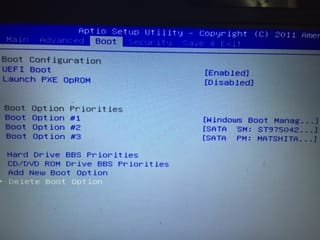
Need help to sort out and going to BIOS didnt help. I have not touched the BIOS config ever since i got this laptop.
When I set the BIOS to boot from CD/DVD and put in the win7 recovery CD disk it doesnt read it. DVD light is blinking.:(

Not sure if ASUS G75VW come wit IDE or ACHI as I did accientally change and save.
System : Win 7 64 bit, i7
 

My Computer

Computer type
Laptop
Computer Manufacturer/Model Number
ASUS
OS
Windows 7 x64
CPU
i7
Motherboard
ASUS
Memory
12 GB
Graphics Card(s)
NVIDIA 660M
Hard Drives
2* 750 GB HDD
Antivirus
Avast
Browser
Chrome

My Computer

Computer type
PC/Desktop
Computer Manufacturer/Model Number
home built
OS
Multi-Boot W7_Pro_x64 W8.1_Pro_x64 W10_Pro_x64 +Linux_VMs +Chromium_VM
CPU
AMD Athlon II x4 620
Motherboard
Gigabyte GA-MA785G-UD3H
Memory
6GB GSkill DDR2 800
Graphics Card(s)
AMD 4670 GPU + AMD 4200 IGP
Sound Card
on board Realtek ALC889A
Monitor(s) Displays
RCA 40" LCD TV, Insignia 32" LCD TV, HP 15" LCD monitor
Screen Resolution
1680 x 1050
Hard Drives
OCZ Vertex 3 120GB,
Samsung F3 1TB (3),
Several others - WD, Seagate, Hitachi, ...
PSU
Corsair 500 W
Case
Rosewill mid tower
Cooling
CM 90mm rifle
Keyboard
Gyration wireless, Logitech wireless, Dell USB wired
Mouse
Gyration wireless, Logitech wireless, V7 USB wired
Internet Speed
Spectrum - 100Mbps D / 10Mbps U
Antivirus
Avast, MBAM3, EMET, WinPatrol
Browser
Pale Moon, Firefox, IE
Other Info
2 multi-boot PC's
Mainly HTPC/Office/Gen purpose (no gaming).
Trendnet USB KVM.
LG DVD burner/Blue Ray Player.
Tray system for removable SATA backup drives.

Not currently OCd, under-volted.
I use Hybrid sleep, rarely re-boot or shutdown.

Hauppauge HD-PVR, Avermedia PCIe TV Tuner, Hauppauge PCI TV Tuner.
I used the command prompt to get in via the win 7 repair disk i created from another laptop.
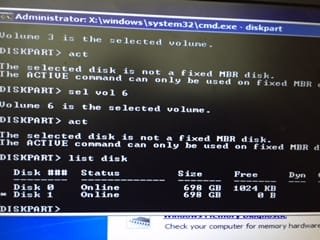
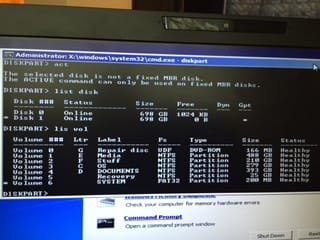
Seems like the OS disk is GPT.

I get "Element not found" when I run fix boot and on startup repair the log shows
"root cause found the partition table does not have a valid system partition..fixed"

However rebooting doesnt solve this.
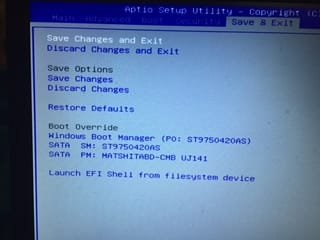
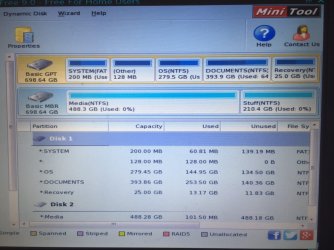
Screen shots from my iphone attached on my disks and volumes.
 

Attachments

  • IMG_0718.JPG
    IMG_0718.JPG
    20.2 KB · Views: 30
  • IMG_0720.JPG
    IMG_0720.JPG
    18.9 KB · Views: 29
  • IMG_0701.JPG
    IMG_0701.JPG
    13.6 KB · Views: 30
  • IMG_0700.JPG
    IMG_0700.JPG
    13.7 KB · Views: 30

My Computer

Computer type
Laptop
Computer Manufacturer/Model Number
ASUS
OS
Windows 7 x64
CPU
i7
Motherboard
ASUS
Memory
12 GB
Graphics Card(s)
NVIDIA 660M
Hard Drives
2* 750 GB HDD
Antivirus
Avast
Browser
Chrome
Try removing the secondary HDD and re-run startup repair perhaps?

http://www.sevenforums.com/tutorials/219533-troubleshooting-windows-7-failure-boot.html

Especially important for you:
A UEFI install to GPT disk must have its installation media or Repair CD booted as a UEFI device. A UEFI install has a EFI System partition instead of System Reserved, and a (hidden) MSR partition, can only boot from a GPT disk. Confirm using Diskpart commands or free Partition Wizard CD that these partitions are intact and run Disk Check on all of them including Win7 partition. Then from System Recovery Options run Startup Repair and if necessary System Restore.
 

My Computer

Computer type
PC/Desktop
Computer Manufacturer/Model Number
Custom Build
OS
Windows 7 Ultimate x64 SP1
CPU
AMD Phenom 2 1090T
Motherboard
Gigabyte GA-890FXA-UD5
Memory
2x8GB Kingston HyperX Fury Black 1600Mhz Unganged
Graphics Card(s)
MSI GTX 970 Gaming 4G
Sound Card
Realtek On-Board HD 7.1 Audio / Logitech G35
Monitor(s) Displays
3xAcer GD245HQ
Screen Resolution
1920x1080
Hard Drives
Samsung 850 Pro 512GB SSD - OS /
WD Caviar Black SATA 3 - 1 TBx2 - Dynamic RAID 0 /
WD Caviar Green SATA 2 - 640GBx2 - Dynamic RAID 0 /
WD Caviar Green SATA 2 - 640GB - Internal Backup /
Seagate Barracude SATA 3 - 3TB - External Backup/ Sync
PSU
HighPower 1000W
Case
Cooler Master HAF 932
Cooling
Noctua NH-D14
Keyboard
Logitech G19
Mouse
Logitech G500
Internet Speed
100/4 Mbit Cable (100GB quota)
Antivirus
ZoneAlarm Extreme Security / MBAM Pro / MBAE Free / SAS Free
Browser
IE 11 - Firefox - Chrome
Other Info
Logitech F710/ G27/ G940/ Z5500 // TrackIR 5 // Nvidia 3D Surround Vision
Screenshots from partition wizard attached. Everything seems okay from them or maybe I'm missing something.
 

Attachments

  • IMG_0727.JPG
    IMG_0727.JPG
    126.3 KB · Views: 0
  • IMG_0729.JPG
    IMG_0729.JPG
    147.9 KB · Views: 0

My Computer

Computer type
Laptop
Computer Manufacturer/Model Number
ASUS
OS
Windows 7 x64
CPU
i7
Motherboard
ASUS
Memory
12 GB
Graphics Card(s)
NVIDIA 660M
Hard Drives
2* 750 GB HDD
Antivirus
Avast
Browser
Chrome
Before I remove HDD I just want to confirm if there is anything I can do to get it to boot .
From the post above I see that the system(200MB) partition is GPT(EFI syste,) and is active and boot.
Should I make the OS partition as bootable?
I know that the system partition should be active.
 

My Computer

Computer type
Laptop
Computer Manufacturer/Model Number
ASUS
OS
Windows 7 x64
CPU
i7
Motherboard
ASUS
Memory
12 GB
Graphics Card(s)
NVIDIA 660M
Hard Drives
2* 750 GB HDD
Antivirus
Avast
Browser
Chrome
Try running startup repair 3 times with a reboot after each.
 

My Computer

Computer type
PC/Desktop
Computer Manufacturer/Model Number
Custom Build
OS
Windows 7 Ultimate x64 SP1
CPU
AMD Phenom 2 1090T
Motherboard
Gigabyte GA-890FXA-UD5
Memory
2x8GB Kingston HyperX Fury Black 1600Mhz Unganged
Graphics Card(s)
MSI GTX 970 Gaming 4G
Sound Card
Realtek On-Board HD 7.1 Audio / Logitech G35
Monitor(s) Displays
3xAcer GD245HQ
Screen Resolution
1920x1080
Hard Drives
Samsung 850 Pro 512GB SSD - OS /
WD Caviar Black SATA 3 - 1 TBx2 - Dynamic RAID 0 /
WD Caviar Green SATA 2 - 640GBx2 - Dynamic RAID 0 /
WD Caviar Green SATA 2 - 640GB - Internal Backup /
Seagate Barracude SATA 3 - 3TB - External Backup/ Sync
PSU
HighPower 1000W
Case
Cooler Master HAF 932
Cooling
Noctua NH-D14
Keyboard
Logitech G19
Mouse
Logitech G500
Internet Speed
100/4 Mbit Cable (100GB quota)
Antivirus
ZoneAlarm Extreme Security / MBAM Pro / MBAE Free / SAS Free
Browser
IE 11 - Firefox - Chrome
Other Info
Logitech F710/ G27/ G940/ Z5500 // TrackIR 5 // Nvidia 3D Surround Vision

My Computer

Computer type
Laptop
Computer Manufacturer/Model Number
ASUS
OS
Windows 7 x64
CPU
i7
Motherboard
ASUS
Memory
12 GB
Graphics Card(s)
NVIDIA 660M
Hard Drives
2* 750 GB HDD
Antivirus
Avast
Browser
Chrome
You did remove the 2nd HDD before trying the repairs, right?
 

My Computer

Computer type
PC/Desktop
Computer Manufacturer/Model Number
Custom Build
OS
Windows 7 Ultimate x64 SP1
CPU
AMD Phenom 2 1090T
Motherboard
Gigabyte GA-890FXA-UD5
Memory
2x8GB Kingston HyperX Fury Black 1600Mhz Unganged
Graphics Card(s)
MSI GTX 970 Gaming 4G
Sound Card
Realtek On-Board HD 7.1 Audio / Logitech G35
Monitor(s) Displays
3xAcer GD245HQ
Screen Resolution
1920x1080
Hard Drives
Samsung 850 Pro 512GB SSD - OS /
WD Caviar Black SATA 3 - 1 TBx2 - Dynamic RAID 0 /
WD Caviar Green SATA 2 - 640GBx2 - Dynamic RAID 0 /
WD Caviar Green SATA 2 - 640GB - Internal Backup /
Seagate Barracude SATA 3 - 3TB - External Backup/ Sync
PSU
HighPower 1000W
Case
Cooler Master HAF 932
Cooling
Noctua NH-D14
Keyboard
Logitech G19
Mouse
Logitech G500
Internet Speed
100/4 Mbit Cable (100GB quota)
Antivirus
ZoneAlarm Extreme Security / MBAM Pro / MBAE Free / SAS Free
Browser
IE 11 - Firefox - Chrome
Other Info
Logitech F710/ G27/ G940/ Z5500 // TrackIR 5 // Nvidia 3D Surround Vision
No I did not. Oops..Will try doing that and post back.
 

My Computer

Computer type
Laptop
Computer Manufacturer/Model Number
ASUS
OS
Windows 7 x64
CPU
i7
Motherboard
ASUS
Memory
12 GB
Graphics Card(s)
NVIDIA 660M
Hard Drives
2* 750 GB HDD
Antivirus
Avast
Browser
Chrome
I removed the second HDD..Since I have two similar at first removed the OS drive but later put it back in while removing the secondary drive.

Startup repair could not automatically repair ..Said some program driver needed to be changed but didnt specify. However simple reboot got me to login to windows straight to desktop !

Ive created a restore point and am going to use mclarium to create a disk image.

Would you suggest I reboot multiple times to check if things are in order?. I want to also schedule a disk check.
Secondly can I now safely put back in my second drive?
 

My Computer

Computer type
Laptop
Computer Manufacturer/Model Number
ASUS
OS
Windows 7 x64
CPU
i7
Motherboard
ASUS
Memory
12 GB
Graphics Card(s)
NVIDIA 660M
Hard Drives
2* 750 GB HDD
Antivirus
Avast
Browser
Chrome

My Computer

Computer type
PC/Desktop
Computer Manufacturer/Model Number
Custom Build
OS
Windows 7 Ultimate x64 SP1
CPU
AMD Phenom 2 1090T
Motherboard
Gigabyte GA-890FXA-UD5
Memory
2x8GB Kingston HyperX Fury Black 1600Mhz Unganged
Graphics Card(s)
MSI GTX 970 Gaming 4G
Sound Card
Realtek On-Board HD 7.1 Audio / Logitech G35
Monitor(s) Displays
3xAcer GD245HQ
Screen Resolution
1920x1080
Hard Drives
Samsung 850 Pro 512GB SSD - OS /
WD Caviar Black SATA 3 - 1 TBx2 - Dynamic RAID 0 /
WD Caviar Green SATA 2 - 640GBx2 - Dynamic RAID 0 /
WD Caviar Green SATA 2 - 640GB - Internal Backup /
Seagate Barracude SATA 3 - 3TB - External Backup/ Sync
PSU
HighPower 1000W
Case
Cooler Master HAF 932
Cooling
Noctua NH-D14
Keyboard
Logitech G19
Mouse
Logitech G500
Internet Speed
100/4 Mbit Cable (100GB quota)
Antivirus
ZoneAlarm Extreme Security / MBAM Pro / MBAE Free / SAS Free
Browser
IE 11 - Firefox - Chrome
Other Info
Logitech F710/ G27/ G940/ Z5500 // TrackIR 5 // Nvidia 3D Surround Vision
I did create two new partitions with minitool
Data is also cleaned up.
Just wondering if the problem starts after inserting the other drive do I go into disk part and Clean it ?
 

My Computer

Computer type
Laptop
Computer Manufacturer/Model Number
ASUS
OS
Windows 7 x64
CPU
i7
Motherboard
ASUS
Memory
12 GB
Graphics Card(s)
NVIDIA 660M
Hard Drives
2* 750 GB HDD
Antivirus
Avast
Browser
Chrome
Lets see after you try again :)
 

My Computer

Computer type
PC/Desktop
Computer Manufacturer/Model Number
Custom Build
OS
Windows 7 Ultimate x64 SP1
CPU
AMD Phenom 2 1090T
Motherboard
Gigabyte GA-890FXA-UD5
Memory
2x8GB Kingston HyperX Fury Black 1600Mhz Unganged
Graphics Card(s)
MSI GTX 970 Gaming 4G
Sound Card
Realtek On-Board HD 7.1 Audio / Logitech G35
Monitor(s) Displays
3xAcer GD245HQ
Screen Resolution
1920x1080
Hard Drives
Samsung 850 Pro 512GB SSD - OS /
WD Caviar Black SATA 3 - 1 TBx2 - Dynamic RAID 0 /
WD Caviar Green SATA 2 - 640GBx2 - Dynamic RAID 0 /
WD Caviar Green SATA 2 - 640GB - Internal Backup /
Seagate Barracude SATA 3 - 3TB - External Backup/ Sync
PSU
HighPower 1000W
Case
Cooler Master HAF 932
Cooling
Noctua NH-D14
Keyboard
Logitech G19
Mouse
Logitech G500
Internet Speed
100/4 Mbit Cable (100GB quota)
Antivirus
ZoneAlarm Extreme Security / MBAM Pro / MBAE Free / SAS Free
Browser
IE 11 - Firefox - Chrome
Other Info
Logitech F710/ G27/ G940/ Z5500 // TrackIR 5 // Nvidia 3D Surround Vision
Well the same problem as soon as I insert the data secondary disk.
 

My Computer

Computer type
Laptop
Computer Manufacturer/Model Number
ASUS
OS
Windows 7 x64
CPU
i7
Motherboard
ASUS
Memory
12 GB
Graphics Card(s)
NVIDIA 660M
Hard Drives
2* 750 GB HDD
Antivirus
Avast
Browser
Chrome
The non OS drive gets labelled as boot manager and the boot also doesn't work if I change the drive boot sequence in bios
I'm sure something got messed up in mini partition usage
 

My Computer

Computer type
Laptop
Computer Manufacturer/Model Number
ASUS
OS
Windows 7 x64
CPU
i7
Motherboard
ASUS
Memory
12 GB
Graphics Card(s)
NVIDIA 660M
Hard Drives
2* 750 GB HDD
Antivirus
Avast
Browser
Chrome

My Computer

Computer type
PC/Desktop
Computer Manufacturer/Model Number
Custom Build
OS
Windows 7 Ultimate x64 SP1
CPU
AMD Phenom 2 1090T
Motherboard
Gigabyte GA-890FXA-UD5
Memory
2x8GB Kingston HyperX Fury Black 1600Mhz Unganged
Graphics Card(s)
MSI GTX 970 Gaming 4G
Sound Card
Realtek On-Board HD 7.1 Audio / Logitech G35
Monitor(s) Displays
3xAcer GD245HQ
Screen Resolution
1920x1080
Hard Drives
Samsung 850 Pro 512GB SSD - OS /
WD Caviar Black SATA 3 - 1 TBx2 - Dynamic RAID 0 /
WD Caviar Green SATA 2 - 640GBx2 - Dynamic RAID 0 /
WD Caviar Green SATA 2 - 640GB - Internal Backup /
Seagate Barracude SATA 3 - 3TB - External Backup/ Sync
PSU
HighPower 1000W
Case
Cooler Master HAF 932
Cooling
Noctua NH-D14
Keyboard
Logitech G19
Mouse
Logitech G500
Internet Speed
100/4 Mbit Cable (100GB quota)
Antivirus
ZoneAlarm Extreme Security / MBAM Pro / MBAE Free / SAS Free
Browser
IE 11 - Firefox - Chrome
Other Info
Logitech F710/ G27/ G940/ Z5500 // TrackIR 5 // Nvidia 3D Surround Vision
Used diskpart to Clean. Rebooted same issue. Went to BIOS booted by clicking boot from EFI filesystem.
Startup repair run and as usual runs for sometime and doesnt fix anything.
Force restart and the laptop boots normally :)

Went to disk management and formatted the second drive as GPT as well. Works well now. No issues as such except the boot sequence doesnt have an entry for the second HDD. Not that it matters since the HDD is a not OS drive.

Thanks Gokay !!
 

My Computer

Computer type
Laptop
Computer Manufacturer/Model Number
ASUS
OS
Windows 7 x64
CPU
i7
Motherboard
ASUS
Memory
12 GB
Graphics Card(s)
NVIDIA 660M
Hard Drives
2* 750 GB HDD
Antivirus
Avast
Browser
Chrome
If it works.. :)
 

My Computer

Computer type
PC/Desktop
Computer Manufacturer/Model Number
Custom Build
OS
Windows 7 Ultimate x64 SP1
CPU
AMD Phenom 2 1090T
Motherboard
Gigabyte GA-890FXA-UD5
Memory
2x8GB Kingston HyperX Fury Black 1600Mhz Unganged
Graphics Card(s)
MSI GTX 970 Gaming 4G
Sound Card
Realtek On-Board HD 7.1 Audio / Logitech G35
Monitor(s) Displays
3xAcer GD245HQ
Screen Resolution
1920x1080
Hard Drives
Samsung 850 Pro 512GB SSD - OS /
WD Caviar Black SATA 3 - 1 TBx2 - Dynamic RAID 0 /
WD Caviar Green SATA 2 - 640GBx2 - Dynamic RAID 0 /
WD Caviar Green SATA 2 - 640GB - Internal Backup /
Seagate Barracude SATA 3 - 3TB - External Backup/ Sync
PSU
HighPower 1000W
Case
Cooler Master HAF 932
Cooling
Noctua NH-D14
Keyboard
Logitech G19
Mouse
Logitech G500
Internet Speed
100/4 Mbit Cable (100GB quota)
Antivirus
ZoneAlarm Extreme Security / MBAM Pro / MBAE Free / SAS Free
Browser
IE 11 - Firefox - Chrome
Other Info
Logitech F710/ G27/ G940/ Z5500 // TrackIR 5 // Nvidia 3D Surround Vision
Back
Top