
Solved Ready to shoot PC, or myself. :( Please help...

alienalias

New member
Local time
11:04 AM
Messages
28
Nothing but PC problems last 2 weeks and completely unable to do any work at home. Writing my book after quitting my job and NOTHING done this last 2 weeks.
SO STINKING frustrated.:cry: So unproductive.:mad: And not a PC whiz.:geek: PLEASE help me!:confused:

Couple weeks ago my Dell Optiplex GX620 started freezing in the middle of work, causing reboots, and major signs of dying. Backed everything up at iDrive, and good thing because then she died. Got it working again to surf Internet for about an hour or two at a time before further crashes, not much else.

Researched online and decided to go cheap until I could afford a premium unit, so bought an eMachine which was: Desktop / AMD Athlon™ II X2 Processor / 4GB Memory / 500GB Hard Drive / NVIDIA GeForce 6150 SE graphics.

I was unaware that the eMachine would not support dual monitors, so I returned it and bought a brand new HP that did. This model has been out for only a month or 2 at most, and I thought I was going a little more "premium", as it was double the cost of my cheap eMachine. I figured I would just man up (girl up) and get a good PC. After returning the eMachine, this new HP I was buying had absolutely everything I needed!

Well, now the Internet connection is so absurdly slow that it makes it impossible to work. BOTH my old Dell and the returned eMachine had Internet speeds and download speeds that were 100 times faster than this "premium" PC! I frequently download different resources and programs to help in my research, and a fast Internet connection and fast download speeds are an absolute and unquestionable necessity for me.

What I don't understand is that every spec on this PC is superior to either of the former PC's I had, of which those PC's surfed the Internet and downloaded at lightning speeds compared to this. I can go to sites like seattletimes.com or miamiherald.com and it will take 5 minutes to load! How can this be???

I have no wireless network, or routers, etc. I have a direct cable modem to PC connection, and it is slow as molasses. How is that possible in a brand new PC in 2011?!

I was so thrilled to get this PC because it has everything I need and is superior in specs to any I've ever had. Now, I want to cry. Can anyone PLEASE help me? I am going into 2 weeks of failure and incompetence because of PC troubles. :(

From system info:
OS Name Microsoft Windows 7 Home Premium
Version 6.1.7600 Build 7600
System Manufacturer Hewlett-Packard
System Model p6774y
System Type x64-based PC
Processor AMD Phenom(tm) II X4 840T Processor, 2900 Mhz, 4 Core(s), 4 Logical Processor(s)
BIOS Version/Date American Megatrends Inc. 6.04, 9/7/2010
SMBIOS Version 2.6
Windows Directory C:\Windows
System Directory C:\Windows\system32
Boot Device \Device\HarddiskVolume1
Locale United States
Hardware Abstraction Layer Version = "6.1.7600.16385"
Installed Physical Memory (RAM) 6.00 GB
Total Physical Memory 5.75 GB
Available Physical Memory 3.98 GB
Total Virtual Memory 11.5 GB
Available Virtual Memory 9.30 GB
Page File Space 5.75 GB

I am not particularly tech or PC savvy, but do have basic knowledge and understanding, and can figure stuff out usually! After an hour or 2 online, I usually find a solution, but not today. :( Today I need a kind and compassionate expert to help me. :)

Please help me!
 

My Computer My Computer

Computer Manufacturer/Model Number
HP p6774y
OS
Windows 7 Home Premium 64 bit
CPU
AMD Phenom II x4 840t processor, 2900 Mhz, 4 core...
Motherboard
N-Alvorix-RS880-uATX (Alvorix)
Memory
Installed physical: 6 GB / Total virtual 11.5 GB
Graphics Card(s)
ATI Radeon HD 4200
Monitor(s) Displays
Acer 23 inch & Dell 19 inch dual monitor set-up
Hard Drives
SATA (7200 rpm), 1 TB.
PSU
Processor speed? 2.93 Ghz. Bus speed: 4000 Mhz HT
OK, until the networking experts tune in (which I am not), lets do some simple things.

1. Right click on the network icon in the taskbar (bottom right) and open the Network and Sharing canter
2. In the left pane of the N&S center, click on "Change Adaptor settings"
3. In adaptor settings, right click on "Local Area Connection" and click on "Status"
4. Take a snip of this little window and post it here.

Then right click again on the network icon in the tasktray and click on " Troubleshoot Problems" - see what that yields.
 

My Computer My Computer

Computer Manufacturer/Model Number
HP, Dell, Gateway, Toshiba - 4 laptops and 2 desktops
OS
Vista, Windows7, Mint Mate, Zorin, Windows 8
CPU
from 1.6GHz Duo to i7
Monitor(s) Displays
2x HP w2207
Hard Drives
5x HDD, 7x SSD, 12x Externals
Keyboard
with trackball - no mices
Mouse
Trackball mice
Internet Speed
DSL 6000
THANK you whs-

IPv4 Connectivity: Internet
IPv6 Connectivity: No Network Access
moz-screenshot-1.png
moz-screenshot-2.png
Media State: Enabled
Duration: 01:40:55 (and counting)
Speed: 100.0 Mbps

Bytes: Sent 5,824,775 Rcv'd 19,305,453

I had already run troubleshoot to no avail. It says it tested the connection and verified I'm able to access some websites.
--------------------------------------------------------------------

Mike C- Thank you. I will do it now...
 

My Computer My Computer

Computer Manufacturer/Model Number
HP p6774y
OS
Windows 7 Home Premium 64 bit
CPU
AMD Phenom II x4 840t processor, 2900 Mhz, 4 core...
Motherboard
N-Alvorix-RS880-uATX (Alvorix)
Memory
Installed physical: 6 GB / Total virtual 11.5 GB
Graphics Card(s)
ATI Radeon HD 4200
Monitor(s) Displays
Acer 23 inch & Dell 19 inch dual monitor set-up
Hard Drives
SATA (7200 rpm), 1 TB.
PSU
Processor speed? 2.93 Ghz. Bus speed: 4000 Mhz HT
HP has a bloatware connection manager which adds 30 seconds to startup time and can throttle connection. Try turning it off to connect directly to your cable modem from Win7.

Check optional Windows updates for newer cable modem driver.

How is it listed in Device Manager under Network Adapters. What is the exact device name and driver version and date?

Now click on Update Driver tab and try to Auto update. http://www.sevenforums.com/tutorials/97061-driver-install-device-manager.html

Here are more general tips to clean up the HP bloatware which can slow Win7: http://www.sevenforums.com/installa...p-all-four-primary-partitions.html#post952573
 
Hope this works...


My Computer My Computer

Computer Manufacturer/Model Number
HP p6774y
OS
Windows 7 Home Premium 64 bit
CPU
AMD Phenom II x4 840t processor, 2900 Mhz, 4 core...
Motherboard
N-Alvorix-RS880-uATX (Alvorix)
Memory
Installed physical: 6 GB / Total virtual 11.5 GB
Graphics Card(s)
ATI Radeon HD 4200
Monitor(s) Displays
Acer 23 inch & Dell 19 inch dual monitor set-up
Hard Drives
SATA (7200 rpm), 1 TB.
PSU
Processor speed? 2.93 Ghz. Bus speed: 4000 Mhz HT
Gregrocker- I am going to try to figure out how to do what you advise. Don't know if it is relevant, but my eMachine I had for the last 10 days (until trading it for this today) also had Windows 7 pre-installed, and I had none of these problems...
 

My Computer My Computer

Computer Manufacturer/Model Number
HP p6774y
OS
Windows 7 Home Premium 64 bit
CPU
AMD Phenom II x4 840t processor, 2900 Mhz, 4 core...
Motherboard
N-Alvorix-RS880-uATX (Alvorix)
Memory
Installed physical: 6 GB / Total virtual 11.5 GB
Graphics Card(s)
ATI Radeon HD 4200
Monitor(s) Displays
Acer 23 inch & Dell 19 inch dual monitor set-up
Hard Drives
SATA (7200 rpm), 1 TB.
PSU
Processor speed? 2.93 Ghz. Bus speed: 4000 Mhz HT
eMachine does not have a connection manager, but allows you to connect directly to the internet from Win7.

HP lards their machines with so much sponsored bloatware that it takes work to clean it all off to let Win7 run freely.

Steps to clean up bloatware.

Whenever I clean up an HP the first thing I turn off is the Connection Manager, then uncheck everything in msconfig except AV, which should be lightweight MS Security Essentials or Avast.
 
Last edited:
Hmm, it's not all that fast, but it should be more than adequate for what you want.

Have a look here;

HP Getting connected with mobile broadband

Play this HP tutorial on broadband connections; ( It's twelve pages, flip them by pressing "Next" on the lower right )

Getting connected with mobile broadband

HP can be a bit of a pain with some stuff, as gregrocker pointed out.

But there can also be other reasons for slow connections.

Regards....Mike Connor
 

My Computer My Computer

OS
Several, including Windows 7 x64 Ultimate
HP has a bloatware connection manager which adds 30 seconds to startup time and can throttle connection. Try turning it off to connect directly to your cable modem from Win7.

Check optional Windows updates for newer cable modem driver.

How is it listed in Device Manager under Network Adapters. What is the exact device name and driver version and date?

Now click on Update Driver tab and try to Auto update. http://www.sevenforums.com/tutorials/97061-driver-install-device-manager.html

Here are more general tips to clean up the HP bloatware which can slow Win7: http://www.sevenforums.com/installa...p-all-four-primary-partitions.html#post952573


GR-
You asked, "How is it listed in Device Manager under Network Adapters. What is the exact device name and driver version and date"
There is a 802.11n Wireless LAN Card and Realtek PCIe FE Family Controller. I went to update and both said it was the latest version.

Strangely (or maybe it's not strange at all), I am not seeing my Ubee brand Modem hardware listed anywhere at all. Should I be seeing that?
 

My Computer My Computer

Computer Manufacturer/Model Number
HP p6774y
OS
Windows 7 Home Premium 64 bit
CPU
AMD Phenom II x4 840t processor, 2900 Mhz, 4 core...
Motherboard
N-Alvorix-RS880-uATX (Alvorix)
Memory
Installed physical: 6 GB / Total virtual 11.5 GB
Graphics Card(s)
ATI Radeon HD 4200
Monitor(s) Displays
Acer 23 inch & Dell 19 inch dual monitor set-up
Hard Drives
SATA (7200 rpm), 1 TB.
PSU
Processor speed? 2.93 Ghz. Bus speed: 4000 Mhz HT
THANK you whs-

IPv4 Connectivity: Internet
IPv6 Connectivity: No Network Access
moz-screenshot-1.png
moz-screenshot-2.png
Media State: Enabled
Duration: 01:40:55 (and counting)
Speed: 100.0 Mbps

Bytes: Sent 5,824,775 Rcv'd 19,305,453

I had already run troubleshoot to no avail. It says it tested the connection and verified I'm able to access some websites.
--------------------------------------------------------------------

Mike C- Thank you. I will do it now...
That looks good. I suspected the IPv6 to be in the way, but it is not. Greg (an expert) is probably on the right track. It may be a HP add-on that does it to you.
 

My Computer My Computer

Computer Manufacturer/Model Number
HP, Dell, Gateway, Toshiba - 4 laptops and 2 desktops
OS
Vista, Windows7, Mint Mate, Zorin, Windows 8
CPU
from 1.6GHz Duo to i7
Monitor(s) Displays
2x HP w2207
Hard Drives
5x HDD, 7x SSD, 12x Externals
Keyboard
with trackball - no mices
Mouse
Trackball mice
Internet Speed
DSL 6000
Hmm, it's not all that fast, but it should be more than adequate for what you want.

Have a look here;

HP Getting connected with mobile broadband

Play this HP tutorial on broadband connections; ( It's twelve pages, flip them by pressing "Next" on the lower right )

Getting connected with mobile broadband

HP can be a bit of a pain with some stuff, as gregrocker pointed out.

But there can also be other reasons for slow connections.

Regards....Mike Connor

I don't understand. There is something that just isn't right though. Pages that loaded on my old Dell or the new eMachine I had for a week would take 5 seconds. On this brand new PC it takes 3 to 5 minutes, if it fully loads at all. The firefox download took 30 seconds on my eMachine... it took 5 minutes with this new HP.

If this is the deal with HP, I just might have to return it to BestBuy. Is that what you would suggest?

*Sigh*
 

My Computer My Computer

Computer Manufacturer/Model Number
HP p6774y
OS
Windows 7 Home Premium 64 bit
CPU
AMD Phenom II x4 840t processor, 2900 Mhz, 4 core...
Motherboard
N-Alvorix-RS880-uATX (Alvorix)
Memory
Installed physical: 6 GB / Total virtual 11.5 GB
Graphics Card(s)
ATI Radeon HD 4200
Monitor(s) Displays
Acer 23 inch & Dell 19 inch dual monitor set-up
Hard Drives
SATA (7200 rpm), 1 TB.
PSU
Processor speed? 2.93 Ghz. Bus speed: 4000 Mhz HT
Hmm, it's not all that fast, but it should be more than adequate for what you want.

Have a look here;

HP Getting connected with mobile broadband

Play this HP tutorial on broadband connections; ( It's twelve pages, flip them by pressing "Next" on the lower right )

Getting connected with mobile broadband

HP can be a bit of a pain with some stuff, as gregrocker pointed out.

But there can also be other reasons for slow connections.

Regards....Mike Connor

I don't understand. There is something that just isn't right though. Pages that loaded on my old Dell or the new eMachine I had for a week would take 5 seconds. On this brand new PC it takes 3 to 5 minutes, if it fully loads at all. The firefox download took 30 seconds on my eMachine... it took 5 minutes with this new HP.

If this is the deal with HP, I just might have to return it to BestBuy. Is that what you would suggest?

*Sigh*

Let's see if we can find the problem first. There is always a reason for these things.

Your internet connection speed is adequate, so it must be something on the machine which is slowing things down. This is actually fairly common with a few "Brand Name" PC's, there is so much stuff they pre-install that is fairly useless.

We just need to find out what it is and remove it.

Go to "Control Panel" from your start menu.

Choose "Programs and Features"

scroll down until you find "HP Connection Manager", ( or a similar entry ). Click on it, and choose "uninstall".

This may solve your problems immediately, as this connection manager is known to cause a number of problems.

What you need to do is connect directly to your internet connection, without the HP stuff.

You can do this directly under windows, without the HP software.

Regards....Mike Connor
 

My Computer My Computer

OS
Several, including Windows 7 x64 Ultimate
Thanks Mike... I couldn't figure out exactly what Greg was telling me to do. I was trying to find connection manager... did not know it was an "uninstall". Thanks for the clarification!
 

My Computer My Computer

Computer Manufacturer/Model Number
HP p6774y
OS
Windows 7 Home Premium 64 bit
CPU
AMD Phenom II x4 840t processor, 2900 Mhz, 4 core...
Motherboard
N-Alvorix-RS880-uATX (Alvorix)
Memory
Installed physical: 6 GB / Total virtual 11.5 GB
Graphics Card(s)
ATI Radeon HD 4200
Monitor(s) Displays
Acer 23 inch & Dell 19 inch dual monitor set-up
Hard Drives
SATA (7200 rpm), 1 TB.
PSU
Processor speed? 2.93 Ghz. Bus speed: 4000 Mhz HT
It almost acts like your wireless is competing for connection :confused:

Can you use the snipping tool to post your network properties ?
 

Attachments

  • Network_properties.JPG
    Network_properties.JPG
    170.7 KB · Views: 37

My Computer My Computer

Computer type
PC/Desktop
Computer Manufacturer/Model Number
Built them myself, Science Experiments !
OS
Win7 Enterprise, Win7 x86 (Ult 7600), Win7 x64 Ult 7600, TechNet RTM on AMD x64 (2.8Ghz)
CPU
AMD fx8350 4ghz, AMD-32 2400mhz, AMD-64 3200mhz, AMDx64 2.8G
Motherboard
SIS 755, ECS-K8M890M-M (Ult 7600), GigaByte & others
Memory
2gb, 4gb on the Ult 7600, 4gb on Technet RTM, 32gb on FX8350
Graphics Card(s)
Draw my own Graphics, several nVidia cards
Sound Card
on motherboard
Monitor(s) Displays
19" flat scr, 28" I-Inc widescr,22" Emprex Widescr, 23" Acer
Screen Resolution
1280 x 1024, 1440 x 900, 1920 x 1080
Hard Drives
6 pata Ide HD's & 2 Sata HD's
added 80gb external on Ult 7600 computer,
numerous extra 1tb, 2TB, 3Tb SATA HD's
A collection of ext HD Docks w/ HDs
PSU
430w, 550w, 600w, 700, 800, etc
Case
All Generic Full Towers
Cooling
Open Air & a few fans, some w/ colored LEDs
Keyboard
Compaq & Dell recycled from GoodWill
Mouse
Made in China Optical Wired Mouse
Internet Speed
Fast Cable InterNet
Antivirus
AVG Free on 24 different Desktops, NO Problems!
Browser
IE 8 is preferred, but use FireFox sometimes
Other Info
Linksys Routers, switches, & Hubs
Too Many USB Flash Drives to count, Biggest is 64GB !
Eight computers in my home network.
Sixteen computers at my business network.
Linked via TeamViewer !
Lots of old used spare computer parts everywhere!
Found about 15 HP things but no HP Connection Manager... haad HP:
Games
MediaSmart DVD
MediaSmart Music
MediaSmart Photo
MediaSmart SmartMenu
MediaSmart Video
MediaSmart MediaSmart/Touchsmart Netflix
HP Moviestore
HP Odomoeter
HP Setup
HP Setup Manager
HP Support Assistant
HP Support Info
HP Update
HP Vision Hardware Diagnostics
 

My Computer My Computer

Computer Manufacturer/Model Number
HP p6774y
OS
Windows 7 Home Premium 64 bit
CPU
AMD Phenom II x4 840t processor, 2900 Mhz, 4 core...
Motherboard
N-Alvorix-RS880-uATX (Alvorix)
Memory
Installed physical: 6 GB / Total virtual 11.5 GB
Graphics Card(s)
ATI Radeon HD 4200
Monitor(s) Displays
Acer 23 inch & Dell 19 inch dual monitor set-up
Hard Drives
SATA (7200 rpm), 1 TB.
PSU
Processor speed? 2.93 Ghz. Bus speed: 4000 Mhz HT
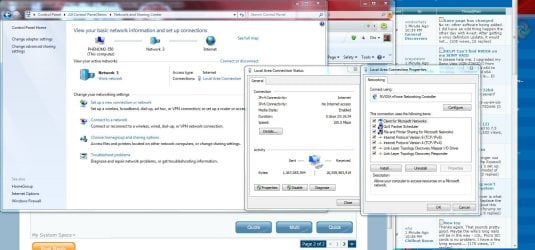
Run your mouse over the devices which are starting with the computer in the bottom right System Tray until you find the HP Connection Manager, double click or right click it to open, find where to turn it off and default to Windows connection manager.

Every model is slightly different and the newest models may have modified it as it has issues known to HP.
 
Does this help DocB?
 

Attachments

  • Internet1.png
    Internet1.png
    501.7 KB · Views: 44

My Computer My Computer

Computer Manufacturer/Model Number
HP p6774y
OS
Windows 7 Home Premium 64 bit
CPU
AMD Phenom II x4 840t processor, 2900 Mhz, 4 core...
Motherboard
N-Alvorix-RS880-uATX (Alvorix)
Memory
Installed physical: 6 GB / Total virtual 11.5 GB
Graphics Card(s)
ATI Radeon HD 4200
Monitor(s) Displays
Acer 23 inch & Dell 19 inch dual monitor set-up
Hard Drives
SATA (7200 rpm), 1 TB.
PSU
Processor speed? 2.93 Ghz. Bus speed: 4000 Mhz HT
There is no modem recognized anywhere... there is no modem tab in device manager, nor a modem under network adapters or other devices. But I have Internet connection. I have tried to go to ubeeinteractive.com to download driver to make sure I have latest, but having trouble with that.
 

My Computer My Computer

Computer Manufacturer/Model Number
HP p6774y
OS
Windows 7 Home Premium 64 bit
CPU
AMD Phenom II x4 840t processor, 2900 Mhz, 4 core...
Motherboard
N-Alvorix-RS880-uATX (Alvorix)
Memory
Installed physical: 6 GB / Total virtual 11.5 GB
Graphics Card(s)
ATI Radeon HD 4200
Monitor(s) Displays
Acer 23 inch & Dell 19 inch dual monitor set-up
Hard Drives
SATA (7200 rpm), 1 TB.
PSU
Processor speed? 2.93 Ghz. Bus speed: 4000 Mhz HT
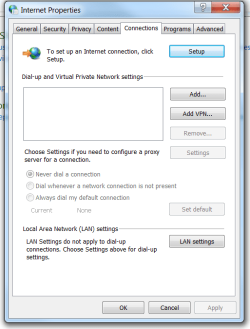
OK... done. Looks like yours. Want a pic?
 

Attachments

  • Internet2.png
    Internet2.png
    21.1 KB · Views: 25

My Computer My Computer

Computer Manufacturer/Model Number
HP p6774y
OS
Windows 7 Home Premium 64 bit
CPU
AMD Phenom II x4 840t processor, 2900 Mhz, 4 core...
Motherboard
N-Alvorix-RS880-uATX (Alvorix)
Memory
Installed physical: 6 GB / Total virtual 11.5 GB
Graphics Card(s)
ATI Radeon HD 4200
Monitor(s) Displays
Acer 23 inch & Dell 19 inch dual monitor set-up
Hard Drives
SATA (7200 rpm), 1 TB.
PSU
Processor speed? 2.93 Ghz. Bus speed: 4000 Mhz HT
Back
Top