
Readyboot error

spyknee

Banned
Local time
3:42 PM
Messages
382
Location
NYC
I keep popping this event. It happened when cache was at 2xxxxx so I increased it, doubled its size. Now its full again????

I use SSD's so superfetch is disabled. But per MS, I have left prefetch enabled.
If I disable prefetch, what are the consequences?
 

Attachments
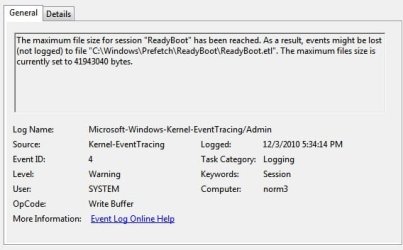
  • readyboot error.jpg
    readyboot error.jpg
    56.1 KB · Views: 67

My Computer

Computer Manufacturer/Model Number
DIY #3, #2
OS
W7 Ulti/64, XP Pro/32
CPU
INTEL i7 920 DO, Core2 Duo 6400
Motherboard
GIGABYTE EX58 UD3R-SLI, EP45-UD3R
Memory
KINGSTON DDR3 1333MHz, CORSAIR DDR2 800MHz
Graphics Card(s)
EVGA GTX 260 x2, 8800 GTX
Sound Card
REALTEK HD onboard, ditto
Monitor(s) Displays
SONY 40" BRAVIA LCD
Screen Resolution
1360 X 768
Hard Drives
OCZ VERTEX/RAID0 -3, Vertex 30GB
PSU
COOLERMASTER 900W, ENERMAX 850W
Case
COOLERMASTER HAF 932 x2
Cooling
stock
Keyboard
MS
Mouse
MS
Internet Speed
ADSL 3MB/768KBs
Other Info
amateur enthusiast
bump
 

My Computer

Computer Manufacturer/Model Number
DIY #3, #2
OS
W7 Ulti/64, XP Pro/32
CPU
INTEL i7 920 DO, Core2 Duo 6400
Motherboard
GIGABYTE EX58 UD3R-SLI, EP45-UD3R
Memory
KINGSTON DDR3 1333MHz, CORSAIR DDR2 800MHz
Graphics Card(s)
EVGA GTX 260 x2, 8800 GTX
Sound Card
REALTEK HD onboard, ditto
Monitor(s) Displays
SONY 40" BRAVIA LCD
Screen Resolution
1360 X 768
Hard Drives
OCZ VERTEX/RAID0 -3, Vertex 30GB
PSU
COOLERMASTER 900W, ENERMAX 850W
Case
COOLERMASTER HAF 932 x2
Cooling
stock
Keyboard
MS
Mouse
MS
Internet Speed
ADSL 3MB/768KBs
Other Info
amateur enthusiast
The error is (apparently) harmless and it seems to be common among people who upgraded to SSDs and thus shut down Superfetch.

For what it is worth, I had this error for a long time and then a few days ago I realized that my partitions were misaligned (thanks, Dell for making your factory image to the old sector-63 alignment). I used Gparted (and a second HD for temp space) to realign the partitions. I did notice after a while that the Readyboot error stopped after I did this.

So i suppose you could check to see what the starting cluster of your c: drive is. If the number doesnt divide evenly by 1024, then you may have just found your problem.

SS
 

My Computer

Computer Manufacturer/Model Number
Dell Studio XPS 8100
OS
Windows 7 x64
CPU
Core i7-860
Motherboard
Dell/Foxconn
Memory
8GB
Graphics Card(s)
EVGA GeForce GT240 SSC
Monitor(s) Displays
Dell 2408WFP
Hard Drives
ST31000528AS
X-25MG2 80GB
Back
Top