
RealDownloader won't open

mermaid88

New member
Local time
12:30 PM
Messages
2
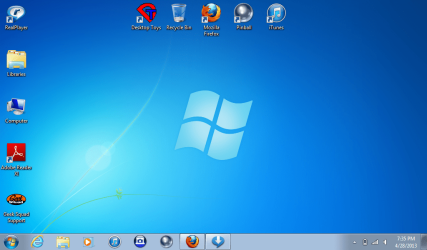
I'm not sure if I had to make a new thread, but I have the same problem again. This time, I have a screenshot (hopefully it actually shows up.).
The icon at the bottom of my desktop with the arrow pointing down, is RealDownloader. When it's working, I can click on that icon, and a box will pop up, showing me what's downloading and its progress. When it's not working, I can click on that stupid icon for the rest of the night and nothing will happen. No box, no "what's downloading", no progress bar.
It was recently suggested that I download Firefox and re-download Realplayer through it. I did, and it's worked for about 2 weeks, although I did notice that it won't work if I put my computer to hibernate and later come back. It made me shut everything down and restart my computer in order to make it work again. But now, I'm back to the original problem that I first posted about when I first joined--it won't open.

please help!
 

Attachments
  • my stupid realplayer.png
    my stupid realplayer.png
    179.4 KB · Views: 10

My Computer

Computer type
Laptop
Computer Manufacturer/Model Number
Toshiba NB305
OS
Windows 7 Starter Edition
Antivirus
Kaspersky
Browser
IE, Safari
This may help.

Found this today. It worked for me, hope it does for you as well.

The RealDownloader is not opening but in the taskbar | Chanmingman's Blog

Now, I just need two things... to figure out why it has become so picky with the videos I want to download (aka it won't do some, but others work just fine), and to find a viable replacement for Realplayer Downloader and Realplayer Converter... any suggestions?
 

My Computer

Computer type
PC/Desktop
Computer Manufacturer/Model Number
Custom
OS
Windows 7 Ultimate 64-bit
Do I see a Geek Squad icon?
 

My Computer

Computer type
PC/Desktop
Computer Manufacturer/Model Number
Home made Desktop
OS
Windows 10 Pro. 64/ version 1709 Windows 7 Pro/64
CPU
Intel i7-6800K @ 4.3
Motherboard
ASUS X-99 Deluxe II
Memory
Corsair Platinum 16 gig @2400
Graphics Card(s)
EVGA GTX 1070 OC
Monitor(s) Displays
Asus 27" LED LCD/VE278Q
Screen Resolution
1920-1080 or 1280-720 HDMI
Hard Drives
INTEL SSD 730-240 Gb Sata 3.0/
PSU
EVGA Platium 1200W
Case
Phanteks Luxe Tempered Glass 8 fans/ one radiator
Cooling
XSPC/ Water Cooled CPU
Keyboard
Das 4 Professional
Mouse
Logitech M705/MX Anywhere 2-S
Internet Speed
100 mbits
Antivirus
Microsoft Security Essentials/ Malwarebytes Premium 3.0/ SAS
Browser
I.E. 11 default/Firefox/ ISP Time Warner Cable/Spectrum
Other Info
LG BluRay Burner/
Sound system-KLipsch-THX/
Icy Dock ssd Hot Swap bays.
i would just reinstall it, its always being updated
 

My Computer

Computer Manufacturer/Model Number
Hewlett packard/p6512uk
OS
Microsoft Windows 7 Home Premium 64-bit 7600
CPU
IIx4 amd athelon 635 processor
Motherboard
FOXCONN 2AA9
Memory
2x2gb
Graphics Card(s)
ati radeon HD 5450
Sound Card
(1) Realtek High Definition Audio (2) AMD High Definition
Monitor(s) Displays
samsung lcd tv 32"
Screen Resolution
1360x 768
Hard Drives
(1) WDC WD10 01FAES-60Z2A0 SATA Disk Device (2) Maxtor OneTouch USB Device (3) ST310003 33AS USB Device (4) WD My Book 1111 USB Device
PSU
?
Cooling
air!
Keyboard
wireless hp
Mouse
wireless Hp,optical
Internet Speed
1.10mb/s
Antivirus
MSE
Browser
Firefox
  • @ boobah: i've always uninstalled/reinstalled it; then within a couple days i had the same problem again.
  • @ Layback Bear: yeah, they were no help; they kept insinuating that what i wanted is against some kind of copyright law, and wouldn't really tell me what to do to fix anything. And the Realplayer support people thought i just didn't know how to open their program, and apparently when you only have the free version, they can only help you one time.
 

My Computer

Computer type
Laptop
Computer Manufacturer/Model Number
Toshiba NB305
OS
Windows 7 Starter Edition
Antivirus
Kaspersky
Browser
IE, Safari
Back
Top