Solved Really Important.

s0uLFir3

New member
Local time
8:23 PM
Messages
8
Hello guys. I have an Intel Core i7 930 CPU running at stock settings and with a stock cooler.

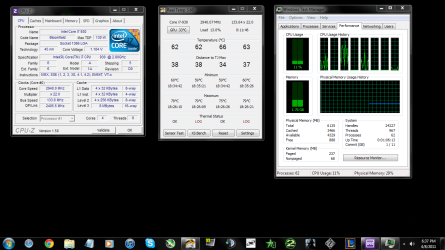
Till like a week back, the CPU Temps used to be 35 - 45 idle and 75 - 85 at load. But suddenly, last week they became like 60 - 80 and the load with no application/file open wouldn't go below 10 - 15%. I have 6GB Ram.

Please help. If I play any game that I want to, the load goes up to 60 - 70% and the CPU Temp goes to up till 100. :cry::(

Desk.png
 

My Computer

OS
Windows 7 Ultimate x64
CPU
i7 930 @ 2.80GHz
Motherboard
Asus Sabertooth x58
Memory
6GB DDR3
Graphics Card(s)
MSI Nvidia GTX 460 Hawk 1 GB Talon Attack
Keyboard
Razer Arctosa
Mouse
Razer Mamba
Internet Speed
4 mbps
might the dust build up on vents, check see if fan/fans running.
 

My Computer

Computer Manufacturer/Model Number
lenovo
OS
windows 7 pro
CPU
intel core 2 quad q8400 2.66
Memory
8 gb
Graphics Card(s)
ati radeon hd 3470
Sound Card
built in
Hard Drives
560 gb
Check for dust as mentioned, make sure the HSF fan is spinning properly, and if needed, remove the HSF, clean it with rubbing alcohol (and processor surface as well), then reapply thermal paste. I have always found that the stuff that comes on Intel stock coolers works okay, but you can do better with a $5 tube of something like arctic silver.

Another thing to consider is a new HSF. I have a Cooler Master Hyper 212+ and it keeps the temps down, even under load, without making extra noise.
 

My Computer

OS
Windows 7 Ultimate x64 SP1
CPU
Intel Core i7-2600
Motherboard
Gigabyte GA-P67A-UD3P-B3
Memory
12 GB Patriot Extreme DDR3-1333
Graphics Card(s)
Nvidia GTX 470
Monitor(s) Displays
Dell UltraSharp 2209WA
Hard Drives
OCZ Agility3 240 GB, WD5001AALS, WD7501AALS
PSU
OCZ ModStream 700W
Case
CoolerMaster HAF 912 Advanced
Cooling
CoolerMaster Hyper 212 Plus
Your temps should have NEVER come near 75-85°C in the first place. I get nervous at 60°C and you are pushing 25°C over that!!! That's scary for a CPU. Assuming no overclocking and the heatsink fan was properly mounted with a proper layer of thermal interface material (TIM), those high temps indicate you have lousy case cooling. The best cooler in the world does no good if all it has is hot air to blow around.

You need to inspect your case for (1) heat trapping dust and (2) adequate front-to-back air flow through the case. If your case supports more or larger fans (120mm or larger) consider enhancing your case cooling. I prefer at least one large fan in front drawing cool air in and at least one large fan in back (in addition to PSU fan) exhausting hot air out. Cases that support an extra large (240mm) "blowhole" fan (an exhaust fan on the top of the case) provides excellent heat removal too.

Another thing to consider is a new HSF.
:( A caution should ALWAYS be given with that advice! Both Intel and AMD make it quite clear in their warranties - their CPUs that come with an OEM supplied heatsink fan (HSF) assembly are packaged, sold, and warrantied as "a unit". Therefore, understand the use of a 3rd party cooler on Intel or AMD CPUs violates the terms of the warranty agreements!

If you don't care about your 3 year warranty, then no problem. But both AMD and Intel care and so they both provide excellent cooling solutions. Some aftermarket coolers are a little quieter, and some may knock a few degrees off the top, but none will drop your temps 25°!

Intel and AMD coolers are designed, built, and expected to adequately cool and last. Therefore, they are warrantied for 3 years too. If the AMD or Intel supplied cooler fails, and takes out the CPU with it, both are covered. Most after maker coolers, including the CoolerMaster are only warrantied for 1 year, maybe 2.

NO aftermarket cooler maker will replace your CPU if their failed cooler results in CPU damage.

Therefore, I recommend against using aftermarket coolers, except for extreme enthusiasts who don't care about their warranties, or those seeking "silent running" for HTPCs - and only when the user is fully aware of the consequences.
 

My Computer

Computer Manufacturer/Model Number
BrightWorks Systems B4
OS
Windows 7 Profession 64-bit
CPU
Intel Core i7-860 Quad
Motherboard
Gigabyte P55-UD4P
Memory
Mushkin 4x2Gb PC12800
Graphics Card(s)
Gigabyte GTX260 896Mb
Sound Card
Integrated 7.1 HD Dolby
Monitor(s) Displays
2 Samsung 2220wm-HAS 22"
Screen Resolution
1680 x 1050 | 1680 x 1050
Hard Drives
WD HE 1Tb
PSU
Corsair TX-750W
Case
Ultra M998
Cooling
OEM
Keyboard
MS Wireless Comfort 5000
Mouse
MS Wireless 5000
Internet Speed
Cable and pretty darn fast
Can anyone show me one instance of either Intel or AMD rejecting a warranty claim solely because the person used an aftermarket heat sink?

Their warranty restrictions are merely legal protection against people who don't properly cool their CPU processor. They could phrase it a little more honestly by saying "we won't honor the warranty if the failure is due to overheating", but they are afraid that might cost them sales. The cooler they include is merely protection against the ignorant person who would buy a bare processor, not cool it at all, then claim that they "didn't know".

For that matter, does anyone here know anyone who has ever put in a warranty claim on a CPU for reasons other than DOA? If a system is running at all, but still having problems, the CPU itself is one of the last places I'd look.
 

My Computer

Computer Manufacturer/Model Number
Self
OS
Main - Windows 7 Pro SP1 64-Bit; 2nd - Windows Server 2008 R2
CPU
Main - Core i7 2600K; 2nd - Core i7 920
Motherboard
Main - Asus P8Z68-V Pro/Gen3; 2nd - Gigabyte GA-EX58-UDR3
Memory
Main - 16GB Corsair Vengeance; 2nd - 12GB Corsair Vengeance
Graphics Card(s)
Main - XFX Radeon 6870 1GB; 2nd - XFX Radeon 4870 1GB
Sound Card
Both: Onboard Realtek Azalia
Monitor(s) Displays
Main - Hann 25" + I-INC 25" + Acer 23"; 2nd - Upgrading Soon
Screen Resolution
Main - 1920x1080 (All Three Monitors); 2nd - Upgrading Soon
Hard Drives
Main - (1) Crucial M4 128GB (Boot)
Main - (1) Seagate 2TB 64MB Cache (Data)
Main - (1) Seagate 2TB 64MB Cache (Data Backup)
2nd - (1) Intel X25-M SSD 80GB (Boot)
2nd - (3) Seagate 1TB 32MB Cache (Data Backup)
2nd - (1) Seagate 320GB (Because)
PSU
Main - OCZ 600W Modular; 2nd - OCZ 600W
Case
Main - Thermaltake Element G; 2nd - NZXT something or other
Cooling
Main - Corsair H80; 2nd - Prolimatech Megahalems
Keyboard
Main - Razer Reclusa; 2nd - Old MS Keyboard
Mouse
Main - Logitech MX Revolution; 2nd - Old MS Mouse
Internet Speed
20Mbps Time-Warner Cable
Can anyone show me one instance of either Intel or AMD rejecting a warranty claim solely because the person used an aftermarket heat sink?
That is not the point. That's like saying it is okay to reuse OEM Windows on a new computer because MS will never know. It is not okay. It is illegal.

But that said there are many like me who support hardware for a living who have been asked by AMD and Intel tech support if,
(1) Was the OEM fan used?
(2) Was TIM properly used?
(3) Was the processor overclocked?​
I am not going to lie to them. I could lose my business, and my freedom. There certainly have been RMA requests denied, at least during the 2nd and 3rd year of the warranties that I personally know of. Common? No. Are AMD and Intel usually gracious about it? Yes. But again, not the point.

I note too motherboards often come with overclocking capabilities built in to the motherboard and they include overclocking software too. But guess what? Neither ASUS, Gigabyte, MSI, BioStar - none of them will pay to replace your CPU or RAM if the motherboard fails catastrophically and takes them out too.

Their warranty restrictions are merely legal protection against people who don't properly cool their CPU processor. They could phrase it a little more honestly by saying "we won't honor the warranty if the failure is due to overheating", but they are afraid that might cost them sales. The cooler they include is merely protection against the ignorant person who would buy a bare processor, not cool it at all, then claim that they "didn't know".
No that is not right. The cooler they include is to (1) protect the CPU and (2) protect the makers from unwarranted RMAs. Because the CPU is warrantied for 3 years, and because neither AMD nor Intel want to replace the CPU under warranty, they provide a fully capable cooler.

And because they are sold as a unit, they know the HSF is matched to that CPU. They have absolutely no control over the alternatives.

Again, you can buy an OEM CPU if you want - cheaper, and without a fan. Or you can choose to use a 3rd party fan if you wish. But it is not fair to "modify" a product then expect the maker to fully cover the modified product when they have absolutely no control over the modifications. Consumers have Rights, but so do manufacturers.

Understand, please, everyone - I am just the messenger! Whether I agree with Intel or AMD is not the point. What is the point is our responsibility as advisors on this site to ensure our readers know the facts. And the facts are clear - using 3rd party coolers on retail, boxed versions of AMD and Intel CPUs violates the terms of the warranties.

If you use a 3rd party cooler, and you are not forthcoming with that information, and instead decide to withhold that information, that is deception. And deception for profit or personal gain, at the the expense of another party, is fraud, a criminal offense.

I think most of our readers prefer to be honest, rather than deceitful - even if it cost them more. We cannot fight spam, malware, software piracy, then condone other fraudulent activity.

Things might be totally different if the OEM supplied coolers were not fully capable and efficient - often not the case many years ago. But today's supplied coolers are excellent coolers, designed to last.
 

My Computer

Computer Manufacturer/Model Number
BrightWorks Systems B4
OS
Windows 7 Profession 64-bit
CPU
Intel Core i7-860 Quad
Motherboard
Gigabyte P55-UD4P
Memory
Mushkin 4x2Gb PC12800
Graphics Card(s)
Gigabyte GTX260 896Mb
Sound Card
Integrated 7.1 HD Dolby
Monitor(s) Displays
2 Samsung 2220wm-HAS 22"
Screen Resolution
1680 x 1050 | 1680 x 1050
Hard Drives
WD HE 1Tb
PSU
Corsair TX-750W
Case
Ultra M998
Cooling
OEM
Keyboard
MS Wireless Comfort 5000
Mouse
MS Wireless 5000
Internet Speed
Cable and pretty darn fast
...
Their warranty restrictions are merely legal protection against people who don't properly cool their CPU processor. They could phrase it a little more honestly by saying "we won't honor the warranty if the failure is due to overheating", but they are afraid that might cost them sales. The cooler they include is merely protection against the ignorant person who would buy a bare processor, not cool it at all, then claim that they "didn't know".
No that is not right. The cooler they include is to (1) protect the CPU and (2) protect the makers from unwarranted RMAs. Because the CPU is warrantied for 3 years, and because neither AMD nor Intel want to replace the CPU under warranty, they provide a fully capable cooler.

And because they are sold as a unit, they know the HSF is matched to that CPU. They have absolutely no control over the alternatives...
How does this stop Joe Noob from installing it improperly? What about forgetting to plug the fan in? Remember when a lot of CPUs came with the heatsink permanently attached? If what you are posting made sense they would still do that today, since it's the only way to ensure that the heatsink works as intended.

I agree with you in principle and would never advocate that anyone lie to get themselves off the hook for something. I think the distinction here is to separate language written by lawyers to protect legal rights from the "common sense" application of the intent of the policy. Car companies tried to pad their bottom line by requiring that all maintenance (including things such as a simple oil change) be performed at the dealer. Every time this was tested in court the car companies lost. I'd bet that if a CPU manufacturer tried voiding a warranty for a CPU which had a flaw similar to the old Pentium Bug just because the end user used a better heatsink than the one provided it would get laughed out of court. Someone with your experience knows what a fried CPU looks like. I don't think you're going to get your warranty honored in that case no matter what story you tell them and no matter whose heatsink you had attached - including the OEM one.

If your point is merely that any heatsink other than the one which comes with the CPU is in technical violation of the warranty agreement then I will accept that for the sake of not belaboring a point. I think you have made the point that that is your position quite emphatically several times now - we get it. :)

To get back to s0uLFir3's original problem, if the CPU never drops below 10-15% CPU usage I would see what processes you might have running behind your back. 10-15% isn't going to account for 60-80 degrees all by itself, but it's not normal.

And I would definitely check the fan. Assuming the fan is running properly, what power plan are you using? What about power settings in the BIOS?
:)
 

My Computer

Computer Manufacturer/Model Number
Self
OS
Main - Windows 7 Pro SP1 64-Bit; 2nd - Windows Server 2008 R2
CPU
Main - Core i7 2600K; 2nd - Core i7 920
Motherboard
Main - Asus P8Z68-V Pro/Gen3; 2nd - Gigabyte GA-EX58-UDR3
Memory
Main - 16GB Corsair Vengeance; 2nd - 12GB Corsair Vengeance
Graphics Card(s)
Main - XFX Radeon 6870 1GB; 2nd - XFX Radeon 4870 1GB
Sound Card
Both: Onboard Realtek Azalia
Monitor(s) Displays
Main - Hann 25" + I-INC 25" + Acer 23"; 2nd - Upgrading Soon
Screen Resolution
Main - 1920x1080 (All Three Monitors); 2nd - Upgrading Soon
Hard Drives
Main - (1) Crucial M4 128GB (Boot)
Main - (1) Seagate 2TB 64MB Cache (Data)
Main - (1) Seagate 2TB 64MB Cache (Data Backup)
2nd - (1) Intel X25-M SSD 80GB (Boot)
2nd - (3) Seagate 1TB 32MB Cache (Data Backup)
2nd - (1) Seagate 320GB (Because)
PSU
Main - OCZ 600W Modular; 2nd - OCZ 600W
Case
Main - Thermaltake Element G; 2nd - NZXT something or other
Cooling
Main - Corsair H80; 2nd - Prolimatech Megahalems
Keyboard
Main - Razer Reclusa; 2nd - Old MS Keyboard
Mouse
Main - Logitech MX Revolution; 2nd - Old MS Mouse
Internet Speed
20Mbps Time-Warner Cable
How does this stop Joe Noob from installing it improperly?
It doesn't. And if you called up AMD and said, I goofed, I did this wrong, then no problem! Or if you called up AMD and told them upfront you used a Zalman cooler, then no problem.

The issue, as you note, is the legal one. If you buy any product, you agree to the terms of the warranty if you decide to use the product. If you decide to use the product in a manner that violates stated terms of the warranty, then the maker has NO obligation or liability to you, and should not be expected to replace the product under warranty.

Withholding pertinent information is no better than flat out lying, and when done to deceive for financial or personal gains, it's fraud. So MY POINT is, as providers of information, as individuals, and as a site, it is our job to keep readers legal, as it is to keep them and their computers safe and sound. It is counter to our jobs to help people become badguys, knowingly or not.

Car companies tried to pad their bottom line by requiring that all maintenance (including things such as a simple oil change) be performed at the dealer.
Yes that is true. But this is different. Your example is more in line with those stupid Void if Damaged stickers unscrupulous makers put on cases. You have the Right to upgrade your RAM, or add a hard drive, and you have a responsibility to keep the interior clean of heat trapping dust. Therefore, you have the Right to open the case and gain access - those stickers mean nothing in that case. However, there are "No User Serviceable Parts Inside" a PSU, for example. So a void sticker on a PSU is valid. The only time those stickers would be legal on a PC is if the builder provided 100% of the maintenance - to include adding parts from elsewhere, and periodic cleaning - free of charge, AND in a timely basis.

On a car, the user is REQUIRED to perform routine maintenance on the car, including oil and filter changes. And rightfully so, you should be able to do that in your back yard. But in those cases, filters and oil MUST meet or exceed approved SAE etc. "industry" standards. There are no such standards for HSF assemblies. Plus, the car maintenance must be done right. If you strip the threads, that's on your. If you fail to tighten the drain plug, that's on you.

But if you decide to change a major component, the cam shaft for example, don't expect the engine warranty to still be valid.

Bottom line is this: Regardless how we feel about the policy, and regardless how AMD and Intel have behaved in the past, the terms of the warranties are clear, and legal. And the makers have every Right to exercise them. And most importantly, those coming here seeking advice have a Right to hear the ALL the facts, good and bad - especially those that may involve legal issues. I note Ignorantia juris non excusat.

If your point is merely that any heatsink other than the one which comes with the CPU is in technical violation of the warranty agreement then I will accept that for the sake of not belaboring a point. I think you have made the point that that is your position quite emphatically several times now - we get it.
That was my point indeed. Sadly, not everyone accepted it, even when faced with irrefutable evidence from two separate, reliable sources. Hopefully all do "get it" now, so we can finally move on to poor s0uLFir3's original problem.

@s0uLFir3 - I notice you live in India, so this is Summer there too. Note extreme ambient (your room) temperatures can have an adverse affect on the internal temperatures of your case. If your case is not providing adequate air flow through the case, you may need to add more case fans or open the side panel and blast a desk fan in there. Or, use the computer at night or early morning when room temperatures drop.

 

My Computer

Computer Manufacturer/Model Number
BrightWorks Systems B4
OS
Windows 7 Profession 64-bit
CPU
Intel Core i7-860 Quad
Motherboard
Gigabyte P55-UD4P
Memory
Mushkin 4x2Gb PC12800
Graphics Card(s)
Gigabyte GTX260 896Mb
Sound Card
Integrated 7.1 HD Dolby
Monitor(s) Displays
2 Samsung 2220wm-HAS 22"
Screen Resolution
1680 x 1050 | 1680 x 1050
Hard Drives
WD HE 1Tb
PSU
Corsair TX-750W
Case
Ultra M998
Cooling
OEM
Keyboard
MS Wireless Comfort 5000
Mouse
MS Wireless 5000
Internet Speed
Cable and pretty darn fast
i would get a can of air and spray the vents and were the fan is..... and if you want open it up and spray some air.. that might be all it needs..
 

My Computer

Computer type
PC/Desktop
Computer Manufacturer/Model Number
Custom Build (Monster*212)
OS
Win-7 H-Prem-x64 Linux-M-Mate-x64
CPU
intel i7 4770k
Motherboard
Gigabyte z78x-hd3 gaming
Memory
Corsair Dominator Platinum DDR3 16 GB (1,866 MHz)
Graphics Card(s)
GIGABYTE GeForce GTX 1060 GV-N1060G1 GAMING-3GD 2
Sound Card
NVIDIA High Definition Audio
Monitor(s) Displays
HP 2711x LED 1080p
Screen Resolution
1920x1080
Hard Drives
SAMSUNG 850 EVO 2.5" 250GB SSD
1tb 7200RPM HDD
250GB 7200RPM HDD
PSU
EVGA 600wattB 80+
Case
Cougar Panzer Max
Cooling
CORSAIR H60 liquid cooling
Keyboard
Logitech
Mouse
logitech
Internet Speed
Cable
Antivirus
Avast
Browser
Chrome
Other Info
LG Bluray reader
Don't you think the same legal principles which make the "Void if Damaged stickers" "stupid" (and unenforceable) would also count with a heat sink? After all, no one is cracking open the CPU to change it.

As for the RAM upgrade, etc, the principle still holds true. If I try to jam my brand new stick of DDR3 in there backwards and crack the RAM slot, do you think I'm still covered? What if I need DDR2 and cut a notch in a stick of DDR3 so it will fit? How about if I use the correct RAM, insert it properly, but don't bother to shut the computer off while I install it? I have worked on computers where all of those things have happened.

Honestly, if you use a quality replacement and install it properly I think you will not have any troubles. Nor should you. I know there are plenty of isolated examples to the contrary, (spill hot coffee in your lap and sue because you got burned....), but all but the very worst of companies would not try to hose their customers over in any reasonable situation. Warranties are written with narrow definitions like this to protect the company from widespread problems due to the abuse of their product. They have a lot of built-in leeway to allow the company to make "exceptions" where the customer has done nothing wrong. Would you consider replacing the OEM heatsink with a properly installed quality upgrade to be "wrong". Common sense still counts for something.

Back to our thread starter, I would recommend checking all of the things mentioned previously, including fan, power settings, and ambient temperature. I would also see what process(es) might be using your CPU when it should be idle.
 

My Computer

Computer Manufacturer/Model Number
Self
OS
Main - Windows 7 Pro SP1 64-Bit; 2nd - Windows Server 2008 R2
CPU
Main - Core i7 2600K; 2nd - Core i7 920
Motherboard
Main - Asus P8Z68-V Pro/Gen3; 2nd - Gigabyte GA-EX58-UDR3
Memory
Main - 16GB Corsair Vengeance; 2nd - 12GB Corsair Vengeance
Graphics Card(s)
Main - XFX Radeon 6870 1GB; 2nd - XFX Radeon 4870 1GB
Sound Card
Both: Onboard Realtek Azalia
Monitor(s) Displays
Main - Hann 25" + I-INC 25" + Acer 23"; 2nd - Upgrading Soon
Screen Resolution
Main - 1920x1080 (All Three Monitors); 2nd - Upgrading Soon
Hard Drives
Main - (1) Crucial M4 128GB (Boot)
Main - (1) Seagate 2TB 64MB Cache (Data)
Main - (1) Seagate 2TB 64MB Cache (Data Backup)
2nd - (1) Intel X25-M SSD 80GB (Boot)
2nd - (3) Seagate 1TB 32MB Cache (Data Backup)
2nd - (1) Seagate 320GB (Because)
PSU
Main - OCZ 600W Modular; 2nd - OCZ 600W
Case
Main - Thermaltake Element G; 2nd - NZXT something or other
Cooling
Main - Corsair H80; 2nd - Prolimatech Megahalems
Keyboard
Main - Razer Reclusa; 2nd - Old MS Keyboard
Mouse
Main - Logitech MX Revolution; 2nd - Old MS Mouse
Internet Speed
20Mbps Time-Warner Cable
Don't you think the same legal principles which make the "Void if Damaged stickers" "stupid" (and unenforceable) would also count with a heat sink?
No. totally different scenario. As I said, you have a right to open your case to install RAM so them saying you can't even open your case is not the same thing.

As for the RAM upgrade, etc, the principle still holds true. If I try to jam my brand new stick of DDR3 in there backwards and crack the RAM slot, do you think I'm still covered? What if I need DDR2 and cut a notch in a stick of DDR3 so it will fit? How about if I use the correct RAM, insert it properly, but don't bother to shut the computer off while I install it? I have worked on computers where all of those things have happened.
What? None of that has anything to do with this, and frankly makes not sense. If you are suggesting cutting a notch in DDR3 to make it fit a DDR2 motherboard, then INTENTIONALLY MISLEAD Crucial by telling them the RAM failed and you don't know why, that's fraud and you need to go to jail.

The facts are there in black and white. Please take it up with Intel and AMD if you don't agree with it. But for now, the law is on their side, and that's it.
 

My Computer

Computer Manufacturer/Model Number
BrightWorks Systems B4
OS
Windows 7 Profession 64-bit
CPU
Intel Core i7-860 Quad
Motherboard
Gigabyte P55-UD4P
Memory
Mushkin 4x2Gb PC12800
Graphics Card(s)
Gigabyte GTX260 896Mb
Sound Card
Integrated 7.1 HD Dolby
Monitor(s) Displays
2 Samsung 2220wm-HAS 22"
Screen Resolution
1680 x 1050 | 1680 x 1050
Hard Drives
WD HE 1Tb
PSU
Corsair TX-750W
Case
Ultra M998
Cooling
OEM
Keyboard
MS Wireless Comfort 5000
Mouse
MS Wireless 5000
Internet Speed
Cable and pretty darn fast
Then I'll try and explain it again.

Warranties are worded in such a way as to provide maximum protection for the manufacturer against the stupidity of the user. That does not mean that every manufacturer will gleefully tell their customer to pound sand when a product fails through no fault of the customer. You yourself admitted that "AMD and Intel usually gracious about it". They are not doing this out of pity or generosity, but out of fairness. If their product has failed through no fault of the customer they are (usually) willing to make it right.

If CPUs were failing right and left and people were getting left holding the bag due to their use of an aftermarket heatsink, this would indeed be an issue. That is not happening. Bottom line is that if a CPU fails due to overheating it is almost certainly going to be the customers fault, whether they are using the heatsink which came with the CPU or not.
 

My Computer

Computer Manufacturer/Model Number
Self
OS
Main - Windows 7 Pro SP1 64-Bit; 2nd - Windows Server 2008 R2
CPU
Main - Core i7 2600K; 2nd - Core i7 920
Motherboard
Main - Asus P8Z68-V Pro/Gen3; 2nd - Gigabyte GA-EX58-UDR3
Memory
Main - 16GB Corsair Vengeance; 2nd - 12GB Corsair Vengeance
Graphics Card(s)
Main - XFX Radeon 6870 1GB; 2nd - XFX Radeon 4870 1GB
Sound Card
Both: Onboard Realtek Azalia
Monitor(s) Displays
Main - Hann 25" + I-INC 25" + Acer 23"; 2nd - Upgrading Soon
Screen Resolution
Main - 1920x1080 (All Three Monitors); 2nd - Upgrading Soon
Hard Drives
Main - (1) Crucial M4 128GB (Boot)
Main - (1) Seagate 2TB 64MB Cache (Data)
Main - (1) Seagate 2TB 64MB Cache (Data Backup)
2nd - (1) Intel X25-M SSD 80GB (Boot)
2nd - (3) Seagate 1TB 32MB Cache (Data Backup)
2nd - (1) Seagate 320GB (Because)
PSU
Main - OCZ 600W Modular; 2nd - OCZ 600W
Case
Main - Thermaltake Element G; 2nd - NZXT something or other
Cooling
Main - Corsair H80; 2nd - Prolimatech Megahalems
Keyboard
Main - Razer Reclusa; 2nd - Old MS Keyboard
Mouse
Main - Logitech MX Revolution; 2nd - Old MS Mouse
Internet Speed
20Mbps Time-Warner Cable
I see admin has cleaned up this thread. Thanks, admin.

Prof - You keep making totally pointless points and I fail to see why. It really serves no purpose here but to drag on the topic's diversion. I am not disagreeing with you - I am just saying, what is written in the AMD and Intel warranties are the ONLY points that matter. And they make it clear, especially AMD,
AMD Warranty said:
"This Limited Warranty shall be null and void if the AMD microprocessor which is the subject of this Limited Warranty is used with any heatsink/fan other than the one provided herewith."

That's it! Period. If anyone does like the warranties, they need to take it up with AMD and Intel, or go hire a lawyer. I did not write the warranties - I haven't even expressed my own opinion about the warranties! Why? Because my opinion is immaterial here too. What matters is that AMD and Intel have every right to deny warranty support if you use an aftermarket cooler (or overclock). I am also reporting that profit through deception is fraud, and a criminal offense. Those are not opinions - just the facts.
 

My Computer

Computer Manufacturer/Model Number
BrightWorks Systems B4
OS
Windows 7 Profession 64-bit
CPU
Intel Core i7-860 Quad
Motherboard
Gigabyte P55-UD4P
Memory
Mushkin 4x2Gb PC12800
Graphics Card(s)
Gigabyte GTX260 896Mb
Sound Card
Integrated 7.1 HD Dolby
Monitor(s) Displays
2 Samsung 2220wm-HAS 22"
Screen Resolution
1680 x 1050 | 1680 x 1050
Hard Drives
WD HE 1Tb
PSU
Corsair TX-750W
Case
Ultra M998
Cooling
OEM
Keyboard
MS Wireless Comfort 5000
Mouse
MS Wireless 5000
Internet Speed
Cable and pretty darn fast
Hello guys. I have an Intel Core i7 930 CPU running at stock settings and with a stock cooler.

Till like a week back, the CPU Temps used to be 35 - 45 idle and 75 - 85 at load. But suddenly, last week they became like 60 - 80 and the load with no application/file open wouldn't go below 10 - 15%. I have 6GB Ram.

Please help. If I play any game that I want to, the load goes up to 60 - 70% and the CPU Temp goes to up till 100. :cry::(

View attachment 168478

i would ask how many background programs are running. a 10 to 15% constant load really isn't that high. and 60 to 70% playing a game is very possible. as for the 100f temp yes it is high even when playing a game, but that cpu should be able to handle 130f without hurting it. i would take the one suggesting and check to see if you case and fans need cleaning. second i would check the air flow.

Digerati i'm pretty sure he is talking fahrenheit not celsius. if it was getting to 100c the system would shut down.

[A caution should ALWAYS be given with that advice! Both Intel and AMD make it quite clear in their warranties - their CPUs that come with an OEM supplied heatsink fan (HSF) assembly are packaged, sold, and warrantied as "a unit". Therefore, understand the use of a 3rd party cooler on Intel or AMD CPUs violates the terms of the warranty agreements!/QUOTE]

intel isn't going to know that you used a third party cooler.

the legal issues of using the stock fan aside can we please keep on topic and try to help the op?
 

My Computer

OS
Windows 7 Ultimate
CPU
Core2Duo E8400
Motherboard
Asus Rampage Formula Rev. 1
Memory
5 Gigs
Graphics Card(s)
Asus Nvidia 9500 Gt
Sound Card
Creative X-Fi Extreme Audio
Monitor(s) Displays
18 Inch LCD
Screen Resolution
1366x768
Hard Drives
c: wd 300 gig velociaptor, wd 1tb, wd 500 gig, wd 320 gig, and 2 wd 40 gig ide drives
PSU
600 watts
Ok, first of all, Thank you all for the replies. :D
Really glad!

And now about the problem, I have a small case, a CM Elite 430 (Elite 430 Black) and I have 5 fans, all running on 1200RPM. There is one intake fan in the front, that's a powerful fan, then 2 exhaust fans on top, one back and one more in the side panel, all those fans are normal, not so fast fans. I'm using a CM eXtreme Plus 650W PSU, which, I'm planing to change. And I'm also planning to get myself a Hyper 212+. Or at least was. :/
But after the replies, I am kinda confused. Should I get it or not? :S

And trust me, my room is really cold. My Air Conditioner is nearly always on, so the temperature is always, specially when I am on the computer about 25 degrees.

And how to I check the BIOS settings and all, I have no idea. But the point is can they change automatically, because I don't think they can and my computer was absolutely fine like a week or so back. :(

And I do remove both the panels while playing at night. And for the time being, I've made all my fans as intake, because since both the panels are open, I think the exhaust makes no sense. :/

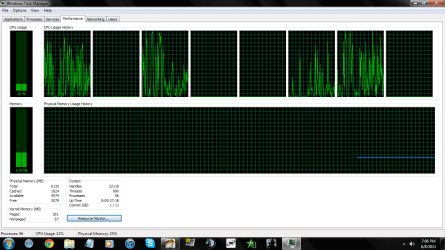
As per the process, here is a picture..

Process.png

And here is another picture, with no proper application running but the few things in system try..

No Applications.png
 

My Computer

OS
Windows 7 Ultimate x64
CPU
i7 930 @ 2.80GHz
Motherboard
Asus Sabertooth x58
Memory
6GB DDR3
Graphics Card(s)
MSI Nvidia GTX 460 Hawk 1 GB Talon Attack
Keyboard
Razer Arctosa
Mouse
Razer Mamba
Internet Speed
4 mbps
i'm pretty sure he is talking fahrenheit not celsius.
Lol, dude, I am talking about Celsius.
 

My Computer

OS
Windows 7 Ultimate x64
CPU
i7 930 @ 2.80GHz
Motherboard
Asus Sabertooth x58
Memory
6GB DDR3
Graphics Card(s)
MSI Nvidia GTX 460 Hawk 1 GB Talon Attack
Keyboard
Razer Arctosa
Mouse
Razer Mamba
Internet Speed
4 mbps
i'm pretty sure he is talking fahrenheit not celsius.
Lol, dude, I am talking about Celsius.


i noticed your pics after i made my post. :o i don't know then. i'd personally say cpu gone bad, fan censors gone bad. 100c should shut down your system without any warning to protect itself. how is the system preforming? as for the load in your one pic i have a heavier load idle without itunes or firefox running, so no those temps should be no higher than say 38 idle. as for the 3rd party heatsink yes i would get it. i always use a 3rd party heatdsink.
 

My Computer

OS
Windows 7 Ultimate
CPU
Core2Duo E8400
Motherboard
Asus Rampage Formula Rev. 1
Memory
5 Gigs
Graphics Card(s)
Asus Nvidia 9500 Gt
Sound Card
Creative X-Fi Extreme Audio
Monitor(s) Displays
18 Inch LCD
Screen Resolution
1366x768
Hard Drives
c: wd 300 gig velociaptor, wd 1tb, wd 500 gig, wd 320 gig, and 2 wd 40 gig ide drives
PSU
600 watts
I would reseat the CPU cooler with new paste. That is a cheap first aid. Maybe even go for a better cooler.
 

My Computer

Computer Manufacturer/Model Number
HP, Dell, Gateway, Toshiba - 4 laptops and 2 desktops
OS
Vista, Windows7, Mint Mate, Zorin, Windows 8
CPU
from 1.6GHz Duo to i7
Monitor(s) Displays
2x HP w2207
Hard Drives
5x HDD, 7x SSD, 12x Externals
Keyboard
with trackball - no mices
Mouse
Trackball mice
Internet Speed
DSL 6000
My temps are like always 60 - 70 (idle). Like always. Even as soon as I boot my PC.
Load, well, I am happy if they are anything below 90 now a days. Goes up to 100. :O
And the computer is a little slow.
And, I am getting a Hyper 212+ if like 2 weeks then. (:
Hope it helps.
And just out of curiosity, umm, let's say the Hyper 212, does bring the temps back to normal, i.e., 35 - 40, will that bring the load down as well?
 

My Computer

OS
Windows 7 Ultimate x64
CPU
i7 930 @ 2.80GHz
Motherboard
Asus Sabertooth x58
Memory
6GB DDR3
Graphics Card(s)
MSI Nvidia GTX 460 Hawk 1 GB Talon Attack
Keyboard
Razer Arctosa
Mouse
Razer Mamba
Internet Speed
4 mbps
This thread is hilarious.
 

My Computer

Computer Manufacturer/Model Number
Self Built
OS
Windows 7 Pro x64
CPU
Intel Core 2 Quad Q9550 OC
Motherboard
ASUS P5Q SE PLUS LGA 775 Intel P45 ATX Intel
Memory
8GB (4x2GB) OCZ Platinum DDR2-1066 + G.SKILL DDR2-1200
Graphics Card(s)
EVGA GeForce GTX 480 SuperClocked OC
Sound Card
HT Omega Striker 7.1
Monitor(s) Displays
Samsung SyncMaster 2433BW, TOSHIBA 32" HDTV 32RV525R
Screen Resolution
1920 x 1200 and 1920x1080
Hard Drives
(Internal)
1. Western Digital VelociRaptor 150GB SATA 10000RPM
(External)
2. DroboS 5x2TB
PSU
CORSAIR 650W
Case
Antec Three Hundred Black Steel ATX Mid Tower Computer Case
Cooling
XIGMATEK HDT-S1283 120mm Rifle CPU Cooler
Keyboard
Logitech Illuminated Keyboard
Mouse
Logitech MX518
Internet Speed
25 Up 25 Down
Other Info
Logitech z-5500 Digital Surround Sound Speaker System
Back
Top