Realtek ALC887 suddenly decided to stop working at all...

creatip

New member
Local time
8:39 PM
Messages
5
Hi,

This is my first time posting in this forum, because I encountered kind of a strange problem with my sound card.

I'm using Asus motherboard M5A78L-M LX, with onboard sound card, which is Realtek ALC 887. Operating on windows 7 ultimate 32bit. I've been using this PC for around 2 years now without any sound problems. So today, I moved my office to a new location. In the morning, I was still playing with my PC with the sound perfectly normal. Then I unplugged my PC, getting ready to move. I packed my PC in a cardboard box, and brought it to my new office by car (so no rough bumps). When I set up my PC again in the new office, there was no sound at all. From control panel>sound, I could see the VU meter were still moving when I play a song, but there was no sound at all from the speakers or headset.

I tested the speakers and headset, they were perfectly normal.

Tried:
- updating realtek driver
- roll back driver to older version
- uninstall driver then let windows automatically install the driver again
- uninstall driver and removed the driver, so windows just registered the sound card as 'HD audio' or something like that
- double checked in control panel>sound that the device that is default and active is indeed the realtek ALC887
- system restore
- troubleshooting audio, which windows didn't find any problems
- stopped, started, restarted windows audio service via services.msc
- taking off the side panel, and physically wiggled the audio jacks
- changing onboard audio setting in BIOS, disabled, enabled, front panel as AC97 and HDaudio
- reload default BIOS settings

None of the above work at all. Still no sound, not even a static noise or something. I'm at the end of my wits, and started to suspect that it's a hardware problem, maybe bad or short-circuited audio jacks or something. But still, it's strange for me that in the morning, everything is normal, moved the PC to a new office, and suddenly it's not working at all.

So is it true that it's a hardware problem (which implying there's nothing I can do other than buy a new sound card)? Or are there anything at all that I can try before that? Any suggestions are very appreciated.

Thank you in advance. Sorry for my bad English.
 

My Computer My Computer

At a glance

windows 7 ultimate x86
Computer type
PC/Desktop
OS
windows 7 ultimate x86
This is pretty off the wall and I only suggest these mundane checks based on an experience I had. After many hours of trying to figure out why I lost sound I found that I mistakenly plugged my speakers in to the wrong jack after cleaning the dust out.

Have you checked to see if the speakers or play back device is muted or turned down in the volume mixer?

It's a long shot but worth the check versus a new sound card and only suggested because of the recent move of the system.
 

My Computer My Computer

At a glance

1. Windows 7 Home Premium sp1 - 64bit 2. Wind...1. AMD Phenom II x2 511 3.4GHz 2. Intel i7-47...1. 5 GB - DDR3 2. 8GB DDR3-1600MHzIntegrated 1. ATI Radeon 4200 2. Intel HD Gra...
Computer type
PC/Desktop
Computer Manufacturer/Model Number
1. HP p6733w Desktop 2. HP Envy 700-515xt Desktop
OS
1. Windows 7 Home Premium sp1 - 64bit 2. Windows 7 Pro sp1 - 64bit
CPU
1. AMD Phenom II x2 511 3.4GHz 2. Intel i7-4790 Quad 4.0GHz
Motherboard
1. N-Alvorix-RS880-uATX 2. Kaili2
Memory
1. 5 GB - DDR3 2. 8GB DDR3-1600MHz
Graphics Card(s)
Integrated 1. ATI Radeon 4200 2. Intel HD Graphics 4600
Sound Card
1. Realtek High Definition Audio 2. Realtek (Neutered Beats)
Monitor(s) Displays
1. Acer V193L 2. HP 2311 Series Wide LCD
Screen Resolution
1. 1280 x 1024 2. 1920 x 1080
Hard Drives
1. 750 GB - 7200 RPM SATA 2. 1TB 7200 RPM SATA
PSU
1. 250w 2. 300w
Cooling
Stock
Keyboard
Logitech USB keyboard
Mouse
Logitech USB optical mouse
Internet Speed
1.0 - 2.0 mbps
Antivirus
Eset Smart Security v9.0.349.0
Browser
Pale Moon
This is pretty off the wall and I only suggest these mundane checks based on an experience I had. After many hours of trying to figure out why I lost sound I found that I mistakenly plugged my speakers in to the wrong jack after cleaning the dust out.

Have you checked to see if the speakers or play back device is muted or turned down in the volume mixer?

It's a long shot but worth the check versus a new sound card and only suggested because of the recent move of the system.

Hi, thank you for the response.

I have tried plugging the speakers to all available audio jacks on my pc (all the while windows media player was playing a song), still no sound.

I just thought of something after I posted this thread yesterday. I remembered that I have a windows xp installed in a different partition. I kept it there to use old hardwares that are not supported by windows 7. So I tried booting into windows xp, and still no sound at all. Tried tweaking the realtek application in windows xp (the one with blue/indigo color), nothing was muted, and still no sound.
 

My Computer My Computer

At a glance

windows 7 ultimate x86
Computer type
PC/Desktop
OS
windows 7 ultimate x86
As I said it was a long shot.

I'll have to leave this for someone with more experience to dig deeper. I know nothing about Windows Media Player.
 

My Computer My Computer

At a glance

1. Windows 7 Home Premium sp1 - 64bit 2. Wind...1. AMD Phenom II x2 511 3.4GHz 2. Intel i7-47...1. 5 GB - DDR3 2. 8GB DDR3-1600MHzIntegrated 1. ATI Radeon 4200 2. Intel HD Gra...
Computer type
PC/Desktop
Computer Manufacturer/Model Number
1. HP p6733w Desktop 2. HP Envy 700-515xt Desktop
OS
1. Windows 7 Home Premium sp1 - 64bit 2. Windows 7 Pro sp1 - 64bit
CPU
1. AMD Phenom II x2 511 3.4GHz 2. Intel i7-4790 Quad 4.0GHz
Motherboard
1. N-Alvorix-RS880-uATX 2. Kaili2
Memory
1. 5 GB - DDR3 2. 8GB DDR3-1600MHz
Graphics Card(s)
Integrated 1. ATI Radeon 4200 2. Intel HD Graphics 4600
Sound Card
1. Realtek High Definition Audio 2. Realtek (Neutered Beats)
Monitor(s) Displays
1. Acer V193L 2. HP 2311 Series Wide LCD
Screen Resolution
1. 1280 x 1024 2. 1920 x 1080
Hard Drives
1. 750 GB - 7200 RPM SATA 2. 1TB 7200 RPM SATA
PSU
1. 250w 2. 300w
Cooling
Stock
Keyboard
Logitech USB keyboard
Mouse
Logitech USB optical mouse
Internet Speed
1.0 - 2.0 mbps
Antivirus
Eset Smart Security v9.0.349.0
Browser
Pale Moon
Have you :

1. Tried using different media players
2. Closely inspected your hardware (motherboard) for blown caps, fuses, little brown spots underneath it?
3 Considered the possibility this is a hardware and not a software fault?
 

My Computer My Computer

At a glance

Windows 7 Ultimate x64FX 8350 @ 4.8ghz, turbo clocked to 5.4ghzMushkin Enhanced Blackline 16GB 1760mhz 10-10...Gigabyte-660 Windforce OC- GPU Clock 1212MHz ...
Computer type
PC/Desktop
Computer Manufacturer/Model Number
Custom Build
OS
Windows 7 Ultimate x64
CPU
FX 8350 @ 4.8ghz, turbo clocked to 5.4ghz
Motherboard
Asus Sabertooth FX990 Gen 3.0 R2.0
Memory
Mushkin Enhanced Blackline 16GB 1760mhz 10-10-9-24 T1
Graphics Card(s)
Gigabyte-660 Windforce OC- GPU Clock 1212MHz /3504MHz ram
Sound Card
Creative Sound Blaster Recon3D PCIe Sound Card
Monitor(s) Displays
Samsung SyncMaster S27B350H (HDMI)
Screen Resolution
1920x1080 60HZ
Hard Drives
1 x SSD Crucial M4 256GB (Primary OS)
3 x HDD WD 1TB
4 x HDD 2TB
1 x HDD 160GB (Secondary Backup OS)
Raid SATA III 6GB/s 4-port PCI-e Controller Card, Marvel 88SE9215 chipset
PSU
Chieftec-650-14CS (Modular) 80 Plus Gold-650 Watt
Case
Akasa Venom Toxic Gaming Big tower ( Custom Black ) Ver 2.0
Cooling
Water 2.0 PRO / GEIL Cyclone VRM / 6x120mm 2x220mm 2x140mm
Keyboard
Logitech G19
Mouse
Wireless Notebook Presenter Mouse 8000
Internet Speed
Fiber GBS
Antivirus
Don't Announce it to the world :)
Browser
Gotta have at least 1!
Have you :

1. Tried using different media players
2. Closely inspected your hardware (motherboard) for blown caps, fuses, little brown spots underneath it?
3 Considered the possibility this is a hardware and not a software fault?

Hi,

1. Yes, tried windows media player, foobar2000, even tried using a game (playing a game).
2. From the top (processor side) nothing seem unusual. Inspecting the back (soldering side) means I have to take the motherboard apart from the PC chassis. I don't think I have the adequate skill for that, afraid I'll end up doing more damage than repairing it.
3. I have considered it (the possibility that the input jacks are blown or short-circuited or something). I just consider it strange that a few hours before, everything is all good, and later it's not working at all. I mean, no degrading sounds, noises, etc in the process. It just went from full force to zero in an instant.

But yes, I have tried everything I can think of and google of, so I thought I'd have to chalk this one to hardware failure. Went and bought a new xonar DG today, installed it, smooth as silk. Out of curiosity, after I installed the xonar, I tried re-enabling the onboard ALC887, and still the same, no sound. Disabled it, the xonar kicked in, and I got sound again.

So should I mark this thread as 'solved'?
 

My Computer My Computer

At a glance

windows 7 ultimate x86
Computer type
PC/Desktop
OS
windows 7 ultimate x86
Hi, as stated above, I gave up on the ALC887, and replaced it with xonar DG.

Now there's a tiny bit of a problem with my xonar DG. Installed the card, updated the driver, got sound coming out of the speakers. The card support front panel audio jack detection, meaning it should detect if there is an audio jack plugged in the front panel, and should automatically mute the rear output speakers and route the sound to front panel. Problem is, I got it backwards! When I plugged in an audio jack to the front panel, the system read it as 'no jack', and continues to output sounds to rear jacks. But when I pull the front audio jack out, the system read it as 'plugged in a jack in front panel', and automatically route the audio to the front panel (which has nothing in it, because I pulled the plug out). So when I do that (plug in or plug out an audio jack from front panel), I have to open asus audio center and manually select the proper output.

As I said, this is a tiny problem actually, but I'm just curious as to why the detection is working, but backwards.

Thank you.

PS: sorry if my question is not about ALC887 anymore. I'm just thinking I'd rather continue posting in this thread, rather than making a new thread with such tiny problem. If you all think I should make a new thread, I will.
 

My Computer My Computer

At a glance

windows 7 ultimate x86
Computer type
PC/Desktop
OS
windows 7 ultimate x86
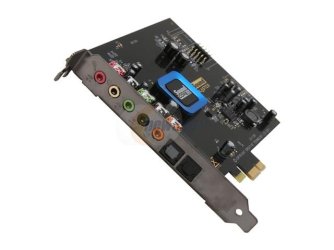
If you have a spare 60~70 dollars I would advise on this sound card, it is amazingly good for its price (it's what I have, so semi biased ) but I have my ps3 with TOSLINK hooked up to it, and it is really cool being able to play games and having your computer keyboard on you lap at the same time and being able to control the sound and or transfer music directly to games. Link Creative Sound Blaster Recon3D PCIe (70SB135000000) Sound Card - Newegg.com

Some specs, quite impressive, and if you look at the recond3d lineup, especially the ones with a cover ( card gets warmer so I think open design is actually more efficient and will last longer, have the SAME specs, only a pretty cover, some LED red light inside but cost twice the money.

The next generation Sound Blaster card - the Sound Blaster Recon3D - is powered by Sound Core3D and heralds a new age in 3D gaming audio and online voice communication. Hardware-accelerated THX TruStudio Pro audio technologies deliver unsurpassed audio playback quality, while the innovative CrystalVoice processing lets you communicate with crystal clear vocal fidelity in your multiplayer games, online chats and video conferencing.
Engineered for low power consumption and high performance, the Sound Core3D processor is Creative's first sound and voice processor to integrate a quad-core high-performance digital signal processor (DSP) and high-quality converters onto a single chip.


By the way, did I mention the sound is AMAZING, and I had a few cards in my time, including a 200 xfi, and a turtle beach and some other ones, this one makes them look like were comparing high quality Candy to a 50 cents cup of coffee :p
 

Attachments

  • 29-102-041-04.jpg
    29-102-041-04.jpg
    19.4 KB · Views: 15

My Computer My Computer

At a glance

Windows 7 Ultimate x64FX 8350 @ 4.8ghz, turbo clocked to 5.4ghzMushkin Enhanced Blackline 16GB 1760mhz 10-10...Gigabyte-660 Windforce OC- GPU Clock 1212MHz ...
Computer type
PC/Desktop
Computer Manufacturer/Model Number
Custom Build
OS
Windows 7 Ultimate x64
CPU
FX 8350 @ 4.8ghz, turbo clocked to 5.4ghz
Motherboard
Asus Sabertooth FX990 Gen 3.0 R2.0
Memory
Mushkin Enhanced Blackline 16GB 1760mhz 10-10-9-24 T1
Graphics Card(s)
Gigabyte-660 Windforce OC- GPU Clock 1212MHz /3504MHz ram
Sound Card
Creative Sound Blaster Recon3D PCIe Sound Card
Monitor(s) Displays
Samsung SyncMaster S27B350H (HDMI)
Screen Resolution
1920x1080 60HZ
Hard Drives
1 x SSD Crucial M4 256GB (Primary OS)
3 x HDD WD 1TB
4 x HDD 2TB
1 x HDD 160GB (Secondary Backup OS)
Raid SATA III 6GB/s 4-port PCI-e Controller Card, Marvel 88SE9215 chipset
PSU
Chieftec-650-14CS (Modular) 80 Plus Gold-650 Watt
Case
Akasa Venom Toxic Gaming Big tower ( Custom Black ) Ver 2.0
Cooling
Water 2.0 PRO / GEIL Cyclone VRM / 6x120mm 2x220mm 2x140mm
Keyboard
Logitech G19
Mouse
Wireless Notebook Presenter Mouse 8000
Internet Speed
Fiber GBS
Antivirus
Don't Announce it to the world :)
Browser
Gotta have at least 1!
If it were me I'd go to the manufacturers web site and check on the manuals or if need be give them a call. It's new therefore under warranty. They would be your best source of information for any issues you are having.

Sound Cards and Digital-to-Analog Converters - Xonar DG
 

My Computer My Computer

At a glance

1. Windows 7 Home Premium sp1 - 64bit 2. Wind...1. AMD Phenom II x2 511 3.4GHz 2. Intel i7-47...1. 5 GB - DDR3 2. 8GB DDR3-1600MHzIntegrated 1. ATI Radeon 4200 2. Intel HD Gra...
Computer type
PC/Desktop
Computer Manufacturer/Model Number
1. HP p6733w Desktop 2. HP Envy 700-515xt Desktop
OS
1. Windows 7 Home Premium sp1 - 64bit 2. Windows 7 Pro sp1 - 64bit
CPU
1. AMD Phenom II x2 511 3.4GHz 2. Intel i7-4790 Quad 4.0GHz
Motherboard
1. N-Alvorix-RS880-uATX 2. Kaili2
Memory
1. 5 GB - DDR3 2. 8GB DDR3-1600MHz
Graphics Card(s)
Integrated 1. ATI Radeon 4200 2. Intel HD Graphics 4600
Sound Card
1. Realtek High Definition Audio 2. Realtek (Neutered Beats)
Monitor(s) Displays
1. Acer V193L 2. HP 2311 Series Wide LCD
Screen Resolution
1. 1280 x 1024 2. 1920 x 1080
Hard Drives
1. 750 GB - 7200 RPM SATA 2. 1TB 7200 RPM SATA
PSU
1. 250w 2. 300w
Cooling
Stock
Keyboard
Logitech USB keyboard
Mouse
Logitech USB optical mouse
Internet Speed
1.0 - 2.0 mbps
Antivirus
Eset Smart Security v9.0.349.0
Browser
Pale Moon
realtek alc887 losing sound.

realtek alc887 sound dropping off fix.
I tried EVERYTHING to get the sound from going away on my realtek alc887 (on card unit).
The ONLY thing that worked in the end, was to do a drive C cleanup, that included removing system files, and then a full scan. My Machine is an ASUS/Intel 64 bit Windows 7 home premium desktop.
 

My Computer My Computer

At a glance

Windows 7 and 10 64 bit
Computer type
PC/Desktop
OS
Windows 7 and 10 64 bit
My Machine is an ASUS/Intel 64 bit Windows 7 home premium desktop.


be more specific, GearJunky.

what kind of ASUS desktop computer or motherboard are you using?
run HWInfo or Speccy to gather more specs and post them here
 

My Computer My Computer

At a glance

Windows 7 SP1 Home Premium 64bit [x64]Intel(R) Core(TM) i5-2310 CPU @ 2.90GHz6 GBIntel HD Graphics 2000
Computer type
PC/Desktop
Computer Manufacturer/Model Number
Dell Inspiron 620
OS
Windows 7 SP1 Home Premium 64bit [x64]
CPU
Intel(R) Core(TM) i5-2310 CPU @ 2.90GHz
Memory
6 GB
Graphics Card(s)
Intel HD Graphics 2000
Sound Card
Conexant CX20641 HD Audio
Hard Drives
Western Digital 1TB (1024GB) WD10EALX-759BA1
Internet Speed
Spectrum Cable Internet up to 100Mbps
Back
Top