Realtek Audio not detecting analog inputs

Genny Justice

New member
Local time
8:16 AM
Messages
6
I have a Gigabyte GA-P55-UD3R that has had no problem for quite a long time using Windows 7 64 bit. Recently after a reboot, the integrated Realtek audio no longer detects any analog connection (tried with mic/speakers/headphones) in any of the jacks.

I removed the current drivers using add / remove, rebooted, then installed the latest drivers from Gigabyte, then I tried Realtek directly, and finally the default Windows audio drivers. I also tried removing the drivers with driver sweeper, directly from device manager, etc. and installing a fresh set of drivers. Additionally, I disconnected the front audio jacks from the motherboard in case that was causing a problem. Windows detects the sound card and there appears to be no problems in device manager.

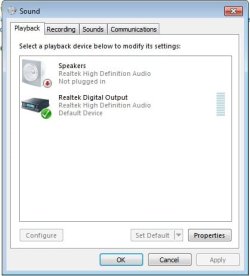
I've gone through every available option in the Realtek sound control options, but I'm at a loss. I have a USB headset that works without a problem, but I can't get these darn analog speakers to work. Any advice? Before anyone says it, 'set default device' is grayed out as an option for the speakers.
 
Last edited:

My Computer

OS
Windows 7 Home Premium 64 bit
CPU
Core i5 750 @ 4.0ghz
Motherboard
Gigabyte GA-P55-UD3R
Memory
4 x 2gb Gskill
Graphics Card(s)
Ati 5850
Sound Card
Integrated (realtek)
Hard Drives
Intel X25-M 80 GB
WD Caviar Black 750 GB
PSU
OCZ 650 W
Case
Corsair 800d
Provide a snippet of your Windows Volume mixer, Playback devices.
 

My Computer

Computer type
PC/Desktop
Computer Manufacturer/Model Number
Custom Build
OS
Windows 7 Home Premium 64 bit
CPU
Intel Core i7-4790
Motherboard
GA-Z87X-D3H
Memory
G.SKILL 8GB (2 x 4GB) DDR3 F3-10666CL9D-8GBNT
Graphics Card(s)
AMD Radeon R7 250
Sound Card
Realtek ALC892
Monitor(s) Displays
Samsung UN32EH5000, Dell 1703FPT
Screen Resolution
1920 x 1080, 1280 x 1024
Hard Drives
WD5003AZEX
WD10EZEX
Samsung HD103SJ
Samsung 128 GB 840 PRO
PSU
SeaSonic M12II SS-500GM
Case
Fractal Design Define R4
Cooling
Zalman CNPS9900ALED
Keyboard
Logitech K800
Mouse
Logitech M705
Internet Speed
16 Mbps
Antivirus
Avast
Browser
Firefox
Other Info
Bose Companion 2 Multimedia Speakers
10char
 

Attachments

  • notpluggedin.jpg
    notpluggedin.jpg
    22.7 KB · Views: 110

My Computer

OS
Windows 7 Home Premium 64 bit
CPU
Core i5 750 @ 4.0ghz
Motherboard
Gigabyte GA-P55-UD3R
Memory
4 x 2gb Gskill
Graphics Card(s)
Ati 5850
Sound Card
Integrated (realtek)
Hard Drives
Intel X25-M 80 GB
WD Caviar Black 750 GB
PSU
OCZ 650 W
Case
Corsair 800d
Do you have the speakers plugged into the back output on the motherboard?
 

My Computer

Computer type
PC/Desktop
Computer Manufacturer/Model Number
Custom Build
OS
Windows 7 Home Premium 64 bit
CPU
Intel Core i7-4790
Motherboard
GA-Z87X-D3H
Memory
G.SKILL 8GB (2 x 4GB) DDR3 F3-10666CL9D-8GBNT
Graphics Card(s)
AMD Radeon R7 250
Sound Card
Realtek ALC892
Monitor(s) Displays
Samsung UN32EH5000, Dell 1703FPT
Screen Resolution
1920 x 1080, 1280 x 1024
Hard Drives
WD5003AZEX
WD10EZEX
Samsung HD103SJ
Samsung 128 GB 840 PRO
PSU
SeaSonic M12II SS-500GM
Case
Fractal Design Define R4
Cooling
Zalman CNPS9900ALED
Keyboard
Logitech K800
Mouse
Logitech M705
Internet Speed
16 Mbps
Antivirus
Avast
Browser
Firefox
Other Info
Bose Companion 2 Multimedia Speakers
Correct...I've verified the speakers work via an MP3 player. I've tried them in every available jack (although green should be the correct one). I've also head phones and a mic which are also not detected.
 

My Computer

OS
Windows 7 Home Premium 64 bit
CPU
Core i5 750 @ 4.0ghz
Motherboard
Gigabyte GA-P55-UD3R
Memory
4 x 2gb Gskill
Graphics Card(s)
Ati 5850
Sound Card
Integrated (realtek)
Hard Drives
Intel X25-M 80 GB
WD Caviar Black 750 GB
PSU
OCZ 650 W
Case
Corsair 800d
You tried setting the speakers as the default device instead of the digital?
 

My Computer

Computer type
PC/Desktop
Computer Manufacturer/Model Number
Me
OS
Win 7 Ultimate x64
CPU
FX-8350 @ 4.6 GHz so far
Motherboard
Asus M5A97 EVO
Memory
ADATA XPG V1 Series Black 8GB DDR3 1600
Graphics Card(s)
Sapphire R9 270x Dual-X
Sound Card
Xonar DGX w/ Corsair Vengence 1300
Monitor(s) Displays
Acer S232HL Abid
Screen Resolution
1920x1080
Hard Drives
120 GB OCZ Vertex 3
500 GB Seagate 7200.12
PSU
Antec Earthwatts 650W Green
Case
Antec Three Hundred
Cooling
Cooler Master 212 EVO
Keyboard
Logitech G510
Mouse
Logitech G500s
Internet Speed
35000/3000
Correct; when the device is in the 'not plugged in' state the option to set default device is grayed out.

I guess I can mark this resolved. I got tired of wrestling with this, chalked it up to hardware failure and bought a cheap soundblaster audigy. Thanks for the input guys.
 

My Computer

OS
Windows 7 Home Premium 64 bit
CPU
Core i5 750 @ 4.0ghz
Motherboard
Gigabyte GA-P55-UD3R
Memory
4 x 2gb Gskill
Graphics Card(s)
Ati 5850
Sound Card
Integrated (realtek)
Hard Drives
Intel X25-M 80 GB
WD Caviar Black 750 GB
PSU
OCZ 650 W
Case
Corsair 800d
WOW

I am having this exact same problem in every way. Ive been going crazy and finally found this post. Is there anyone who has found a solution? Right now i can no longer use my headphone jack or my rear output. Working one minute, not working the next.

Please help.
 

My Computer

Computer Manufacturer/Model Number
Cyber Power PC
OS
Windows 7 64 bit Home Premium
I am having this exact same problem in every way. Ive been going crazy and finally found this post. Is there anyone who has found a solution? Right now i can no longer use my headphone jack or my rear output. Working one minute, not working the next.

Please help.

Dear Brandon Hill,
Welcome! Are you ABSOLUTELY sure(sorry for the caps) that all the jacks are snugly and properly fitting into their respective slots! I mean ,no loose connections at all? I am asking because you are getting and losing the sound moment to moment! Connections, always check connections,my hardware engineer friend used to say!
Regards,
Sreedhav
 

My Computer

Computer Manufacturer/Model Number
Sony Vaio C series VPCCB35FN laptop
OS
MS Windows 7 Home Premium 64-bit SP1
CPU
IntelCore [email protected]; Sandy Bridge 32nm Tech.
Motherboard
Sony Vaio Version:C609NJYJ
Memory
4096Mb RAM; Single ChannelDDR3@665MHz; DRAM Freq:662MHz
Graphics Card(s)
AMD Radeon HD 6630M; GPU:Whistler;BIOS Core&mem Clock:123.36
Sound Card
REALTEK High Definition Audio Device; INTEL Display Card
Monitor(s) Displays
Generic PnP Intel HD;Resolution:1920*1040 Pixels; BPP:32bits
Screen Resolution
Current Resolution:1920*1080 Pixels; Monitor Frequency:60Hz
Hard Drives
Internal HD:TOSHIBA MK5061GSY; Real Size:488 GB;NTFS; 3 Partitions; SATA; HEADS:16

External HDD: WD Elements 1023 PORTABLE; Estimated Size: 1TB; NTFS; 3 Partitions
Cooling
Lateral Exhaust with a Cooling Pad Placed Beneath.
Keyboard
Logitech Bluetooth+ Generic Integrated K-B
Mouse
Logitech Bluetooth
Internet Speed
2MBPS
Other Info
1)Trend Micro Titanium Maximum Security Suite Version:3
2)SAS-PRO

3)MBAM--PRO


4)WATERFOX+IE9 +WOT+LINKEXTEND+ DRWEBCUREIT LINK CHECKER

5)SPYWAREBLASTER

6) WINPATROL PLUS

7) SANDBOXIE and
8) A BIT OF COMMON SENSE.
Dear Brandon Hill,
I am posting my audio input to a microphone jack and can you provide a similar snippet? Mine was just diagnosed as "LOW AUDIO VOLUME" by the MS troubleshooter

regards,
Sreedhav
 

Attachments

  • Recording Audio_2011-03-23_14-34-16.png
    Recording Audio_2011-03-23_14-34-16.png
    8.5 KB · Views: 61

My Computer

Computer Manufacturer/Model Number
Sony Vaio C series VPCCB35FN laptop
OS
MS Windows 7 Home Premium 64-bit SP1
CPU
IntelCore [email protected]; Sandy Bridge 32nm Tech.
Motherboard
Sony Vaio Version:C609NJYJ
Memory
4096Mb RAM; Single ChannelDDR3@665MHz; DRAM Freq:662MHz
Graphics Card(s)
AMD Radeon HD 6630M; GPU:Whistler;BIOS Core&mem Clock:123.36
Sound Card
REALTEK High Definition Audio Device; INTEL Display Card
Monitor(s) Displays
Generic PnP Intel HD;Resolution:1920*1040 Pixels; BPP:32bits
Screen Resolution
Current Resolution:1920*1080 Pixels; Monitor Frequency:60Hz
Hard Drives
Internal HD:TOSHIBA MK5061GSY; Real Size:488 GB;NTFS; 3 Partitions; SATA; HEADS:16

External HDD: WD Elements 1023 PORTABLE; Estimated Size: 1TB; NTFS; 3 Partitions
Cooling
Lateral Exhaust with a Cooling Pad Placed Beneath.
Keyboard
Logitech Bluetooth+ Generic Integrated K-B
Mouse
Logitech Bluetooth
Internet Speed
2MBPS
Other Info
1)Trend Micro Titanium Maximum Security Suite Version:3
2)SAS-PRO

3)MBAM--PRO


4)WATERFOX+IE9 +WOT+LINKEXTEND+ DRWEBCUREIT LINK CHECKER

5)SPYWAREBLASTER

6) WINPATROL PLUS

7) SANDBOXIE and
8) A BIT OF COMMON SENSE.
I meant the sound had been working then suddenly stopped never to return. The rear audio jacks are very firmly connected to the motherboard, as is the microphone jack. I would provide a snippit but i do not know how. However, my headphones are definantly turned on and up, as is my speaker audio.

My problem is exactly as the origional poster stated.
 

My Computer

Computer Manufacturer/Model Number
Cyber Power PC
OS
Windows 7 64 bit Home Premium
Please help

I am having the same issue as the other users posted so far and the only suggestion that was ever posted was to secure the connections...

OK, so to reiterate what was already said, I cannot enable the rear audio jacks on my Windows 7 Pro x64 system because it is not detecting that I've plugged anything into it.

Is there a way to trick the system into thinking that the jacks are plugged in so that I can push audio out of the rear panel?

I know this is the issue, as the front mic jack and headphone jack works and so does the rear optical out on the same speaker setup and wiring. One bit of information I did not mention is that I'm only plugging three of the possible 5, 3.5mm jacks into the rear panel. This shouldn't matter though should it? I only have a 3 jack speaker system and a 5 jack (+1 for the mic) audio card.

I'm hoping I do not have to go out and replace my sound card, or my computer speaker system. Is there any way I can go through the setup wizard again or something to get this working? It worked previously on Vista, but when I upgraded to Windows 7 Pro, it stopped.
 

My Computer

OS
Windows 7 Professional x64
For what it's worth, I ended up buying a sound card and threw it in. The manufacturer advised me to RMA but I didn't want to go through the hassle.
 

My Computer

OS
Windows 7 Home Premium 64 bit
CPU
Core i5 750 @ 4.0ghz
Motherboard
Gigabyte GA-P55-UD3R
Memory
4 x 2gb Gskill
Graphics Card(s)
Ati 5850
Sound Card
Integrated (realtek)
Hard Drives
Intel X25-M 80 GB
WD Caviar Black 750 GB
PSU
OCZ 650 W
Case
Corsair 800d
With the Realtek jack detection, the trick is to remove all connections and insert one connection at a time.
Once the connection has been recognized by the software, press OK. Go on to the next connection and repeat until everything is detected.

Usually just going through the jack detection process, will clear things up for most people.
 

My Computer

Computer type
PC/Desktop
Computer Manufacturer/Model Number
Custom Build
OS
Windows 7 Home Premium 64 bit
CPU
Intel Core i7-4790
Motherboard
GA-Z87X-D3H
Memory
G.SKILL 8GB (2 x 4GB) DDR3 F3-10666CL9D-8GBNT
Graphics Card(s)
AMD Radeon R7 250
Sound Card
Realtek ALC892
Monitor(s) Displays
Samsung UN32EH5000, Dell 1703FPT
Screen Resolution
1920 x 1080, 1280 x 1024
Hard Drives
WD5003AZEX
WD10EZEX
Samsung HD103SJ
Samsung 128 GB 840 PRO
PSU
SeaSonic M12II SS-500GM
Case
Fractal Design Define R4
Cooling
Zalman CNPS9900ALED
Keyboard
Logitech K800
Mouse
Logitech M705
Internet Speed
16 Mbps
Antivirus
Avast
Browser
Firefox
Other Info
Bose Companion 2 Multimedia Speakers
I think I have a solution. I was having the same issue. Only digital outputs were showing as options, and analog outputs were greyed out showing no device in and wouldn't auto-detect. Perusing the internet, I finally found a forum suggestion that worked. Full disclaimer here, I know editing your registry has it's hazards, and I essentially just followed someone else's instructions and trusted them (well, plus others had said it worked). Please do so at your own risk. Here is the post from jdneff at the HP forums (I would rather he get credit, since I'm just passing on the solution):

I was having quite similar problems and was finally able to resolve it.

Something seems to be completely borked with the realtek drivers regarding automatic jack detection.

After attempting to use the method described here (easier if you can) Vista and Realtek Front Panel Audio not working – Solution « freeweelee, I discovered that I was completely unable to shut off the jack detection in the Realtek audio manager (no folder icon).

For those of you who (like me) have no folder icon, I managed to find another way to disable the jack detection.

Using the registry editor, find all instances of ForceDisableJD and change the value from 00 to FF.

After making sure I got all of them, I was able to reboot and everything works fine now.

I did as he suggested (had 4 or 5 instances), reboot, and everything is working perfectly! I hope this works for you too. It seems there are a lot of unresolved instances of this problem on forums.
 

My Computer

OS
Windows 7 64-bit
Sound fun

Well, nobody has written anything in this forum in quite some time, but I've made a bit of progress in this realm, so I thought I'd post it. I had this same issue and went bonkers trying to fix it for hours. I tried drivers, bios settings, system settings, default sound devices, even looked at the motherboard thinking I might see a frayed lead or broken solder point or something, but nothing worked. Finally I just started clicking on things, and found a setting that doesn't FIX the situation, but allows you to get sound again.

Here's my take on the situation. Your computer has (had) the ability to watch your jacks and determine when something has been inserted into them. The Realtek HD Audio Manager uses that input to inform you (quite helpfully?) that you have just inserted or removed something from an audio jack. It also uses this information to determine which devices you're using, and to limit your options when it comes to settings and control panel tabs, apparently so as not to confuse you by allowing you to make changes to device profiles that aren't currently plugged into your computer.

Here's the issue, this functionality likely relies on the detection of very small amounts of electricity being run through the jack...the plug completes a small circuit that signals the motherboard that something has been inserted...which is fine unless a larger jolt of electricity makes its way to that sensitive detector and fries the thing out. I can't guarantee that this is what's happening, but it makes sense. Anyway, now that your computer can't detect input changes, it also assumes you don't have anything plugged in, ever again.

In the past, again, this would be no problem...headphone jacks are just simple metal to metal to connections, so as long as nobody tried to get fancy with the software, you'd be fine, but wait, they did. In this age of wonder, if that very fragile piece of technology goes bad (mine lasted about a year, the same length of my Dell warranty) the Realtek software basically shuts down your jacks. There really isn't a fix for the detection as far as I can tell, not without replacing your sound card or motherboard. However, Realtek doesn't have to check the detection status to just play sound through the darn device, but they sort of hide the option. In the realtek audio manager (mine shows up in the system tray as a little orange speaker icon) there is an unlabeled icon that looks like a folder. It doesn't even look like something you should be able to click on, and what the heck does a folder have anything to do with sound, your audio devices, or front panel jack detection? Nothing, that's what. You'd never know that if you click on it, there is a single checkbox option within to "Disable Front Panel Jack Detection", but there is. Go in there, check the box, and Realtek will no longer rely on this broken detector to populate your Microphone and Speaker panel tabs, and you'll be able to get sound again. I know some of this was hinted at in other posts, but there it is. I hope this will save SOMEONE, SOMEWHERE, the anguish of smashing their head against their tower for half a day, but if not, I still feel better :)
 

My Computer

OS
Windows 7 Home Premium 64
Sound fun II

Oh, and I DO use the rear panel, not the front, but it didn't matter, no sound came out of either end until i turned off *front* panel jack detection.

Benno
 

My Computer

OS
Windows 7 Home Premium 64
"You'd never know that if you click on it, there is a single checkbox option within to "Disable Front Panel Jack Detection", but there is. Go in there, check the box, and Realtek will no longer rely on this broken detector to populate your Microphone and Speaker panel tabs, and you'll be able to get sound again. I know some of this was hinted at in other posts, but there it is. I hope this will save SOMEONE, SOMEWHERE, the anguish of smashing their head against their tower for half a day, but if not, I still feel better :)" - Benno

Benno, my man, you have no idea! I just spent 2 hours brainstorming my butt off trying to find out the problem. I did everything! I reinstalled the software for my motherboard, updated the drivers for my soundcard a hundred times. I even checked this box before (the disable front panel jack detection) but didn't test it right after, cause i assumed it wouldn't work. Well, I decided to give it another go (what the heck right) and wow, it worked. Thanks so much for your post... you saved me a lot of grief. P.s. I know this post is old, but I just wanted to say thanks!
 

My Computer

Computer type
PC/Desktop
Computer Manufacturer/Model Number
Custom
OS
Windows 7 64bit
A Google search has found literally 100's with the same problem and no real solution. One forum person said he had contacted Asus and they screwed up the BIOS big time. They allegedly were looking for a solution. Question is why are they allowed to sell MOBO's that are faulty
My Asus board goes back and I will go get a Gigabyte board. At least they work
 

My Computer

OS
Windows 7 Ultimate
Congratulations to Benno! His solution worked like a charm for me, too! :-)
 

My Computer

Computer type
PC/Desktop
OS
Win7 Home 32/64 bit
Back
Top