Realtek disable jack detection

azhag

New member
Local time
2:14 AM
Messages
14
Hi,
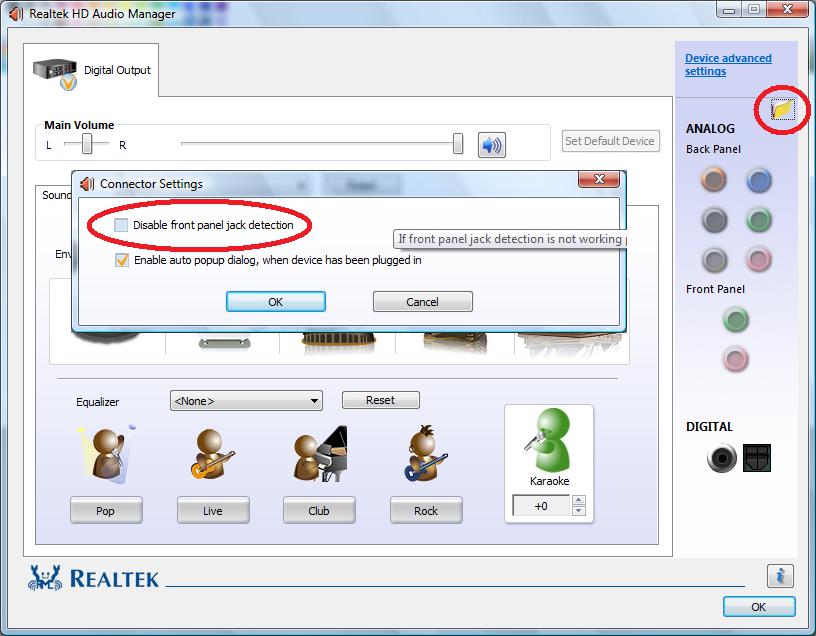
Back in the day, in the Realtek audio manager, it was possible to check an option to disable front jack detection. This would allow me to use both my heaphones (plugged in the front panel) and my speakers (plugged in the rear panel) at the same time.
HOWEVER since version r2.70 I can't find a way to achieve this.
It would be very nice if someone could help me with this problem =)
 

My Computer

Computer type
PC/Desktop
Computer Manufacturer/Model Number
custom build
OS
Windows 7 Ultimate x64
CPU
i5 3570k
Motherboard
Asus p8z77-i
Memory
Corsair Vengeance, 2x4GB, DDR3-1600, CL8
Graphics Card(s)
hd7870
Antivirus
Mircosoft Security Essentials
Browser
Firefox
Back in the day

When was that? In Windows XP? I have RealTek, with the latest that has been supplied by my motherboard vendor and it has what you want. Generally, the RealTek driver from the PC or motherboard vendor (as applicable) is the preferred. There is even a statement on the RealTek site to use the vendor provided drivers.
 

My Computer

Computer type
PC/Desktop
Computer Manufacturer/Model Number
My Own Build
OS
Windows 10 64 bit
CPU
Intel i7 6700K
Motherboard
ASUS ROG Maximus VIII Hero
Memory
16GB Corsair Dominator
Graphics Card(s)
Intel CPU Graphics
Sound Card
RealTek
Monitor(s) Displays
27" Dell S2719dgf
Screen Resolution
2560X1440
Hard Drives
1 TB Samsung 850 EVO SSD for Win 10 Pro
500GB Samsung 850 EVO SSD for Win 10 Insider
2 TB drive for backup
PSU
EVGA Supernova 750G2
Case
BeQuiet Silent Base 600
Cooling
Deepcool Captain 120EX
Keyboard
Microsoft Wireless 2000
Mouse
Microsoft wireless
Internet Speed
100 MB/sec (Cable)
Antivirus
Microsoft Defender and Malwarebytes
Browser
Edge/Firefox
Other Info
Cakewalk (Sonar) by BandLab and Studio One 4.1 Pro recording studio software. MOTU 896Mk3 Hybrid recording interface, Frontier Tranzport wireless control unit, Behringer X-Touch Control Surface.
Five USB connected optical drives for CD Audio production using Nero BurningROM
Control Panel\All Control Panel Items-Realtek HD Audio Manager-Right click on the green\pink jack icon from the Front Panel-Connector Retasking-uncheck checkbox: Enable auto pop up dialog, when device has been plugged in.
165974_4939816087207_2093034723_n.jpg
 

My Computer

Computer type
PC/Desktop
OS
The 8.1 OS made by Billy Microsoft
The problem is that my Audio Manager looks like this, and I can't find the correct options :
windowo.png
 

My Computer

Computer type
PC/Desktop
Computer Manufacturer/Model Number
custom build
OS
Windows 7 Ultimate x64
CPU
i5 3570k
Motherboard
Asus p8z77-i
Memory
Corsair Vengeance, 2x4GB, DDR3-1600, CL8
Graphics Card(s)
hd7870
Antivirus
Mircosoft Security Essentials
Browser
Firefox
Disable Popub

Click the wrench in the bottom right

you will get this

realtek_zps00edec9c.png
[/IMG]
 

My Computer

Computer type
PC/Desktop
Computer Manufacturer/Model Number
Dude Build
OS
Windows 10 Pro X64
CPU
Intel(R) Core(TM) i5-3570K CPU OC@ 4.5GHZ Turbo
Motherboard
MSI Z77A-G45 Gaming
Memory
8.00 GB DDR3 1600Mhz
Graphics Card(s)
MSI Gaming X GTX 1070
Sound Card
Realtek High Definition
Monitor(s) Displays
Dell S23O9W, HP L1710
Screen Resolution
DELL-1920 x 1080 HP-1280 x1024
Hard Drives
Crucial m4 256 SSD, WD 7200RPM 500GB WD 1TB
PSU
Seasonic X650 GOLD
Case
Zalman Z12
Cooling
Antec Kuhler 920
Keyboard
Logitech
Mouse
MSI DS100 Interceptor
Internet Speed
50 down and 5 up
Antivirus
MSE
Browser
Chrome, IE 11
Other Info
Logitech X-620 Speakers
Yes but I'm looking for this option:
REaltek_HD_Audio_Manager.jpg
 

My Computer

Computer type
PC/Desktop
Computer Manufacturer/Model Number
custom build
OS
Windows 7 Ultimate x64
CPU
i5 3570k
Motherboard
Asus p8z77-i
Memory
Corsair Vengeance, 2x4GB, DDR3-1600, CL8
Graphics Card(s)
hd7870
Antivirus
Mircosoft Security Essentials
Browser
Firefox
Top one circled

realtek_zpse451819f.png
[/IMG]
 

My Computer

Computer type
PC/Desktop
Computer Manufacturer/Model Number
Dude Build
OS
Windows 10 Pro X64
CPU
Intel(R) Core(TM) i5-3570K CPU OC@ 4.5GHZ Turbo
Motherboard
MSI Z77A-G45 Gaming
Memory
8.00 GB DDR3 1600Mhz
Graphics Card(s)
MSI Gaming X GTX 1070
Sound Card
Realtek High Definition
Monitor(s) Displays
Dell S23O9W, HP L1710
Screen Resolution
DELL-1920 x 1080 HP-1280 x1024
Hard Drives
Crucial m4 256 SSD, WD 7200RPM 500GB WD 1TB
PSU
Seasonic X650 GOLD
Case
Zalman Z12
Cooling
Antec Kuhler 920
Keyboard
Logitech
Mouse
MSI DS100 Interceptor
Internet Speed
50 down and 5 up
Antivirus
MSE
Browser
Chrome, IE 11
Other Info
Logitech X-620 Speakers
OMG I must be blind :p. My problem now is that my option window doesn't have that option^^:
window2.png
 

My Computer

Computer type
PC/Desktop
Computer Manufacturer/Model Number
custom build
OS
Windows 7 Ultimate x64
CPU
i5 3570k
Motherboard
Asus p8z77-i
Memory
Corsair Vengeance, 2x4GB, DDR3-1600, CL8
Graphics Card(s)
hd7870
Antivirus
Mircosoft Security Essentials
Browser
Firefox
Click the gear in the top right for device advanced settings and post pic
 

My Computer

Computer type
PC/Desktop
Computer Manufacturer/Model Number
Dude Build
OS
Windows 10 Pro X64
CPU
Intel(R) Core(TM) i5-3570K CPU OC@ 4.5GHZ Turbo
Motherboard
MSI Z77A-G45 Gaming
Memory
8.00 GB DDR3 1600Mhz
Graphics Card(s)
MSI Gaming X GTX 1070
Sound Card
Realtek High Definition
Monitor(s) Displays
Dell S23O9W, HP L1710
Screen Resolution
DELL-1920 x 1080 HP-1280 x1024
Hard Drives
Crucial m4 256 SSD, WD 7200RPM 500GB WD 1TB
PSU
Seasonic X650 GOLD
Case
Zalman Z12
Cooling
Antec Kuhler 920
Keyboard
Logitech
Mouse
MSI DS100 Interceptor
Internet Speed
50 down and 5 up
Antivirus
MSE
Browser
Chrome, IE 11
Other Info
Logitech X-620 Speakers
window3.png
 

My Computer

Computer type
PC/Desktop
Computer Manufacturer/Model Number
custom build
OS
Windows 7 Ultimate x64
CPU
i5 3570k
Motherboard
Asus p8z77-i
Memory
Corsair Vengeance, 2x4GB, DDR3-1600, CL8
Graphics Card(s)
hd7870
Antivirus
Mircosoft Security Essentials
Browser
Firefox
Try checking the first option to tie up devices
 

My Computer

Computer type
PC/Desktop
Computer Manufacturer/Model Number
Dude Build
OS
Windows 10 Pro X64
CPU
Intel(R) Core(TM) i5-3570K CPU OC@ 4.5GHZ Turbo
Motherboard
MSI Z77A-G45 Gaming
Memory
8.00 GB DDR3 1600Mhz
Graphics Card(s)
MSI Gaming X GTX 1070
Sound Card
Realtek High Definition
Monitor(s) Displays
Dell S23O9W, HP L1710
Screen Resolution
DELL-1920 x 1080 HP-1280 x1024
Hard Drives
Crucial m4 256 SSD, WD 7200RPM 500GB WD 1TB
PSU
Seasonic X650 GOLD
Case
Zalman Z12
Cooling
Antec Kuhler 920
Keyboard
Logitech
Mouse
MSI DS100 Interceptor
Internet Speed
50 down and 5 up
Antivirus
MSE
Browser
Chrome, IE 11
Other Info
Logitech X-620 Speakers
It doesn't change anything.
I tryed installing both the drivers from Realtek and those from Asus, no difference.
 

My Computer

Computer type
PC/Desktop
Computer Manufacturer/Model Number
custom build
OS
Windows 7 Ultimate x64
CPU
i5 3570k
Motherboard
Asus p8z77-i
Memory
Corsair Vengeance, 2x4GB, DDR3-1600, CL8
Graphics Card(s)
hd7870
Antivirus
Mircosoft Security Essentials
Browser
Firefox
Do you have your speakers hooked up, and the front jacks to a headset?
 

My Computer

Computer type
PC/Desktop
Computer Manufacturer/Model Number
Dude Build
OS
Windows 10 Pro X64
CPU
Intel(R) Core(TM) i5-3570K CPU OC@ 4.5GHZ Turbo
Motherboard
MSI Z77A-G45 Gaming
Memory
8.00 GB DDR3 1600Mhz
Graphics Card(s)
MSI Gaming X GTX 1070
Sound Card
Realtek High Definition
Monitor(s) Displays
Dell S23O9W, HP L1710
Screen Resolution
DELL-1920 x 1080 HP-1280 x1024
Hard Drives
Crucial m4 256 SSD, WD 7200RPM 500GB WD 1TB
PSU
Seasonic X650 GOLD
Case
Zalman Z12
Cooling
Antec Kuhler 920
Keyboard
Logitech
Mouse
MSI DS100 Interceptor
Internet Speed
50 down and 5 up
Antivirus
MSE
Browser
Chrome, IE 11
Other Info
Logitech X-620 Speakers
My speakers are plugged in the back green jack and my heaphones are plugged in the front green jack
 

My Computer

Computer type
PC/Desktop
Computer Manufacturer/Model Number
custom build
OS
Windows 7 Ultimate x64
CPU
i5 3570k
Motherboard
Asus p8z77-i
Memory
Corsair Vengeance, 2x4GB, DDR3-1600, CL8
Graphics Card(s)
hd7870
Antivirus
Mircosoft Security Essentials
Browser
Firefox
Basically if i unplug my headset my speakers work correctly. As soon as i plug my headset in the front panel, the speakers stop working and the sound is in the headset.
 

My Computer

Computer type
PC/Desktop
Computer Manufacturer/Model Number
custom build
OS
Windows 7 Ultimate x64
CPU
i5 3570k
Motherboard
Asus p8z77-i
Memory
Corsair Vengeance, 2x4GB, DDR3-1600, CL8
Graphics Card(s)
hd7870
Antivirus
Mircosoft Security Essentials
Browser
Firefox
Open Sound Manager, click on your speakers, click the gear for Device advance setttings, under playback device check make front and rear outpurt devices playback two different audio streams
 

My Computer

Computer type
PC/Desktop
Computer Manufacturer/Model Number
Dude Build
OS
Windows 10 Pro X64
CPU
Intel(R) Core(TM) i5-3570K CPU OC@ 4.5GHZ Turbo
Motherboard
MSI Z77A-G45 Gaming
Memory
8.00 GB DDR3 1600Mhz
Graphics Card(s)
MSI Gaming X GTX 1070
Sound Card
Realtek High Definition
Monitor(s) Displays
Dell S23O9W, HP L1710
Screen Resolution
DELL-1920 x 1080 HP-1280 x1024
Hard Drives
Crucial m4 256 SSD, WD 7200RPM 500GB WD 1TB
PSU
Seasonic X650 GOLD
Case
Zalman Z12
Cooling
Antec Kuhler 920
Keyboard
Logitech
Mouse
MSI DS100 Interceptor
Internet Speed
50 down and 5 up
Antivirus
MSE
Browser
Chrome, IE 11
Other Info
Logitech X-620 Speakers
The problem is that I can't manage to find the playback device tab.
 

My Computer

Computer type
PC/Desktop
Computer Manufacturer/Model Number
custom build
OS
Windows 7 Ultimate x64
CPU
i5 3570k
Motherboard
Asus p8z77-i
Memory
Corsair Vengeance, 2x4GB, DDR3-1600, CL8
Graphics Card(s)
hd7870
Antivirus
Mircosoft Security Essentials
Browser
Firefox
Right click the speaker icon in the bottom right of your taskbar and select playback devices.... what is your default playback device?
 

My Computer

Computer type
PC/Desktop
Computer Manufacturer/Model Number
Dude Build
OS
Windows 10 Pro X64
CPU
Intel(R) Core(TM) i5-3570K CPU OC@ 4.5GHZ Turbo
Motherboard
MSI Z77A-G45 Gaming
Memory
8.00 GB DDR3 1600Mhz
Graphics Card(s)
MSI Gaming X GTX 1070
Sound Card
Realtek High Definition
Monitor(s) Displays
Dell S23O9W, HP L1710
Screen Resolution
DELL-1920 x 1080 HP-1280 x1024
Hard Drives
Crucial m4 256 SSD, WD 7200RPM 500GB WD 1TB
PSU
Seasonic X650 GOLD
Case
Zalman Z12
Cooling
Antec Kuhler 920
Keyboard
Logitech
Mouse
MSI DS100 Interceptor
Internet Speed
50 down and 5 up
Antivirus
MSE
Browser
Chrome, IE 11
Other Info
Logitech X-620 Speakers
My default playback device is set to speakers "Realtek High definition audio" and there is no way I can use both speakers and heaphones at the same time.
 

My Computer

Computer type
PC/Desktop
Computer Manufacturer/Model Number
custom build
OS
Windows 7 Ultimate x64
CPU
i5 3570k
Motherboard
Asus p8z77-i
Memory
Corsair Vengeance, 2x4GB, DDR3-1600, CL8
Graphics Card(s)
hd7870
Antivirus
Mircosoft Security Essentials
Browser
Firefox
I would try to uninstall, then reboot and let windows load default again. Then go to the asus site download the latest and try again. Sorry, sometimes these things happen. I have an MSI board and had to do this.
 

My Computer

Computer type
PC/Desktop
Computer Manufacturer/Model Number
Dude Build
OS
Windows 10 Pro X64
CPU
Intel(R) Core(TM) i5-3570K CPU OC@ 4.5GHZ Turbo
Motherboard
MSI Z77A-G45 Gaming
Memory
8.00 GB DDR3 1600Mhz
Graphics Card(s)
MSI Gaming X GTX 1070
Sound Card
Realtek High Definition
Monitor(s) Displays
Dell S23O9W, HP L1710
Screen Resolution
DELL-1920 x 1080 HP-1280 x1024
Hard Drives
Crucial m4 256 SSD, WD 7200RPM 500GB WD 1TB
PSU
Seasonic X650 GOLD
Case
Zalman Z12
Cooling
Antec Kuhler 920
Keyboard
Logitech
Mouse
MSI DS100 Interceptor
Internet Speed
50 down and 5 up
Antivirus
MSE
Browser
Chrome, IE 11
Other Info
Logitech X-620 Speakers
Back
Top